

All Activity
- Past hour
-
View File High poly PFHA05 The mod replaces the PFHA05 model and textures. To Install 1. Download: PFHA05 2. Copy all files to the Knights of the Old republic's Override folder. (Example location - C:\Program Files (x86)\Steam\steamapps\common\swkotor\Override) 3. When/if prompted to overwrite files, press okay. 4. If you like the mod; leave a comment or endorse! (It would be much appreciated) Made with love. Submitter Dark Hope Submitted 09/13/2026 Category Mods K1R Compatible Yes
-
View File Rakata ModInstaller Easily manage, install, and revert loose-file mods. Features: Opens a mod as the zip, 7z or rar it downloaded as, or as a folder you already unpacked. No unpacking first. Works out which files are actually game content. Readmes, screenshots and packaging are left behind, and a mod shipping alternate versions of the same file asks you to pick one. Every install is recorded and can be taken back later. Uninstall leaves a file alone if something has changed it since, so it will not step on a patcher mod's work or on a later mod's. Finds duplicates already sitting in your Override. A name capitalised two ways, or one texture shipped as both a TPC and a TGA. Only one of each is ever loaded, and the game picks it arbitrarily. Shows what every layer of the game holds for a given file, so you can see a loose file quietly shadowing a copy inside a module archive. Finds your installation on its own. Steam, GOG and retail, on Windows, Linux and macOS, for both KotOR 1 and KotOR 2. If you play on Linux or a Steam Deck, this fixes something quiet Mod builds are ordered lists, and later mods are meant to overwrite parts of earlier ones. On Windows that happens by itself, because the filesystem does not care whether a file is called `Appearance.2da` or `appearance.2da`. On Linux it does care. Both files end up in Override, the game loads whichever one it reaches first, and the overwrite prompt the build guide told you to expect never appears. Your install order silently did not happen. This installs by name with case folded away, so the overwrite you meant is the one you get, and it keeps whatever spelling the file already had rather than adding another. What it does not do TSLPatcher mods. Those do not copy files into place. They merge rows into 2DA files that are already there, add entries to the talk table and write inside module archives. This recognises them and says so instead of half-installing them. Keep using HoloPatcher for those. Tested against The loose-file mods from the community build lists, and a full modded install. Additionally tested on Linux by @Leilukin and on macOS by @FTD Thanks for your help testing! Requirements The window fits a 1280x800 screen, so it works on a Steam Deck without too much squeezing. On Windows: Windows 10+ 64-bit On macOS: macOS 10.12+ for Intel Macs and 11.0+ for Apple Silicon Macs On Linux: Any recent Linux distro with glibc 2.35+ About Rakata Rakata is a clean-room Rust workspace for reading, writing and validating KotOR game data, written from scratch against notes taken from the engine rather than from anybody else's code. This installer is one tool built on top of it. It is free and open-source under GPL-3.0, and the source along with the format documentation is at https://codeberg.org/Synchro/rakata LLM Disclosure This project made use of an LLM during development, in the following capacities: Brainstorming: exploring possible approaches and design directions Decompilation assistance: help interpreting reverse-engineered code Code comments: refining and clarifying existing comments Skeletons and fixes: generating initial code scaffolding and minor fixes. All LLM-assisted output was modified and reviewed by a human before being committed. Submitter Synchro Submitted 09/13/2026 Category Modding Tools
-
View File KOTOR AMD Cards Crash Fix. Star Wars Knights of old Republic 1 and 2 crashes when turn Frame Buffer Effects on with Ati Drivers, this atioglxx.dll from ATI Catalyst 14.4 fixes the crash on AMD Cards, please note it might not work for newest cards, just drop the file in the game directory. Submitter Narzoul Submitted 09/13/2026 Category Mods K1R Compatible Yes
-
Does anyone know of a good guide for creating custom lightsaber hilts? I'm using Blender 5.0 and KotorBlender 4.0.7 (https://github.com/OpenKotOR/kotorblender/releases/tag/v4.0.7). Currently I'm just trying to simply take the model for the blue lightsaber and remove the bottom of the hilt. When I did that, the hilt turned invisible (the blade still shows up normally). I tried unwrapping the textures in case that was a factor, but the hilt is still invisible. I'm sure there's a rational explanation for why this is happening, but right now I'm more curious if there's instructions so I can fix this AND avoid other screw-ups in the future.
-
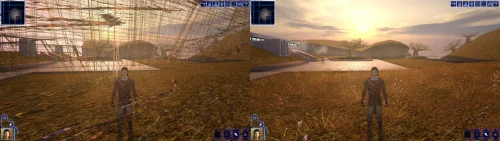 Restores/fixes the original effects!
 -
Version 1.0.0
0 downloads
The mod replaces the PFHA05 model and textures. To Install 1. Download: PFHA05 2. Copy all files to the Knights of the Old republic's Override folder. (Example location - C:\Program Files (x86)\Steam\steamapps\common\swkotor\Override) 3. When/if prompted to overwrite files, press okay. 4. If you like the mod; leave a comment or endorse! (It would be much appreciated) Made with love. - Today
-
 Do you have any luck if you try the latest version of Modern Driver Compatibility? I fixed some pretty major shader bugs I initially missed. What kind of issues were you running into with those mods installed? Rendering issues? Or a straight up crash.
 -
Version 1.0.0
1 download
Easily manage, install, and revert loose-file mods. Features: Opens a mod as the zip, 7z or rar it downloaded as, or as a folder you already unpacked. No unpacking first. Works out which files are actually game content. Readmes, screenshots and packaging are left behind, and a mod shipping alternate versions of the same file asks you to pick one. Every install is recorded and can be taken back later. Uninstall leaves a file alone if something has changed it since, so it will not step on a patcher mod's work or on a later mod's. Finds duplicates already sitting in your Override. A name capitalised two ways, or one texture shipped as both a TPC and a TGA. Only one of each is ever loaded, and the game picks it arbitrarily. Shows what every layer of the game holds for a given file, so you can see a loose file quietly shadowing a copy inside a module archive. Finds your installation on its own. Steam, GOG and retail, on Windows, Linux and macOS, for both KotOR 1 and KotOR 2. If you play on Linux or a Steam Deck, this fixes something quiet Mod builds are ordered lists, and later mods are meant to overwrite parts of earlier ones. On Windows that happens by itself, because the filesystem does not care whether a file is called `Appearance.2da` or `appearance.2da`. On Linux it does care. Both files end up in Override, the game loads whichever one it reaches first, and the overwrite prompt the build guide told you to expect never appears. Your install order silently did not happen. This installs by name with case folded away, so the overwrite you meant is the one you get, and it keeps whatever spelling the file already had rather than adding another. What it does not do TSLPatcher mods. Those do not copy files into place. They merge rows into 2DA files that are already there, add entries to the talk table and write inside module archives. This recognises them and says so instead of half-installing them. Keep using HoloPatcher for those. Tested against The loose-file mods from the community build lists, and a full modded install. Additionally tested on Linux by @Leilukin and on macOS by @FTD Thanks for your help testing! Requirements The window fits a 1280x800 screen, so it works on a Steam Deck without too much squeezing. On Windows: Windows 10+ 64-bit On macOS: macOS 10.12+ for Intel Macs and 11.0+ for Apple Silicon Macs On Linux: Any recent Linux distro with glibc 2.35+ About Rakata Rakata is a clean-room Rust workspace for reading, writing and validating KotOR game data, written from scratch against notes taken from the engine rather than from anybody else's code. This installer is one tool built on top of it. It is free and open-source under GPL-3.0, and the source along with the format documentation is at https://codeberg.org/Synchro/rakata LLM Disclosure This project made use of an LLM during development, in the following capacities: Brainstorming: exploring possible approaches and design directions Decompilation assistance: help interpreting reverse-engineered code Code comments: refining and clarifying existing comments Skeletons and fixes: generating initial code scaffolding and minor fixes. All LLM-assisted output was modified and reviewed by a human before being committed. -
 Teufelschwanz89 joined the community
 -
 pestilence1090 joined the community
 -
 frischevollmilk joined the community
 -
 76kami67 joined the community
 -
 Narzoul changed their profile photo
 -
.thumb.png.fb21501b75fd4c78fe978fdc193755bf.png)
Version 1.0.0
0 downloads
Star Wars Knights of old Republic 1 and 2 crashes when turn Frame Buffer Effects on with Ati Drivers, this atioglxx.dll from ATI Catalyst 14.4 fixes the crash on AMD Cards, please note it might not work for newest cards, just drop the file in the game directory. -
 Kanossa joined the community
 -
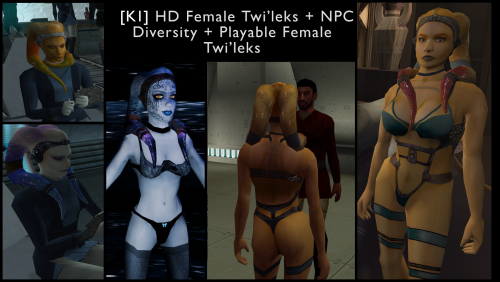 Yep, it fixed for me thanks, but I noticed the back side, more specific buttom checks has some wierd black lines all around when I don't use anti aliasing, or maybe it's due to old Windows 7 64bit system, but do you think that Kotor 1 models are bit diffrent than ones in Kotor 2, anyway do you think models from Kotor 2 get broken when imported to Kotor 1?
 -
Setting windows scaling to 100% is what fixed this for me This mod is a Godsent. I am finally able to play KOTOR 1 for the 1st time because I never got it working properly on a 4K TV. Now the game looks amazing together with a texture mod. Thank you. I found 1 bug though so far, in my 15 hours: the Scripts menu is empty for all characters, it looks like this: https://imgur.com/70Ekx9O
-
 David1337 joined the community
 -

AxC's Mira/Hanharr - Reputation Over Alignment
AxConsortium commented on AxConsortium's file in Mods
.thumb.png.3301b414885aa5c5ced45535fec5ddfc.png) I'd rather keep it as it is, since this mirrors vanilla behavior, where neutral alignment leads to Mira. But it's a good idea for an optional file, I'll look into it!
I'd rather keep it as it is, since this mirrors vanilla behavior, where neutral alignment leads to Mira. But it's a good idea for an optional file, I'll look into it! -
 Zaphren joined the community
 -
 reachislost joined the community
 -
 skarphace joined the community
 -
 The best way to get KOTOR scaled up for modern resolutions. Works great on my superultrawide
 -
 LOLOLOLOLOLOLOLOLOLOLOLOL!!!!!!!!
 -
 Skullbone379 joined the community
 -
Hey there! Thanks for trying the patch out! I will take a look and see if I can reproduce the issue on my end, keep an eye out for a fix. EDIT: Have reproduced the issue and have a fix! The same issue also killed HK-47's eyes as well as a couple other issues. I should have a new release up shortly. Released!
- Yesterday
-
View File [TSL] Exchange Gamorrean Fix ===================================================== [TSL] Exchange Gamorrean Fix ===================================================== Mod for Knights of the Old Republic II - The Sith Lords Author: Lily File Name: Exchange_Gamorrean_Fix.zip Latest Version: 1.0 --- 1. DESCRIPTION: With TSLRCM, the Gamorrean Exchange thugs in the refugee sector on Nar Shaddaa have two bugs: 1. They no longer have dialogue if you try to talk to them. I believe the base game had a bug where they had more dialogue lines than they would actually say when you talk to them, and TSLRCM tried to fix this but it ended up even more broken and they just remain silent. With this mod, all of their dialogue lines are restored. 2. When you security one of the metal boxes near them, they tell you "Get out of there or I bash you!" which is an empty threat as they don't care if you take what's inside the box. With this mod, they will become hostile and attack you if you open the box to take what's inside (unless you are in stealth) as intended. --- 2. INSTALLATION: Run Install.exe and select your KotOR 2 game directory. A "backup" folder is created by the installer in the same directory. Don't delete it if you plan to uninstall later. --- 3. UNINSTALLATION: Run Install.exe, select your KotOR 2 directory, and use the "Tools > uninstall/restore backup" option to revert all changes made by this mod. --- 4. KNOWN ISSUES: None. If you find any bugs or problems, please report them. --- 5. MOD COMPATIBILITY: This should be compatible with all other mods. Requires TSLRCM. Do not use the Steam Workshop for KotOR. It will almost certainly end with compatibility issues. --- 6. SUPPORT: My mods are free to use. You do not need to pay for them, but if you would like to say thanks, you can buy me a coffee! --- 7. PERMISSIONS: Please let me know if you plan on using any of the files in my mod for your own mod. The answer is "yes you may", but I would like to know what you are doing with it! Do not directly reupload this mod anywhere else. --- 8. THANKS: - Fred Tetra - KotOR Tool - Cortisol - Holocron Toolset & HoloPatcher - Fair Strides - TSLPatcher THIS MODIFICATION IS NOT SUPPORTED BY BIOWARE/OBSIDIAN ENTERTAINMENT OR LUCASARTS OR ANY LICENSORS/SPONSORS OF THE MENTIONED COMPANIES. USE THIS FILE AT YOUR OWN RISK. Submitter Lily Submitted 09/12/2026 Category Mods TSLRCM Compatible Yes
-
![More information about "[TSL] Exchange Gamorrean Fix"](https://deadlystream.com/downloads/screens/monthly_2026_09/20260912154612_1.thumb.jpg.a7baab39ff2842f8499ca644a681ac76.jpg)
Version 1.0.0
9 downloads
===================================================== [TSL] Exchange Gamorrean Fix ===================================================== Mod for Knights of the Old Republic II - The Sith Lords Author: Lily File Name: Exchange_Gamorrean_Fix.zip Latest Version: 1.0 --- 1. DESCRIPTION: With TSLRCM, the Gamorrean Exchange thugs in the refugee sector on Nar Shaddaa have two bugs: 1. They no longer have dialogue if you try to talk to them. I believe the base game had a bug where they had more dialogue lines than they would actually say when you talk to them, and TSLRCM tried to fix this but it ended up even more broken and they just remain silent. With this mod, all of their dialogue lines are restored. 2. When you security one of the metal boxes near them, they tell you "Get out of there or I bash you!" which is an empty threat as they don't care if you take what's inside the box. With this mod, they will become hostile and attack you if you open the box to take what's inside (unless you are in stealth) as intended. --- 2. INSTALLATION: Run Install.exe and select your KotOR 2 game directory. A "backup" folder is created by the installer in the same directory. Don't delete it if you plan to uninstall later. --- 3. UNINSTALLATION: Run Install.exe, select your KotOR 2 directory, and use the "Tools > uninstall/restore backup" option to revert all changes made by this mod. --- 4. KNOWN ISSUES: None. If you find any bugs or problems, please report them. --- 5. MOD COMPATIBILITY: This should be compatible with all other mods. Requires TSLRCM. Do not use the Steam Workshop for KotOR. It will almost certainly end with compatibility issues. --- 6. SUPPORT: My mods are free to use. You do not need to pay for them, but if you would like to say thanks, you can buy me a coffee! --- 7. PERMISSIONS: Please let me know if you plan on using any of the files in my mod for your own mod. The answer is "yes you may", but I would like to know what you are doing with it! Do not directly reupload this mod anywhere else. --- 8. THANKS: - Fred Tetra - KotOR Tool - Cortisol - Holocron Toolset & HoloPatcher - Fair Strides - TSLPatcher THIS MODIFICATION IS NOT SUPPORTED BY BIOWARE/OBSIDIAN ENTERTAINMENT OR LUCASARTS OR ANY LICENSORS/SPONSORS OF THE MENTIONED COMPANIES. USE THIS FILE AT YOUR OWN RISK. -
Thanks for reporting. The normals from KotOR II were still on the models and making it look strange. Fixed. You can redownload the mod and reinstall it - no need to uninstall the old version, the new one will overwrite it just fine. Let me know if it is fixed for you!
-
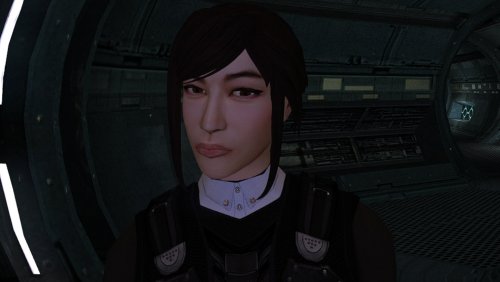
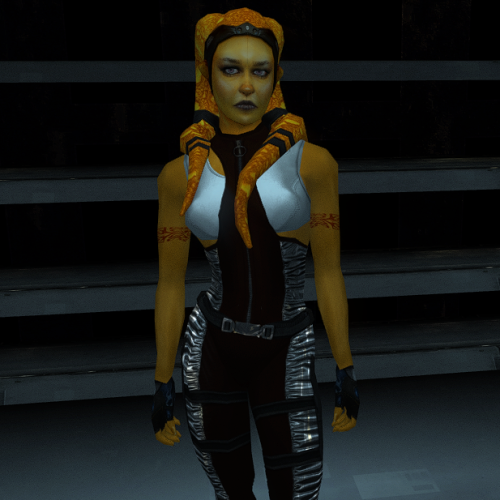 Her outfit gives me Judy from Cyberpunk vibes. I like it
 -
Hiya RaymanGT, to say I'm surprise by this mod is put to it simply at this point, it even work on my Windows 7 64bit. I have question though, could you perhaps look into as to make exe to display cinematics in widescreen, without editing though hex, only to have what is known as cinematics display black screen, but audio is playing, only alt-tab out of the game works to display properly. The only mod that helps me is Flawless Widescreen , but it shouldn't be a solution, otherwise great mod there mate.
-
Neat mod there friend, but I notice some problems like dark stains around the mouth, also on the left lips of Playable Female Twi'leks there's white spot. Hope you can fix it somehow.
-
 Excellent work! Is there a plan to do a Kotor 1 version?
 -
View File Scaled Kotor | Widescreen + UI Scaling Expands supported resolutions and scales all Menus/HUD. Install - Use with Kotor Patch Manager: https://github.com/LaneDibello/Kotor-Patch-Manager - Download and copy HD UI Menu Pack textures to override directory - Copy Scaled Kotor textures to override directory, overwrite if asked - Apply all "Scaled" patches with patch manager and then click launch. - Alt Tab Patch and Movie Patch are recommended. - Change resolution in game - please report any bugs Source: https://github.com/J0-o/ScaledKotorWidescreenPatch Roadmap: - trace and upscale the font to a higher resolution to improve clarity at resolutions above 1080p Submitter J Submitted 09/11/2026 Category Mods K1R Compatible No
-
 Kovacs343 changed their profile photo
 -
Fairly significant update coming to Echoes of the Republic in the nebulous near future. Almost done implementing a new short questline, then I still need to run through the whole game again to test it.
- Last week
-
 TSL PATCHER INSTALL NOT WORKING IT SAYS UNABLE TO LOCATE CHANGES.INI









