Search the Community
Showing results for tags 'Textures'.
-
Version 3.7
1,194 downloads
VANILLA PLANETS HD A VANILLA-FAITHFUL ENVIRONMENTAL TEXTURE OVERHAUL ━━━━━━━━━━━━━━━━━━━━━━━━━━━━━━━━━━━━ OVERVIEW ━━━━━━━━━━━━━━━━━━━━━━━━━━━━━━━━━━━━ Vanilla Planets HD is an environmental texture upscale for Star Wars: Knights of the Old Republic II — The Sith Lords. The mod upscales the game’s planet, area, environmental, screen, display, and panel textures using Topaz Gigapixel at up to four times their original resolution. The goal is to keep KOTOR II as close to its original visual style as possible while making the textures cleaner, sharper, and more detailed. I created this mod because I wanted an HD environmental overhaul that preserved the original materials without making surfaces excessively reflective or glossy. There are no ReShade presets, lighting edits, shader changes, or major visual redesigns. FEATURES ━━━━━━━━━━━━━━━━━━━━━━━━━━━━━━━━━━━━ • Planet and area textures upscaled at up to 4x resolution • All major environments included • Screens, displays, monitors, and panels included • Ebon Hawk interior and exterior included • Optimized TPC textures • Vanilla-faithful appearance • Separate add-ons for TSLRCM and the KOTOR 2 Community Patch INCLUDED AREAS ━━━━━━━━━━━━━━━━━━━━━━━━━━━━━━━━━━━━ Peragus and the Harbinger Telos Ebon Hawk Interior and Exterior Dantooine Dxun Onderon Nar Shaddaa Korriban Malachor V Shared planet and environmental textures Screens, displays, monitors, and panels DOWNLOADS ━━━━━━━━━━━━━━━━━━━━━━━━━━━━━━━━━━━━ There are three files total. MAIN FILE The complete Vanilla Planets HD texture overhaul. This file is required for all users. TSLRCM ADD-ON Additional textures for users of The Sith Lords Restored Content Mod. Requires the Vanilla Planets HD main file and TSLRCM. KOTOR 2 COMMUNITY PATCH ADD-ON Additional textures for users of the KOTOR 2 Community Patch. Requires the Vanilla Planets HD main file and the KOTOR 2 Community Patch. INSTALLATION ━━━━━━━━━━━━━━━━━━━━━━━━━━━━━━━━━━━━ UPDATING FROM A PREVIOUS VERSION If you are updating from a previous version of Vanilla Planets HD, delete the following files from your override folder if they are present: DAN_blst03.tpc DAN_fall.tpc DAN_gobo1.tpc DAN_gobo2.tpc DAN_LBms.tpc DAN_leaf02.tpc DANfx_mots.tpc KOR_lightbeams.tpc DXN_treeline2.tpc PLC_Water01b.tpc After removing these files, install the new version normally using the instructions below. MAIN FILE 1. Download and extract the Vanilla Planets HD main file. 2. Copy the included override folder into your main KOTOR II installation directory. 3. replace files if prompted. ADD-ONS If you use TSLRCM or the KOTOR 2 Community Patch, install the corresponding Vanilla Planets HD add-on after installing the main file. If you use both TSLRCM and the KOTOR 2 Community Patch, install the TSLRCM add-on first, followed by the KOTOR 2 Community Patch add-on. Replace files when prompted. Highly Recommended After Installation After installation, download and install Remove Duplicate TGA-TPC. Run the included .bat file and delete any duplicate TGA files. IMPORTANT The TSLRCM and KOTOR 2 Community Patch files are add-ons and are not standalone downloads. Always install the Vanilla Planets HD main file first. SKYBOXES AND BACKDROPS ━━━━━━━━━━━━━━━━━━━━━━━━━━━━━━━━━━━━ Vanilla Planets HD does not replace the game’s major skyboxes, distant backdrops, or cockpit window views. These assets were intentionally left untouched because Kexikus has already created excellent high-resolution skybox and backdrop mods, while tjsase has created a dedicated mod for the cockpit views. The following mods are highly recommended: High Quailty Skyboxes II TSL Backdrop Improvements TSL HD Cockpit Skyboxes COMPATIBILITY ━━━━━━━━━━━━━━━━━━━━━━━━━━━━━━━━━━━━ Vanilla Planets HD is compatible with most gameplay, character, interface, bug-fix, and audio mods. Conflicts may occur with other planet or environmental texture overhauls that replace the same files. When two mods contain textures with the same filename, the files installed last will take priority. CREDITS ━━━━━━━━━━━━━━━━━━━━━━━━━━━━━━━━━━━━ Obsidian Entertainment and BioWare — Original KOTOR II textures and assets ━━━━━━━━━━━━━━━━━━━━━━━━━━━━━━━━━━━━ VANILLA PLANETS HD The original worlds of KOTOR II in higher definition. -
View File KotOR II Switch Texture Restoration KotOR II Switch Texture Restoration The Switch port of KotOR II included some upscaled textures for much of the game, just like the first game. While some of these look fine, I found some of the armor and character portraits pretty bad to look at. Not as bad as K1, but still annoying at times. I'm not sure why, but these were not advertised or mentioned, and there is no way to turn them off in game. This mod restores the original textures for the character portraits, armor textures, while preserving the new UI and button prompts. Please notify me if anything is broken or you run into issues. I played many hours with this mod, but it has by no means been exhaustively tested. It should not cause any major or game-breaking issues though. This is compatible with, but does not require my KotOR II Switch Modding Framework, if you wish to use this with other mods that change textures, install this first. NOTE: Like any other mod for Switch, this requires a hacked or modded Switch with custom firmware. This can probably be adapted to firmwares other than Atmosphere, but I offer no support for them. Installation is dead simple, extract the "atmosphere" folder to the root of your SD card. If you wish to uninstall: If this is the only mod you installed: Simply delete the "0100B2C016252000" folder under atmosphere/contents/ If you installed other mods, it will depend. I would generally recommend just wiping clean for safety, or if you didn't install any other texture mods, you could delete just the "Textures" folder in override. Big thanks to JC for a ton of help with this mod. Submitter jacqylfrost Submitted 06/26/2022 Category Mods TSLRCM Compatible Yes
-
Version 3.1
319 downloads
V A N I L L A C H A R A C T E R S H D V E R S I O N 3.0 An HD character texture overhaul for STAR WARS: KNIGHTS OF THE OLD REPUBLIC II THE SITH LORDS ━━━━━━━━━━━━━━━━━━━━━━━━━━━━━━━━━━━━━━━━━━━━━━ The familiar faces of the Old Republic—restored in high definition. ━━━━━━━━━━━━━━━━━━━━━━━━━━━━━━━━━━━━━━━━━━━━━━ O V E R V I E W Vanilla Characters HD enhances the original character textures from KOTOR 2 while preserving the game’s classic art direction. Version 3.0 has been rebuilt using optimized TPC textures and a new modular file structure. Transparency and alpha-channel issues affecting certain textures in previous versions have also been fixed. The textures were upscaled at 4x using Topaz Gigapixel AI and optimized primarily at approximately 2K resolution. ────────────────────────────────────────────── T E X T U R E C O V E R A G E Humans and aliens Droids Beasts and creatures Clothing and armor Character body textures ────────────────────────────────────────────── M O D U L A R F I L E S MAIN FILE — VANILLA GAME Contains the HD textures used by the original game. This is the primary standalone file. TSLRCM and the KOTOR 2 Community Patch are not required. OPTIONAL TSLRCM FILE Contains additional HD textures for characters and restored content included in The Sith Lords Restored Content Mod. Install this file only when using TSLRCM. OPTIONAL COMMUNITY PATCH FILE Contains HD versions of character textures included or modified by the KOTOR 2 Community Patch. Install this file only when using the Community Patch. ────────────────────────────────────────────── F E A T U R E S Optimized TPC texture format Mostly 2K character textures Fixed transparency and alpha-channel issues Modular optional files Preserves the original KOTOR 2 visual style No gameplay changes No model changes No character redesigns ────────────────────────────────────────────── I N S T A L L A T I O N Download and extract the Main File. Place the included TPC files into your KOTOR 2 Override folder. Install the optional TSLRCM file only when using TSLRCM. Install the optional Community Patch file only when using the KOTOR 2 Community Patch. Allow the optional files to overwrite textures from the Main File when prompted. IMPORTANT: Remove any older version of Vanilla Characters HD before installing Version 3.0. Old TGA files may override the new TPC textures. When updating, use Remove Duplicate TGA/TPC or manually remove duplicate TGA and TPC copies of the same texture. ────────────────────────────────────────────── C O M P A T I B I L I T Y The Main File can be installed by itself with the vanilla game. Optional files are available for: The Sith Lords Restored Content Mod KOTOR 2 Community Patch Other character texture mods may replace some of the same files. The textures installed last will generally take priority. ────────────────────────────────────────────── V E R S I O N 3.0 Converted the mod to optimized TPC textures Removed the previous uncompressed TGA version Added a modular file structure Added optional TSLRCM textures Added optional Community Patch textures Fixed transparent texture issues Corrected alpha-channel handling Improved texture optimization ━━━━━━━━━━━━━━━━━━━━━━━━━━━━━━━━━━━━━━━━━━━━━━ M A Y T H E F O R C E B E W I T H Y O U ━━━━━━━━━━━━━━━━━━━━━━━━━━━━━━━━━━━━━━━━━━━━━━ -
Version 1.0.0
94 downloads
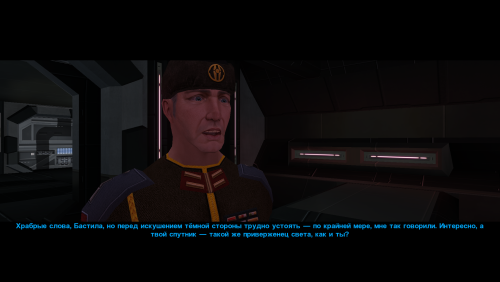
A small mod that improves the textures for Saul Karath. His model is so low-low-poly that I felt like I was retexturing characters for Pirates of the Caribbean once again.😆 Unpack and copy all files to the Knights of the Old Republic's Override folder. -
View File Saul Karath Retexture A small mod that improves the textures for Saul Karath. His model is so low-low-poly that I felt like I was retexturing characters for Pirates of the Caribbean once again.😆 Unpack and copy all files to the Knights of the Old Republic's Override folder. Submitter Narve Submitted 08/26/2026 Category Mods K1R Compatible Yes
-
Version 4.1
504 downloads
VANILLA ICONS AND GUI HD 1,539 UPSCALED ICON AND INTERFACE TEXTURES FOR KOTOR II ━━━━━━━━━━━━━━━━━━━━━━━━━━━━━━━━━━━━ OVERVIEW Vanilla Icons and GUI HD contains 1,539 upscaled textures in the main file, not including compatibility-patch textures. The mod upscales every icon, GUI icon, and interface texture that could be safely enhanced while preserving the original appearance of Star Wars: Knights of the Old Republic II — The Sith Lords. This includes item icons, weapons, armor, clothing, portraits, menu icons, galaxy-map assets, GUI backgrounds, controller icons, and other interface textures. All included textures were upscaled to 4x their original resolution using Topaz Gigapixel. The mod began as Gamepad Menu Upscaled, later expanded into Forgotten UI Textures, and has now grown into a complete icon and interface overhaul. ━━━━━━━━━━━━━━━━━━━━━━━━━━━━━━━━━━━━ MAIN FILE CONTENTS The main file includes: • Item, weapon, armor, clothing, and equipment icons • Usable-item and inventory icons • Force-power, feat, ability, and interface icons • Player-character, party-member, and other character portraits • Gamepad menu textures and controller icons • Menu and GUI icons • Galaxy-map textures and icons • GUI backgrounds • Additional interface textures The vanilla blue lightsaber icons have also been recolored to correct their noticeably purple appearance. (See image) while preserving their original design, glow, and transparency. ━━━━━━━━━━━━━━━━━━━━━━━━━━━━━━━━━━━━ COMPATIBILITY PATCHES Only install a compatibility patch when using its corresponding mod. THE SITH LORDS RESTORED CONTENT MOD PATCH Includes additional and replacement interface textures used by The Sith Lords Restored Content Mod. Requires the main file and TSLRCM. KOTOR 2 COMMUNITY PATCH Includes additional and replacement interface textures used by the KOTOR 2 Community Patch. Requires the main file and the KOTOR 2 Community Patch. ━━━━━━━━━━━━━━━━━━━━━━━━━━━━━━━━━━━━ MISCELLANEOUS FILES SWOOP RACE OVERLAYS Upscales the interface overlays used during swoop races. The latest version of Vanilla Planets HD already includes these textures. You do not need this optional file if using my other mod. TSLRCM MAIN MENU LOGO Upscales the TSLRCM main menu logo The TSL Main Menu Model Fix and all of its prerequisites are hard requirements for this file. ━━━━━━━━━━━━━━━━━━━━━━━━━━━━━━━━━━━━ INSTALLATION 1. Download and extract the main file. 2. Copy the included Override folder into your main KOTOR II installation directory. 3. Place the folders and replace files when prompted. 4. Install the TSLRCM or KOTOR 2 Community Patch compatibility files afterward, when applicable. 5. If you’re using both TSLRCM and the KOTOR 2 Community Patch, install the TSLRCM icon patch first, followed by the K2CP icon patch. ━━━━━━━━━━━━━━━━━━━━━━━━━━━━━━━━━━━━ REQUIREMENTS AND COMPATIBILITY • Requires Star Wars: Knights of the Old Republic II — The Sith Lords • Compatible with The Sith Lords Restored Content Mod • Compatible with the KOTOR 2 Community Patch • Compatibility patches require the main file and their corresponding mods • The optional TSLRCM main-menu file requires the TSL Main Menu Model Fix and all of its prerequisites COMPATIBILITY NOTE The main file replaces many of the same textures included in: TSL - AI Upscaled Icon Overhaul TSL - AI Upscaled PC and Party Portrait Overhaul Installing Vanilla Icons and GUI HD afterward will overwrite matching icons and portraits from those mods. ━━━━━━━━━━━━━━━━━━━━━━━━━━━━━━━━━━━━ CREDITS Obsidian Entertainment — Original KOTOR II textures and assets -
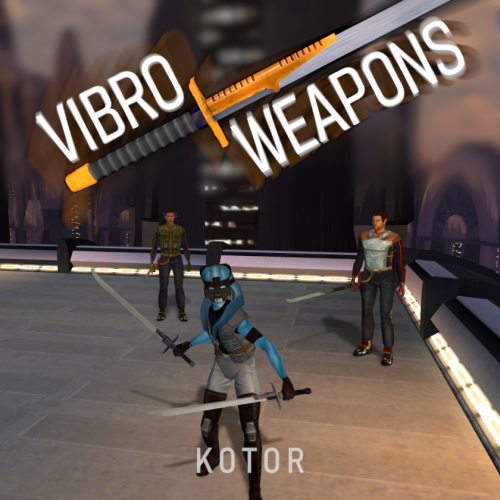
View File HQ Vibro Weapons + Effects - K1 Vibro Weapons with vibration effects. All vanilla vibroswords, vibroblades, and vibro double-blades updated. Toasty Fresh vibro models were used as a base and each texture was color matched to the vanilla style. Vibration and motion blur effects were added to the blades. 6 Vibroblades Vibroblade - g_w_vbroshort01 Krath Blood Blade - g_w_vbroshort02 Echani Vibroblade - g_w_vbroshort03 Sanasiki's Blade - g_w_vbroshort04 g_w_vbroshort05 g_w_vbroshort06 g_w_vbroshort07 Mission's Vibroblade - g_w_vbroshort08 Prototype Vibroblade - g_w_vbroshort09 7 Vibroswords VibroSword - g_w_vbroswrd01 Krath Dire Sword - g_w_vbroswrd02 Sith Tremor Sword - g_w_vbroswrd03 Echani Foil - g_w_vbroswrd04 Bacca's Ceremonial Blade - g_w_vbroswrd05 g_w_vbroswrd06 g_w_vbroswrd07 g_w_vbroswrd08 Baragwin Assault Blade - g1_w_vbroswrd01 GenoHaradan Poison Blade - geno_blade 4 Vibro Double- Blades Vibro Double-Blade - g_w_vbrdblswd01 Sith War Sword - g_w_vbrdblswd02 (not used)Echani Double-Brand - g_w_vbrdblswd03 Yusanis' Brand - g_w_vbrdblswd04 g_w_vbrdblswd05 g_w_vbrdblswd06 g_w_vbrdblswd07 Credit: KoTOR Weapon Model Overhaul by Toasty Fresh - 3 models/textures were used as base KOTOR Blender Submitter J Submitted 07/18/2026 Category Mods K1R Compatible No
-
Version 1.0.0
194 downloads
Vibro Weapons with vibration effects. All vanilla vibroswords, vibroblades, and vibro double-blades updated. Toasty Fresh vibro models were used as a base and each texture was color matched to the vanilla style. Vibration and motion blur effects were added to the blades. 6 Vibroblades Vibroblade - g_w_vbroshort01 Krath Blood Blade - g_w_vbroshort02 Echani Vibroblade - g_w_vbroshort03 Sanasiki's Blade - g_w_vbroshort04 g_w_vbroshort05 g_w_vbroshort06 g_w_vbroshort07 Mission's Vibroblade - g_w_vbroshort08 Prototype Vibroblade - g_w_vbroshort09 7 Vibroswords VibroSword - g_w_vbroswrd01 Krath Dire Sword - g_w_vbroswrd02 Sith Tremor Sword - g_w_vbroswrd03 Echani Foil - g_w_vbroswrd04 Bacca's Ceremonial Blade - g_w_vbroswrd05 g_w_vbroswrd06 g_w_vbroswrd07 g_w_vbroswrd08 Baragwin Assault Blade - g1_w_vbroswrd01 GenoHaradan Poison Blade - geno_blade 4 Vibro Double- Blades Vibro Double-Blade - g_w_vbrdblswd01 Sith War Sword - g_w_vbrdblswd02 (not used)Echani Double-Brand - g_w_vbrdblswd03 Yusanis' Brand - g_w_vbrdblswd04 g_w_vbrdblswd05 g_w_vbrdblswd06 g_w_vbrdblswd07 Credit: KoTOR Weapon Model Overhaul by Toasty Fresh - 3 models/textures were used as base KOTOR Blender-
- 5
-

-

-
- vibrosword
- weapons
- (and 2 more)
-
![More information about "Restored Dantooine Textures Pack [K1]"](https://deadlystream.com/downloads/screens/monthly_2022_04/Dant.thumb.png.4ba60a649ee7371a540bce615c079d04.png)
Version 1.0.0
357 downloads
A Mod for Star Wars Knights of The Old Republic Author: N-DReW25 1.0.0 Release Date: 09.04.2022 Installation: Inside the "For Override" folder are 3 folders: "Bark", "Grass" and "Skybox". This mod is modular, meaning you don't have to install all 3 texture options if you don't want to. The Bark and Skybox folders will contain the tree and skybox textures, copy the files within Bark and/or Skybox and paste them into your Override folder. If you have an option to overwrite, then that means you have another mod which already modifies the Bark and/or Skybox texture and you'll need to choose whether or not to install the Bark and/or Skybox textures. Inside the Grass folder you will find the folders "Grass 1", "Grass 2", "Grass 3", "Grass 4" and "Grass 5". Each grass folder is a different mod, you should only install ONE grass mod! The screenshots on the mod page will show you WHAT each grass mod does, do keep in mind that some grass mods might do minimal changes and will require TWO texture changes whereas other grass mods might change the ENTIRE aesthetic of K1 Dantooine and will change up to FIVE textures. Just like the Bark/Skybox textures, simply select the grass mod you want and copy the files directly into your Override folder. Description: In K1, Dantooine has a few unusued textures for grass, trees and skybox. This mod will simply replace the vanilla textures with the unused textures, you have a few textures to choose from. 1) Tree: The Trees of Dantooine will sport a more realistic tree texture. 2) Skybox: This skybox appears to have been an incomplete draft by Bioware, do keep in mind that the "roof" of the Skybox does not exist in the game files and thus is missing from the mod. 3) Grasses: Up to 5 different grass textures exist in the game files meaning you can only install 1 grass mod (Please consult the Mod's Screenshots to see what each Grass mod does). Known Bugs: This mod shouldn't have bugs but if there is report it on Deadlystream.com. Incompatibilities: Will be incompatible with any mods which modifies the following files: "LDA_bark02.tga" "LDA_bark02.tpc" "LDA_bark04.tga" "LDA_bark04.tpc" "LDA_rock04.tga" "LDA_rock04.tpc" "LDA_graspatch01.tga" "LDA_graspatch01.tpc" "LDA_grass2.tga" "LDA_grass2.tpc" "LDA_grass07.tga" "LDA_grass07.tpc" "LDA_rock06.tga" "LDA_rock06.tpc" "LDA_sky001.tga" "LDA_sky001.tpc" "LDA_sky002.tga" "LDA_sky002.tpc" "LDA_sky003.tga" "LDA_sky003.tpc" "LDA_sky004.tga" "LDA_sky004.tpc" This mod uses the TGA texture format, meaning any TGA mods which use the same files will be overwritten by this mod. However, if you install TGA and TPC files of the same name together, it will probably crash your game so be sure to make sure none of these files are present in your Override folder. Do keep in mind, let's say if you install the tree and grass textures but NOT the skybox textures then you'll be able to use another skybox mod (And vice versa). Report any unknown incompatibilities to me on Deadlystream.com Permissions: Do NOT claim credit for this mod and do not use assets from this mod without my permission. Thanks: Bioware: For such an amazing game Fred Tetra: For Kotor Tool And everyone who downloads the mod! Legal: THIS MODIFICATION IS NOT SUPPORTED BY BIOWARE/OBSIDIAN ENTERTAINMENT, LUCASARTS, DISNEY OR ANY LICENSERS/SPONSORS OF THE MENTIONED COMPANIES. USE OF THIS FILE IS AT YOUR OWN RISK AND THE ABOVE-MENTIONED COMPANIES OR THE AUTHOR IS NOT RESPONSIBLE FOR ANY DAMAGE CAUSED TO YOUR COMPUTER FOR THE USAGE OF THIS FILE. -
Version 1.1.1
580 downloads
A Mod for Star Wars Knights of The Old Republic Author: N-DReW25 1.0.0 Release Date: 31.05.2025 Installation: Please install the K1 Community Patch FIRST before this mod! No exceptions! Once you click on the INSTALL.exe, you'll be given a few options. Each option will install a different alien species into your game, to get all the aliens the pack offers you'll need to install all options one after the other. Bith- This option will add 4 new Bith variants across the game. Ithorian- This option will add 2 new Ithorian variants across the game. Duros- This option will add 2 new Duros variants across the game. Devaronian- This option will add Devaronians to the game. They come in 5 variants with each variant having a matching Czerka variant. Description: This mod adds brand new aliens to the game whether it be entirely new aliens or expansions to the already available aliens from the vanilla game. Each and every alien, both vanilla and new, shall have five variants. For expanded pre-existing aliens, for example the Rodians (when they are added) will only have one new appearance as there are already four generic Rodian variants in the vanilla game whereas the Duros get two new appearances as they only have three whilst the Bith get four new appearances as they only have one. New aliens, if applicable, shall have unique soundsets and new VO wherever possible. These new aliens may replace pre-existing aliens, for example a Devaronian may replace a Twi'lek and its Twi'lek VO whilst other hypothetical aliens like the Zabraks may replace previously human NPCs with Zabraks. Known Bugs: This mod shouldn't have any bugs but if there are please report them to me on Deadlystream. Incompatibilities: To be added! Permissions: Do NOT claim credit for this mod and do not use assets from this mod without my permission. Thanks to: SilverEdge9: For the Brotherhood of Shaodow: Solomon's Revenge mod, this mod photo sourced and modified elements of Lukeo H'tiba's texture for one of the Biths. RedRob41: For his artwork in the Revenge of Revan mod by Logan23, this mod photo sourced and modified elements of his Bith textures for several Bith redesigns. BithBiter: For his TSL Party Project mod, this mod photo sourced and modified elements of his Bith texture for several Bith redesigns. Bioware: For such an amazing game! Obsidian: For such an amazing sequel! Fred Tetra: For Kotor Tool! h3w1zard1: For the HoloPatcher! Everyone who downloads the mod! Legal: THIS MODIFICATION IS NOT SUPPORTED BY BIOWARE/OBSIDIAN ENTERTAINMENT, LUCASARTS, DISNEY OR ANY LICENSERS/SPONSORS OF THE MENTIONED COMPANIES. USE OF THIS FILE IS AT YOUR OWN RISK AND THE ABOVE-MENTIONED COMPANIES OR THE AUTHOR IS NOT RESPONSIBLE FOR ANY DAMAGE CAUSED TO YOUR COMPUTER FOR THE USAGE OF THIS FILE. -
View File Vanilla Characters HD Optimized V A N I L L A C H A R A C T E R S H D V E R S I O N 3.0 An HD character texture overhaul for STAR WARS: KNIGHTS OF THE OLD REPUBLIC II THE SITH LORDS ━━━━━━━━━━━━━━━━━━━━━━━━━━━━━━━━━━━━━━━━━━━━━━ The familiar faces of the Old Republic—restored in high definition. ━━━━━━━━━━━━━━━━━━━━━━━━━━━━━━━━━━━━━━━━━━━━━━ O V E R V I E W Vanilla Characters HD enhances the original character textures from KOTOR 2 while preserving the game’s classic art direction. Version 3.0 has been rebuilt using optimized TPC textures and a new modular file structure. Transparency and alpha-channel issues affecting certain textures in previous versions have also been fixed. The textures were upscaled at 4x using Topaz Gigapixel AI and optimized primarily at approximately 2K resolution. ────────────────────────────────────────────── T E X T U R E C O V E R A G E Humans and aliens Droids Beasts and creatures Clothing and armor Character body textures ────────────────────────────────────────────── M O D U L A R F I L E S MAIN FILE — VANILLA GAME Contains the HD textures used by the original game. This is the primary standalone file. TSLRCM and the KOTOR 2 Community Patch are not required. OPTIONAL TSLRCM FILE Contains additional HD textures for characters and restored content included in The Sith Lords Restored Content Mod. Install this file only when using TSLRCM. OPTIONAL COMMUNITY PATCH FILE Contains HD versions of character textures included or modified by the KOTOR 2 Community Patch. Install this file only when using the Community Patch. ────────────────────────────────────────────── F E A T U R E S Optimized TPC texture format Mostly 2K character textures Fixed transparency and alpha-channel issues Modular optional files Preserves the original KOTOR 2 visual style No gameplay changes No model changes No character redesigns ────────────────────────────────────────────── I N S T A L L A T I O N Download and extract the Main File. Place the included TPC files into your KOTOR 2 Override folder. Install the optional TSLRCM file only when using TSLRCM. Install the optional Community Patch file only when using the KOTOR 2 Community Patch. Allow the optional files to overwrite textures from the Main File when prompted. IMPORTANT: Remove any older version of Vanilla Characters HD before installing Version 3.0. Old TGA files may override the new TPC textures. When updating, use Remove Duplicate TGA/TPC or manually remove duplicate TGA and TPC copies of the same texture. ────────────────────────────────────────────── C O M P A T I B I L I T Y The Main File can be installed by itself with the vanilla game. Optional files are available for: The Sith Lords Restored Content Mod KOTOR 2 Community Patch Other character texture mods may replace some of the same files. The textures installed last will generally take priority. ────────────────────────────────────────────── V E R S I O N 3.0 Converted the mod to optimized TPC textures Removed the previous uncompressed TGA version Added a modular file structure Added optional TSLRCM textures Added optional Community Patch textures Fixed transparent texture issues Corrected alpha-channel handling Improved texture optimization ━━━━━━━━━━━━━━━━━━━━━━━━━━━━━━━━━━━━━━━━━━━━━━ M A Y T H E F O R C E B E W I T H Y O U ━━━━━━━━━━━━━━━━━━━━━━━━━━━━━━━━━━━━━━━━━━━━━━ Submitter Saul0097 Submitted 06/02/2026 Category Skins TSLRCM Compatible Yes
-
View File Vanilla Planets HD VANILLA PLANETS HD A VANILLA-FAITHFUL ENVIRONMENTAL TEXTURE OVERHAUL ━━━━━━━━━━━━━━━━━━━━━━━━━━━━━━━━━━━━ OVERVIEW ━━━━━━━━━━━━━━━━━━━━━━━━━━━━━━━━━━━━ Vanilla Planets HD is an environmental texture upscale for Star Wars: Knights of the Old Republic II — The Sith Lords. The mod upscales the game’s planet, area, environmental, screen, display, and panel textures using Topaz Gigapixel at up to four times their original resolution. The goal is to keep KOTOR II as close to its original visual style as possible while making the textures cleaner, sharper, and more detailed. I created this mod because I wanted an HD environmental overhaul that preserved the original materials without making surfaces excessively reflective or glossy. There are no ReShade presets, lighting edits, shader changes, or major visual redesigns. FEATURES ━━━━━━━━━━━━━━━━━━━━━━━━━━━━━━━━━━━━ • Planet and area textures upscaled at up to 4x resolution • All major environments included • Screens, displays, monitors, and panels included • Ebon Hawk interior and exterior included • Optimized TPC textures • Vanilla-faithful appearance • Separate add-ons for TSLRCM and the KOTOR 2 Community Patch INCLUDED AREAS ━━━━━━━━━━━━━━━━━━━━━━━━━━━━━━━━━━━━ Peragus and the Harbinger Telos Ebon Hawk Interior and Exterior Dantooine Dxun Onderon Nar Shaddaa Korriban Malachor V Shared planet and environmental textures Screens, displays, monitors, and panels DOWNLOADS ━━━━━━━━━━━━━━━━━━━━━━━━━━━━━━━━━━━━ There are three files total. MAIN FILE The complete Vanilla Planets HD texture overhaul. This file is required for all users. TSLRCM ADD-ON Additional textures for users of The Sith Lords Restored Content Mod. Requires the Vanilla Planets HD main file and TSLRCM. KOTOR 2 COMMUNITY PATCH ADD-ON Additional textures for users of the KOTOR 2 Community Patch. Requires the Vanilla Planets HD main file and the KOTOR 2 Community Patch. INSTALLATION ━━━━━━━━━━━━━━━━━━━━━━━━━━━━━━━━━━━━ UPDATING FROM A PREVIOUS VERSION If you are updating from a previous version of Vanilla Planets HD, delete the following files from your override folder if they are present: DAN_blst03.tpc DAN_fall.tpc DAN_gobo1.tpc DAN_gobo2.tpc DAN_LBms.tpc DAN_leaf02.tpc DANfx_mots.tpc KOR_lightbeams.tpc DXN_treeline2.tpc PLC_Water01b.tpc After removing these files, install the new version normally using the instructions below. MAIN FILE 1. Download and extract the Vanilla Planets HD main file. 2. Copy the included override folder into your main KOTOR II installation directory. 3. replace files if prompted. ADD-ONS If you use TSLRCM or the KOTOR 2 Community Patch, install the corresponding Vanilla Planets HD add-on after installing the main file. If you use both TSLRCM and the KOTOR 2 Community Patch, install the TSLRCM add-on first, followed by the KOTOR 2 Community Patch add-on. Replace files when prompted. Highly Recommended After Installation After installation, download and install Remove Duplicate TGA-TPC. Run the included .bat file and delete any duplicate TGA files. IMPORTANT The TSLRCM and KOTOR 2 Community Patch files are add-ons and are not standalone downloads. Always install the Vanilla Planets HD main file first. SKYBOXES AND BACKDROPS ━━━━━━━━━━━━━━━━━━━━━━━━━━━━━━━━━━━━ Vanilla Planets HD does not replace the game’s major skyboxes, distant backdrops, or cockpit window views. These assets were intentionally left untouched because Kexikus has already created excellent high-resolution skybox and backdrop mods, while tjsase has created a dedicated mod for the cockpit views. The following mods are highly recommended: High Quailty Skyboxes II TSL Backdrop Improvements TSL HD Cockpit Skyboxes COMPATIBILITY ━━━━━━━━━━━━━━━━━━━━━━━━━━━━━━━━━━━━ Vanilla Planets HD is compatible with most gameplay, character, interface, bug-fix, and audio mods. Conflicts may occur with other planet or environmental texture overhauls that replace the same files. When two mods contain textures with the same filename, the files installed last will take priority. CREDITS ━━━━━━━━━━━━━━━━━━━━━━━━━━━━━━━━━━━━ Obsidian Entertainment and BioWare — Original KOTOR II textures and assets ━━━━━━━━━━━━━━━━━━━━━━━━━━━━━━━━━━━━ VANILLA PLANETS HD The original worlds of KOTOR II in higher definition. Submitter Saul0097 Submitted 05/20/2026 Category Mods TSLRCM Compatible Yes
-
View File Vanilla Icons and GUI HD VANILLA ICONS AND GUI HD 1,539 UPSCALED ICON AND INTERFACE TEXTURES FOR KOTOR II ━━━━━━━━━━━━━━━━━━━━━━━━━━━━━━━━━━━━ OVERVIEW Vanilla Icons and GUI HD contains 1,539 upscaled textures in the main file, not including compatibility-patch textures. The mod upscales every icon, GUI icon, and interface texture that could be safely enhanced while preserving the original appearance of Star Wars: Knights of the Old Republic II — The Sith Lords. This includes item icons, weapons, armor, clothing, portraits, menu icons, galaxy-map assets, GUI backgrounds, controller icons, and other interface textures. All included textures were upscaled to 4x their original resolution using Topaz Gigapixel. The mod began as Gamepad Menu Upscaled, later expanded into Forgotten UI Textures, and has now grown into a complete icon and interface overhaul. ━━━━━━━━━━━━━━━━━━━━━━━━━━━━━━━━━━━━ MAIN FILE CONTENTS The main file includes: • Item, weapon, armor, clothing, and equipment icons • Usable-item and inventory icons • Force-power, feat, ability, and interface icons • Player-character, party-member, and other character portraits • Gamepad menu textures and controller icons • Menu and GUI icons • Galaxy-map textures and icons • GUI backgrounds • Additional interface textures The vanilla blue lightsaber icons have also been recolored to correct their noticeably purple appearance. (See image) while preserving their original design, glow, and transparency. ━━━━━━━━━━━━━━━━━━━━━━━━━━━━━━━━━━━━ COMPATIBILITY PATCHES Only install a compatibility patch when using its corresponding mod. THE SITH LORDS RESTORED CONTENT MOD PATCH Includes additional and replacement interface textures used by The Sith Lords Restored Content Mod. Requires the main file and TSLRCM. KOTOR 2 COMMUNITY PATCH Includes additional and replacement interface textures used by the KOTOR 2 Community Patch. Requires the main file and the KOTOR 2 Community Patch. ━━━━━━━━━━━━━━━━━━━━━━━━━━━━━━━━━━━━ MISCELLANEOUS FILES SWOOP RACE OVERLAYS Upscales the interface overlays used during swoop races. The latest version of Vanilla Planets HD already includes these textures. You do not need this optional file if using my other mod. TSLRCM MAIN MENU LOGO Upscales the TSLRCM main menu logo The TSL Main Menu Model Fix and all of its prerequisites are hard requirements for this file. ━━━━━━━━━━━━━━━━━━━━━━━━━━━━━━━━━━━━ INSTALLATION 1. Download and extract the main file. 2. Copy the included Override folder into your main KOTOR II installation directory. 3. Place the folders and replace files when prompted. 4. Install the TSLRCM or KOTOR 2 Community Patch compatibility files afterward, when applicable. 5. If you’re using both TSLRCM and the KOTOR 2 Community Patch, install the TSLRCM icon patch first, followed by the K2CP icon patch. ━━━━━━━━━━━━━━━━━━━━━━━━━━━━━━━━━━━━ REQUIREMENTS AND COMPATIBILITY • Requires Star Wars: Knights of the Old Republic II — The Sith Lords • Compatible with The Sith Lords Restored Content Mod • Compatible with the KOTOR 2 Community Patch • Compatibility patches require the main file and their corresponding mods • The optional TSLRCM main-menu file requires the TSL Main Menu Model Fix and all of its prerequisites COMPATIBILITY NOTE The main file replaces many of the same textures included in: TSL - AI Upscaled Icon Overhaul TSL - AI Upscaled PC and Party Portrait Overhaul Installing Vanilla Icons and GUI HD afterward will overwrite matching icons and portraits from those mods. ━━━━━━━━━━━━━━━━━━━━━━━━━━━━━━━━━━━━ CREDITS Obsidian Entertainment — Original KOTOR II textures and assets Submitter Saul0097 Submitted 05/06/2026 Category Mods TSLRCM Compatible Yes
-
Version 1.0.0
126 downloads
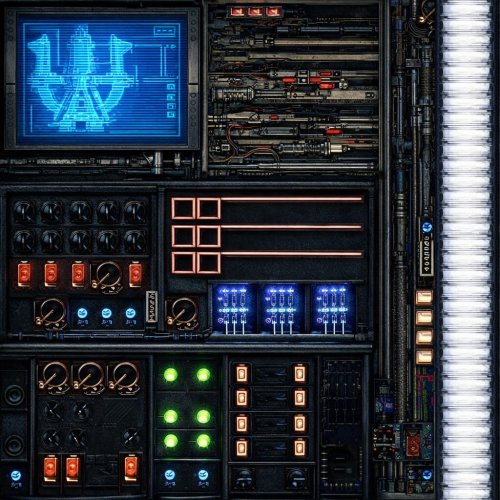
HD (1024 x 1024) textures for hyperdrive panels on Ebon Hawk. Just place it to your Override folder. -
Version 1.0.0
49 downloads
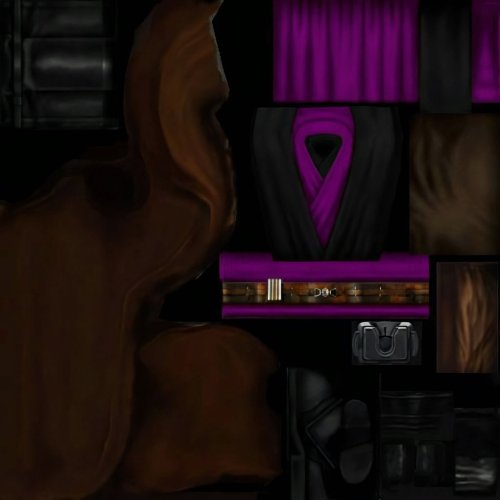
Textures for Jedi robes for "Brotherhood of Shadow: Solomon's Revenge 1.5", you need this expansion for this modification to work. Also, you need "JC's Fashion Line I: Cloaked Jedi Robes for K1 1.4" and "K1 Movie-Style Jedi Master Robes 1.1.0" installed to work. Installation: Copy this mod's files to your Override folder with replace. Don't forget to delete the .txi files of the same name from your Override folder. I haven't tested how this will work in-game yet, but since you'll be replacing the vanilla Jedi robes from the two mods mentioned above, it should work fine. -
View File HD Ebon Hawk Hyperdrive panels HD (1024 x 1024) textures for hyperdrive panels on Ebon Hawk. Just place it to your Override folder. Submitter Etienne76 Submitted 02/10/2026 Category Skins K1R Compatible Yes
-
 View File BoSSR addon for K1 Movie-Style Jedi Master Robes 1.1.0 by N-DReW25 Textures for Jedi robes for "Brotherhood of Shadow: Solomon's Revenge 1.5", you need this expansion for this modification to work. Also, you need "JC's Fashion Line I: Cloaked Jedi Robes for K1 1.4" and "K1 Movie-Style Jedi Master Robes 1.1.0" installed to work. Installation: Copy this mod's files to your Override folder with replace. Don't forget to delete the .txi files of the same name from your Override folder. I haven't tested how this will work in-game yet, but since you'll be replacing the vanilla Jedi robes from the two mods mentioned above, it should work fine. Submitter Etienne76 Submitted 02/09/2026 Category Knights of The Old Republic
 -
Version 1.0.0
88 downloads
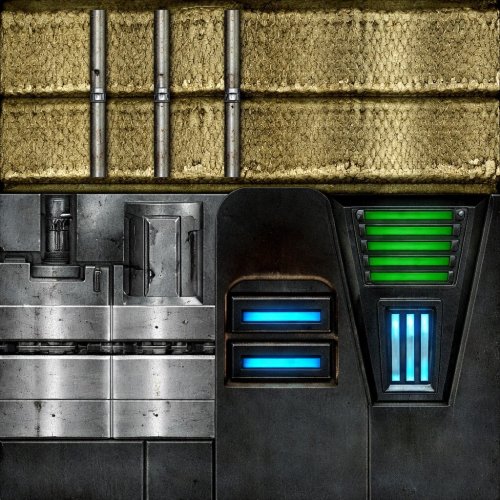
HD Belts textures 1024 x 1024 for KotOR I. -
View File HD Belts textures HD Belts textures 1024 x 1024 for KotOR I. Submitter Etienne76 Submitted 01/24/2026 Category Skins K1R Compatible Yes
-
Hello There! And Happy new year everyone. Well I know that the tittle may sound confusing, let me explain this request. I downloaded the Revan's Robes Revisioned mod maded by Jonathan7 and Sithspecter, you know is a must have for any fan of the character, however I found a texture for the robes that are just like "the jedi knight revan" but with the cape and the belt maded by L0ki194. I really liked it and then I used it on the mod. As you know to change the textures on the model you have to rename the texture to pmbj01.tga. And here is were the problem begins, normally I would use it just as it is, but my brother prefers the sith ones, we share one PC and we can't just live changing the textures always. That's why I'm here, Can someone make a version that allow me to use the custom textures without modifying the other one? My idea is just using the Revan's robes revisioned as a base and just make the robes a different item from the other one, finding this in the secret compartiment of the Ebon Hawk instead of Nemo's body, just to avoid conflicts with the previus mod. I know that there are some mods of Jedi Knight Revan, but one of them have some bugs and the other one just crash your game. Thank you for your attention.
-
Version 1.1.0
279 downloads
High quality floor textures. The goal was to retain the original look while improving the clarity of the various floor textures. The Peragus grate texture, was really low resolution and terrible quality so it has been remade. The grate flooring into Atris' room was also low quality and repared using another grate texture. Many others required manual cleaning. Almost all textures are doubled in resolution and with a tiling trick brought to 4x original. -

Version 1.4
467 downloads
A Mod for Star Wars Knights of The Old Republic Author: N-DReW25 1.0.0 Release Date: 20.06.2021 Installation: Simply click on the TSLPatcher.exe, select your option, click install and sit back and watch the TSLPatcher do its magic. WARNING: If you wish to use Gloveless Sith Officers and Albino Sith Officers at the same time, please install Gloveless Sith Officers FIRST and Albino Sith Officers SECOND! Uninstallation: Depends on what you've chosen to install. Copy the files within the generated "backup" folder and place the file inside your modules folder, make sure you overwrite. Description: July 15 2003 was the day Kotor 1 was released for the first time on Xbox. If you've played Kotor on the Xbox or have played my Knights of the Old XBOX mod then you might be aware that the Xbox version and the PC version of these games are different, but what if I told you there was a 3rd version of Kotor which you might not have heard of before? Between 2002 and early 2003, the original Kotor website published a series of images which ranged from concept art to promotional screenshots of the game during its Beta/Pre-Release stage of development. Whilst these promotional screenshots might appear worse than the vanilla game (As these are pre-release/in-development screenshots), a few eagle eyed observers might notice some features in said screenshots which the vanilla game lacks. What this mod will do is add these features into the vanilla PC game. WARNING: Please be sure to consult the mod's screenshots before installing (Or ask the mod author in the comments), the installer for this mod is modular allowing you to install things at your leisure, however, some features might be perceived as lower quality than others so it is recommended to be 100% sure of what you want to install before installing anything. None of the features should break your game, it's merely a matter of your own opinion on whether or not you like the aesthetic of a specific feature or not. Known Bugs: This mod shouldn't have bugs but if there is Just PM me on Deadlystream. Gloveless Jedi Robes do not receive the grey Dark Side transitions, meaning the player character will have a grey head with normal hands. The best way to fix this would be to use a mod which removes the Dark Side transitions. Incompatibilities: Would be incompatible with any mods which modifies Mission Vao's body/underwear/head texture and portraits, Trask Ulgo's unique head texture and portraits, Jedi Robe textures and models, Sith Officer body/head textures or models Permissions: Do NOT claim credit for this mod and do not use assets from this mod without my permission. Thanks to: Bioware: For such an amazing game Fred Tetra: For Kotor Tool Stoffee: For TSLPatcher Everyone who downloads the mod! Legal: THIS MODIFICATION IS NOT SUPPORTED BY BIOWARE/OBSIDIAN ENTERTAINMENT, LUCASARTS, DISNEY OR ANY LICENSERS/SPONSORS OF THE MENTIONED COMPANIES. USE OF THIS FILE IS AT YOUR OWN RISK AND THE ABOVE-MENTIONED COMPANIES OR THE AUTHOR IS NOT RESPONSIBLE FOR ANY DAMAGE CAUSED TO YOUR COMPUTER FOR THE USAGE OF THIS FILE.- 3 comments
-
- 2
-
-
- pre-release
- beta
- (and 5 more)
-
View File Floors - TSL High quality floor textures. The goal was to retain the original look while improving the clarity of the various floor textures. The Peragus grate texture, was really low resolution and terrible quality so it has been remade. The grate flooring into Atris' room was also low quality and repared using another grate texture. Many others required manual cleaning. Almost all textures are doubled in resolution and with a tiling trick brought to 4x original. Submitter J Submitted 11/29/2025 Category Mods TSLRCM Compatible Yes
-
Version 4.0.0
1,189 downloads
Version 4 released - should be final Compressed and optimized, 2x Upscaled Vanilla Textures This is not a 4k/8k super high-res remaster of the textures. Priorities were optimizing vanilla textures first, while also doubling the resolution. This should act as a base texture upgrade. Then I suggest you still use other texture mods and bug fixes on top of this. Every texture has been doubled in resolution. GUI and icons are also included. All textures are packed as compressed TPCs and then bundled in two .erf files. INSTALL: extract the 2 .erf files to your game directory\TexturePacks (NOT IN THE OVERRIDE DIRECTORY) This will overwrite the existing vanilla texture files so back them up if you wish. Refined Add-on Textures: extract to override folder These are textures that originally looked bad or were very low resolution so I reworked them. They still look vanilla+. - All circular grates had really low quality textures. Instead of upscaling, they have been tiled twice as dense. - The ebon hawk scaffolding was low quality and looked bad when upscaled. The scaffolding from Nar Shadda was used and color matched. - Nar Shadda panels were too uniform, shifted part of the texture to make the tile look more random. Optimization: - a lot textures were twice the file size they should have been - the highest quality compression was used on the new texture, it takes a very long time to convert but avoids bad compression artifacts Upscale: - HDCube 4 was used to upscale every texture at 2x - different model weights used depending on the texture - alpha channels processed separately, then recombined-
- 4
-
-
- upscaled
- texture pack
- (and 3 more)
-
View File Optimized and Upscaled Textures - TSL Version 4 released - should be final Compressed and optimized, 2x Upscaled Vanilla Textures This is not a 4k/8k super high-res remaster of the textures. Priorities were optimizing vanilla textures first, while also doubling the resolution. This should act as a base texture upgrade. Then I suggest you still use other texture mods and bug fixes on top of this. Every texture has been doubled in resolution. GUI and icons are also included. All textures are packed as compressed TPCs and then bundled in two .erf files. INSTALL: extract the 2 .erf files to your game directory\TexturePacks (NOT IN THE OVERRIDE DIRECTORY) This will overwrite the existing vanilla texture files so back them up if you wish. Refined Add-on Textures: extract to override folder These are textures that originally looked bad or were very low resolution so I reworked them. They still look vanilla+. - All circular grates had really low quality textures. Instead of upscaling, they have been tiled twice as dense. - The ebon hawk scaffolding was low quality and looked bad when upscaled. The scaffolding from Nar Shadda was used and color matched. - Nar Shadda panels were too uniform, shifted part of the texture to make the tile look more random. Optimization: - a lot textures were twice the file size they should have been - the highest quality compression was used on the new texture, it takes a very long time to convert but avoids bad compression artifacts Upscale: - HDCube 4 was used to upscale every texture at 2x - different model weights used depending on the texture - alpha channels processed separately, then recombined Submitter J Submitted 09/08/2025 Category Skins TSLRCM Compatible Yes