Search the Community
Showing results for tags 'Kotor1'.
-
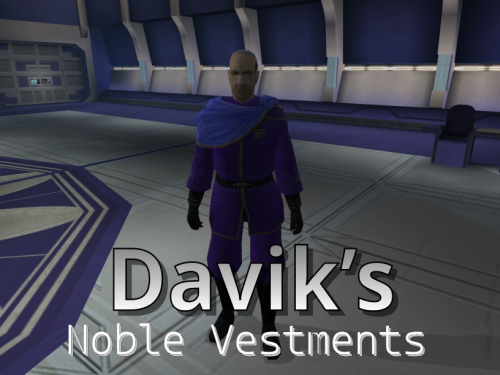
Version 1.0.0
770 downloads
Description: As I've explored all the mods which adjust and improve the textures and models for various objects and people in the game, I've noticed that surprisingly little attention has been given to modifying the appearance or look of one NPC in particular: Davik Kang, the crime lord and leader of the Exchange crime syndicate on Taris. While he doesn't have much actual screen time, he is quite important to much of the Taris section of the game. Although the tastes and opinions of people will vary wildly on this, I always felt like his appearance was rather "clunky" as he always seemed to be wearing his armor. Despite the fact that this is understandable, it would seem more fitting for an important crime-lord and de-facto important "noble" of Taris to be dressed rather formal or fancy given how others of his profession and rank are typically dressed. It would not be far-fetched to assume one in his position could wear a robe or formal jacket with body armor underneath for protection while maintaining a more "polished" look on the outside. I've included a custom skin and ported model from Kotor II for Davik's outer vestments, as well as a sharper-textured tpc file for his head that is included in the K2 game files. Installation: Just run the TSLPatcher the direct it to your game file To Uninstall: Remove the files from your Override folder and add the backup .2da file to it Copyright: Anyone is welcome to use my models and textures, just please ask first and be sure to give me credit UPDATE: New version includes texture of his robe without the military medals, as requested Thanks to: Effix, N-DReW25, Thor110, and others for giving me the basics of porting models and assigning textures in the game Legal: THIS MODIFICATION IS NOT SUPPORTED BY BIOWARE/OBSIDIAN ENTERTAINMENT, LUCASARTS, DISNEY OR ANY LICENSERS/SPONSORS OF THE MENTIONED COMPANIES. USE OF THIS FILE IS AT YOUR OWN RISK AND THE ABOVE-MENTIONED COMPANIES OR THE AUTHOR IS NOT RESPONSIBLE FOR ANY DAMAGE CAUSED TO YOUR COMPUTER FOR THE USAGE OF THIS FILE. -
Version 1.0.0
47 downloads
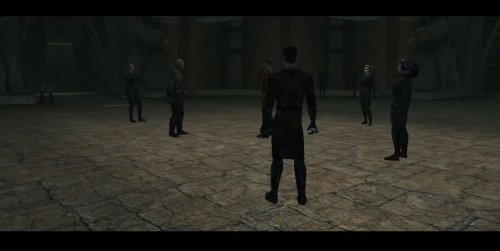
Title: Korriban Sith Military Academy Author: RavenFal Date Released: 07/04/2026 TLDR: Uthar, Yuthura, & Jorak all wear unique sith military uniforms while all other Dark Jedi wear the Dark Jedi robes previously only seen on the PC, Bastila, and a fallen Belaya. Some Dark Jedi in the academy are changed to be Twi'lek. Credits: Shem's Robes for Korriban Sith Students & Pwener's Korriban Sith Uniform Fixes (Both used with permission) This mod is very simple: It combines Shem's Robes for Korriban Sith Students & Pwener's Korriban Sith Uniform Fixes into one nice package, while removing all the extra crystals drops Shem's original mod added in order to keep the game balanced. The additon of Twi'lek Sith included in Shem's original mod is (mostly) still in place. I liked the idea of the Sith Academy on Korriban having the look of a military academy, but also thought it was weird that we are the only character that gets Dark Jedi Robes. So this mod changes every sith in the academy besides Uthar, Yuthura, & Jorak, to wear Dark Jedi Robes. Uthar, Yuthura, and Jorak now wear their appropriate unique Sith Military Uniforms at all times to highlight that they command both the Dark Jedi & Sith Soldiers of the Academy. Compatibility: Yuthura Sith Eyes with Light Side Transition - prioritize this mod's "dan13_yuthura.utc" file above the one added by that mod & there should be no issues. Incompatible with any other mod that changes the appearances of any of the Sith in the Korriban Academy. This mod will require you to have a saved game before you land on Korriban to take affect. Installation: Run the TSL Patcher executable. Uninstall: Replace the appearance.2da file in your override folder with the file saved in the backup folder. Delete all of the .utc, .tga, .mdl, & .mdx files of this mod from your override folder. THIS MODIFICATION IS NOT MADE, DISTRIBUTED, OR SUPPORTED BY BIOWARE, OR LUCASARTS ENTERTAINMENT COMPANY LLC. ELEMENTS TM & © LUCASARTS ENTERTAINMENT COMPANY LLC AND/OR ITS LICENSORS. -

Version 1.3.6
4,264 downloads
Improves the AI of KotOR 1. Changes: - Companions and most other NPCs use blaster feats - Enemy forceusers now use Force Breach and Lightsaber Throw (previously the AI ignored these force powers completely) - Enemy forceusers now use force buffs more often (Force Speed, Force Armor ect...) - NPCs with the Force Jump feat actually do force jumps if they are further than 10m from the target - Enemys reactivate shields after 200s - Some minor bug fixes - Jedi Support AI reworked - NPCs use Master Rapid Shot or Master Flurry if available instead of the default attack - NPCs use the highest level of feats and force powers available to them - The AI now uses feats granted by items - Once the player reaches a high enough level, the Jedi Support AI no longer uses low level force buffs, because they became obsolete - Companions now heal every team member properly not just the one controlled by the player (injury check fix) - Companions now use all types of force buffs (Jedi Support AI: uses buffs that apply to the whole team, Other AI styles: use powers that only buff the caster) - Plugin support - Grenade target selection fix List of supported plugins: - Repeating blaster attacks restoration 2.0 by R2-X2 - all of darthbdaman's mods -
View File Korriban Sith Military Academy Title: Korriban Sith Military Academy Author: RavenFal Date Released: 07/04/2026 TLDR: Uthar, Yuthura, & Jorak all wear unique sith military uniforms while all other Dark Jedi wear the Dark Jedi robes previously only seen on the PC, Bastila, and a fallen Belaya. Some Dark Jedi in the academy are changed to be Twi'lek. Credits: Shem's Robes for Korriban Sith Students & Pwener's Korriban Sith Uniform Fixes (Both used with permission) This mod is very simple: It combines Shem's Robes for Korriban Sith Students & Pwener's Korriban Sith Uniform Fixes into one nice package, while removing all the extra crystals drops Shem's original mod added in order to keep the game balanced. The additon of Twi'lek Sith included in Shem's original mod is (mostly) still in place. I liked the idea of the Sith Academy on Korriban having the look of a military academy, but also thought it was weird that we are the only character that gets Dark Jedi Robes. So this mod changes every sith in the academy besides Uthar, Yuthura, & Jorak, to wear Dark Jedi Robes. Uthar, Yuthura, and Jorak now wear their appropriate unique Sith Military Uniforms at all times to highlight that they command both the Dark Jedi & Sith Soldiers of the Academy. Compatibility: Yuthura Sith Eyes with Light Side Transition - prioritize this mod's "dan13_yuthura.utc" file above the one added by that mod & there should be no issues. Incompatible with any other mod that changes the appearances of any of the Sith in the Korriban Academy. This mod will require you to have a saved game before you land on Korriban to take affect. Installation: Run the TSL Patcher executable. Uninstall: Replace the appearance.2da file in your override folder with the file saved in the backup folder. Delete all of the .utc, .tga, .mdl, & .mdx files of this mod from your override folder. THIS MODIFICATION IS NOT MADE, DISTRIBUTED, OR SUPPORTED BY BIOWARE, OR LUCASARTS ENTERTAINMENT COMPANY LLC. ELEMENTS TM & © LUCASARTS ENTERTAINMENT COMPANY LLC AND/OR ITS LICENSORS. Submitter Raven-Fal Submitted 07/04/2026 Category Mods K1R Compatible Yes
-
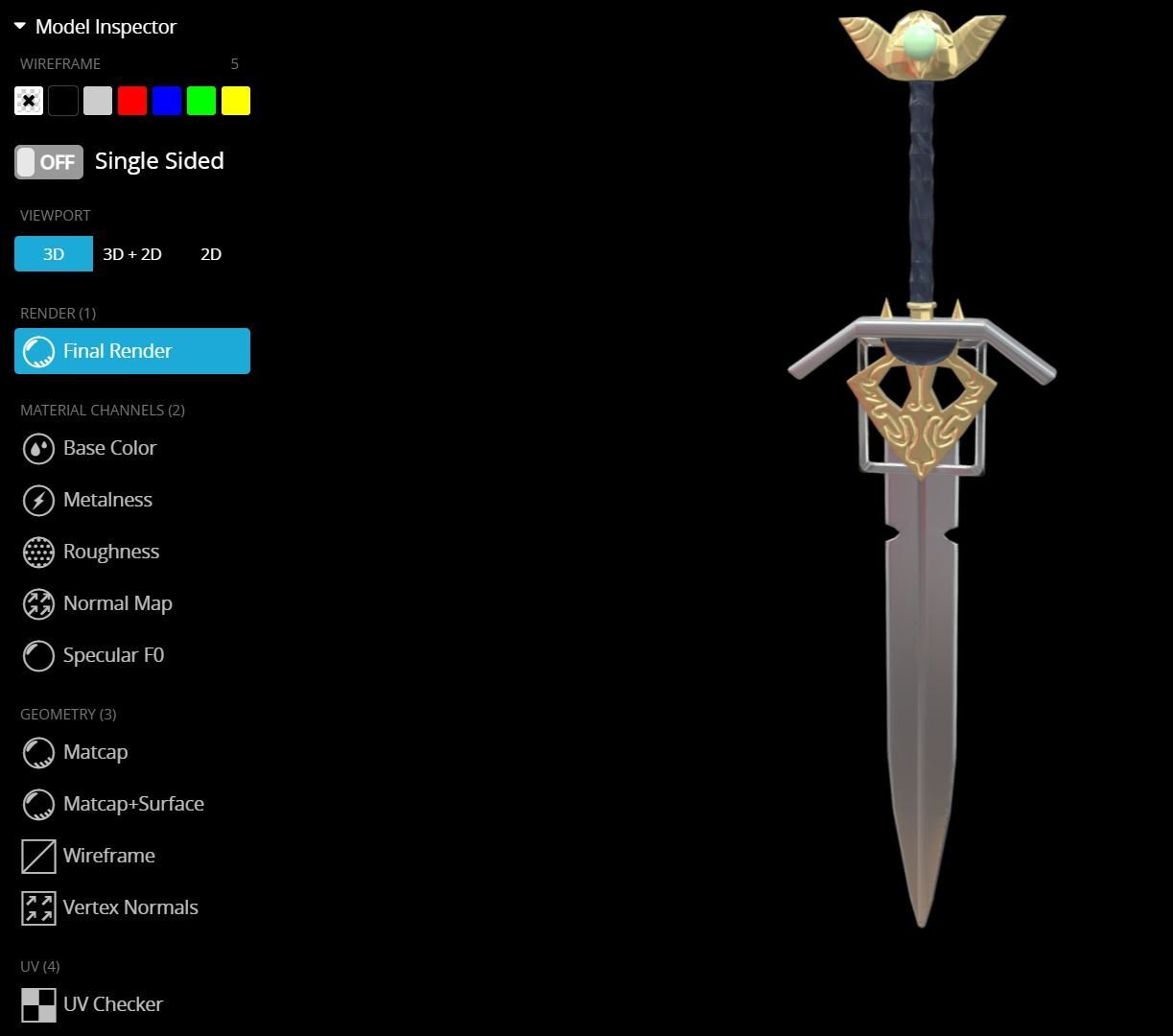
 More than a request, I want some guide and advice for making this mod by myself, I have made my own items' mods before and change some items' descriptions to make them more lore-friendly or work over already existing mods. I'm still a beginner, so If you could guide me with this I would be grateful. This mod would consist on changing the Sword of Ajunta Pall (which is a double-bladed sword) into a single-bladed sword inspired in this Sith Sword from the "Book of Sith" (written by Daniel Wallace, who describe that this Sith Sword was improved by immersing it in a bath of "blood spilled in wrath), just 'cause it looks and sound cool as hell, and I would love to use it with the Spectral Ajunta Pall mod: I have some experience on 3D modeling oriented to enginering (like Inventor, SolidWorks & Freecad) 'cause of college, but not in videogames 3d modelling. Fortunately there's a user called Jonatan Santana that already 3D modeled this Sith Sword using Substance Painter and upload it on Sketchfab on many formats (dae, .gltf, .usdz, .glb). I already asked for Jonatan's permision (the model has the CC Atribution License) and I'm awaiting his approval. But I want to know if the files format (dae, .gltf, .usdz, .glb), number of poligons, or scale of the model allows me to make the mod. If it works, what programs do I need to make the mod (like Kotor Tool, or Holocron Toolset), how can I scale the model (in case it's dimensions are not the right ones), how do I assign this the single-bladed sword (and character) the correct movements (instead of the double-bladed ones). I would be really grateful if you can help me with those questions and give me some of your guide. May the force be with you!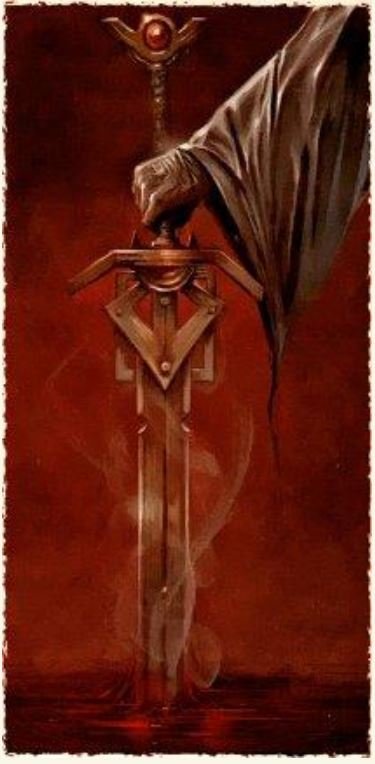
-
Version 1.0.0
73 downloads
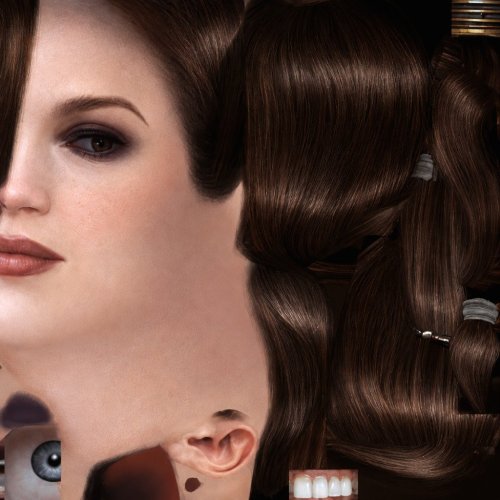
HD head for Bastila. (Recommended to use it with the Party Model fixes and HD Bastila mod by redrob41.) -
View File Bastila HD Head HD head for Bastila. (Recommended to use it with the Party Model fixes and HD Bastila mod by redrob41.) Submitter GearHead Submitted 06/22/2026 Category Knights of The Old Republic Mods Used K1R Compatible Yes Does this mod/file/content use AI? Yes If you use AI, please describe how it is used. I generated the texture with AI then did some minor edits to the picture like color correction ect...
-
Version 1.4.5
2,375 downloads
Balance in the Force Balance in the force is a gameplay overhaul mod that provides a streamlined leveling experience that’s more in line with its sequel with some important departures. I've rebalanced the base weapon types and heavily increased the damage for ranged weapons. Not only does this keep ranged builds competitive with melee builds but it also makes the enemies more difficult. Balance in the Force also contains a number of quality-of-life features. For example, all of the classes have been modernized to KotOR 2’s feat, force power, and attack bonus progression. Persuade is a class skill for the main character regardless of starting class. The Force Power and Alignment system gets an important revision. All characters have functional background feats that help to deepen the immersive roleplaying experience. There are also several optional patches included that revert some of the more controversial changes made by this mod to allow for a more customized experience. Full Change List Optional Patches Compatibility Balance in the Force was expressly designed to be compatible with the KOTOR 1 Community Patch. The community patch is a compilation of new and previous community driven bug fixes. Another important mod is Kotor1 - Improved AI. It changes enemy and npc behaviors to actually use their upgraded powers, buffs, feats at their highest levels. It makes them apply buffs and use shields more frequently. Enemies will use lightsaber throw, force jump, and force breach now. I highly recommend both of these mods. BitF should be compatible with all of the graphics mods as well as long as they don't also modify gameplay elements. BitF is designed to be its own gameplay ecosystem so other gameplay mods aren't recommended and most likely aren't even compatible. You're welcome to try them at your own risk. I can't promise you that things will work correctly. The proper patching order for mods involving BitF is as follows: 1. KOTOR 1 Community Patch 2. Balance in the Force 3. Any optional BitF patches 4. Kotor1 - Improved AI 5. Any other mods. Credits Below is a list of the people whose tools or works were included with this mod. Timbo: Balance in the Force mod author. Zoctavous and myself: Dantooine XP Boost scripting. JCarter426: Minimum level conditional dialogue scripting. Offthegridmorty and djh269: Bastila has TSL Battle Meditation Darth_Sapiens: KOTOR TOOL Fair Strides: TSL Patcher, TLKEd Cortisol: HoloPatcher & Holocron Toolset VarsityPuppet: 2DA Editor Special Thanks… Below is a list of authors’ whose mods inspired the ideas presented in Balance in the Force. MoustacheVerte: K2-like Progression MoustacheVerte: Force Buffs Duration x2 Sdub: Immersive Feats Mod Sdub: Persuade Unlocked Captain Spoque: Weapon Damages Overhaul TK-664: Weapon Base Stats Re-balanced Elm: Kotor1 balanced force powers Extra Special Thanks These individuals have spent an unreasonable amount of time helping me with this mod. Thor110 for teaching me how to do most of this. I could not have done any of this without him. Zoctavous for helping me gain a deeper understanding of this game’s scripting. Offthegridmorty for very patiently helping me incorporate Bastila has TSL Meditation into Balance in the Force. JayB33UK for patiently hunting down a persistent little bug that to my great shame, existed across multiple versions. -

Version 1.0.0
209 downloads
This mod changes the number of troops that spawn on the Star Forge. More specifically in Deck 2 and the Command Center. Options range from Half to x10. Star Forge Horde half - Padawan difficulty. Star Forge Horde x2 - Jedi Knight difficulty. Star Forge Horde x3 - Jedi Master difficulty. Star Forge Horde x4 - Jedi Grand Master difficulty. Star Forge Horde x5 - Chosen One difficulty. Star Forge Horde x10 - You are insane. -
Sorry if this is the wrong place to post. What on earth is the exact font and size and color and style used by the first game? If anyone knows it would be appreciated 🙏 thank you
-
Version 1.0.0
67 downloads
This mod swaps the upgrades of the Jurgan Kalta's Power Suit and the Cassus Fett's Battle Armor. Why? You might ask? Well... because without their upgrades they are identical, and when you upgrade them the Cassus Fett's Battle Armor gains +1 Strength bonus, but it isn't a power armor, unlike Jurgan Kalta's Power Suit. It is quite literally in the name. So it made more sense to have the upgrades the other way around. The devs probably made a mistake when they assigned the upgrades to the armor, since their unupgraded versions are the same, it is easy to mix up the two. -
.thumb.png.951b22687332612a5c2130a605b9d21c.png)
Version 1.0.0
680 downloads
Author: EAF97 Description: Most of the Sith students, teachers, and workers at the Sith academy on Korriban in K1 will now wear Dark Jedi robes according to rank and ported in from K2 that are worn by the Dark Jedi at Trayus Sith Academy on Malachor V in K2. Visually-speaking, this mod is meant to make the same appearance enhancement for Korriban Sith that JCarter426's "Cloaked Jedi Robes for K1" makes to Jedi robes with ported K2 models and could also be installed over JC's "Back in Black" which edits the NPCs' equipment (and which this mod itself doesn't do). -There will be two main options for installation: Version 1 installs both the clothing overhaul and gives unique heads to several of the NPCs who have direct conversations with the players such as Kel Algwinn and Dak Vesser, while Version 2 only overhauls the clothing. -Lashowe, Mekel, Shaardan, and other students will wear “low” robes -Yuthura and other teachers will wear “mid” robes -Masters (just Uthar) will wear “high” robes. -Students and teachers who are out working in the valley will wear darker variants of Dark Jedi Padawan and Master robes, respectively, with the ported player and companion robe models from K2 -Those who are dueling or practicing combat skills will wear “training” outfits (K1-style “tunics”) from Unused K1 Tunics for TSL -Captives will wear “prisoner” outfits -Workers (Tariga, Adrenas) will wear a darker variant of Onderon commoner clothing from Effixian's Zeison Sha/Jal Shey to Onderon Clothing -All of the “Lite” NPCs will be upgraded based on the new heads and gender given to them in K1CP but will have the new clothing. -A compatibility patch for K1CP will be available for both versions to give Tariga (the Huttese-speaking human NPC who gives directions to the Valley) a female appearance. -There will be an optional add-on to install the female variant of the Trayus-style Dark Jedi “Master” robes for Yuthura which I decided to include since nobody else wears it. -Sith guards, troopers, soldiers, and archaeologists will NOT be affected. I would **strongly** recommend installing K1CP **before** this mod in order to get a full overhaul of NPCs in the area but it isn’t necessary in order for the mod to work and the base installation will assume that K1CP isn’t installed -Equipment of NPCs will NOT be edited, this is purely a **visual** overhaul but is compatible with any mod that edits the NPCs’ equipment such as “Back in Black” by JCarter426 -Aside from any Sith students or teachers who are encountered in Dreshdae, the "Prospective" Sith students as well as Czerka employees and other civilians in the area will NOT be affected. I would recommend some of the other NPC overhaul mods listed below for enhancing those characters. For the most part, this mod mainly aims to change the Sith students, teachers, and staff at the Academy itself -Any Sith or Dark Jedi outside of Korriban will NOT be affected and there are multiple mods (listed below) which sufficiently enhance them and which I would recommend to be installed along with this mod. Installation: Just run the TSLPatcher the direct it to your game file. If you plan on using this mod alongside K1CP, I'd recommend installing K1CP **first** if you haven't already. Install either Version 1 (Clothes & Heads) OR Version 2 (Clothes Only) and then install either version of the Tariga patch for K1CP based on whichever version of the base installation was chosen (basically gives Tariga a female appearance in line with K1CP's changes that also adds the changes made to other NPCs in the main mod). To Uninstall: Remove the files from your Override folder and add the backup .2da file to it Credit: Special thanks to Effix, 90SK, Dark Hope, Laast, and ShiningRedHD for allowing me to use some of their models and textures, to N-DReW25 for advice given on the mod, and to JCarter426 whose work with porting Jedi robes from K2 inspired this mod Recommended Mods to accompany this one: "Kotor 1 Community Patch" by A Future Pilot: https://deadlystream.com/files/file/1258-kotor-1-community-patch/ The following mods by JCarter426: https://deadlystream.com/files/file/1378-jcs-fashion-line-i-cloaked-jedi-robes-for-k1/ https://deadlystream.com/files/file/2309-jcs-czerka-business-attire-for-k1/ "Dark Jedi Wear Robes (for JC's Cloaked Jedi Robes Mod)" by DarthParametric: https://deadlystream.com/files/file/1411-dark-jedi-wear-robes-for-jcs-cloaked-jedi-robes-mod/ The following mods by N-DReW25: https://deadlystream.com/files/file/2469-czerka-redux/ https://deadlystream.com/files/file/2310-k1-clothing-pack/ https://deadlystream.com/files/file/1109-sith-stalkers-k1/ The following mods by Dark Hope: https://deadlystream.com/files/file/2316-sithcom-dh/ https://deadlystream.com/files/file/2164-darth-bandon-hd/ https://deadlystream.com/files/file/2042-sith-soldier-hd/ https://deadlystream.com/files/file/2188-war-droid-mark-i-hd/ "K1 Better Male Twilek Heads" by Ashton Scorpius https://deadlystream.com/files/file/1430-k1-better-male-twilek-heads/ The following mods by Leiluken: https://deadlystream.com/files/file/2228-kotor-1-twilek-male-npc-diversity/ https://deadlystream.com/files/file/2179-kotor-1-twilek-female-npc-diversity/ Compatibility: If you're using any mods that change the appearance of NPCs in the Academy or on Korriban generally such as K1CP, I would recommend installing them BEFORE installing this mod. If you're using Leilukin's "Belaya's Unique Look" for example, install this mod AFTER it; it uses the same unique head for the character that Leilukin's mod uses and sources it from SpaceAlex's "K1 Enhancement Pack" modder's resource but also gives Belaya the same clothing overhaul as the others at the Academy if she appears. This mod should also be compatible with JCarter426's "Back in Black" mod (and I would even recommend using it alongside mine but it isn't necessary in order for my mod to work), but should be installed AFTER JC's mod so that the appearance overhaul in this mod won't be overwritten. Compatible with both K1CP **and** K1R but I would **strongly** encourage using it alongside K1CP. However, neither one is required in order for the mod to work COPYRIGHT I used the models from JCarter426's modder's resource "JC's Cloaked Jedi Robes & Supermodel Port": https://deadlystream.com/files/file/1379-jcs-cloaked-jedi-robes-supermodel-port-for-k1/ I have also utilized the following mods in my work with general permission (given in their "read me" files) from the authors to use their mods as long as they are given credit: "New Male Caucasian Bearded PC Head" by SHB: "You may use these skins etc. in your own mods without my expressed permission, as long as the original files stay intact, and proper credit is given." https://www.gamefront.com/games/knights-of-the-old-republic-ii/file/new-male-caucasian-bearded-pc-head "Character Overhaul -Redux-" by ShiningRedHD: "You are allowed to use the assets in this file without permission as long as you credit me" https://www.nexusmods.com/kotor2/mods/1060 Legal: THIS MODIFICATION IS NOT SUPPORTED BY BIOWARE/OBSIDIAN ENTERTAINMENT, LUCASARTS, DISNEY OR ANY LICENSERS/SPONSORS OF THE MENTIONED COMPANIES. USE OF THIS FILE IS AT YOUR OWN RISK AND THE ABOVE-MENTIONED COMPANIES OR THE AUTHOR IS NOT RESPONSIBLE FOR ANY DAMAGE CAUSED TO YOUR COMPUTER FOR THE USAGE OF THIS FILE. -
Greetings, recently I've been replaying Metro game series and also looked at Jedi Fallen Order. The idea I had from mix of those two games was a more of a dark atmosphere related idea based on how Kotor 2 talks about how certain areas with great violence can cause echoes in the Force can be viewed and percieved throughout the Galaxy. So, as I looked back at Taris Lower Levels, Manaan underwater levels, Kashyyk, Dxun, Narr-Shadaa vent areas and Malachor, I suddenly thought - "What if we could be given visions through the Force of how certain events have happened on there to help telling us a story?" For example, in Metro Last Light there were scenes of various people turned Ghosts relieving moments of their deaths in certain areas, kids in their appartments, watching the fall of nuclear bombs, pilots on planes trying to contact airports before suddenly the planes engines turn off and pilots seeing nuclear explosions as the plane is going down and so on. And due to that... I was curious if it is possible to recreats some experiences like that in Kotor 1 and 2, like making certain cutscenes happen with Force Ghost like representation of events or creating micro scenes with us being sent into a small rooms where certain cutscenes will playout, before the game would load us back into a normal world.
-
 Hi everyone! I'm currently playing KotOR 1 on an M-chip Mac and I'm trying to fix a notoriously broken old mod (the Force Power Pack that adds Force Rage, Floating Lightsabers, etc.). I spent a lot of time completely rewriting the .nss scripts to fix the fatal bugs (like Force Rage instantly killing the player, and the Floating Lightsabers spawning as invisible NPCs or failing to ignite). The code is finally perfect and ready to go. The problem: I physically cannot compile them into .ncs files. Kotor Tool and Holocron Toolset are completely broken on my Mac (even through Whisky/Wine, they throw OpenGL and path errors that I can't bypass). The request: Could someone with a working Windows setup and Kotor Tool/Holocron please compile these 6 short .nss files for KotOR 1 and share the .ncs files with me? It would literally take 2 minutes and save my sanity. Thank you so much in advance! di_fls1.nss di_fls2.nss di_fls3.nss di_rage.nss di_rage1.nss di_rage2.nss di_rage3.nss DI_K1FPP The original mod.7z
 -
.thumb.jpg.b9966493183514de7df927b6448851cb.jpg)
Version 1.1
59 downloads
US to UK translation! Translates all subtitles in the base game, and should also work with any cut content restorations. - - - - - Not sure what 'colour' to choose for your lightsaber? Fear not! Spellings changed include favourites, such as; colour rumour travelled judgement with over 100 spellings changed!!! Simply select english and away you go! For any country that uses EN-GB british spelling (I'm looking at you ROI/AUS/NZ), or even those that don't. Two versions are available to download. For Jedi who like to fight with 'Lightsabers', or for Jedi who would prefer to wield 'Lightsabres'. - - - - - To Download: Unzip the file, drag the new dialog.tlk file into your game folder, and it's done. (Which would be in Program Files(x86)/Steam/steamapps/common/swkotor) I recommend moving the original dialog.tlk file somewhere safe incase you'd like to revert back! - - - - - Mod Compatibilities: KotOR 1 Restoration: Installing this mod after K1R enables their TLK corrections to apply to UKSpelling's dialog.tlk file. That means you'll get the grammar and typo fixes of K1R and the en-gb spellings (Not sure if this changes some of my spelling changes though!). If installing this mod before K1R, you'll get en-gb spellings but won't have the grammar and typo fixes of KR1. - - - - - Only the subtitles will show EN-GB spellings I'm afraid. In-game words such as on textures will still be the same. (Selecting any language other than english won't change the subtitles.) Enjoy! -
 Hey everyone, I’ve been playing around with the combat log and trying to improve some of the messages it shows during fights. Editing the StrRefs in dialog.tlk works fine for the basic templates, like the ones that use <CUSTOM0>, <CUSTOM1>, <CUSTOM2> and so on. But it looks like not all combat log lines come from the TLK. Some parts seem to be assembled somewhere else, and I can’t figure out where the overall structure or ordering of the messages is defined. So I wanted to ask: Is there any other file that controls how combat log entries are formatted? Or is most of it hardcoded and only partially exposed through dialog.tlk?? I’m still pretty new to this side of modding, so any pointers or experience would be greatly appreciated. Thanks!
 -
How can you import a model from KOTOR 1 to KOTOR 2 and vice-versa? I understand that you need to use MDLOPs or MDLEdit, and then a 3d model software like blender with the add-ons available for download on this site, but I don't understand what steps actually need to be taken to make the model files from one game readable by the other game.
-
View File [K1] Mandalore the Unknown [K1] Mandalore the Unknown Author: RavenFal Release Date: 11/28/2025 "Yes, that's him. I toyed with calling him dar'Mand'alor, loosely translating Mandalore the Unknown." ―Abel G. Peña This mod changes the Mandalorian Captain found by the Temple on the Unknown World to be “Mandalore the Unknown”, the self-proclaimed Mandalore referenced several times in KOTOR by HK-47 and the Mandalorians on Kashyyyk, but never seen in-game. Per the campaign guide, Canderous defeated him between games and took his armor and helmet as a way to honor him, combining the helmet with Mandalore the Ultimate's mask (which is why Manalore's helmet in KOTOR 2 looks so different compared to the mask from the comics). This mod moves that confrontation earlier in the timeline, allowing players to experience Canderous acquiring his armor from KOTOR 2 and letting him (or anyone in your party who can equip heavy armor) to rock up to the Star Forge wearing one of the coolest armor sets from either game. “Mandalore the Unknown” is wearing an upgradeable armor set with the appearance of Mandalore's Armor from KOTOR 2. Upon his defeat, he'll drop this armor instead of the “Mandalorian Assault Armor” the Mandalorian Captain drops in the base game. The appearance is set up as a disguise, and so it will work for both male and female characters. He also drops a datapad that explains why he was sending teams of Mandalorians to hunt in the Shadowlands, what he's doing on the Unknown World, and changes up events a little more to make to him the one who made the modifications to Mandalore's mask. I have also included optional files to change Mandalore the Ultimate from SilverEdge9's Brotherhood of Shadow: Solomon's Revenge mod to also have the appearance of Mandalore from KOTOR 2. The mask looted from the “Non-Canon” chest remains unaltered and has its original appearance. This mod is not compatible with any mod that alters g_mandalor004.utc (the Mandalorian Captain on the Unknown World). To Install the main mod: 1. Run the “Install.exe” program from the mod folder. To Install Optional files to change the appearance of Mandalore the Ultimate in BOSSR: 1. Copy all files from the “Optional – BOSSR Mandalore Replacement” folder into your Override folder. To Uninstall the main mod: 1. Delete the following files from your Override folder: bos_mandhelm.uti g_a_mandotsl.uti g_mandalor004.utc mandotsl_datapad.uti p_mandalorebb.mdl p_mandalorebb.mdx P_MandB.tga 2. Replace the “appearance.2da” file from your Override folder with the “appearance.2da” file saved in the “backup” folder found in the main mod folder. To Uninstall the Optional files for BOSSR: 1. Delete the following files from your Override folder: brg_mandalore.utc msp_mandalore.utc myp_mandalore.utc mzp_mandalore.utc Credits: SilverEdge9 for the original Brotherhood of Shadow: Solomon's Revenge files. Submitter Raven-Fal Submitted 11/28/2025 Category Mods K1R Compatible Yes
-
![More information about "[K1] Mandalore the Unknown"](https://deadlystream.com/downloads/screens/monthly_2025_11/0.thumb.JPG.6dc4dd29780906efac2fa5c8fac23e49.JPG)
Version 1.0.0
206 downloads
[K1] Mandalore the Unknown Author: RavenFal Release Date: 11/28/2025 "Yes, that's him. I toyed with calling him dar'Mand'alor, loosely translating Mandalore the Unknown." ―Abel G. Peña This mod changes the Mandalorian Captain found by the Temple on the Unknown World to be “Mandalore the Unknown”, the self-proclaimed Mandalore referenced several times in KOTOR by HK-47 and the Mandalorians on Kashyyyk, but never seen in-game. Per the campaign guide, Canderous defeated him between games and took his armor and helmet as a way to honor him, combining the helmet with Mandalore the Ultimate's mask (which is why Manalore's helmet in KOTOR 2 looks so different compared to the mask from the comics). This mod moves that confrontation earlier in the timeline, allowing players to experience Canderous acquiring his armor from KOTOR 2 and letting him (or anyone in your party who can equip heavy armor) to rock up to the Star Forge wearing one of the coolest armor sets from either game. “Mandalore the Unknown” is wearing an upgradeable armor set with the appearance of Mandalore's Armor from KOTOR 2. Upon his defeat, he'll drop this armor instead of the “Mandalorian Assault Armor” the Mandalorian Captain drops in the base game. The appearance is set up as a disguise, and so it will work for both male and female characters. He also drops a datapad that explains why he was sending teams of Mandalorians to hunt in the Shadowlands, what he's doing on the Unknown World, and changes up events a little more to make to him the one who made the modifications to Mandalore's mask. I have also included optional files to change Mandalore the Ultimate from SilverEdge9's Brotherhood of Shadow: Solomon's Revenge mod to also have the appearance of Mandalore from KOTOR 2. The mask looted from the “Non-Canon” chest remains unaltered and has its original appearance. This mod is not compatible with any mod that alters g_mandalor004.utc (the Mandalorian Captain on the Unknown World). To Install the main mod: 1. Run the “Install.exe” program from the mod folder. To Install Optional files to change the appearance of Mandalore the Ultimate in BOSSR: 1. Copy all files from the “Optional – BOSSR Mandalore Replacement” folder into your Override folder. To Uninstall the main mod: 1. Delete the following files from your Override folder: bos_mandhelm.uti g_a_mandotsl.uti g_mandalor004.utc mandotsl_datapad.uti p_mandalorebb.mdl p_mandalorebb.mdx P_MandB.tga 2. Replace the “appearance.2da” file from your Override folder with the “appearance.2da” file saved in the “backup” folder found in the main mod folder. To Uninstall the Optional files for BOSSR: 1. Delete the following files from your Override folder: brg_mandalore.utc msp_mandalore.utc myp_mandalore.utc mzp_mandalore.utc Credits: SilverEdge9 for the original Brotherhood of Shadow: Solomon's Revenge files. -
I'd like to create a mod to add a Krayt Dragon Pearl to Vorn Daasraad's (Gamorean Genoharadan target) body, but I don't know which file(s) I need to edit, or which tool is the best to use for making that edit.
-
Version 1.0.1
354 downloads
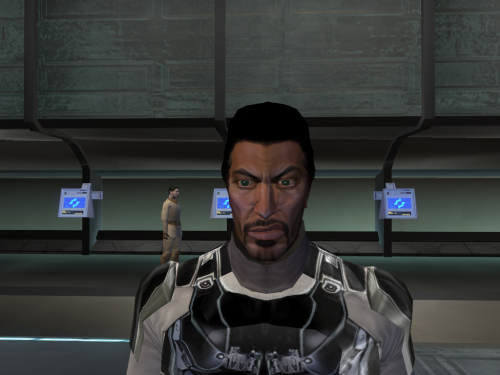
!!!THIS MOD IS FOR KOTOR 1 I ACCIDENTLY IMPORTED IT AD K2 MOD!!! I remade Brejik the mesh and textures -
Version 1.0.0
79 downloads
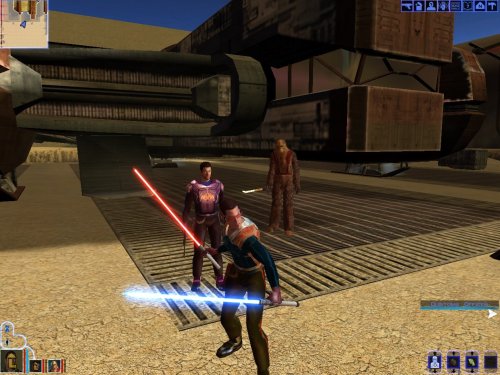
Title: Ulic Qel-Droma's Upgradeable Armor Author: RavenFal Date Released: 10/30/2025 This mod re-textures Ulic Qel Droma's Mesh Suit to have an appearance closer to how his Robes appeared in the comics. It also makes the armor upgradeable. Mesh Underlay gives all tiers of Power Attack, and Armor Reinforcement gives all tiers of Force Jump. These bonus feats are an allusion to Ulic's defeat of Mandalore the Indomidable from the comics. This armor cannot be accessed normally in-game. You will need to use the cheat code "getitem g_a_class5006" to obtain it, or use another mode that allows you to obtain it without cheats, such as SAO's Sleheyron Story Mode. This mod is incombatible with any other mod that edits Ulic Qel Droma's Mesh Suit. This mod Installation: Copy all files into the Override Folder. Uninstallation: Delete the files from the Override Folder. THIS MODIFICATION IS NOT MADE, DISTRIBUTED, OR SUPPORTED BY BIOWARE, OR LUCASARTS ENTERTAINMENT COMPANY LLC. ELEMENTS TM & © LUCASARTS ENTERTAINMENT COMPANY LLC AND/OR ITS LICENSORS. -
View File Ulic Qel-Droma's Upgradeable Armor Title: Ulic Qel-Droma's Upgradeable Armor Author: RavenFal Date Released: 10/30/2025 This mod re-textures Ulic Qel Droma's Mesh Suit to have an appearance closer to how his Robes appeared in the comics. It also makes the armor upgradeable. Mesh Underlay gives all tiers of Power Attack, and Armor Reinforcement gives all tiers of Force Jump. These bonus feats are an allusion to Ulic's defeat of Mandalore the Indomidable from the comics. This armor cannot be accessed normally in-game. You will need to use the cheat code "getitem g_a_class5006" to obtain it, or use another mode that allows you to obtain it without cheats, such as SAO's Sleheyron Story Mode. This mod is incombatible with any other mod that edits Ulic Qel Droma's Mesh Suit. This mod Installation: Copy all files into the Override Folder. Uninstallation: Delete the files from the Override Folder. THIS MODIFICATION IS NOT MADE, DISTRIBUTED, OR SUPPORTED BY BIOWARE, OR LUCASARTS ENTERTAINMENT COMPANY LLC. ELEMENTS TM & © LUCASARTS ENTERTAINMENT COMPANY LLC AND/OR ITS LICENSORS. Submitter Raven-Fal Submitted 10/30/2025 Category Mods K1R Compatible Yes
-
View File (Kotor 1) Brejik remade !!!THIS MOD IS FOR KOTOR 1 I ACCIDENTLY IMPORTED IT AD K2 MOD!!! I remade Brejik the mesh and textures Submitter Elayerfawkes45 Submitted 10/23/2025 Category Skins K1R Compatible
-
Version 1.0.0
493 downloads
Complete KOTOR music overhaul (SWTOR style) Hello there ! After some playthroughs, I thought the KOTOR 1 ambient themes were great but too old and I needed something fresh. And yes, I know there are some musics overhaul mods out there, such as Detran’s movie mod : https://www.nexusmods.com/kotor/mods/1552 But I wanted a more ambient version. And I realized SWTOR themes were the perfect match for most of the places you visit in KOTOR. So I took many SWTOR themes (and some others, if you want the surprise don’t look at the resumee below, but there’s not much more than SWTOR themes tbf), which gives us a total of 26 ambient musics (there’s not much about fight music yet, but updates could come if asked). Hope you like it ! Installation : - Make a backup of the streammusic folder in your game directory, - take the files from my mod’s “themes” folder and put them in your streammusic folder. When ask to replace, click yes. - You’re ready to go, enjoy ! If you liked the mod, please consider putting a like, a 5 stars or even a simple review, it helps a lot even if it doesn't cost you much. So thank you in advance. Uninstallation : - Delete your streammusic folder in your game directory, - Take your streammusic backup folder and put it back in your game directory. Issues / incompatibilities : None that I know of. Tell me if you find one, but since it only replaces files in streammusic folder it should be good. Thus, K1R compatibility should be guaranteed (K1CP too, that one I tried and it should work perfectly) Obviously though, you must not have other music mods installed that make changes to the same files/themes for it to work. That’s basically it. If you enjoy it and/or have improvement to suggest, feel free to text me ! Themes : Sith Theme (mus_theme_sith, Endar Spire) : The Siege of Alderaan Taris Upper city (mus_area_tarisup) : Coruscant, The Capital Appartments upper (mus_area_townsus ?) : Glory, the Galactic Republic Taris Lower city (mus_area_gang) : Scum, the Bounty Hunter Appartments lower (mus_area_townint ?) : Taris, The Plague Taris Sewers (mus_area_sewers) : Nal Hutta, The Glorious Jewel Dantooine Academy (mus_area_acad) : Peace, the Jedi Consular Dantooine outside (mus_area_out) : Justice, the Jedi Knight Dantooine Rakata Ruins (mus_area_ruins) : Voss, The Mystic Garden Ahto City (mus_area_ahto) : Alderaan, The Throne Manaan ocean floor (mus_area_hrakert) : Ziost, the grave Cantina 1 and 2 (mus_area_cant1 et mus_area_cant2) : Run Kessel Run / See you on the Dark Side : Jukebox themes Tatooine Desert (mus_area_desert) : The Desert and the Robot Auction Kashyyyk (mus_area_kash) : Tython, The Wellspring Wookie village (mus_area_enclave) : Episode VI’s Victory Celebration Shadowlands (mus_area_shadow) : Dromund Kaas, The Seat of Power Korriban academy (mus_area_valsith) : Treachery, the Sith Inquisitor Korriban fight (mus_bat_valsith) : Deception, the Sith Warrior Star forge (mus_area_sforge) : Balmorra, The Forge Bastila (mus_theme_bast, love) Theme : Bastila Shan and Revan Love Theme | CINEMATIC VERSION from Samuel Kim Carth (mus_theme_carth, republic army) Theme : Hope, the Republic Trooper Main screen Theme (mus_theme_cult) : Clash of Destiny Epic Version from Samuel Kim Czerka Theme (mus_theme_czerka) : Villainy, the Imperial Agent Malak Theme (mus_theme_malak) : Star Wars: Duel of The Fates | EPIC VERSION from Samuel Kim Republic Theme (mus_theme_rep) : Bravado, the Smuggler First, thanks to Shem for his ultimate sound mod (which I recommend downloading first, then my mod) But even more to JCarter for his amazing SithCodec which I obviously used for my mod. Other than that, big thanks to all people who contributed to making this game, these musics, and to the Deadlystream people that make modders and the community's life much easier. Thanks to all of the people who download this mod, and to the Kotor community in general.







.thumb.jpg.1956fb08fa61295f24848196db9478d7.jpg)