


AOD333
-
Content Count
24 -
Joined
-
Last visited
-
 5/5. Just like the one for droids, this item is necessary as the slow movement bug pops up often. While not as in line with immersion as the Droid Oil Bath, it also isn't immersion breaking, just another medical item. As with the other I added it to several merchants, and they both have a permanent place in my override folder.
 -
 5/5. This is a very simple, but necessary item, does exactly what it says. Also love that you called it an oil bath. I've added it to the inventory of several merchants, and immersion wise it fits perfectly.
 -
 I love this HK-47 texture. Sure there are other nice ones out there, but not only does this one look great, it adds some class and charm to our favorite droid (not that he's lacking in either one!). 5/5, this has been in my override for every playthrough since this texture was released.
 -
Hello everyone, I'm currently in the process of making a very simple mod that increases enemy difficulty. I was inspired to do this by SAO1138's Hard Mode patch for their Sleheyron Story Mode mod. I (and I'm sure most people) simply find the game too easy. I do play with the Darth Souls difficulty mod by ChabdlerJ47, usually on the hard setting (200% damage), but even this isn't enough. And setting it to even higher damage just feels odd, as some encounters become medpack spam fests and the ones I would truly like to be more difficult (common enemies) are still too easy. Anyways, I found SAO1138's Hard Mode patch to be a good difficulty increase. It increased the difficulty without making things feel unfair, so I compared those files with the original ones. After playing through the game I decided that a 1.5x increase to the Strength and HP of most enemies would be a fairly balanced change, but I'll probably make a 2x version as well. In some cases I will increase other stats, and maybe add better weapons here and there, but the idea isn't to make things feel unfair, just more challenging. I am currently in the process of creating this, and I will of course share it when I'm done. Now my first question (and main concern) has to do with enemy scaling. For instance I know that the sand people you face at lvl12+ are much stronger than those you face at lvl1-11. I've looked all over but so far haven't been able to locate a list of which enemies scale, by how much, and at what player level the increase takes effect. If anyone has this information and would be willing to share it, it would be much appreciated. Even without this info I still think that 1.5x will be a fair increase overall, as even with the scaling things feel too easy. And if there are encounters or enemies that end up feeling too tough, we have a difficulty slider for that. My second question, is whether or not there is anything else that affects enemy difficulty. Are there any scripts that I should be aware of? I know that there are spawning scripts, but my assumption is that those scripts spawn enemies using their UTC files within the module, so the 1.5x stat increase would affect the enemies spawned through scripts as well. Again if I'm wrong about that can someone please let me know. I don't have a ton of time to dedicate to modding, but this shouldn't take that long, and I plan to release it within a month or so. Answers to my questions will help me know if I'm on the right track, or if I'm missing anything. Also, on an unrelated note, does anyone know of a detailed tutorial on creating tslpatcher instruction scripts? Perhaps there's one on this site and I've simply missed it. I would like learn this, as tslpatcher (or holopatcher) seem to be the standard, and I have mods I've created that I'd like to share, but I want them to be as compatible as possible (some require 2da edits). Thanks in advance for any help/advice.
-
 This is great work. It really was a great idea and it's executed flawlessly. The textures are sharp, and the trim was added to all the right spots to be accentuated as the character moves. 5/5 for sure. And something else. I (and I assume many others) already had the envmap for my PC and companions set to CM_Baremetal due to other armor mods. One downside to this however is that standard jedi robes look sort of weird, at least the dark jedi robes do, they reflect in an ugly way. These robes, in addition to what I said above about how great they look, offer a perfect alternative. They are a perfect replacement for the dark jedi robes, and with the stats tweaked a bit, they are a perfect middle ground between common robes, and better ones like Qel-Droma's or some custom ones I put together. This mod more than deserves the 5/5 I gave it, as although there are tons of armor and robe mods, only a small number of these truly stand out in their beauty and design, and these are some of the best.
 -
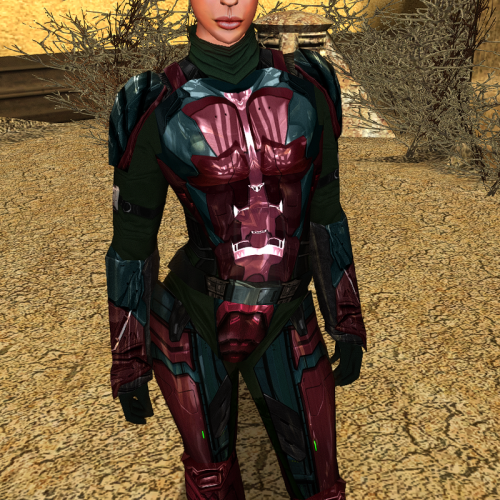 5/5. Your texture work for Kotor is some of the best, and these sets are no different. My favorite from this set is definitely the gold Mandalorian set (PFBH04/PMBH04). I love it so much that I used it as the texture for Redhawke's Baragwin Glazed Armor, which I of course edited to not be so OP. And I used Detran's version for the Mandalorian armor. I don't use texture packs for the environment, but I do use high res textures for npcs, armor, clothing and weapons. And when it comes to armor, all of yours have a permanent place in my override, though I did some switching around to match my favorite textures to my favorites armors 😋.
 -
 This mod deserves more than 5 stars, but 5 is the max. Seriously everyone should try it. I've played most of the mods that add new content to Kotor (both 1&2), and this is one of the best. As far as Kotor 1 is concerned this mod definitely is the best one. It is so well made, well written, well acted, I really can't fault it in any way. And beyond all of those things, this mod has a certain charm to it that is lacking in the other big mods. It truly feels like an official expansion pack. And it is an expansion pack, it's huge. The mod author has clearly made an effort to avoid spoilers, so I won't give any specifics about the content, but suffice it to say that it delivers in every way. It's so good that I actually removed some of the other big mods from my modpack, they were incompatible, and this one is far superior (sorry but facts are facts). As I said above, this mod, in every way feels like an official expansion, and I highly recommend it to everyone. It now has a permanent place in my mod build. And one last thing, the creator of this mod also deserves credit for how passionate they are about it, you can tell that it's a labor of love. And they also deserve credit when it comes to support. They answer questions and address problems very quickly. When I posted on the Nexus page about an incompatibility between this mod and another, they created and posted a compatibility patch for it while I was still researching how to create one myself, saving me a ton of time and effort. And my case isn't special, if anyone goes to the Nexus mod page you will see just how supportive this person is. They are a top notch content creator.
 -
 I love this mod, at least I love the shop part. The quest is not very inspiring to say the least, and is an irritating barrier to access that I believe should be optional, maybe for a discount. I still give this 5 stars though because Redhawke's work here is outstanding. I think it is still the best merchant mod, and it provides a very convenient way of adding custom items into the game with Holocron Toolset. One problem people should be aware of however is that the global.jrl in this mod will mess up other mods. It's quest's journal entry will overwrite that of other mods. But since this mod only has one quest, and it's extremely straightforward, we don't really need a journal entry. That said, here's how to avoid any problems, and also how to just disable the quest if you prefer. How to avoid global.jrl problems: After installing all of your mods that contain the file global.jrl (EXCEPT Redhawke's mod), make a backup of this file. Then install Redhawke's mod, once this is done paste the backup back into the override and overwrite it. This will obviously break the journal entry for Redhawke's mod, but that's no big deal, it's one quest and it's extremely straightforward. How to disable the quest entirely like I have: Extract Weebul's dialog file (rh_weebul.dlg) from rhjawashop.mod with Holocron Toolset, open that dlg file, click on E3 so it's highlighted, then hit the delete key on the keyboard, then do the same with E4. Next click on E0, on the right hand side you'll see a box that says "Conditional", remove rh_jawatest from that box. And that's it. Save the file. Then re-open rhjawashop.mod, click on rh_weebul.dlg and select remove at the bottom. Then click on the add button, and select the file you just edited. Then just save it and copy the edited rhjawashop.mod to your modules folder, overwrite and voila, no more boring quest, you can access the amazing shop immediately. 🥳 Oh one last thing, before I disabled the quest, I noticed that during the dialogue with Weebul, if you click on "where are these tunnels" or something like that, it crashes the game. This could be exclusive to my mod pack, but if you click on the "revenge is never a good reason" option things will work as intended and you will able to continue.
 -
 I really wish I could write a positive review, and in my defense I really tried hard to like this mod, and have played through it twice in it's entirety. To begin, the story, quests, action, etc are not bad, which is why I gave it 2 stars. Although some of the content can be confusing at first, like the door in Exar Kun's tomb. Now the reasons why it's 2 stars instead of 5. This mod is a mess. It alters things that it has no reason to, creating conflicts where there shouldn't be any. It adds placeables that add to the overall limit when it doesn't need to (there are alternatives that don't affect the limit). But the biggest problems are the items and textures. For one the items that it adds are incredibly overpowered. Every one of them might as well be called "God's Robes", "God's Lightsaber Crystal", etc. Next, it replaces items and textures without any disclaimer or warning that it does so. It also edits items, once again without any warning that it does so. For example in order to have the new lightsaber crystals work with the vanilla sabers, the authors of course had to include edited uti's for these files, but they added a +2 to attack to the double saber, effectively nullifying any penalty when combined with TWF. Again this change is made without making the end user aware of it. So for your entire playthrough you have a +2 to attack if you use double sabers. It adds a set of Revan's Robes into the module, and edits the existing set, for the existing set it replaces the vanilla textures with new (ugly) ones. For the new set it does add a new uti that uses a new texture variation, but it changes a bunch of lines in appearance.2da to use this new model/texture, which messes with other Revan Robe mods. And there was no reason to do this, the mod already has new robes and didn't need to recycle (and change) Revan's. Next, it changes republic armor. I don't mean that it adds a new set for the player to wear, I mean that it changes the model/texture of the existing armor the republic soldiers uses to an ugly dark blue version and edits appearance.2da to have all republicsoldiers use the new version. Again, it just does this with no disclaimer. The creator of this mod clearly loves the color blue, because they added it into everything. It also adds armor which overwrites vanilla models and textures, using new ones instead (even more blue). Some of the items it adds are cool, but as I said above they are extremely overpowered and are more or less cheat tier items. Just to make these items usable I had to edit every single one of them. I also had to do an absolute ton of editing to undo all the texture and model changes. After all the work I did just to undo all of the unnecessary changes this mod makes, and to rebalance the items (I don't like playing on god mode), I replayed it. And after replaying it, I decided it simply wasn't worth the hassle and re-installed my entire modpack (it's massive) without this mod. I wish I had more positive things to say, but I don't, this mod is extremely shoddy work. I highly recommend that people avoid this mod, unless you are ok with all of the problems I outlined above.
 -
I'm necroing this thread even though it's a faux pas in case anyone else (like me) is desperately trying to figure out why in the hell there are three entries for hp. So, here's for posterity: I hope one of the greats will correct me if I'm wrong about any of this. I believe (99% sure) that the max hp actually is the constitution modifier, and that feats are also accounted for by the Max HP value. I'll explain why. Examples from vanilla utc files: Bastila is a Jedi Sentinel, she is at level 3 and gets 8 vitality points per level. She also has 12 Constitution, so a modifier of +1 per lvl. Her Base HP and Current HP are both 24 (3×8) and her Max HP is 27 (+3 from CON). Carth is a Soldier, he is at level 4 and gets 10 vitality points per level. He has 12 Constitution, so a modifier of +1 per lvl. His Base HP and Current HP are both 40 (4×10) and his Max HP is 44 (+4 from CON). Mission is a Scoundrel, she is at level 3 and gets 6 vitality points per level. She has 12 Constitution, so a modifier of +1 per lvl. Her Base HP and Current HP are both 18 (3×6), and her Max HP is 21 (+3 from CON). It seems clear that the Max HP value is accounting for the Constitution modifier. Now let's look at Canderous since he has the Toughness Feat. Canderous is a Soldier, he is at level 5 and gets 10 vitality points per level. He has a Constitution of 14, so a modifier of +2 per lvl. His Base HP and Current HP are both 50 (5×10), however his Max HP is 65. His +2 Constitution modifier make his Max HP 60, so it seems logical that the extra 5 is coming from the Toughness feat, which is +1 per level. The only thing that casts any doubt on this is HK-47. As a combat Droid he should get 12 vitality points per level. He joins the party at level 6, so he should have at least 72hp. But in his utc he only has 60 Base/Current HP and he has 66 Max HP. He has 10 Constitution. So these numbers line up perfectly with a level 6 Soldier with a Constitution of 10 (no modifier), but who has the Toughness feat. If I'm correct then HK-47 should have a Base HP and Current HP value of 72 (6×12), and a Max HP value of 78 (+6 from Toughness). I'm not sure what to make of that, as I checked the classes.2da file and the combat Droid does indeed get 12 vitality points per level, so it would seem that there was a mistake made in his utc file. Or that at some point Bioware changed the Combat Droid hitdie value in classes.2da from 10 to 12 for balance reasons, but forgot to update his utc file. HK-47 has a Strength value of 16, so our poor and innocent assassination Droid was clearly overlooked quite a bit. The game SHOULD give him the correct HP value, as it does calculate what an NPC's health should be based on stats and modifiers and assigns that value, regardless of what is in the files (I believe) but I don't have a save with him present to confirm this. But if this irks anyone else, and even if the game does correct it, HK-47 should have Base HP/Current HP 72 and Max HP 78, and it's very easy to change with Kotor Tool or the Holocron toolset. I think I'm right that Base HP and Current HP are what the character should have based on their class/level, and that Max HP is the Base HP + Attribute and Feat modifiers. Again, if anyone can confirm what I've said, that would be good, if not I'll update this comment when I have definitive answers. Sorry to necro an old thread, but I found this thread while searching for an answer to why there are 3 HP values in the utc files, and what they all meant. I couldn't find a definitive answer to this and figured all of this out myself. I thought I should share this information as a service to the community, in case anyone was trying to edit companion stats but was hesitant to do so out of fear of messing something up. I chose to post this here instead of creating a new thread because it answers the OP's question. I hope this information is helpful to someone. EDIT: Just a small update to confirm that the information I posted above is indeed correct. Base HP and Current HP is the character's total hitpoints from the class hitdie value (in classes.2da) multiplied by the character's level. And both of these values should be the same, unless for some reason you want the character to start with less health. And most importantly, the Max HP value is the Base HP with all modifiers from Constitution and Feats added to it.
-
 This toolset is incredible and makes modding Kotor so easy. For example, in order to make mods compatible with the community patch, modules had to be edited. With the Holocron Toolset I was able easily edit the files in question, then open the modules, remove the offending files and replace them with the edited ones, with a few clicks of the mouse. When I was editing the level gains for feats, skills, hitpoints, force points and force powers, I was able to quickly and easily extract the vanilla 2da tables for comparison. Click on core, 2d array, and everything you need is right there. And not only that, but this amazing toolset even reads your override and module folders flawlessly. An example, I really hate spawning custom gear from mods with the console or finding it for free. The stuff is usually quite a bit better than the vanilla items and makes them irrelevant. I've always wanted to add the custom items from mods to the inventory of merchants. This toolset made that process (previously quite difficult) an absolute breeze. I was able to add them directly from my override folder into the merchant's inventory with a few clicks. I still use Kotor Tool for simple changes. For example making changes to or adding item properties as the user interface is simpler and quicker. But for anything beyond simple item properties, it's Holocron Toolset all the way. The creator of the Holocron Toolset did a legendary service to the Kotor modding community by making this, and there's really not much that it can't do. 5/5 of course. I'd also like to personally thank the creator of this Toolset, it has saved me so much time, and has allowed me to finally create a massive (in my opinion definitive) modpack which I will use for all of my future playthroughs. Some of the things required to create this modpack and make so many previously incompatible mods work together without issue were beyond my skill. But with this toolset these things were not only made possible for me to accomplish, but extraordinarily easy to do. So thank you a hundred times over for your time and effort in creating this truly amazing modding utility.
 -
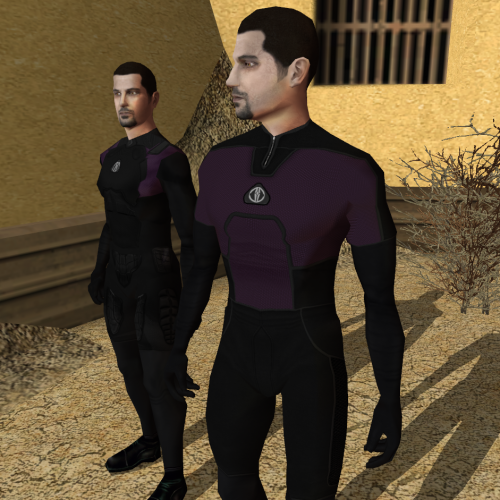 This is definitely THE male underwear mod, there really isn't a lot of options in this regard. In the past I just left the males with default underwear and changed the females, but now everyone will be wearing those awesome purple jumpsuits, regardless of force alignment. Great work. 5/5.
 -
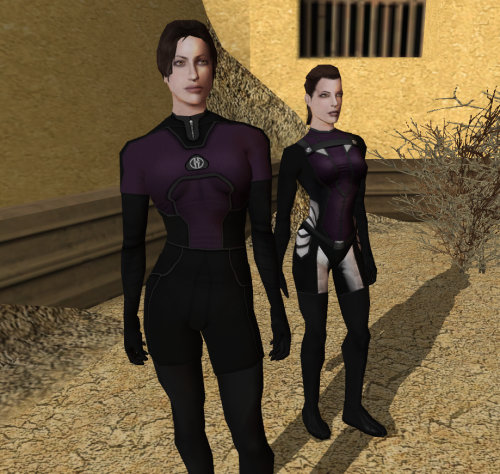 These are fantastic. Especially the purple ones. There aren't many great underwear mods out there for the player character, and using ones designed for companions doesn't always look great. This however is perfect, it's just underwear and you barely ever see it but it does look really nice. And a jumpsuit makes more sense than skimpy lingerie, especially in space, even if it lacks the "eye candy factor", but hey, this is Kotor, not Dragon Age. Definitely a 5/5. It would be nice if it was optimized for companions. Bastila's model for example doesn't really work with them, although I do have her wearing the one in the first screenshot and while it's not perfect, it does look better than the skimpy alternatives, you did a great job on these.
 -
Fair point about necroing, but I'm glad I did since you shared those great resources. Not everyone knows about these resources, I didn't know to check github for that sort of stuff. Anyways thanks a lot for posting those, I've downloaded both the scripts and the DeNCS alternative, very helpful.
-
I know that this is an old thread but I just want to offer an alternative suggestion in case you or anyone else is still looking. I'm currently having similar troubles with trying to decompile scripts. However, for the merchants, could you not just edit the cost of each item in Kotor Tool? Obviously it would be preferable to edit the merchants and their markups, but if it's proving to be insurmountable then perhaps what I suggested could work for you. Different merchants have different markups and all that, but increasing the base price of each item in Kotor Tool would increase the cost of the item in the game. You could load the game, check the merchants inventory for the item in question and make note of the price, then open that item in KT and check the base price, and the difference between the two will tell you what the markup is for that merchant. This would be a tedious process to be sure, would probably be easiest to use multiple monitors or you main PC + a laptop, have the game open on the main and KT open on the laptop. I'm currently building a big modpack, one that I hope is definitive so that in the future I can just unzip and play. A part of that is to add custom items from mods to merchant inventories, since I hate getting top tier items for free. While I'm at it I will probably rebalance things as well in the same way that you were trying to in order to make the game tougher. I plan to edit the prices of many items in the way I described above. It might be tedious but modding is a labor of love.
