Leaderboard


Popular Content
Showing content with the highest reputation on 05/08/2025 in all areas
-
Hello there Salk! 1) So the 2 doors on each opposite side hide the blackness or some akward background from the level. I felt it was more natural like this. The middle door is not that necessary, but once again i felt it was more natural and it also hides a bit of the akward geometry. Maybe the doors should be optional. 2) Nice catch about the MusicNight row. I am working on a module that use the swoop platform geometry, so I surely edited this without noticing! I am going to upload a file with the fixed music, because it absolutely changes the mood for this part of the game. Ty for bringing attention to this. 3) Indeed. For swoop bikers, i noticed they use the same uv/low texture from the Niktos in game, i simply used upscaled textures for Niktos as a replacement. Their model is still very low poly, but there are some welcome extra details from the textures (especially the faces). The upscaled textures are exclusive to the nikto bikers and won't affect the other Nikto creatures. Nice feedback here, so i'm fixing the music and providing an optional patch for the doors!2 points
-
2 points
-
Version 2.0
888 downloads
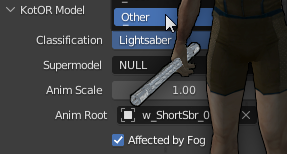
In the latest Aspry patch, the textures on lightsaber hilts are bugged. It seems theres an extra shader applied to them and maybe texture math breaks at certain angles. Aspyr compatible models are provided with working hilt textures. INSTALL: For Crazy34's New Lightsaber Blade Models: Install the original mod first then extract this Aspyr compatible patch to the override folder. For Vanillas saber models: Exact to override folder. TSLRCM should be installed first. FOR MOD DEVELOPERS: You can use these models. The latest fix was to move the hilt mesh to a separate model and reference it in the blade model. The blade model type is lightsaber and the hilt type is character. These changes were made using KOTOR Blender.1 point -
Version 4.1.2
12,785 downloads
While you sleep in the medical room, 3C-FD is patching your game. Restores fog and reflections which were broken in the Aspyr update. Works with both Steam and GOG versions. Compatible for KOTOR 1 and 2. Graphical INI edtor. Included KOTOR2 Patches: - Fog Fix - Reflections Fix - 4GB Patch - Subtle Color Shift (yellow tint removal) - Music Volume During Dialogue Fix - Borderless Window Mode Included KOTOR1 Patches: - 4GB Patch - Borderless Window Mode How to use: Place in game directory and run it. Load kotor exe on the 'patches' tab, select patches to install, click apply. How this was made: - The fog shading was just covered up when the latest version was released. I was able to send that data to the new Fracture shaders and apply fog coloring. It checks if the fog color is set to black and if not then it applies fog. Modules that don't use fog have a default fog color of black, Duxn and Dantoonie use a grayish color. - The shader for when both a lightmap and a cubemap is applied, to the same model, had a typo. Cubemap was labeled as a '2D' instead of 'CUBE'. Easy fix. Luckily the shaders are a plain text string, in the exe, and can be modified with a hex editor. The only issue is that the character length needs to be the same or smaller. The only way to get more data in the shader is to remove extra spaces/linebreaks and to shorten variables to single characters. - The music was lowered so much during dialogue that it was almost non existent. I was able to find the functions for calling volume control, using ghidra. The call was made only 3 times and from there it was process of elimination. Ultimately disabling a variable change if in dialogue, before the first volume change call, worked. Bugs: - Fog fix does not work with M478 Special Thanks: HappyFunTimes101 - ShaderOverride - I could not have done this without this tool. This made sorting out and identifying the shader data much easier. I probably wouldn't have even attempted or known where to look if this didn't exist. JCarter426 - For pointing out that the music was broken during dialogue. I hadn't noticed but couldn't stand it after hearing for myself. Source: https://github.com/J0-o/3C-FD-Patcher Browser-based Version: https://j0-o.github.io/3C-FD-Patcher-js/1 point -
Version 2.0
508 downloads
Main idea Have you ever, while playing KOTOR, been disappointed by the way the prestige quests’ storyline on Korriban was organized, because you couldn’t tell Uthar Wynn about every quest you’d done before going to Naga Sadow’s tomb just because you “had enough prestige to become a Sith in full” ? And then, they would stay in your quests journal forever. Or maybe, you were annoyed when you discovered that to finish Ajunta Pall’s quest, you had to give away his sword and you couldn’t get it back ? Especially with amazing mods that make it look so beautiful and actually enjoyable in-game ? The K1R and K1CP remove the quests from the journal when going to Naga Sadow's tomb. So with one of them a part of the issue is fixed. However, I promise you, this is a way better alternative. You can choose between : - VANILLA FRIENDLY VERSION : This gives you the possibility to tell Uthar about every prestige quests you’ve completed, even after reaching max prestige. You'll need to report to master Uthar right BEFORE going to Naga Sadow’s tomb for your final test. To be very honest, this is mostly for dark side players, but I’m sure there are lots out there. Furthermore, I’ve played as a neutral/slightly light side character and I still had that problem (1 or 2 quests I couldn’t finish). - FULL VERSION : It contains 3 main components. You will now have in your game : Optional (ONLY FOR FULL VERSION) Requirements (ONLY FOR FULL VERSION) Installation Compatibility Thanks Permissions If you need to know more, please contact me on DeadlyStream or Discord KOTOR / DeadlyStream server : “The_Chaser_One”.1 point -
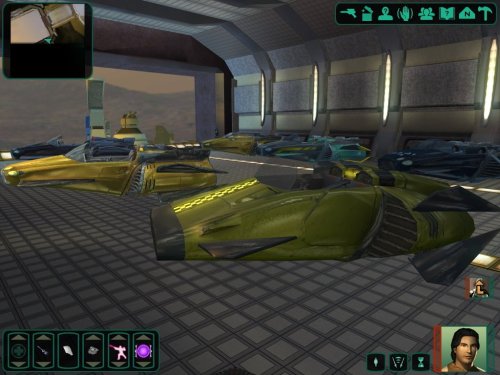
View File [K1] Swoop platform model repairs Swoop platform models repairs =============== By ZobiZob ------------------ Description There are notoriously some problems with most of the levels geometry, models and textures. They are not ultra noticeable, but once you see it, you can't unsee it. As i am working on a custom module using the swoop platform geometry, i decided to fix some of these problems, and also add numerous details like venting effects, animated light and distant swoop riders with upscaled textures for their bikes + different colors for riders. The full pack also displays your swoop in the module. Fixed music changes from 1.5 with version 1.6. Installation 3 options, either the full pack with the swoop you use during the race displayed, no swoop bike displayed and also an option without the doors. 1) Use the holopatcher.exe included and you're ready to go. If you're not satisfied with an option or the other, you can always come back and reinstall the desired option. Known Bugs and Incompatibilities Everything should be fine. If you replace the m03af.git file after installing the doors that i added in the distance will disappear. The upscaled textures only affect the swoop bikers and won't change the textures for Niktos/swoopgang creatures. Permissions You are free to incorporate this into any of your work without asking, just credit me and shiningredHD for the upscaled textures (swoop riders, swoop bikes). Acknowledgements All materials and copyrights belong to LucasArts, and Bioware. Upscaled textures from ShiningRedHD. I own none of the materials, and I'm not making any money out of this mod. This mod is not to be distributed for profit, either. Submitter CapitaineSpoque Submitted 04/26/2025 Category Mods K1R Compatible Yes1 point
-
The nostalgia bug recently bit me and I thought it might be fun to play some KOTOR2, with mods of course! After a bit of tinkering I think I have a working mod set up running on Linux. I thought that my experience might be useful to someone else attempting to install mods on Linux or a maybe a Steam Deck. A fair warning though, I have not had time to play test yet beyond running around on Peragus so there could be issues that I haven't discovered or steps that I forgot that I did. I'll try to update if I run in to any issue but I'm not promising anything, I have a nasty habit of spending days modding a game only to never actually play it when I'm done! First install the native Linux version of KOTOR2:TSL from steam Next download the latest KOTORModSync (currently 1.0.2) https://github.com/th3w1zard1/KOTORModSync - linux-x64.zip - KOTOR.Modbuilds.Rev10.zip (Contains KOTOR2_Full.toml modlist we will be using) The install directly can be found at ~/.local/share/Steam/steamapps/common/Knights of the Old Republic II/ All regular game assets are in the subdirectory 'steamassets', this is where mods will be installed, not in the main game install directory Run the game once to make sure it runs properly, I'm using Arch Linux with Hyprland(Wayland compositor) so I needed to add 'SDL_VIDEODRIVER=x11 %command%' to my launch commands to get it to run properly. The kotor2.ini found in the steamassets directory is not used, delete it. The correct kotor2.ini is found at ~/.local/share/aspyr-media/kotor2/swkotor2.ini Create a symlink to it in the steamassets directory ln -s ~/.local/share/aspyr-media/kotor2/swkotor2.ini swkotor2.ini Backup you KOTOR2 directory in case you make a mistake: tar zcvf kotor2.tar.gz Knights\ of\ the\ Old\ Republic\ II You can restore with rm Knights\ of\ the\ Old\ Republic\ II tar zxvf kotor2.tar.gz Open KOTORModSync and load the installation file (KOTOR2_Full.toml) Create a directory to store mods in (I use ~/Games/KOTOR2Mods/) Go through the mod list and download each mod to you mod directory from the link. Make sure to download The Sith Lords Restored Content Mod as a zip from the google drive link and not the regular exe installer. There are also a few cases where if you download a mod form ModNexus instead of DeadlyStream the name of the zip file will not be correct and needs to be renamed. As of writing this there are 2 issues with this mod list, this first one is with 'Reflective Lightsaber Blades' (New_Lightsaber_Blade_Model_TSL). currently the included version of Holopatcher has issues reading info.rtf files with non UTF-8 encoding and a error window will pop up. This does not actually appear to affect the installation of the mod and can be ignored. This issue will be fixed in the next relese. The second issue is with 'Improved AI' and requires some work. For some reason the zip file you download contains the mod compressed into a self extracting 7z file. KOTORModSync does currently not appear to be able to extract self extracting 7z files on Linux. My Solution was to extract the mod manually, repack it as a 7z file and alter the install instructions (7z on linux can handle 7z SFX exe files just fine). unzip imporvedai.zip cd Improved\ AI/ 7z x Modified\ AI.exe 7z a ModifiedAI.7z Modified\ AI Move the new 7z file to you mod dir and change the mod install instructions to: 1. Extract <<modDirectory>>\ModifiedAI.7z 2. TSLPatcher <<modDirectory>>\ModifiedAI\Modified AI\Install AI Tweak.exe 1 Set your mod directories. Mod Location is the mod dir you created (~/Games/KOTOR2Mods/ for me) and Kotor Directory should be '~/.local/share/Steam/steamapps/common/Knights of the Old Republic II/steamassets/' - Run pre install validation, if there are any issues detected you will need to fix them. You can find a log file in the KOTORModSync directory that can help you troubleshoot issues. - Choose 'Mock case-insensitive filesystem' - Run 'Fix duplicate files/folders' - Click 'Start the install' and cross your fingers, hopefully you set up everything correctly and installing mods should complete successfully. This takes quite a while. - All files in steamassets need to be lowercase, in some cases files installed by the mod will have uppercase lettering. There is probably a better solution but I created the following script and ran it in each directory that contained files that needed to be renamed. Be VERY careful not to run it from any other directory: # !/bin/bash for file in *; do #Suppresses all errors as not to spam errors when file does not need to be renamed mv -v "$file" "$(echo $file | tr '[:upper:]' '[:lower:]')" 2>/dev/null done I was going to try and use Reshade shaders with vkBasalt but unfortunately that was to much for my poor laptop's integrated graphics but it did seem like vkBasalts SMAA anti-aliasing worked better the KOTOR2's build in AA so I stuck with it. To get vkBasalt to work with KOTOR2 on my set up I need to run it through gamescope. Install gamescope, I'm using gamescope-git from AUR but regular gamescope from extra my work for you. If you're trying to follow this guide on a steamdeck you should already be using gmescope. See https://wiki.archlinux.org/title/Gamescope Once you've installed gamescope add 'gamescope -h 1080 -H 1080 -f -- %command%' to your steam launch options and make sure you can launch the game Install vkBasalt fro AUR yay -S vkbasalt copy the default vkbasalt config file to your KOTOR2 dir cp /usr/share/vkBasalt/vkBasalt.conf.example .local/share/Steam/steamapps/common/Knights\ of\ the\ Old\ Republic\ II/vkBasalt.conf Enable SMAA and whatever else you want (I you are going to give reshade shaders a try then the best source of shaders seems to be here: https://github.com/gripped/vkBasalt-working-reshade-shaders) effects = cas:smaa Enable vkBasalt by adding 'ENABLE_VKBASALT=1 VKBASALT_LOG_FILE="vkBasalt.log"' to your steam launch options. My finally launch options look like this: SDL_VIDEODRIVER=x11 ENABLE_VKBASALT=1 VKBASALT_LOG_FILE="vkBasalt.log" gamescope -h 1080 -H 1080 -f -- %command% And that's it! I hope this will be of some use to somebody1 point
-
Version 1.0.0
402 downloads
TSL is a great sequel and has a lot to offer. The TSLRCM team did an outstanding patching up of the game, but there were numerous bugs that still exist in the game (even with the Community Patch). This mod aims to fix those that aren’t fixed as well as to fix consistency issues. While I was at it, I decided to add some restored content as well. Bug Fixes: Restored Content:1 point -
Version 1.0.0
62 downloads
Description: This modder's resource contains 6 air taxi speeders (5 from Star Wars: The Old Republic and 1 created by Viktor Trisjin), each with diffuse and normal map textures. It also contains an AI-voiced protocol taxi droid with a simple custom texture (taxi logo added) and an example dialogue file for him. If you want to use Airtaxi_lp model in your mod, then you must mention that the model was created by Viktor Trisjin and is licensed under Creative Commons Attribution. Acknowledgments: Thanks to DarthParametric for his help and advices. Airtaxi_lp model was created by Viktor Trisjin (https://skfb.ly/ozoLM) and is licensed under Creative Commons Attribution (http://creativecommons.org/licenses/by/4.0/). Disclaimer THIS MODIFICATION IS PROVIDED AS-IS AND IS NOT SUPPORTED BY BIOWARE/OBSIDIAN ENTERTAINMENT, LUCASARTS, DISNEY OR ANY LICENSERS/SPONSORS OF THE MENTIONED COMPANIES. USE OF THIS FILE IS AT YOUR OWN RISK AND THE ABOVE-MENTIONED COMPANIES OR THE AUTHOR IS NOT RESPONSIBLE FOR ANY DAMAGE CAUSED TO YOUR COMPUTER FOR THE USAGE OF THIS FILE.1 point -
So the bikers are not creatures, but models within the level geometry. They do not use at all a row in appearance.2da. That's why they use a different model from niktos and different texture names I edited this using Blender. No problem! It's a part of the huge Kotor Expansion Pack i'm working on right now, i'm trying to release some of this stuff as standalone. Ty for your feedback aswell, especially regarding the music!1 point
-
Hello, @CapitaineSpoque! I have a couple of questions about some changes made by this modification to the .git area file and one about some included upscaled textures. 1) What's the point of the 3 additional doors? 2) I noticed that there is also a change in the MusicNight field from the original 30 to 10. Is it because the MusicDay field originally is 10 too? 3) lts_swpg.tga is a texture that should be used on RedRos just like lts_swpg1.tga should be used for the other Nikto guarding Bastila? I'm asking because from what little I understand, it would seem that those NPCs use appearance 45 and 262 respectively. When I check this in the appearance.2da file it seems the texture used is N_Swoopgang01 and N_Swoopgang02? If I'm not wrong (and I could very well be), doesn't this mean that the upscaled textures are unused in the game? Thanks!1 point
-
Hey there, Salk. Good questions. Both have been asked before so I probably should have included them in my original post. 1: Yes, I’ve tried to contact SithSpecter. I just haven’t had any luck with it. He has a pending friend request from me on Discord. Plan A was to offer to collaborate, or at least talk out what I had in mind. I’d love to meet the guy, but I also found a 2019 post from him where he said his modding work is going fully private. 2: Compatibility: So I have a few different options for compatibility between my work and SithSpecter’s. Right now the most realistic option, I think, is setting his mod and mine in different areas of Sleheyron. I’ve found that SithSpecter named the city on Sleheyron “Sleheyron City,” so I named my area “Malron District.” I’m looking into the possibility of making the galaxy map planet selection GUI extra large with the ability to click two different sides of the world, for two different spaceport destinations. Click the left half of the planet to get info on Sleheyron City, right half for Malron. If that doesn’t work, I was going to put a shuttle in the modules that let players travel from Sleheyron City to Malron and vice versa. If you’ve ever played SWTOR, I was inspired by the system where players can travel to Corellia or the Black Hole area of the planet.1 point
-
I was mentioned in Episode 110 of A More Civilized Age: A Star Wars Podcast for my same-gender romance mods for KotOR 2!1 point
-
Hello, SAO1138. I commend you for the ambitious idea, but I do have a couple of questions that perhaps are crossing the minds of other people reading your announcement: 1) Have you tried to contact Sith Specter about lending help in completing his own Sleheyron project rather than embark on a "solo mission"? Now, I must admit I have my share of doubts about whether Sith Specter will ever finish his Sleheyron modification considering the ludicrous amount of time that has passed since its inception, but perhaps dedicated help would have been a way to kick things in motion again? 2) You wrote that you are hoping to make it compatible with Sith Specter's own Sleheyron modification, but we have to be realistic. It won't. Sith Specter must have been working on his own areas, characters, quests, and so on. How could two massive projects focusing both on restoring a new planet ever be compatible? This question connects directly to the first one where I was suggesting that combining forces would be the way to go. Said that, I wish you the best luck!1 point
-
Why would you make another separate patch mod? You could have submitted them to K2CP. Hell, you could have just asked to take over management of K2CP.1 point
-
I have questions. Here are a few . . . to start. What's your modding experience? As you’ve never posted here before, no one here is likely to know of any work you may (or may not) have done before. What's the size of your beta team? Who is working with you on this? Is it mostly a solo affair? Do you have any screenshots other than the galaxy map which could have come straight from Sithspecter's mod? With some minimal research, I see you’ve posted two videos on YouTube. Will all of your characters be aliens? If so, is that why you say there won’t be any AI voices? In those two videos, I don’t think I saw any lip sync for the dialogues? Are you planning to fix that, preferably before the next teaser video release? (But especially before a mod release.) Why are you starting with a planet mod as your first KotOR mod? So, it sounds like there are about 26 new modules in your mod that Sithspecter hasn’t created. Are they actually new or are they reskinned previous modules? Speaking of skins, have you made any new ones? Or is it a combination of recycling of materials found in the base game combined with what Sithspecter may have provided in his previous effort? This last one may be out of left field but I just have to ask: Are there any areas in the mod which render characters as orange colored?1 point
-
View File Proper Korriban quests ending Main idea Have you ever, while playing KOTOR, been disappointed by the way the prestige quests’ storyline on Korriban was organized, because you couldn’t tell Uthar Wynn about every quest you’d done before going to Naga Sadow’s tomb just because you “had enough prestige to become a Sith in full” ? And then, they would stay in your quests journal forever. Or maybe, you were annoyed when you discovered that to finish Ajunta Pall’s quest, you had to give away his sword and you couldn’t get it back ? Especially with amazing mods that make it look so beautiful and actually enjoyable in-game ? The K1R and K1CP remove the quests from the journal when going to Naga Sadow's tomb. So with one of them a part of the issue is fixed. However, I promise you, this is a way better alternative. You can choose between : - VANILLA FRIENDLY VERSION : This gives you the possibility to tell Uthar about every prestige quests you’ve completed, even after reaching max prestige. You'll need to report to master Uthar right BEFORE going to Naga Sadow’s tomb for your final test. To be very honest, this is mostly for dark side players, but I’m sure there are lots out there. Furthermore, I’ve played as a neutral/slightly light side character and I still had that problem (1 or 2 quests I couldn’t finish). - FULL VERSION : It contains 3 main components. You will now have in your game : Optional (ONLY FOR FULL VERSION) Requirements (ONLY FOR FULL VERSION) Installation Compatibility Thanks Permissions If you need to know more, please contact me on DeadlyStream or Discord KOTOR / DeadlyStream server : “The_Chaser_One”. Submitter The_Chaser_One Submitted 05/03/2025 Category Mods K1R Compatible Yes1 point
-
May the Fourth be with all my old buddies here at Deadly Stream! Major props for keeping this community going over the past two decades!1 point
-
 I like this mod, I play it with every time, but I docked this one star because, despite my love of this mod and what it does, currently two of the Bastila files causes bugs: p_bastilla001.utc and p_bastill002.utc. 001 causes the bug where she is invisible during the interrogation on the Leviathan, and 002 causes the black-screen bug after finishing the Unknown World (light-side) and crashes the game upon playing the cutscene. Until it's fixed, be warned when installing this mod. It plays fine if you remove the two .utc files.1 point
 -
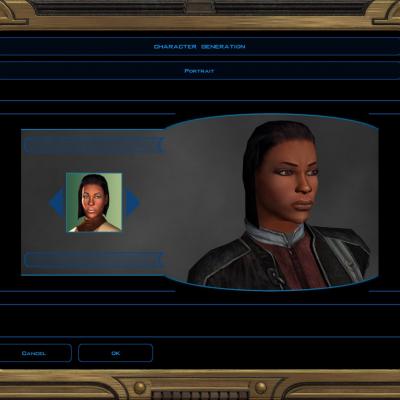
Version 0.9
344 downloads
A simple retexture for the PFHB01 head! No DS transitions--but I'd be happy to make them if people are interested. =INSTALLATION= 1. Extract the TGA file from the zip. 2. Drop it into your override folder. All done! Feel free to leave a comment if you think the texture could be improved in some specific way.1 point -
Consider my mods unofficial modder's resources at this point (May 08, 2025). Feel free to change and release them as you wish.0 points
-
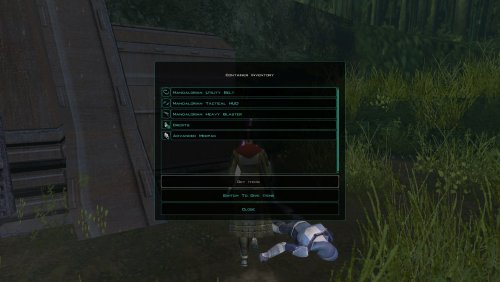
One more thing you could add is Thorium Charges to the dead Mandalorian on Dxun. The datapad he carried indicated he was attempting to blow open the cache with them.0 points
-
 Installed this for a friend, she loved it! Saber sounds were just fantastic!0 points