J
-
Posts
164 -
Joined
-
Last visited
-
Days Won
28
Content Type
Profiles
Forums
Blogs
Forum & Tracker Requests
Downloads
Gallery
Store
Events
Everything posted by J
-
 It's visible in the HR menu screenshots.
 -
This looks like a vanilla game bug but i can look into it.
-
-
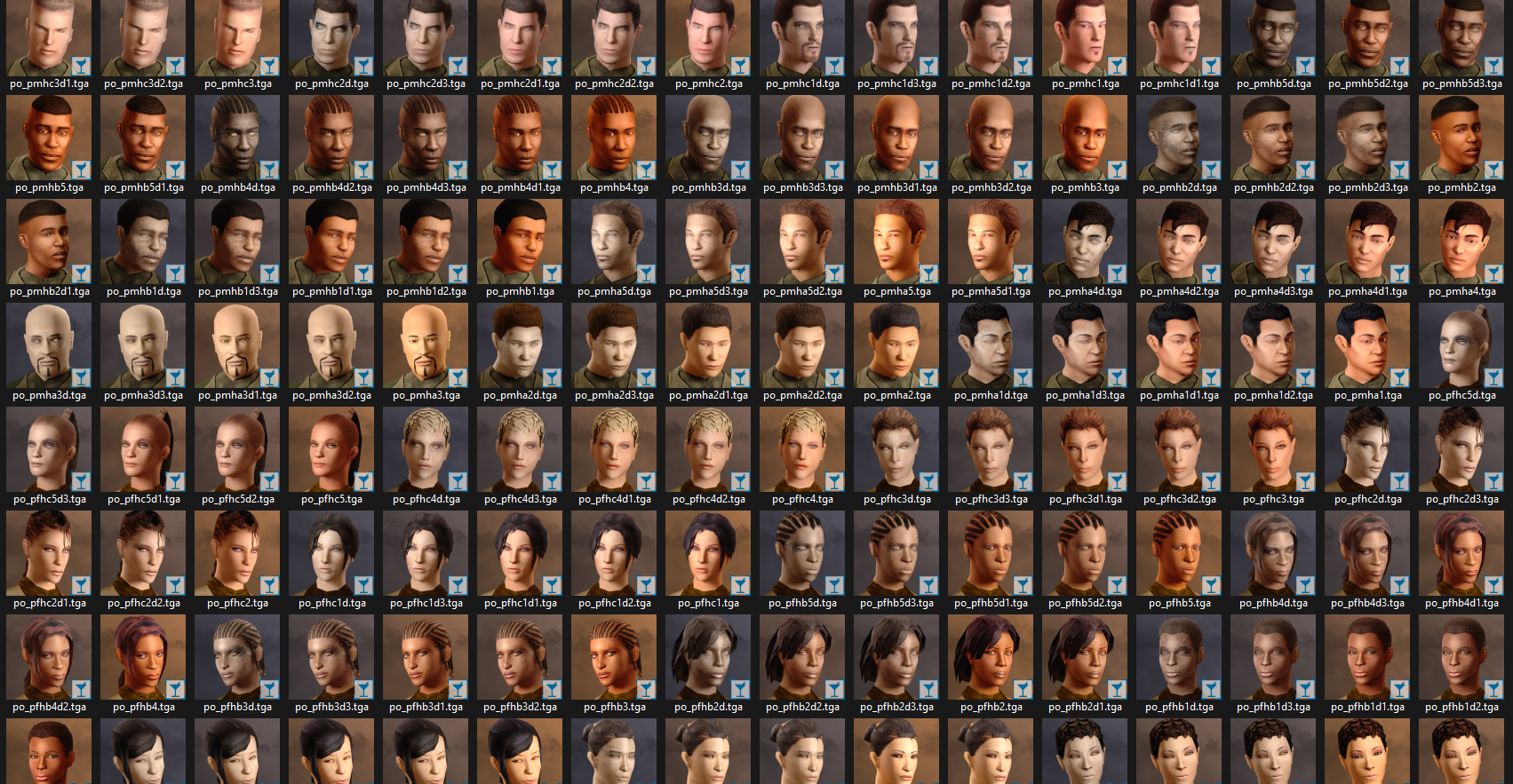
View File Portraits Remade | K1 170+ portraits to replace party and player portraits. 5 stage lightside/darkside transitions. Install - extract the .TPC files to the game's override folder How Were These Made Kotor Blender and ImageMagick. I will be releasing the scripts to easily generate matching portraits. Blender and KotorBlender plugin will need to be install but the portrait generation process does not require blender knowledge. Submitter J Submitted 10/11/2026 Category Mods K1R Compatible No
-
Version 1.0.0
17 downloads
170+ portraits to replace party and player portraits. 5 stage lightside/darkside transitions. Install - extract the .TPC files to the game's override folder How Were These Made Kotor Blender and ImageMagick. I will be releasing the scripts to easily generate matching portraits. Blender and KotorBlender plugin will need to be install but the portrait generation process does not require blender knowledge. -
sort by file size, theres like 40+ textures that are larger than 2MB
-
Everything except the large background file would be compatible. If you are looking for the menus to stretch to the width of the screen, this patch does not do that. It maintains the original menu aspect ratio, without stretching any ui elements, and fills in the extra space with extended backgrounds.
-
Menu backgrounds won't be compatible but you can replace any of the icons. The HD UI mod would be redundant because I have made new hd textures.
-
Correct. they are not compatible. Scaled Kotor is a replacement
-
I don't know much about the execution of the KMRP mod. There's details on it's github page. Scaled Kotor was developed with a few goals in mind: 1) Scaling to any resolution while maintaining the menus aspect ratio and not stretching any UI assets. 2) compatibility with Kotor Patch Manger and it's rapidly growing patch ecosystem 3) HD UI assets that preserve the original aesthetic. This includes the expanded menu borders, icons, backgrounds, and hud. This a large project(much larger than I expected) that I am still updating. The current focus is new icons.
-
View File Force Lightning Is Dangerous | TSL Makes force shock, lightning and storm more dangerous and chaotic to the caster. If an enemy passes a will save, against these powers, the damage is halved. With this mod, half of the damage is directed back at the caster. Light/dark alignment modifies the damage taken, plus any resistance/immunity. A fully darkside aligned character will take 0 damage reflected back at them. A fully lightside character will take all reflected damage. This makes the Energy Resistance power, shields, and electrical resist/immunity gear more important. You can still spam force storm but you need to build for it. Install: - install Alignment Affects Force Powers [TSL] first - then install this mod Credit: - offthegridmorty - for allowing me to include the alignment modifier for compatibility with Alignment Affects Force Powers [TSL] Submitter J Submitted 09/25/2026 Category Mods TSLRCM Compatible Yes
-
View File Force Lightning Is Dangerous | K1 Makes force shock, lightning and storm more dangerous and chaotic to the caster. If an enemy passes a will save, against these powers, the damage is halved. With this mod, half of the damage is directed back at the caster. Light/dark alignment modifies the damage taken, plus any resistance/immunity. A fully darkside aligned character will take 0 damage reflected back at them. A fully lightside character will take all reflected damage. This makes the Energy Resistance power, shields, and electrical resist/immunity gear more important. Unfortunately k1 only has one item while K2 has plenty. You can still spam force storm but you need to build for it. Install: - install Alignment Affects Force Powers [K1] first - then install this mod Credit: - offthegridmorty - for allowing me to include the alignment modifier for compatibility with Alignment Affects Force Powers [K1] Submitter J Submitted 09/25/2026 Category Mods K1R Compatible No
-
Version 1.0.0
14 downloads
Makes force shock, lightning and storm more dangerous and chaotic to the caster. If an enemy passes a will save, against these powers, the damage is halved. With this mod, half of the damage is directed back at the caster. Light/dark alignment modifies the damage taken, plus any resistance/immunity. A fully darkside aligned character will take 0 damage reflected back at them. A fully lightside character will take all reflected damage. This makes the Energy Resistance power, shields, and electrical resist/immunity gear more important. You can still spam force storm but you need to build for it. Install: - install Alignment Affects Force Powers [TSL] first - then install this mod Credit: - offthegridmorty - for allowing me to include the alignment modifier for compatibility with Alignment Affects Force Powers [TSL] -
Version 1.0.0
17 downloads
Makes force shock, lightning and storm more dangerous and chaotic to the caster. If an enemy passes a will save, against these powers, the damage is halved. With this mod, half of the damage is directed back at the caster. Light/dark alignment modifies the damage taken, plus any resistance/immunity. A fully darkside aligned character will take 0 damage reflected back at them. A fully lightside character will take all reflected damage. This makes the Energy Resistance power, shields, and electrical resist/immunity gear more important. Unfortunately k1 only has one item while K2 has plenty. You can still spam force storm but you need to build for it. Install: - install Alignment Affects Force Powers [K1] first - then install this mod Credit: - offthegridmorty - for allowing me to include the alignment modifier for compatibility with Alignment Affects Force Powers [K1] -
View File Portraits Remade | TSL 200+ portraits to replace party and player portraits. 5 stage lightside/darkside transition restored. Install - extract the .TPC files to the game's override folder - the optional portraits.2da file enables 5 stage lightside/darkside transitions, copy it to override. How Were These Made Kotor Blender and ImageMagick. I will be releasing the scripts to easily generate matching portraits. Blender and KotorBlender plugin will need to be install but the portrait generation process does not require blender knowledge. Submitter J Submitted 09/24/2026 Category Mods TSLRCM Compatible Yes
-
Version 1.0.0
60 downloads
200+ portraits to replace party and player portraits. 5 stage lightside/darkside transition restored. Install - extract the .TPC files to the game's override folder - the optional portraits.2da file enables 5 stage lightside/darkside transitions, copy it to override. How Were These Made Kotor Blender and ImageMagick. I will be releasing the scripts to easily generate matching portraits. Blender and KotorBlender plugin will need to be install but the portrait generation process does not require blender knowledge.- 1 review
-
- 5
-

-
did you download the Scaled Kotor patches and add them to the Kotor Patch Manager patches folder?
-
Are you using the GOG version or the Editable EXE? This is required. Also make sure you don't have any other widescreen mod files in override, like .gui files.
-
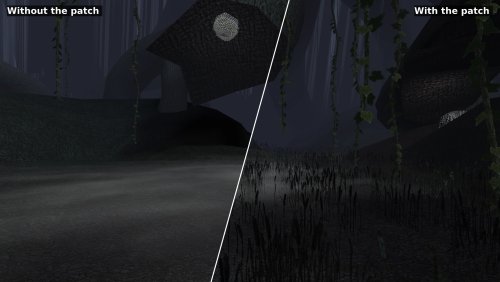 Restores/fixes the original effects!
 -
View File Scaled Kotor | Widescreen + UI Scaling Expands supported resolutions and scales all Menus/HUD. Install - Use with Kotor Patch Manager: https://github.com/LaneDibello/Kotor-Patch-Manager - Editable K1 Executable or GOG version required - Copy Scaled Kotor textures and font files to override directory - Apply Scaled Kotor patch with patch manager and then click launch. - Alt Tab Patch and Movie Patch are recommended. - Change resolution in game - please report any bugs Recommended - K1 Modern Driver Compatibility Patch Source: https://github.com/J0-o/ScaledKotorWidescreenPatch Credits: HD UI Menu Pack - The menu background outlines were combined with custom menu borders Vriff - Supplied the custom font scaling system Submitter J Submitted 09/11/2026 Category Mods K1R Compatible No
-
Version 1.4.0
349 downloads
Expands supported resolutions and scales all Menus/HUD. Install - Use with Kotor Patch Manager: https://github.com/LaneDibello/Kotor-Patch-Manager - Editable K1 Executable or GOG version required - Copy Scaled Kotor textures and font files to override directory - Apply Scaled Kotor patch with patch manager and then click launch. - Alt Tab Patch and Movie Patch are recommended. - Change resolution in game - please report any bugs Recommended - K1 Modern Driver Compatibility Patch Source: https://github.com/J0-o/ScaledKotorWidescreenPatch Credits: HD UI Menu Pack - The menu background outlines were combined with custom menu borders Vriff - Supplied the custom font scaling system -
 No your LLM is wrong. The lightsaber models I posted are using vanilla models as a base. Yes the hilts are heavily modified but the blade meshes are edited to be mathematically symetrical. I offered it as a reference, on how to fix this issue, for future mods.
 -
@RonRheaBob76your ai post is nonsensical and distracting. If anyone is curious about the issue, it's been fixed. The blade meshes and UVs were uneven and some were missing the node type lightsaber. I included these fixes in my lightsabers mod for K1 and TSL, if anyone wants a reference. https://deadlystream.com/files/file/2794-lightsaber-hilt-variety-tsl
-
Auto downloaded from nexus require premium. You will need to download nexus links manually. The next release should have this fixed, so it opens a browser instead of giving an error.
-
View File 1v1 Assassin - Citadel Station Citadel Station assassin no longer frees your companions, for a 3v1 fight. Also includes a fix from TSLRCM and a fix for TSF agents disappearing before the screen fades to black. Copy 'a_grenn_cut.ncs' to your games 'override' directory. Submitter J Submitted 08/27/2026 Category Mods TSLRCM Compatible Yes