


J
-
Posts
162 -
Joined
-
Last visited
-
Days Won
28
Content Type
Profiles
Forums
Blogs
Forum & Tracker Requests
Downloads
Gallery
Store
Events
Everything posted by J
-
View File Optimized and Upscaled Textures - K1 I applied the same process from Optimized and Upscaled Textures - TSL to the original game here. Compressed and optimized, 2x Upscaled Vanilla Textures This is not a 4k/8k super high-res remaster of the textures. Priorities were optimizing vanilla textures first, while also doubling the resolution. This should act as a base texture upgrade. Then I suggest you still use other texture mods and bug fixes on top of this. Every texture has been doubled in resolution. GUI and icons are also included. All textures are packed as compressed TPCs and then bundled in two .erf files. INSTALL: extract the 2 .erf files to your game directory\TexturePacks (NOT IN THE OVERRIDE DIRECTORY) This will overwrite the existing vanilla texture files so back them up if you wish. Optimization: - a lot textures were twice the file size they should have been - the highest quality compression was used on the new texture, it takes a very long time to convert but avoids bad compression artifacts Upscale: - HDCube 4 was used to upscale every texture at 2x - different model weights used depending on the texture - alpha channels processed separately, then recombined Submitter J Submitted 10/03/2025 Category Skins K1R Compatible Yes
-
Version 1.3.0
1,526 downloads
I applied the same process from Optimized and Upscaled Textures - TSL to the original game here. Compressed and optimized, 2x Upscaled Vanilla Textures This is not a 4k/8k super high-res remaster of the textures. Priorities were optimizing vanilla textures first, while also doubling the resolution. This should act as a base texture upgrade. Then I suggest you still use other texture mods and bug fixes on top of this. Every texture has been doubled in resolution. GUI and icons are also included. All textures are packed as compressed TPCs and then bundled in two .erf files. INSTALL: extract the 2 .erf files to your game directory\TexturePacks (NOT IN THE OVERRIDE DIRECTORY) This will overwrite the existing vanilla texture files so back them up if you wish. Optimization: - a lot textures were twice the file size they should have been - the highest quality compression was used on the new texture, it takes a very long time to convert but avoids bad compression artifacts Upscale: - HDCube 4 was used to upscale every texture at 2x - different model weights used depending on the texture - alpha channels processed separately, then recombined -
 yeah if renamed to the right textures. not sure which ones though oh wait no. the reflections would probably crash the game. I'm working on k1 textures and ill release a k1 ebon hawk version.
 -
Try to remove or comment out the "procedure type water" line from the TXI
-
To fix the alpha issue, change the alpha depth to 0 in TGA2TPC(it the eyeball icon next to the texture name) or add "# alphablending 0.00" to their TXI file. Yes it is slow, especially if using ultra compression quality and especially with 2k or higher textures.
-
Maybe once I dive into K1 modding. I'm sure I'll keep tweaking this one as well
-
Not particularly. While I was making upscaled textures, I felt the Ebon Hawk needed more attention.
-
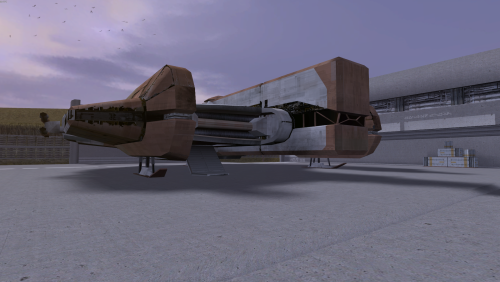
View File HD Ebon Hawk - TSL HD damaged Ebon Hawk. The original texture was upscaled then a lot of manual cleanup and detail was added. I also baked in custom reflections. This replaces all landing pad ebon hawk textures and the prologue/endgame texture. The always damaged version is a damaged ebon hawk for the whole game. Both versions have damaged prologue and end game textures. The clean version has a repaired texture for the rest of the game. Submitter J Submitted 09/24/2025 Category Mods TSLRCM Compatible Yes
-
Version 3.1
320 downloads
HD damaged Ebon Hawk. The original texture was upscaled then a lot of manual cleanup and detail was added. I also baked in custom reflections. This replaces all landing pad ebon hawk textures and the prologue/endgame texture. The always damaged version is a damaged ebon hawk for the whole game. Both versions have damaged prologue and end game textures. The clean version has a repaired texture for the rest of the game. -
 no, Windows PC only
 -
View File Optimized and Upscaled Textures - TSL Version 4 released - should be final Compressed and optimized, 2x Upscaled Vanilla Textures This is not a 4k/8k super high-res remaster of the textures. Priorities were optimizing vanilla textures first, while also doubling the resolution. This should act as a base texture upgrade. Then I suggest you still use other texture mods and bug fixes on top of this. Every texture has been doubled in resolution. GUI and icons are also included. All textures are packed as compressed TPCs and then bundled in two .erf files. INSTALL: extract the 2 .erf files to your game directory\TexturePacks (NOT IN THE OVERRIDE DIRECTORY) This will overwrite the existing vanilla texture files so back them up if you wish. Refined Add-on Textures: extract to override folder These are textures that originally looked bad or were very low resolution so I reworked them. They still look vanilla+. - All circular grates had really low quality textures. Instead of upscaling, they have been tiled twice as dense. - The ebon hawk scaffolding was low quality and looked bad when upscaled. The scaffolding from Nar Shadda was used and color matched. - Nar Shadda panels were too uniform, shifted part of the texture to make the tile look more random. Optimization: - a lot textures were twice the file size they should have been - the highest quality compression was used on the new texture, it takes a very long time to convert but avoids bad compression artifacts Upscale: - HDCube 4 was used to upscale every texture at 2x - different model weights used depending on the texture - alpha channels processed separately, then recombined Submitter J Submitted 09/08/2025 Category Skins TSLRCM Compatible Yes
-
Version 4.0.0
1,163 downloads
Version 4 released - should be final Compressed and optimized, 2x Upscaled Vanilla Textures This is not a 4k/8k super high-res remaster of the textures. Priorities were optimizing vanilla textures first, while also doubling the resolution. This should act as a base texture upgrade. Then I suggest you still use other texture mods and bug fixes on top of this. Every texture has been doubled in resolution. GUI and icons are also included. All textures are packed as compressed TPCs and then bundled in two .erf files. INSTALL: extract the 2 .erf files to your game directory\TexturePacks (NOT IN THE OVERRIDE DIRECTORY) This will overwrite the existing vanilla texture files so back them up if you wish. Refined Add-on Textures: extract to override folder These are textures that originally looked bad or were very low resolution so I reworked them. They still look vanilla+. - All circular grates had really low quality textures. Instead of upscaling, they have been tiled twice as dense. - The ebon hawk scaffolding was low quality and looked bad when upscaled. The scaffolding from Nar Shadda was used and color matched. - Nar Shadda panels were too uniform, shifted part of the texture to make the tile look more random. Optimization: - a lot textures were twice the file size they should have been - the highest quality compression was used on the new texture, it takes a very long time to convert but avoids bad compression artifacts Upscale: - HDCube 4 was used to upscale every texture at 2x - different model weights used depending on the texture - alpha channels processed separately, then recombined-
- 4
-

-
- upscaled
- texture pack
- (and 3 more)
-
View File Lightsaber Hilt Variety - TSL 30 Vanilla+ lightsaber hilts (10 regular,10 short,10 double) Working texture for both Aspyr and Legacy In the base game, every lightsaber you find has the same hilt model. My goal was to add some variability to the lightsaber hilts while also fitting within Kotor's engine limitations. Hilts are still tied to crystal color but should give the illusion that every saber hilt isn't exactly the same. The Blade I have rebuilt the original blade model, so that JC's Lightsaber Visual Effects for K2 is compatible (and recommended). The blades are now perfectly symmetrical after some UV editing. I also fixed a bug where some models didn't render all of the blade planes. A glowing light source has been added to each blade thanks to Crazy34's Light saber models. The Hilt I started with a base hilt design and then tweaked each one to have a slightly different shaped grip, emitter, and pummel. One hilt shouldn't stand out or overshadow the design of the others. Hopefully they feel like they belong. 10 hilts are completed for each crystal color. These are also compatible with the Aspyr version of the game, which had broken hilt textures. I added a custom hilt for Malak as well. Install Steps: - TSLRCM Required - 3C-FD Patcher is required for Aspyr version - JC's Lightsaber Visual Effects for K2 is recommended. The glowing light colors were made to match these. - Extract and copy mod files to override directory - Alternative texture is also in the downloads, with less gold/bronze Credits: - Crazy34's Light saber models for the glowing light effect - JC's Lightsaber Visual Effects for K2 amazing blade texture, I matched the glowing effect to work with these Submitter J Submitted 08/01/2025 Category Mods TSLRCM Compatible Yes
-
Version 2.0
6,081 downloads
30 Vanilla+ lightsaber hilts (10 regular,10 short,10 double) Working texture for both Aspyr and Legacy In the base game, every lightsaber you find has the same hilt model. My goal was to add some variability to the lightsaber hilts while also fitting within Kotor's engine limitations. Hilts are still tied to crystal color but should give the illusion that every saber hilt isn't exactly the same. The Blade I have rebuilt the original blade model, so that JC's Lightsaber Visual Effects for K2 is compatible (and recommended). The blades are now perfectly symmetrical after some UV editing. I also fixed a bug where some models didn't render all of the blade planes. A glowing light source has been added to each blade thanks to Crazy34's Light saber models. The Hilt I started with a base hilt design and then tweaked each one to have a slightly different shaped grip, emitter, and pummel. One hilt shouldn't stand out or overshadow the design of the others. Hopefully they feel like they belong. 10 hilts are completed for each crystal color. These are also compatible with the Aspyr version of the game, which had broken hilt textures. I added a custom hilt for Malak as well. Install Steps: - TSLRCM Required - JC's Lightsaber Visual Effects for K2 is recommended. The glowing light colors were made to match these. - Extract and copy mod files to override directory - Alternative texture is also in the downloads, with less gold/bronze Credits: - Crazy34's Light saber models for the glowing light effect - JC's Lightsaber Visual Effects for K2 amazing blade texture, I matched the glowing effect to work with these- 7 comments
- 1 review
-
- 5
-
-
- bugfix
- lightsaber
- (and 2 more)
-
 Im working a on new fix but its taking some time to build new models.
- 32 comments
-
- 1
-
-
- lightsaber hilt
- bugfix
- (and 1 more)
-
Try v3.0. I repackaged it with different tools. Hopefully it doesn't get flagged as a false positive again. It's a very simple script packaged with 7zip. Anyone can inspect the source by opening it in 7zip.
-
Unfortunately the 4GB patch, that you already applied, modifies the exe. 3C-FD Patcher checks for an unmodified exe because it is changing very specific bytes.
-
should be fixed now. download and copy to override again
-
 After. It should not conflict
 -
View File Water Restoration This is my attempt to restore the Dantooine water, plus some other areas, after the Aspyr Patch broke water effects. Requires 3C-FD Patcher for the reflection effect. The original textures have been upscaled and the bumpmap has been replaced with a higher detailed water animation and baked into the textures alpha layer. Included: - Dantooine water - Enclave sublevel fountain - Telos ocean seam fix - Telos murky water restored - Jungle Tomb water - Citadel Station Residential fountain water - Sith Tomb Install Instructions: 1) Apply 3C-FD patcher to fix the game's reflections 2) extract water restoration mod contents to override directory Submitter J Submitted 06/21/2025 Category Mods TSLRCM Compatible Yes
-
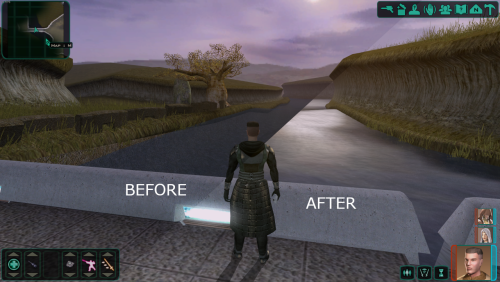
Version 3.0
8,093 downloads
This is my attempt to restore the Dantooine water, plus some other areas, after the Aspyr Patch broke water effects. Requires 3C-FD Patcher for the reflection effect. The original textures have been upscaled and the bumpmap has been replaced with a higher detailed water animation and baked into the textures alpha layer. Included: - Dantooine water - Enclave sublevel fountain - Telos ocean seam fix - Telos murky water restored - Jungle Tomb water - Citadel Station Residential fountain water - Sith Tomb Install Instructions: 1) Apply 3C-FD patcher to fix the game's reflections 2) extract water restoration mod contents to override directory -
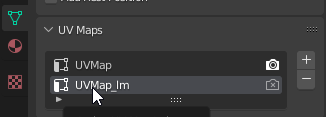
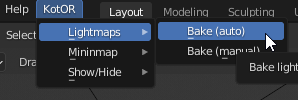
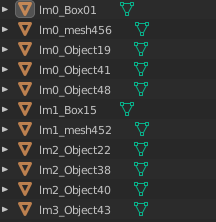
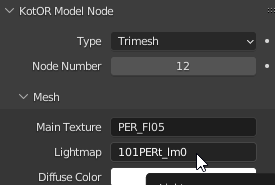
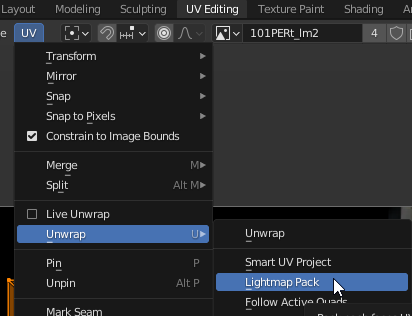
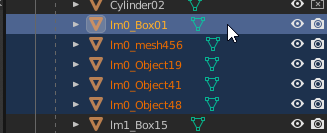
You will need the KOTOR Blender plugin. I used the 3.3 LTS version of blender but it looks like it has now been updated to newer versions. I still recommend using a LTS version. First you need to switch to the lightmap UV. If you don't, the lightmap will be baked on top of the diffuse texture. You can find this under UV Maps in each meshes Object Data Properties. Select each mesh and click UVMap_lm. Yes, it is tedious but it's required. To bake the lightmaps with the plugin, click the KotOR menu -> Lightmaps -> Bake(Auto). You should click an empty space, first, to make sure no meshes are selected. If meshes are selected it will only bake for what is selected. At this point you may notice the lighting looks bad. The UVs need to be unwrapped and some lightmaps will need to be resized to a higher resolution. This is optional but it helps me keep it organized. Look through the list of meshes and see which ones have lightmaps. I then rename the meshes to start with the lightmap name (lm0_Object19,lm1_Box01, lm9_mesh456,...). When unwrapping the UVs this makes it easy to select all meshes that share a lightmap, which you may be doing multiple times. There's 3 ways to unwrap the lightmap UVs. Each has different advantages and disadvantages. The best to use will depend on each group of meshes, sharing a lightmap. 1) Lightmap Pack (Most efficient) - This one will work for most but sometimes the triangles of a face get separated, creating an ugly seam. 2) Unwrap (Medium efficient) - Keeps the basic shape of faces the same bust doesn't pack as efficiently. This one requires you to select all(a key) UVs first or nothing happens. 3) Smart UV Project (Least efficient) - This one maintains the shape of faces perfectly but each UV takes up a lot of space. May require you to increase the lightmap resolution really high to look good (1024x1024 or more). While in the layout workspace, select all meshes that share a lightmap. Then switch to the UV Editing workspace. All meshes need to be selected in the 3D view, for the UVs to show in the UV editor. Then select one of the unwrap types in UV -> Unwrap. Remember, if doing regular unwrap, selecting all UVs is first required. Now, go back to the Layout workspace and bake the lightmaps. Some lightmaps may have weird artifacts or look low res. You can compensate for that by resizing the lightmap texture. Go to the UV Editing workspace and select the lightmap to edit. Then Image -> Resize. I try not to resize higher than 512x512 and I keep less detailed meshes between 16 and 128. The larger the texture size, the more memory it takes in game and the longer it takes to bake. Then go back to Layout workspace and bake again. To save the lightmap texture, go to UV Editing layout then Image -> Save As. You will need to do this for each lightmap once and make sure you choose TGA when saving. After, you can use Save All Images. I haven't even touched on lighting but here's a few tips: - Under World Properties, the surface color will affect your lighting a lot. I prefer to just remove the surface(or make it darker) and it gives me more control over the lighting. - Point lights fill the room with a lot of ambient light. If you want more control over the shadows use spot lights. - The game engine will add even more lighting on top of the scene. You can control this in the light's Object Properties -> KotOR Model Node -> Light
-
I'm not sure yet. I need to do a play through and make notes of problematic areas.
-
I have uploaded a fix. It was editing the swkotor2.ini with fullscreen=0, even if the borderless window mode patch wasn't selected. If your game opens in windowed mode either press alt + enter to switch to fullscreen or edit swkotor2.ini. [Display Options] FullScreen=1 [Graphics Options] AllowWindowedMode=0 FullScreen=1
- 36 comments
-
- 1
-
-
- hex-editing
- aspyr
- (and 1 more)
-
View File Texture Conflict Checker Texture conflict checker for K1 and K2. Place in your game directory and open it. It will list all conflicting textures, in the override folder, and allow you to choose which version to keep. Unwanted textures are moved to a texture_duplicates folder and can be restored through the tool. Source: https://github.com/J0-o/kotormods/tree/main/Texture Conflict Checker Submitter Jiiprah Submitted 06/05/2025 Category Modding Tools


