DarthParametric
-
Posts
4,907 -
Joined
-
Last visited
-
Days Won
557
Content Type
Profiles
Forums
Blogs
Forum & Tracker Requests
Downloads
Gallery
Store
Events
Everything posted by DarthParametric
-
.thumb.png.1fbbef4dd34d28e85d0f829e93407944.png) Just before entering the Grove for the first time.
Just before entering the Grove for the first time. -
How does that work? Uses a lookup table of values or something?
-

KOTOR1 in 3440x1440 modding journey
DarthParametric replied to Pops Maellard's topic in General Kotor/TSL Modding
OK so here's another comparison, this time with the star map timing adjusted and with the (re)addition of the vanilla lighting, as requested by @Sith Holocron. Although I did tweak the light in the first room to switch it from the original yellow colour to the blue of the light in the star map room. I've since made a minor FoV tweak to the last shot (from 11° to 12°) which hopefully should bring every shot to parity - or as close as I can make it - with the original. I think the only remaining changes are to open the door leading to the room where you encounter the droid (and Nemo's corpse), and delete the flag placeable in the computer room just visible off in the background of the close-up on Malak's face. Strangely the lights fixed the issue with the shading around Malak's eye sockets, which was a nice bonus. The only thing remaining that really bugs me now is the desync between the star map opening and the sound effect for it. This is present in the original video, so it's a problem with the audio track. I'm guessing they must have made a late adjustment to the animation after they had already finalised the audio. Or maybe it was just a mistake. Not sure what can be done to fix it. We could overlay a duplicate of the map opening SFX, but then you'd get a weird duplicate/echo thing going on. Maybe that back end of the audio track could be adjusted/stretched? That might screw up the music though. I guess I can try playing around with it. -
You'd have to ask someone with much better technical knowledge of the model format than I to answer the question. Perhaps @seedhartha can answer regarding the compress quats flag? I assume it alters how they are stored in the model in some manner? A memory saving feature?
-
I'd say you need to do a Reset XForm on all your custom meshes before you realign their pivots to match the pivot of the appropriate vanilla meshes. As to animations, you can simply export the model from KMax without anims and then copy and paste the anims from the vanilla ASCII into your ASCII before compiling.
-
KOTOR1 in 3440x1440 modding journey
DarthParametric replied to Pops Maellard's topic in General Kotor/TSL Modding
Revised version with some of the changes outlined above. Still need to tweak the timing of the star map opening. The framing of the last shot is also seemingly impossible to match by tweaking the Field of View value in the DLG, at least with the star map in its regular game position. I may have to try pushing it a bit closer to the door to see if that allows for tighter framing. -
Are you creating new anims, or trying to use the vanilla ones? Exporting from KBlender?
-
KOTOR1 in 3440x1440 modding journey
DarthParametric replied to Pops Maellard's topic in General Kotor/TSL Modding
Thanks to @Sith Holocron providing a custom VO track to generate lip sync, and @seedhartha for creating a new lip sync tool as part of the reone toolkit, it's getting pretty close. The first line is still a little off to my eyes. Too much lip flapping during the "Dark Side" bit, and the "I can feel its power" needs a small delay. I also need to tweak the timing of the door opening. The framing needs a little adjustment as well - the original seems to be zoomed in a little tighter in some shots. On the plus side, I think the lip sync for the close-up on Malak's face ("If we pass beyond this door we can never go back") is actually much better than the original. Edit: Here's a comparison of the original vs the latest attempt. -
Given they have a new version of MSS, they may have entirely new audio. Copy the attached batch file into the game's folder and run it, then reply back attaching the hash list text file it generates. K1_Generate_Hashes.bat
-
The presence of mss32midi.dll suggests they are using a different version of the Miles Sound System. You could try deleting Mss32.dll, mss32midi.dll, and the "miles" folder and then using the copies in the attached. K1_MSS.7z
-
The cmd window needs to be open in the KOTOR directory. You can make your life easier by simply copying and pasting the above into a text file and renaming it .bat instead of .txt. Then simply copy it into the KOTOR directory an double click on it. Or use the attached version. dir_dump.bat
-
You'll need to dump a directory listing of the Amazon version's install folder so we can see what's there. Open a command window (DOS box) in the game's folder and type in dir /b /o:gn > amazon.txt Then reply and attach the txt file.
-
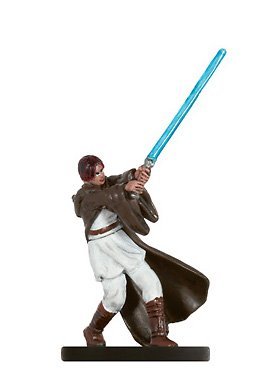 The appearance is generated the very first time you enter the tomb. It won't change if you load a save already inside. Try putting this modified script in your Override folder. It removes the save check. darkpc_head.ncs
 -
RESOURCE:Fat Commoner Body Models - Modder's Resource
DarthParametric posted a topic in Mod Releases
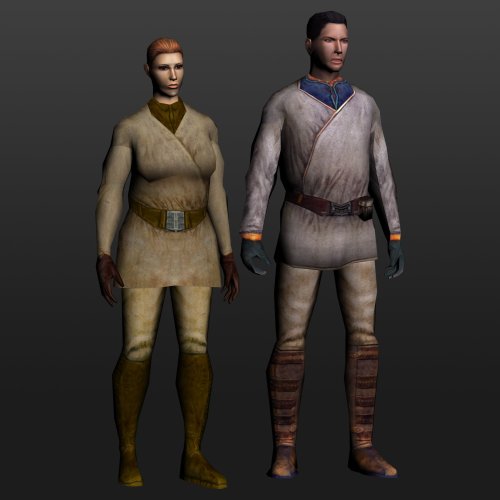
View File Fat Commoner Body Models - Modder's Resource This is a modder’s resource that provides some additional commoner body models that can be used for NPCs. The game includes body models for fat male and female commoners, each using a custom texture with no variants. They are unused. Originally, as part of the K1 Community Patch, a fat-ified version of the standard male commoner body was made to be used for Handon on Dantooine. This allowed it to use the regular commoner textures. As of K1CP v1.10.0, this addition has been removed, so the assets are now being made available for third party mods to make use of. Additionally, the vanilla female fat commoner model has had some adjustments made to its UVs so that it can also make use of the regular commoner texture variants. A simple TSLPatcher setup has been provided that edits the two vanilla appearance rows to switch their texture assignments, as well as adding new rows using all the regular NPC heads. Note to regular users: Installing this package by itself will do nothing as the game does not make use of the vanilla fat commoner appearance rows. It requires other authors to create content utilising it. Permissions: This is a modder’s resource, and thus intended to be utilised by the community. You can freely incorporate the included assets in your mod. Simply provide credit to the Community Patch team and link back to this page. Do not redistribute/rehost this resource as-is elsewhere. Submitter DarthParametric Submitted 11/12/2023 Category Modder's Resources-
- 1
-

-
All the party members have Starting Conditional checks to determine if they are available. You should see these being used in most DLGs for party member interjections. For Mira and Hanharr specifically: https://github.com/KOTORCommunityPatches/Vanilla_KOTOR_Script_Source/blob/master/TSL/Vanilla/Data/Scripts/c_con_mirapm.nss https://github.com/KOTORCommunityPatches/Vanilla_KOTOR_Script_Source/blob/master/TSL/Vanilla/Data/Scripts/c_con_hanharrpm.nss
-
KOTOR1 in 3440x1440 modding journey
DarthParametric replied to Pops Maellard's topic in General Kotor/TSL Modding
So I have been experimenting a bit more with it, making some adjustments. @seedhartha helped by fixing up an issue with the rig of Malak's stunt model to allow the facial animations to work. I have been looking at the original video and comparing it to my in-game capture and looking at the animations in Max to try an sort out the lip sync timing issues. I'm not sure if it's due to the frame rate of the video (29.97fps) or something else, but the individual shot lengths don't match the individual animation lengths (30fps). For example, the first shot's animation is 16.4667 seconds, but the first shot in 09.bik is only 16.383 seconds. Not sure what the best approach to fix it might be, whether I can massage the audio to better match the animation, or if I should try and adjust the animation to match the audio. -
Sounds like a pathing problem where she physically can't reach the door. Have you tried manually walking right up to the door until you bump into it before clicking on it?
-
Version 1.1.0
111 downloads
This is a modder’s resource that provides some additional commoner body models that can be used for NPCs. The game includes body models for fat male and female commoners, each using a custom texture with no variants. They are unused. Originally, as part of the K1 Community Patch, a fat-ified version of the standard male commoner body was made to be used for Handon on Dantooine. This allowed it to use the regular commoner textures. As of K1CP v1.10.0, this addition has been removed, so the assets are now being made available for third party mods to make use of. Additionally, the vanilla female fat commoner model has had some adjustments made to its UVs so that it can also make use of the regular commoner texture variants. A simple TSLPatcher setup has been provided that edits the two vanilla appearance rows to switch their texture assignments, as well as adding new rows using all the regular NPC heads. Note to regular users: Installing this package by itself will do nothing as the game does not make use of the vanilla fat commoner appearance rows. It requires other authors to create content utilising it. Permissions: This is a modder’s resource, and thus intended to be utilised by the community. You can freely incorporate the included assets in your mod. Simply provide credit to the Community Patch team and link back to this page. Do not redistribute/rehost this resource as-is elsewhere. -
Yeah I agree that looks the most suitable for a datapad gripped by a mangled arm. Although it does raise the question of how exactly the player would be able to read any info off it.
-
KOTOR1 in 3440x1440 modding journey
DarthParametric replied to Pops Maellard's topic in General Kotor/TSL Modding
I doubt it. I'm sure they would have done it in whatever video editor they were using, be it AE or something else. Plus they did all those cross-fades and such in the revelation sequence which would have had to have been done out of engine. If you want to try the in-engine version out yourself, here's the stunt module and the recompiled stunt models. Just open the console and type in "warp stunt_danruins". You'll be in the central room where the overseer droid usually is. Go left or right and interact with one of the terminals. That will launch the cutscene. I noticed the original version's audio really drags out the door opening, so the regular door may have to be swapped out for a custom placeable that uses the stunt animation (tried the character approach, didn't work). Dan_Dream_Stunt_Module.7z -
KOTOR1 in 3440x1440 modding journey
DarthParametric replied to Pops Maellard's topic in General Kotor/TSL Modding
So I created a stunt module for it to test it out. Seems to be some wonkiness going on with the anims. Not sure what's up with that. I'll have to take a look at the models. It also seems like the game doesn't want to apply stunt animations to a door. I guess that will require creating a dummy creature version of it, although possibly the door could just be scripted to open at the right time. Additionally, the star map will need to be scripted to play its opening anim at the end. And that pillar behind it will need to be removed (I think it's just a placeable). Edit: Tweaked the FoV in a few shots to better match the original. Needs further work and the star map timing is possibly a bit off. But obviously resolving the stunt anims is the primary concern. Edit 2: Ahah! It was screwy bone indexes. Should have realised sooner. I assume the models must have changed at some point in development. Recompiling the stunt models against their supermodels fixed it. Now it just needs lip sync and a bit of minor tweaking to align it with the original video's audio track. One option would be to keep it as a purely in-engine scene. The only problem would be replicating the black screen edge "fog" VFX. You can't add any new video effect filters (like the inbuilt security camera blue/scanlines one), but you could potentially cheat it by putting a plane in front of the camera with an animated texture. Not sure how hot it would look though, and it would likely require different versions for different aspect ratios. -
TXI and Material limitations
DarthParametric replied to Zombiewells's topic in General Kotor/TSL Modding
It's in the animations, as I mentioned above: -
What's the actual file the game is using? A TPC or a TGA and TXI? Whichever it is, attach them.
-
KOTOR1 in 3440x1440 modding journey
DarthParametric replied to Pops Maellard's topic in General Kotor/TSL Modding
I think doing it in-engine makes the most sense, just to keep the look consistent with the original. That way the only thing you'd need to add would be the black mist (?) screen overlay and subtitles. Not as such, but here is the module list, which you can use to get the prefixes from. -
KOTOR1 in 3440x1440 modding journey
DarthParametric replied to Pops Maellard's topic in General Kotor/TSL Modding
The Dantooine dream stunt anims exist, although Revan and Malak's positions don't line up with the Ruins layout so they'd need adjustment. The animated camera does line up with the layout though (starts outside the star map chamber). The models are M15aa_c01_cam, M15aa_c01_char02 (Malak), M15aa_c01_char04 (Revan), M15aa_c01_char03 (door). For other stuff like the Bastila/Revan fight and the revelation sequence, most of it should be able to be recreated with mostly generic anims. It would probably need to be done in TSL, just because you can script all anims there, unlike K1. There might need to be the odd custom anim cobbled together. The star map fly-arounds would be simple enough. It's really only the Hawk's take-off/landing sequences, Taris fly-overs/bombardment, and endgame Star Forge battle sequences that would be difficult. They can't really be done in-engine. I did play around with the idea of redoing the take-off/landing videos, but it would be a ton of effort. I had a brief fiddle with the first half of the Manaan take-off before moving off to focus on other things. That would really require a team of people, not just because of the workload but because you'd need people to handle different facets. Like all the missing VFX in this shot for example. Manaan_Take-off_WIP_Render_Test_2b.mp4