All Activity
- Past hour
-
 HeiHallo joined the community
- Today
-
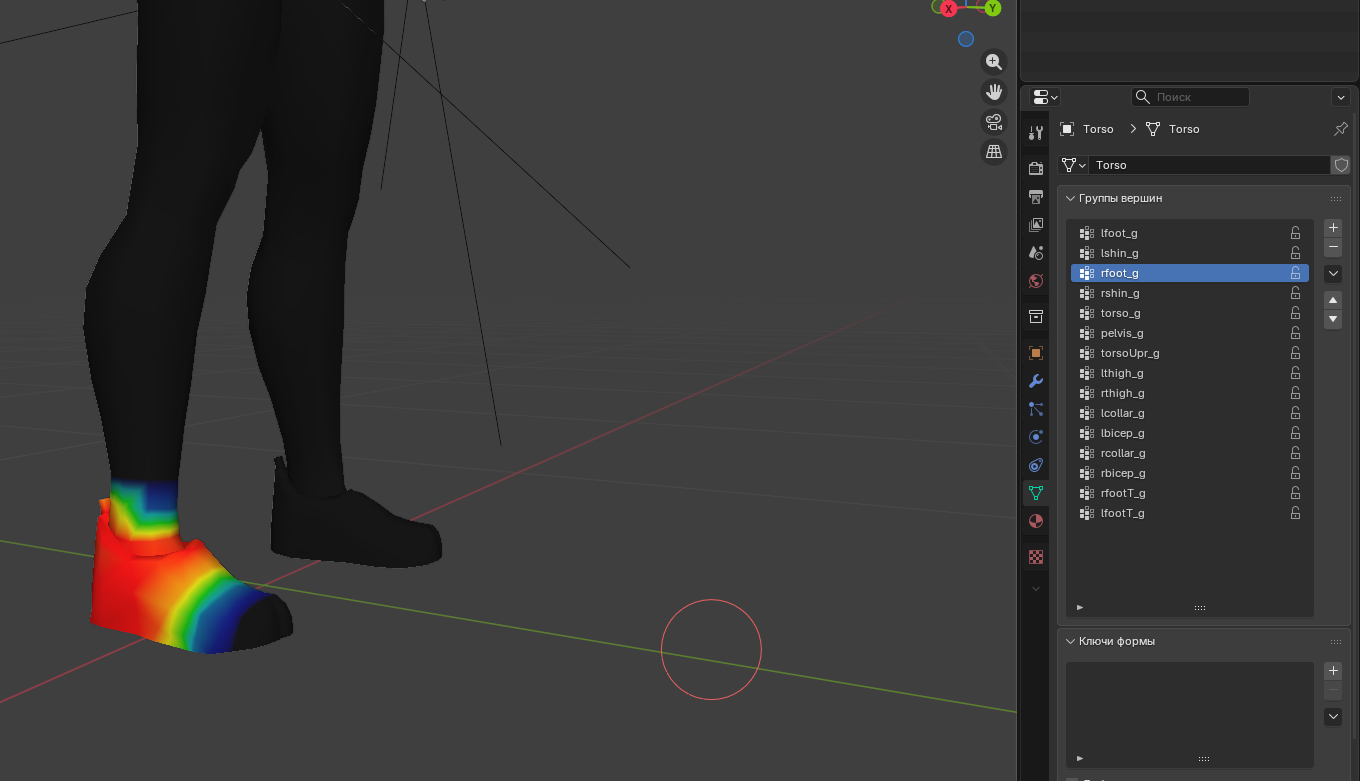
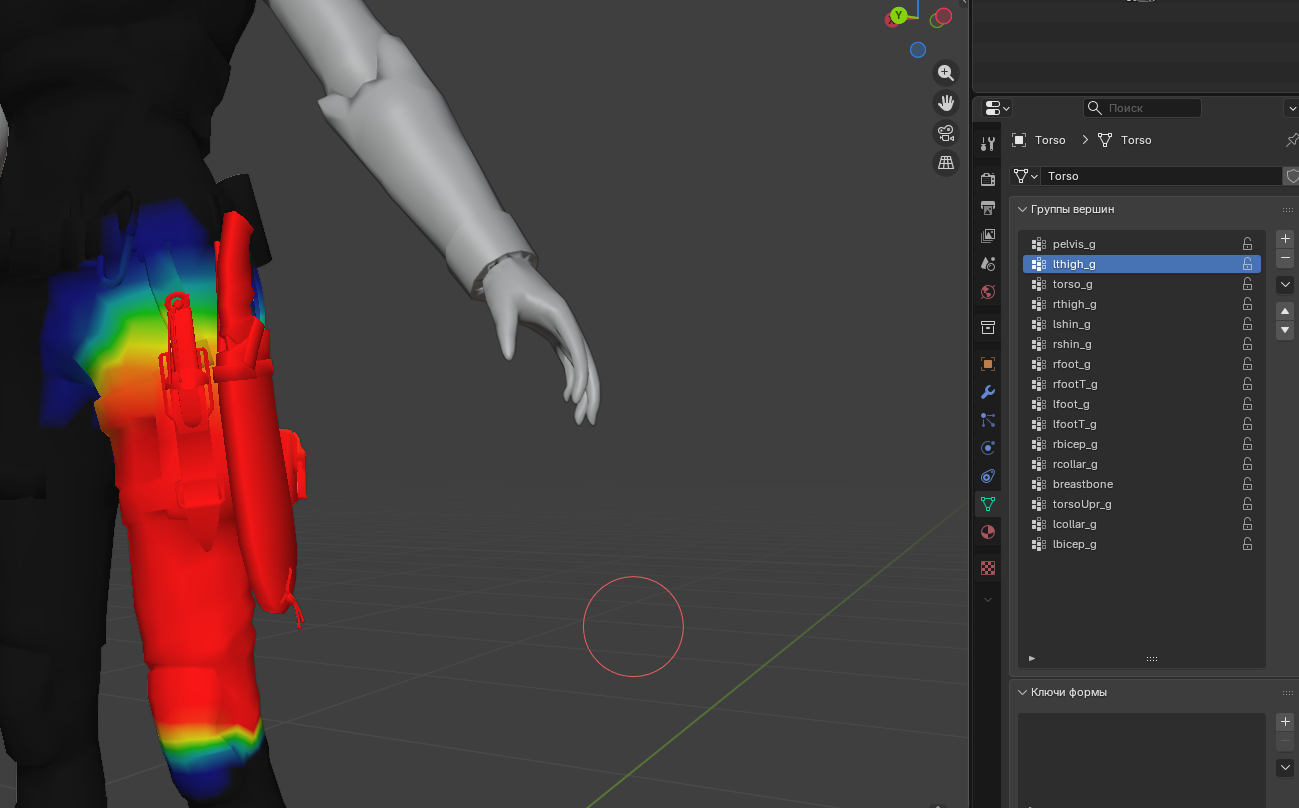
In my experience, this is due to the weights on the leg being set incorrectly. Each vertex must have its own weight; if it’s missing, the game will either fail to render it or render it incorrectly.
-
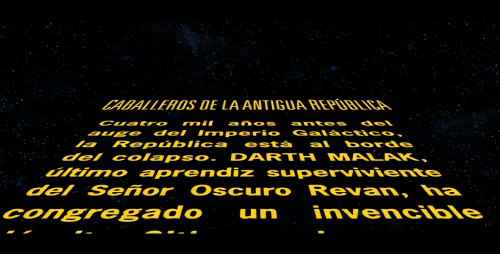
View File KOTOR 1 – Spanish HD Cutscenes All 61 cutscenes of the Spanish version of KOTOR 1, upscaled x4 (2560 pixels wide) with Video2x from the original game videos, by Alcias01200. - The Spanish opening crawl and all burned-in Spanish subtitles are kept and now crisp. - Original audio unchanged (English voices, as in the Spanish version of the game). - New 16:9 legal screen: the upscaled artwork fills the screen with a slow camera push-in, and the Spanish legal text has been re-typeset. - Plays very well on 1080p screens as well. Installation: back up your game's movies folder, then copy the content of this archive's movies folder into it, overwriting the files. Also offered as an option by the KOTOR 1 Mod Build Installer for Spanish games. Spanish testers wanted: if you play the Spanish version, your feedback is very welcome. Made with Video2x (Real-ESRGAN) and RAD Video Tools; the conversion scripts and the legal screen were made with the help of Claude (Anthropic AI). Original cutscenes: BioWare / LucasArts. Submitter Alcias01200 Submitted 11/24/2026 Category Media
-
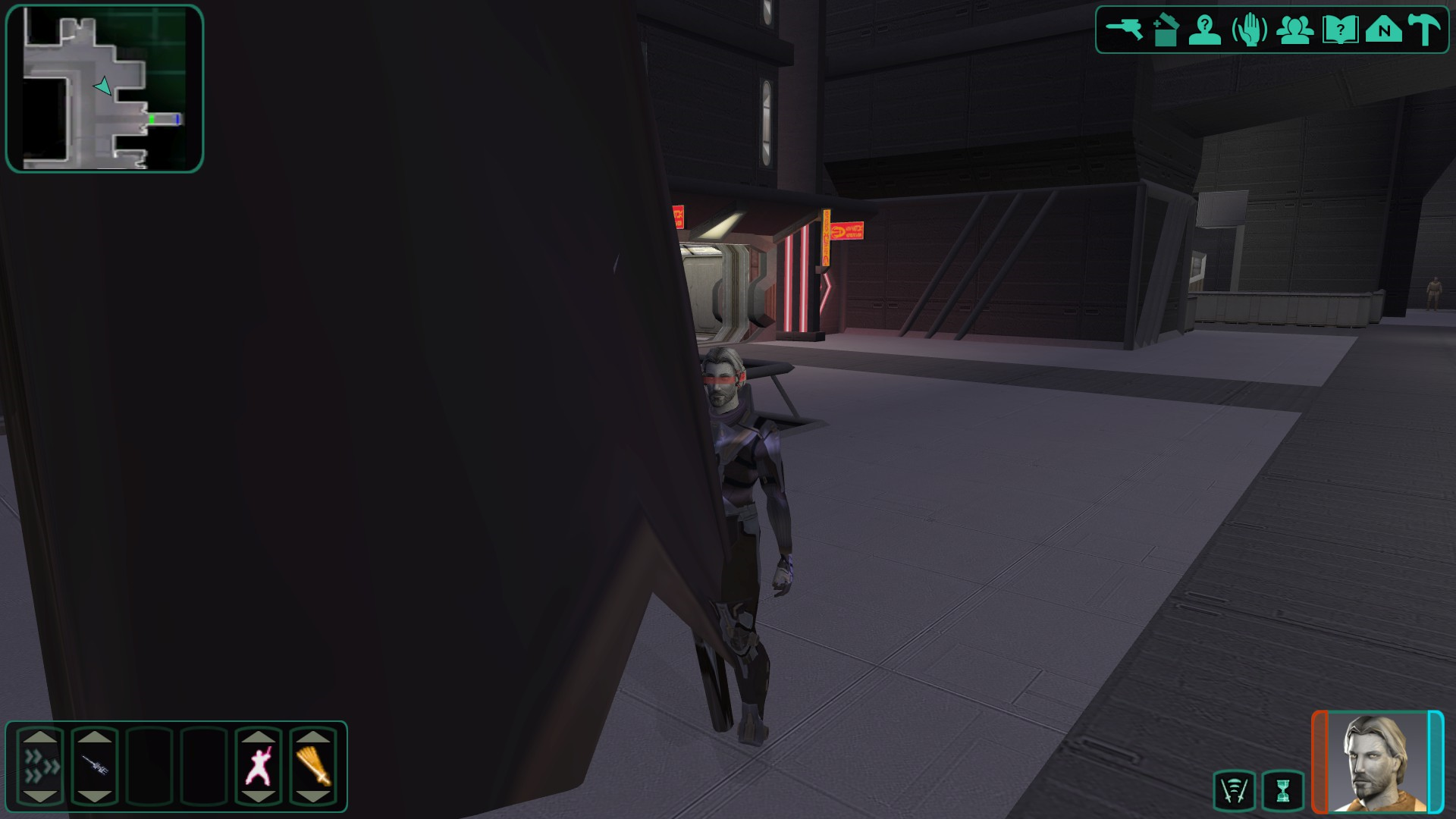
Managed to get it in the game but parts of the armor are missing and there's something wrong with the foot.
-
Kotor 1 Movies Crashing?
DarthParametric replied to Skeet1983's topic in Knights of the Old Republic General
Assuming you only restored the movie files (BIKs in the Movies folder) then no, it wouldn't impact anything else. If you didn't keep a backup though, then how you restore them without screwing up everything else might be problematic. Is this the Steam version? -
Kotor 1 Movies Crashing?
Skeet1983 replied to Skeet1983's topic in Knights of the Old Republic General
Hello. How would I go back to the Vanilla movies for Kotor 1? Also, would that impact the rest of the game such as keeping game in widescreen? Help appreciated -
 serugodes changed their profile photo
-
Version 1.0.0
0 downloads
All 61 cutscenes of the Spanish version of KOTOR 1, upscaled x4 (2560 pixels wide) with Video2x from the original game videos, by Alcias01200. - The Spanish opening crawl and all burned-in Spanish subtitles are kept and now crisp. - Original audio unchanged (English voices, as in the Spanish version of the game). - New 16:9 legal screen: the upscaled artwork fills the screen with a slow camera push-in, and the Spanish legal text has been re-typeset. - Plays very well on 1080p screens as well. Installation: back up your game's movies folder, then copy the content of this archive's movies folder into it, overwriting the files. Also offered as an option by the KOTOR 1 Mod Build Installer for Spanish games. Spanish testers wanted: if you play the Spanish version, your feedback is very welcome. Made with Video2x (Real-ESRGAN) and RAD Video Tools; the conversion scripts and the legal screen were made with the help of Claude (Anthropic AI). Original cutscenes: BioWare / LucasArts. -
expansion Mission to Sleheyron: A New Story Expansion Mod for KOTOR
jmorenobothwell commented on SAO1138's file in Mods
 If you don't mind sharing, how's this playthrough going?
-
 As others have stated, this mod takes the Taris Dueling Arena to a whole other level. There's just no comparison: the patrons look like actual people, not cardboard cutouts. The little viewscreens are fully functional in-game, right down to the last "deathmatch" promo. 10/10!!!
-
All Hands on Deck for the Leviathan Prison Break
jmorenobothwell reviewed DarthParametric's file in Mods
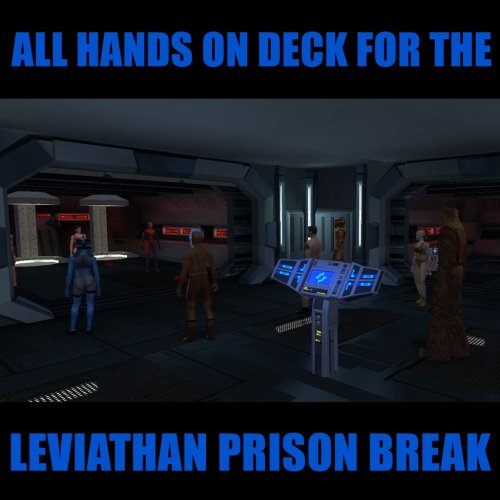 A fantastic mod that has earned a lock in my K1 mod builds permanently. The Leviathan prison break now feels finished. 10/10
-
 Anzwertree joined the community
-
 No joke, this mod made investing skill points into Demolitions worth it across the board! Grenades are infinitely more useful in fights now, especially in the late game. 10/10!
-
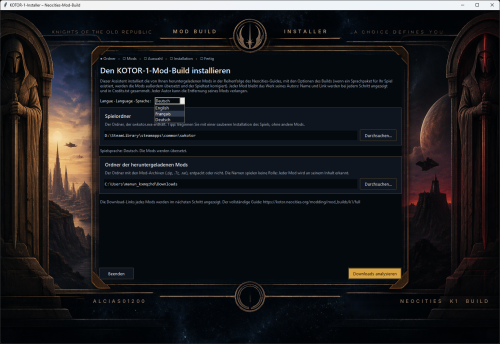
View File KOTOR 1 Mod Build Installer (Neocities guide) This installer sets up the KOTOR 1 mod build from the Neocities guide (https://kotor.neocities.org/modding/mod_builds/k1/full) in the guide's order, with the build's options. It does not contain any mod. You download each mod yourself from its author's page: the installer opens the pages for you, tells you which file to take, recognises the archives in your Downloads folder by their content (names don't matter), and installs everything in order with HoloPatcher. Why this installer • Simple: one program to run, no mod manager to set up. It opens the download pages for you, tells you which file to take for each mod, and copes with renamed archives or files downloaded twice. • Fast: on a clean game, the 185 mods of the build installed in about 3 minutes, instead of the hours a manual install takes (the optional HD cutscenes add a minute or less on an SSD). • Good-looking: a window styled after the game's own menus. • A touch of magic: it recognises each mod by its content, reads your game's language to pick the right version, and credits every author at every step. Features • Recognises 180+ mods from their archives (.zip, .7z, .rar), even renamed. • Installs them in the guide's order, with the build's settings preselected; every option can be changed before installing. • Shows each mod's name and author at every step and writes them, with their links, to Credits.txt. • Reads your game's language: ◦ French game: the French language pack is added (translated mods, fixes to the French game text, optional French HD cutscenes). ◦ German game: the German language pack is added (translated mods, optional German HD cutscenes). This pack is a preview: it was translated with the help of AI and has not yet been reviewed by native speakers. ◦ Spanish game: the Spanish language pack is added (translated mods, optional Spanish HD cutscenes). This pack is also a preview, translated with the help of AI and not yet reviewed by native speakers. ◦ English game (and any other language for now): the mods are installed as their authors made them. When a mod exists in your language (e.g. Manaan Fast Travel System), the installer picks up that version. • Interface in English, French, German or Spanish. • KMRP (KOTOR Modern Restoration Patch) is part of the download list and is run automatically at the end of the installation. • Optional HD cutscenes: French, German or Spanish HD cutscenes for French, German and Spanish games, Naelavok's KotOR 1 Remastered (AI Upscaled) Cutscenes for the other languages (or as an alternative). Testers wanted Every new version and every language pack needs players to try it on a real game. If you install the build with this installer, your feedback is the best help you can give: what worked, what didn't, and the installateur_k1.log file written in your game folder if something went wrong. German and Spanish speakers are especially welcome to report mistakes in the German and Spanish packs. Coming next • Italian pack: interface and translated mods, to be reviewed by native speakers. • Automatic maintenance is planned, so that the installer always offers the latest versions of the build's mods. Antivirus Some antivirus programs flag the installer with a generic detection of Python programs (PyInstaller). It is a false positive. VirusTotal reports: • Zip v1.2.1 (1/53, generic machine-learning detection only): VirusTotal report • Installer exe v1.2.1 (4/70, heuristic and machine-learning detections only): VirusTotal report Requirements • KOTOR 1 (Steam or GOG) on a clean install, without mods. • 7-Zip (https://www.7-zip.org) for the .7z and .rar archives. • About 15 GB of free space (more with the optional HD cutscenes). How to use Unzip, run Installateur_K1.exe and follow the pages: game folder, downloads, choices, installation. KMRP is run automatically at the end. Full instructions are in README_EN.txt (LISEZMOI.txt in French, LIESMICH.txt in German). Credits and permissions • Every mod remains the work of its author. The installer only installs what you download from the authors' own pages. Any author can ask for their mod to be removed from the installer. • The build and its order come from the Neocities guide (KOTOR Community Portal). • Tools: HoloPatcher / PyKotor (th3w1zard1, LGPL-3.0), TSLPatcher (stoffe, Fair Strides). • KMRP: RaymanGT (GPL-3.0). • Installer and French, German and Spanish language packs by Alcias01200, made with the help of Claude (Anthropic AI). Background image created by Alcias01200 with Microsoft Copilot (AI), retouched. Changelog • 1.2.1 - Updated for KOTOR 1 Twi'lek Male NPC Diversity 1.2 (its upscaled textures and original necks are now installer options); French pack 1.1.2. • 1.2 - Spanish game support: Spanish language pack (preview), Spanish interface, optional Spanish HD cutscenes; KMRP is now part of the download list and is run automatically at the end of the installation. • 1.1 - German game support: German language pack (preview), German interface, optional German HD cutscenes. • 1.0.1 - HD cutscenes for non-French games (Naelavok's KotOR 1 Remastered Cutscenes); Leviathan Differentiated Dialogue for non-French games; English date in the log, accents read correctly. • 1.0 - First release: English and French games, English and French interface. Submitter Alcias01200 Submitted 11/25/2026 Category Mods K1R Compatible No
-
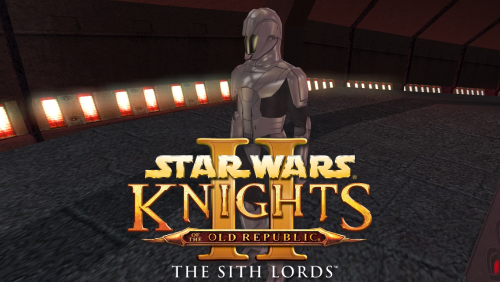
View File K2 Sith Soldier Restoration A Mod for Star Wars Knights of The Old Republic II Author: N-DReW25 1.0.0 Release Date: 25.11.2026 Installation: Please install The Sith Lords Restored Content Mod 1.8.6 FIRST, no exceptions. It is highly advised to install the KOTOR 2 Community Patch before this mod, this is optional. Click on the HoloPatcher.exe, click install, and sit back and watch the installer do its magic. Description: This mod was originally destined to be an optional install for the "K2 Appearance Restoration Pack" mod, however, I know that there are K1 versions of this very mod which are popular and so I figured it would be easier for new users to find this mod if it were a standalone download and not a single install component of a multi-install mod. What this mod does is simple, it restores the white Sith Soldier texture for the Sith Soldiers of Kotor 2. However... it also comes with some additional goodies. In various beta/pre-release screenshots, alongside footage of the E3 Demo, you can see that some of the Sith Soldiers in the Dxun Tomb are red instead of shiny as they are in the base game. I believe that they were changed from red to shiny (default) due to technical limitations of the old Xbox. By making all of the Sith Soldiers shiny instead of both shiny and red, that meant the Xbox had to load one less texture which would've improved performance on the Xbox version of Kotor. On Dxun, Onderon, and the Ravager any Sith Soldier labelled "Sith Elite Trooper" or "Sith Heavy Trooper" have been turned red whereas the Sith Soldiers labelled "Sith Trooper" are white and the Sith Soldiers labelled "Sith Assault Trooper" are the default shiny ones. In addition to these changes, I have replaced the red Sith Beast Trainers on Onderon to use the unused (or very rare) white Sith Commando appearance. That means that the white Sith Commandos appear on Onderon, the shiny Sith Commandos appear on Telos and the Ravager, and the red Sith Commandos appear on Malachor. Known Bugs: This mod shouldn't have any bugs but if you find any please report them to me on Deadlystream. Due to Obsidian seldom using Sith Soldiers named "Sith Trooper" that does mean that the white Sith Troopers shall be rarer than the more elite red and shiny Sith Soldier variants. Incompatibilities: To be added! Permissions: Do NOT claim credit for this mod and do not use assets from this mod without my permission. Thanks to: A Future Pilot: For creating the Sith Soldier Texture Restoration mod for K1, of which the Sith Soldier Corpse placeable texture was borrowed from! Bioware: For such an amazing first game! Obsidian Entertainment: For such an amazing sequel and for keeping the cut content in the files! Fred Tetra: For Kotor Tool! Cortisol: For Holocron Patcher! Everyone who downloads the mod! Legal: THIS MODIFICATION IS NOT SUPPORTED BY BIOWARE/OBSIDIAN ENTERTAINMENT, LUCASARTS, DISNEY OR ANY LICENSERS/SPONSORS OF THE MENTIONED COMPANIES. USE OF THIS FILE IS AT YOUR OWN RISK AND THE ABOVE-MENTIONED COMPANIES OR THE AUTHOR IS NOT RESPONSIBLE FOR ANY DAMAGE CAUSED TO YOUR COMPUTER FOR THE USAGE OF THIS FILE. Submitter N-DReW25 Submitted 11/24/2026 Category Mods TSLRCM Compatible Yes
-
 These are fantastic gameplay-wise, and they look amazing! My Jedi crew has never looked better. 😎
-
Version 1.2.1
6 downloads
This installer sets up the KOTOR 1 mod build from the Neocities guide (https://kotor.neocities.org/modding/mod_builds/k1/full) in the guide's order, with the build's options. It does not contain any mod. You download each mod yourself from its author's page: the installer opens the pages for you, tells you which file to take, recognises the archives in your Downloads folder by their content (names don't matter), and installs everything in order with HoloPatcher. Why this installer • Simple: one program to run, no mod manager to set up. It opens the download pages for you, tells you which file to take for each mod, and copes with renamed archives or files downloaded twice. • Fast: on a clean game, the 185 mods of the build installed in about 3 minutes, instead of the hours a manual install takes (the optional HD cutscenes add a minute or less on an SSD). • Good-looking: a window styled after the game's own menus. • A touch of magic: it recognises each mod by its content, reads your game's language to pick the right version, and credits every author at every step. Features • Recognises 180+ mods from their archives (.zip, .7z, .rar), even renamed. • Installs them in the guide's order, with the build's settings preselected; every option can be changed before installing. • Shows each mod's name and author at every step and writes them, with their links, to Credits.txt. • Reads your game's language: ◦ French game: the French language pack is added (translated mods, fixes to the French game text, optional French HD cutscenes). ◦ German game: the German language pack is added (translated mods, optional German HD cutscenes). This pack is a preview: it was translated with the help of AI and has not yet been reviewed by native speakers. ◦ Spanish game: the Spanish language pack is added (translated mods, optional Spanish HD cutscenes). This pack is also a preview, translated with the help of AI and not yet reviewed by native speakers. ◦ English game (and any other language for now): the mods are installed as their authors made them. When a mod exists in your language (e.g. Manaan Fast Travel System), the installer picks up that version. • Interface in English, French, German or Spanish. • KMRP (KOTOR Modern Restoration Patch) is part of the download list and is run automatically at the end of the installation. • Optional HD cutscenes: French, German or Spanish HD cutscenes for French, German and Spanish games, Naelavok's KotOR 1 Remastered (AI Upscaled) Cutscenes for the other languages (or as an alternative). Testers wanted Every new version and every language pack needs players to try it on a real game. If you install the build with this installer, your feedback is the best help you can give: what worked, what didn't, and the installateur_k1.log file written in your game folder if something went wrong. German and Spanish speakers are especially welcome to report mistakes in the German and Spanish packs. Coming next • Italian pack: interface and translated mods, to be reviewed by native speakers. • Automatic maintenance is planned, so that the installer always offers the latest versions of the build's mods. Antivirus Some antivirus programs flag the installer with a generic detection of Python programs (PyInstaller). It is a false positive. VirusTotal reports: • Zip v1.2.1 (1/53, generic machine-learning detection only): VirusTotal report • Installer exe v1.2.1 (4/70, heuristic and machine-learning detections only): VirusTotal report Requirements • KOTOR 1 (Steam or GOG) on a clean install, without mods. • 7-Zip (https://www.7-zip.org) for the .7z and .rar archives. • About 15 GB of free space (more with the optional HD cutscenes). How to use Unzip, run Installateur_K1.exe and follow the pages: game folder, downloads, choices, installation. KMRP is run automatically at the end. Full instructions are in README_EN.txt (LISEZMOI.txt in French, LIESMICH.txt in German). Credits and permissions • Every mod remains the work of its author. The installer only installs what you download from the authors' own pages. Any author can ask for their mod to be removed from the installer. • The build and its order come from the Neocities guide (KOTOR Community Portal). • Tools: HoloPatcher / PyKotor (th3w1zard1, LGPL-3.0), TSLPatcher (stoffe, Fair Strides). • KMRP: RaymanGT (GPL-3.0). • Installer and French, German and Spanish language packs by Alcias01200, made with the help of Claude (Anthropic AI). Background image created by Alcias01200 with Microsoft Copilot (AI), retouched. Changelog • 1.2.1 - Updated for KOTOR 1 Twi'lek Male NPC Diversity 1.2 (its upscaled textures and original necks are now installer options); French pack 1.1.2. • 1.2 - Spanish game support: Spanish language pack (preview), Spanish interface, optional Spanish HD cutscenes; KMRP is now part of the download list and is run automatically at the end of the installation. • 1.1 - German game support: German language pack (preview), German interface, optional German HD cutscenes. • 1.0.1 - HD cutscenes for non-French games (Naelavok's KotOR 1 Remastered Cutscenes); Leviathan Differentiated Dialogue for non-French games; English date in the log, accents read correctly. • 1.0 - First release: English and French games, English and French interface. -
 Mrlock4 joined the community
-
Version 1.0.0
8 downloads
A Mod for Star Wars Knights of The Old Republic II Author: N-DReW25 1.0.0 Release Date: 25.11.2026 Installation: Please install The Sith Lords Restored Content Mod 1.8.6 FIRST, no exceptions. It is highly advised to install the KOTOR 2 Community Patch before this mod, this is optional. Click on the HoloPatcher.exe, click install, and sit back and watch the installer do its magic. Description: This mod was originally destined to be an optional install for the "K2 Appearance Restoration Pack" mod, however, I know that there are K1 versions of this very mod which are popular and so I figured it would be easier for new users to find this mod if it were a standalone download and not a single install component of a multi-install mod. What this mod does is simple, it restores the white Sith Soldier texture for the Sith Soldiers of Kotor 2. However... it also comes with some additional goodies. In various beta/pre-release screenshots, alongside footage of the E3 Demo, you can see that some of the Sith Soldiers in the Dxun Tomb are red instead of shiny as they are in the base game. I believe that they were changed from red to shiny (default) due to technical limitations of the old Xbox. By making all of the Sith Soldiers shiny instead of both shiny and red, that meant the Xbox had to load one less texture which would've improved performance on the Xbox version of Kotor. On Dxun, Onderon, and the Ravager any Sith Soldier labelled "Sith Elite Trooper" or "Sith Heavy Trooper" have been turned red whereas the Sith Soldiers labelled "Sith Trooper" are white and the Sith Soldiers labelled "Sith Assault Trooper" are the default shiny ones. In addition to these changes, I have replaced the red Sith Beast Trainers on Onderon to use the unused (or very rare) white Sith Commando appearance. That means that the white Sith Commandos appear on Onderon, the shiny Sith Commandos appear on Telos and the Ravager, and the red Sith Commandos appear on Malachor. Known Bugs: This mod shouldn't have any bugs but if you find any please report them to me on Deadlystream. Due to Obsidian seldom using Sith Soldiers named "Sith Trooper" that does mean that the white Sith Troopers shall be rarer than the more elite red and shiny Sith Soldier variants. Incompatibilities: To be added! Permissions: Do NOT claim credit for this mod and do not use assets from this mod without my permission. Thanks to: A Future Pilot: For creating the Sith Soldier Texture Restoration mod for K1, of which the Sith Soldier Corpse placeable texture was borrowed from! Bioware: For such an amazing first game! Obsidian Entertainment: For such an amazing sequel and for keeping the cut content in the files! Fred Tetra: For Kotor Tool! Cortisol: For Holocron Patcher! Everyone who downloads the mod! Legal: THIS MODIFICATION IS NOT SUPPORTED BY BIOWARE/OBSIDIAN ENTERTAINMENT, LUCASARTS, DISNEY OR ANY LICENSERS/SPONSORS OF THE MENTIONED COMPANIES. USE OF THIS FILE IS AT YOUR OWN RISK AND THE ABOVE-MENTIONED COMPANIES OR THE AUTHOR IS NOT RESPONSIBLE FOR ANY DAMAGE CAUSED TO YOUR COMPUTER FOR THE USAGE OF THIS FILE.-
- 3
-

-

-
- sith soldier
- sith trooper
- (and 5 more)
-
 Matuca1849 joined the community
-
This is actually pretty cool, and you only just started this work?
-
View File KOTOR 1 – German HD Cutscenes All 61 cutscenes of the German version of KOTOR 1, upscaled x4 to 2560 pixels wide. What's included The 61 original German cutscenes, upscaled x4 with Video2X (Real-ESRGAN, AI upscaling), from the game's own videos. The German opening crawl and all burned-in German subtitles, now crisp and readable. The original German audio, unchanged and in sync. A new legal screen in 16:9 (2560x1440): the upscaled artwork fills the screen with a slow camera push-in, and the German legal text has been re-typeset to be perfectly readable. Installation Back up your game's movies folder. Copy the content of this archive's movies folder into your game's movies folder, overwriting the files. Screen resolution: these cutscenes are made in 2560 pixels wide, but they work on any screen. The game scales them to your resolution: they look great on a 1080p screen too, and on 4K. For the German version of the game. If your game is in French, see KOTOR 1 – French HD Cutscenes. Credits Original cutscenes: BioWare / LucasArts. Upscaling and assembly: Alcias01200. Legal screen re-typesetting and quality checks done with the help of Claude (Anthropic AI). _____________________________________________________________________________________________________________________________ Alle 61 Zwischensequenzen der deutschen Version von KOTOR 1, vierfach hochskaliert auf 2560 Pixel Breite. Inhalt Die 61 originalen deutschen Zwischensequenzen, mit Video2X (Real-ESRGAN, KI-Hochskalierung) aus den Videos des Spiels vierfach hochskaliert. Die deutsche Eröffnungs-Laufschrift und alle eingeblendeten deutschen Untertitel, jetzt gestochen scharf und gut lesbar. Der deutsche Originalton, unverändert und synchron. Ein neuer rechtlicher Hinweis im Format 16:9 (2560x1440): Die hochskalierte Illustration füllt den ganzen Bildschirm, mit einer langsamen Kamerafahrt, und der deutsche Rechtstext wurde neu gesetzt, damit er perfekt lesbar ist. Installation Sichern Sie den Ordner movies Ihres Spiels. Kopieren Sie den Inhalt des Ordners movies aus diesem Archiv in den Ordner movies des Spiels und ersetzen Sie die vorhandenen Dateien. Bildschirmauflösung: Diese Zwischensequenzen sind 2560 Pixel breit, funktionieren aber auf jedem Bildschirm. Das Spiel passt sie an Ihre Auflösung an: Auch auf einem 1080p- oder 4K-Bildschirm sehen sie hervorragend aus. Für die deutsche Version des Spiels. Credits Original-Zwischensequenzen: BioWare / LucasArts. Hochskalierung und Zusammenstellung: Alcias01200. Neugestaltung des rechtlichen Hinweises und Qualitätskontrollen mit Hilfe von Claude (KI von Anthropic). Looking for German testers: I'm preparing a German translation pack for the KOTOR 1 full mod build (Neocities guide), installed by my build installer. If you play the German version and would like to test it, send me a private message. Tester gesucht: Ich bereite ein deutsches Sprachpaket für den kompletten KOTOR-1-Mod-Build (Neocities-Guide) vor, das mit meinem Build-Installer installiert wird. Wenn Sie die deutsche Version spielen und es testen möchten, schreiben Sie mir eine private Nachricht. Submitter Alcias01200 Submitted 11/25/2026 Category Media
-
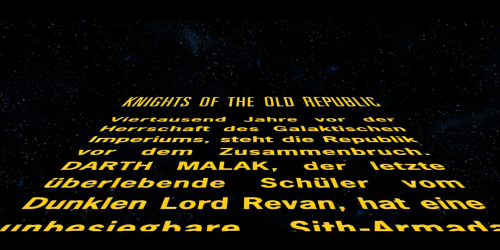
Version 1.0.0
0 downloads
All 61 cutscenes of the German version of KOTOR 1, upscaled x4 to 2560 pixels wide. What's included The 61 original German cutscenes, upscaled x4 with Video2X (Real-ESRGAN, AI upscaling), from the game's own videos. The German opening crawl and all burned-in German subtitles, now crisp and readable. The original German audio, unchanged and in sync. A new legal screen in 16:9 (2560x1440): the upscaled artwork fills the screen with a slow camera push-in, and the German legal text has been re-typeset to be perfectly readable. Installation Back up your game's movies folder. Copy the content of this archive's movies folder into your game's movies folder, overwriting the files. Screen resolution: these cutscenes are made in 2560 pixels wide, but they work on any screen. The game scales them to your resolution: they look great on a 1080p screen too, and on 4K. For the German version of the game. If your game is in French, see KOTOR 1 – French HD Cutscenes. Credits Original cutscenes: BioWare / LucasArts. Upscaling and assembly: Alcias01200. Legal screen re-typesetting and quality checks done with the help of Claude (Anthropic AI). _____________________________________________________________________________________________________________________________ Alle 61 Zwischensequenzen der deutschen Version von KOTOR 1, vierfach hochskaliert auf 2560 Pixel Breite. Inhalt Die 61 originalen deutschen Zwischensequenzen, mit Video2X (Real-ESRGAN, KI-Hochskalierung) aus den Videos des Spiels vierfach hochskaliert. Die deutsche Eröffnungs-Laufschrift und alle eingeblendeten deutschen Untertitel, jetzt gestochen scharf und gut lesbar. Der deutsche Originalton, unverändert und synchron. Ein neuer rechtlicher Hinweis im Format 16:9 (2560x1440): Die hochskalierte Illustration füllt den ganzen Bildschirm, mit einer langsamen Kamerafahrt, und der deutsche Rechtstext wurde neu gesetzt, damit er perfekt lesbar ist. Installation Sichern Sie den Ordner movies Ihres Spiels. Kopieren Sie den Inhalt des Ordners movies aus diesem Archiv in den Ordner movies des Spiels und ersetzen Sie die vorhandenen Dateien. Bildschirmauflösung: Diese Zwischensequenzen sind 2560 Pixel breit, funktionieren aber auf jedem Bildschirm. Das Spiel passt sie an Ihre Auflösung an: Auch auf einem 1080p- oder 4K-Bildschirm sehen sie hervorragend aus. Für die deutsche Version des Spiels. Credits Original-Zwischensequenzen: BioWare / LucasArts. Hochskalierung und Zusammenstellung: Alcias01200. Neugestaltung des rechtlichen Hinweises und Qualitätskontrollen mit Hilfe von Claude (KI von Anthropic). Looking for German testers: I'm preparing a German translation pack for the KOTOR 1 full mod build (Neocities guide), installed by my build installer. If you play the German version and would like to test it, send me a private message. Tester gesucht: Ich bereite ein deutsches Sprachpaket für den kompletten KOTOR-1-Mod-Build (Neocities-Guide) vor, das mit meinem Build-Installer installiert wird. Wenn Sie die deutsche Version spielen und es testen möchten, schreiben Sie mir eine private Nachricht. -
 Inuit2930 joined the community
- Yesterday
-
 woahgeez joined the community
-
 WCS117 joined the community
-
Kotor 1 Movies Crashing?
DarthParametric replied to Skeet1983's topic in Knights of the Old Republic General
Just the vanilla movies, not anything else. -
 esmeriz joined the community
-
 Yellowmods10 joined the community
-
Kotor 1 Movies Crashing?
Skeet1983 replied to Skeet1983's topic in Knights of the Old Republic General
Hello. I did not revert back to vanilla Kotor as I thought Widescreen resolutions would only work with a modded/editable EXE of game. Further thoughts and help appreciated -
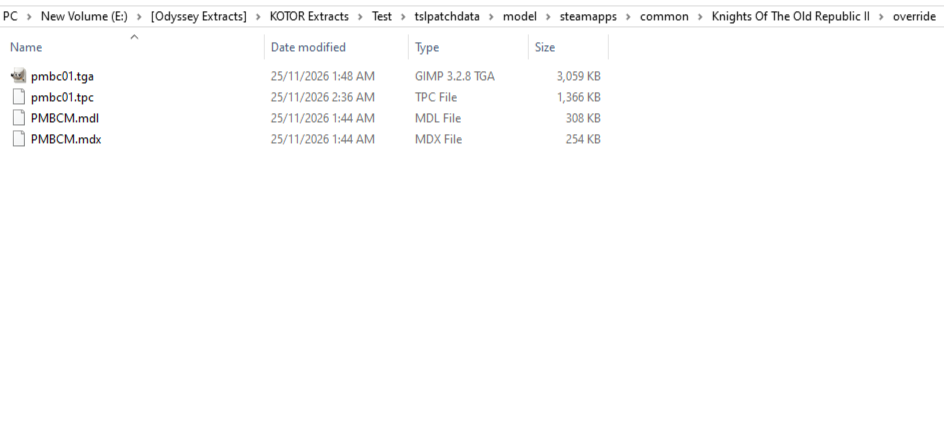
@DarthParametric @Dark Hope When testing the mod, do I set the files (attached image) up through an installation package when manually installing mods for something like Skyrim (i.e. Steam/steamapps/common/Skyrim/Data) but (Steam/steamapps/common/KOTOR II/override) for KOTOR II through a mod manager so I can switch it on/off whenever?
-
 Kyoichi joined the community
-
 The best cutscene mod out there without any doubt.
-
Kotor 1 Movies Crashing?
DarthParametric replied to Skeet1983's topic in Knights of the Old Republic General
I saw you post in the upscaled movies thread. Did you revert to vanilla and see if those crash? I'm pretty sure other people had crashes with the upscaled videos. I know I had crashes myself with my own rescale experiments. -
Kotor 1 Movies Crashing?
Skeet1983 replied to Skeet1983's topic in Knights of the Old Republic General
My laptop has the following specs: Lenovo Legion 5 Pro - Windows 11 Version 26H2 - 32GB System RAM - Nvidia RTX 5060 with 8GB VRAM, 2560*1600 native res - Processor: AMD Ryzen 7 8745HX with Radeon Graphics @ 3.60 GHz -
 Drutar changed their profile photo
-
Hi Pops, First, thank you for K1 Cutscenes Rescaled. The quality is impressive, and I've added it as an option to my installer for the K1 Neocities build. While testing, I ran into a reproducible issue that I thought you'd want to know about: Version: 1.5.2, 30 fps, 2560x1440 (k1rs_30fps_2560x1440.7z), main files only (no alts). Game: fresh Steam copy of KOTOR 1 with the K1 Neocities build and KMRP 1.6.0, running at 2560x1440. Issue: the game closes to the desktop right at the end of the opening crawl (01a.bik), with no error message. It happened twice in a row. If I skip the crawl with a click, everything carries on normally, and the other movies before it (legal, logos) play fine. KMRP hooks the movie decoding, so it may be an interaction between the size of 01a.bik (about 928 MB) and KMRP rather than an issue with your files. I'm reporting it here first in case you've seen it before or have a hint. I can run more tests if that helps. Thanks again for your work, Alcias01200