


Saul0097
-
Posts
42 -
Joined
-
Last visited
-
Days Won
2
Content Type
Profiles
Forums
Blogs
Forum & Tracker Requests
Downloads
Gallery
Store
Events
Files posted by Saul0097
-
Vanilla Maps HD (KOTOR1)
All maps x4 upscaled to HD
Vanilla Maps HD (K1) upscales the original KOTOR 1 map textures while keeping the vanilla look intact. The maps are high res (2k) and much sharper.
All maps were upscaled 4x using Topaz Gigapixel.
Main features
Upscaled vanilla map textures.
4x Topaz Gigapixel upscale.
Installation instructions
Copy the Override folder into your main Knights of the Old Republic directory.
Replace files if prompted.
282 downloads
-
Vanilla Planets HD
VANILLA PLANETS HD
A VANILLA-FAITHFUL ENVIRONMENTAL TEXTURE OVERHAUL
━━━━━━━━━━━━━━━━━━━━━━━━━━━━━━━━━━━━
OVERVIEW
━━━━━━━━━━━━━━━━━━━━━━━━━━━━━━━━━━━━
Vanilla Planets HD is an environmental texture upscale for Star Wars: Knights of the Old Republic II — The Sith Lords.
The mod upscales the game’s planet, area, environmental, screen, display, and panel textures using Topaz Gigapixel at up to four times their original resolution.
The goal is to keep KOTOR II as close to its original visual style as possible while making the textures cleaner, sharper, and more detailed.
I created this mod because I wanted an HD environmental overhaul that preserved the original materials without making surfaces excessively reflective or glossy.
There are no ReShade presets, lighting edits, shader changes, or major visual redesigns.
FEATURES
━━━━━━━━━━━━━━━━━━━━━━━━━━━━━━━━━━━━
• Planet and area textures upscaled at up to 4x resolution
• All major environments included
• Screens, displays, monitors, and panels included
• Ebon Hawk interior and exterior included
• Optimized TPC textures
• Vanilla-faithful appearance
• Separate add-ons for TSLRCM and the KOTOR 2 Community Patch
INCLUDED AREAS
━━━━━━━━━━━━━━━━━━━━━━━━━━━━━━━━━━━━
Peragus and the Harbinger
Telos
Ebon Hawk Interior and Exterior
Dantooine
Dxun
Onderon
Nar Shaddaa
Korriban
Malachor V
Shared planet and environmental textures
Screens, displays, monitors, and panels
DOWNLOADS
━━━━━━━━━━━━━━━━━━━━━━━━━━━━━━━━━━━━
There are three files total.
MAIN FILE
The complete Vanilla Planets HD texture overhaul.
This file is required for all users.
TSLRCM ADD-ON
Additional textures for users of The Sith Lords Restored Content Mod.
Requires the Vanilla Planets HD main file and TSLRCM.
KOTOR 2 COMMUNITY PATCH ADD-ON
Additional textures for users of the KOTOR 2 Community Patch.
Requires the Vanilla Planets HD main file and the KOTOR 2 Community Patch.
INSTALLATION
━━━━━━━━━━━━━━━━━━━━━━━━━━━━━━━━━━━━
UPDATING FROM A PREVIOUS VERSION
If you are updating from a previous version of Vanilla Planets HD, delete the following files from your override folder if they are present:
DAN_blst03.tpc
DAN_fall.tpc
DAN_gobo1.tpc
DAN_gobo2.tpc
DAN_LBms.tpc
DAN_leaf02.tpc
DANfx_mots.tpc
KOR_lightbeams.tpc
DXN_treeline2.tpc
PLC_Water01b.tpc
After removing these files, install the new version normally using the instructions below.
MAIN FILE
1. Download and extract the Vanilla Planets HD main file.
2. Copy the included override folder into your main KOTOR II installation directory.
3. replace files if prompted.
ADD-ONS
If you use TSLRCM or the KOTOR 2 Community Patch, install the corresponding Vanilla Planets HD add-on after installing the main file.
If you use both TSLRCM and the KOTOR 2 Community Patch, install the TSLRCM add-on first, followed by the KOTOR 2 Community Patch add-on.
Replace files when prompted.
Highly Recommended After Installation
After installation, download and install Remove Duplicate TGA-TPC. Run the included .bat file and delete any duplicate TGA files.
SKYBOXES AND BACKDROPS
━━━━━━━━━━━━━━━━━━━━━━━━━━━━━━━━━━━━
Vanilla Planets HD does not replace the game’s major skyboxes, distant backdrops, or cockpit window views. These assets were intentionally left untouched because Kexikus has already created excellent high-resolution skybox and backdrop mods, while tjsase has created a dedicated mod for the cockpit views.
The following mods are highly recommended:
High Quailty Skyboxes II
TSL Backdrop Improvements
TSL HD Cockpit Skyboxes
COMPATIBILITY
━━━━━━━━━━━━━━━━━━━━━━━━━━━━━━━━━━━━
Vanilla Planets HD is compatible with most gameplay, character, interface, bug-fix, and audio mods.
Conflicts may occur with other planet or environmental texture overhauls that replace the same files.
When two mods contain textures with the same filename, the files installed last will take priority.
CREDITS
━━━━━━━━━━━━━━━━━━━━━━━━━━━━━━━━━━━━
Obsidian Entertainment and BioWare — Original KOTOR II textures and assets
━━━━━━━━━━━━━━━━━━━━━━━━━━━━━━━━━━━━
VANILLA PLANETS HD
The original worlds of KOTOR II in higher definition.1,162 downloads
-
Vanilla Weapons HD
Description
Vanilla Weapons HD Upscales all weapon textures in kotor 2 using topaz gigapixel X4
The mod is split into 5 separate files:
Melee Weapons HD
Blasters HD
Lightsabers HD
Grenades HD (includes mines and detonators)
Bronze Lightsaber (Download if using tsl restored content mod)
Glitched lightsaber hilt fix tsl aspyr is recommended if you're using the lightsabers file.
They are separated in case you already use another lightsaber mod, high quality blaster mod, or other weapon texture replacement.
Installation
Place the override folder into your main KOTOR 2 directory.
Replace files if prompted.
378 downloads
- texture
- lightsaber
- (and 9 more)
-
Vanilla Characters HD Optimized
V A N I L L A C H A R A C T E R S H D
V E R S I O N 3.0
An HD character texture overhaul for
STAR WARS: KNIGHTS OF THE OLD REPUBLIC II
THE SITH LORDS
━━━━━━━━━━━━━━━━━━━━━━━━━━━━━━━━━━━━━━━━━━━━━━
The familiar faces of the Old Republic—restored in high definition.
━━━━━━━━━━━━━━━━━━━━━━━━━━━━━━━━━━━━━━━━━━━━━━
O V E R V I E W Vanilla Characters HD enhances the original character textures from KOTOR 2 while preserving the game’s classic art direction. Version 3.0 has been rebuilt using optimized TPC textures and a new modular file structure. Transparency and alpha-channel issues affecting certain textures in previous versions have also been fixed. The textures were upscaled at 4x using Topaz Gigapixel AI and optimized primarily at approximately 2K resolution. ────────────────────────────────────────────── T E X T U R E C O V E R A G E Humans and aliens Droids Beasts and creatures Clothing and armor Character body textures ────────────────────────────────────────────── M O D U L A R F I L E S MAIN FILE — VANILLA GAME Contains the HD textures used by the original game. This is the primary standalone file. TSLRCM and the KOTOR 2 Community Patch are not required. OPTIONAL TSLRCM FILE Contains additional HD textures for characters and restored content included in The Sith Lords Restored Content Mod. Install this file only when using TSLRCM. OPTIONAL COMMUNITY PATCH FILE Contains HD versions of character textures included or modified by the KOTOR 2 Community Patch. Install this file only when using the Community Patch. ────────────────────────────────────────────── F E A T U R E S Optimized TPC texture format Mostly 2K character textures Fixed transparency and alpha-channel issues Modular optional files Preserves the original KOTOR 2 visual style No gameplay changes No model changes No character redesigns ────────────────────────────────────────────── I N S T A L L A T I O N Download and extract the Main File. Place the included TPC files into your KOTOR 2 Override folder. Install the optional TSLRCM file only when using TSLRCM. Install the optional Community Patch file only when using the KOTOR 2 Community Patch. Allow the optional files to overwrite textures from the Main File when prompted. IMPORTANT: Remove any older version of Vanilla Characters HD before installing Version 3.0. Old TGA files may override the new TPC textures. When updating, use Remove Duplicate TGA/TPC or manually remove duplicate TGA and TPC copies of the same texture. ────────────────────────────────────────────── C O M P A T I B I L I T Y The Main File can be installed by itself with the vanilla game. Optional files are available for: The Sith Lords Restored Content Mod KOTOR 2 Community Patch Other character texture mods may replace some of the same files. The textures installed last will generally take priority. ────────────────────────────────────────────── V E R S I O N 3.0 Converted the mod to optimized TPC textures Removed the previous uncompressed TGA version Added a modular file structure Added optional TSLRCM textures Added optional Community Patch textures Fixed transparent texture issues Corrected alpha-channel handling Improved texture optimization
━━━━━━━━━━━━━━━━━━━━━━━━━━━━━━━━━━━━━━━━━━━━━━
M A Y T H E F O R C E B E W I T H Y O U
━━━━━━━━━━━━━━━━━━━━━━━━━━━━━━━━━━━━━━━━━━━━━━280 downloads
-
Vanilla FX HD
Vanilla FX HD upscales the all the original KOTOR FX textures using Topaz Gigapixel x4.
Main features
Upscaled all (96) FX textures using Topaz Gigapixel x4.
Keeps the original vanilla look and style.
Improves the clarity of visual effects without changing the overall art direction.
Requirements
No special requirements.
A working KOTOR 2 installation is required.
Installation instructions
Extract the mod.
Place the included files into your Override folder.
If prompted to replace files, choose yes.
137 downloads
(0 reviews)0 comments
Updated
-
Vanilla Icons and GUI HD
VANILLA ICONS AND GUI HD
1,539 UPSCALED ICON AND INTERFACE TEXTURES FOR KOTOR II
━━━━━━━━━━━━━━━━━━━━━━━━━━━━━━━━━━━━
OVERVIEW
Vanilla Icons and GUI HD contains 1,539 upscaled textures in the main file, not including compatibility-patch textures.
The mod upscales every icon, GUI icon, and interface texture that could be safely enhanced while preserving the original appearance of Star Wars: Knights of the Old Republic II — The Sith Lords.
This includes item icons, weapons, armor, clothing, portraits, menu icons, galaxy-map assets, GUI backgrounds, controller icons, and other interface textures.
All included textures were upscaled to 4x their original resolution using Topaz Gigapixel.
The mod began as Gamepad Menu Upscaled, later expanded into Forgotten UI Textures, and has now grown into a complete icon and interface overhaul.
━━━━━━━━━━━━━━━━━━━━━━━━━━━━━━━━━━━━
MAIN FILE CONTENTS
The main file includes:
• Item, weapon, armor, clothing, and equipment icons
• Usable-item and inventory icons
• Force-power, feat, ability, and interface icons
• Player-character, party-member, and other character portraits
• Gamepad menu textures and controller icons
• Menu and GUI icons
• Galaxy-map textures and icons
• GUI backgrounds
• Additional interface textures
The vanilla blue lightsaber icons have also been recolored to correct their noticeably purple appearance. (See image) while preserving their original design, glow, and transparency.
━━━━━━━━━━━━━━━━━━━━━━━━━━━━━━━━━━━━
COMPATIBILITY PATCHES
Only install a compatibility patch when using its corresponding mod.
THE SITH LORDS RESTORED CONTENT MOD PATCH
Includes additional and replacement interface textures used by The Sith Lords Restored Content Mod.
Requires the main file and TSLRCM.
KOTOR 2 COMMUNITY PATCH
Includes additional and replacement interface textures used by the KOTOR 2 Community Patch.
Requires the main file and the KOTOR 2 Community Patch.
━━━━━━━━━━━━━━━━━━━━━━━━━━━━━━━━━━━━
MISCELLANEOUS FILES
SWOOP RACE OVERLAYS
Upscales the interface overlays used during swoop races.
The latest version of Vanilla Planets HD already includes these textures. You do not need this optional file if using my other mod.
TSLRCM MAIN MENU LOGO
Upscales the TSLRCM main menu logo
The TSL Main Menu Model Fix and all of its prerequisites are hard requirements for this file.
━━━━━━━━━━━━━━━━━━━━━━━━━━━━━━━━━━━━
INSTALLATION
1. Download and extract the main file.
2. Copy the included Override folder into your main KOTOR II installation directory.
3. Place the folders and replace files when prompted.
4. Install the TSLRCM or KOTOR 2 Community Patch compatibility files afterward, when applicable.
5. If you’re using both TSLRCM and the KOTOR 2 Community Patch, install the TSLRCM icon patch first, followed by the K2CP icon patch.
━━━━━━━━━━━━━━━━━━━━━━━━━━━━━━━━━━━━
REQUIREMENTS AND COMPATIBILITY
• Requires Star Wars: Knights of the Old Republic II — The Sith Lords
• Compatible with The Sith Lords Restored Content Mod
• Compatible with the KOTOR 2 Community Patch
• Compatibility patches require the main file and their corresponding mods
• The optional TSLRCM main-menu file requires the TSL Main Menu Model Fix and all of its prerequisites
━━━━━━━━━━━━━━━━━━━━━━━━━━━━━━━━━━━━
CREDITS
Obsidian Entertainment — Original KOTOR II textures and assets
466 downloads
(0 reviews)0 comments
Updated
-
Bigger Dialog Font
BIGGER DIALOG FONT
━━━━━━━━━━━━━━━━━━━━━━━━━━━━━━━━━━━━ DESCRIPTION
Bigger Dialog Font increases dialogue and menu description font size in KOTOR 2 for better readability on modern displays.
The main download includes all available font sizes:
20% Bigger
25% Bigger
30% Bigger
40% Bigger
50% Bigger
60% Bigger
70% Bigger
80% Bigger
Choose whichever size works best for your resolution and setup.
The download also includes an optional Font Upscaled folder. Increasing the original font size can make the text appear low-resolution or blurry, so these upscaled font textures can be used to make the larger text look clearer.
━━━━━━━━━━━━━━━━━━━━━━━━━━━━━━━━━━━━
DIALOG SUBTITLE WORD WRAP BETA
The optional Dialog Subtitle Word Wrap beta modifies dialog.tlk to add line breaks to dialogue subtitles, helping prevent subtitle text from extending off-screen when using the larger font sizes.
The add-on is now modular and includes three versions:
Vanilla
TSLRCM
TSLRCM + KOTOR 2 Community Patch
Choose the version that matches your installation.
The requirements only apply to the Dialog Subtitle Word Wrap version you choose. The regular Bigger Dialog Font files do not have any known mod requirements.
Important: Always back up your original dialog.tlk before installing the Dialog Subtitle Word Wrap beta.
━━━━━━━━━━━━━━━━━━━━━━━━━━━━━━━━━━━━
INSTALLATION
Main Font Files
Download and extract the ZIP file. Open the extracted folder. Choose your preferred font size. Place the files from your chosen size folder into your KOTOR 2 override folder. Replace files if prompted. Optional Upscaled Font
If you want clearer font textures, open the Font Upscaled folder and place its files into your override folder.
This is optional, but recommended if the enlarged font looks blurry or low-resolution.
Dialog Subtitle Word Wrap Beta
Read the included README first. Choose the version that matches your setup: Vanilla
TSLRCM
TSLRCM + KOTOR 2 Community Patch
Back up your original dialog.tlk. Place the new dialog.tlk into your main KOTOR 2 directory, where the game executable is located. ━━━━━━━━━━━━━━━━━━━━━━━━━━━━━━━━━━━━
EXTRA NOTES
Screenshots were taken at 1920x1080.
━━━━━━━━━━━━━━━━━━━━━━━━━━━━━━━━━━━━
CHANGELOG
Consolidated all font sizes into the main download.
Added 20%, 25%, 30%, 40%, 50%, 60%, 70%, and 80% font size options.
Added optional upscaled font textures for clearer enlarged text.
Dialog Subtitle Word Wrap beta is now modular.
Added separate Dialog Subtitle Word Wrap versions for Vanilla, TSLRCM, and TSLRCM + KOTOR 2 Community Patch.
458 downloads
- qol
- hud/interface
- (and 5 more)
(0 reviews)0 comments
Updated
-
Vanilla Maps HD
Vanilla Maps HD upscales the map textures in Knights of the Old Republic II to make them sharper and cleaner.
I tried other upscaled map mods, but they still were not sharp or high res enough for what I wanted. So I extracted the map textures myself and upscaled them x4 using Topaz Gigapixel.
This mod also includes upscaled map textures for The Sith Lords Restored Content Mod and Droid Planet. You do not need either mod installed for Vanilla Maps HD to work. If you do use them, the included map textures are covered.
Installation instructions
Extract the zip file
Place override folder into your main kotor 2 directory
Replace files if prompted
Main features
Upscaled vanilla KOTOR II map textures
x4 Topaz Gigapixel upscale
Sharper and cleaner map images
Includes support for The Sith Lords Restored Content Mod map textures
Includes support for Droid Planet map textures
Optional file available for Cathalan Improvement Project
Requirements
No hard requirements.
The Sith Lords Restored Content Mod and Droid Planet are not required, but their map textures are included for users who have them installed.
Cathalan Improvement Project is only needed if you use the optional Cathalan file.
Credits
Obsidian Enterainment
254 downloads
(0 reviews)0 comments
Updated
-
Vanilla Loading Screens HD
This mod upscales all vanilla loading screens in KOTOR 2
All textures were upscaled 4x using Topaz Gigapixel AI, then resized and optimized for in game use.
The goal is to keep the original look while improving clarity and sharpness.
Main Features
4x AI upscaled using Topaz Gigapixel Improved clarity and detail Preserves the original art style Optimized for in-game use No redesigns or stylistic changes Files:
2K optimized version Balanced quality and performance Installation
Manual Install
Extract the contents of the zip file, open the folder and place "override" into your Knights of the Old Republic II directory. Click replace if prompted.
Community / Support
For KOTOR 1 and KOTOR II modding help, tech support, mod requests, resources, tutorials, project discussion, and mod updates, join my discord server, Kotor Workbench:
Kotor Workbench modding server
Modders and non modders are both welcome.
222 downloads
(0 reviews)0 comments
Updated
-
Bigger Dialog Font (K1)
Bigger Font increases the text size throughout Knights of the Old Republic, including menus, dialog, and subtitles.
This mod is intended for widescreen/high-resolution setups where the default KOTOR text can look too small, especially at 1080p and higher resolutions.
File Options
30 Percent Bigger Font
40 Percent Bigger Font
All versions also include TGA texture files upscaled 4x with Topaz Gigapixel. This keeps the text looking sharp and high resolution, since increasing the font size makes the original textures look very blurry and low res.
Requirements:
KotOR High Resolution Menus (Make sure you have it's prerequisites installed.)
K1 Main Menu Widescreen Fix
HD UI Menu Pack
Remove Duplicate TGA-TPC
This is required because some installs may have duplicate TPC files that can override the TGA files from this mod.
Updating from an older version
Before installing, delete the old .txi and matching .tga font files from your Override folder if present:
dialogfont10x10 dialogfont10x10a dialogfont10x10b dialogfont12x16 dialogfont16x16 dialogfont16x16a dialogfont16x16b dialogfont32x32 fnt_console fnt_credits fnt_creditsa fnt_creditsb fnt_d10x10b fnt_d16x16 fnt_d16x16a fnt_d16x16b fnt_dialog16x16 fnt_galahad14
Install Instructions Choose one version: 30 percent, 40 percent, or 50 percent. Extract the zip file, then place the included Override folder into your main swkotor directory. Alternatively, you can place the included TGA and TXI files directly into your existing Override folder. Choose to replace files if prompted. Dialog.tlk Beta Add-on optional file This optional beta add-on requires Kotor 1 Community Patch. Before installing, back up your original dialog.tlk file. To install, place the included dialog.tlk file into your main swkotor directory and replace when prompted. If the font does not appear in-game, use Remove Duplicate TGA-TPC to check for duplicate TPC files that may be overriding the TGA file
If the font does not appear in-game, use Remove Duplicate TGA-TPC to check for duplicate TPC files that may be overriding the TGA files.
Note:
Some NPC subtitles and text in the description box slightly go off screen. This is very minor and not really noticeable, I am currently looking for a workaround.
307 downloads
- accessibility
- quality of life
- (and 3 more)
-
Prequel Robes Replacement Retex
Description
I’ve upscaled and retextured some robes from [TSL] Prequel Robe Replacement.
Main Features
- 2x upscale of all robes from the original mod using Topaz Gigapixel.
- Retextured three of the original robes in GIMP: Jedi Robe, Baran Do Novice Robe, and Baran Do Sage Robe.
- 1K file available. This version resizes the robes back down to their original resolution.
- Optional Robes file included. See the photos for previews of the custom robe options.
Requirements
This mod requires [TSL] Prequel Robe Replacement 1.0 (no exceptions)
Install Instructions
- Install the required mod: [TSL] Prequel Robe Replacement first. This mod will not work without it.
- Download your preferred files
- Extract the contents of the zip file.
- Place the override folder into your main KOTOR 2 directory, or place the TGA files directly into the game’s override folder.
- Replace files if prompted.
Credits
Original mod by Kainzorus Prime, Please like/endorse the original mod.
87 downloads
(0 reviews)0 comments
Updated
-
True Controller Support (K1)
True Controller Support adds modern controller support to Star Wars: Knights of the Old Republic through an ASI plugin.
This mod is designed to add console style controller support for Kotor 1 without the need for external software or steam input.
This major update includes two separate downloads:
- Xbox Controller Support Version
- PlayStation Controller Support Version (Might support other Gamepads but hasn't been tested.)
Main Features
Adds console like controller support to KOTOR with natural analog left stick walk/run movement, horizontal right stick camera control, and D-pad/Touchpad cursor emulation for seamless menu and UI navigation.
Default Controls Shared Xbox and PlayStation controls: LB / L1 = Pause RB / R1 = Cursor Select (Left Click) LT / L2 = Cycle Target RT / R2 = Cycle Target Left Stick = Movement Right Stick = Camera Movement (horizontal like console) A / Cross = Default Action B / Circle = Escape / Game Menu Y / Triangle = Cancel Action X / Square = Swap Character LS / L3 = Flourish Weapon RS / R3 = First-Person Free Look Start = Escape / Game Menu Select / Touchpad = Solo Mode Right Stick Up/Down = Scroll through the action and floating hotbar menu items and actions (Mouse scroll wheel) Xbox Version Notes
Xbox uses the D-pad for cursor emulation D-pad directional arrow navigation is disabled by default (This is because the cursor moves at the same time) D-pad directional navigation can be enabled in kotorgamepad.ini (It works, but it is slightly janky, so it is disabled by default.) PlayStation Version Notes
PlayStation uses the touchpad for cursor emulation by default Cursor emulation can be switched to the D-pad in kotorgamepad.ini D-pad directional arrow navigation is enabled by default (This works better on PlayStation because cursor emulation is handled by the touchpad) Note: Playstation touchpad cursor can be adjusted using the ini file, you got alot of settings, I've made some adjustments myself but haven't really fine tuned it.
Installation and setup:
In-Game Settings: Set your in-game keybinds and controls to default Leave Mouse Look disabled (Mouse Look is disabled by default in the game) Do not enable Mouse Look for this version of the mod like previous versions. Make sure steam input is disabled
if updating from an older version:
Old files to remove if present:
K1Controller.ini K1Controller.asi K1Controller.log dinput8.dll SDL2.dll Xbox Controller Version install instructions
Download the Xbox version Extract the contents of the zip file Place the following files into your main swkotor directory: dinput8.dll kotorgamepad.ini kotorgamepad.asi PlayStation Controller Version install instructions
Download the PlayStation version Extract the contents of the zip file Place the following files into your main swkotor directory: dinput8.dll SDL2.dll kotorgamepad.ini kotorgamepad.asi Switching Versions
If you are switching from Xbox to PlayStation, delete the Xbox version files first If you are switching from PlayStation to Xbox, delete the PlayStation version files first Then install the version you want to use Replacing the files directly may work, but a clean reinstall is recommended
Uninstallation:
Xbox version:
Delete dinput8.dll Delete kotorgamepad.ini Delete kotorgamepad.asi PlayStation version:
Delete dinput8.dll Delete SDL2.dll Delete kotorgamepad.ini Delete kotorgamepad.asi
Credits: Key Mouse Accessibility by LaneDibello for reference.
370 downloads
- qol
- quality of life
- (and 2 more)
-
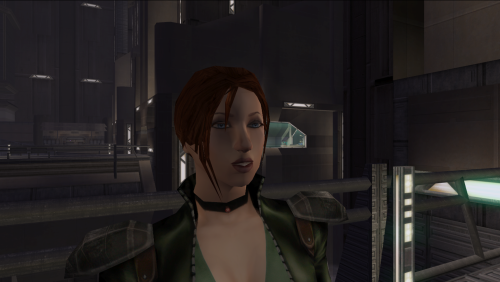
Lore Friendly Mira Edit
Lore Friendly Mira Replacer gives Mira red hair, 2K textures, and custom portraits while keeping Mira's look lore accurate. Installation instructions Install Kirin’s Mira Replacer first, use PFHX01 Make sure Kirin’s PFHX01 replacer for Mira is installed. Place this mod’s files into your Override folder. Replace files if prompted.
Main features Red hair for Mira Slightly adjusted eye color 2K HD textures Custom portraits Lore friendly
Requirements Requires Kirin's Mira Replacer PFHX01 This mod will not work without it. No dark side transitions are included in this version, but they may be added in a future update. Credits Thanks to Kirin for the original Mira replacer.46 downloads
-
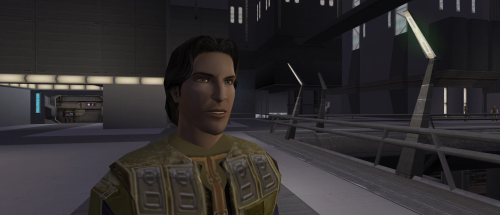
Custom Exile HD
This mod gives the Male Jedi Exile (PMHH01) a custom visual overhaul with realistic pale green eyes, a custom skin tone, brown hair with subtle realistic highlights, custom portraits, and movie inspired dark side transitions.
Features
HD Custom Exile face texture Realistic pale green eyes Custom skin tone Brown hair with subtle realistic highlights Custom portraits Movie inspired dark side transitions Second Sith transition with yellow eyes and a reddish undertone Simple texture replacement Installation
Place the override folder into your main kotor 2 directory.
If asked to overwrite files, choose yes.
Compatibility
This mod may conflict with other mods that replace the same Exile head, portraits, or dark side transition textures.
Requirements
None.
54 downloads