

Jump to content

7 Screenshots

About This File

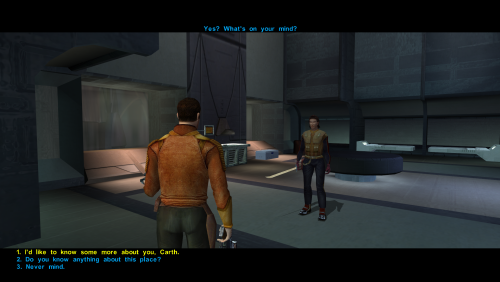
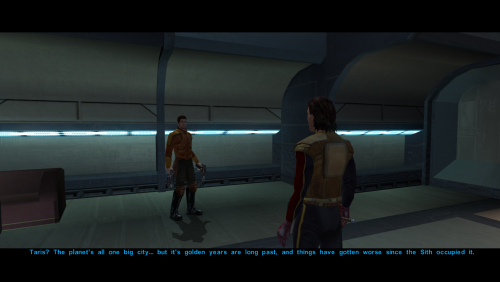
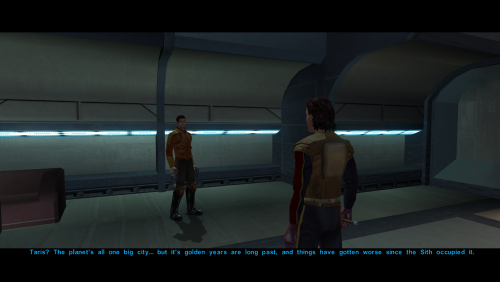
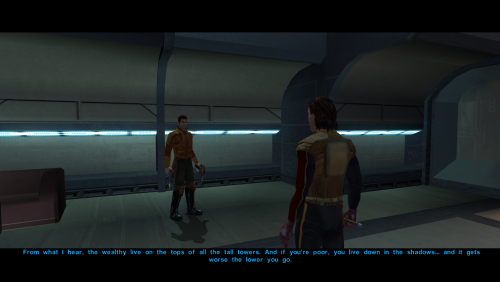
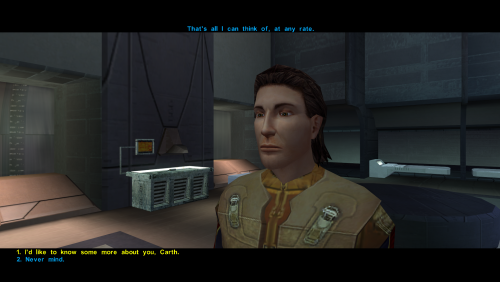
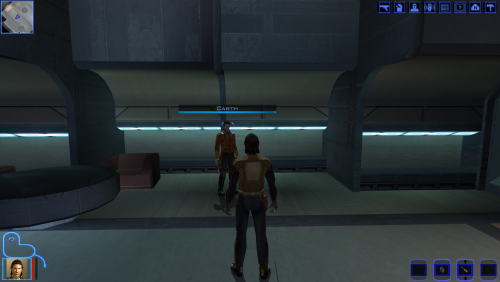
Bigger Font increases the text size throughout Knights of the Old Republic, including menus, dialog, and subtitles.
This mod is intended for widescreen/high-resolution setups where the default KOTOR text can look too small, especially at 1080p and higher resolutions.

File Options
30 Percent Bigger Font
40 Percent Bigger Font

All versions also include TGA texture files upscaled 4x with Topaz Gigapixel. This keeps the text looking sharp and high resolution, since increasing the font size makes the original textures look very blurry and low res.


Requirements:

KotOR High Resolution Menus   (Make sure you have it's prerequisites installed.)

K1 Main Menu Widescreen Fix

HD UI Menu Pack

Remove Duplicate TGA-TPC

This is required because some installs may have duplicate TPC files that can override the TGA files from this mod.

Updating from an older version

Before installing, delete the old .txi and matching .tga font files from your Override folder if present:

dialogfont10x10
dialogfont10x10a
dialogfont10x10b
dialogfont12x16
dialogfont16x16
dialogfont16x16a
dialogfont16x16b
dialogfont32x32
fnt_console
fnt_credits
fnt_creditsa
fnt_creditsb
fnt_d10x10b
fnt_d16x16
fnt_d16x16a
fnt_d16x16b
fnt_dialog16x16
fnt_galahad14


Install Instructions
Choose one version: 30 percent, 40 percent, or 50 percent.
Extract the zip file, then place the included Override folder into your main swkotor directory.
 
Alternatively, you can place the included TGA and TXI files directly into your existing Override folder.
Choose to replace files if prompted.
 
Dialog.tlk Beta Add-on optional file
This optional beta add-on requires Kotor 1 Community Patch.
Before installing, back up your original dialog.tlk file.
To install, place the included dialog.tlk file into your main swkotor directory and replace when prompted.
 
If the font does not appear in-game, use Remove Duplicate TGA-TPC to check for duplicate TPC files that may be overriding the TGA file


If the font does not appear in-game, use Remove Duplicate TGA-TPC to check for duplicate TPC files that may be overriding the TGA files.

Note:
Some NPC subtitles and text in the description box slightly go off screen. This is very minor and not really noticeable, I am currently looking for a workaround.

Edited by Saul0097


What's New in Version 1.0.0   See changelog

Released

No changelog available for this version.


User Feedback

Recommended Comments

JasonRyder

Posted (edited)

I won't be able to see item quantity numbers, right? That was a hard-coded issue that couldn't be fixed in a similar mod: Larger Text Fonts for KOTOR

Edited by JasonRyder
Saul0097

Posted

1 hour ago, JasonRyder said:

I won't be able to see item quantity numbers, right? That was a hard-coded issue that couldn't be fixed in a similar mod: Larger Text Fonts for KOTOR

Seems to be showing fine if this is what you mean.

32370_20260618220303_1.png

JasonRyder

Posted

59 minutes ago, Saul0097 said:

Seems to be showing fine if this is what you mean.

32370_20260618220303_1.png

That is not what I meant. I meant the small numbers that are next to credits and other items in the inventory page and when you loot them.

Saul0097

Posted

5 hours ago, JasonRyder said:

That is not what I meant. I meant the small numbers that are next to credits and other items in the inventory page and when you loot them.

I'll check when I get the chance.

Attackperson48

Posted

It seems like this mod is for 1080p, not 4k which is why people have issue with item quantity. It's not a font issue, it's a textbox scaling issue which is caused by the .exe being outdated. 

Saul0097

Posted

5 hours ago, Attackperson48 said:

It seems like this mod is for 1080p, not 4k which is why people have issue with item quantity. It's not a font issue, it's a textbox scaling issue which is caused by the .exe being outdated. 

It only adjust txi files from textures. It should work with higher resolutions.

MikeTsa7

Posted (edited)

I've been using this for a few hours now, main issue I have is the text on the computer consoles you can hack and droids you can repair doesn't show up.

I also had two other issues but I consider them minor. The chat bubble that pops up from random npc that don't have dialogue cutscenes doesn't show text most of the time and as other users mentioned you can't see the amount on some things, like currency when you loot.

I'm using the 50% increase on 1440p resolution, I've installed all mods from the kotor community portal build guide. This is the only extra mod I've added outside the build guide.

EDIT: Update after a few more hours I switched to the 30% increase that other users said worked better. I could now see computer console options and droid repair options but I also found new issues.

The minor issue was not being able to see the play time on saves. The major issue was the game crashing to desktop when opening some boxes, specifically I remember 1 box in the Korriban cantina and another in a room you spawn later in the same planet, took the mod off and they opened without issues after a google search said other font mods had the same issue.

Edited by MikeTsa7

Join the conversation

You can post now and register later. If you have an account, sign in now to post with your account.

Guest
Add a comment...

×   Pasted as rich text.   Paste as plain text instead

  Only 75 emoji are allowed.

×   Your link has been automatically embedded.   Display as a link instead

×   Your previous content has been restored.   Clear editor

×   You cannot paste images directly. Upload or insert images from URL.

×
×
  • Create New...

Important Information

By using this site, you agree to our Guidelines.