DarthParametric
-
Posts
4,907 -
Joined
-
Last visited
-
Days Won
557
Content Type
Profiles
Forums
Blogs
Forum & Tracker Requests
Downloads
Gallery
Store
Events
Everything posted by DarthParametric
-

TOR Ports: KOTOR Comic Republic Uniforms Admiralty Patch
DarthParametric commented on DarthParametric's file in Mods
 Depends what you mean by original. The first line of the description tells you everything you need to know.
 -
View File Harbinger Hull Fixes The Harbinger is apparently the Swiss cheese of spacecraft. It has more holes in it than a damn sieve. This mod is a combination and extension of my previous separate mods fixing various geometry and model issues with the Harbinger. Geometry has been tweaked or added, UVs adjusted, model hierarchies re-ordered, etc. where appropriate to remove gaps, fix incorrect lightmaps, or address other problems. The previous individual mods rolled into this mod: Harbinger Escape Pod Room Hole Fix Harbinger Broom Closet Wall Lights Fix Harbinger Command Deck Corridor Wall Gaps Fix Those mods are now considered deprecated and have been removed from the site. N.B. I recommend the use of @Kexikus' TSL Backdrop Improvements mod for an enhanced view out of the Harbinger's windows. Specific Changes: 151HAR (Harbinger Command Deck) - Plugged a large gap in the wall of the escape pod room (151HAR09) 151HAR (Harbinger Command Deck) - Closes some small gaps in the exit airlock and inaccessible cutscene room that are visible during the hologram cutscenes (151HAR14, 151HAR17) 151HAR (Harbinger Command Deck) - Replaces the asteroid exterior visible through the windows with the more detailed version used during the space suit sequence (151HARSB) and tweaks its lightmap to fix a couple of visible shading errors (104pera_lm0) 152HAR (Harbinger Crew Deck) - Fixes the non-functional wall lights in the storage room (152HAR33) 152HAR (Harbinger Crew Deck) - Repositions an offset panel in one of the doorways outside the medbay (152HAR30) Compatibility: Should be compatible with just about everything, but it won't be compatible with any mod that replaces the same room models, listed above Acknowledgements: Thanks to bead-v for KOTORMax and MDLEdit, and ndix UR for MDLOps 2K18 Edition Thanks to @ndix UR for bringing the "broom closet" light issue to my attention Thanks to @Deltm for bringing the hologram cutscene room issues to my attention Thanks to @DarthRaindrops for bringing the medbay corridor issue to my attention Thanks to @134340Goat for bringing the asteroid exterior issue to my attention Submitter DarthParametric Submitted 10/04/2018 Category Mods TSLRCM Compatible Yes
-

Version 1.1
1,678 downloads
The Harbinger is apparently the Swiss cheese of spacecraft. It has more holes in it than a damn sieve. This mod is a combination and extension of my previous separate mods fixing various geometry and model issues with the Harbinger. Geometry has been tweaked or added, UVs adjusted, model hierarchies re-ordered, etc. where appropriate to remove gaps, fix incorrect lightmaps, or address other problems. The previous individual mods rolled into this mod: Harbinger Escape Pod Room Hole Fix Harbinger Broom Closet Wall Lights Fix Harbinger Command Deck Corridor Wall Gaps Fix Those mods are now considered deprecated and have been removed from the site. N.B. I recommend the use of @Kexikus' TSL Backdrop Improvements mod for an enhanced view out of the Harbinger's windows. Specific Changes: 151HAR (Harbinger Command Deck) - Plugged a large gap in the wall of the escape pod room (151HAR09) 151HAR (Harbinger Command Deck) - Closes some small gaps in the exit airlock and inaccessible cutscene room that are visible during the hologram cutscenes (151HAR14, 151HAR17) 151HAR (Harbinger Command Deck) - Replaces the asteroid exterior visible through the windows with the more detailed version used during the space suit sequence (151HARSB) and tweaks its lightmap to fix a couple of visible shading errors (104pera_lm0) 152HAR (Harbinger Crew Deck) - Fixes the non-functional wall lights in the storage room (152HAR33) 152HAR (Harbinger Crew Deck) - Repositions an offset panel in one of the doorways outside the medbay (152HAR30) Compatibility: Should be compatible with just about everything, but it won't be compatible with any mod that replaces the same room models, listed above Acknowledgements: Thanks to bead-v for KOTORMax and MDLEdit, and ndix UR for MDLOps 2K18 Edition Thanks to @ndix UR for bringing the "broom closet" light issue to my attention Thanks to @Deltm for bringing the hologram cutscene room issues to my attention Thanks to @DarthRaindrops for bringing the medbay corridor issue to my attention Thanks to @134340Goat for bringing the asteroid exterior issue to my attention -
Revan's Hoodless/Maskless Flowing Robes For K1
DarthParametric commented on DarthParametric's file in Mods
 The mod doesn't include any textures, it just uses vanilla ones. PMBJ01 is the vanilla Revan texture.
 -
This is also the original request thread, not a mod support thread.
-
Opening dialog.tlk file for KOTOR 1 and 2?
DarthParametric replied to goedmonton's topic in General Kotor/TSL Modding
Seems to work if you download it via the page rather than the direct link, but yes, the DS hosted one should be the same (I forgot it was also here). -
Opening dialog.tlk file for KOTOR 1 and 2?
DarthParametric replied to goedmonton's topic in General Kotor/TSL Modding
Not really, other than that most actual conversations are in module-specific DLG files, not the TLK, in terms of the actual structure of a conversation (only the text strings are in the TLK). For that you'd be better off with DLGEditor - http://www.starwarsknights.com/mtools/dlgeditor_232.zip You'll still want the converted TLK if you plan on copying and pasting lines to a guide, but they are not stored in any human-friendly order, so you'll need the DLGEditor in order to have a logical way to peruse the branches of specific conversations. -
Opening dialog.tlk file for KOTOR 1 and 2?
DarthParametric replied to goedmonton's topic in General Kotor/TSL Modding
It's a collection of commandline tools. Assuming you are on Windows, you'll need to run it from a command prompt, AKA a DOS box. Running each tool without arguments will display their built-in help. BioWare TLK to XML converter Usage: tlk2xml [<options>] <input file> [<output file>] -h --help This help text --version Display version information --cp1250 Read TLK strings as Windows CP-1250 --cp1251 Read TLK strings as Windows CP-1251 --cp1252 Read TLK strings as Windows CP-1252 --cp932 Read TLK strings as Windows CP-932 --cp936 Read TLK strings as Windows CP-936 --cp949 Read TLK strings as Windows CP-949 --cp950 Read TLK strings as Windows CP-950 --utf8 Read TLK strings as UTF-8 --utf16le Read TLK strings as little-endian UTF-16 --utf16be Read TLK strings as big-endian UTF-16 --nwn Use Neverwinter Nights encodings --nwn2 Use Neverwinter Nights 2 encodings --kotor Use Knights of the Old Republic encodings --kotor2 Use Knights of the Old Republic II encodings --jade Use Jade Empire encodings --witcher Use The Witcher encodings --dragonage Use Dragon Age encodings --dragonage2 Use Dragon Age II encodings If no output file is given, the output is written to stdout. There is no way to autodetect the encoding of strings in TLK files, so an encoding must be specified. Alternatively, the game this TLK is from can be given, and an appropriate encoding according to that game and the language ID found in the TLK is used. To make your life easier, just download this batch file and drop it into the same folder as the tool and TLK. Double click it and follow the instructions. TLK_to_XML.bat -
Opening dialog.tlk file for KOTOR 1 and 2?
DarthParametric replied to goedmonton's topic in General Kotor/TSL Modding
You can convert it to XML with tlk2xml from Xoreos Tools - https://github.com/xoreos/xoreos-tools/releases -
You have to script it. There are examples in vanilla dialogues. I'll see if I can dig one up. Edit: I believe this is the command you need: // 143: Cause the caller to face vTarget void SetFacingPoint(vector vTarget); Perhaps something like: ActionDoCommand(SetFacingPoint(GetPosition(GetObjectByTag("CREATURE_TAG")))); Or a full example from TSL: // a_turnpcatton // This script turns the PC to face Atton. void main() { // Turn PC towards Atton. vector vAtton = GetPosition( OBJECT_SELF ); AssignCommand( GetPCSpeaker(), SetFacingPoint( vAtton ) ); }
-
The same reason they kept a load of K1 stuff they never used.
-
I wouldn't say it was a mistake. Rather, its intended function was likely taken over by LEH_Scre02.
-
There's no mention of it in any model from either game.
-
That shouldn't have anything to do with me. My understanding is that it is a vanilla bug.
-
KotOR & TSL Ramble
DarthParametric replied to Rtas Vadum's topic in Knights of the Old Republic General
Ah, is it actually a height change? I thought from the thumbnail that it was a gap. -
KotOR & TSL Ramble
DarthParametric replied to Rtas Vadum's topic in Knights of the Old Republic General
So 106PER I guess. I'll take a look at it when I get the chance. -
KotOR & TSL Ramble
DarthParametric replied to Rtas Vadum's topic in Knights of the Old Republic General
A gap in the floor? Whereabouts specifically is that? -
KotOR & TSL Ramble
DarthParametric replied to Rtas Vadum's topic in Knights of the Old Republic General
Stunt modules are just cutscene-specific versions of a given module, although often they will use a custom layout to remove any excess rooms that won't be seen (for example, STUNT_07 is the Ebon Hawk stunt module used during the Taris escape cutscene). TSL does the same thing, they just use the standard level naming convention rather than using the "stunt" label (for example, 352NAR is the Goto's yacht stunt module used for the bounty hunter briefing cutscene). -
Someone on /r/gamedev posted this with the caption "UV Mapping Explained", which seems appropriate:
-
KotOR & TSL Ramble
DarthParametric replied to Rtas Vadum's topic in Knights of the Old Republic General
That's because that scene uses a stunt module, not the regular Hawk module. That would definitely point to there being some sort of mod issue with the Hawk module. See if you have a ebo_m12aa.mod file in your Modules folder and, if so, attach it. -
KotOR & TSL Ramble
DarthParametric replied to Rtas Vadum's topic in Knights of the Old Republic General
I believe that AMD has a framerate lock option incorporated into their driver control panel. See if you can find that and set it to 59fps. -
Where does this texture show up in KotOR1?
DarthParametric replied to Sith Holocron's topic in General Kotor/TSL Modding
It's either covered over with a different set of panels, or they use a completely different model instead. From what I can tell, the turret module the game uses is M12AB, which uses models M12ab_MGT01 through to M12ab_MGT07. All of these models only contain a "modelhook", no geometry of their own. They also have animations, so I gather that is how they handle the enemy fighters. Hook them on to the dummies and then remove them when the game registers a hit with the turret. I guess the turret geometry itself must also be loaded this way, but there are no references in the layout or models themselves.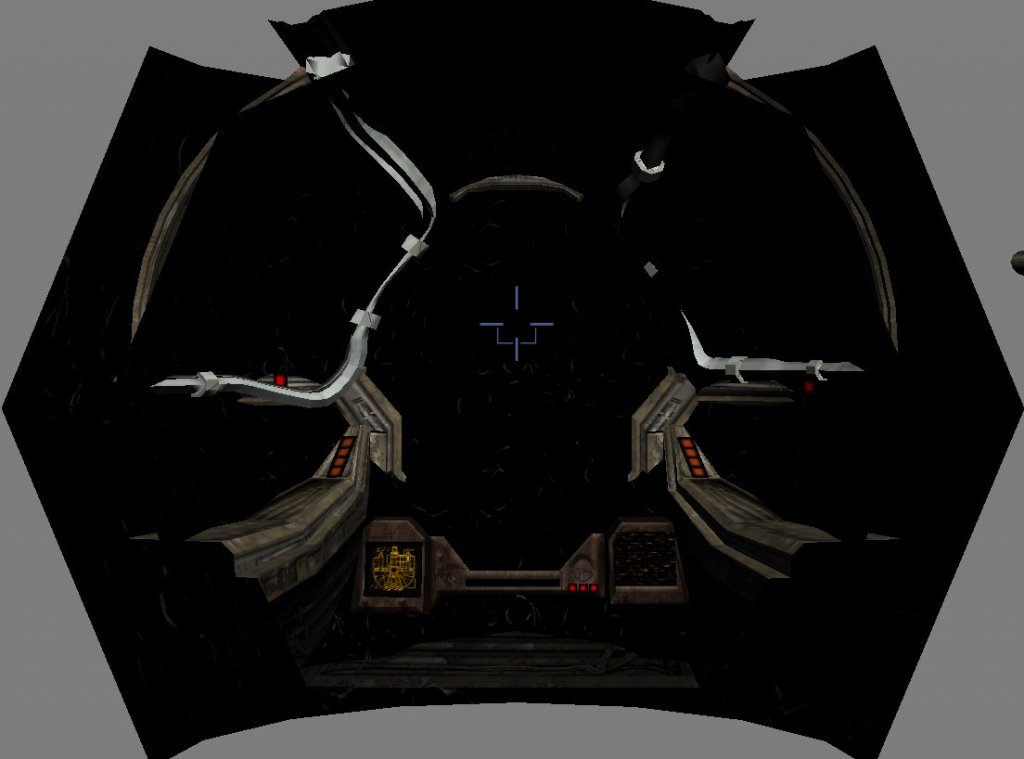
-
Where does this texture show up in KotOR1?
DarthParametric replied to Sith Holocron's topic in General Kotor/TSL Modding
The only models in either game that reference it are MGF_carthturret and MGF_turlights (the former comprising the majority of the turret window and surrounds, the latter being some additional computer panels), both in K1. Both would appear to be part of the turrent minigame, but I see no reference to them in any layout. Looking at mgf_ebonhawk.lyt, it only references MGF_turretcam. I would guess MGF stands for something like "Mini-Game Fighters". -
 While that is no doubt why Bioware made him orange for the PC version, he is called green by Rickard at one point, hence the change. There's an alternative solution to the problem, which may be addressed at some point in the future.
 -
Entry #7 - The Prodigal Knight: OUT NOW
DarthParametric commented on DarthVarkor's blog entry in Darth Varkor's KOTOR Machinima Saga: Production Blog
I can barely remember what happened yesterday, much less whenever that must have occurred.