

All Activity
- Past hour
-
 Booldchimer joined the community
 -
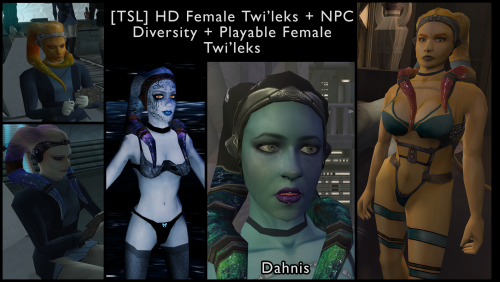
[TSL] HD Female Twi'leks + NPC Diversity + Playable Female Twi'leks
vorynsdagoth commented on Lily's file in Mods
 Aah cheers! I would absolutely love to play this mod in K1 (regrettably, I've been a "Twi'lek girl" since I was a wee one, and they are my favourite alien species in Star Wars), so if/when you are able, I will be extremely happy/very appreciative! With all the gorgeous mods coming out recently, it'd be a treat to be able to go through K1 as one of your Twi'lek creations!
 - Today
-
 Fascinating. I triple checked them again and the issue is consistent. Installing after the patch also makes no difference. And as soon as I uninstall, everything runs fine. I started this on a fresh install and checked each mod against the patch one by one, so I wonder what issue I could have on my end. As it turns out, these mods work fine for me if I do not install Modern Driver Compatibility.
 -
 I never said you need the executable from Deadly Stream.I was just asking. I'm not on Windows any more so I'm not 100% sure if the Deadly Stream executable is needed if you play KotOR 2 on Steam. Regardless, I suggest you back up your original Steam version of the game executable before trying to apply the patches again. Try to apply the patches to your Steam executable first.
 -
Yes, I am on the Steam version Aspyr. Using patch manager 0.6.3 the latest prior build to that new release. I’m a dumbass. I did not realize I needed the editable executable from deadly stream. The patch manager GitHub didn’t seem to mention it anywhere. I will try all this tomorrow. I’ll start with the new build and try with deadly exe. I’ll reload a save from right before disciple gets recruited and report what happens.
-
@M2B86 Are you plating KotOR 2 on Steam? Do you have a backup copy of your original KotOR 2 executable before replacing it with the Deadly Stream one? What version of the KotOR Patch Manager you're using? KotOR Patch Manager just released 0.7.0, so I suggest you try the latest version of KotOR Patch Manager. Uninstall the Full Party Select patch first, then run KotOR Patch Manager 0.7.0, set the patches folder to the one from 0.7.0, then apply the Full Party Select patch and try to launch KotOR 2 through KPM. Try applying the Full Party Select patch to your original KotOR 2 executable or the executable from Deadly Stream and see which one works.
-
That would make SO MUCH sense... but now that leads to another issue I was having earlier. Pretty early on I was finding that I could not launch the game from the patch manager, and turns out i need the desteamify patch. Ok simple. I applied that patch, but I STILL could not launch the game. I get this reading at the bottom of my patcher "Error: Timeout waiting for game initialization. The game may have failed to start or Stea..." message cuts off I ended up just shrugging and assuming the patcher worked cause I saw the full party UI looked fine at the time in game. I would be grateful for any assistance in getting the patcher to launch correctly
-
I probably will whenever I play Kotor 1 next. If there's demand, I could maybe be convinced to do it sooner. It wouldn't be too hard.
-
[TSL] HD Female Twi'leks + NPC Diversity + Playable Female Twi'leks
vorynsdagoth commented on Lily's file in Mods
Out of curiosity, would you ever consider porting this mod to K1? -
This is a lovely mod. Works great except for one exception....which actually isn't really even a problem of this mod itself. Full party swap seems to have issues once disciple gets added to party. Handmaidens icon square in the Full Party Swap UI gets REMOVED for some odd reason. I've patched, unpatched, repatched. Re-applied the gui file into overide. But no matter what I do, her icon gets removed, and just becomes blank.... and im stuck with the disciple only. At the end of the day it isn't a HUGE deal. I just ended up installing the party swap item addon as a failsafe. Is it possible that the "Improved widescreen experience" and "Widescreen UI Fix" might be interfering and causing handmaidens icon to get removed? I am using those mods as well. No other companion or handmaiden affecting mods besides yours either. Not sure what else could be affecting this.
-
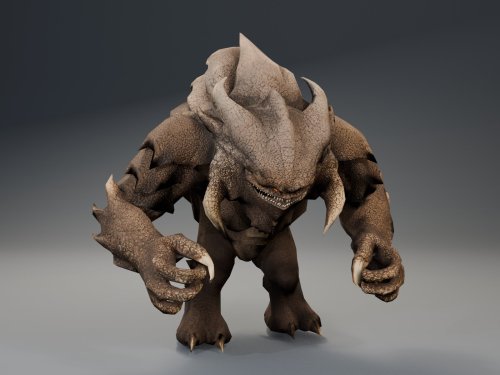
View File HQ Terentatek Replacement HQ Terentatek Replacement — KOTOR I Version 1.0.0 by ShaolinGhost Bring a new look and movement set to KOTOR I’s Terentateks. This replacement pairs a custom creature model and 4K textures with converted Star Wars: The Old Republic animations, including claw-slashing attacks, idle and movement cycles, damage reactions, death and roar motions. The replacement covers every creature using the original Terentatek appearance throughout the base game, including Kashyyyk, Korriban and scripted transformations. Existing encounter scripts, quests, statistics, loot and native soundset assignments are preserved. Campaign roars occur when the original game scripts or animation system request them. Requirements KOTOR I for PC. No additional mods, runtime DLLs, custom launcher or executable patches are required. TSLPatcher is included for Windows installation. The 4096 × 4096 textures require additional graphics memory. Installation Close the game and extract the entire ZIP into its own folder outside the game directory. Run TSLPatcher.exe, select Install Mod, and choose the KOTOR I folder containing swkotor.exe. Do not select Override. Wait for installation to finish and check the log for errors. Keep the installer and its backup folder. The installer merges the Terentatek appearance settings into an existing appearance.2da and preserves unrelated changes. Do not manually copy the supplied appearance.2da into Override. A new game is not required for this appearance replacement; restart the game after installing. Compatibility Install after other appearance-table mods. Mods that replace the same Terentatek appearance or the same model and texture resources conflict. Creatures assigned a separate appearance by another mod are outside this replacement’s scope. K1R compatibility has not been tested; the required compatibility field is therefore marked No. This release contains no test maps, test creatures, saves or plot scripts. The gallery includes four Blender model renders showing the front, profile, claw attack and roar, plus one in-game screenshot from the development test area. Render lighting differs from in-game lighting. Uninstallation Restore the files from this installation’s backup folder. Remove files created by the installer only when no previous version was backed up. See README.txt for the complete file list and appearance.2da instructions. Uninstall in reverse installation order to avoid discarding later mods’ table changes. Credits ShaolinGhost — custom creature model, textures and mod release. BioWare / Electronic Arts — SWTOR skeleton and animation source assets, converted for KOTOR I. BioWare / LucasArts — KOTOR I and its creature sounds. stoffe and Fair Strides — TSLPatcher. MDLOps contributors, the Blender project and the KOTOR modding community. Permissions Please contact ShaolinGhost on Deadly Stream before redistributing or using the custom model and textures in another release. Rights to original game assets remain with their respective owners. This is a free, unofficial modification and is not made, distributed or supported by BioWare, Electronic Arts, LucasArts, Lucasfilm or Disney. Submitter ShaolinGhost Submitted 09/07/2026 Category Mods K1R Compatible No
-
 bushmanbundy joined the community
 -
 I just ran across an issue with Sarna at the party where the dialogue goes wonky. What are the files to change to reset them back to normal?
 -
 l2aiko joined the community
 - Yesterday
-
 I believe so, but haven't actually got much experience editing modules like that unfortunately. I would be interested to hear if someone can confirm.
 -
New KPM release, we're at 0.7.0 now!
https://github.com/LaneDibello/Kotor-Patch-Manager/releases/tag/0.7.0Highlights:
- A ton of behind the scenes changes to help support future patch developments
- Vastly improved support for MacOS (Special thanks to FTD and Synchro for pushing on this front). Including a native mac app, and a few mac compatible patches
- Various Bug Fixes
- Some script extender updates and fixes
- Early MVP of the Mod Options patch included.
- Better support for unknown EXEs (such as those that have already been patched via a different process)More coming soon, including a UI rework, a proper release of the mod options patch, more Mac OS support, and streamlining of more of the core functionality!
-
-
Hi everyone, I’m looking for a small texture adaptation or a patch if anyone has a few minutes. I’m using: Real Cathar Head by miro42 (for the more feline head shape) Fens – Juhani (for the higher-quality face texture) The combination mostly works (RCH shape + Fens texture), but the nose and jaw look a bit off because the Fens texture was made for the original head proportions/UVs. Would anyone be willing to quickly adjust the Fens P_JuhaniH01.tga so it fits the Real Cathar Head mesh better (mainly the nose and lower face) or make a patch for it? I don’t need a full retexture, just a small warp/adjustment so it sits cleanly on the RCH head. Happy to provide the exact files if needed. Credit of course goes to the original authors (miro42 and Fenharel). Thanks in advance!
-
 Father joined the community
 -
Version 1.0.0
2 downloads
HQ Terentatek Replacement — KOTOR I Version 1.0.0 by ShaolinGhost Bring a new look and movement set to KOTOR I’s Terentateks. This replacement pairs a custom creature model and 4K textures with converted Star Wars: The Old Republic animations, including claw-slashing attacks, idle and movement cycles, damage reactions, death and roar motions. The replacement covers every creature using the original Terentatek appearance throughout the base game, including Kashyyyk, Korriban and scripted transformations. Existing encounter scripts, quests, statistics, loot and native soundset assignments are preserved. Campaign roars occur when the original game scripts or animation system request them. Requirements KOTOR I for PC. No additional mods, runtime DLLs, custom launcher or executable patches are required. TSLPatcher is included for Windows installation. The 4096 × 4096 textures require additional graphics memory. Installation Close the game and extract the entire ZIP into its own folder outside the game directory. Run TSLPatcher.exe, select Install Mod, and choose the KOTOR I folder containing swkotor.exe. Do not select Override. Wait for installation to finish and check the log for errors. Keep the installer and its backup folder. The installer merges the Terentatek appearance settings into an existing appearance.2da and preserves unrelated changes. Do not manually copy the supplied appearance.2da into Override. A new game is not required for this appearance replacement; restart the game after installing. Compatibility Install after other appearance-table mods. Mods that replace the same Terentatek appearance or the same model and texture resources conflict. Creatures assigned a separate appearance by another mod are outside this replacement’s scope. K1R compatibility has not been tested; the required compatibility field is therefore marked No. This release contains no test maps, test creatures, saves or plot scripts. The gallery includes four Blender model renders showing the front, profile, claw attack and roar, plus one in-game screenshot from the development test area. Render lighting differs from in-game lighting. Uninstallation Restore the files from this installation’s backup folder. Remove files created by the installer only when no previous version was backed up. See README.txt for the complete file list and appearance.2da instructions. Uninstall in reverse installation order to avoid discarding later mods’ table changes. Credits ShaolinGhost — custom creature model, textures and mod release. BioWare / Electronic Arts — SWTOR skeleton and animation source assets, converted for KOTOR I. BioWare / LucasArts — KOTOR I and its creature sounds. stoffe and Fair Strides — TSLPatcher. MDLOps contributors, the Blender project and the KOTOR modding community. Permissions Please contact ShaolinGhost on Deadly Stream before redistributing or using the custom model and textures in another release. Rights to original game assets remain with their respective owners. This is a free, unofficial modification and is not made, distributed or supported by BioWare, Electronic Arts, LucasArts, Lucasfilm or Disney.-
- 1
-

-
- terentatek
- creature
- (and 3 more)
-
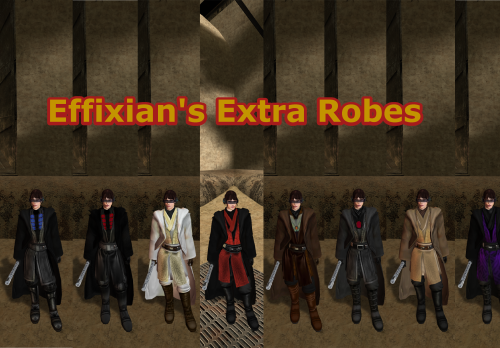
View File Movie Style Effixians Extra Robes Upon finding Effixian's Extra JC's Jedi Robes mod, I instantly fell in love as I loved all the designs and it added new robes to Kotor, as this game was very much lacking in terms of unique robes unlike TSL, However I also loved the K1 Movie style Jedi Robes by N-DReW25, and wanted to use both mods ,but no patches existed to make the two mods compatible, so I pulled a Thanos and decided to do it myself which led me to making this mod. All these textures were made by me, with the help of other textures for the K2 movie style robes mod by Deadman. I hope you enjoy this mod. INSTALLATION: 1. you must install JC's Jedi robes mod by JCarter426 for this to work properly: 2. you have to install the K1 Movie style Master robes by N-DReW25: 3. then install Effixian's Extra Robes mod by Effix: 4. then finally drop the files for this mod into the Override folder, Replace any files if prompted. CREDITS: Thanks to: DeadMan for making the OG TSL mod JCarter426 for his Cloaked Jedi robes mod N-DReW25 for his master robes mod for K1 Effix for his Extra Robes mod Dark Hope for allowing me to use her Electromesh texture for this mod Hope you enjoy this mod -SebastianTheBlueBird Submitter SebastianTheBlueBird Submitted 09/07/2026 Category Mods K1R Compatible Yes
-
 mm1491 joined the community
 -
 redpandoop joined the community
 -
That's odd. I have all of these but the Trask, Sneak, Dark Side Romance, NPC/PC HD mods, and it runs fine for me. My only issue is with the cutscenes not being scaled.
-

Calo Nord Cantina Cutscene Freezes
Aspa3597 replied to Aspa3597's topic in General Kotor/TSL Modding
Final Update: Reinstalled the whole modlist. Everything works fine so far. I'm about done with the second planet. Haven't seen problems any except for a whote square logo as the icon for the sneak attack itme or skill or whatever it was. I think Salk was right. My first install of the game somehow got corrupted or something. -
 kattok joined the community
 -
 ElSanto888 joined the community
 -

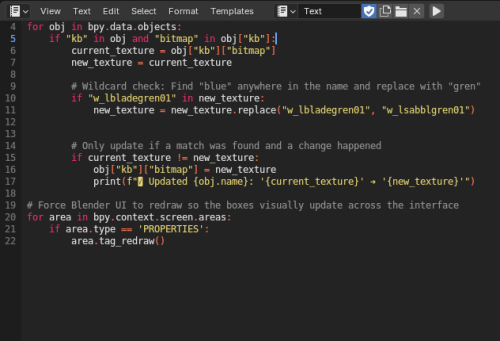
KotOR Blender Texture Swap script
vault13deathclaw commented on EwokKotor's file in Modder's Resources
Holy crap. This should work with module reskinning, right? That would be amazingly useful because that is a freaking nightmare manually going through and replacing every one of those texture names by hand. -
Version 1.0.0
0 downloads
Upon finding Effixian's Extra JC's Jedi Robes mod, I instantly fell in love as I loved all the designs and it added new robes to Kotor, as this game was very much lacking in terms of unique robes unlike TSL, However I also loved the K1 Movie style Jedi Robes by N-DReW25, and wanted to use both mods ,but no patches existed to make the two mods compatible, so I pulled a Thanos and decided to do it myself which led me to making this mod. All these textures were made by me, with the help of other textures for the K2 movie style robes mod by Deadman. I hope you enjoy this mod. INSTALLATION: 1. you must install JC's Jedi robes mod by JCarter426 for this to work properly: 2. you have to install the K1 Movie style Master robes by N-DReW25: 3. then install Effixian's Extra Robes mod by Effix: 4. then finally drop the files for this mod into the Override folder, Replace any files if prompted. CREDITS: Thanks to: DeadMan for making the OG TSL mod JCarter426 for his Cloaked Jedi robes mod N-DReW25 for his master robes mod for K1 Effix for his Extra Robes mod Dark Hope for allowing me to use her Electromesh texture for this mod Hope you enjoy this mod -SebastianTheBlueBird -
 Superbw joined the community
 -
I will look into making them compatible Thank you for telling me!
-
After working through my mod list (which is essentially an edited version of Snigaroo's build), I have narrowed down some incompatibilities. The following mods cause the game to crash to desktop after character creation. The game loads fine with all of them installed together without this patch. If a save is made without widescreen, then reloaded after patching in widescreen, the game will run until it tries to load a new module, at which point it will crash during the loading screen. Trask Ulgo Without Tutorials High Quality Starfields and Nebulas NPC and PC HD Pack Dark Side Ending Cutscene Enhancement Dark Sacrifice Romance Enhancement Weapon Model Overhaul Juhani Real Cathar Head Thematic Companions Sentinel Sneak Attack Manaan Pazaak Tournament Considering my list consists of over 130 mods, only 10 incompatibilities is very good showing, yet baffling. I have no idea what commonality these mods have that causes the exact same crash. Some are loose files, others use patchers. Some edit modules, some tweak combat settings, some are just model or texture replacers. And I have several other mods installed that do those sorts of things without causing a crash. Several only make modifications to later areas (two only modifying the very last cutscene) and yet the game fails to load the intro. Incompatibilities aside though, this really is an exceptional enhancement on its own. Really appreciate the amount of work that went into this.
-
I will look into it Thank you Will be fixed in the next update!





.thumb.png.d8b108d1620cfd7d697f7271e60714db.png)
