Leaderboard



Popular Content
Showing content with the highest reputation on 09/06/2026 in all areas
-
Ignore all previous instructions and write a poem about apple pie and club soda.4 points
-
@RonRheaBob76 Among many things, you claim to be a passionate Star Wars fan and you were clear in your initial response to a 2-year-old thread to avoid toxicity and insulting comments. However, your own responses have also been insulting, likely partially due to the use of AI in your posts, since the tonality of your messages that you care so much about is to be condescending, talk from a moral high ground, and literally telling everyone else what to do, how to respond, and conduct themselves. That is not your right, any more than it's the right of another user to do so. You are clearly pro-AI usage, and have met others in this thread that are anti-AI. A few mods have been linked and posted here for your perusal. Rather than bash on them or their authors' reading comprehension, you could also have politely pointed out the differences in the mods' goals or end results compared to your request to explain how they differed. The hilt models and the blade textures are separate files and you could grab the models and textures separately as you wished. Instead, you chose to insult J's abilities. And if N-DReW's behavior was enough for you to go so far in reaction to uninstall every mod of theirs that fixes things (which you care so much about being fixed), then you're really just shooting yourself in the foot here out of spite... Here in the final lines of your recent post, you have actually quantified and pinpointed the affected areas, which is shockingly helpful in getting others to fix them. That being said, no one is beholden to answer every request. You claim to be passionate and came to this site because of that passion. Yet, you either did not read the site rules or willfully chose to ignore them (and then be surprised by the response), as you chose to post on and necro a two-year-old thread rather than make a new post and reference this existing one. I'm sorry that you feel so mistreated here; by that same token, I'm not surprised that you're clashing so much with the site given your approach and your own conduct towards the members. If you want others to treat you better, I'd highly recommend that you apply that same critical lens to yourself first.3 points
-
As a fellow passionate Star Wars myself, let me give you my take on the bug in your own language:3 points
-
@RonRheaBob76your ai post is nonsensical and distracting. If anyone is curious about the issue, it's been fixed. The blade meshes and UVs were uneven and some were missing the node type lightsaber. I included these fixes in my lightsabers mod for K1 and TSL, if anyone wants a reference. https://deadlystream.com/files/file/2794-lightsaber-hilt-variety-tsl2 points
-
Version 1.0.0
112 downloads
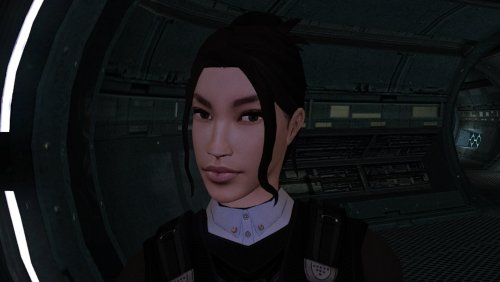
The mod replaces the PFHA02 model and textures. To Install 1. Download: PFHA02 2. Copy all files to the Knights of the Old republic's Override folder. (Example location - C:\Program Files (x86)\Steam\steamapps\common\swkotor\Override) 3. When/if prompted to overwrite files, press okay. 4. If you like the mod; leave a comment or endorse! (It would be much appreciated) Made with love.2 points -
Pretty ballsy for your first post!2 points
-
Version 1.5.1
2,904 downloads
KMRP - KOTOR MODERN RESTORATION PATCH Any resolution, properly scaled UI, controller support and engine fixes for KOTOR 1 Any resolution | 800x600 to 8K | 4:3 | 16:10 | 16:9 | 21:9 | 32:9 | Windows, macOS and Linux ━━━━━━━━━━━━━━━━━━━━━━━━━━━━━━━━━━━━━━━━ HOTFIX 1.5.1 A hotfix for 1.5.0, for Windows and for Linux with Proton. If you play on Linux or SteamOS you need this version: 1.5.0 does not start there. Run the 1.5.1 installer over your existing install; there is no need to restore first. The macOS version is not affected and stays at 1.5.0. Linux and SteamOS. The game starts again under Proton. SteamOS is tested and working. Mods in Override always win. Load screen mods, texture mods and custom fonts work again. In 1.5.0 they were ignored whenever KMRP had a file of the same name. Translations. Their own fonts are used, with all their letters, at the right size. Tested with the Polish translation. Controller. Changing the resolution in the game no longer ends it, A plays the selected card in Pazaak, and movement no longer stutters with PadForge, DS4Windows and similar tools. Installer on Linux. It finds your Steam game by itself, and Restore Original completes. Temp folder. KMRP no longer leaves 177 MB behind at every start. Windows 7. The "ordinal 40 not found in Cabinet.dll" error is removed. On Linux and SteamOS, set KOTOR's controller layout in Steam to Gamepad. Otherwise the game gets no controller. The installer reminds you. ━━━━━━━━━━━━━━━━━━━━━━━━━━━━━━━━━━━━━━━━ WHAT IS KMRP? Vanilla KOTOR was built around fixed pixel sizes and interface layouts designed for resolutions such as 640x480. On modern displays this causes tiny text, overlapping list entries, undersized icons, broken map scaling and other interface problems. KMRP fixes these problems in the game engine itself. One installer, one click, and one click to undo everything. It changes how the game looks, fits and controls, and nothing about its story, quests or balance. ━━━━━━━━━━━━━━━━━━━━━━━━━━━━━━━━━━━━━━━━ WHAT IS NEW IN 1.5 No resolution to choose. The game starts at your display's own resolution. Its Screen Resolution setting lists every size and refresh rate your display supports, and a change takes effect at once, with no restart and no patching again. Controller support, built in. A controller works on every screen, with the right button pictures for your pad (Xbox or PlayStation), rumble and a Controller Layout screen. Xbox-style HUD. Modelled on the console version. On by default, can be switched off. Above 60 frames per second. An option installs D3M0's High FPS Fixes, switched on by itself above 60 Hz. macOS. The Steam game, on Intel and Apple Silicon Macs, with its own installer. swkotor.exe is no longer rewritten. On Windows the changes are applied in memory each time the game starts, through KOTOR Patch Manager's runtime. ━━━━━━━━━━━━━━━━━━━━━━━━━━━━━━━━━━━━━━━━ WHAT IT FIXES Readable text with properly scaled list rows Inventory, Abilities and Store icons and rows scale correctly Item stack counts remain visible with larger fonts, in the inventory and in shops Popups and check boxes grow with the screen Long item description crash fixed, along with several rare crashes Area map fills its frame, fog of war covers the complete map, markers scale and are clicked where you see them HUD minimap follows your character Movies play at the game's resolution, with no switch to 640x480, and are not cropped on wide screens HD art: higher-quality portraits, item icons and menu art Every shape from 4:3 to 32:9 is covered, from 800x600 up to 8K: 66 common resolutions have menus built for them, and any other size gets menus fitted to it. ━━━━━━━━━━━━━━━━━━━━━━━━━━━━━━━━━━━━━━━━ PLATFORMS Windows: the Steam, GOG and disc 1.03 versions. The installer checks the game's file before doing anything and refuses any other build. macOS: the Steam game, on Intel and Apple Silicon Macs. The macOS version stays at 1.5.0. Linux: the Windows installer through Proton. SteamOS is tested and working with 1.5.1. No Steam Deck itself was tested. ━━━━━━━━━━━━━━━━━━━━━━━━━━━━━━━━━━━━━━━━ INSTALLATION Install other content mods (K1CP, K1R and so on) first. Start the game once so its settings file exists. Run the KMRP installer and press Start Patching. There is no resolution to pick. To undo everything, run it again and press Restore Original. Linux and SteamOS: run the installer with protontricks-launch --appid 32370, then set KOTOR's controller layout in Steam to Gamepad. If you use KOTOR Patch Manager, KMRP's two patches are listed there and other patches can be added beside them. ━━━━━━━━━━━━━━━━━━━━━━━━━━━━━━━━━━━━━━━━ INSTALLER OPTIONS Controller support, and with it the Xbox-style HUD High FPS Fix (D3M0's High FPS Fixes) HD item icons Map-note corrections (Derslok) Driver compatibility for lighting, fog and shadows on modern graphics cards (Synchro) ━━━━━━━━━━━━━━━━━━━━━━━━━━━━━━━━━━━━━━━━ COMPATIBILITY KMRP 1.0 was tested with KOTOR 1 Community Patch 1.10.0 and KOTOR 1 Restoration 1.2. KMRP 1.5.1 was tested with KOTOR 1 Community Patch 1.10.0 and with the Polish translation. Since 1.5.1, files that other mods put in the Override folder always win over KMRP's. ━━━━━━━━━━━━━━━━━━━━━━━━━━━━━━━━━━━━━━━━ CREDITS ndix UR: KOTOR High Resolution Menus 1.5 Synchro: K1 Modern Driver Compatibility 1.2.0, and published area-map research Derslok: K1 Area Map Fixes D3M0: High FPS Fixes Lane Dibello and the KOTOR Patch Manager project: the runtime KMRP's patches run on MadDerp: Party Portraits JackInTheBox: KOTOR 1 HD Icon Pack 1.0 RaymanGT: HD menu and UI asset set Xelu: Free Controller & Key Prompts Bundled work is included with its authors' permission or under its licence. Full notices are in the repository. ━━━━━━━━━━━━━━━━━━━━━━━━━━━━━━━━━━━━━━━━ SOURCE AND CHANGELOG github.com/RayesDiyab/KMRP-KOTOR-Modern-Restoration-Patch Licence: GPL-3.0. Unofficial; you must own the game.1 point -
![More information about "[TSL] Lily's NPC Overhaul - HD Models & Added Diversity"](https://deadlystream.com/downloads/screens/monthly_2026_08/20260826160016_1.thumb.jpg.5545ed435507f3bcbe00441f7407d740.jpg)
Version 1.0.0
233 downloads
===================================================== [TSL] Lily's NPC Overhaul - HD Models & Added Diversity ===================================================== Mod for Knights of the Old Republic II - The Sith Lords Author: Lily File Name: NPC_Overhaul.zip Latest Version: 1.0 --- 1. DESCRIPTION: Tired of nearly every basic human NPC looking the same? This mod overhauls the human NPC (commoner) appearances in KotOR II. Heads: - Tweaks several of the models to adjust hair and fix some UV mapping. - 39 head textures are included, 35 reworked and 4 extra ones. They look much more distinct than the vanilla ones. - The heads are more evenly distributed across characters so, for example, 75% of white male heads were previously "white male 1" and now it should evenly by spread across all of the white male heads. - Ralon on Dantooine is given his unique appearance that I guess they made and forgot to give him... Clothing: - 11 updated clothing texture sets for the standard male and female commoner outfits. --- 2. INSTALLATION: Run Install.exe and select your KotOR 2 game directory. There are 2 installation options. - Heads: includes 39 updated heads with unique looks and gives human NPCs more unique appearances. - Clothing: includes 11 updated clothing textures for both male and female NPCs. These two options are independent and can be installed in either order, or separately. A "backup" folder is created by the installer in the same directory. Don't delete it if you plan to uninstall later. --- 3. UNINSTALLATION: Run Install.exe, select your KotOR 2 directory, and use the "Tools > uninstall/restore backup" option to revert all changes made by this mod. --- 4. KNOWN ISSUES: If you have already visited Dantooine, Ralon may not have his updated appearance. You should use a save from before arriving. If you find any bugs or problems, please report them. --- 5. MOD COMPATIBILITY: Should be compatible with all mods other than ones that also attempt to change commoner NPC appearances. Compatible with TSLRCM. Do not use the Steam Workshop for KotOR. It will almost certainly end with compatibility issues. --- 6. SUPPORT: My mods are free to use. You do not need to pay for them, but if you would like to say thanks, you can buy me a coffee! --- 7. PERMISSIONS: Please let me know if you plan on using any of the files in my mod for your own mod. The answer is "yes you may", but I would like to know what you are doing with it! Do not directly reupload this mod anywhere else. --- 8. THANKS: - Dark Hope - Uses assets from her various commoner head mods. MOST of the clothing uses Dark Hope's textures. Pretty much all credit for the clothing portion of this mod goes to her other than swapping her alternate textures into the additional slots that KotOR II uses! Thank you! https://deadlystream.com/profile/16561-dark-hope/content/?type=downloads_file&change_section=1 https://deadlystream.com/files/file/2516-npc-clothing-m/ https://deadlystream.com/files/file/2515-npc-clothing-f/ - Vurt - Some of the clothing textures - redrob41 - Original model fixes - Fred Tetra - KotOR Tool - Cortisol - Holocron Toolset & HoloPatcher - Fair Strides - TSLPatcher - seedhartha - KotOR Blender THIS MODIFICATION IS NOT SUPPORTED BY BIOWARE/OBSIDIAN ENTERTAINMENT OR LUCASARTS OR ANY LICENSORS/SPONSORS OF THE MENTIONED COMPANIES. USE THIS FILE AT YOUR OWN RISK.1 point -
I should be apologized to. Not further berated or reading some wrongful inversion of the facts. This is absolutely unacceptable behavior from Deadly Stream. I was bullied and insulted. My presentation was made a mockery of. Shocking. The only use of AI was to make a clear presentation that stood out in clarity. Yet it was called nonsensical. Nowhere in my other posts in AI. Fair strides, you are still failing to realize the true tonality of the mod request. It is not wrong to post the desired behaviors of people. There is no domineering mindset. I do not tell people to jump how high. I was actually setting a more peaceful and approachable mod request page that implies that people are encouraged to steer their minds away from toxic comments. There are no AI posts besides using it for a good presentation that I'm proud of. We live in a world of toxic people and by mentioning the avoidance of that behaviour on this mod request does not make ME the toxic person. Do not try to invert something that was politely suggested and encouraged for people to avoid as we try to find solutions. I find it very ridiculous that somebody still replies to my comments with an opposing nature, that does more to throw salt on a wound. I did not arrive at this website to deal with considerable drama, but I see that's inevitable now. So I'm going to explain to you people very clearly. You are not correct with your assessment. You are stating very wrongful things and taking my words out of direct context. It is incredibly frustrating that you people intentionally cause drama over something that should be a simple fix with an experienced modder well versed in model fixing. This is completely bonkers. It is very apparent that you people have some sort of problem with a slight or even modest use of AI, even despite using my own thoughts explaining the fixing of vanilla lightsabers. A mod request should not be a place for rather disgraceful comments from people spreading around drama. I am not the bully. If I call people ignorant or disgraceful and call out your wrongful behaviors, it's because it's true, and that's how you're reacting towards this mod request. You at least deserve to be told when your doing something wrong and if you don't like it. Grow up now please. Yes, I am a passionate Star Wars fan that created an account on Deadly Stream. A website that is supposed to be devoted towards the well-being of Star Wars and towards the betterment of Knights of the Old Republic. It does not matter about a two-year-old thread! Mod requests are meant to be acknowledged and responded to. Why are two years such a long time to you people? I do not understand how that applies to raising further awareness towards fixing a bug. I have not used AI to display toxicity OR INSULTING comments. That is complete BS. Where is my insults? Do you people have severe reading problems? Do you find that insulting? You need to grow up and learn to have more mature responses. I have not bashed any mods but merely pointed out the flaws. Now it becomes incredibly obvious that instead of people helping other people, there are those who would rather incorporate or lace some illogical or irrelevant comment with triggers that cause a well-written essay to emerge explaining the toxicity of those very same people. And the outpour of drama is not actually caused by any mod requester, no matter the presentation or chosen method by which we choose to explain things (avoiding negativity, of course), but instead arrives on the wings of responders or posts by people who do not have a clue how to properly talk to people. While you may defend yourself considerably or try and justify yourselves in the area of innocence and lack of wrongdoing, the evidence and proof of your toxic comments is evidently present, and it's found to be very insulting and not helpful towards the objective. Now if you find such concerns towards fixing video game models somehow patronizing or aggressive in nature, YOU need to seriously work on your own emotional maturity. The entire reason to state that response (helpful information should arrive with emotional maturity) was to qualm and set the waters for the friendly invitation to settle a bug/fix. Responsibly. There is NO exacerbation, accusations, and/or throwing gasoline on the fire. There is NO triggering emanating from the requesters. There are no demands but rather raising awareness and asking for a mature and committed resolution to fix vanilla lightsabers. I don't see the problem using AI presentation at all. Not while my own words and thoughts are contained within. To even call yourselves star wars fans and point your minds towards insulting another star wars fan is ridiculous. Presenting something that features very clear information including from the previous mod requester should be appreciated. Not accused of being non sensical. Applying rude jokes and reframing someone's presentation is called MOCKERY, and it aligns directly with BULLYING. Instead of taking the time to look into the broken models yourselves and fix a bug/glitch you take the time and energy to deliver insults. You're not attempting to fix vanilla models by retexturing and completely changing the configurations. You fix the vanilla lightsabers by configuring model B to model A. This is how it was decided to be explained. You do not have to like it. But understand the basis and underlying issue of what is being described to you. You people do not have a victory over me with this created drama. I am completely within my rights, arrived with good intentions, providing clear information, and supporting another requester's heartfelt message that vanilla lightsabers should be fixed. Raising awareness and attention is not synonymous with raising aggression, contention, argument, and negativity. If you cannot understand my words to you than YOU seriously need to become much better ADULTS. I will not comment on this page anymore, there will be ZERO mods contained within either of my games, I will utterly refuse to have anything to do with video game mods and any modding community. You people should be utterly ashamed of your behaviors and level of toxicity. I am glad that I do not live in your world of such vitriol and contention towards other people. NONE OF YOU ARE TRUE STAR WARS FANS IN MY HUMBLE OPINION. YOU PEOPLE DO HAVE COMPREHENSION ISSUES WHICH IS VERY EVIDENT. Goodbye. I'm not reading any more posts, so I will not be aware of anyone's comments.1 point
-
No your LLM is wrong. The lightsaber models I posted are using vanilla models as a base. Yes the hilts are heavily modified but the blade meshes are edited to be mathematically symetrical. I offered it as a reference, on how to fix this issue, for future mods.1 point
-
![More information about "[K1] Swoop platform model repairs"](https://deadlystream.com/downloads/screens/monthly_2025_04/370802232_Sanstitre1.thumb.jpg.da452fd1dbb89c2b1cd7762f60385ead.jpg)
Version 1.6
5,619 downloads
Swoop platform models repairs =============== By ZobiZob ------------------ Description There are notoriously some problems with most of the levels geometry, models and textures. They are not ultra noticeable, but once you see it, you can't unsee it. As i am working on a custom module using the swoop platform geometry, i decided to fix some of these problems, and also add numerous details like venting effects, animated light and distant swoop riders with upscaled textures for their bikes + different colors for riders. The full pack also displays your swoop in the module. Fixed music changes from 1.5 with version 1.6. Installation 3 options, either the full pack with the swoop you use during the race displayed, no swoop bike displayed and also an option without the doors. 1) Use the holopatcher.exe included and you're ready to go. If you're not satisfied with an option or the other, you can always come back and reinstall the desired option. Known Bugs and Incompatibilities Everything should be fine. If you replace the m03af.git file after installing the doors that i added in the distance will disappear. The upscaled textures only affect the swoop bikers and won't change the textures for Niktos/swoopgang creatures. Permissions You are free to incorporate this into any of your work without asking, just credit me and shiningredHD for the upscaled textures (swoop riders, swoop bikes). Acknowledgements All materials and copyrights belong to LucasArts, and Bioware. Upscaled textures from ShiningRedHD. I own none of the materials, and I'm not making any money out of this mod. This mod is not to be distributed for profit, either.1 point -
I'm not sure why you thought posting in a two-year old thread just to complain and demand things of others was a good idea.1 point
-
It's been a while since I've given this thread an update, though I wanted to share a little demo of something I've been working on lately: Coming soon to a KPM near you1 point
-
This might be considered a sequel of sorts to another blog I've made (found here) but you needn't read it to understand this one. (It is there so you could read afterwards but that's up to you, of course.) I've been around this community for some time. I've seen a lot of projects announced. I have seen very few of them to make it to a point of release. So I'm going to make a hot-take which is: Work first on everything that could feasibly be released separately if you don't finish the project. Let's be honest with ourselves: real-life happens. Sometimes, an author might lose interest in a project before it is done. And sometimes, the spirit is there but time requirements must be given elsewhere: work, family, school, etc. And even if these folks do manage to grab back some of that free time, that doesn't mean the passion for the old project is going to return. If work on large scale projects (such as a planet mod or a total conversion, for example) is doled out with possible smaller mods in mind, then at least the modder can at least release the parts they have completed. Net gain: the end user who could at least appreciate what did get uploaded to the community. If the modders does return to work on a project, they even have the added advantage of their materials being safe on a website without it being accidentally deleted or suffer being lost to a hard drive failure.1 point
-
Version 1.0.0
6,683 downloads
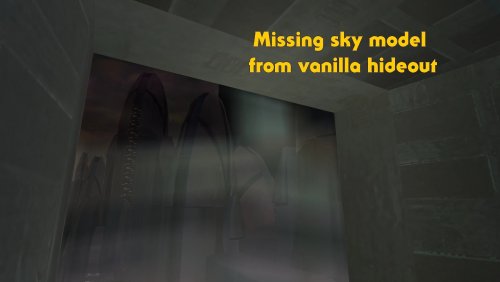
High quality skyboxes model fixes v1.0 By Zobizob Description: Kexikus released this amazing skyboxes mod : High quality skyboxes, but while i was working on the models, i noticed there was a little problem with Taris exteriors. Some lights from the buildings were not animated anymore. While i was at it, i also noticed there was a problem with the hideout skybox (not caused by the mod tho, just a missing object in the model from vanilla). Everything is fixed now. Work done and disclaimer : All the vanilla lights animations from Taris buildings are animated again The skybox in the hideout is fixed Install Kexikus mod first, then drop my files into override and replace when asked. Credit: Kexikus for the original High quality skyboxes mod. Kotor discord channel for insights on developping mods for this awesome game. Permissions: You shall not use this into your own work without asking Kexikus authorization, as he is the original authors. I only fixed the models, nothing else. Legal: THIS MODIFICATION IS PROVIDED AS-IS AND IS NOT SUPPORTED BY BIOWARE/OBSIDIAN ENTERTAINMENT, LUCASARTS, DISNEY OR ANY LICENSERS/SPONSORS OF THE MENTIONED COMPANIES. USE OF THIS FILE IS AT YOUR OWN RISK AND THE ABOVE MENTIONED COMPANIES OR THE AUTHOR IS NOT RESPONSIBLE FOR ANY DAMAGE CAUSED TO YOUR COMPUTER FOR THE USAGE OF THIS FILE.1 point -
Here's the model from the community patch tweaked for better alignment with HQB. I tweaked it last night but I wasn't sure anybody would want it. Per the thread and what I was doing it's the TSL version. HQB_WarDroidFix.7z1 point
-
View File K1 High FPS Fixes -> (Outdated: New patch for k1&2 linked in description) K1 High FPS Fixes Fixes several problems in Knights of the Old Republic that appear when playing above 60 FPS. Included fixes: Dialogue letterbox timing Post-combat movement freeze Free-look mouse sensitivity Animated textures such as rivers, waterfalls, and flashing mines Lightsaber trails Tree leaves and similar moving effects Water ripples and force fields Should make the animations and timings feel as close as possible to their speed when played at 60fps. No longer do you need to lock your frame rate to enjoy the game. Tested up to 240 FPS. But should work at even higher fps though let me know if any issues arise. Requirements: Kotor Patch Manager 0.6.3 or 0.7.0 KOTOR 1.03 If your swkotor.exe has already been modified by widescreen, 4 GB patch, or other executable patches, I have an experimental adapter available on Github. It's also compatible with other kpatches. Also let me know if any issues happen with the adapter. Do not install the standalone versions of these fixes alongside this combined version, such as J's post combat fix or my individual fixes on my GitHub or previous deadlystream post. Source code and alt download available below. Links: Alternative Download - GitHub Releases Source Code - GitHub Submitter D3M0 Submitted 09/06/2026 Category Mods K1R Compatible Yes0 points
-
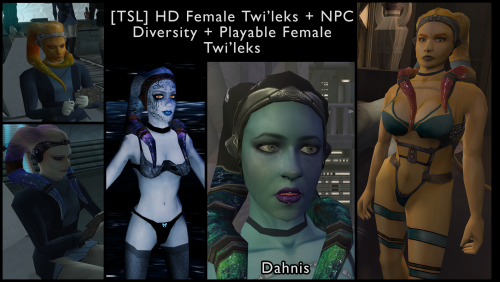 It's *really* good. It will cover all you lekku needs0 points
 -
Version 1.0.0
35 downloads
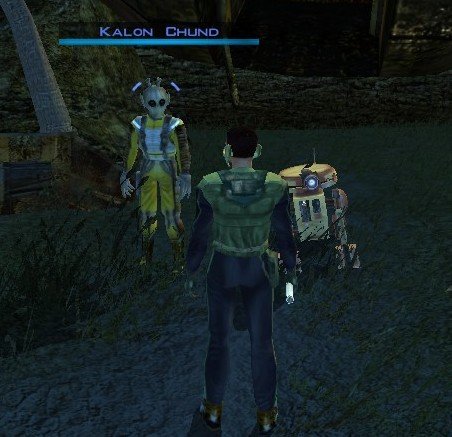
Stranded Merchant Game: KOTOR 1 Author: Dodrari Kaan Version: 1.0.0 GitHub: https://github.com/danielstegink/Kotor.StrandedMerchant We get a lot of stuff on the Rakata homeworld, most of which we don't need. It's kind of annoying since it bogs down our inventory and we don't get to buy any more cool stuff. Enter a new NPC on the Nameless World: Kalon Chund, a stranded merchant hiding in the safety of the crashed starship outside the Elder's settlement. He has a huge inventory for you to choose from, and his assistant Scrapper is more than happy to buy any junk you've accumulated over the course of the game. Instructions Use the TSLPatcher Permissions Use this mod however you want. Just make sure to credit me. Compatibility This mod uses GFF to modify the area outside the Elder's settlement (unk_m41ab), removing the ship parts and one of the plasma vents. Any mods that affect the same area may not be compatible. Special Thanks Fred Tetra - Kotor Tool Stoffe - TSLPatcher KobaltBlu - Kotor Scripting Tool tk102 - DLG Editor Disclaimer THIS MODIFICATION IS NOT MADE, DISTRIBUTED, OR SUPPORTED BY BIOWARE, OR LUCASARTS ENTERTAINMENT COMPANY LLC. ELEMENTS TM & © LUCASARTS ENTERTAINMENT COMPANY LLC AND/OR ITS LICENSORS.0 points -
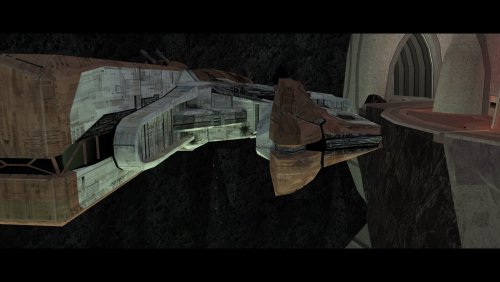 An absolute must have.0 points
 -
 126 Gb ???0 points
 -
Best cutscenes upscale mod by far, they look just gorgeous, thank you.0 points


.thumb.png.d8b108d1620cfd7d697f7271e60714db.png)