




About This File
=PartySwap=
A KNIGHTS OF THE OLD REPUBLIC II: THE SITH LORDS MODIFICATION
ORIGINAL AUTHOR: DarthTyren (darthtyren@gmail.com)
CURRENT MAINTAINER: Leilukin
LATEST VERSION: 1.5
FILE NAME: PartySwap 1.5.7z
CONTACT: E-mail to Leilukin at contact@leilukin.com, or message to Leilukin on Deadly Stream
1. DESCRIPTION:
This mod allows the player to recruit both Handmaiden and Disciple in the same playthrough regardless of the player character's gender.
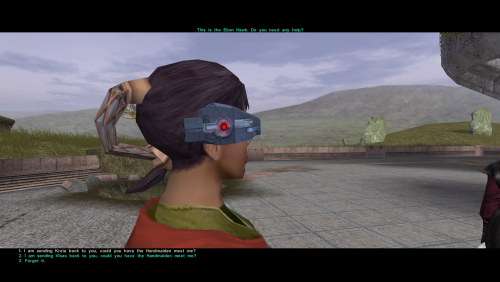
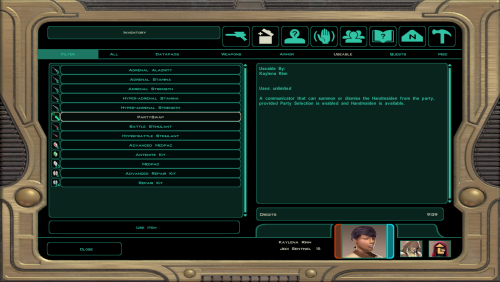
If you install the “PartySwap Item” add-on of this mod, when Disciple joins your party on Dantooine, a usable item named PartySwap will be added to your inventory, and will appear in the shield item slot of the quick bar. You can use this PartySwap item to add or remove Handmaiden from your current party, including replacing any member of your current party with Handmaiden, as long as you are able to choose your party at that point of the game. This item was created to work around the limitations of not being able to select Handmaiden from the party selection screen after Disciple joins your party and takes Handmaiden’s slot in the party selection screen. However, Handmaiden remains part of the Ebon Hawk crew, and you can still talk to Handmaiden.
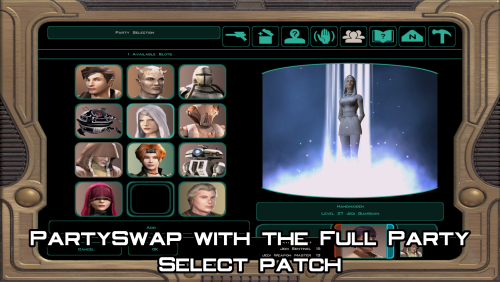
Alternatively, you can choose to install the “Full Party Select” patch from KotOR Patch Manager (KPM), which expands the number of slots displayed in the party selection screen, and thus allows you to add Handmaiden to your current party, or remove her from your current party, without needing to install the “PartySwap Item” add-on and use the PartySwap item.
For the PartySwap mod to take effect, you must install this mod before you leave the secret academy on Telos, where Handmaiden joins your party. For the “PartySwap Item” add-on to take effect, you must install the add-on before Discple joins your party on Dantooine.
NOTE: Since July 2023, the original mod author DarthTyren has officially handed over the management and development of this mod to Leilukin, due to DarthTyren's departure from the KotOR modding scene. Therefore, if you have questions about or encountered any issues with this mod, Leilukin is the one to contact for.
2. INSTALLATION:
First and foremost, make sure you have The Sith Lords Restored Content Mod (TSLRCM) installed, since TSLRCM is REQUIRED for this mod to work.
After downloading this mod, extract the mod’s 7z file to anywhere you like, as long as it is not within the KotOR 2 directory.
Run PartySwap Installer.exe located inside the extracted folder. You may only choose ONE of these two options to install the main part of the mod:
- Default Installation: Choose this option if you use TSLRCM without M4-78EP.
- M4-78EP Installation: Choose this option if you use M4-78 Enhancement Project (M4-78EP) in addition to TSLRCM. You must install M4-78EP first before running this installation option.
FOR REGULAR TSLRCM USERS:
Choose the installation option you want, and select your KotOR 2 game folder as your KotOR 2 directory path, click the “Install” button and let the installer do its job.
FOR STEAM WORKSHOP USERS:
If you have subscribed to The Sith Lords Restored Content Mod (TSLRCM) from the Steam Workshop, for your KotOR directory path, you must choose TSLRCM's Steam Workshop folder, NOT the main KOTOR 2 directory. The directory of the Steam Workshop version of TSLRCM is \Steam\SteamApps\Workshop\content\208580\485537937, while the directory of the TSLRCM + M4-78EP combined Steam Workshop mod is \Steam\SteamApps\Workshop\content\208580\1402798020.
Note that PartySwap will NOT be added to the Steam Workshop. Reading this on why it is NOT recommended to use the Steam Workshop for modding the KotOR games:
PARTYSWAP ITEM ADD-ON OR FULL PARTY SELECT PATCH:
To keep being able to add Handmaiden to your current party after Disciple joins your party, you have two options:
- Install the “PartySwap Item” add-on from this mod: After installing the main part of this PartySwap mod, select “ADD-ON: PartySwap Item” from the install option drop-down of PartySwap Installer.exe, and click the “Install” button. If you choose to install this add-on, you must install the add-on before Disciple joins your party on Dantooine to be able to receive the PartySwap item.
-
Install the “Full Party Select” patch from KotOR Patch Manager (KPM): (Note that it does not matter if you apply the Full Party Select patch before or after installing this PartySwap mod)
- Download and install KotOR Patch Manager.
- Extract the downloaded archive, then run KpatchLauncher from the “bin” sub-folder.
- If you are on Windows, it is recommended to check "Use library proxy" under the "Options" menu at the top bar, otherwise you may need to launch KotOR 2 through KPM for the KPM patches to take effect. This step is not required if you are on macOS or Linux.
- In the KPM window, set the "Game" path to target your KotOR 2 game’s folder that contains your KotOR 2 game executable (such as swkotor2.exe), and the "Patches" path to target KPM’s “patches” sub-folder.
- Select and apply the “Full Party Select” patch.
- Go to KPM’s “patch” sub-folder, then the “FullPartySelect additional files” sub-folder, and put the partyselect_p.gui file into your game’s Override folder.
When you install this mod, two new folders named "backup" and “uninstall” will be created by the installer in the same folder as the installer. Do not delete the folders or any of the files within the folder if you are planning on uninstalling this mod.
This mod also provides a compatibility patch for deathdisco’s Coruscant Jedi Temple and danil-ch's Kreia's Fall Cutscene (In-Game).Go to the “Compatibility Patches” folder from this mod, read the READ ME files within the sub-folders and follow the instructions to make PartySwap compatible with these mods. Go to the “Coruscant Jedi Temple Compatibility Patch” folder from this mod, read the READ ME files within the subfolder and follow the instructions to make PartySwap compatible with Coruscant Jedi Temple.
Note: The "Source" folder includes the source of the script used by this mod for modders' reference. Ignore the "Source" folder if you only want to install and play this mod.
3. UNINSTALLATION:
Run PartySwap Installer.exe. rom the “Tools” drop-down menu, select “Uninstall Mod / Restore Backup”, then confirm to uninstall the mod.
If you have also installed the PartySwap Item add-on, it will uninstall the add-on first. After uninstalling the add-on, you need to select Yes to delete the most recent backup folder, then select “Uninstall Mod / Restore Backup” from the drop-down menu again to uninstall the main part of the mod.
4. KNOWN ISSUES:
None currently known. If you find any bugs or issues, please report them by posting on PartySwap’s download page or support thread on the Deadly Stream forums, or contact Leilukin directly.
5. MOD COMPATIBILITY:
Apart from The Sith Lords Restored Content Mod (TSLRCM), which is required for this mod to work, any mod that edits Kreia's endgame dialog (904kreia.dlg) or Zuka's dialog on Dxun (zuka.dlg) is incompatible with this mod, unless they merge in installation. In that case, you must install PartySwap first.
This mod is not compatible with any other mod that involves putting the holorec.dlg file in the Override folder. If you want to use this mod, make sure you DO NOT have holorec.dlg in your Override folder, or Handmaiden will not be able to join your party when you play a female character!
This mod provides compatibility patches for deathdisco’s Coruscant Jedi Temple and danil-ch's Kreia's Fall Cutscene (In-Game).
This mod is compatible with KOTOR 2 Community Patch.
This mod is compatible with JC2's Train the Handmaiden.
This mod is compatible with all Leilukin’s mods for KotOR 2, including the romance mods, as long as you follow the instructions from Leilukin’s mod.
If you want to use danil-ch and Darth Hayze’s Extended Enclave, downloading and installing a separate compatibility patch is required to make PartySwap compatible with Extended Enclave. If you use Leilukin’s Handmaiden and Female Exile – Disciple and Male Exile Romance, you need to use the patch included in that mod. Otherwise, go to this page for a standalone compatibility patch: https://deadlystream.com/files/file/1304-partyswap-and-extended-enclave-compatibility-patch/
This mod is compatible with WildKarrde’s TSL Expanded Ending, as long as you install PartySwap first before installing TSL Expanded Ending.
6. PERMISSION:
You may modify this mod for personal use or show this mod in screenshots. However, please do not redistribute or re-host this mod. Do not release your mods containing assets from this mod without permission.
7. CREDITS:
Fair Strides — Can almost take credit for half the mod getting done, by helping with scripts, understanding Waypoints and TSLPatcher, etc. Thank you!
Thanks to the wonderful modding community at Holowan Labs/DeadlyStream for helping with the problems faced with the development of this mod.
Special thanks to VarsityPuppet, for teaching about #include scripts and how this mod does not need to bother with them.
Sith Holocron — Thanks for the aid with VO splicing!
Snigaroo — For testing and reporting bugs, including the game breaking bug surrounding Disciple's endgame dialog, suggesting improvements to the mechanics of the PartySwap item, as well as transferring the ownership of this mod file to Leilukin on Deadly Stream.
Cortisol — For developing HoloPatcher as a better alternative to TSLPatcher to make installing and uninstalling this mod faster.
danil-ch — For giving permission to create compatibility patch for Kreia’s Fall Cutscene (in-game)
JCarter426 — For developing SithCodec for modding audio files of the KotOR games
THIS MODIFICATION IS NOT SUPPORTED BY BIOWARE/OBSIDIAN ENTERTAINMENT OR LUCASARTS OR ANY LICENSERS/SPONSORS OF THE MENTIONED COMPANIES. USE THIS FILE AT YOUR OWN RISK AND NEITHER THE ABOVE MENTIONED COMPANIES NOR THE AUTHOR IS RESPONSIBLE FOR ANY DAMAGE CAUSED TO YOUR COMPUTER FOR THE USAGE OF THIS FILE.
Edited by Leilukin
What's New in Version 1.4.3 See changelog
Released
Improve compatibility with Steam's Linux port of TSL, by converting the custom voice-overs from MP3 to encoded WAV format, and renaming mod files to lowercase.
 With version 1.4.3:
- Download

