All Activity
- Past hour
-
KOTOR 1 – Calo Nord Cantina Cutscene Freezes / Javyar’s Cantina Scripts Break – Community Portal Mod Build I'm having a game-breaking scripting issue in KOTOR 1 while following the Community Portal spoiler-free mod build. I installed the mods in the prescribed order, including the Community Patch compatibility versions where specified. The problem occurs in Javyar's Cantina on Taris, during Calo Nord's introductory cutscene. The problem When I enter the cantina and trigger Calo Nord's scene: Calo says "Go away." One of the Black Vulkars responds. The dialogue/cutscene then stops progressing. Calo remains standing in the cantina instead of continuing the scripted sequence. The rest of the expected sequence never happens — Calo does not perform the countdown/throw the grenade/kill the Vulkars/leave. This also causes other scripted content in the cantina to malfunction. For example, Bib Surool is missing from his expected position next to Lyn Sekla, which breaks the Starlight Entertainers-related content. I've also noticed that companions can behave incorrectly/not follow properly after this point, which makes me suspect that the game is failing to complete some scripted state rather than this simply being a visual issue. What I've already tried I've tried the following: Game/display set to 60 Hz Game capped at 60 FPS V-sync ON V-sync OFF Restarting the game Loading a save from before entering Javyar's Cantina Starting the scene with no companions in the party Removing mods from Override that specifically appeared to make changes to Calo Trying to use save editing to bypass/complete the event Retesting the scene from an earlier save The problem consistently reproduces. Community Patch I am using K1 Community Patch 1.10.0, as specified by the mod build. I also have a separate archive/folder called "K1CP Patch" containing: n_fatcomm.mdl n_fatcomm.mdx These appear to be model files, so I don't believe they are related to the Calo scripting problem. Important discovery: tar_m03ae.mod Since Javyar's Cantina is module M03AE, I started investigating tar_m03ae.mod. I found two versions associated with the installation of K1 Twi'lek Male NPC Diversity: Backup version: approximately 843 KB, dated/associated with the August 28 installation Current installed version: approximately 857 KB, last modified September 1 The Twi'lek Diversity mod was installed using the Community Patch-compatible version, as instructed by the mod/build. Interestingly, when I use the Diversity-modified module, Bib Surool is actually present in the correct location next to Lyn Sekla. Before using that module version, Bib was missing. So the mod clearly affects the state/contents of the cantina module even though its primary purpose is NPC appearance diversity. I inspected the m03ae.git files from the different module versions. The root contains: Areaproportions [Struct] = 14 Creature List [List] = 27 Cameralist [List] = 12 Door List [List] = 2 Encounter List = 0 List [List] = 0 Placable List [List] = 36 Soundlist [List] = 2 Storelist [List] = 1 Triggerlist [List] = 6 UseTemplates [UInt8] = 1 WaypointList [List] = 28 I specifically compared Calo's creature entry (entry 12) between the 843 KB and 857 KB module versions. Calo's TemplateResRef is: tar03_calo031 The values for Calo's creature entry were identical between the two versions. So at least from that comparison, Calo's physical placement/orientation in the area GIT does not appear to be the difference. Relevant precedent I found a Deadly Stream discussion from 2025 involving a broken Javyar's Cantina scripted scene where a modified tar_m03ae.mod was ultimately involved. In that case, a K1CP Tweak Pack bug-fix component affecting the cantina sitter was found to be responsible for breaking the scene, and removing that component allowed the scene to work again. I realize this does not necessarily mean my problem has the same cause, but it seems significant because my issue is also a scripted Javyar's Cantina scene failure involving tar_m03ae.mod. Calo script information I also looked at the K1CP script source for the Calo cantina scene (k_ptar_calobar.nss). The end of the script manipulates Calo and the three aliens and then resumes the conversation after a delay. It contains logic involving: taproomvic031 taproomvic032 taproomvic033 calo031 and eventually: ActionPauseConversation(); ... AssignCommand(oCalo, PlayAnimation(ANIMATION_FIREFORGET_THROW_LOW)); DelayCommand(0.6, PlaySound("cs_grentoss")); DelayCommand(1.2, ActionResumeConversation()); There is also a comment in the source regarding an apparently incorrect UT_SetPlotBooleanFlag function assignment. I don't know whether that is relevant to my particular failure, but I'm including it in case someone familiar with K1CP scripting recognizes something. Current theory At this point I'm wondering whether some mod is modifying tar_m03ae.mod in a way that interferes with the Calo cutscene's dialogue/script state. The main possibilities I've identified are: K1 Twi'lek Male NPC Diversity, despite installing its Community Patch-compatible version exactly as instructed. Another mod from the Community Portal build that modifies tar_m03ae.mod. An interaction involving K1CP 1.10.0 and another mod. A problem with the Calo cutscene script itself. I do not have the K1CP Tweak Pack installed. Proposed next test My next planned test is to start a completely new game with: K1CP 1.10.0 No other mod that modifies tar_m03ae.mod and then rush to Javyar's Cantina to test Calo's scene. The idea is to determine whether the problem disappears when the cantina module is isolated from the other module-changing mods. If the Calo scene works, I'll know the problem is almost certainly caused by one of the other mods modifying the cantina module. If it still fails, I'll know to stop focusing on those mods and investigate K1CP/the Calo script or another global conflict. What I'm hoping someone can help with I'd particularly appreciate help from someone familiar with K1CP, module injection/HoloPatcher, or KOTOR scripting who can tell me: Which mods in the Community Portal build modify tar_m03ae.mod Whether the K1CP Tweak Pack has a known component that can interfere with Calo's cantina scene Whether the K1 Twi'lek Male NPC Diversity compatibility patch is expected to modify tar_m03ae.mod Whether the Calo script shown above has any known failure conditions Whether the missing Bib Surool and the frozen Calo cutscene are likely related Whether there is a known conflict between K1CP 1.10.0 and another component of the Community Portal build in Javyar's Cantina I followed the build's installation instructions, including the Community Patch compatibility version of the Twi'lek Diversity mod, so I'm particularly interested in finding out whether this is a mod interaction/patching problem rather than an installation-order mistake. Thanks to anyone willing to take a look. I've already spent a considerable amount of time troubleshooting this, so I'd really appreciate any suggestions that can narrow it down without requiring me to reinstall the entire build. One other thing Maybe I'm just an idiot and I'm missing something obvious here, but I'd really like to have a legitimate playthrough of the game. I don't want to have to use cheats, save editing, or console commands to force quests and scripts to complete because of a mod-related bug. I'm perfectly fine troubleshooting this and doing whatever testing is necessary, but my goal is to eventually have a playthrough where the game works as intended and I don't have to wonder whether I've broken something by bypassing a bug.
- Today
-
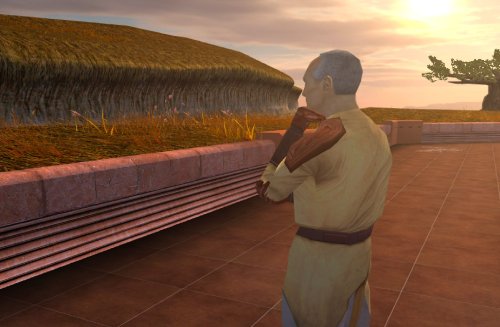 Keep up the good work! Is it possible to add an option for Bastila to join early outside the Enclave, in order to access her dialogue with master Nemo? There's also an unused dialogue for the Council if you visit the ruins early and for Nemo to teach the player the Jedi code.
 -
 Hope98 joined the community
 -
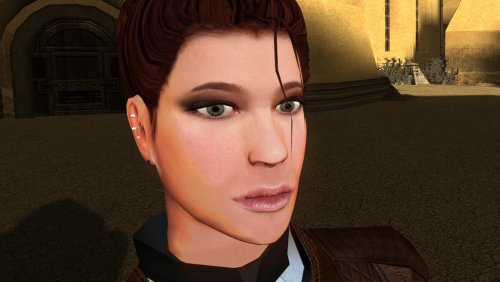 Really amazing job on making the hair-meshes and bone structure so much more detailed. Is that your take on Detran's Bastila in the preview where Revan is ogling?
 -
In the process of creating my own Mandalorians on the Rakata homeworld mod (real original, I know). In addition to adding 2 new areas with unique enemies and cool items, I will also modify Mandalorians elsewhere in the game to establish a sub-plot hinting at the rise of a new Mandalore. I have the areas and most of the custom equipment already from a prototype of this mod that I never uploaded. Currently working on creating a new lightsaber model for the Darksaber, though I'm having trouble figuring out how to make lightsaber blades stop rotating so I can give the blade its iconic shape.
-
Sorry about that, first time making a WIP thread. This mod will add a new mini-story to the Rakata homeworld in which you have to stop a rogue Sith Lord from acquiring a cache of ancient Infinite Empire weapons so he can overthrow Malak. It includes 3 new areas, a number of unique enemies (including unique trooper armors found in my Sith Soldiers Recolored mod), as well as a large-scale boss battle in which your entire crew will rush to your aid! I'm working with a friend to fix a custom lightsaber hilt that will be one of the big rewards at the end. Once that is done, I will have just a little playtesting left before I am ready to release the mod.
-
 cru joined the community
 -
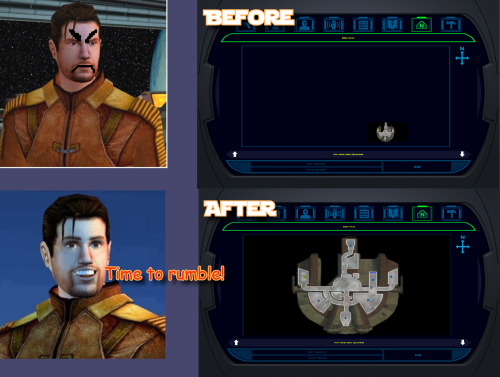 @The_Chaser_One Thx, I will check custom maps when I can
 -
.thumb.gif.91a11d126eb3f6d5a04eccb0d72ef59c.gif)
Page render optimization issues related to scrolling
Tyvokka replied to Lane's topic in Site Feedback
Yeah I think this is just how the software handles certain features that are "live" and constantly streaming data, but I will see if it's something we have control over to be changed. -
Auto downloaded from nexus require premium. You will need to download nexus links manually. The next release should have this fixed, so it opens a browser instead of giving an error.
-
View File High poly PFHC02 The mod replaces the PFHC02 model and textures. To Install 1. Download: PFHC02 2. Copy all files to the Knights of the Old republic's Override folder. (Example location - C:\Program Files (x86)\Steam\steamapps\common\swkotor\Override) 3. When/if prompted to overwrite files, press okay. 4. If you like the mod; leave a comment or endorse! (It would be much appreciated) Made with love. Submitter Dark Hope Submitted 09/03/2026 Category Mods K1R Compatible Yes
-
Version 1.0.0
9 downloads
The mod replaces the PFHC02 model and textures. To Install 1. Download: PFHC02 2. Copy all files to the Knights of the Old republic's Override folder. (Example location - C:\Program Files (x86)\Steam\steamapps\common\swkotor\Override) 3. When/if prompted to overwrite files, press okay. 4. If you like the mod; leave a comment or endorse! (It would be much appreciated) Made with love. -
Well here we are with me using the news section for once. We have a couple of changes that will be coming later in the year, so I figured now is a good time to share. Deadlysteam will be undergoing more maintenance and changes to the site towards the end of the year. Here is what is in store: Username/display name login is going away and instead you will use your email address to login If you want to use your email address to login, you can do so now but username login will eventually be deprecated We will get yet another new theme It won't be too drastic of a change but the current design will be ever so modestly changed If you want to submit any background graphics or other ideas you can feel free to do so here! Clubs will be widely rolling out Going forward anyone that wants their own "mod forum" can use the clubs feature to create their own "forum / page" Many of you can create clubs already by going to the menu and navigating to clubs, it will be more widely made avaliable Yes this is similar to FB pages and Subreddits, you can use them or not it is up to you Status Updates are changing Status updates will have some customization done to maintain support for that feature, this means that how they look and feel plus where they can be accessed may change Tagging will be updated Right now we have an "open tagging" systems where anyone can add a tag Going forward will be moving to a "closed tagging" system which will allow us to maintain consistent tagging across DS All current tags will be converted to closed tags I will share more information on some of these changes as it gets closer to the end of the year, but as always thank you for coming to Deadlystream and feel free to ask any questions here.
-
 Vexaria joined the community
 -
It's a WiP thread with nary a description of the mod and no mention of the progress either. More information please?
-
My download keeps failing with this error "[2026-09-03 09:22:39.038 W] Aborting download: Either you clicked on a premium-only link and your account is not premium, or the download link was generated by a different account than the one stored in Mod Organizer." I have tried reinstalling MO2 multiple times and went from the latest 2.5.3 back to 2.5.3 beta 1 and unlinked my account and reset my browser a few times. this is my full event log: [2026-09-03 09:22:00.145 D] timing: MOApplication() 0 ms [2026-09-03 09:22:00.145 D] timing: main() multiprocess 90 ms [2026-09-03 09:22:00.146 D] command line: '"C:\Gaming\Modding\KOTOR\MO2\ModOrganizer.exe" ' [2026-09-03 09:22:00.146 I] starting Mod Organizer version 2.5.3beta1 revision bf8bb4d2 in C:/Gaming/Modding/KOTOR/MO2, usvfs: 0.5.7.0 [2026-09-03 09:22:00.146 I] data path: C:/Gaming/Modding/KOTOR/MO2 [2026-09-03 09:22:00.146 I] working directory: C:/Gaming/Modding/KOTOR/MO2 [2026-09-03 09:22:00.146 D] timing: MOApplication setup() 0 ms [2026-09-03 09:22:00.484 I] [KOTOR] inserted plugin dir into sys.path: C:\Gaming\Modding\KOTOR\MO2\plugins\basic_games\games [2026-09-03 09:22:00.484 I] [KOTOR] inserted shared dir into sys.path: C:\Gaming\Modding\KOTOR\MO2\plugins\basic_games\games\kotor [2026-09-03 09:22:00.484 I] [KOTOR] plugin file path: C:\Gaming\Modding\KOTOR\MO2\plugins\basic_games\games\game_kotor.py | plugin dir: C:\Gaming\Modding\KOTOR\MO2\plugins\basic_games\games [2026-09-03 09:22:00.484 I] [KOTOR] sys.path[0]: C:\Gaming\Modding\KOTOR\MO2\plugins\basic_games\games\kotor [2026-09-03 09:22:00.484 I] [KOTOR] sys.path[1]: C:\Gaming\Modding\KOTOR\MO2\plugins\basic_games\games [2026-09-03 09:22:00.484 I] [KOTOR] sys.path[2]: C:/Gaming/Modding/KOTOR/MO2/plugins [2026-09-03 09:22:00.484 I] [KOTOR] sys.path[3]: C:\Gaming\Modding\KOTOR\MO2 [2026-09-03 09:22:00.484 I] [KOTOR] sys.path[4]: C:\Gaming\Modding\KOTOR\MO2\plugins\plugin_python\libs\pythoncore.zip [2026-09-03 09:22:00.485 I] [KOTOR] sys.path[5]: C:\Gaming\Modding\KOTOR\MO2\plugins\plugin_python\libs [2026-09-03 09:22:00.485 I] [KOTOR] sys.path[6]: C:\Gaming\Modding\KOTOR\MO2\plugins\data [2026-09-03 09:22:00.485 I] [KOTOR] sys.path[7]: C:\Gaming\Modding\KOTOR\MO2 [2026-09-03 09:22:00.485 I] [KOTOR] sys.path[8]: C:\Gaming\Modding\KOTOR\MO2\plugins\basic_games\lib [2026-09-03 09:22:00.485 I] [KOTOR] import probe: external-import-ok [2026-09-03 09:22:00.486 I] [KOTOR2] plugin file path: C:\Gaming\Modding\KOTOR\MO2\plugins\basic_games\games\game_kotor2.py | plugin dir: C:\Gaming\Modding\KOTOR\MO2\plugins\basic_games\games [2026-09-03 09:22:00.486 I] [KOTOR2] sys.path[0]: C:\Gaming\Modding\KOTOR\MO2\plugins\basic_games\games\kotor [2026-09-03 09:22:00.486 I] [KOTOR2] sys.path[1]: C:\Gaming\Modding\KOTOR\MO2\plugins\basic_games\games [2026-09-03 09:22:00.486 I] [KOTOR2] sys.path[2]: C:/Gaming/Modding/KOTOR/MO2/plugins [2026-09-03 09:22:00.486 I] [KOTOR2] sys.path[3]: C:\Gaming\Modding\KOTOR\MO2 [2026-09-03 09:22:00.486 I] [KOTOR2] sys.path[4]: C:\Gaming\Modding\KOTOR\MO2\plugins\plugin_python\libs\pythoncore.zip [2026-09-03 09:22:00.486 I] [KOTOR2] sys.path[5]: C:\Gaming\Modding\KOTOR\MO2\plugins\plugin_python\libs [2026-09-03 09:22:00.486 I] [KOTOR2] sys.path[6]: C:\Gaming\Modding\KOTOR\MO2\plugins\data [2026-09-03 09:22:00.486 I] [KOTOR2] sys.path[7]: C:\Gaming\Modding\KOTOR\MO2 [2026-09-03 09:22:00.486 I] [KOTOR2] sys.path[8]: C:\Gaming\Modding\KOTOR\MO2\plugins\basic_games\lib [2026-09-03 09:22:00.486 I] [KOTOR2] import probe: external-import-ok [2026-09-03 09:22:00.626 I] DownloadManagerPlugin.__init__ [2026-09-03 09:22:00.652 I] using game plugin 'STAR WARS Knights of the Old Republic' ('kotor', variant (none), steam id '32370') at c:/gaming/steam/steamapps/common/swkotor [2026-09-03 09:22:00.653 I] [%s] Steam detected:%s path:%s steam_root:%s [2026-09-03 09:22:00.653 I] [KOTOR Plugin] registering executables: c:/gaming/steam/steamapps/common/swkotor/swkotor.exe [2026-09-03 09:22:16.554 I] [KOTOR2 Sync] KSON loaded: 200 mod(s). [2026-09-03 09:22:16.728 W] [KOTOR2 Sync] Archive validation needs attention: 0 ok, 1 empty, 199 missing, 0 mismatch, 0 validation skipped, 0 user skipped. [2026-09-03 09:22:36.136 I] [KOTOR2 Sync] KSON loaded: 200 mod(s). [2026-09-03 09:22:36.297 W] [KOTOR2 Sync] Archive validation needs attention: 0 ok, 1 empty, 199 missing, 0 mismatch, 0 validation skipped, 0 user skipped. [2026-09-03 09:22:38.741 I] [KOTOR2 Sync] Download queue started: 199 missing archive(s). [2026-09-03 09:22:39.038 W] Aborting download: Either you clicked on a premium-only link and your account is not premium, or the download link was generated by a different account than the one stored in Mod Organizer.
-
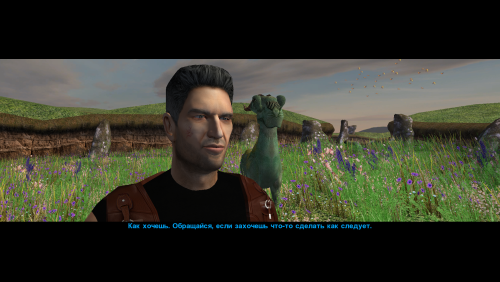 Incredible mod! I'd love to see a version with this high-poly head and texture for K2 as well.
 -
 Soops joined the community
 -
 LordZeplin joined the community
 -
View File KOTOR 1 High FPS Post-Combat Fix Fixes a high FPS bug in Star Wars: Knights of the Old Republic that can prevent or delay player movement for a short time immediately after combat ends when playing above 60 FPS. The download includes two alternative versions of the fix. Only one should be installed at a time. PostCombatFix.kpatch fixes the post-combat movement issue while effectively having no delay. This one is more experimental and I don't know if there are any major issues. PostCombatFix60fps.kpatch fixes the same issue but keeps the same delay as if it was 60fps to keep behavior intended and prevent any issues from the no delay version. These were made at the time of Kotor Patch Manager 0.6.3. Installation: Install Kotor Patch Manager 0.6.3. Place the .kpatch file you want to use in Kotor Patch Manager’s patches folder. Open Kotor Patch Manager and install the patch. Do not install both versions at the same time. Submitter D3M0 Submitted 09/02/2026 Category Mods K1R Compatible Yes
-
Version 1.0.0
8 downloads
Fixes a high FPS bug in Star Wars: Knights of the Old Republic that can prevent or delay player movement for a short time immediately after combat ends when playing above 60 FPS. The download includes two alternative versions of the fix. Only one should be installed at a time. PostCombatFix.kpatch fixes the post-combat movement issue while effectively having no delay. This one is more experimental and I don't know if there are any major issues. PostCombatFix60fps.kpatch fixes the same issue but keeps the same delay as if it was 60fps to keep behavior intended and prevent any issues from the no delay version. These were made at the time of Kotor Patch Manager 0.6.3. Installation: Install Kotor Patch Manager 0.6.3. Place the .kpatch file you want to use in Kotor Patch Manager’s patches folder. Open Kotor Patch Manager and install the patch. Do not install both versions at the same time. -
 ChronosMadara joined the community
 -
 Ciborgcrash joined the community
 - Yesterday
-
 OuterRimDan changed their profile photo
 -
 mrhara joined the community
 -

K1 Area Map Fixes - High Resolution Area Map & Map Marker Fix
The_Chaser_One commented on Derslok's file in Mods
Seems to be working fine without the upscale. It is indeed related to your mod, somehow. Only for custom maps though, as mentioned earlier. -
 HeavyFlow joined the community
 -
OuterRimDan joined the community
-
@The_Chaser_One Our mod only rescales the player/party marker/map note position and the map's fill/scale, it doesn't touch anything about which parts of the map get revealed or when, that's handled entirely by the base engine and cached per module, separately from the marker fix. My hunch is you're seeing a vanilla engine quirk that's just more visible on non-standard room layouts. I get something similar on the ebon hawk map both in vanilla and with the mod. To help confirm that: could you run Uninstall.bat (to remove what our mod changed) and check whether the same delay happens? If it still shows up, that confirms it's unrelated to our mod. If it goes away, let me know and I'll dig further. Either way, appreciate you flagging it, and glad the widescreen fix itself is working well for you! @StellarExile Short version: KOTOR's map has a bunch of old numbers baked into the EXE that assume a low resolution. We made our own patch to make those values scale with a bigger resolution. That caused a couple of problems because the map and HUD minimap secretly share some of those values. Changing them directly made the minimap break, so we had to give the map its own private copies of values and redirect it to use those instead (injected new code into exe). Kinda same idea for the player and party markers. And a lot of the vanilla map notes were not centered properly. We checked and manually repositioned around 250 of them and built the fixes into a lookup table. Also inserted in the exe. If you want the technical details, offsets, and full source, it's all in the More info\TECHNICAL.txt and More info\source\ folders inside the download.
-
I downloaded it a couple of years back, so I don't really remember. I'll update my blender and kotorblender versions and see what I can figure out. Thanks, Vriff!
-
View File Narve's New Canderous Head This mod changes the head (model and texture) of Canderous Ordo. An optional portrait for Canderous is also included, which you can use if desired. When modeling the head, I was inspired by the actor Clancy Brown; I think his characterization suits the role of Canderous very well. The mod contains four main files: p_candh.mdl and p_candh.mdx - the model, P_CandH01.tga and P_CandH01.txi - the texture. One additional file, PO_pcanderous.tga, is Canderous's portrait; you can choose to use it or not, as you wish. This portrait is in the same style as the portraits from my other party member portrait mod. How to install: Unpack and copy files to the Knights of the Old Republic's Override folder. Note: This is a new model that is significantly different from the vanilla version. Both the geometry and the UV map are different. No retextures from the vanilla head will fit this model! And, of course, the texture from this mod will not fit Canderous' vanilla head. If anyone asks: the body texture is from this mod by wonderful Dark Hope. Thanks: I would like to thank Elayerfawkes45 for the original high-poly mesh, which I used as a starting point for my head model. Submitter Narve Submitted 09/02/2026 Category Mods K1R Compatible Yes
-
That version of kotorblender is many years old, the latest distro is here: https://github.com/OpenKotOR/kotorblender I'm not even sure how you got that version of KOTORBlender, have you had it for years or is there somewhere you downloaded it from? I can only find the OG release and this version.
-
K1 Area Map Fixes - High Resolution Area Map & Map Marker Fix
The_Chaser_One commented on Derslok's file in Mods
Response from the author: Hi! Did you use it on an existing save? Will check it when I have time I did use it on an existing save but I had not entered said module before. -
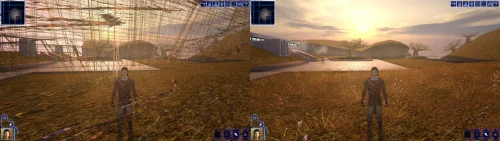 I would never stop using the KPM and the KotorUniResPatch because you have solved something that is extremely important. The Soft Shadow and Frame Buffer Effects are usable again!!! And for that I can't thank you enough Synchro, and I'm sure that many others that, as me, use the AMD cards. I even stopped played KOTOR for a while, thinking that Aspyr would never release an Updated version to solve this like they have done it for TSL, and all the KOTOR remake thing, let me hopeless that It would ever be a solution, you know. But you solved, and this is incredible, along with other patches that make the game even more good to play than before. May The Force Be With You and your family, Synchro
 -
Glad it works! Worst case you can always use the standalone version if you prefer using k1-hrm over KPM and KotorUniResPatch