All Activity
- Past hour
-
 I've uploaded a KotOR II version of this.
 - Today
-
 I've uploaded a patch for this to make it compatible with TSLRCM and give you the option to disable the dark shroud.
 -
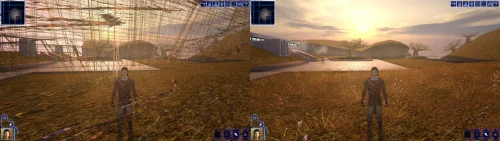 Yeah, unfortunately the Kotor Patch Manager needs a clean executable (you can use a gog one or the editable exe, both work), the best way to get widescreen support back in that scenario is to use @J's https://github.com/J0-o/KotorUniResPatch patches. They work quite well, but depending on what you already have installed you may need to undo existing overrides in order for everything to look right. (e.g. the high resolution menu mods) They've properly scaled pretty much every interface in the game to look right (and even unlocked the in game resolution menu) This does have me thinking that it might be a good idea to have a standalone version of this mod that can be dropped in to existing modbuild installs or installs with other pre-patched executables. Stay tuned for something on that, I'll see if I can take a look at what is needed on the weekend.
 -
 rikotatsuha joined the community
 -
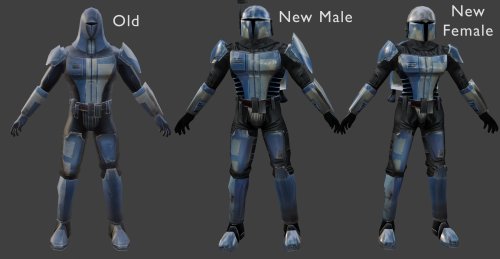 You can use these textures with the default model. You would just have to go into the tslpatchdata folder and copy all of the .tpc files into your override folder without any of the .mdl/.mdx files. Check and make sure that you don't have any N_Mandalorian##.tga files in your override folder or they may conflict. It'll look like this:
 -

Why it's not okay to upload someone else's mods
selfbio replied to Xuul's topic in General Kotor/TSL Modding
Hey, I’m curious—how do you folks manage to squeeze in real-life meetups when your passion projects (like modding or theater) already eat up so much time? Any tricks for finding people who just want to share a drink and a laugh without overcommitting? FixDim.com Find a girl who excites your senses -
can u make a hd texture like these model have but on default kotor mandalorians?
-
 Blizz127 joined the community
 -
 View File [TSL] Curvier Handmaiden-Style Underwear for Female Player, Handmaiden, Mira, and Visas ===================================================== [TSL] Curvier Handmaiden-Style Underwear for Female Player, Handmaiden, Mira, and Visas ===================================================== Mod for Knights of the Old Republic II - The Sith Lords Author: Lily File Name: Curvier_Female_PC_Party_Underwear.zip Latest Version: 1.0 --- 1. DESCRIPTION: Replaces the default underwear model for female player characters, Handmaiden, Mira, and Visas with a curvier Handmaiden-style underwear model. Custom textures are included for each character, with matching dark side transition variants. --- 2. INSTALLATION: Run Install.exe and select your KotOR 2 game directory. There are 7 installation options. - Default Installation: Updates the new underwear model for female player characters and all three party members. You probably want this one. - Player characters ONLY: Updates player character models to the new underwear model. - Party members ONLY: Updates party member models to the new underwear model. - Visas ONLY: Updates Visas to the new underwear model. - Mira ONLY: Updates Mira to the new underwear model. - Handmaiden ONLY: Updates Handmaiden to the new underwear model. - PFHC03 Patch: Updates the look for PFHC03 if you use Effixian's PFHC03 Restoration mod. Install that mod first! If you use the default installation, you do NOT need to install any of the individual options separately. The PFHC03 Patch NEEDS to be installed separately - it is NOT included in any other option. You should be safe to reinstall this mod on top of itself without any problems. You can mix and match installation options if you want everything except the Visas replacement, for example. A "backup" folder is created by the installer in the same directory. Don't delete it if you plan to uninstall later. --- 3. UNINSTALLATION: Run Install.exe, select your KotOR 2 directory, and use the "Tools > uninstall/restore backup" option to revert all changes made by this mod. --- 4. KNOWN ISSUES: None. If you find any bugs or problems, please report them. --- 5. MOD COMPATIBILITY: All files should have unique names. This mod only touches body models, textures, and appearance entries - no dialogue, scripting, or module changes. Should be compatible with all other mods, including TSLRCM. Anything that changes the underwear texture for female players or Handmaiden, Mira, or Visas will conflict. If you use Effixian's PFHC03 Restoration mod, install it first, then run this mod's PFHC03 Patch. Do not use the Steam Workshop for KotOR. It will almost certainly end with compatibility issues. --- 6. Support: My mods are free to use. You do not need to pay for them, but if you would like to say thanks, you can buy me a coffee! --- 7. PERMISSIONS: Please let me know if you plan on using any of the files in my mod for your own mod. The answer is "yes you may", but I would like to know what you are doing with it! Do not directly reupload this mod anywhere else. --- 8. THANKS: - redrob41 - Original underwear model - Effixian - PFHC03 Restoration - bead-v - MDLEdit - Fred Tetra - KotOR Tool - Cortisol - Holocron Toolset & HoloPatcher - Fair Strides - TSLPatcher - seedhartha - KotOR Blender - ndix UR - tga2tpc THIS MODIFICATION IS NOT SUPPORTED BY BIOWARE/OBSIDIAN ENTERTAINMENT OR LUCASARTS OR ANY LICENSORS/SPONSORS OF THE MENTIONED COMPANIES. USE THIS FILE AT YOUR OWN RISK. Submitter Lily Submitted 08/21/2026 Category Mods TSLRCM Compatible Yes
 -
View File [TSL] Armor Class 4, 5 & 6 Remodel ===================================================== [TSL] Armor Class 4, 5 & 6 Remodel ===================================================== Mod for Knights of the Old Republic II - The Sith Lords Author: Lily Latest Version: 1.0 --- 1. DESCRIPTION: This mod replaces the armor body models for classes 4, 5, and 6 in KotOR 2, giving them a more armored look. The original KotOR 1 models were made by Attackperson35. This mod adds the models to KotOR 2, including Bao-Dur variants. Textures are sourced from Dark Hope's and Vurt's armor texture mods with small tweaks. The included textures are from those two mods combined - if you prefer a different look, you can install the models only and drop in textures from whatever. Class 4 (Light Armor): The shoulder pads from the original models have been kept. Shin guards, knee pads, and armguards have been removed - this is light armor, and the extra plating looked out of place on it. Affects: Light Combat Suit, Combat Suit, Mandalorian Combat Suit, Zabrak Combat Suit, Echani Light Armor, Massassi Ceremonial Armor, Mandalorian Heavy Suit, Electromesh Suit, and any other armor sharing the class 4 body. Class 5 (Medium Armor): Includes shoulder pads, wrist guards, and shin guards. Affects: Heavy Combat Suit, Bonadan Alloy Heavy Suit, Zabrak Battle Armor, Ubese Environmental Suit, Echani Shield Suit, Reinforced Fiber Armor, Zabrak Field Armor, Ulic Qel Droma's Mesh Suit, Armored Flight Suit, and any other armor sharing the class 5 body. Class 6 (Medium Armor): Includes shoulder pads, wrist guards, and shin guards. Affects: Khoonda Militia Armor, Military Suit, Echani Battle Armor, Cinnagar War Suit, Sith Battle Suit, Verpine Fiber Mesh, Exar Kun's Light Battle Suit, Heavy Cinnagar War Suit, Verpine Fiber Ultramesh, and any other armor sharing the class 6 body. --- 2. INSTALLATION: Run Install.exe and select your KotOR 2 game directory. Each armor class has two installation options: - Models: Installs new armor body models. - Textures: Installs the included texture selection. You can install models only, textures only, or both. Installing models without textures will use whatever textures you already have installed. Double check that you do not have both an old .tga/.txi file pair AND a new .tpc file for the armor textures If you do, one is going to take priority over the other. You can use Remove Duplicate TGA-TPC to accomplish this quickly. A "backup" folder is created by the installer in the same directory. Don't delete it if you plan to uninstall later. --- 3. UNINSTALLATION: Run Install.exe, select your KotOR 2 directory, and use the "Tools > uninstall/restore backup" option to revert all changes made by this mod. --- 4. KNOWN ISSUES: None. If you find any bugs or problems, please report them. --- 5. MOD COMPATIBILITY: This mod replaces armor body models and their associated textures only. No 2da files, scripts, or dialogue are changed. Should be compatible with all other mods, including TSLRCM. Models replaced: - Class 4: PFBCL, PFBCM, PFBCS, PMBCL, PMBCM, PMBCS, BAODUR_BC - Class 5: PFBDL, PFBDM, PFBDS, PMBDL, PMBDM, PMBDS, BAODUR_BD - Class 6: PFBEL, PFBEM, PFBES, PMBEL, PMBEM, PMBES, BAODUR_BE Any mod that replaces these same files will conflict. Do not use the Steam Workshop for KotOR. It will almost certainly cause compatibility issues. --- 6. SUPPORT: My mods are free to use. You do not need to pay for them, but if you would like to say thanks, you can buy me a coffee! --- 7. PERMISSIONS: Do not directly reupload this mod anywhere else. Ask before using any assets. --- 8. THANKS: - Attackperson35 - Original KOTOR 1 armor models (classes 4, 5, and 6) - Dark Hope - HD armor textures: Class 4 textures Class 5 textures Class 6 textures - Vurt - Vurt's Visual Resurgence armor textures - redrob41 - Original Bao-Dur body model fixes - bead-v - MDLEdit - Cortisol - Holocron Toolset & HoloPatcher - Fair Strides - TSLPatcher THIS MODIFICATION IS NOT SUPPORTED BY BIOWARE/OBSIDIAN ENTERTAINMENT OR LUCASARTS OR ANY LICENSORS/SPONSORS OF THE MENTIONED COMPANIES. USE THIS FILE AT YOUR OWN RISK. Submitter Lily Submitted 08/21/2026 Category Mods TSLRCM Compatible Yes
-
View File [TSL] HD Rodians ===================================================== [TSL] HD Rodians ===================================================== Mod for Knights of the Old Republic II - The Sith Lords Author: Lily File Name: HD_Rodians_TSL.zip Latest Version: 1.0 --- 1. DESCRIPTION: This mod ports Stormie97's High Quality Aliens: Rodians from KotOR 1 to KotOR 2, with Dark Hope's HD retextures included and tweaked. - Replaces the original low-poly Rodian model with Stormie97's custom high-poly version. - Five HD texture variants for Rodian NPCs. - Adds an environment map for specular sheen. - All four Rodian appearance entries updated in appearance.2da. - Sitting Rodian placeable updated in placeables.2da. --- 2. INSTALLATION: Run Install.exe and select your KotOR 2 game directory. A "backup" folder is created by the installer in the same directory. Don't delete it if you plan to uninstall later. --- 3. UNINSTALLATION: Run Install.exe, select your KotOR 2 directory, and use the "Tools > uninstall/restore backup" option to revert all changes made by this mod. --- 4. KNOWN ISSUES: None. If you find any bugs or problems, please report them. --- 5. MOD COMPATIBILITY: This mod only touches the Rodian model, Rodian textures, and the relevant rows in appearance.2da and placeables.2da - no dialogue, scripting, or other module changes. Should be compatible with all other mods, including TSLRCM. If you have any other mods that change Rodian appearances, this mod will obviously stop the old appearances from showing. All files should have unique names, so this should not overwrite other mods, and it would just take Appearance.2da changes (or an uninstallation) to revert. Do not use the Steam Workshop for KotOR. It will almost certainly end with compatibility issues. --- 6. SUPPORT: My mods are free to use. You do not need to pay for them, but if you would like to say thanks, you can buy me a coffee! --- 7. PERMISSIONS: Do not directly reupload this mod anywhere else. Ask before using any assets. --- 8. THANKS: - Stormie97 - High Quality Aliens: Rodians - Dark Hope - Rodian HD Retexture - bead-v - MDLEdit - Cortisol - Holocron Toolset & HoloPatcher - Fair Strides - TSLPatcher THIS MODIFICATION IS NOT SUPPORTED BY BIOWARE/OBSIDIAN ENTERTAINMENT OR LUCASARTS OR ANY LICENSORS/SPONSORS OF THE MENTIONED COMPANIES. USE THIS FILE AT YOUR OWN RISK. Submitter Lily Submitted 08/21/2026 Category Mods TSLRCM Compatible Yes
-
![More information about "[TSL] Curvier Handmaiden-Style Underwear for Female Player, Handmaiden, Mira, and Visas"](https://deadlystream.com/downloads/screens/monthly_2026_08/20260821142214_1.thumb.jpg.fca2064aa971070642209846cd7ea8f8.jpg)
Version 1.0.0
3 downloads
===================================================== [TSL] Curvier Handmaiden-Style Underwear for Female Player, Handmaiden, Mira, and Visas ===================================================== Mod for Knights of the Old Republic II - The Sith Lords Author: Lily File Name: Curvier_Female_PC_Party_Underwear.zip Latest Version: 1.0 --- 1. DESCRIPTION: Replaces the default underwear model for female player characters, Handmaiden, Mira, and Visas with a curvier Handmaiden-style underwear model. Custom textures are included for each character, with matching dark side transition variants. --- 2. INSTALLATION: Run Install.exe and select your KotOR 2 game directory. There are 7 installation options. - Default Installation: Updates the new underwear model for female player characters and all three party members. You probably want this one. - Player characters ONLY: Updates player character models to the new underwear model. - Party members ONLY: Updates party member models to the new underwear model. - Visas ONLY: Updates Visas to the new underwear model. - Mira ONLY: Updates Mira to the new underwear model. - Handmaiden ONLY: Updates Handmaiden to the new underwear model. - PFHC03 Patch: Updates the look for PFHC03 if you use Effixian's PFHC03 Restoration mod. Install that mod first! If you use the default installation, you do NOT need to install any of the individual options separately. The PFHC03 Patch NEEDS to be installed separately - it is NOT included in any other option. You should be safe to reinstall this mod on top of itself without any problems. You can mix and match installation options if you want everything except the Visas replacement, for example. A "backup" folder is created by the installer in the same directory. Don't delete it if you plan to uninstall later. --- 3. UNINSTALLATION: Run Install.exe, select your KotOR 2 directory, and use the "Tools > uninstall/restore backup" option to revert all changes made by this mod. --- 4. KNOWN ISSUES: None. If you find any bugs or problems, please report them. --- 5. MOD COMPATIBILITY: All files should have unique names. This mod only touches body models, textures, and appearance entries - no dialogue, scripting, or module changes. Should be compatible with all other mods, including TSLRCM. Anything that changes the underwear texture for female players or Handmaiden, Mira, or Visas will conflict. If you use Effixian's PFHC03 Restoration mod, install it first, then run this mod's PFHC03 Patch. Do not use the Steam Workshop for KotOR. It will almost certainly end with compatibility issues. --- 6. Support: My mods are free to use. You do not need to pay for them, but if you would like to say thanks, you can buy me a coffee! --- 7. PERMISSIONS: Please let me know if you plan on using any of the files in my mod for your own mod. The answer is "yes you may", but I would like to know what you are doing with it! Do not directly reupload this mod anywhere else. --- 8. THANKS: - redrob41 - Original underwear model - Effixian - PFHC03 Restoration - bead-v - MDLEdit - Fred Tetra - KotOR Tool - Cortisol - Holocron Toolset & HoloPatcher - Fair Strides - TSLPatcher - seedhartha - KotOR Blender - ndix UR - tga2tpc THIS MODIFICATION IS NOT SUPPORTED BY BIOWARE/OBSIDIAN ENTERTAINMENT OR LUCASARTS OR ANY LICENSORS/SPONSORS OF THE MENTIONED COMPANIES. USE THIS FILE AT YOUR OWN RISK. -
![More information about "[TSL] HD Rodians"](https://deadlystream.com/downloads/screens/monthly_2026_08/20260821112801_1.thumb.jpg.ce1b722df7b5c30541478f89b6d4b4c9.jpg)
Version 1.0.0
1 download
===================================================== [TSL] HD Rodians ===================================================== Mod for Knights of the Old Republic II - The Sith Lords Author: Lily File Name: HD_Rodians_TSL.zip Latest Version: 1.0 --- 1. DESCRIPTION: This mod ports Stormie97's High Quality Aliens: Rodians from KotOR 1 to KotOR 2, with Dark Hope's HD retextures included and tweaked. - Replaces the original low-poly Rodian model with Stormie97's custom high-poly version. - Five HD texture variants for Rodian NPCs. - Adds an environment map for specular sheen. - All four Rodian appearance entries updated in appearance.2da. - Sitting Rodian placeable updated in placeables.2da. --- 2. INSTALLATION: Run Install.exe and select your KotOR 2 game directory. A "backup" folder is created by the installer in the same directory. Don't delete it if you plan to uninstall later. --- 3. UNINSTALLATION: Run Install.exe, select your KotOR 2 directory, and use the "Tools > uninstall/restore backup" option to revert all changes made by this mod. --- 4. KNOWN ISSUES: None. If you find any bugs or problems, please report them. --- 5. MOD COMPATIBILITY: This mod only touches the Rodian model, Rodian textures, and the relevant rows in appearance.2da and placeables.2da - no dialogue, scripting, or other module changes. Should be compatible with all other mods, including TSLRCM. If you have any other mods that change Rodian appearances, this mod will obviously stop the old appearances from showing. All files should have unique names, so this should not overwrite other mods, and it would just take Appearance.2da changes (or an uninstallation) to revert. Do not use the Steam Workshop for KotOR. It will almost certainly end with compatibility issues. --- 6. SUPPORT: My mods are free to use. You do not need to pay for them, but if you would like to say thanks, you can buy me a coffee! --- 7. PERMISSIONS: Do not directly reupload this mod anywhere else. Ask before using any assets. --- 8. THANKS: - Stormie97 - High Quality Aliens: Rodians - Dark Hope - Rodian HD Retexture - bead-v - MDLEdit - Cortisol - Holocron Toolset & HoloPatcher - Fair Strides - TSLPatcher THIS MODIFICATION IS NOT SUPPORTED BY BIOWARE/OBSIDIAN ENTERTAINMENT OR LUCASARTS OR ANY LICENSORS/SPONSORS OF THE MENTIONED COMPANIES. USE THIS FILE AT YOUR OWN RISK. -
![More information about "[TSL] Armor Class 4, 5 & 6 Remodel"](https://deadlystream.com/downloads/screens/monthly_2026_08/20260820104814_1.thumb.jpg.a333cc5293fc34553ca2d39811e33bc5.jpg)
Version 1.0.0
10 downloads
===================================================== [TSL] Armor Class 4, 5 & 6 Remodel ===================================================== Mod for Knights of the Old Republic II - The Sith Lords Author: Lily Latest Version: 1.0 --- 1. DESCRIPTION: This mod replaces the armor body models for classes 4, 5, and 6 in KotOR 2, giving them a more armored look. The original KotOR 1 models were made by Attackperson35. This mod adds the models to KotOR 2, including Bao-Dur variants. Textures are sourced from Dark Hope's and Vurt's armor texture mods with small tweaks. The included textures are from those two mods combined - if you prefer a different look, you can install the models only and drop in textures from whatever. Class 4 (Light Armor): The shoulder pads from the original models have been kept. Shin guards, knee pads, and armguards have been removed - this is light armor, and the extra plating looked out of place on it. Affects: Light Combat Suit, Combat Suit, Mandalorian Combat Suit, Zabrak Combat Suit, Echani Light Armor, Massassi Ceremonial Armor, Mandalorian Heavy Suit, Electromesh Suit, and any other armor sharing the class 4 body. Class 5 (Medium Armor): Includes shoulder pads, wrist guards, and shin guards. Affects: Heavy Combat Suit, Bonadan Alloy Heavy Suit, Zabrak Battle Armor, Ubese Environmental Suit, Echani Shield Suit, Reinforced Fiber Armor, Zabrak Field Armor, Ulic Qel Droma's Mesh Suit, Armored Flight Suit, and any other armor sharing the class 5 body. Class 6 (Medium Armor): Includes shoulder pads, wrist guards, and shin guards. Affects: Khoonda Militia Armor, Military Suit, Echani Battle Armor, Cinnagar War Suit, Sith Battle Suit, Verpine Fiber Mesh, Exar Kun's Light Battle Suit, Heavy Cinnagar War Suit, Verpine Fiber Ultramesh, and any other armor sharing the class 6 body. --- 2. INSTALLATION: Run Install.exe and select your KotOR 2 game directory. Each armor class has two installation options: - Models: Installs new armor body models. - Textures: Installs the included texture selection. You can install models only, textures only, or both. Installing models without textures will use whatever textures you already have installed. Double check that you do not have both an old .tga/.txi file pair AND a new .tpc file for the armor textures If you do, one is going to take priority over the other. You can use Remove Duplicate TGA-TPC to accomplish this quickly. A "backup" folder is created by the installer in the same directory. Don't delete it if you plan to uninstall later. --- 3. UNINSTALLATION: Run Install.exe, select your KotOR 2 directory, and use the "Tools > uninstall/restore backup" option to revert all changes made by this mod. --- 4. KNOWN ISSUES: None. If you find any bugs or problems, please report them. --- 5. MOD COMPATIBILITY: This mod replaces armor body models and their associated textures only. No 2da files, scripts, or dialogue are changed. Should be compatible with all other mods, including TSLRCM. Models replaced: - Class 4: PFBCL, PFBCM, PFBCS, PMBCL, PMBCM, PMBCS, BAODUR_BC - Class 5: PFBDL, PFBDM, PFBDS, PMBDL, PMBDM, PMBDS, BAODUR_BD - Class 6: PFBEL, PFBEM, PFBES, PMBEL, PMBEM, PMBES, BAODUR_BE Any mod that replaces these same files will conflict. Do not use the Steam Workshop for KotOR. It will almost certainly cause compatibility issues. --- 6. SUPPORT: My mods are free to use. You do not need to pay for them, but if you would like to say thanks, you can buy me a coffee! --- 7. PERMISSIONS: Do not directly reupload this mod anywhere else. Ask before using any assets. --- 8. THANKS: - Attackperson35 - Original KOTOR 1 armor models (classes 4, 5, and 6) - Dark Hope - HD armor textures: Class 4 textures Class 5 textures Class 6 textures - Vurt - Vurt's Visual Resurgence armor textures - redrob41 - Original Bao-Dur body model fixes - bead-v - MDLEdit - Cortisol - Holocron Toolset & HoloPatcher - Fair Strides - TSLPatcher THIS MODIFICATION IS NOT SUPPORTED BY BIOWARE/OBSIDIAN ENTERTAINMENT OR LUCASARTS OR ANY LICENSORS/SPONSORS OF THE MENTIONED COMPANIES. USE THIS FILE AT YOUR OWN RISK. -
View File [TSL] Kreia's Assorted Robe Collection TSLRCM Patch ===================================================== [TSL] Kreia's Assorted Robe Collection TSLRCM Patch ===================================================== Mod for Knights of the Old Republic II - The Sith Lords Author: Lily File Name: Kreias_Robes_TSLRCM_Patch.zip Latest Version: 1.0 --- 1. DESCRIPTION: This is a compatibility patch for ChAiNz.2da and stoffe-mkb's Kreia's Assorted Robe Collection. Kreia's Assorted Robe Collection makes Kreia's appearance update dynamically based on whatever robe she is wearing. The original mod is not compatible with TSLRCM because it overwrites three files that TSLRCM also modifies: remote.dlg, k_204tel_enter, and k_701area_enter. This patch resolves those conflicts. There are two main install options: - WITH Shroud: Installs the TSLRCM-compatible scripts and also includes the original mod's "Kreia's Dark Shroud" questline and crafted item. The Dark Shroud's item properties have been fixed - the original mod used random stats, this version hardcodes them so the item always has the same properties: Defense Bonus: +2 Regenerate Force Points: +1 Attribute Bonus: Charisma +3 Attribute Bonus: Wisdom +3 Attribute Penalty: Constitution -2 Restricted to: Kreia (Female) - WITHOUT Shroud: Installs only the TSLRCM-compatible scripts. The Dark Shroud questline is disabled. Kreia's robe appearance system still works normally. There is also an optional patch for compatibility with JCarter426's Thematic Obscured Mausoleum Burial (TOMB) mod. --- 2. INSTALLATION: IMPORTANT: Install Kreia's Assorted Robe Collection BEFORE running this patch. If you are using the TOMB patch, install TOMB before running this patch as well. Run Install.exe and select your KotOR 2 game directory. There are 3 installation options: - Kreia's Assorted Robe Collection WITH Shroud: Patches Kreia's Assorted Robe Collection for TSLRCM compatibility and includes the original "Kreia's Dark Shroud" questline and item. Installs TSLRCM-compatible versions of k_204tel_enter and k_701area_enter, the fixed kreia_shroud.uti with hardcoded stats, and the TSLRCM version of remote.dlg. - Kreia's Assorted Robe Collection WITHOUT Shroud: Patches Kreia's Assorted Robe Collection for TSLRCM compatibility and disables the original "Kreia's Dark Shroud" questline and item. Installs the TSLRCM versions of k_204tel_enter and k_701area_enter that don't spawn any shroud content, and the TSLRCM version of remote.dlg. - Kreia's Assorted Robe Collection / TOMB patch: Patches KAR for compatibility with JCarter426's TOMB mod. Install BOTH Kreia's Assorted Robe Collection AND TOMB before running this. This patch can be run before or after the WITH/WITHOUT Shroud options - order does not matter. You can switch between WITH Shroud and WITHOUT Shroud by running the other option over your existing installation. Installing WITH Shroud will enable the questline; installing WITHOUT Shroud will disable it. There are no compatibility issues with doing this. However, note that once you have reached Telos in your playthrough, you will be stuck with whichever option is currently installed - switching after that point may cause issues. A "backup" folder is created by the installer in the same directory. Don't delete it if you plan to uninstall later. --- 3. UNINSTALLATION: Run Install.exe, select your KotOR 2 directory, and use the "Tools > uninstall/restore backup" option to revert all changes made by this mod. If you want to manually disable the Dark Shroud questline, you can delete k_204tel_enter.ncs and k_701area_enter.ncs from your Override folder. This prevents the shroud-related placeables from ever spawning. You may also delete other shroud-specific files (kds_*.ncs, kds_*.dlg, kreia_shroud.uti, etc.) if you want a cleaner removal, but be careful not to delete any scripts that are also used by Kreia's robe appearance system. This is possible but not recommended. --- 4. KNOWN ISSUES: None. If you find any bugs or problems, please report them. --- 5. MOD COMPATIBILITY: Requires TSLRCM. Requires Kreia's Assorted Robe Collection (install that before this). Optional: compatible with TOMB via the included TOMB patch (install that before this). Any mod that edits these files will not be fully compatible with Kreia's Assorted Robe Collection: k_oei_userdef.ncs k_204tel_enter.ncs k_701area_enter.ncs remote.dlg In-depth explanation: k_oei_userdef.ncs is the only one required for Kreia's robe changes, and in the Neocities full mod build, the only conflict is TOMB, which is patched by this mod. If anything else you use touches this file, you will need another patch or it will not be compatible with Kreia's Assorted Robe Collection period. k_204tel_enter.ncs, k_701area_enter.ncs, and remote.dlg are only needed for Kreia's Dark Shroud, and in the Neocities full build they are only changed by TSLRCM (and remote tells influence, which is still included in the "no shroud" patch). If you use another mod that edits these files, it will not be compatible with Kreia's Dark Shroud. You can install the "no shroud" version of this patch and then install another mod that touches any of these three files safely and they should be compatible. You will only miss out on the shroud questline. Additional note for expert modders: this patch puts k_204tel_enter.ncs and k_701area_enter.ncs into the override folder. If you are installing a mod that edits these inside of a .mod file, you will need to remove these 2 files from the override folder or they will be overridden. You can do this safely as the files in the "no shroud" patch are just copies of those files from the .mod file added by TSLRCM. As long as those 2 files are the TSLRCM version from either the override folder or a .mod file, Kreia's Dark Shroud will be disabled and you can touch those files as you please. remote.dlg will technically not do anything differently without k_204tel_enter.ncs or k_701area_enter.ncs, so whatever version you have will be safe, but the one from the "no shroud" patch is the cleanest. Do not use the Steam Workshop for KotOR. It will almost certainly cause compatibility issues. --- 6. SUPPORT: My mods are free to use. You do not need to pay for them, but if you would like to say thanks, you can buy me a coffee! --- 7. PERMISSIONS: Do not directly reupload this mod anywhere else. Ask before using any assets. --- 8. THANKS: - ChAiNz.2da & stoffe - Kreia's Assorted Robe Collection - JCarter426 - Thematic Obscured Mausoleum Burial (TOMB) - Cortisol - Holocron Toolset & HoloPatcher - Fair Strides - TSLPatcher THIS MODIFICATION IS NOT SUPPORTED BY BIOWARE/OBSIDIAN ENTERTAINMENT OR LUCASARTS OR ANY LICENSORS/SPONSORS OF THE MENTIONED COMPANIES. USE THIS FILE AT YOUR OWN RISK. Submitter Lily Submitted 08/21/2026 Category Mods TSLRCM Compatible Yes
-
View File [TSL] Folklore Mandalorians ===================================================== [TSL] Folklore Mandalorians ===================================================== Mod for Knights of the Old Republic II - The Sith Lords Author: Lily File Name: TSL_Folklore_Mandalorians.zip Latest Version: 1.0 --- 1. DESCRIPTION: This mod is a port of Attackperson35's Folklore Mandalorians mod to KotOR 2. It replaces the Mandalorian NPC models and textures. Features: - Glowing visor with a different color per texture variant. - Edited jetpack model. - Edited helmet. - Remapped textures on the main model. - Remeshed shoulderplates that no longer clip the model. - 7 texture variants. --- 2. INSTALLATION: Run Install.exe and select your KotOR 2 game directory. A "backup" folder is created by the installer in the same directory. Don't delete it if you plan to uninstall later. Double check that you do not have both an old .tga/.txi file pair AND a new .tpc file for the armor textures If you do, one is going to take priority over the other. You can use Remove Duplicate TGA-TPC to accomplish this quickly. --- 3. UNINSTALLATION: Run Install.exe, select your KotOR 2 directory, and use the "Tools > uninstall/restore backup" option to revert all changes made by this mod. --- 4. KNOWN ISSUES: None. If you find any bugs or problems, please report them. --- 5. MOD COMPATIBILITY: This mod only replaces the Mandalorian male and female models (N_Mandalorian.mdl/mdx, N_Mandalorianf.mdl/mdx) and seven texture files (N_Mandalorian01-07.tpc). No 2DA, dialogue, or scripting changes are made. It should be compatible with all other mods, including TSLRCM. Any mod that also modifies Mandalorian model or texture files will conflict with this one. Note: the models in this mod are remapped specifically for the included textures. Other textures applied to these models may not display correctly. Do not use the Steam Workshop for KotOR. It will almost certainly end with compatibility issues. --- 6. SUPPORT: My mods are free to use. You do not need to pay for them, but if you would like to say thanks, you can buy me a coffee! --- 7. PERMISSIONS: Do not directly reupload this mod anywhere else. Ask before using any assets. --- 8. THANKS: - Attackperson35 - Folklore Mandalorians (original KotOR 1 mod) - Vurt - Vurt's Visual Resurgence (textures) - DarthDeadMan - Head and jetpack 3D models - Fred Tetra - KotOR Tool - Cortisol - Holocron Toolset & HoloPatcher - Fair Strides - TSLPatcher THIS MODIFICATION IS NOT SUPPORTED BY BIOWARE/OBSIDIAN ENTERTAINMENT OR LUCASARTS OR ANY LICENSORS/SPONSORS OF THE MENTIONED COMPANIES. USE THIS FILE AT YOUR OWN RISK. Submitter Lily Submitted 08/21/2026 Category Mods TSLRCM Compatible No
-
View File [TSL] HD Female Twi'leks + NPC Diversity + Playable Female Twi'leks ===================================================== [TSL] HD Female Twi'leks + NPC Diversity + Playable Female Twi'leks ===================================================== Mod for Knights of the Old Republic II - The Sith Lords Author: Lily File Name: HD_Female_Twilek_Diversity_and_PCs.rar Latest Version: 1.0 --- 1. DESCRIPTION: This mod overhauls the female Twi'lek NPCs in KotOR 2 and adds 26 new playable female Twi'lek heads. NPC Overhaul: - Upscaled and updated dancer outfits. - Body skin tones all match head skin tones. - Added specular highlights to body textures. - Added specular highlights with a bump map to the heads, giving female lekku the same light-reactive shine male Twi'leks have. Eyes and lips also get a subtle shine. - NPCs now use different lekku positioning per head, so they no longer all look like pure reskins. - The mercenary droidmaster on Telos Surface and Borna Lys on Nar Shaddaa now each have a unique head texture pulled from the new playable set, plus a backup head, so their default appearance doesn't clone the player. - Includes a patch for Leilukin's "Dahnis Unique Look" mod, giving their textures an HD look. Playable Heads: - 26 playable female Twi'lek models, including every female Twi'lek NPC. - A number of completely new heads. - Dark side transitions. - Every playable head comes with a Handmaiden-style underwear model, a dancer outfit model, and an assassin-style clothing model, all with matching skin tones. --- 2. INSTALLATION: Run Install.exe and select your KotOR 2 game directory. There are 4 installation options. - Default Installation: Includes playable Twi'lek models and replacements for NPC Twi'leks. You probably want this one. - Playable Twi'leks ONLY: Includes only models for the player character, NPC Twi'leks will remain unchanged - NPC replacement ONLY: Replaces models for NPC Twi'leks, does not add any playable characters - Dahnis Patch: Updates the look for Dahnis based on Leilukin's Dahnis Unique Look mod. Install that mod first! If you use the default installation, you DO NOT need to install NPC replacement ONLY or Playable Twi'leks ONLY. The Dahnis patch NEEDS to be installed separately - it is NOT included in any other option. You should be safe to reinstall this mod on top of itself without any problems. A "backup" folder is created by the installer in the same directory. Don't delete it if you plan to uninstall later. --- 3. UNINSTALLATION: Run Install.exe, select your KotOR 2 directory, and use the "Tools > uninstall/restore backup" option to revert all changes made by this mod. --- 4. KNOWN ISSUES: If you decide to install only PCs and then later decide to add the NPCs, you should use the default installation option the second time. Installing PCs ONLY and then NPCs ONLY will prevent the backup head from working properly. If you do this, just run the default installation and it should work. If you have already visited Nar Shaddaa, Borna will not have her updated appearance. You should use a save from before arriving. If you find any bugs or problems, please report them. --- 5. MOD COMPATIBILITY: All files should have unique names. Installing this This mod only touches female Twi'lek head/body models, textures, and appearance-related files - no dialogue, scripting, or module changes. Should be compatible with all other mods, including TSLRCM. If you have any other mods that have changed the female Twi'lek appearances, this mod will obviously stop the old appearances from showing. All files should have unique names, so this should not overwrite other mods, and it would just take Appearance.2da changes (or an uninstallation) to revert. If you use Leilukin's "Dahnis Unique Look" mod, install that mod first, then run this mod's Dahnis Patch. Do not use the Steam Workshop for KotOR. It will almost certainly end with compatibility issues. --- 6. SUPPORT: My mods are free to use. You do not need to pay for them, but if you would like to say thanks, you can buy me a coffee! --- 7. PERMISSIONS: Please let me know if you plan on using any of the files in my mod for your own mod. The answer is "yes you may", but I would like to know what you are doing with it! Do not directly reupload this mod anywhere else. --- 8. THANKS: - Dark Hope - HD Twilek base textures - Leilukin & SpaceAlex - Dahnis Unique Look - Effixian - Red Twi'lek head - DarthParametric - Twi'lek high boots model - redrob41 - Original Twi'lek head/body model fixes - corpsecotillion - Original dark side transition texture - Fred Tetra - KotOR Tool - Cortisol - Holocron Toolset & HoloPatcher - Fair Strides - TSLPatcher - ??? - A couple playable heads are originally from a decade-old modpack with no credits. If you are or know the author, let me know and I can credit the author/remove them. THIS MODIFICATION IS NOT SUPPORTED BY BIOWARE/OBSIDIAN ENTERTAINMENT OR LUCASARTS OR ANY LICENSORS/SPONSORS OF THE MENTIONED COMPANIES. USE THIS FILE AT YOUR OWN RISK. Submitter Lily Submitted 08/20/2026 Category Mods TSLRCM Compatible Yes
-
Version 1.0.0
2 downloads
===================================================== [TSL] Folklore Mandalorians ===================================================== Mod for Knights of the Old Republic II - The Sith Lords Author: Lily File Name: TSL_Folklore_Mandalorians.zip Latest Version: 1.0 --- 1. DESCRIPTION: This mod is a port of Attackperson35's Folklore Mandalorians mod to KotOR 2. It replaces the Mandalorian NPC models and textures. Features: - Glowing visor with a different color per texture variant. - Edited jetpack model. - Edited helmet. - Remapped textures on the main model. - Remeshed shoulderplates that no longer clip the model. - 7 texture variants. --- 2. INSTALLATION: Run Install.exe and select your KotOR 2 game directory. A "backup" folder is created by the installer in the same directory. Don't delete it if you plan to uninstall later. Double check that you do not have both an old .tga/.txi file pair AND a new .tpc file for the armor textures If you do, one is going to take priority over the other. You can use Remove Duplicate TGA-TPC to accomplish this quickly. --- 3. UNINSTALLATION: Run Install.exe, select your KotOR 2 directory, and use the "Tools > uninstall/restore backup" option to revert all changes made by this mod. --- 4. KNOWN ISSUES: None. If you find any bugs or problems, please report them. --- 5. MOD COMPATIBILITY: This mod only replaces the Mandalorian male and female models (N_Mandalorian.mdl/mdx, N_Mandalorianf.mdl/mdx) and seven texture files (N_Mandalorian01-07.tpc). No 2DA, dialogue, or scripting changes are made. It should be compatible with all other mods, including TSLRCM. Any mod that also modifies Mandalorian model or texture files will conflict with this one. Note: the models in this mod are remapped specifically for the included textures. Other textures applied to these models may not display correctly. Do not use the Steam Workshop for KotOR. It will almost certainly end with compatibility issues. --- 6. SUPPORT: My mods are free to use. You do not need to pay for them, but if you would like to say thanks, you can buy me a coffee! --- 7. PERMISSIONS: Do not directly reupload this mod anywhere else. Ask before using any assets. --- 8. THANKS: - Attackperson35 - Folklore Mandalorians (original KotOR 1 mod) - Vurt - Vurt's Visual Resurgence (textures) - DarthDeadMan - Head and jetpack 3D models - Fred Tetra - KotOR Tool - Cortisol - Holocron Toolset & HoloPatcher - Fair Strides - TSLPatcher THIS MODIFICATION IS NOT SUPPORTED BY BIOWARE/OBSIDIAN ENTERTAINMENT OR LUCASARTS OR ANY LICENSORS/SPONSORS OF THE MENTIONED COMPANIES. USE THIS FILE AT YOUR OWN RISK. -
![More information about "[TSL] Kreia's Assorted Robe Collection TSLRCM Patch"](https://deadlystream.com/downloads/screens/monthly_2026_08/20260821142223_1.thumb.jpg.bb8066320972a771b2bd3c796039b3ba.jpg)
Version 1.0.0
5 downloads
===================================================== [TSL] Kreia's Assorted Robe Collection TSLRCM Patch ===================================================== Mod for Knights of the Old Republic II - The Sith Lords Author: Lily File Name: Kreias_Robes_TSLRCM_Patch.zip Latest Version: 1.0 --- 1. DESCRIPTION: This is a compatibility patch for ChAiNz.2da and stoffe-mkb's Kreia's Assorted Robe Collection. Kreia's Assorted Robe Collection makes Kreia's appearance update dynamically based on whatever robe she is wearing. The original mod is not compatible with TSLRCM because it overwrites three files that TSLRCM also modifies: remote.dlg, k_204tel_enter, and k_701area_enter. This patch resolves those conflicts. There are two main install options: - WITH Shroud: Installs the TSLRCM-compatible scripts and also includes the original mod's "Kreia's Dark Shroud" questline and crafted item. The Dark Shroud's item properties have been fixed - the original mod used random stats, this version hardcodes them so the item always has the same properties: Defense Bonus: +2 Regenerate Force Points: +1 Attribute Bonus: Charisma +3 Attribute Bonus: Wisdom +3 Attribute Penalty: Constitution -2 Restricted to: Kreia (Female) - WITHOUT Shroud: Installs only the TSLRCM-compatible scripts. The Dark Shroud questline is disabled. Kreia's robe appearance system still works normally. There is also an optional patch for compatibility with JCarter426's Thematic Obscured Mausoleum Burial (TOMB) mod. --- 2. INSTALLATION: IMPORTANT: Install Kreia's Assorted Robe Collection BEFORE running this patch. If you are using the TOMB patch, install TOMB before running this patch as well. Run Install.exe and select your KotOR 2 game directory. There are 3 installation options: - Kreia's Assorted Robe Collection WITH Shroud: Patches Kreia's Assorted Robe Collection for TSLRCM compatibility and includes the original "Kreia's Dark Shroud" questline and item. Installs TSLRCM-compatible versions of k_204tel_enter and k_701area_enter, the fixed kreia_shroud.uti with hardcoded stats, and the TSLRCM version of remote.dlg. - Kreia's Assorted Robe Collection WITHOUT Shroud: Patches Kreia's Assorted Robe Collection for TSLRCM compatibility and disables the original "Kreia's Dark Shroud" questline and item. Installs the TSLRCM versions of k_204tel_enter and k_701area_enter that don't spawn any shroud content, and the TSLRCM version of remote.dlg. - Kreia's Assorted Robe Collection / TOMB patch: Patches KAR for compatibility with JCarter426's TOMB mod. Install BOTH Kreia's Assorted Robe Collection AND TOMB before running this. This patch can be run before or after the WITH/WITHOUT Shroud options - order does not matter. You can switch between WITH Shroud and WITHOUT Shroud by running the other option over your existing installation. Installing WITH Shroud will enable the questline; installing WITHOUT Shroud will disable it. There are no compatibility issues with doing this. However, note that once you have reached Telos in your playthrough, you will be stuck with whichever option is currently installed - switching after that point may cause issues. A "backup" folder is created by the installer in the same directory. Don't delete it if you plan to uninstall later. --- 3. UNINSTALLATION: Run Install.exe, select your KotOR 2 directory, and use the "Tools > uninstall/restore backup" option to revert all changes made by this mod. If you want to manually disable the Dark Shroud questline, you can delete k_204tel_enter.ncs and k_701area_enter.ncs from your Override folder. This prevents the shroud-related placeables from ever spawning. You may also delete other shroud-specific files (kds_*.ncs, kds_*.dlg, kreia_shroud.uti, etc.) if you want a cleaner removal, but be careful not to delete any scripts that are also used by Kreia's robe appearance system. This is possible but not recommended. --- 4. KNOWN ISSUES: None. If you find any bugs or problems, please report them. --- 5. MOD COMPATIBILITY: Requires TSLRCM. Requires Kreia's Assorted Robe Collection (install that before this). Optional: compatible with TOMB via the included TOMB patch (install that before this). Any mod that edits these files will not be fully compatible with Kreia's Assorted Robe Collection: k_oei_userdef.ncs k_204tel_enter.ncs k_701area_enter.ncs remote.dlg In-depth explanation: k_oei_userdef.ncs is the only one required for Kreia's robe changes, and in the Neocities full mod build, the only conflict is TOMB, which is patched by this mod. If anything else you use touches this file, you will need another patch or it will not be compatible with Kreia's Assorted Robe Collection period. k_204tel_enter.ncs, k_701area_enter.ncs, and remote.dlg are only needed for Kreia's Dark Shroud, and in the Neocities full build they are only changed by TSLRCM (and remote tells influence, which is still included in the "no shroud" patch). If you use another mod that edits these files, it will not be compatible with Kreia's Dark Shroud. You can install the "no shroud" version of this patch and then install another mod that touches any of these three files safely and they should be compatible. You will only miss out on the shroud questline. Additional note for expert modders: this patch puts k_204tel_enter.ncs and k_701area_enter.ncs into the override folder. If you are installing a mod that edits these inside of a .mod file, you will need to remove these 2 files from the override folder or they will be overridden. You can do this safely as the files in the "no shroud" patch are just copies of those files from the .mod file added by TSLRCM. As long as those 2 files are the TSLRCM version from either the override folder or a .mod file, Kreia's Dark Shroud will be disabled and you can touch those files as you please. remote.dlg will technically not do anything differently without k_204tel_enter.ncs or k_701area_enter.ncs, so whatever version you have will be safe, but the one from the "no shroud" patch is the cleanest. Do not use the Steam Workshop for KotOR. It will almost certainly cause compatibility issues. --- 6. SUPPORT: My mods are free to use. You do not need to pay for them, but if you would like to say thanks, you can buy me a coffee! --- 7. PERMISSIONS: Do not directly reupload this mod anywhere else. Ask before using any assets. --- 8. THANKS: - ChAiNz.2da & stoffe - Kreia's Assorted Robe Collection - JCarter426 - Thematic Obscured Mausoleum Burial (TOMB) - Cortisol - Holocron Toolset & HoloPatcher - Fair Strides - TSLPatcher THIS MODIFICATION IS NOT SUPPORTED BY BIOWARE/OBSIDIAN ENTERTAINMENT OR LUCASARTS OR ANY LICENSORS/SPONSORS OF THE MENTIONED COMPANIES. USE THIS FILE AT YOUR OWN RISK. -
View File New portraits for PartyMembers Hello! This is my first time submitting a mod. These are improved and unified portraits of the party members. I tried to stay within their canon images, while giving them high-quality images in a consistent style. How to install: Unpack and copy all files to the Knights of the Old Republic's Override folder. Submitter Narve Submitted 08/21/2026 Category Mods K1R Compatible Yes
-
View File HD Animated Computer Interface Just another interface for computer terminals. Animated (4 frames) texture, for 16x9 monitors. How to install: Unpack and copy all files to the Knights of the Old Republic's Override folder. Submitter Narve Submitted 08/21/2026 Category Mods K1R Compatible Yes
-
View File K2 Pre-Release Pack A Mod for Star Wars Knights of The Old Republic II: The Sith Lords Author: N-DReW25 1.0.0 Release Date: 22.08.2026 Installation: This mod currently only has "Override Mods" to offer. Simply copy the files within the "Beta Cockpit Skyboxes" folder and paste them into your Override folder. Description: December 6th 2004 was the day Kotor II was released for the first time on Xbox. If you aren't living under a rock, you'll know that both the Xbox and PC versions of the game were released in an unfinished state and how a mod called "The Sith Lord's Restored Content Modification" was developed years later to restore the cut content, thus 'completing' the game. Some of us might be aware of other cut content which didn't make it into TSLRCM such as M4-78... but what if I told you there's other things Obsidian cut from the game which you may not know about. Like Bioware before Kotor I's release, Obsidian released concept art & promotional screenshots of Kotor II in the months leading up to its release during the game's development. Whilst these promotional screenshots might appear worse than the vanilla game (as these are pre-release/in-development screenshots), a few eagle eyed observers might notice some features in said screenshots which the vanilla game lacks. What this mod will do is add these features back into the game. Override Mods: * Beta Cockpit Skyboxes- These are the beta skyboxes of the Ebon Hawk's cockpit. These files were left unused in the game files and were from a period of development before the current skyboxes were finalized. * Beta Battle Armors- Like how Light Battle Armor was reskinned green in the final game, multiple screenshots depict the normal Battle Armor as being blue. This not only reskins the Battle Armor to match the beta screenshots, but the Light and Heavy Battle Armors have also been changed as in the background of those screenshots you can vaguely see that they were both also blue at some point. () Known Bugs: This mod shouldn't have bugs but if you find any please report them to me on Deadlystream. Incompatibilities: Would be incompatible with any mods which modifies the Ebon Hawk's cockpit skyboxes or the Light, Heavy, and normal Battle Armor textures. Permissions: Do NOT claim credit for this mod and do not use assets from this mod without my permission. Thanks to: Obsidian: For such an amazing game! Fred Tetra: For Kotor Tool JackInTheBox: For making the KOTOR 2 Alpha Textures mod of which the thumbnail of that mod was used in the thumbnail of this mod! Everyone who downloads the mod! Legal: THIS MODIFICATION IS NOT SUPPORTED BY BIOWARE/OBSIDIAN ENTERTAINMENT, LUCASARTS, DISNEY OR ANY LICENSERS/SPONSORS OF THE MENTIONED COMPANIES. USE OF THIS FILE IS AT YOUR OWN RISK AND THE ABOVE-MENTIONED COMPANIES OR THE AUTHOR IS NOT RESPONSIBLE FOR ANY DAMAGE CAUSED TO YOUR COMPUTER FOR THE USAGE OF THIS FILE. Submitter N-DReW25 Submitted 08/21/2026 Category Mods TSLRCM Compatible Yes
-
View File [TSL] PFHH01 / PFHH02 Fix ===================================================== [TSL] PFHH01/PFHH02 Fix ===================================================== Mod for Knights of the Old Republic II - The Sith Lords Author: Lily File Name: PFHH01_PFHH02_Fix.zip Latest Version: 1.0 --- 1. DESCRIPTION: Fixes a vanilla game bug where two default female player heads (PFHH01 and PFHH02) have incorrect body textures for the dancer's outfit. This mod patches those entries to use the correct body textures for both the light side and dark side appearances. --- 2. INSTALLATION: Run Install.exe and select your KotOR 2 game directory. A "backup" folder is created by the installer in the same directory. Don't delete it if you plan to uninstall later. --- 3. UNINSTALLATION: Run Install.exe, select your KotOR 2 directory, and use the "Tools > uninstall/restore backup" option to revert all changes made by this mod. --- 4. KNOWN ISSUES: None. If you find any bugs or problems, please report them. --- 5. MOD COMPATIBILITY: This mod only touches appearance.2da, specifically the PFHH01 and PFHH02 rows (rows 663-668). It is compatible with TSLRCM and should be compatible with almost all other mods. Any mod that modifies these same two appearances in appearance.2da may conflict. Do not use the Steam Workshop for KotOR. It will almost certainly end with compatibility issues. --- 6. SUPPORT: My mods are free to use. You do not need to pay for them, but if you would like to say thanks, you can buy me a coffee! --- 7. PERMISSIONS: Please let me know if you plan on using any of the files in my mod for your own mod. The answer is "yes you may", but I would like to know what you are doing with it! Do not directly reupload this mod anywhere else. --- 8. THANKS: - Fred Tetra - KotOR Tool - Cortisol - Holocron Toolset & HoloPatcher - Fair Strides - TSLPatcher THIS MODIFICATION IS NOT SUPPORTED BY BIOWARE/OBSIDIAN ENTERTAINMENT OR LUCASARTS OR ANY LICENSORS/SPONSORS OF THE MENTIONED COMPANIES. USE THIS FILE AT YOUR OWN RISK. Submitter Lily Submitted 08/21/2026 Category Mods TSLRCM Compatible Yes
-
View File [TSL] No Duplicate Bao-Dur Fix ===================================================== [TSL] No Duplicate Bao-Dur Fix ===================================================== Mod for Knights of the Old Republic II - The Sith Lords Author: Lily File Name: No_Duplicate_Bao-Dur.zip Latest Version: 1.0 --- 1. DESCRIPTION: During Bao-Dur's Jedi training cutscene, the game creates duplicate stand-ins of Bao-Dur and the player character to act out the training montage. Afterward, these duplicates are supposed to be removed - but the duplicate Bao-Dur is never actually destroyed, leaving a phantom Bao-Dur wandering the Ebon Hawk for the rest of the game. This mod fixes the two scripts responsible for cleaning up after the training sequence, so the duplicate is properly removed when the cutscene ends. --- 2. INSTALLATION: Run Install.exe and select your KotOR 2 game directory. A "backup" folder is created by the installer in the same directory. Don't delete it if you plan to uninstall later. --- 3. UNINSTALLATION: Run Install.exe, select your KotOR 2 directory, and use the "Tools > uninstall/restore backup" option to revert all changes made by this mod. --- 4. KNOWN ISSUES: None. If you find any bugs or problems, please report them. --- 5. MOD COMPATIBILITY: This mod installs two files to your Override folder: - a_noremotefix.ncs - a_remotetrain.ncs No 2DA or other game files are modified. Any mod that also modifies these two script files will conflict with this one. I believe this is only TSLRCM, which this needs to be installed after. Requires TSLRCM. Do not use the Steam Workshop for KotOR. It will almost certainly end with compatibility issues. --- 6. SUPPORT: My mods are free to use. You do not need to pay for them, but if you would like to say thanks, you can buy me a coffee! --- 7. PERMISSIONS: Please let me know if you plan on using any of the files in my mod for your own mod. The answer is "yes you may", but I would like to know what you are doing with it! Do not directly reupload this mod anywhere else. --- 8. THANKS: - Fred Tetra - KotOR Tool - Cortisol - Holocron Toolset & HoloPatcher - Fair Strides - TSLPatcher THIS MODIFICATION IS NOT SUPPORTED BY BIOWARE/OBSIDIAN ENTERTAINMENT OR LUCASARTS OR ANY LICENSORS/SPONSORS OF THE MENTIONED COMPANIES. USE THIS FILE AT YOUR OWN RISK. Submitter Lily Submitted 08/21/2026 Category Mods TSLRCM Compatible Yes
-
 Styrnlona joined the community
 -
 mattmoresto joined the community
 -
 Azer10 joined the community
 -
![More information about "[TSL] No Duplicate Bao-Dur Fix"](https://deadlystream.com/downloads/screens/monthly_2026_08/20260821003014_1.thumb.jpg.84b7b9fd8d64f83483b967dc7ccad85e.jpg)
Version 1.0.0
1 download
===================================================== [TSL] No Duplicate Bao-Dur Fix ===================================================== Mod for Knights of the Old Republic II - The Sith Lords Author: Lily File Name: No_Duplicate_Bao-Dur.zip Latest Version: 1.0 --- 1. DESCRIPTION: During Bao-Dur's Jedi training cutscene, the game creates duplicate stand-ins of Bao-Dur and the player character to act out the training montage. Afterward, these duplicates are supposed to be removed - but the duplicate Bao-Dur is never actually destroyed, leaving a phantom Bao-Dur wandering the Ebon Hawk for the rest of the game. This mod fixes the two scripts responsible for cleaning up after the training sequence, so the duplicate is properly removed when the cutscene ends. --- 2. INSTALLATION: Run Install.exe and select your KotOR 2 game directory. A "backup" folder is created by the installer in the same directory. Don't delete it if you plan to uninstall later. --- 3. UNINSTALLATION: Run Install.exe, select your KotOR 2 directory, and use the "Tools > uninstall/restore backup" option to revert all changes made by this mod. --- 4. KNOWN ISSUES: None. If you find any bugs or problems, please report them. --- 5. MOD COMPATIBILITY: This mod installs two files to your Override folder: - a_noremotefix.ncs - a_remotetrain.ncs No 2DA or other game files are modified. Any mod that also modifies these two script files will conflict with this one. I believe this is only TSLRCM, which this needs to be installed after. Requires TSLRCM. Do not use the Steam Workshop for KotOR. It will almost certainly end with compatibility issues. --- 6. SUPPORT: My mods are free to use. You do not need to pay for them, but if you would like to say thanks, you can buy me a coffee! --- 7. PERMISSIONS: Please let me know if you plan on using any of the files in my mod for your own mod. The answer is "yes you may", but I would like to know what you are doing with it! Do not directly reupload this mod anywhere else. --- 8. THANKS: - Fred Tetra - KotOR Tool - Cortisol - Holocron Toolset & HoloPatcher - Fair Strides - TSLPatcher THIS MODIFICATION IS NOT SUPPORTED BY BIOWARE/OBSIDIAN ENTERTAINMENT OR LUCASARTS OR ANY LICENSORS/SPONSORS OF THE MENTIONED COMPANIES. USE THIS FILE AT YOUR OWN RISK. -
![More information about "[TSL] PFHH01 / PFHH02 Fix"](https://deadlystream.com/downloads/screens/monthly_2026_08/20260821003357_1.thumb.png.1617bbebe3ee9c0acb910d13282234bb.png)
Version 1.0.0
1 download
===================================================== [TSL] PFHH01/PFHH02 Fix ===================================================== Mod for Knights of the Old Republic II - The Sith Lords Author: Lily File Name: PFHH01_PFHH02_Fix.zip Latest Version: 1.0 --- 1. DESCRIPTION: Fixes a vanilla game bug where two default female player heads (PFHH01 and PFHH02) have incorrect body textures for the dancer's outfit. This mod patches those entries to use the correct body textures for both the light side and dark side appearances. --- 2. INSTALLATION: Run Install.exe and select your KotOR 2 game directory. A "backup" folder is created by the installer in the same directory. Don't delete it if you plan to uninstall later. --- 3. UNINSTALLATION: Run Install.exe, select your KotOR 2 directory, and use the "Tools > uninstall/restore backup" option to revert all changes made by this mod. --- 4. KNOWN ISSUES: None. If you find any bugs or problems, please report them. --- 5. MOD COMPATIBILITY: This mod only touches appearance.2da, specifically the PFHH01 and PFHH02 rows (rows 663-668). It is compatible with TSLRCM and should be compatible with almost all other mods. Any mod that modifies these same two appearances in appearance.2da may conflict. Do not use the Steam Workshop for KotOR. It will almost certainly end with compatibility issues. --- 6. SUPPORT: My mods are free to use. You do not need to pay for them, but if you would like to say thanks, you can buy me a coffee! --- 7. PERMISSIONS: Please let me know if you plan on using any of the files in my mod for your own mod. The answer is "yes you may", but I would like to know what you are doing with it! Do not directly reupload this mod anywhere else. --- 8. THANKS: - Fred Tetra - KotOR Tool - Cortisol - Holocron Toolset & HoloPatcher - Fair Strides - TSLPatcher THIS MODIFICATION IS NOT SUPPORTED BY BIOWARE/OBSIDIAN ENTERTAINMENT OR LUCASARTS OR ANY LICENSORS/SPONSORS OF THE MENTIONED COMPANIES. USE THIS FILE AT YOUR OWN RISK. -
I have this same issue, after some basic testing I found using uniws to fix the resolution makes the kotor executable into an unknown so the patches dont work.