


AxConsortium
-
Posts
49 -
Joined
-
Last visited
-
Days Won
5
Content Type
Profiles
Forums
Blogs
Forum & Tracker Requests
Downloads
Gallery
Store
Events
Everything posted by AxConsortium
-
Salk, I'm genuinely flattered that you're putting this much thought into my little mod. It wasn't meant to be ideal, more like a personal test for myself, which I decided to publish upon completion. I welcome your changes and additions, especially your idea to rewrite Deesra's greeting trigger. That was a smart and smooth decision, and I hadn't thought of that. Feel free to share your edited files with me if you'd like. I'd be happy to upload an update with full credit to you. Or I could recreate the changes myself and still credit you either way. After the update, I may submit this mod to the KOTOR Mod Build if I can get in contact with someone who oversees it. But only after I'm confident about the quality of my mod.
-
First, thank you for verifying my mod. That is very nice of you! And yes, your finding is correct. I've set up both in-game dialogues and journal entries to reflect if the player has ever met Nemo in person before, or missed him and hence doesn't know him. That is what the "c_dan_nemof_done" conditional is for. Of course, I originally wanted the player to give the body to the Council. And who is Deesra anyway? He's just the dude who loves to talk about terentateks. In lore, he is also an apprentice to Master Dorak (the one I would have preferred to give the body to) and he eventually succeeds him as Jedi Chronicler after the story of both KOTORs. So I used a bit of my headcanon and decided that during the player's training on Dantooine, they become acquainted with Deesra and his goal to become a Chronicler. In that case, the in-universe decision to give the body to Deesra is that the player character just knows he will want to deal with the body himself as part of his training. But the meta reason is dialogue voicing, sure.
-
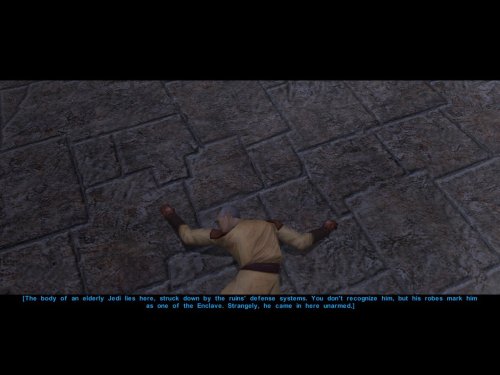
View File AxC's Recover Nemo's Body In the game, the Council acknowledges they sent a Jedi to investigate the ruins, but he has not returned. They do nothing about it, never mention him again, and simply send you instead and call it a day. Consequently, we can do nothing either, except rob the corpse of his belongings and leave him in his tomb. This small immersion mod allows you to recover the body of Nemo from the Dantooine ruins. Or not. The choice is yours. Bring him not to the apathetic Council, but to Deesra, who trains under Master Dorak to one day become Chronicler of the Jedi Order. He will properly document Nemo's fate and attend to his burial. A short quest begins once you search Nemo's remains and decide to take his body back to the Enclave. You may also choose to deliberately leave him there, as the Council always intended, and the quest will auto-complete, affirming your decision. Upon completion, you receive a purple crystal that once belonged to Nemo himself. In my opinion, a fitting way to obtain this signature crystal before leaving Dantooine for the first time. Note: Due to how the game works, it's best to install this mod before entering the Dantooine Ruins for the first time. Otherwise, the dialogue after interacting with the corpse may not trigger naturally. As a failsafe, I've added an additional dialogue option with the Ancient Droid. After finishing your business in the ruins, ask him questions and a new line will appear: "Did you kill the Jedi over there?". This allows you to investigate the body the same way as after searching him. Bugs: Nothing major, but if installed on an existing save and using the failsafe route, the body may only disappear after you revisit the location. Installation: Use the HoloPatcher installer included in the archive. Credits: Fred Tetra, for KOTOR Tool TK102, for DLGEditor Torlack, stoffe & TK102, for NWNSSCOMP JdNoa & Dashus, for DeNCS Cortisol, for Holocron Toolset and HoloPatcher Submitter AxConsortium Submitted 03/10/2026 Category Mods K1R Compatible Yes
-
Version 1.0.0
53 downloads
In the game, the Council acknowledges they sent a Jedi to investigate the ruins, but he has not returned. They do nothing about it, never mention him again, and simply send you instead and call it a day. Consequently, we can do nothing either, except rob the corpse of his belongings and leave him in his tomb. This small immersion mod allows you to recover the body of Nemo from the Dantooine ruins. Or not. The choice is yours. Bring him not to the apathetic Council, but to Deesra, who trains under Master Dorak to one day become Chronicler of the Jedi Order. He will properly document Nemo's fate and attend to his burial. A short quest begins once you search Nemo's remains and decide to take his body back to the Enclave. You may also choose to deliberately leave him there, as the Council always intended, and the quest will auto-complete, affirming your decision. Upon completion, you receive a purple crystal that once belonged to Nemo himself. In my opinion, a fitting way to obtain this signature crystal before leaving Dantooine for the first time. Note: Due to how the game works, it's best to install this mod before entering the Dantooine Ruins for the first time. Otherwise, the dialogue after interacting with the corpse may not trigger naturally. As a failsafe, I've added an additional dialogue option with the Ancient Droid. After finishing your business in the ruins, ask him questions and a new line will appear: "Did you kill the Jedi over there?". This allows you to investigate the body the same way as after searching him. Bugs: Nothing major, but if installed on an existing save and using the failsafe route, the body may only disappear after you revisit the location. Installation: Use the HoloPatcher installer included in the archive. Credits: Fred Tetra, for KOTOR Tool TK102, for DLGEditor Torlack, stoffe & TK102, for NWNSSCOMP JdNoa & Dashus, for DeNCS Cortisol, for Holocron Toolset and HoloPatcher -
Please drop any Lightsaber hilt mods you have created here
AxConsortium replied to Untold Prophecy's topic in Mod Requests
Is there a chanсe I could get those? Thanks in advance! -
View File AxC's Dantooine Star Map Placement Fix n the original game, the Star Map on Dantooine is positioned awkwardly off-center, despite the room clearly being designed for it to be in the middle. Thanks to a Reddit user who spotted this, I couldn't ignore it any longer. This mod corrects the placement so the Star Map now sits properly at the room's center. An additional optional file does the same for the Ancient Droid, centering him in his chamber as well. This mod will only apply it's changes on saves, where the ruins were not yet entered. Credits: WilliamDarkstar4, for the unfortunate discovery that drove me to this Fred Tetra, for KOTOR Tool TK102, for DLGEditor Torlack, stoffe & TK102, for NWNSSCOMP JdNoa & Dashus, for DeNCS Cortisol, for Holocron Toolset Submitter AxConsortium Submitted 02/12/2026 Category Mods K1R Compatible Yes
-

Version 1.0.0
76 downloads
n the original game, the Star Map on Dantooine is positioned awkwardly off-center, despite the room clearly being designed for it to be in the middle. Thanks to a Reddit user who spotted this, I couldn't ignore it any longer. This mod corrects the placement so the Star Map now sits properly at the room's center. An additional optional file does the same for the Ancient Droid, centering him in his chamber as well. This mod will only apply it's changes on saves, where the ruins were not yet entered. Credits: WilliamDarkstar4, for the unfortunate discovery that drove me to this Fred Tetra, for KOTOR Tool TK102, for DLGEditor Torlack, stoffe & TK102, for NWNSSCOMP JdNoa & Dashus, for DeNCS Cortisol, for Holocron Toolset -
 @N-DReW25 I couldn't bring myself to bother you without at least attempting to implement the HoloPatcher myself first. I believe I've implemented this properly now. Would you be willing to take a look and see if everything is set up correctly now?
 -
Thank you so much for telling me this, I didn't notice. I'll try my hand at HoloPatcher now, but it's a notorious problem for me. If I wouldn't be able to update it today, I will request your help.
-
 Sure, that's reasonable. Just uploaded the dual shards version as you requested.
 -
.thumb.png.19be58931dc971bcbec5e537c1995749.png) Honestly, it's unpredictable. It works perfectly for some and soft-locks for others, depending on their setup. I hope to revisit and fix it in the future, but I can't guarantee it will work for you now.
Honestly, it's unpredictable. It works perfectly for some and soft-locks for others, depending on their setup. I hope to revisit and fix it in the future, but I can't guarantee it will work for you now. -
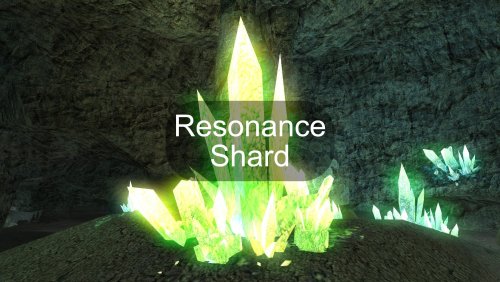
View File AxC's Resonance Shard This mod introduces a unique item: the Resonance Shard, a slived fragment of the Exile's personal crystal. This shard can be discovered in the same crystal formation within the Dantooine Crystal Cave where the original crystal is found. The shard is designed to be used as an implant (requiring Wisdom 14+) by any organic companion. When equipped, it forges a powerful Force bond, allowing the chosen companion to join and share the existing Force Chain between the Exile and Kreia (when she is in the party). Once bonded, most beneficial Force powers used on the Exile, Kreia, or the chosen companion will automatically resonate through the connection, extending their positive influence to all others within the chain. Note: Due to how the game works, the shard will only appear if this is your first time entering the Crystal Cave. If you have already visited the cave, you can add the item with the following console command: giveitem e_imp1_axc01 Credits: Fred Tetra, for KOTOR Tool TK102, for DLGEditor Torlack, stoffe & TK102, for NWNSSCOMP JdNoa & Dashus, for DeNCS Cortisol, for Holocron Toolset Submitter AxConsortium Submitted 12/13/2025 Category Mods TSLRCM Compatible Yes
-
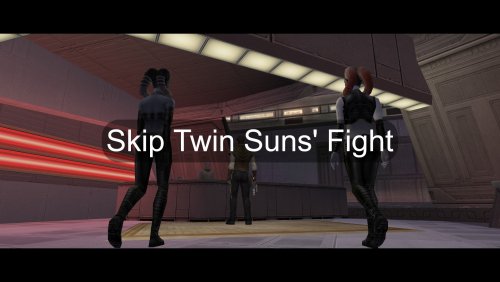
View File AxC's Skip Twin Suns' Fight During the Nar Shaddaa questline, Atton is forced to face the Twin Suns alone. Depending on various factors (especially if Nar Shaddaa is your first planet) this short segment can be notoriously difficult. This mod presents you with a choice to skip the battle without losing any content or to complete it the intended way. The decision remains yours. Additionally, this mod includes a minor restoration not present in the TSLRCM: It correctly implements Atton’s low-influence dialogue in the scene immediately following the battle. If your influence with Atton is below 40, his reason for returning to the Ebon Hawk will reflect his more self-interested nature. Compatibility: Easier Twin Suns' Fight - Fully compatible! You can use both mods and have the option to either skip the fight entirely or play through an easier (but not easy) version of it. TSLRCM - Fully compatible. This mod's restoration is a separate, additive fix. Credits: John Doom, for Easier Twin Suns' Fight Fred Tetra, for KOTOR Tool TK102, for DLGEditor Torlack, stoffe & TK102, for NWNSSCOMP JdNoa & Dashus, for DeNCS Cortisol, for Holocron Toolset Submitter AxConsortium Submitted 12/13/2025 Category Mods TSLRCM Compatible Yes
-
Version 1.0.2
142 downloads
This mod introduces a unique item: the Resonance Shard, a slived fragment of the Exile's personal crystal. This shard can be discovered in the same crystal formation within the Dantooine Crystal Cave where the original crystal is found. The shard is designed to be used as an implant (requiring Wisdom 14+) by any organic companion. When equipped, it forges a powerful Force bond, allowing the chosen companion to join and share the existing Force Chain between the Exile and Kreia (when she is in the party). Once bonded, most beneficial Force powers used on the Exile, Kreia, or the chosen companion will automatically resonate through the connection, extending their positive influence to all others within the chain. Note: Due to how the game works, the shard will only appear if this is your first time entering the Crystal Cave. If you have already visited the cave, you can add the item with the following console command: giveitem e_imp1_axc01 Credits: Fred Tetra, for KOTOR Tool TK102, for DLGEditor Torlack, stoffe & TK102, for NWNSSCOMP JdNoa & Dashus, for DeNCS Cortisol, for Holocron Toolset -
Version 1.0.1
53 downloads
During the Nar Shaddaa questline, Atton is forced to face the Twin Suns alone. Depending on various factors (especially if Nar Shaddaa is your first planet) this short segment can be notoriously difficult. This mod presents you with a choice to skip the battle without losing any content or to complete it the intended way. The decision remains yours. Additionally, this mod includes a minor restoration not present in the TSLRCM: It correctly implements Atton’s low-influence dialogue in the scene immediately following the battle. If your influence with Atton is below 40, his reason for returning to the Ebon Hawk will reflect his more self-interested nature. Compatibility: Easier Twin Suns' Fight - Fully compatible! You can use both mods and have the option to either skip the fight entirely or play through an easier (but not easy) version of it. TSLRCM - Fully compatible. This mod's restoration is a separate, additive fix. Credits: John Doom, for Easier Twin Suns' Fight Fred Tetra, for KOTOR Tool TK102, for DLGEditor Torlack, stoffe & TK102, for NWNSSCOMP JdNoa & Dashus, for DeNCS Cortisol, for Holocron Toolset -
Thank you for bringing this up to my attention, I appreciate it. Honestly, I should revisit and rework this entire mod when I gain a bit more experience.
-
View File AxC's TSL Ebon Hawk K1 Camera & Unlocked Map A simple modification that restores the player camera inside the Ebon Hawk in Knights of the Old Republic II: The Sith Lords to the closer, more classic view from the first KOTOR game. Nothing complex, just a straightforward return to the preferred camera. Additionally, this mod fully unlocks the Ebon Hawk's map from the start, just as it was in KOTOR I, removing the fog of war for a more seamless exploration of your ship. Installation & Important Notes: This mod is safe to install at any time. However, for the changes to apply correctly, it is highly recommended to load a save game from any location other than the Ebon Hawk after installation. Once you enter the Ebon Hawk with the mod active, the new camera and map settings will be baked into your save file. Because of this, uninstalling the mod may not properly revert the changes. Please ensure you have a backup save from before the mod was installed or used, just in case. Nostalgia is strong with this one. Credits: Fred Tetra, for KOTOR Tool TK102, for DLGEditor Torlack, stoffe & TK102, for NWNSSCOMP JdNoa & Dashus, for DeNCS Cortisol, for Holocron Toolset Submitter AxConsortium Submitted 11/07/2025 Category Mods TSLRCM Compatible Yes
-
.thumb.png.c53afb22c6ced903bfe3e520701c3746.png)
Version 1.0.0
70 downloads
A simple modification that restores the player camera inside the Ebon Hawk in Knights of the Old Republic II: The Sith Lords to the closer, more classic view from the first KOTOR game. Nothing complex, just a straightforward return to the preferred camera. Additionally, this mod fully unlocks the Ebon Hawk's map from the start, just as it was in KOTOR I, removing the fog of war for a more seamless exploration of your ship. Installation & Important Notes: This mod is safe to install at any time. However, for the changes to apply correctly, it is highly recommended to load a save game from any location other than the Ebon Hawk after installation. Once you enter the Ebon Hawk with the mod active, the new camera and map settings will be baked into your save file. Because of this, uninstalling the mod may not properly revert the changes. Please ensure you have a backup save from before the mod was installed or used, just in case. Nostalgia is strong with this one. Credits: Fred Tetra, for KOTOR Tool TK102, for DLGEditor Torlack, stoffe & TK102, for NWNSSCOMP JdNoa & Dashus, for DeNCS Cortisol, for Holocron Toolset -
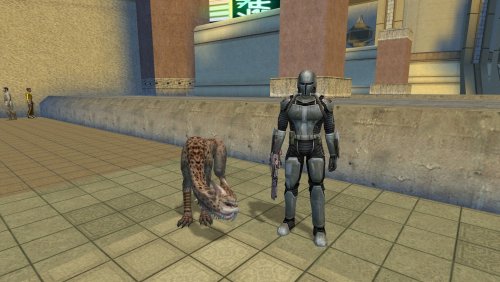 Good catch! Lord Mird was an influence, sure, but Galaar was ultimately inspired more by the general trope of a grizzled old warrior and his dog than by any specific character.
 -
Could've, yes, but modeling an entire unique creature with custom set of animations is way beyond me. Had to choose a creature from vanilla for the task.
-
Hey! Yes, both of my mods are also on the Steam Workshop. Oh, he can definitely smell cancer. Won't do anything about it, though. He'd just give you a look like "Shame" and then go back to sleep. He's just one lazy dude. Thank you, that's exactly the dynamic I aimed to create. Hope you'll enjoy winning him over!
-
View File AxC's Hound of Mandalore Give the Mand'alor a companion worthy of his station. This mod adds a unique Maalraas, named Galaar (Mando'a for "Hawk"), as a permanent and interactive companion for Mandalore. I've always loved Mandalore as a character but felt he was lacking compared to other party members. This mod helps him stand out by giving him Galaar, a personal Maalraas that will follow him much like Bao-Dur's Remote, and one that will hopefully prove its worth in battle. But Galaar is more than just a follower; he's a character in his own right. His loyalty isn't given freely, it's earned through your actions and, most importantly, your relationship with Mandalore himself. To acquire Galaar, you must head to the Western Square on Onderon. There, you will find a Sullustan merchant named Kobbegg standing near a cage containing the beast. Speak to him, but be prepared to spend a considerable amount of credits for such a rare creature... or find another way to negotiate the price. Kobbegg's attitude and your options will change based on a choice you made long ago on Peragus. Features: A Deeply Reactive Companion: Galaar is a fully interactive party member. You can speak with him aboard the Ebon Hawk and in the field. His demeanor and dialogue are not static; they are a direct reflection of your Influence with Mandalore, shifting from hostile wariness to absolute devotion. A Unique Judge of Character: Galaar forms his own opinions! Ask him what he thinks, and he'll give you his instinctual, animal-level read on every member of your crew. This includes everyone from Atton to HK-47, and even recognizes the GONK droid from my other mod, GONK and Loaded! He Senses Who You Are: Galaar's opinion of you is complex. He will comment on your chosen path, whether you are a Guardian, Sentinel, or Consular, and even recognize your Prestige Class. Furthermore, he intuitively senses your alignment, offering a unique perspective on your journey to the Light Side, Dark Side, or somewhere in between. Planetary Instincts: Galaar can sense the nature of each world you visit. Ask him how he feels on planets from the jungles of Dxun to the tombs of Korriban, and get a creature's-eye view of the galaxy. Lore-Friendly & Interactive Acquisition: The quest to get Galaar is a multi-layered conversation with the merchant Kobbegg, featuring persuasion, intimidation, and even Force-based solutions. Additional Merchant: Kobbegg also operates as a general merchant, selling armor, weapons, and implants. Seamless Integration: If you have my Customizing Droids mod installed, Kobbegg will also sell Droid Customization Kits. Notes: The mod can be installed at any time, but the encounter will only trigger before your first visit to the Western Square. TSLRCM is not required, but is always recommended. Credits: Princess Artemis, for Cati (inspiration) Fred Tetra, for KOTOR Tool TK102, for DLGEditor Torlack, stoffe & TK102, for NWNSSCOMP JdNoa & Dashus, for DeNCS Cortisol, for Holocron Toolset Submitter AxConsortium Submitted 10/11/2025 Category Mods TSLRCM Compatible Yes
-
Version 1.1.0
181 downloads
Give the Mand'alor a companion worthy of his station. This mod adds a unique Maalraas, named Galaar (Mando'a for "Hawk"), as a permanent and interactive companion for Mandalore. I've always loved Mandalore as a character but felt he was lacking compared to other party members. This mod helps him stand out by giving him Galaar, a personal Maalraas that will follow him much like Bao-Dur's Remote, and one that will hopefully prove its worth in battle. But Galaar is more than just a follower; he's a character in his own right. His loyalty isn't given freely, it's earned through your actions and, most importantly, your relationship with Mandalore himself. To acquire Galaar, you must head to the Western Square on Onderon. There, you will find a Sullustan merchant named Kobbegg standing near a cage containing the beast. Speak to him, but be prepared to spend a considerable amount of credits for such a rare creature... or find another way to negotiate the price. Kobbegg's attitude and your options will change based on a choice you made long ago on Peragus. Features: A Deeply Reactive Companion: Galaar is a fully interactive party member. You can speak with him aboard the Ebon Hawk and in the field. His demeanor and dialogue are not static; they are a direct reflection of your Influence with Mandalore, shifting from hostile wariness to absolute devotion. A Unique Judge of Character: Galaar forms his own opinions! Ask him what he thinks, and he'll give you his instinctual, animal-level read on every member of your crew. This includes everyone from Atton to HK-47, and even recognizes the GONK droid from my other mod, GONK and Loaded! He Senses Who You Are: Galaar's opinion of you is complex. He will comment on your chosen path, whether you are a Guardian, Sentinel, or Consular, and even recognize your Prestige Class. Furthermore, he intuitively senses your alignment, offering a unique perspective on your journey to the Light Side, Dark Side, or somewhere in between. Planetary Instincts: Galaar can sense the nature of each world you visit. Ask him how he feels on planets from the jungles of Dxun to the tombs of Korriban, and get a creature's-eye view of the galaxy. Lore-Friendly & Interactive Acquisition: The quest to get Galaar is a multi-layered conversation with the merchant Kobbegg, featuring persuasion, intimidation, and even Force-based solutions. Additional Merchant: Kobbegg also operates as a general merchant, selling armor, weapons, and implants. Seamless Integration: If you have my Customizing Droids mod installed, Kobbegg will also sell Droid Customization Kits. Notes: The mod can be installed at any time, but the encounter will only trigger before your first visit to the Western Square. TSLRCM is not required, but is always recommended. Credits: Princess Artemis, for Cati (inspiration) Fred Tetra, for KOTOR Tool TK102, for DLGEditor Torlack, stoffe & TK102, for NWNSSCOMP JdNoa & Dashus, for DeNCS Cortisol, for Holocron Toolset -
 This is a fantastic mod! Thank you for investing your time and talent to create it.
- 4 comments
-
- 1
-

-
- sith marauder
- sith lord
- (and 5 more)
-
View File AxC's Skip Remote Sequence This simple mod does exactly one thing: it lets you skip the Remote flying sequence on Malachor V without losing any content. Now you don't have to go through this notorious chapter if you don't want to. How it works: Adds a skip option when the Remote sequence begins All cutscenes and dialogue play normally like nothing was skipped Works with or without TSLRCM Completely optional every time (play it normally when you want to) Credits: Fred Tetra, for KOTOR Tool TK102, for DLGEditor Torlack, stoffe & TK102, for NWNSSCOMP JdNoa & Dashus, for DeNCS Cortisol, for Holocron Toolset Submitter AxConsortium Submitted 08/12/2025 Category Mods TSLRCM Compatible Yes

