Leaderboard




Popular Content
Showing content with the highest reputation since 09/08/2026 in all areas
-
Version 1.0.0
57 downloads
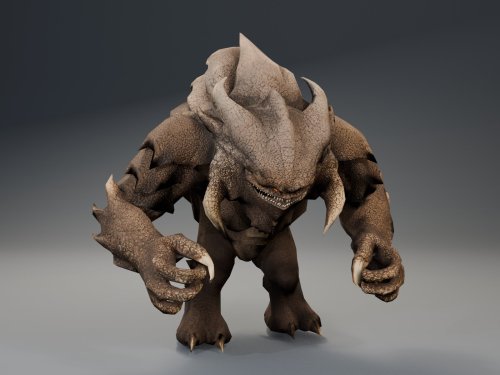
HQ Terentatek Replacement — KOTOR I Version 1.0.0 by ShaolinGhost Bring a new look and movement set to KOTOR I’s Terentateks. This replacement pairs a custom creature model and 4K textures with converted Star Wars: The Old Republic animations, including claw-slashing attacks, idle and movement cycles, damage reactions, death and roar motions. The replacement covers every creature using the original Terentatek appearance throughout the base game, including Kashyyyk, Korriban and scripted transformations. Existing encounter scripts, quests, statistics, loot and native soundset assignments are preserved. Campaign roars occur when the original game scripts or animation system request them. Requirements KOTOR I for PC. No additional mods, runtime DLLs, custom launcher or executable patches are required. TSLPatcher is included for Windows installation. The 4096 × 4096 textures require additional graphics memory. Installation Close the game and extract the entire ZIP into its own folder outside the game directory. Run TSLPatcher.exe, select Install Mod, and choose the KOTOR I folder containing swkotor.exe. Do not select Override. Wait for installation to finish and check the log for errors. Keep the installer and its backup folder. The installer merges the Terentatek appearance settings into an existing appearance.2da and preserves unrelated changes. Do not manually copy the supplied appearance.2da into Override. A new game is not required for this appearance replacement; restart the game after installing. Compatibility Install after other appearance-table mods. Mods that replace the same Terentatek appearance or the same model and texture resources conflict. Creatures assigned a separate appearance by another mod are outside this replacement’s scope. K1R compatibility has not been tested; the required compatibility field is therefore marked No. This release contains no test maps, test creatures, saves or plot scripts. The gallery includes four Blender model renders showing the front, profile, claw attack and roar, plus one in-game screenshot from the development test area. Render lighting differs from in-game lighting. Uninstallation Restore the files from this installation’s backup folder. Remove files created by the installer only when no previous version was backed up. See README.txt for the complete file list and appearance.2da instructions. Uninstall in reverse installation order to avoid discarding later mods’ table changes. Credits ShaolinGhost — custom creature model, textures and mod release. BioWare / Electronic Arts — SWTOR skeleton and animation source assets, converted for KOTOR I. BioWare / LucasArts — KOTOR I and its creature sounds. stoffe and Fair Strides — TSLPatcher. MDLOps contributors, the Blender project and the KOTOR modding community. Permissions Please contact ShaolinGhost on Deadly Stream before redistributing or using the custom model and textures in another release. Rights to original game assets remain with their respective owners. This is a free, unofficial modification and is not made, distributed or supported by BioWare, Electronic Arts, LucasArts, Lucasfilm or Disney.4 points -
Version 1.0.0
35 downloads
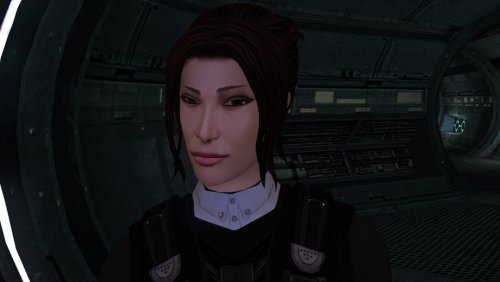
The mod replaces the PFHA04 model and textures. To Install 1. Download: PFHA04 2. Copy all files to the Knights of the Old republic's Override folder. (Example location - C:\Program Files (x86)\Steam\steamapps\common\swkotor\Override) 3. When/if prompted to overwrite files, press okay. 4. If you like the mod; leave a comment or endorse! (It would be much appreciated) Made with love.3 points -
Version 1.0.0
27 downloads
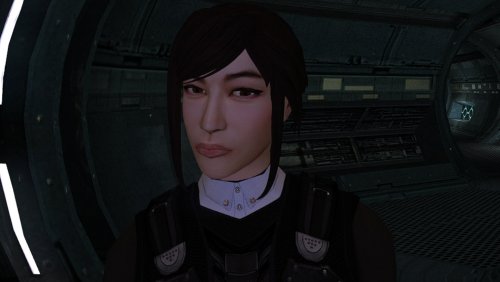
The mod replaces the PFHA05 model and textures. To Install 1. Download: PFHA05 2. Copy all files to the Knights of the Old republic's Override folder. (Example location - C:\Program Files (x86)\Steam\steamapps\common\swkotor\Override) 3. When/if prompted to overwrite files, press okay. 4. If you like the mod; leave a comment or endorse! (It would be much appreciated) Made with love.2 points -
Version 1.0.0
709 downloads
KMRP - KOTOR MODERN RESTORATION PATCH Modern resolutions, properly scaled UI, engine fixes and restored interface behaviour for KOTOR 1 48 resolutions | 800x600 to 15360x8640 | 4:3 | 16:10 | 16:9 | 21:9 | 32:9 WHAT IS KMRP? Vanilla KOTOR was built around fixed pixel sizes and interface layouts originally designed for resolutions such as 640x480. On modern displays this causes tiny text, overlapping list entries, undersized icons, broken map scaling and other interface problems. KMRP fixes these problems in the game engine itself. It supports 48 resolutions from 800x600 up to 15360x8640 across 4:3, 16:10, 16:9, 21:9 and 32:9. Several of these fixes require changes to swkotor.exe because the affected values are hardcoded inside the engine and cannot be reached through GUI or 2DA files alone. WHAT IT FIXES Readable text with properly scaled list rows Inventory, Abilities and Store icons and rows scale correctly Item stack counts remain visible with larger fonts Long item description crash fixed Description text no longer runs under the scrollbar Area map fills its frame Fog of war covers the complete map Map marker clicks line up correctly 250 misplaced map notes can be corrected using Derslok's fixes HUD minimap is zoomed correctly again Dialogue letterboxing, tutorial popups and interface artwork follow the selected resolution INSTALLATION Install other content mods first, such as K1CP or K1R, then install KMRP. Download the standard KOTOR Editable Executable Run KMRP - KOTOR Modern Restoration Patch.exe. Select your resolution. Open Advanced Settings if you want to change optional components. Click Start Patching. Launch KOTOR. To change resolution later, use Restore Original first, then patch again. KMRP backs up the executable, INI and every Override file it modifies before patching. EXE PATCHING KMRP modifies swkotor.exe because several interface values and bugs are hardcoded inside the game engine. Before writing anything, KMRP verifies the executable by SHA-256 and file size. Unknown executables are rejected. KMRP modifies 893 bytes of the 4,042,752-byte executable, around 0.022%, and adds ten 4KB code sections where additional space is required. Every executable patch is documented in the GitHub repository. KMRP is not a launcher and nothing stays running in the background. The only exception is the optional Modern Driver Compatibility component, which places two files beside the executable. If you do not want your executable modified, do not install KMRP. INCLUDED COMPONENTS K1 Modern Driver Compatibility 1.2.0 by Synchro Optional. Restores lighting, reflections, fog, soft shadows and correct grass rendering on modern hardware. K1 Area Map Fixes by Derslok Optional. Corrects 250 misplaced map-note positions. Party Portraits by MadDerp Bundled with permission. KOTOR 1 HD Icon Pack 1.0 by JackInTheBox Bundled with permission. COMPATIBILITY Tested with: KOTOR 1 Community Patch 1.10.0 KOTOR 1 Restoration 1.2 K1CP replaces two icons also included in the HD Icon Pack. KMRP keeps the K1CP versions where applicable. DOWNLOADS GitHub Releases https://github.com/RayesDiyab/KMRP-KOTOR-Modern-Restoration-Patch/releases Nexus Mods https://www.nexusmods.com/kotor/mods/1879 Deadly Stream Available on this page SOURCE AND DOCUMENTATION Full source code, executable patch documentation and reverse-engineering notes: https://github.com/RayesDiyab/KMRP-KOTOR-Modern-Restoration-Patch CREDITS ndix UR KOTOR High Resolution Menus 1.5 Synchro K1 Modern Driver Compatibility and published area-map research Derslok K1 Area Map Fixes MadDerp Party Portraits JackInTheBox KOTOR 1 HD Icon Pack RaymanGT HD menu and UI asset set LICENSE KMRP is licensed under GPL-3.0. Star Wars: Knights of the Old Republic © 2003 BioWare Corp. / LucasArts. KMRP is an unofficial community patch and is not affiliated with or endorsed by BioWare, LucasArts, Lucasfilm or Disney. You must own the game.2 points -
![More information about "[K1] HD Female Twi'leks + NPC Diversity + Playable Female Twi'leks"](https://deadlystream.com/downloads/screens/monthly_2026_09/Untitled-5.thumb.png.825cd65aa1f41bb1266ad35609de16ba.png)
Version 1.1.0
63 downloads
===================================================== [K1] HD Female Twi'leks + NPC Diversity + Playable Female Twi'leks ===================================================== Mod for Knights of the Old Republic 1 Author: Lily File Name: K1_HD_Female_Twilek_Diversity_and_PCs_v1.zip Latest Version: 1.1 --- 1. DESCRIPTION: This mod overhauls the female Twi'lek NPCs in KotOR 1 and adds 26 new playable female Twi'lek heads. NPC Overhaul: - Upscaled and updated dancer outfits. - Body skin tones all match head skin tones. - Added specular highlights to body textures. - Added specular highlights with a bump map to the heads, giving female lekku the same light-reactive shine male Twi'leks have. Eyes and lips also get a subtle shine. - NPCs now use different lekku positioning per head, so they no longer all look like pure reskins. - Gives a unique appearance to: - Yuthura Ban when encountered on Dantooine - Zaerdra - Hidden Beks bodyguard, Taris - Lyn Sekla - dancer, Taris - Janice Nall - droid shop owner, Taris - Kandon's Bodyguard - Black Vulkar Base - Malare - Bastila's quest - Lena - Mission's quest - Zoriis Bafka - swoop racer, Tatooine - Casandra Mateil - swoop racer, Manaan - Zeena - swoop racer, Manaan Playable Heads: - 26 playable female Twi'lek models, including every female Twi'lek NPC. - A number of completely new heads. - Dark side transitions. - Every playable head comes with a Handmaiden-style underwear model with matching skin tones. Find the KotOR II version here! --- 2. INSTALLATION: Run Install.exe and select your KotOR 1 game directory. There are 3 installation options. - Default Installation: Includes playable Twi'lek models and replacements for NPC Twi'leks. You probably want this one. - Playable Twi'leks ONLY: Includes only models for the player character, NPC Twi'leks will remain unchanged - NPC replacement ONLY: Replaces models for NPC Twi'leks, does not add any playable characters If you use the default installation, you DO NOT need to install NPC replacement ONLY or Playable Twi'leks ONLY. You should be safe to reinstall this mod on top of itself without any problems. You will probably want to use a widescreen mod such as this Without a high resolution, the bump mapping looks pretty bad. A "backup" folder is created by the installer in the same directory. Don't delete it if you plan to uninstall later. --- 3. UNINSTALLATION: Run Install.exe, select your KotOR 1 directory, and use the "Tools > uninstall/restore backup" option to revert all changes made by this mod. --- 4. KNOWN ISSUES: If you have met any of the NPCs, they will not have their unique appearance. You should use a save from beforehand. If you find any bugs or problems, please report them. --- 5. MOD COMPATIBILITY: Installing this should not break any other mods or have any conflicts, including K1R. This mod only touches female Twi'lek head/body models, textures, and appearance-related files - no dialogue, scripting, or module changes. Should be compatible with all other mods other than any other mods that have changed the female Twi'lek appearances, this mod will obviously stop the old appearances from showing. All files should have unique names, so this should not overwrite other mods, and it would just take Appearance.2da changes (or an uninstallation) to revert. Notably, this mod conflicts with KotOR 1 Twi'lek Female NPC Diversity That mod directly installs to the override folder instead of into modules, so you will need to uninstall that mod if you want to see the NPC appearances from this mod. However, if you wish to keep any appearances from that mod or any other female Twi'lek NPC mods, you can install those after this one to overwrite specific NPCs without an issue. Do not use the Steam Workshop for KotOR. It will almost certainly end with compatibility issues. --- 6. SUPPORT: My mods are free to use. You do not need to pay for them, but if you would like to say thanks, you can buy me a coffee! --- 7. PERMISSIONS: Please let me know if you plan on using any of the files in my mod for your own mod. The answer is "yes you may", but I would like to know what you are doing with it! Do not directly reupload this mod anywhere else. --- 8. THANKS: - Dark Hope - HD Twilek base textures - Leilukin & SpaceAlex - Dahnis Unique Look - Effixian - Red Twi'lek head - DarthParametric - Twi'lek high boots model - redrob41 - Original Twi'lek head/body model fixes, original underwear, dancer, assassin models - bead-v - MDLEdit - Fred Tetra - KotOR Tool - Cortisol - Holocron Toolset & HoloPatcher - Fair Strides - TSLPatcher - seedhartha - KotOR Blender - ndix UR - tga2tpc - ??? - A couple playable heads are originally from a decade-old modpack with no credits. If you are or know the author, let me know and I can credit the author/remove them. THIS MODIFICATION IS NOT SUPPORTED BY BIOWARE/OBSIDIAN ENTERTAINMENT OR LUCASARTS OR ANY LICENSORS/SPONSORS OF THE MENTIONED COMPANIES. USE THIS FILE AT YOUR OWN RISK.2 points -
Fairly significant update coming to Echoes of the Republic in the nebulous near future. Almost done implementing a new short questline, then I still need to run through the whole game again to test it.2 points
-
Hello! Can anyone provide new senior (especially Male) heads to K1? K2 imports would be fine, but I would love to have some completely new ones to add some variety to the game. Cheers!2 points
-
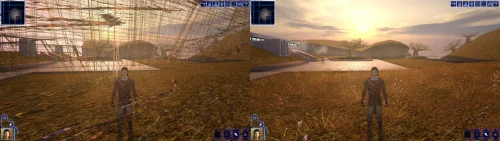 An mod that did the (a couple of years ago) impossible. He solved one of the most pertiment bugs for the K1 users, the enabling of Soft Shadows, Frame Buffer Effects and all the bugs in the metalic surfaces, reflections and all. To me even the Standalone version of this mod is mandatory. Congratulations goes to the modder1 point
 -
 That's a fair question, and it comes down to a couple of things: At the moment the ModInstaller only has the ability to manage loose file mods, of which there are still a fair few out there! (maybe 60% of the mod builds are loose file mods) Unlike on Windows: loose mod installs on Linux are a bit of a nightmare and require a lot of prep-work, and careful consideration to make sure that case mismatches (This vs this) aren't an issue. For example: to get a mod prepped at the moment you'll need to extract it somewhere, ensure all of the files are the same case, make sure whatever is inside your override folder is the same case so that if you expect to overwrite something you can, and then you can install the mod. And even once you do that, there's no easy way to undo or restore any backups unless you're doing them all yourself. Next: you also need to make sure you're using a pre-release version of HoloPatcher to make sure it also doesn't mess up the case on any files.. The ModInstaller handles the loose file mod side of things: it's able to track loose file mods you've installed as well as handle collisions when there is a naming problem (only really an issue on Linux). It also opens mod archives directly, so you don't even need to extract them somewhere. (You can also handle tpc and tga duplicates too!) So the idea at the moment is to give Linux users (and Windows/Mac users too!) the ability to manage loose file mods in a more convenient way. Now to your point about TSLPatcher or HoloPatcher support: That is part of the final plan, but there is a lot more work to it than just integrating holopatcher and being done with it. Rakata (the library that I built, and what the the organiser is built on) only supports K1 at the moment, and it is almost ready to actually be able to support having a patching engine built on top of it, but it isn't quite ready for prime time yet. The plan is to build out support for Cortisol's Kotor Patching Language. Then write adapters for both old style TSLPatcher mods and HoloPatcher mods, so all variants can be supported properly. What this means is that loose mods and patcher mods will both able to be managed by the same application, and would give you the ability to uninstall/reinstall disable, etc. quite easily. Early days! But things are looking pretty positive. Keep an eye out for my saveeditor that is also almost ready to release as an initial version. It will support live session editing (when paired with a patch via KPM) and a plethora of other useful features (including rakata-lint, a verification engine that is designed to catch crashes before you deploy mods or in the future, edit game assets)1 point
 -
No prob! Enjoy not looking into HK's empty eyes any longer (As a sidenote, BioWare really knocked the Dantooine caves out of the park)1 point
-
OMG, you're an absolute legend. The glitch that's been haunting me for about a decade has finally come to an end. Thanks1 point
-
Version 1.0.0
36 downloads
A Mod for Star Wars Knights of The Old Republic II Author: N-DReW25 1.0 Release Date: 30.08.2026 Installation: Please install the Revenge of Revan mod FIRST before this mod! No exceptions! To install the "Alt Corellia City Reskin" and/or the "TOR Corellia Skybox" addon simply open their folders, copy their files to the Override folder, and overwrite the pre-existing files. The "Coruscant Skybox Pack" comes in two versions, the "Demo Coruscant Skybox" and the "Vanilla Coruscant Skybox" - you can only install one. Pick the one you want to install and open its folder, copy their files to the Override folder, and overwrite the pre-existing files. The "Party Clothes" addon is installed via a HoloPatcher. If you want to use this, you must install the "Episode One & a Half" addon BEFORE you install Party Clothes. Once that is installed, just click on the INSTALL.exe, add your Kotor II file directory, click install, and the addon shall be installed. To install "Episode One & a Half", you must do the following: 1) Copy the "dialog.tlk" file and paste it into your "Knights of the Old Republic II" folder, overwriting the previous one. 2) Open the "For Override" folder, press Cntrl + A on your keyboard to select the files, copy them all into your Override folder, and overwrite the pre-existing files. 3) Open the "For Modules" folder, press Cntrl + A on your keyboard to select the files, copy them all into your Modules folder, and overwrite the pre-existing files. 4) Open the "For StreamMusic" folder, press Cntrl + A on your keyboard to select the files, copy them all into your StreamMusic folder, and overwrite the pre-existing files. 5) Open the "For StreamSounds" folder, press Cntrl + A on your keyboard to select the files, copy them all into your StreamSounds folder, and overwrite the pre-existing files. 6) Open the "For StreamVoice" folder, press Cntrl + A on your keyboard to select the files, copy them all into your StreamVoice folder, and overwrite the pre-existing files. Consult the "Changelog.txt" for a full list of features added in this patch. Description: The ROR Addon Pack is a mod pack for the Revenge of Revan mod (ROR) which contains features for the ROR mod which either got rejected from the main mod, are experimental in nature but could be used by players, or are preview features for an upcoming Episode release. As of right now, the pack contains the following addons: Episode One & a Half: This addon contains all of the bug fixes and new content for Episode One that's going to be added in the Episode Two release. Consider this addon a "public beta" before it is added to the main ROR mod as part of Episode Two. Just so that you know, Episode Two will contain the bug fixes/new content for Episode One's Corellia and add the planet Nar Shaddaa to continue the story from where Episode One left off. Episode One & a Half shall be removed from the addon pack once Episode Two releases and will probably be replaced with Episode Two & a Half, Episode Three & a Half etc at later dates. Release 1.0 currently has new content for the opening of the mod up until the Player reports the Tyrena Station Security Recordings to Bao-Dur. A future update shall include improved content for the Esbek Hotel up until the very end of the mod. Main Changelog: Item Specific Changelog: Party Clothes: Similar to Atton and Mira in Kotor II, this addon adds unique clothing that only Uldir and Drayen can wear. Drayen's armor slot will become locked (similar to Mandalore in Kotor II), however, his clothing has very good stats for the early game meaning you won't want to replace it anyway. In future updates, clothing shall be added to future party members when they are added. TOR Corellia Skybox: Replaces the ROR skybox with the Corellia skybox from The Old Republic MMO. Coruscant Skybox Pack: Contains alternative skyboxes for Coruscant. Right now only the ROR Demo Coruscant Skybox and the Vanilla Coruscant Skybox are available. Alt Corellia City Reskin: This is a WIP addon that replaces the current Corellia textures. These may, or may not, be added to the main mod at some point. It is also possible that different textures may be added to the mod instead of these. As these are a WIP there may be textural anomalies in certain parts of the mod. Known Bugs: This mod shouldn't have any bugs but if there are please report them to me on Deadlystream. Incompatibilities: To be added! Permissions: Assets from this mod may not be used without explicit permission from the authors. Voice Actors: JC2: B8-C2. Sith Holocron: HoloNet News Droid [Coruscant and Corellia]. Thanks to: Logan: Beginning the restoration effort for K1! ROR's Main Dev Team: For developing the original K1R mod! Contributors of the Main ROR mod: For contributing to Episode One's release. AxConsortium70: Extensive beta testing, to the point that they fixed some of the more illusive bugs they discovered! Jonathan7: Assets from Force Fashion II, a mod already in ROR, have been modified and included in this pack for the Episode One & a Half addon. RedRob41: Assets from ROR Episode One have been modified and included in this pack for the Episode One & a Half addon! 90SK: Armor and Mask assets from his mods have been added into this pack for the Episode One & a Half addon! SilverEdge9: More assets from BOSSR have been modified and included in this pack for the Episode One & a Half addon! Flammenwerfer: Their mod "The Sith Mask" has been used in this pack for the Episode One & a Half addon. The readme of their mod on NexusMods gives modders free permission to use this asset as long as credit is given to them! ScrierOne: Their mod "Sith Mask Reskin" has been used in this pack for the Episode One & a Half addon. Their NexusMods page states that modders have permission to use this asset! Vurt: For making the Hutt textures in his "Vurt's KotOR Visual Resurgence" mod, these textures were used as a base for ROR's Hutts! Elayerfawkes45: For making the Hutt textures in his "Hutt remesh and retextured with bumps" mod, these textures were used as a base for ROR's Hutts! Detran: For making the Hutt textures in his Detran's Hutts" mod, these textures were used as a base for ROR's Hutts! Sith Holocron: Voice filters for B8-C2, the HoloNet News Droids, and a Royal Guard NPC! Leilukin: Assets from their mod "Missing K1 Party Member Ports for TSL [Modder's Resource]" has been used in this pack for the Episode One & a Half addon. It is a Modder's Resource! Doc Valentine: Creator of the ROR Demo Coruscant Skybox which has become an addon of this pack! Scorchlicious: For fetching the TOR Corellian Skybox for the pack! ElevenLabs Website: For the custom AI VO service! Bioware: For such an amazing game! Obsidian: For such an amazing sequel! Fred Tetra: For Kotor Tool! Cortisol: For Holocron Toolset! Everyone who downloads the mod! Legal: THIS MODIFICATION IS NOT SUPPORTED BY BIOWARE/OBSIDIAN ENTERTAINMENT, LUCASARTS, DISNEY OR ANY LICENSERS/SPONSORS OF THE MENTIONED COMPANIES. USE OF THIS FILE IS AT YOUR OWN RISK AND THE ABOVE-MENTIONED COMPANIES OR THE AUTHOR IS NOT RESPONSIBLE FOR ANY DAMAGE CAUSED TO YOUR COMPUTER FOR THE USAGE OF THIS FILE.1 point -
Thanks a lot N-DReW! I'll try it in my next playthrough, I love this project.1 point
-
View File High poly PFHA05 The mod replaces the PFHA05 model and textures. To Install 1. Download: PFHA05 2. Copy all files to the Knights of the Old republic's Override folder. (Example location - C:\Program Files (x86)\Steam\steamapps\common\swkotor\Override) 3. When/if prompted to overwrite files, press okay. 4. If you like the mod; leave a comment or endorse! (It would be much appreciated) Made with love. Submitter Dark Hope Submitted 09/13/2026 Category Mods K1R Compatible Yes1 point
-
View File Rakata ModInstaller Easily manage, install, and revert loose-file mods. Features: Opens a mod as the zip, 7z or rar it downloaded as, or as a folder you already unpacked. No unpacking first. Works out which files are actually game content. Readmes, screenshots and packaging are left behind, and a mod shipping alternate versions of the same file asks you to pick one. Every install is recorded and can be taken back later. Uninstall leaves a file alone if something has changed it since, so it will not step on a patcher mod's work or on a later mod's. Finds duplicates already sitting in your Override. A name capitalised two ways, or one texture shipped as both a TPC and a TGA. Only one of each is ever loaded, and the game picks it arbitrarily. Shows what every layer of the game holds for a given file, so you can see a loose file quietly shadowing a copy inside a module archive. Finds your installation on its own. Steam, GOG and retail, on Windows, Linux and macOS, for both KotOR 1 and KotOR 2. If you play on Linux or a Steam Deck, this fixes something quiet Mod builds are ordered lists, and later mods are meant to overwrite parts of earlier ones. On Windows that happens by itself, because the filesystem does not care whether a file is called `Appearance.2da` or `appearance.2da`. On Linux it does care. Both files end up in Override, the game loads whichever one it reaches first, and the overwrite prompt the build guide told you to expect never appears. Your install order silently did not happen. This installs by name with a common lowercase filename, so the overwrite you meant is the one you get. What it does not do TSLPatcher mods. Those do not copy files into place. They merge rows into 2DA files that are already there, add entries to the talk table and write inside module archives. This recognises them and says so instead of half-installing them. Keep using HoloPatcher for those. Tested against The loose-file mods from the community build lists, and a full modded install. Additionally tested on Linux by @Leilukin and on macOS by @FTD Thanks for your help testing! Requirements The window fits a 1280x800 screen, so it works on a Steam Deck without too much squeezing. On Windows: Windows 10+ 64-bit On macOS: macOS 10.12+ for Intel Macs and 11.0+ for Apple Silicon Macs On Linux: Any recent Linux distro with glibc 2.35+ About Rakata Rakata is a clean-room Rust workspace for reading, writing and validating KotOR game data, written from scratch against notes taken from the engine rather than from anybody else's code. This installer is one tool built on top of it. It is free and open-source under GPL-3.0, and the source along with the format documentation is at https://codeberg.org/Synchro/rakata LLM Disclosure This project made use of an LLM during development, in the following capacities: Brainstorming: exploring possible approaches and design directions Decompilation assistance: help interpreting reverse-engineered code Code comments: refining and clarifying existing comments Skeletons and fixes: generating initial code scaffolding and minor fixes. All LLM-assisted output was modified and reviewed by a human before being committed. Submitter Synchro Submitted 09/13/2026 Category Modding Tools1 point
-
In the process of creating my own Mandalorians on the Rakata homeworld mod (real original, I know). In addition to adding 2 new areas with unique enemies and cool items, I will also modify Mandalorians elsewhere in the game to establish a sub-plot hinting at the rise of a new Mandalore. I have the areas and most of the custom equipment already from a prototype of this mod that I never uploaded. Currently working on creating a new lightsaber model for the Darksaber, though I'm having trouble figuring out how to make lightsaber blades stop rotating so I can give the blade its iconic shape.1 point
-
Restores/fixes the original effects!1 point
-
.thumb.png.3301b414885aa5c5ced45535fec5ddfc.png) I'd rather keep it as it is, since this mirrors vanilla behavior, where neutral alignment leads to Mira. But it's a good idea for an optional file, I'll look into it!1 point
I'd rather keep it as it is, since this mirrors vanilla behavior, where neutral alignment leads to Mira. But it's a good idea for an optional file, I'll look into it!1 point -

Version 1.2.1
55 downloads
Expands supported resolutions and scales all Menus/HUD. Install - Use with Kotor Patch Manager: https://github.com/LaneDibello/Kotor-Patch-Manager - Download and copy HD UI Menu Pack textures to override directory - Copy Scaled Kotor textures to override directory, overwrite if asked - Apply all "Scaled" patches with patch manager and then click launch. - Alt Tab Patch and Movie Patch are recommended. - Change resolution in game - please report any bugs Source: https://github.com/J0-o/ScaledKotorWidescreenPatch Roadmap: - trace and upscale the font to a higher resolution to improve clarity at resolutions above 1080p - adjust margins in items lists - increase default feat icon size1 point -
View File [TSL] Exchange Gamorrean Fix ===================================================== [TSL] Exchange Gamorrean Fix ===================================================== Mod for Knights of the Old Republic II - The Sith Lords Author: Lily File Name: Exchange_Gamorrean_Fix.zip Latest Version: 1.0 --- 1. DESCRIPTION: With TSLRCM, the Gamorrean Exchange thugs in the refugee sector on Nar Shaddaa have two bugs: 1. They no longer have dialogue if you try to talk to them. I believe the base game had a bug where they had more dialogue lines than they would actually say when you talk to them, and TSLRCM tried to fix this but it ended up even more broken and they just remain silent. With this mod, all of their dialogue lines are restored. 2. When you security one of the metal boxes near them, they tell you "Get out of there or I bash you!" which is an empty threat as they don't care if you take what's inside the box. With this mod, they will become hostile and attack you if you open the box to take what's inside (unless you are in stealth) as intended. --- 2. INSTALLATION: Run Install.exe and select your KotOR 2 game directory. A "backup" folder is created by the installer in the same directory. Don't delete it if you plan to uninstall later. --- 3. UNINSTALLATION: Run Install.exe, select your KotOR 2 directory, and use the "Tools > uninstall/restore backup" option to revert all changes made by this mod. --- 4. KNOWN ISSUES: None. If you find any bugs or problems, please report them. --- 5. MOD COMPATIBILITY: This should be compatible with all other mods. Requires TSLRCM. Do not use the Steam Workshop for KotOR. It will almost certainly end with compatibility issues. --- 6. SUPPORT: My mods are free to use. You do not need to pay for them, but if you would like to say thanks, you can buy me a coffee! --- 7. PERMISSIONS: Please let me know if you plan on using any of the files in my mod for your own mod. The answer is "yes you may", but I would like to know what you are doing with it! Do not directly reupload this mod anywhere else. --- 8. THANKS: - Fred Tetra - KotOR Tool - Cortisol - Holocron Toolset & HoloPatcher - Fair Strides - TSLPatcher THIS MODIFICATION IS NOT SUPPORTED BY BIOWARE/OBSIDIAN ENTERTAINMENT OR LUCASARTS OR ANY LICENSORS/SPONSORS OF THE MENTIONED COMPANIES. USE THIS FILE AT YOUR OWN RISK. Submitter Lily Submitted 09/12/2026 Category Mods TSLRCM Compatible Yes1 point
-
![More information about "[TSL] Exchange Gamorrean Fix"](https://deadlystream.com/downloads/screens/monthly_2026_09/20260912154612_1.thumb.jpg.a7baab39ff2842f8499ca644a681ac76.jpg)
Version 1.0.0
16 downloads
===================================================== [TSL] Exchange Gamorrean Fix ===================================================== Mod for Knights of the Old Republic II - The Sith Lords Author: Lily File Name: Exchange_Gamorrean_Fix.zip Latest Version: 1.0 --- 1. DESCRIPTION: With TSLRCM, the Gamorrean Exchange thugs in the refugee sector on Nar Shaddaa have two bugs: 1. They no longer have dialogue if you try to talk to them. I believe the base game had a bug where they had more dialogue lines than they would actually say when you talk to them, and TSLRCM tried to fix this but it ended up even more broken and they just remain silent. With this mod, all of their dialogue lines are restored. 2. When you security one of the metal boxes near them, they tell you "Get out of there or I bash you!" which is an empty threat as they don't care if you take what's inside the box. With this mod, they will become hostile and attack you if you open the box to take what's inside (unless you are in stealth) as intended. --- 2. INSTALLATION: Run Install.exe and select your KotOR 2 game directory. A "backup" folder is created by the installer in the same directory. Don't delete it if you plan to uninstall later. --- 3. UNINSTALLATION: Run Install.exe, select your KotOR 2 directory, and use the "Tools > uninstall/restore backup" option to revert all changes made by this mod. --- 4. KNOWN ISSUES: None. If you find any bugs or problems, please report them. --- 5. MOD COMPATIBILITY: This should be compatible with all other mods. Requires TSLRCM. Do not use the Steam Workshop for KotOR. It will almost certainly end with compatibility issues. --- 6. SUPPORT: My mods are free to use. You do not need to pay for them, but if you would like to say thanks, you can buy me a coffee! --- 7. PERMISSIONS: Please let me know if you plan on using any of the files in my mod for your own mod. The answer is "yes you may", but I would like to know what you are doing with it! Do not directly reupload this mod anywhere else. --- 8. THANKS: - Fred Tetra - KotOR Tool - Cortisol - Holocron Toolset & HoloPatcher - Fair Strides - TSLPatcher THIS MODIFICATION IS NOT SUPPORTED BY BIOWARE/OBSIDIAN ENTERTAINMENT OR LUCASARTS OR ANY LICENSORS/SPONSORS OF THE MENTIONED COMPANIES. USE THIS FILE AT YOUR OWN RISK.1 point -
I am actually planning on doing this as an optional install for the NPC Diversity Pack. In the vanilla game, for normal heads there are 3 white male, 3 asian male, 3 white females, 3 asian female, 2 black male, and 2 black female heads (when you include the Tatooine commoners as the 3rd white and asian heads, that is) and for the senior heads there are 2 white male, 2 asian male, 2 white females, 2 asian females, 2 black males, and 2 black female heads. TLDR, there are 16 generic commoner heads and 12 generic senior commoner heads. In my update, I plan to increase everyone's head count from 2 or 3 all the way up to 5. With my mod, for normal heads there will be 5 white male, 5 asian male, 5 white females, 5 asian female, 5 black male, and 5 black female heads and for the senior heads there will be 5 white male, 5 asian male, 5 white females, 5 asian females, 5 black males, and 5 black female heads. Most of the textures are ready, and with permission granted from Lily (and help porting the models) I've been able to use Lily's NPC Overhaul in my work. Do note that whilst Lily's mod is a HD mod, mine isn't and so the textures I'm using have been reduced to the vanilla 512x512 quality. Below is an example of me testing one of these new textures on Deadeye Duncan's head model, I don't think I'll use this texture on Deadeye's model and I'm certainly not replacing Deadeye's texture but this is to see that the texture looks good in-game. I have also began experimenting with the other head models with the vanilla textures, if I don't use the models and/or textures in the NPC Diversity Pack I'll most likely use it in the Galaxy of Faces mod.


 1 point
 -
I came across your mod through the KOTOR Modern Restoration Patch, and I'm thrilled that the game is finally being restored to how it was originally intended. However, I keep running into a problem whenever I play KOTOR on hardware that isn't powered by an NVIDIA graphics card, and this patch doesn't fix it either. Maybe some members of the community are familiar with this issue. Certain alpha textures, which are supposed to give specific surfaces a metallic or wet look, actually darken those areas at the same time. HK-47, for example, looks absolutely terrible and is covered in black spots. The tips of male Twi’lek lekku also end up black. Another graphics bug that likely has the same cause affects the crystals on Dantooine, which simply have no texture but instead just a transparent, shiny surface. I’m currently trying to fix this issue on my Steam Deck, but so far without success. In any case, is there perhaps a setting in this patch that can resolve the problem? Or is there at least a small hope that a future update to this patch might fix it?1 point
-
![More information about "[TSL] HD Female Twi'leks + NPC Diversity + Playable Female Twi'leks"](https://deadlystream.com/downloads/screens/monthly_2026_08/Untitled-5.thumb.png.21f9c26623ffeaef67cfbac75b8615b7.png)
Version 1.1.0
180 downloads
===================================================== [TSL] HD Female Twi'leks + NPC Diversity + Playable Female Twi'leks ===================================================== Mod for Knights of the Old Republic II - The Sith Lords Author: Lily File Name: HD_Female_Twilek_Diversity_and_PCs.rar Latest Version: 1.1 --- 1. DESCRIPTION: This mod overhauls the female Twi'lek NPCs in KotOR 2 and adds 26 new playable female Twi'lek heads. NPC Overhaul: - Upscaled and updated dancer outfits. - Body skin tones all match head skin tones. - Added specular highlights to body textures. - Added specular highlights with a bump map to the heads, giving female lekku the same light-reactive shine male Twi'leks have. Eyes and lips also get a subtle shine. - NPCs now use different lekku positioning per head, so they no longer all look like pure reskins. - The mercenary droidmaster on Telos Surface and Borna Lys on Nar Shaddaa now each have a unique head texture pulled from the new playable set, plus a backup head, so their default appearance doesn't clone the player. - Includes a patch for Leilukin's "Dahnis Unique Look" mod, giving their textures an HD look. Playable Heads: - 26 playable female Twi'lek models, including every female Twi'lek NPC. - A number of completely new heads. - Dark side transitions. - Every playable head comes with a Handmaiden-style underwear model, a dancer outfit model, and an assassin-style clothing model, all with matching skin tones. Find the KotOR 1 version here! --- 2. INSTALLATION: Run Install.exe and select your KotOR 2 game directory. There are 4 installation options. - Default Installation: Includes playable Twi'lek models and replacements for NPC Twi'leks. You probably want this one. - Playable Twi'leks ONLY: Includes only models for the player character, NPC Twi'leks will remain unchanged - NPC replacement ONLY: Replaces models for NPC Twi'leks, does not add any playable characters - Dahnis Patch: Updates the look for Dahnis based on Leilukin's Dahnis Unique Look mod. Install that mod first! If you use the default installation, you DO NOT need to install NPC replacement ONLY or Playable Twi'leks ONLY. The Dahnis patch NEEDS to be installed separately - it is NOT included in any other option. You should be safe to reinstall this mod on top of itself without any problems. A "backup" folder is created by the installer in the same directory. Don't delete it if you plan to uninstall later. --- 3. UNINSTALLATION: Run Install.exe, select your KotOR 2 directory, and use the "Tools > uninstall/restore backup" option to revert all changes made by this mod. --- 4. KNOWN ISSUES: If you decide to install only PCs and then later decide to add the NPCs, you should use the default installation option the second time. Installing PCs ONLY and then NPCs ONLY will prevent the backup head from working properly. If you do this, just run the default installation and it should work. If you have already visited Nar Shaddaa, Borna will not have her updated appearance. You should use a save from before arriving. If you find any bugs or problems, please report them. --- 5. MOD COMPATIBILITY: Should be compatible with all other mods, including TSLRCM. This mod only touches female Twi'lek head/body models, textures, and appearance-related files - no dialogue, scripting, or module changes. If you have any other mods that have changed the female Twi'lek appearances, this mod will obviously stop the old appearances from showing. All files should have unique names, so this should not overwrite other mods, and it would just take Appearance.2da changes (or an uninstallation) to revert. If you use Leilukin's "Dahnis Unique Look" mod, install that mod first, then run this mod's Dahnis Patch. Do not use the Steam Workshop for KotOR. It will almost certainly end with compatibility issues. --- 6. SUPPORT: My mods are free to use. You do not need to pay for them, but if you would like to say thanks, you can buy me a coffee! --- 7. PERMISSIONS: Please let me know if you plan on using any of the files in my mod for your own mod. The answer is "yes you may", but I would like to know what you are doing with it! Do not directly reupload this mod anywhere else. --- 8. THANKS: - Dark Hope - HD Twilek base textures - Leilukin & SpaceAlex - Dahnis Unique Look - Effixian - Red Twi'lek head - DarthParametric - Twi'lek high boots model - redrob41 - Original Twi'lek head/body model fixes - Fred Tetra - KotOR Tool - Cortisol - Holocron Toolset & HoloPatcher - Fair Strides - TSLPatcher - ??? - A couple playable heads are originally from a decade-old modpack with no credits. If you are or know the author, let me know and I can credit the author/remove them. THIS MODIFICATION IS NOT SUPPORTED BY BIOWARE/OBSIDIAN ENTERTAINMENT OR LUCASARTS OR ANY LICENSORS/SPONSORS OF THE MENTIONED COMPANIES. USE THIS FILE AT YOUR OWN RISK.1 point -
This is the best news I could have gotten today! Thank you! Off to start a new playthrough!1 point
-
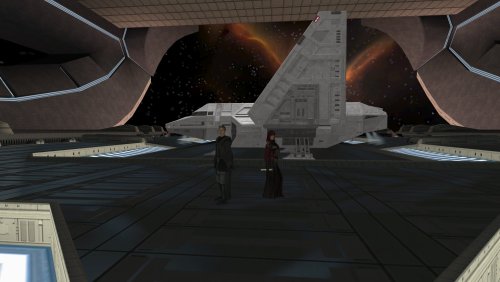 It's an excellent mod - I really enjoyed the additional content although some of the dungeons can be a bit repetitive. On the whole it's a very ambitious project and should be lauded for that, I enjoy the fact that it is developing on a constant basis.1 point
 -
Neutral reputation leads to Mira. Maybe that's where Force Alignment should tip the scales? Regards ❤️1 point
-
 Update 0.13.2 now fixes the HoloPatcher, though manually copying the dialogues into your Override folder should fix the problem if you/other player's don't want to reinstall their whole game for this one bug fix. With the dialogues in the Override could you confirm whether or not these new dialogues still have your weird problems. The bribe dialogue is reserved for same gender players, meaning a male player can only bribe Yun Genda whilst a female player can bribe Sarna. In the vanilla game, the dialogue for the same gender players cuts off after a certain point and you can no longer interact with the same gender NPC whether it be Yun Genda or Sarna. In RC-K1CP, at the point where the dialogue would normally end is more dialogue to continue to the bribe content. If players would want this, I could make an optional install which can add the bribe content to opposite gender players or even a second optional install to add the flirt content to same gender players to allow for females to flirt with Sarna and males to flirt with Yun Genda - this'll pair well with the LGBT mods made by Leilukin.1 point
 -
Version 1.0.0
60 downloads
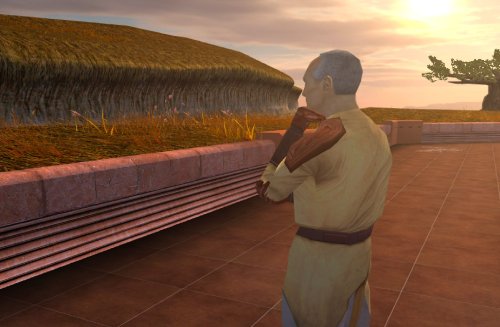
Despawns Nemo once you cleanse the grove. DESCRIPTION After returning to the Enclave from cleansing the grove, the Council gives you a mission to investigate the nearby ruins, telling you they already sent a Jedi to investigate and fear the worst since he hasn’t returned. This Jedi turns out to be Nemo, but since the game doesn’t despawn Nemo from the courtyard until after this conversation, you’ll literally pass him on your way into the Enclave. Apparently the whole time they were awaiting his return he was standing outside reflecting on the beauty of nature, before suddenly remembering he was supposed to be doing something and sprinting over to the ruins. This mod fixes the issue so Nemo will no longer be outside the Enclave once you have cleansed the grove. INSTALLATION Move the file from “to override” to your override folder. UNINSTALLATION Remove k_pdan_14a_area.ncs from your override folder. COMPATIBILITY Compatible the KOTOR 1 Community Patch, which this mod forwards the script changes from. Not compatible with other mods that edit the script k_pdan_14a_area.ncs, though I’m not aware of any. PERMISSIONS You may use this mod however, but any redistribution or modification should include the source script, maintaining the comment headers and credit to K1CP. CREDITS offthegridmorty JC, DarthParametric - K1CP source script for k_pdan_14a_area1 point -

Version 1.5
52,534 downloads
=PartySwap= A KNIGHTS OF THE OLD REPUBLIC II: THE SITH LORDS MODIFICATION ORIGINAL AUTHOR: DarthTyren (darthtyren@gmail.com) CURRENT MAINTAINER: Leilukin LATEST VERSION: 1.5 FILE NAME: PartySwap 1.5.7z CONTACT: E-mail to Leilukin at contact@leilukin.com, or message to Leilukin on Deadly Stream 1. DESCRIPTION: This mod allows the player to recruit both Handmaiden and Disciple in the same playthrough regardless of the player character's gender. If you install the “PartySwap Item” add-on of this mod, when Disciple joins your party on Dantooine, a usable item named PartySwap will be added to your inventory, and will appear in the shield item slot of the quick bar. You can use this PartySwap item to add or remove Handmaiden from your current party, including replacing any member of your current party with Handmaiden, as long as you are able to choose your party at that point of the game. This item was created to work around the limitations of not being able to select Handmaiden from the party selection screen after Disciple joins your party and takes Handmaiden’s slot in the party selection screen. However, Handmaiden remains part of the Ebon Hawk crew, and you can still talk to Handmaiden. Alternatively, you can choose to install the “Full Party Select” patch from KotOR Patch Manager, which expands the number of slots displayed in the party selection screen, and thus allows you to add Handmaiden to your current party, or remove her from your current party, without needing to install the “PartySwap Item” add-on and use the PartySwap item. For the PartySwap mod to take effect, you must install this mod before you leave the secret academy on Telos, where Handmaiden joins your party. For the “PartySwap Item” add-on to take effect, you must install the add-on before Discple joins your party on Dantooine. NOTE: Since July 2023, the original mod author DarthTyren has officially handed over the management and development of this mod to Leilukin, due to DarthTyren's departure from the KotOR modding scene. Therefore, if you have questions about or encountered any issues with this mod, Leilukin is the one to contact for. 2. INSTALLATION: First and foremost, make sure you have The Sith Lords Restored Content Mod (TSLRCM) installed, since TSLRCM is REQUIRED for this mod to work. After downloading this mod, extract the mod’s 7z file to anywhere you like, as long as it is not within the KotOR 2 directory. Run PartySwap Installer.exe located inside the extracted folder. You may only choose ONE of these two options to install the main part of the mod: Default Installation: Choose this option if you use TSLRCM without M4-78EP. M4-78EP Installation: Choose this option if you use M4-78 Enhancement Project (M4-78EP) in addition to TSLRCM. You must install M4-78EP first before running this installation option. FOR REGULAR TSLRCM USERS: Choose the installation option you want, and select your KotOR 2 game folder as your KotOR 2 directory path, click the “Install” button and let the installer do its job. FOR STEAM WORKSHOP USERS: If you have subscribed to The Sith Lords Restored Content Mod (TSLRCM) from the Steam Workshop, for your KotOR directory path, you must choose TSLRCM's Steam Workshop folder, NOT the main KOTOR 2 directory. The directory of the Steam Workshop version of TSLRCM is \Steam\SteamApps\Workshop\content\208580\485537937, while the directory of the TSLRCM + M4-78EP combined Steam Workshop mod is \Steam\SteamApps\Workshop\content\208580\1402798020. Note that PartySwap will NOT be added to the Steam Workshop. Reading this on why it is NOT recommended to use the Steam Workshop for modding the KotOR games: PARTYSWAP ITEM ADD-ON OR FULL PARTY SELECT PATCH: To keep being able to add Handmaiden to your current party after Disciple joins your party, you have two options: Install the “PartySwap Item” add-on from this mod: After installing the main part of this PartySwap mod, select “ADD-ON: PartySwap Item” from the install option drop-down of PartySwap Installer.exe, and click the “Install” button. Install the “Full Party Select” patch from KotOR Patch Manager: Download and install KotOR Patch Manager, extract the archive, then run KpatchLauncher from the “bin” folder. Set the "Game" path to target your KotOR 2 game’s folder that contains your KotOR 2 game executable (such as swkotor2.exe), and the "Patches" path to target the Patch Manager’s “patches” folder, then select and apply the “Full Party Select” patch. Go to the Patch Manager’s “patch” folder, then the “FullPartySelect additional files” folder, and put the partyselect_p.gui file into your game’s Override folder. Note that it does not matter if you apply the Full Party Select patch before or after installing this PartySwap mod. If you are on Windows, you need to launch your KotOR 2 game through the KotOR Patch Manager for the patch to take effect. When you install this mod, two new folders named "backup" and “uninstall” will be created by the installer in the same folder as the installer. Do not delete the folders or any of the files within the folder if you are planning on uninstalling this mod. This mod also provides a compatibility patch for deathdisco’s Coruscant Jedi Temple and danil-ch's Kreia's Fall Cutscene (In-Game).Go to the “Compatibility Patches” folder from this mod, read the READ ME files within the sub-folders and follow the instructions to make PartySwap compatible with these mods. Go to the “Coruscant Jedi Temple Compatibility Patch” folder from this mod, read the READ ME files within the subfolder and follow the instructions to make PartySwap compatible with Coruscant Jedi Temple. Note: The "Source" folder includes the source of the script used by this mod for modders' reference. Ignore the "Source" folder if you only want to install and play this mod. 3. UNINSTALLATION: Run PartySwap Installer.exe. rom the “Tools” drop-down menu, select “Uninstall Mod / Restore Backup”, then confirm to uninstall the mod. If you have also installed the PartySwap Item add-on, it will uninstall the add-on first. After uninstalling the add-on, you need to select Yes to delete the most recent backup folder, then select “Uninstall Mod / Restore Backup” from the drop-down menu again to uninstall the main part of the mod. 4. KNOWN ISSUES: None currently known. If you find any bugs or issues, please report them by posting on PartySwap’s download page or support thread on the Deadly Stream forums, or contact Leilukin directly. 5. MOD COMPATIBILITY: Apart from The Sith Lords Restored Content Mod (TSLRCM), which is required for this mod to work, any mod that edits Kreia's endgame dialog (904kreia.dlg) or Zuka's dialog on Dxun (zuka.dlg) is incompatible with this mod, unless they merge in installation. In that case, you must install PartySwap first. This mod is not compatible with any other mod that involves putting the holorec.dlg file in the Override folder. If you want to use this mod, make sure you DO NOT have holorec.dlg in your Override folder, or Handmaiden will not be able to join your party when you play a female character! This mod provides compatibility patches for deathdisco’s Coruscant Jedi Temple and danil-ch's Kreia's Fall Cutscene (In-Game). This mod is compatible with KOTOR 2 Community Patch. This mod is compatible with JC2's Train the Handmaiden. This mod is compatible with all Leilukin’s mods for KotOR 2, including the romance mods, as long as you follow the instructions from Leilukin’s mod. If you want to use danil-ch and Darth Hayze’s Extended Enclave, downloading and installing a separate compatibility patch is required to make PartySwap compatible with Extended Enclave. If you use Leilukin’s Handmaiden and Female Exile – Disciple and Male Exile Romance, you need to use the patch included in that mod. Otherwise, go to this page for a standalone compatibility patch: https://deadlystream.com/files/file/1304-partyswap-and-extended-enclave-compatibility-patch/ This mod is compatible with WildKarrde’s TSL Expanded Ending, as long as you install PartySwap first before installing TSL Expanded Ending. 6. PERMISSION: You may modify this mod for personal use or show this mod in screenshots. However, please do not redistribute or re-host this mod. Do not release your mods containing assets from this mod without permission. 7. CREDITS: Fair Strides — Can almost take credit for half the mod getting done, by helping with scripts, understanding Waypoints and TSLPatcher, etc. Thank you! Thanks to the wonderful modding community at Holowan Labs/DeadlyStream for helping with the problems faced with the development of this mod. Special thanks to VarsityPuppet, for teaching about #include scripts and how this mod does not need to bother with them. Sith Holocron — Thanks for the aid with VO splicing! Snigaroo — For testing and reporting bugs, including the game breaking bug surrounding Disciple's endgame dialog, suggesting improvements to the mechanics of the PartySwap item, as well as transferring the ownership of this mod file to Leilukin on Deadly Stream. Cortisol — For developing HoloPatcher as a better alternative to TSLPatcher to make installing and uninstalling this mod faster. danil-ch — For giving permission to create compatibility patch for Kreia’s Fall Cutscene (in-game) JCarter426 — For developing SithCodec for modding audio files of the KotOR games THIS MODIFICATION IS NOT SUPPORTED BY BIOWARE/OBSIDIAN ENTERTAINMENT OR LUCASARTS OR ANY LICENSERS/SPONSORS OF THE MENTIONED COMPANIES. USE THIS FILE AT YOUR OWN RISK AND NEITHER THE ABOVE MENTIONED COMPANIES NOR THE AUTHOR IS RESPONSIBLE FOR ANY DAMAGE CAUSED TO YOUR COMPUTER FOR THE USAGE OF THIS FILE.1 point -
1 point
-
Fascinating. I triple checked them again and the issue is consistent. Installing after the patch also makes no difference. And as soon as I uninstall, everything runs fine. I started this on a fresh install and checked each mod against the patch one by one, so I wonder what issue I could have on my end. As it turns out, these mods work fine for me if I do not install Modern Driver Compatibility.1 point
-
I probably will whenever I play Kotor 1 next. If there's demand, I could maybe be convinced to do it sooner. It wouldn't be too hard.1 point
-
1 point
-
Version 1.0.0
11 downloads
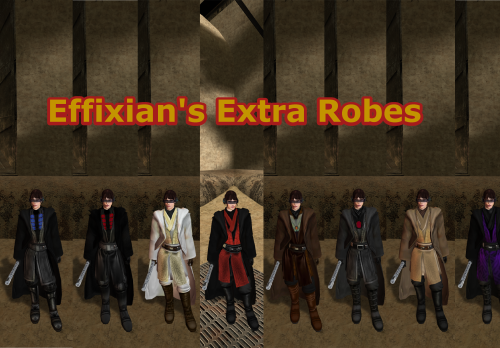
Upon finding Effixian's Extra JC's Jedi Robes mod, I instantly fell in love as I loved all the designs and it added new robes to Kotor, as this game was very much lacking in terms of unique robes unlike TSL, However I also loved the K1 Movie style Jedi Robes by N-DReW25, and wanted to use both mods ,but no patches existed to make the two mods compatible, so I pulled a Thanos and decided to do it myself which led me to making this mod. All these textures were made by me, with the help of other textures for the K2 movie style robes mod by Deadman. I hope you enjoy this mod. INSTALLATION: 1. you must install JC's Jedi robes mod by JCarter426 for this to work properly: 2. you have to install the K1 Movie style Master robes by N-DReW25: 3. then install Effixian's Extra Robes mod by Effix: 4. then finally drop the files for this mod into the Override folder, Replace any files if prompted. CREDITS: Thanks to: DeadMan for making the OG TSL mod JCarter426 for his Cloaked Jedi robes mod N-DReW25 for his master robes mod for K1 Effix for his Extra Robes mod Dark Hope for allowing me to use her Electromesh texture for this mod Hope you enjoy this mod -SebastianTheBlueBird1 point -
Updated the model and texture. Added polygons and mesh decoration. Removed some imperfections.1 point
-
Version 1.0.0
7 downloads
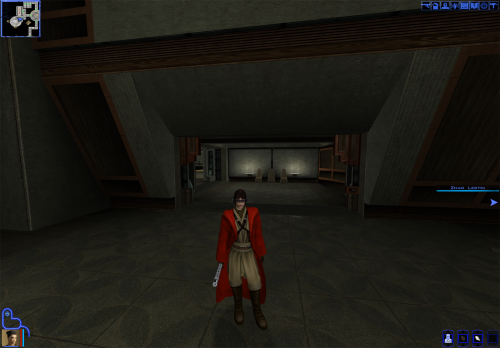
similar to my Red-Brown-Blue retexture for K1 Movie-Style Jedi Master Robes by N-DReW25, this mod changes the look of the Qel Droma Robes for Kotor 1 utilizing Effixian's Qel-Droma Robes Reskin for JC's Cloaked Jedi Robes 1.0.2. INSTALLATION 1. you must install JC's Cloaked Jedi Robes for everything to work properly: 2. install the same Qel Droma robes mod by Effixian: 3. then install the Movie Style Master Robes mod by N-DReW25: and finally you can then install this mod to Properly install this mod, delete all mods with the names starting with PFBI05 and PMBI05 in the Master Robes mod folder because they are in tpc format and this mod is in .tga format meaning it won't work while the .tpc files are in you're override folder. Hope you enjoy this mod -Sebastian The Blue Bird.1 point -
![More information about "[K1] Swoop platform model repairs"](https://deadlystream.com/downloads/screens/monthly_2025_04/370802232_Sanstitre1.thumb.jpg.da452fd1dbb89c2b1cd7762f60385ead.jpg)
Version 1.6
5,069 downloads
Swoop platform models repairs =============== By ZobiZob ------------------ Description There are notoriously some problems with most of the levels geometry, models and textures. They are not ultra noticeable, but once you see it, you can't unsee it. As i am working on a custom module using the swoop platform geometry, i decided to fix some of these problems, and also add numerous details like venting effects, animated light and distant swoop riders with upscaled textures for their bikes + different colors for riders. The full pack also displays your swoop in the module. Fixed music changes from 1.5 with version 1.6. Installation 3 options, either the full pack with the swoop you use during the race displayed, no swoop bike displayed and also an option without the doors. 1) Use the holopatcher.exe included and you're ready to go. If you're not satisfied with an option or the other, you can always come back and reinstall the desired option. Known Bugs and Incompatibilities Everything should be fine. If you replace the m03af.git file after installing the doors that i added in the distance will disappear. The upscaled textures only affect the swoop bikers and won't change the textures for Niktos/swoopgang creatures. Permissions You are free to incorporate this into any of your work without asking, just credit me and shiningredHD for the upscaled textures (swoop riders, swoop bikes). Acknowledgements All materials and copyrights belong to LucasArts, and Bioware. Upscaled textures from ShiningRedHD. I own none of the materials, and I'm not making any money out of this mod. This mod is not to be distributed for profit, either.1 point -
![More information about "[K1] K2 swoops to K1"](https://deadlystream.com/downloads/screens/monthly_2025_04/swoop1.thumb.jpg.4f3de38f4f76729d2dab6fbab9857034.jpg)
Version 1.0.0
5,328 downloads
Swoops from K2 to K1 =============== By ZobiZob ------------------ Description A small mod that changes your swoop model while racing. Either you keep the vanilla model, and it only adds a shield effect when you take damage (extracted from K2), or you can completely replace the vanilla K1 model with the one from K2 and all its animations. You have the choice between the 3 skins that there are in TSL (Classic, black, beige). There is a folder with the screenshots to see the K2 model and the different skins. Installation 1) Use Holopatcher.exe and choose one of the installation option. If you are not satisfied, you can restart the launcher and chose another option. Known Bugs and Incompatibilities Everything should be fine as long as you do not replace the model file from the swoop with something else of course. The model on the ebon hawk will still be the vanilla one. Permissions You are free to incorporate this into any of your work without asking, just credit me. Acknowledgements All materials and copyrights belong to LucasArts, Obsidian and Bioware. This mod is not to be distributed for profit, either.1 point -
Version 1.0.0
56 downloads
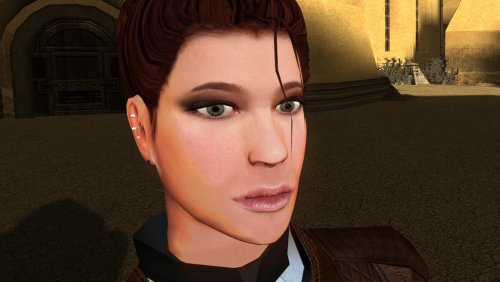
The mod replaces the PFHC02 model and textures. To Install 1. Download: PFHC02 2. Copy all files to the Knights of the Old republic's Override folder. (Example location - C:\Program Files (x86)\Steam\steamapps\common\swkotor\Override) 3. When/if prompted to overwrite files, press okay. 4. If you like the mod; leave a comment or endorse! (It would be much appreciated) Made with love.1 point -
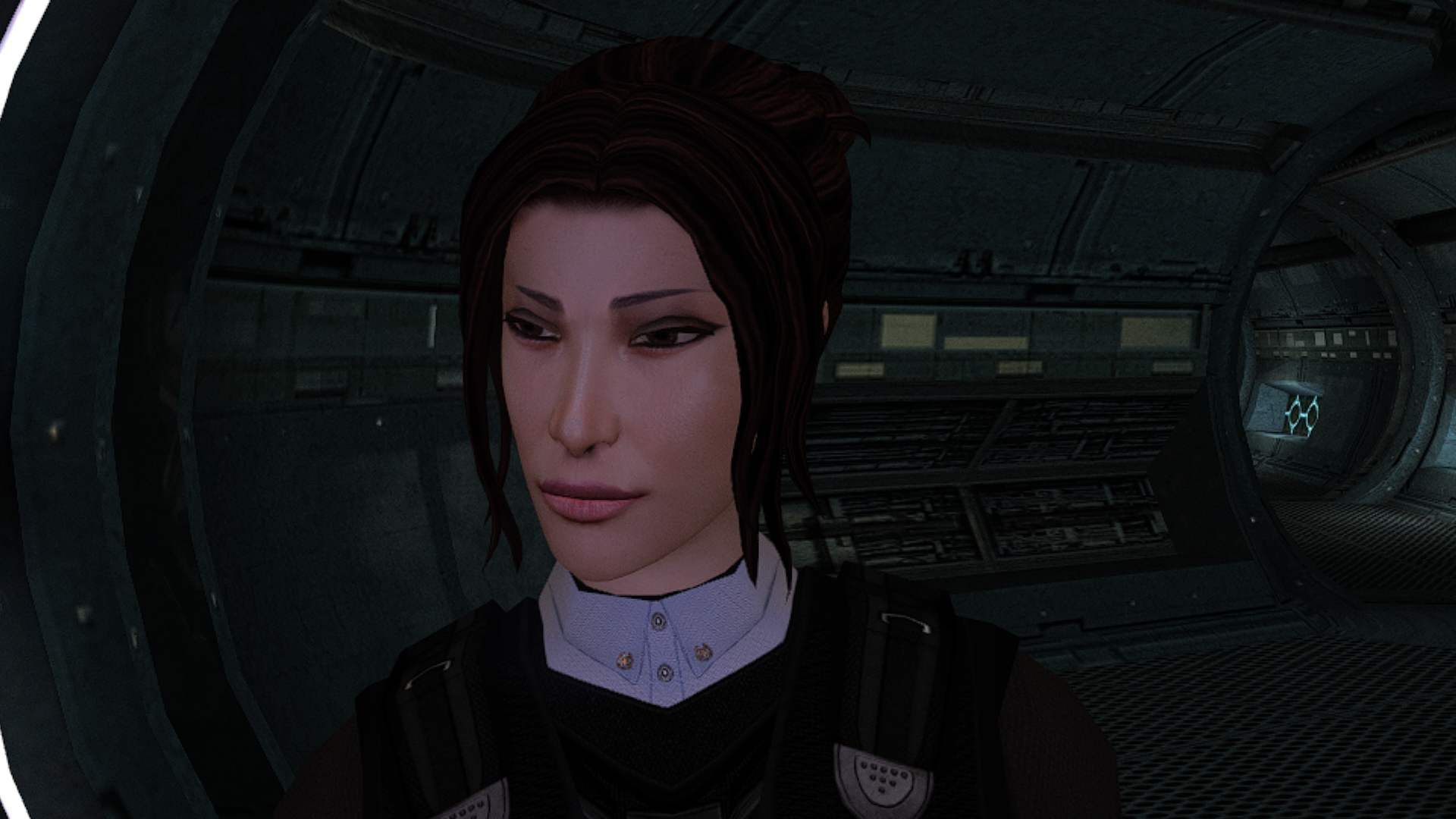
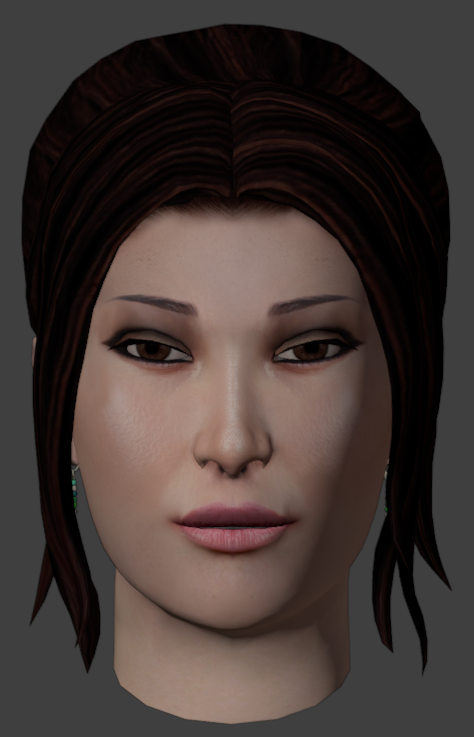
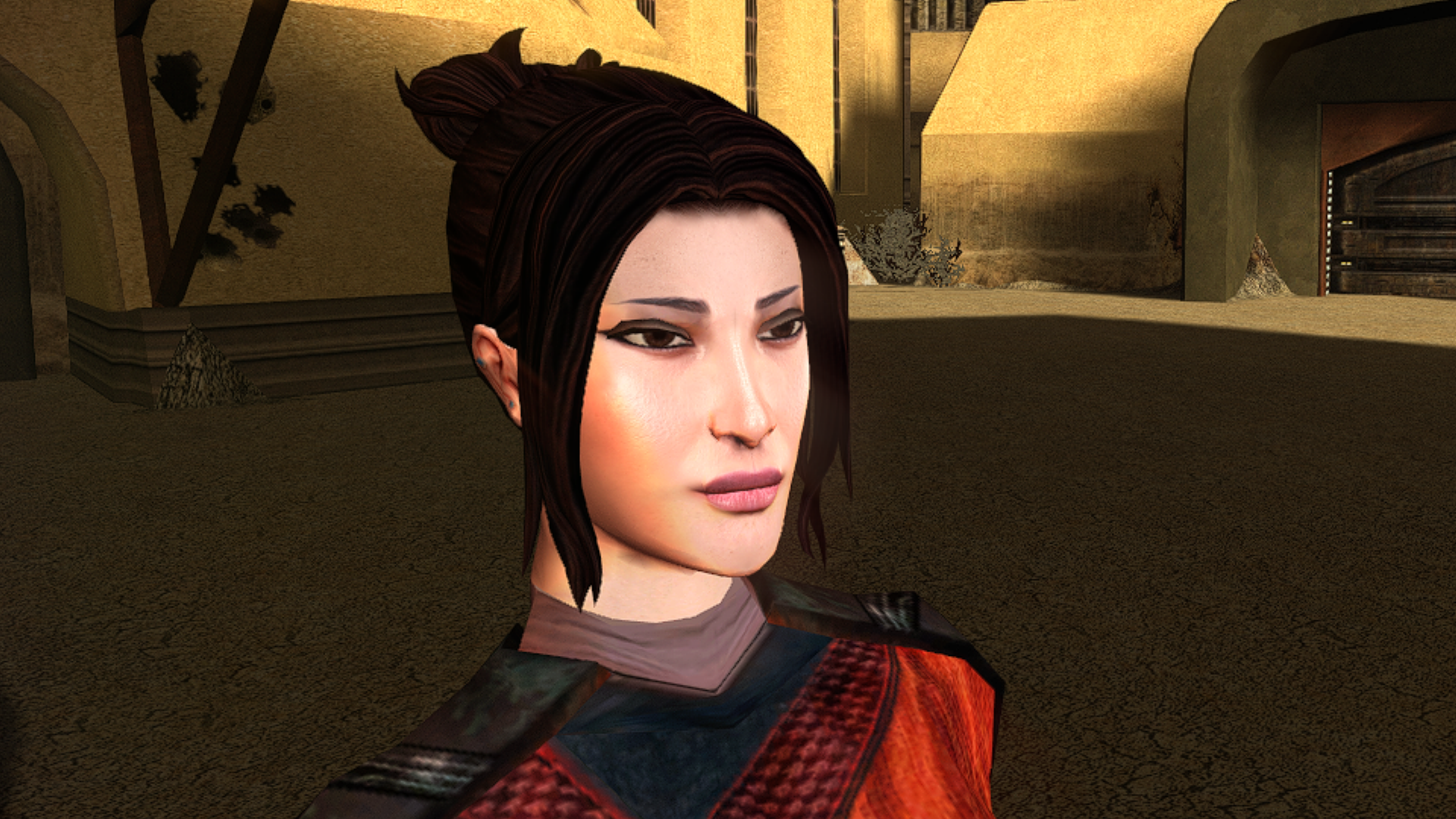
Really amazing job on making the hair-meshes and bone structure so much more detailed. Is that your take on TCS's Bastila in the preview where Revan is ogling?1 point
-
1 point
-
54 downloads
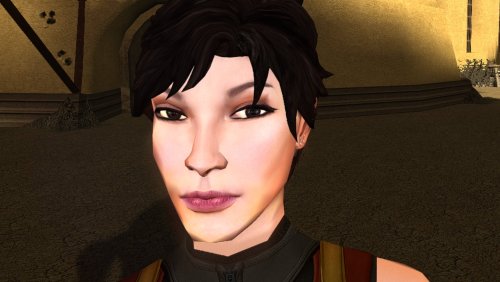
The mod replaces the PFHA03 model and textures. Thanks to DarthParametric, without him this mod would not have seen the light of day. To Install 1. Download: PFHA03 2. Copy all files to the Knights of the Old republic's Override folder. (Example location - C:\Program Files (x86)\Steam\steamapps\common\swkotor\Override) 3. When/if prompted to overwrite files, press okay. 4. If you like the mod; leave a comment or endorse! (It would be much appreciated) Made with love.1 point -
1 point
-
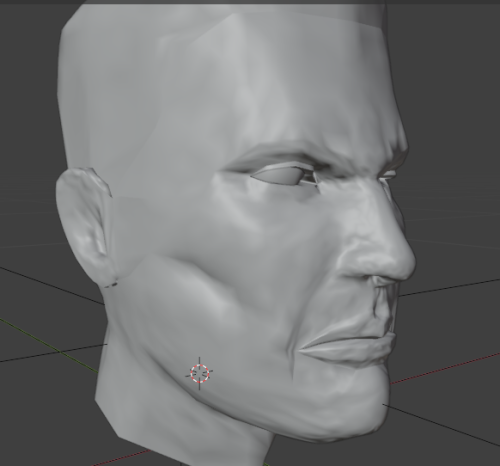
Version 1.0.0
143 downloads
I remeshed Canderous and retextured him i inspired myself with this artwork. I uploaded 2 versions of my textures. one more like the original textures and the other more like the image. I did not remade him AS the image but i was inspired.1 point -
 This is amazing! I love Heyorange's mod, but the textures quality was off-putting. Fantastic job ty!1 point
 -
 I like the idea a lot. Ahh... How many times walking to that compartiment knowing in advance the answer... Hoping to be able to melt -just a bit- her hardened heart (and a glitch in the game...) What about make the romance available for female characters as well? The hottest huntress in the galaxy seduced by a sensual female exile? As a female PC she does not even want to be my friend... sniff...1 point
 -
1 point
-

Version 1.5.1
12,532 downloads
This mod modernizes all K1 cutscenes by upscaling, slight compositing, and remaking text elements. This in 3440x1440, 3840x2160, 2560x1440 and 1920x1080 resolutions at the original framerate and interpolated to a 60fps version. Disclaimer This mod only includes enhanced cutscenes. Adjusting your game to the preferred resolution is necessary. There's multiple guides on how to do this online. (like this one.) Information - Cutscenes have been upscaled using a combination of AI models in Topaz Video AI 4-5, then re-composited and exported back to bink files at a high bitrrate. - Remade the subtitles for videos 02-09-31a-50-56b - Remade legal screen - Remade title crawl in video 01a - Fixed issues in certain videos (color grading, broken fades,..) Mirror - Google drive currently down as I'm looking for an alternative hosting solution. Installation - Download preferred resolution and frame rate versions. - Extract the downloaded folders into the "movies" folder in your game installation directory. Remember to make a backup of the original folder first if you want to restore them at some point. - Overwrite with any preferred alt versions. Alts All the resolution versions have the same alternative options. - "legal" an alternative legalscreen option. - "nosubs" removes subtitles from videos 02-09-31a-50-56b - "whitesubs" adds white instead of blue subtitles to videos 02-09-31a-50-56b Let me know if you run into any issues or have any thoughts. This is by no means perfect since the upscaling process still introduces a lot of artifacts but I'm hoping to revisit and improve this project whenever there's a significant update in available upscaling video tech. [UPDATE: Working on a new version based on the Starlight Mini model from Topaz]0 points -
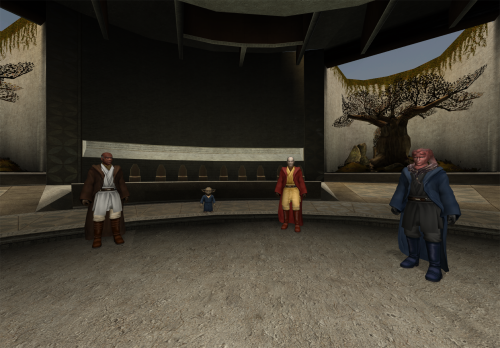
Version 1.0.0
8 downloads
I make my deadly stream debut with this retexture. As soon as I saw the K1 Movie-Style Jedi Master Robes by N-DReW25 I fell in love because a mod I loved in TSL was finally put into K1. Download it here: However recently I had the thought of "what if I made the robes to look like the Red Brown and Blue robes from JC's Fashion Line I: Cloaked Jedi Robes for K1 1.4 which you can also download here if you want that mod instead: it turned out to be quite successful. I used the white and black robes from the OG movie style robes mod by DeadMan and made new textures from the red blue and qel Droma Robes which I will upload separately Initially I made it just for myself but I decided to share it on Deadly Stream for others to enjoy, I hope you like my first mod. INSTALLATION: Step 1: you must install the original mod by N-DReW25 for this mod to work properly which also requires JC's Jedi robes mod I have left the links for both mods above the installation. Step 2: to install this retexture, first you must look through the names of all files from this mod, then delete all .tpc files with the same name as all files in this mods folder as this mod's files are in .tga format and tpc files appear first in Kotor, meaning if you just put this mods files in the Override, the mod would not work because the .tpc files are still in the Override folder (I would have just made the mod files .tpc files but this is my first mod and I don't know how to do that im a complete noob) Once you have put the retexture files in the override and deleted the .tpc files with the same name you are good to go enjoy my first mod and let me know if you come across any bugs. -Sebastian the Blue Bird0 points
.thumb.png.d8b108d1620cfd7d697f7271e60714db.png)