Leaderboard



Popular Content
Showing content with the highest reputation on 03/03/2026 in all areas
-

Version 3.3.7a
304,367 downloads
KotOR Savegame Editor is a Perl/Tk application used in the editing of Star Wars: Knights of the Old Republic savegame files. The following fields are currently editable: - Savegame name - Player name - NPC Name - Appearance (player and party) - Portrait (player and party) - Attributes - Skill Ranks - Equipment (player and party)*** - Feats (add/remove)** - Powers (add/remove)** - Cheats Used flag - Hit Points (current and max*) - Force Points (current and max*) - Experience Points (player and party) - Good/Evil rating - Credits - Time played - Class (see notes below)** - Levels - Current Party - NPCs - Global Booleans - Global Numerics - Gender - Min1HP - Inventory** - Influence (TSL only) - Chemicals (TSL only) - Components (TSL only) - Quests *=Note: Max Hit Points and Max Force Points, while editable appear to be calculated at the time the savegame is loaded. Therefore while these fields are editable, the game will change the values back to what it calculates as correct. It is therefore better to change your Wis/Cha and Con to affect your MFP and MHP. ** Not supported on Xbox Saves, will cause "Damaged Savegame" message. *** See special section for detailed instructions ----------------- Credits ----------------- tk102 for originally creating the KSE. Pazuzu156 for reporting the issue with the Cloud saves, as well as helping fix it and setting up a mirror for and creating the auto-updater. Chev Chelios for much discussion of how Steam worked, as well as creating the INI-Generation tool, KPF. ----------------- Before Using KSE ----------------- --------------- Intro to KSE --------------- ------------- Using KSE ------------- --------------------------------------------- Override Folder: Subdirectories NOT supported --------------------------------------------- ----------------------------- Notes About Feats and Powers ----------------------------- ------------------------- Reminder: No Safety Net! ------------------------- ----------------------------------------------- Notes regarding Class-changing/Adding/Removing ----------------------------------------------- -------------------------------- Notes regarding changing levels -------------------------------- ------------------------------- Notes about changing equipment ------------------------------- =============== Known Bugs =============== No saves found (You have Steam KotOR 2 and use cloud saves) ----------------------------------------------------------- Go to your KotOR 2 folder and make a folder called "saves". Inventory Hiccup ------------------ If an item is added to your inventory and it has the same Tag as another item, KSE will generate an error. Getting Stuck During Vision Sequence (KotOR1) ---------------------------------------------- Symptom: After leaving the Endar Spire or Leaving Taris, you run into a sequence where you should be seeing a "dream" cutscene but instead you're locked up in a room with a "CutStart" object that doesn't do anything. Cause: You have NOT placed the modified .dlg files into your override directory and you have changed your character to a Jedi/Minion/Droid class or you have changed your Gender to something other than Male or Female. Fix: Download the KSE Fixed Cutscene Files (available from http://www.pcgamemods.com/8800 ) and place the .dlg files into your Override folder. ============================================== After changing appearance to look like (an NPC), the real NPC has no head! --------------------------------------------------------------- Symptom: You change appearance to look like one of your party NPCs and all is well until you attempt to enter a new area with that NPC. Then the NPC loses its head! Cause: SW:KotOR doesn't like two unique characters appearing together. Fix: From T7Nowhere's post on Holowan Labs-- =============================================================== Equipment Section ------------------ Due to an unknown bug, the Equipment branch might become unusable. The only fix is to restart KSE. ================== Please report bugs to zxcvbnm6012@yahoo.com 11/7/13 - In addition, please report bugs to tristongoucher@gmail.com Thank you. - Fair Strides.1 point -
384 downloads
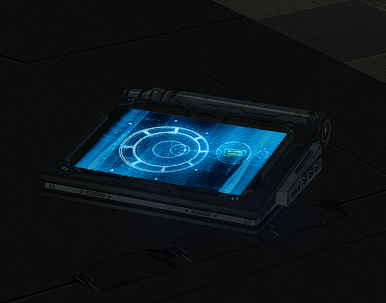
New models and textures for the datapad. Models created by DarthParametric. To Install 1. Download: DarthParametric's Datapad.rar 2. Copy all files to the Knights of the Old republic's Override folder. (Example location - C:\Program Files (x86)\Steam\steamapps\common\swkotor\Override) 3. When/if prompted to overwrite files, press okay. 4. If you like the mod; leave a comment or endorse! (It would be much appreciated) Made with love.1 point -

Version 2.0.5
8,704 downloads
This mod is focused on the so-called Quest Crystal, a powerful lightsaber crystal only the player character can utilize. There are three parts to this mod, which may be installed together or individually. Class-Based Properties The Quest Crystal in the original game has differing properties depending on your character's level and alignment only. This option gives the Quest Crystal differing properties based on your character's class in addition to their level and alignment. Each combination of class and alignment has access to a unique set of item properties. Note: A crystal with Class-Based Properties is saved differently from the original crystal. Save game files containing the original crystal will not function correctly with Class-Based Properties installed. Likewise, save game files containing a Class-Based Properties crystal will no longer function correctly if that part of the mod is uninstalled. Workbench Attunement In the original game, only Kreia is able to attune your Quest Crystal to keep it up to date with your character's stats. This option allows you to attune the crystal without Kreia's help. The player will be able to attune the crystal in the final act of the game, or earlier by passing a Wisdom check after crafting a lightsaber and observing Kreia attune the crystal. This option also removes the "[Learn about using the workbench.]" dialogue from any workbenches you can access after the game's prologue. Bug Fixes In the original game, you are not always given a Quest Crystal that properly reflects your player character. This mod includes bug fixes to correct that problem. While all of the installation options include these bug fixes, they can also be installed alone without the rest of the mod. Installation Extract files from the downloaded archive. Run INSTALL.exe. Select which option you want to install: a) Class-Based Properties + Workbench Attunement b) Class-Based Properties c) Workbench Attunement d) Bug Fixes Only Click "Install Mod" and select your game directory. This Workbench Attunement part of this mod only supports the English language version of the game at this time. Uninstallation During installation, TSLPatcher generates a backup folder and a log recording which files were affected. Restore or delete all module files affected by this mod. For each module, copy the corresponding .mod file from the backup folder to replace the one in your game's Modules folder if a backup was created, otherwise delete the .mod file from your game's Modules folder. Restore or delete all .2da files affected by this mod. For each, copy the corresponding .2da file from the backup folder to replace the one in your game's Override folder if a backup was created, otherwise delete the .2da file from your game's Override folder. Delete workbnch.dlg from your Override folder only if you have not installed other mods which edit this file. Otherwise, leave it; you will still have the tutorial removed but all other changes to the workbench dialogue will be inaccessible without the rest of the mod installed. Delete all other files installed by this mod from your game's Override folder. Note that depending on which option you installed, some of the above might not be necessary. Compatibility This mod is compatible with my Saber Workshop mod. The order of installation does not matter. This mod makes minimal changes to the global workbench dialogue (workbnch.dlg) but it is installed by overwriting the file. This is an unfortunate necessity because TSLPatcher is not so good at patching dialogue files, especially when different mods do very similar things. I thought long and hard, and this seemed the most compatible option to me despite its inherent problems, because it simplifies the installation for mods which are designed to be compatible with this mod while minimizing amount of changes needed to make a compatibility patch. In any case, other mods which edit the global workbench dialogue will only be compatible with this mod if one of the following is true: The other mod is installed after this mod and patches (i.e. does not overwrite) the workbench dialogue The other mod is installed after this mod, overwrites the workbench dialogue, and includes this mod's changes to the workbench dialogue The other mod has a compatibility patch which is installed after this mod, overwrites the workbench dialogue, and includes this mod's changes to the workbench dialogue Credits KOTOR Tool – Fred Tetra 2DA Editor – VarsityPuppet TSLPatcher – stoffe & Fair Strides DeNCS – JdNoa & Dashus DLGEditor – tk102 ERFEdit – stoffe & Fair Strides K-GFF – tk102 NWNSSCOMP – Torlack, stoffe, & tk102 xoreos tools – xoreos team https://xoreos.org/ with thanks to @Snigaroo for help deciding the class-based item properties License This work is licensed under a Creative Commons Attribution-NonCommercial 4.0 International License. Donations If you enjoy my mods and would like to show your support in a monetary manner, you may do so via PayPal at https://www.paypal.me/carterunited.1 point -
Yes. The logo is superimposed over the loading screen, so simply deleting the logo texture in the Override will revert it to the vanilla one. No. There are some mods that provide alternative logos, but I'm assuming you're not using any of those since you're complaining about it.1 point
-
Hello, Lane. One thing I would like to see happen, if possible at all, is to extend the numerical display for replies in dialogue files. The way it is now if you have more than 9 alternatives to choose among, the next ones have a "-" rather than the next number. It does not look good. Perhaps something can be done about it? There are not many such situations. The replies are very often limited to a number that is lower than 10, but it does happen in few cases. Example: in the Temple of the Ancient on Lehon. The file unk_comp.dlg contains an entry node with 11 replies. Cheers!1 point
-
There have been three major repositories of KotOR mods: PCGamemods.com between about 2004-2006, KotORFiles, between about 2007-2012, and DeadlyStream. PCGamemods.com tapped out at around 750 mods for KotOR and 800 for TSL, or roughly about 1550 mods total. KotORFiles'counter stopped working at 1978 files for both games. Today, DeadlyStream has 1200 KotOR files, and 1184 TSL files. This makes it the largest KotOR modding repository ever! 🎉1 point
-
 Thanks a lot for an excellent mod and your help!1 point
 -
 Are there any screenshots of the alternate Nar Shaddaa screen (the Refugee Landing Pad screen)? Either way, I'm excited to give this mod a go!1 point
 -
KSE has been open sourced, and updates can be found here: https://gitlab.com/kotorsge-team/kse/-/releases 3.3.7a is an outdated version.1 point
-
 .... yes. 😄1 point
 -
Hi, I'd like a lower res version too, because my game doesn't show some of the largest ones (upari, sapith..) thanks0 points