All Activity
- Past hour
-
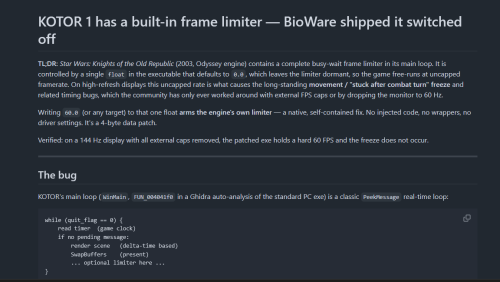 Here is the text converted to BBCode, styled cleanly for forum posts: [h1]KOTOR 1 has a built-in frame limiter — BioWare shipped it switched off[/h1] [b]TL;DR:[/b] [i]Star Wars: Knights of the Old Republic[/i] (2003, Odyssey engine) contains a complete busy-wait frame limiter in its main loop. It is controlled by a single [font=monospace]float[/font] in the executable that defaults to [font=monospace]0.0[/font], which leaves the limiter dormant, so the game free-runs at uncapped framerate. On high-refresh displays this uncapped rate is what causes the long-standing [b]movement / "stuck after combat turn" freeze[/b] and related timing bugs, which the community has only ever worked around with external FPS caps or by dropping the monitor to 60 Hz. Writing [font=monospace]60.0[/font] (or any target) to that one float [b]arms the engine's own limiter[/b] — a native, self-contained fix. No injected code, no wrappers, no driver settings. It's a 4-byte data patch. Verified: on a 144 Hz display with all external caps removed, the patched exe holds a hard 60 FPS and the freeze does not occur. [hr] [h2]The bug[/h2] KOTOR's main loop ([font=monospace]WinMain[/font], [font=monospace]FUN_004041f0[/font] in a Ghidra auto-analysis of the standard PC exe) is a classic [font=monospace]PeekMessage[/font] real-time loop: [code] while (quit_flag == 0) { read timer (game clock) if no pending message: render scene (delta-time based) SwapBuffers (present) ... optional limiter here ... } [/code] Gameplay logic — movement, and the combat round/turn state machine — advances by frame [b]delta-time[/b]. With no frame cap, delta-times on a fast display become tiny and irregular, and the 2003-era state machine mis-steps: the controlled character's action queue stalls until something rebuilds it (switching party member, or a save/load clears it). That is the freeze players have reported for 20 years. [h2]The dormant limiter[/h2] Immediately after [font=monospace]SwapBuffers[/font], the loop contains this (Ghidra decompilation, lightly annotated): [code=c] if (DAT_007a3c58 != 0) // a separate, also-off coarse limiter Sleep(DAT_0078d1e8); if (0.0f < cap) { // cap = _DAT_007a3c64 (the frame-cap float) target = 1000.0f / cap; // target frame time // measure elapsed since frame start, then: if (elapsed < target) { do { // busy-spin: re-read the game timer } while (elapsed < target); // hold the frame until target reached } } [/code] With real constant values read from the binary: [table] [tr] [th]Symbol[/th] [th]RVA[/th] [th]Value[/th] [th]Meaning[/th] [/tr] [tr] [td][font=monospace]_DAT_007a3c64[/font][/td] [td][font=monospace]0x7a3c64[/font][/td] [td][b]0.0[/b][/td] [td]frame cap (FPS). [b]This is it.[/b][/td] [/tr] [tr] [td]numerator const[/td] [td][font=monospace]0x73d6fc[/font][/td] [td]1000.0[/td] [td][font=monospace]target_ms = 1000.0 / cap[/font][/td] [/tr] [tr] [td]zero const[/td] [td][font=monospace]0x73d700[/font][/td] [td]0.0[/td] [td]used in the [font=monospace]0.0 < cap[/font] gate[/td] [/tr] [tr] [td]timer scale const[/td] [td][font=monospace]0x73d708[/font][/td] [td]0.001[/td] [td]raw timer -> milliseconds[/td] [/tr] [/table] The gate is literally [b]"if cap > 0, limit the frame."[/b] With [font=monospace]cap = 60[/font], the loop busy-waits until each frame has taken [font=monospace]1000/60 ≈ 16.67 ms[/font], i.e. it caps at 60 FPS. This is the [i]same[/i] formula the engine uses elsewhere — the movie-playback path caps to 30 with it — so the mechanism is proven, not speculative. [h2]Why it's off[/h2] [font=monospace]_DAT_007a3c64[/font] starts at [font=monospace]0.0[/font]. The [b]only[/b] code that writes it is a render-setup function ([font=monospace]FUN_004c5880[/font]), and that write is guarded: [code=c] if (DAT_00832904 != 0) { ... _DAT_007a3c64 = (float)DAT_00832904; // arm the cap } [/code] [font=monospace]DAT_00832904[/font] lives in [b]BSS[/b] — zero-initialized, and it has [b]no writer anywhere in the binary[/b] (it's a config variable exposed by address, never set by default). So the guard is never true, the cap value is never assigned, and [font=monospace]_DAT_007a3c64[/font] stays [font=monospace]0.0[/font] for the entire session. The limiter is complete, correct, and permanently asleep. Because nothing ever writes the cap during normal play, [b]patching its initial [font=monospace].data[/font] value is safe and permanent[/b] — no code path overwrites it. [h2]The patch[/h2] Standard PC v1.03 / GOG / "editable" executable: [code] file offset 0x3A3C64 : 00 00 00 00 (float 0.0, limiter off) -> 00 00 70 42 (float 60.0, 60 FPS cap) [/code] Other caps if you prefer: [font=monospace]30.0[/font] = [font=monospace]00 00 F0 41[/font], [font=monospace]72.0[/font] = [font=monospace]00 00 90 42[/font], [font=monospace]120.0[/font] = [font=monospace]00 00 F0 42[/font]. A Python patcher ([font=monospace]kotor_fpscap_patch.py[/font]) is included; it fingerprints the two [font=monospace].rdata[/font] constants before writing, backs up the exe, and refuses to touch an executable whose layout it doesn't recognize: [code] python kotor_fpscap_patch.py "path\to\swkotor.exe" 60 [/code] [h2]Verification[/h2] [],144 Hz display, all external FPS caps and driver "wait for vertical refresh" overrides removed. [],Patched exe launched directly. [*],Framerate held a hard [b]60[/b]; the movement/turn freeze did not reproduce on transitions that previously triggered it. [h2]Caveats[/h2] [],[b]Busy-wait, by design.[/b] The limiter spins a CPU core while pacing each frame (this is BioWare's own implementation — the movie path spins the same way). On a modern machine, one pegged core for a single-threaded 2003 game is harmless, but it is not a [font=monospace]Sleep[/font]-based idle cap. A future refinement could redirect the gate to the engine's own [font=monospace]Sleep(DAT_0078d1e8)[/font] limiter instead. [],[b]Offset is per-exe-layout.[/b] [font=monospace]0x3A3C64[/font] is verified for the standard PC exe. Other builds (Steam-with-different-packing, 4-CD, Mac) may differ; find [font=monospace]_DAT_007a3c64[/font] by locating the [font=monospace]1000.0 / cap[/font] main-loop math. [],[b]Steam "Verify integrity" reverts it[/b] (restores the stock exe). Re-apply after any verify. [],Stacks cleanly with the 4GB LARGE_ADDRESS_AWARE patch, UniWS widescreen, and the community mod builds — it only touches one unrelated float. [h2]Method[/h2] Static reverse engineering only (Ghidra). Chain: locate timing-API imports ([font=monospace]QueryPerformanceCounter[/font], [font=monospace]GetTickCount[/font], [font=monospace]Sleep[/font]) → their callers → the [font=monospace]PeekMessage[/font] message pump → its caller ([font=monospace]WinMain[/font]) → the frame-limiter block in the loop → the cap float and its dormant guard. Full decompiled C of the engine was exported and searched locally to trace the call chain. [hr] [i]Reverse-engineered from a legally-owned copy for interoperability and bug-fixing. Not affiliated with BioWare/LucasArts/Aspyr.[/i]
 -
 if you could release this to the public that would be amazing love your work!!!
 -

Kotor 1 - Stuck before Dantooine Star Map
xispect replied to keegs's topic in Knights of the Old Republic General
I'm having the same problem: I go into a room where there's supposed to be a map, but nothing happens. It turns out there's supposed to be a cutscene there, but for some reason it's not there. Can you help me, please? What exactly do you have to do to crash your game like that? And what should you do if you manage to recover a save file from such a crash? I'll keep this in mind for the future and make sure to save my game. 000015 - Game14.zip - Today
-
xispect joined the community
-
 TipsyDrow joined the community
 -
 dashot joined the community
 -
-
 Vinnzz joined the community
 -
 gibbymerkle joined the community
 -
 Peanutearth joined the community
 -
 blurrrrrp joined the community
 -
 leoanc01 joined the community
 -
 DARKJEDI1234 joined the community
 -
Much appreciated. By the way, you wrote that the limiter could be reintroduced at different values. Would you still recommend 60 generally? Cheers! 🥂
- Yesterday
-
 Ah yeah my bad, you need K1CP for the mod to work. Lemme fix that real quick. Edit : Who the heck would install this kind of mod alone though... When I was looking for mods for this game 2 years ago the first thing I stumbled upon was K1R, right before understanding K1CP+RC-K1CP makes more sense nowadays. Edit 2 ; Done. You can download the new version if needed. A clean .mod file has been included and added to the Patcher. Installation instructions don't change.
 -
You are right...I was sleepy yesterday night I will make it more friendly
-
 Hope this can help someone. Improved How To Scale And Rig Player Models In Kotor(1).mp4
-
- 1
-

-
PartySwap has been updated to 1.5, by making the PartySwap item to an optional add-on, since the Full Party Select patch from KotOR Patch Manager provides another method to allow you to keep being able to add Handmaiden to your party after Disciple joins your party.
- 452 replies
-
- 3
-

-
-

-
- handmaiden
- party
- (and 2 more)
-
PartySwap has been updated to 1.5, by making the PartySwap item to an optional add-on, since the Full Party Select patch from KotOR Patch Manager provides another method to allow you to keep being able to add Handmaiden to your party after Disciple joins your party.
-
Sounds interesting, but I would welcome a more detailed installation instructions for Windows users.
-
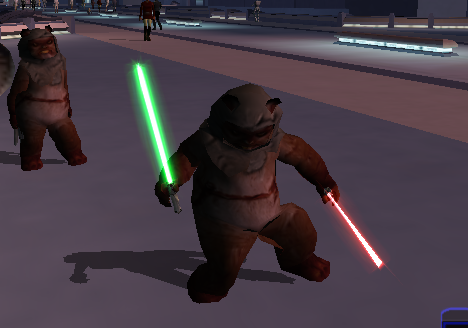
View File Playable Ewok with 2 Hand Animations This is a total overhaul of my previous Ewok Mod using the method I used on my Jawa mod so that the Ewok now has 2 handed weapon animations. Aware of small glitch where because Ewok is too fat 2h lightsaber clips through model slightly. Can be fixed easily probably will later. This Kotor 1 mod adds a playable custom ewok mdl that can be placed into the override folder to replace some npcs or used in conjunction with KSE as a playable character with combat animations. No 2 hand mele combat animations at this time. This .Zip file contains a ReadMe.txt a brief tutorial.txt on how to recreate the mod process, the custom .tga files for the textures, and finally the custom .mdl and .mdx files that can be dropped into override following the instructions in the ReadMe file. I also included a link to how to recreate the process incase anyone is interested. Disclaimer: This mod utilizes a modified asset from the community-maintained SWBF2 Mod Tools SDK 2020 available at ModDB, alongside original assets from Star Wars: Knights of the Old Republic. Full credit goes to the original developers, artists, and respective intellectual property rights holders (Lucasfilm, Pandemic Studios, and BioWare). This is a strictly non-profit, fan-made educational project intended exclusively as a technical proof-of-concept demonstrating asset handling for the KOTOR modding community. Furthermore, I do not own or claim rights to any of the third-party tools used or described in this project; all rights belong entirely to their respective developers Submitter EwokKotor Submitted 07/21/2026 Category Mods K1R Compatible Yes
-
View File Playable Jawa This mod adds a playable Jawa to K1. Shoutout to DarthParametric for helping me to figure out the bug on the prototype! Simply drop the files into Override to install. Feel free to use this mod in your own works but plz give credit. Video on process coming soon. Submitter EwokKotor Submitted 07/21/2026 Category Mods K1R Compatible Yes
-
View File KOTOR_FPS_CAP # KOTOR 1 has a built-in frame limiter — BioWare shipped it switched off **TL;DR:** *Star Wars: Knights of the Old Republic* (2003, Odyssey engine) contains a complete busy-wait frame limiter in its main loop. It is controlled by a single `float` in the executable that defaults to `0.0`, which leaves the limiter dormant, so the game free-runs at uncapped framerate. On high-refresh displays this uncapped rate is what causes the long-standing **movement / "stuck after combat turn" freeze** and related timing bugs, which the community has only ever worked around with external FPS caps or by dropping the monitor to 60 Hz. Writing `60.0` (or any target) to that one float **arms the engine's own limiter** — a native, self-contained fix. No injected code, no wrappers, no driver settings. It's a 4-byte data patch. Verified: on a 144 Hz display with all external caps removed, the patched exe holds a hard 60 FPS and the freeze does not occur. --- ## The bug KOTOR's main loop (`WinMain`, `FUN_004041f0` in a Ghidra auto-analysis of the standard PC exe) is a classic `PeekMessage` real-time loop: ``` while (quit_flag == 0) { read timer (game clock) if no pending message: render scene (delta-time based) SwapBuffers (present) ... optional limiter here ... } ``` Gameplay logic — movement, and the combat round/turn state machine — advances by frame **delta-time**. With no frame cap, delta-times on a fast display become tiny and irregular, and the 2003-era state machine mis-steps: the controlled character's action queue stalls until something rebuilds it (switching party member, or a save/load clears it). That is the freeze players have reported for 20 years. ## The dormant limiter Immediately after `SwapBuffers`, the loop contains this (Ghidra decompilation, lightly annotated): ```c if (DAT_007a3c58 != 0) // a separate, also-off coarse limiter Sleep(DAT_0078d1e8); if (0.0f < cap) { // cap = _DAT_007a3c64 (the frame-cap float) target = 1000.0f / cap; // target frame time // measure elapsed since frame start, then: if (elapsed < target) { do { // busy-spin: re-read the game timer } while (elapsed < target); // hold the frame until target reached } } ``` With real constant values read from the binary: | Symbol | RVA | Value | Meaning | |-------------------|-----------|----------|----------------------------------| | `_DAT_007a3c64` | `0x7a3c64` | **0.0** | frame cap (FPS). **This is it.** | | numerator const | `0x73d6fc` | 1000.0 | `target_ms = 1000.0 / cap` | | zero const | `0x73d700` | 0.0 | used in the `0.0 < cap` gate | | timer scale const | `0x73d708` | 0.001 | raw timer -> milliseconds | The gate is literally **"if cap > 0, limit the frame."** With `cap = 60`, the loop busy-waits until each frame has taken `1000/60 ≈ 16.67 ms`, i.e. it caps at 60 FPS. This is the *same* formula the engine uses elsewhere — the movie-playback path caps to 30 with it — so the mechanism is proven, not speculative. ## Why it's off `_DAT_007a3c64` starts at `0.0`. The **only** code that writes it is a render-setup function (`FUN_004c5880`), and that write is guarded: ```c if (DAT_00832904 != 0) { ... _DAT_007a3c64 = (float)DAT_00832904; // arm the cap } ``` `DAT_00832904` lives in **BSS** — zero-initialized, and it has **no writer anywhere in the binary** (it's a config variable exposed by address, never set by default). So the guard is never true, the cap value is never assigned, and `_DAT_007a3c64` stays `0.0` for the entire session. The limiter is complete, correct, and permanently asleep. Because nothing ever writes the cap during normal play, **patching its initial `.data` value is safe and permanent** — no code path overwrites it. ## The patch Standard PC v1.03 / GOG / "editable" executable: ``` file offset 0x3A3C64 : 00 00 00 00 (float 0.0, limiter off) -> 00 00 70 42 (float 60.0, 60 FPS cap) ``` Other caps if you prefer: `30.0` = `00 00 F0 41`, `72.0` = `00 00 90 42`, `120.0` = `00 00 F0 42`. A Python patcher (`kotor_fpscap_patch.py`) is included; it fingerprints the two `.rdata` constants before writing, backs up the exe, and refuses to touch an executable whose layout it doesn't recognize: ``` python kotor_fpscap_patch.py "path\to\swkotor.exe" 60 ``` ## Verification - 144 Hz display, all external FPS caps and driver "wait for vertical refresh" overrides removed. - Patched exe launched directly. - Framerate held a hard **60**; the movement/turn freeze did not reproduce on transitions that previously triggered it. ## Caveats - **Busy-wait, by design.** The limiter spins a CPU core while pacing each frame (this is BioWare's own implementation — the movie path spins the same way). On a modern machine, one pegged core for a single-threaded 2003 game is harmless, but it is not a `Sleep`-based idle cap. A future refinement could redirect the gate to the engine's own `Sleep(DAT_0078d1e8)` limiter instead. - **Offset is per-exe-layout.** `0x3A3C64` is verified for the standard PC exe. Other builds (Steam-with-different-packing, 4-CD, Mac) may differ; find `_DAT_007a3c64` by locating the `1000.0 / cap` main-loop math. - **Steam "Verify integrity" reverts it** (restores the stock exe). Re-apply after any verify. - Stacks cleanly with the 4GB LARGE_ADDRESS_AWARE patch, UniWS widescreen, and the community mod builds — it only touches one unrelated float. ## Method Static reverse engineering only (Ghidra). Chain: locate timing-API imports (`QueryPerformanceCounter`, `GetTickCount`, `Sleep`) → their callers → the `PeekMessage` message pump → its caller (`WinMain`) → the frame-limiter block in the loop → the cap float and its dormant guard. Full decompiled C of the engine was exported and searched locally to trace the call chain. --- *Reverse-engineered from a legally-owned copy for interoperability and bug-fixing. Not affiliated with BioWare/LucasArts/Aspyr.* Submitter VexFlint Submitted 07/21/2026 Category Mods K1R Compatible Yes
-
Version 1.0.0
24 downloads
# KOTOR 1 has a built-in frame limiter — BioWare shipped it switched off **TL;DR:** *Star Wars: Knights of the Old Republic* (2003, Odyssey engine) contains a complete busy-wait frame limiter in its main loop. It is controlled by a single `float` in the executable that defaults to `0.0`, which leaves the limiter dormant, so the game free-runs at uncapped framerate. On high-refresh displays this uncapped rate is what causes the long-standing **movement / "stuck after combat turn" freeze** and related timing bugs, which the community has only ever worked around with external FPS caps or by dropping the monitor to 60 Hz. Writing `60.0` (or any target) to that one float **arms the engine's own limiter** — a native, self-contained fix. No injected code, no wrappers, no driver settings. It's a 4-byte data patch. Verified: on a 144 Hz display with all external caps removed, the patched exe holds a hard 60 FPS and the freeze does not occur. --- ## The bug KOTOR's main loop (`WinMain`, `FUN_004041f0` in a Ghidra auto-analysis of the standard PC exe) is a classic `PeekMessage` real-time loop: ``` while (quit_flag == 0) { read timer (game clock) if no pending message: render scene (delta-time based) SwapBuffers (present) ... optional limiter here ... } ``` Gameplay logic — movement, and the combat round/turn state machine — advances by frame **delta-time**. With no frame cap, delta-times on a fast display become tiny and irregular, and the 2003-era state machine mis-steps: the controlled character's action queue stalls until something rebuilds it (switching party member, or a save/load clears it). That is the freeze players have reported for 20 years. ## The dormant limiter Immediately after `SwapBuffers`, the loop contains this (Ghidra decompilation, lightly annotated): ```c if (DAT_007a3c58 != 0) // a separate, also-off coarse limiter Sleep(DAT_0078d1e8); if (0.0f < cap) { // cap = _DAT_007a3c64 (the frame-cap float) target = 1000.0f / cap; // target frame time // measure elapsed since frame start, then: if (elapsed < target) { do { // busy-spin: re-read the game timer } while (elapsed < target); // hold the frame until target reached } } ``` With real constant values read from the binary: | Symbol | RVA | Value | Meaning | |-------------------|-----------|----------|----------------------------------| | `_DAT_007a3c64` | `0x7a3c64` | **0.0** | frame cap (FPS). **This is it.** | | numerator const | `0x73d6fc` | 1000.0 | `target_ms = 1000.0 / cap` | | zero const | `0x73d700` | 0.0 | used in the `0.0 < cap` gate | | timer scale const | `0x73d708` | 0.001 | raw timer -> milliseconds | The gate is literally **"if cap > 0, limit the frame."** With `cap = 60`, the loop busy-waits until each frame has taken `1000/60 ≈ 16.67 ms`, i.e. it caps at 60 FPS. This is the *same* formula the engine uses elsewhere — the movie-playback path caps to 30 with it — so the mechanism is proven, not speculative. ## Why it's off `_DAT_007a3c64` starts at `0.0`. The **only** code that writes it is a render-setup function (`FUN_004c5880`), and that write is guarded: ```c if (DAT_00832904 != 0) { ... _DAT_007a3c64 = (float)DAT_00832904; // arm the cap } ``` `DAT_00832904` lives in **BSS** — zero-initialized, and it has **no writer anywhere in the binary** (it's a config variable exposed by address, never set by default). So the guard is never true, the cap value is never assigned, and `_DAT_007a3c64` stays `0.0` for the entire session. The limiter is complete, correct, and permanently asleep. Because nothing ever writes the cap during normal play, **patching its initial `.data` value is safe and permanent** — no code path overwrites it. ## The patch Standard PC v1.03 / GOG / "editable" executable: ``` file offset 0x3A3C64 : 00 00 00 00 (float 0.0, limiter off) -> 00 00 70 42 (float 60.0, 60 FPS cap) ``` Other caps if you prefer: `30.0` = `00 00 F0 41`, `72.0` = `00 00 90 42`, `120.0` = `00 00 F0 42`. A Python patcher (`kotor_fpscap_patch.py`) is included; it fingerprints the two `.rdata` constants before writing, backs up the exe, and refuses to touch an executable whose layout it doesn't recognize: ``` python kotor_fpscap_patch.py "path\to\swkotor.exe" 60 ``` ## Verification - 144 Hz display, all external FPS caps and driver "wait for vertical refresh" overrides removed. - Patched exe launched directly. - Framerate held a hard **60**; the movement/turn freeze did not reproduce on transitions that previously triggered it. ## Caveats - **Busy-wait, by design.** The limiter spins a CPU core while pacing each frame (this is BioWare's own implementation — the movie path spins the same way). On a modern machine, one pegged core for a single-threaded 2003 game is harmless, but it is not a `Sleep`-based idle cap. A future refinement could redirect the gate to the engine's own `Sleep(DAT_0078d1e8)` limiter instead. - **Offset is per-exe-layout.** `0x3A3C64` is verified for the standard PC exe. Other builds (Steam-with-different-packing, 4-CD, Mac) may differ; find `_DAT_007a3c64` by locating the `1000.0 / cap` main-loop math. - **Steam "Verify integrity" reverts it** (restores the stock exe). Re-apply after any verify. - Stacks cleanly with the 4GB LARGE_ADDRESS_AWARE patch, UniWS widescreen, and the community mod builds — it only touches one unrelated float. ## Method Static reverse engineering only (Ghidra). Chain: locate timing-API imports (`QueryPerformanceCounter`, `GetTickCount`, `Sleep`) → their callers → the `PeekMessage` message pump → its caller (`WinMain`) → the frame-limiter block in the loop → the cap float and its dormant guard. Full decompiled C of the engine was exported and searched locally to trace the call chain. --- *Reverse-engineered from a legally-owned copy for interoperability and bug-fixing. Not affiliated with BioWare/LucasArts/Aspyr.* -
Chaser, I tried downloading the mod just now, and noticed that it doesn't provide its own copy of korr_m38ab.mod. This makes it very difficult to download the mod on its own. Just thought you should know.
-
Version 3.0.0
2 downloads
This is a total overhaul of my previous Ewok Mod using the method I used on my Jawa mod so that the Ewok now has 2 handed weapon animations. Aware of small glitch where because Ewok is too fat 2h lightsaber clips through model slightly. Can be fixed easily probably will later. This Kotor 1 mod adds a playable custom ewok mdl that can be placed into the override folder to replace some npcs or used in conjunction with KSE as a playable character with combat animations. No 2 hand mele combat animations at this time. This .Zip file contains a ReadMe.txt a brief tutorial.txt on how to recreate the mod process, the custom .tga files for the textures, and finally the custom .mdl and .mdx files that can be dropped into override following the instructions in the ReadMe file. I also included a link to how to recreate the process incase anyone is interested. Disclaimer: This mod utilizes a modified asset from the community-maintained SWBF2 Mod Tools SDK 2020 available at ModDB, alongside original assets from Star Wars: Knights of the Old Republic. Full credit goes to the original developers, artists, and respective intellectual property rights holders (Lucasfilm, Pandemic Studios, and BioWare). This is a strictly non-profit, fan-made educational project intended exclusively as a technical proof-of-concept demonstrating asset handling for the KOTOR modding community. Furthermore, I do not own or claim rights to any of the third-party tools used or described in this project; all rights belong entirely to their respective developers - Last week
-
 Of course I did lmao. I tried a LOT of things. What made me furious is it WAS supposed to work, there's literally nothing wrong with the dialogue and script, which is probably why it worked for you. But me... just a black screen. Anyway. Glad you can finish the mod ! (My K1 expansion will be a LOT easier to install. :D)
 -
Did you really expect someone to hold on to saves for 11 years?

-
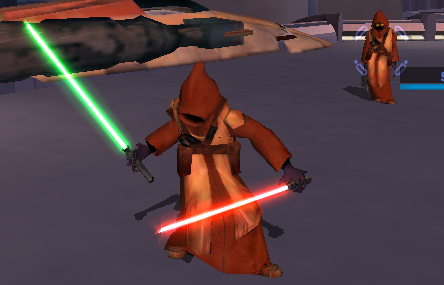
Version 1.1.0
5 downloads
This mod adds a playable Jawa to K1. Shoutout to DarthParametric for helping me to figure out the bug on the prototype! Simply drop the files into Override to install. Feel free to use this mod in your own works but plz give credit. Video on process coming soon. -
FIXED Mod will be posted soon! It was a user error where since I only had the Base (PFBCS) selected and didnt have cutscenedummy explicitly selected it was not applying the transform to cutscene dummy, rather only to the base. I then ran into an error where this caused warping, but found by unparenting the mesh before scaling then reparenting once the changes were applied to the rig enabled me to find a workaround. Submitting on deadlystream also in meantime this should be live https://www.nexusmods.com/kotor/mods/1837
-
 What version of blender and kotorblender are you using?
 -
I hate to say this but I just got past Freedom Nadd's tomb, did you ever try just... walking through the door? Like I know that sounds bad but I mean literally running into the door? It stayed closed for me but it had no collision and I loaded into Dxun fine. Thank you for the installation guide, it didn't solve my own problem but I'll leave what worked for me (so far) here for any future users. I installed TJM manually onto the Aspyr patch version on Steam, along with the wonderful 3C-FD Patcher by J. The mod launches and runs fine on the modern version to my knowledge but to fix the dialogue you gotta play around with it; imo it's worth it for the qol that the Aspyr patch + 3D-FD patch provide. Go into the TJM part 2 installation ZIP, >StreamVoice>GBL. You'll see a bunch of folders with .wav files inside; you need to convert all of them to .mp3. There's about 3000 of them and it took me about 15-25 minutes of work with Audacity. Once you do that, use JCarter's SithCodec to encode the .mp3s into the VO format, then put the encoded files back into their GBL folders. Keep all the folders under GBL in order (IE, keep all the "bast.mp3/wav" files in the bast file) and then in your Kotor 2 directory, pop the new Streamvoice folder into your Kotor 2 directory, overwrite the old files, and it should work a-okay. Hope this helps someone in the future.
-
For some reason in Blender when i scale down the whole base and apply the transforms the scale applies to the mesh but not the dummy. I am attaching a very short video demonstrating this. I will try to see if I can figure out how to scale the rig using the ASCII, unless there is a better way? KBlender Problem Export Scaled Rig.mp4
-
could you please reupload the save, they are empty. tia