Search the Community
Showing results for tags 'darth traya'.
Found 9 results
-
Version 1.7
1,566 downloads
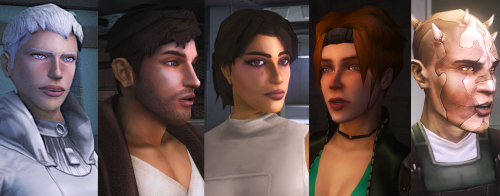
Currently on my thousandth playthrough and figured I'd share the stuff I've been making for it so far Hi! Please visit this mod's Nexus page for better IMAGE DESCRIPTIONS https://www.nexusmods.com/kotor2/mods/1319?tab=images INCLUDES: Unique, High Quality, Upscaled Complexions and Hair for - Atton (6 Options, Full Darkside Support, All Portraits Included) The Handmaiden (2 Options, Full Darkside Support, All Portraits Included) Female Exile (2 Options, Full Darkside Support, All Portraits Included) Bao-Dur (2 Options, Full Darkside Support, All Portraits Included) Visas (3 Options, Full Darkside Support, All Portraits Included) Mira (3 Options, Full Darkside Support, All Portraits Included) Disciple ( 3 Options, Full Darkside Support, All Portraits Included ) Kreia ( 2 Options, Full Darkside Support, All Portraits Included ) ALL TEXTURES are upscaled from 512x512 to 2048x2048 Hair, skin details and eyebrows are painted by hand... just throwing that out there If anyone is interested in lower resolutions (like for mobile or something) just ask NEW in 1.5 Visas Full in-game skintone Support for Alt. Exile New in 1.2 NO EYELINER ATTON FOR KOTOR SUBREDDIT Love everyone who was polite. Enjoy. CHANGES FROM DEFAULT FILE Closer to Vanilla Gives Atton back his crows feet, eyebags and smile lines (I'm sorry I stole them in the first place) A more noticeable darkside progression Fluffier and lighter brows And most importantly; no eyeliner INSTALLATION Loose-File method, please see README, included in all files, for more info. THIS MOD WILL CONFLICT WITH THE FOLLOWING FILES and any mod that uses them ------ (To ENSURE compatibility, I advise you DELETE these files, if present in your Override folder, before installing this mod. Or, simply don't use this mod) EXILE PFHC05.TPC/TGA PFHC05D1.TPC/TGA PFHC05D2.TPC/TGA po_PFHC05.TPC/TGA po_PFHC05d1.TPC/TGA po_PFHC05d2.TPC/TGA ATTON P_AttnH1.TPC/TGA P_AttnH1D1.TPC/TGA P_AttnH1D2.TPC/TGA po_PAtton.TPC/TGA po_PAttond1.TPC/TGA po_PAttond2.TPC/TGA HANDMAIDEN P_HandmaidenH.TPC/TGA P_HandmaidenHD1.TPC/TGA P_HandmaidenHD2.TPC/TGA po_PHandM.TPC/TGA po_PHandMD1.TPC/TGA po_PHandMD2.TPC/TGA BAO-DUR P_Bao_DurH.TPC/TGA P_Bao_DurHD1.TPC/TGA P_Bao_DurHD2.TPC/TGA po_PBaoDur.TPC/TGA po_PBaoDurd1.TPC/TGA po_PBaoDurd2.TPC/TGA VISAS P_VisasH01.TPC/TGA P_VisasHD01.TPC/TGA P_VisasHD02.TPC/TGA po_PVisas.TPC/TGA po_PVisasd1.TPC/TGA po_PVisasd2.TPC/TGA MIRA P_MiraH.TPC/TGA P_MiraHD1.TPC/TGA P_MiraHD2.TPC/TGA po_pmira.TPC/TGA po_pmirad1.TPC/TGA po_pmirad2.TPC/TGA DISCIPLE P_DiscipleH.TPC/TGA P_DiscipleHD1.TPC/TGAd P_DiscipleHD2.TPC/TGA PO_PDisciple.TPC/TGA PO_PDiscipled1.TPC/TGA PO_PDiscipled2.TPC/TGA KREIA P_KreiaH.TPC/TGA P_KreiaEvilH.TPC/TGA PO_PKreia.TPC/TGA ------------------------------------------------------------------------------------------------------------------------------------------------------------------------- PLANS and FUTURE UPDATES --------------------------------------------------------------------------- ---------------------------------------------------------------------------- Kreia (Current WIP) Done, yay Mira (Current WIP) Done, yay Visas (Planned) Done, yay Bao-Dur (Current WIP) Done, yay Disciple (Planned) Done, yay Mandalore (WIP) figure out tpc T-T Adding Custom Portraits for the entire cast (Current WIP. Pray for me, I suck at taking screenshots T-T) MODS VISIBLE IN SCREENSHOTS Shirtless Atton Retex Bao-Dur is Buff Minimal Headgear TSL RESHADE (in most screenshots, highly recommended if you want the look in my screenshots) Tastefully Atmospheric Reshade - MaxYari THANK YOU ------------------------------------------------------------------------------------------------------------------------------------------------------ For reading this far, and if you have any questions I'd be happy to answer them to the best of my abilities -------------------------------------------------------------------- Please keep in mind, if you do not like an aspect of these complexions, I would be happy to tweak it for you as long as you are polite and respectful when asking. ------------------------------------------------------------------------------------------------------------------------------------------------------------------------- CREDITS LucasArts Obsidian Entertainment, Inc. BioWare voidceta - HUGE thanks for a specific file present in this mod DarthParametric - For the Female Exile Clothes base mod and for giving me release permission TOOLS USED Kotor Tool Holocron Toolset GIMP Shameless use of Google images and Pinterest- 8 comments
- 3 reviews
-
- 4
-

-
- player head
- bao dur
- (and 25 more)
-
Version 1.1
1,041 downloads
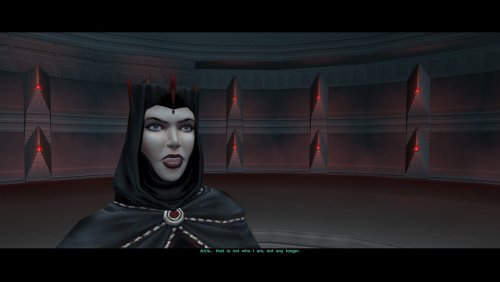
There were lots of discussions and disputes about whether Atris should or shouldn't play bigger role in TSL, care the mantle of Lord of Betrayal or not, and if her dark appearance was essential or completely out of place. In my point of view, the change of her look in the final confrontation would be very symbolic, accentuating her corruption and conscious act of betrayal. So I've threw together this simple mod for personal use, but decided to share it with those who would be interested in facing Atris as "Darth Traya". Enjoy To install: 1. IMPORTANT: make a backup copy of your "262tel.mod" file located in Modules folder of your game (in the case of Steam version - located in Modules folder inside Steam workshop's TSLRCM directory "485537937"). 2. Copy "262tel.mod" from mod's Modules folder into game's Modules folder (for Steam version - into TSLRCM workshop folder "485537937") and confirm the replacement.. 3. Copy the contents of mod's Override folder into game's Override folder. To uninstall: Replace modded file with "262tel.mod" from Backup folder found in mod's directory (or better yet, with the backup you created in step 1). Requirements: Restored Content Mod is REQUIRED for this mod to work. Credits: - Credit for the base .mod file this mod was based upon goes to creators of TSLRCM. - Dark Atris' robes are present in the original TSL files, so in certain way It's a restoration, and credit for them goes to TSL developer team.- 7 comments
- 2 reviews
-
- 1
-
-
- tsl
- restoration
- (and 3 more)
-
View File anakinnzz' Party and Player Head Complexion Tweaks Currently on my thousandth playthrough and figured I'd share the stuff I've been making for it so far Hi! Please visit this mod's Nexus page for better IMAGE DESCRIPTIONS https://www.nexusmods.com/kotor2/mods/1319?tab=images INCLUDES: Unique, High Quality, Upscaled Complexions and Hair for - Atton (6 Options, Full Darkside Support, All Portraits Included) The Handmaiden (2 Options, Full Darkside Support, All Portraits Included) Female Exile (2 Options, Full Darkside Support, All Portraits Included) Bao-Dur (2 Options, Full Darkside Support, All Portraits Included) Visas (3 Options, Full Darkside Support, All Portraits Included) Mira (3 Options, Full Darkside Support, All Portraits Included) Disciple ( 3 Options, Full Darkside Support, All Portraits Included ) Kreia ( 2 Options, Full Darkside Support, All Portraits Included ) ALL TEXTURES are upscaled from 512x512 to 2048x2048 Hair, skin details and eyebrows are painted by hand... just throwing that out there If anyone is interested in lower resolutions (like for mobile or something) just ask NEW in 1.5 Visas Full in-game skintone Support for Alt. Exile New in 1.2 NO EYELINER ATTON FOR KOTOR SUBREDDIT Love everyone who was polite. Enjoy. CHANGES FROM DEFAULT FILE Closer to Vanilla Gives Atton back his crows feet, eyebags and smile lines (I'm sorry I stole them in the first place) A more noticeable darkside progression Fluffier and lighter brows And most importantly; no eyeliner INSTALLATION Loose-File method, please see README, included in all files, for more info. THIS MOD WILL CONFLICT WITH THE FOLLOWING FILES and any mod that uses them ------ (To ENSURE compatibility, I advise you DELETE these files, if present in your Override folder, before installing this mod. Or, simply don't use this mod) EXILE PFHC05.TPC/TGA PFHC05D1.TPC/TGA PFHC05D2.TPC/TGA po_PFHC05.TPC/TGA po_PFHC05d1.TPC/TGA po_PFHC05d2.TPC/TGA ATTON P_AttnH1.TPC/TGA P_AttnH1D1.TPC/TGA P_AttnH1D2.TPC/TGA po_PAtton.TPC/TGA po_PAttond1.TPC/TGA po_PAttond2.TPC/TGA HANDMAIDEN P_HandmaidenH.TPC/TGA P_HandmaidenHD1.TPC/TGA P_HandmaidenHD2.TPC/TGA po_PHandM.TPC/TGA po_PHandMD1.TPC/TGA po_PHandMD2.TPC/TGA BAO-DUR P_Bao_DurH.TPC/TGA P_Bao_DurHD1.TPC/TGA P_Bao_DurHD2.TPC/TGA po_PBaoDur.TPC/TGA po_PBaoDurd1.TPC/TGA po_PBaoDurd2.TPC/TGA VISAS P_VisasH01.TPC/TGA P_VisasHD01.TPC/TGA P_VisasHD02.TPC/TGA po_PVisas.TPC/TGA po_PVisasd1.TPC/TGA po_PVisasd2.TPC/TGA MIRA P_MiraH.TPC/TGA P_MiraHD1.TPC/TGA P_MiraHD2.TPC/TGA po_pmira.TPC/TGA po_pmirad1.TPC/TGA po_pmirad2.TPC/TGA DISCIPLE P_DiscipleH.TPC/TGA P_DiscipleHD1.TPC/TGAd P_DiscipleHD2.TPC/TGA PO_PDisciple.TPC/TGA PO_PDiscipled1.TPC/TGA PO_PDiscipled2.TPC/TGA KREIA P_KreiaH.TPC/TGA P_KreiaEvilH.TPC/TGA PO_PKreia.TPC/TGA ------------------------------------------------------------------------------------------------------------------------------------------------------------------------- PLANS and FUTURE UPDATES --------------------------------------------------------------------------- ---------------------------------------------------------------------------- Kreia (Current WIP) Done, yay Mira (Current WIP) Done, yay Visas (Planned) Done, yay Bao-Dur (Current WIP) Done, yay Disciple (Planned) Done, yay Mandalore (WIP) figure out tpc T-T Adding Custom Portraits for the entire cast (Current WIP. Pray for me, I suck at taking screenshots T-T) MODS VISIBLE IN SCREENSHOTS Shirtless Atton Retex Bao-Dur is Buff Minimal Headgear TSL RESHADE (in most screenshots, highly recommended if you want the look in my screenshots) Tastefully Atmospheric Reshade - MaxYari THANK YOU ------------------------------------------------------------------------------------------------------------------------------------------------------ For reading this far, and if you have any questions I'd be happy to answer them to the best of my abilities -------------------------------------------------------------------- Please keep in mind, if you do not like an aspect of these complexions, I would be happy to tweak it for you as long as you are polite and respectful when asking. ------------------------------------------------------------------------------------------------------------------------------------------------------------------------- CREDITS LucasArts Obsidian Entertainment, Inc. BioWare voidceta - HUGE thanks for a specific file present in this mod DarthParametric - For the Female Exile Clothes base mod and for giving me release permission TOOLS USED Kotor Tool Holocron Toolset GIMP upscale.media - PixelBin Shameless use of Google images and Pinterest Submitter rumbuggy Submitted 11/20/2025 Category Mods TSLRCM Compatible Yes
-
- 1
-
-
- player head
- bao dur
- (and 25 more)
-
View File Kreia's Facial Dark Side Corruption, Be Gone! Description: I wanted to give Kreia in her dark side robes no dark side corruption, because I find it to be quite silly. So, I used GIMP to paint on her regular face with no dark side corruption on the texture file for her dark side head. After I finished, I used Waifu2x to scale up the texture twice, so it looks brighter and more HD. (I personally find using Waifu2x to upscale images makes them more brighter and more HD than using GIMP.) Installation: 1. Unzip the .zip archive with an app like WinRAR, 7zip, etc. 2. Copy "P_KreiaEvilH.tga" and paste it in the "Override" folder found in the "Knights of the old republic 2" folder. *3. If prompted to overwrite any files, overwrite said files. *4. If you have a "P_KreiaEvilH.tga" file or any other file that has the file name of "P_KreiaEvilH" (like .tpc or .dds), make sure to delete it to avoid any conflicts. Credits: Kotor Tool by Fred Tetra - Used to get the P_KreiaEvilH file GIMP - Used to get the P_KreiaH face onto P_KreiaEvilH file and fix any errors or any parts that didn't look "clean" enough. Waifu2x - Used to upscale the texture twice, to look more clean, brighter, and HD. Use of File(s): Please do not upload this same skin on any other sites. Do not ReUpload this same skin without my permission. If you're editing this skin and would like to upload it somewhere else or on DS, please ask me for Permission before by Messaging be on DeadlyStream (Account is Lewok2007) Submitter Lewok2007 Submitted 04/22/2023 Category Skins TSLRCM Compatible Yes
-

Version 1.0.0
89 downloads
Description: I wanted to give Kreia in her dark side robes no dark side corruption, because I find it to be quite silly. So, I used GIMP to paint on her regular face with no dark side corruption on the texture file for her dark side head. After I finished, I used Waifu2x to scale up the texture twice, so it looks brighter and more HD. (I personally find using Waifu2x to upscale images makes them more brighter and more HD than using GIMP.) Installation: 1. Unzip the .zip archive with an app like WinRAR, 7zip, etc. 2. Copy "P_KreiaEvilH.tga" and paste it in the "Override" folder found in the "Knights of the old republic 2" folder. *3. If prompted to overwrite any files, overwrite said files. *4. If you have a "P_KreiaEvilH.tga" file or any other file that has the file name of "P_KreiaEvilH" (like .tpc or .dds), make sure to delete it to avoid any conflicts. Credits: Kotor Tool by Fred Tetra - Used to get the P_KreiaEvilH file GIMP - Used to get the P_KreiaH face onto P_KreiaEvilH file and fix any errors or any parts that didn't look "clean" enough. Waifu2x - Used to upscale the texture twice, to look more clean, brighter, and HD. Use of File(s): Please do not upload this same skin on any other sites. Do not ReUpload this same skin without my permission. If you're editing this skin and would like to upload it somewhere else or on DS, please ask me for Permission before by Messaging be on DeadlyStream (Account is Lewok2007)-
- 2
-

-
- kreia
- dark side corruption
- (and 2 more)
-
View File Dark Robes for Atris There were lots of discussions and disputes about whether Atris should or shouldn't play bigger role in TSL, care the mantle of Lord of Betrayal or not, and if her dark appearance was essential or completely out of place. In my point of view, the change of her look in the final confrontation would be very symbolic, accentuating her corruption and conscious act of betrayal. So I've threw together this simple mod for personal use, but decided to share it with those who would be interested in facing Atris as "Darth Traya". Enjoy To install: 1. IMPORTANT: make a backup copy of your "262tel.mod" file located in Modules folder of your game (in the case of Steam version - located in Modules folder inside Steam workshop's TSLRCM directory "485537937"). 2. Copy "262tel.mod" from mod's Modules folder into game's Modules folder (for Steam version - into TSLRCM workshop folder "485537937") and confirm the replacement.. 3. Copy the contents of mod's Override folder into game's Override folder. To uninstall: Replace modded file with "262tel.mod" from Backup folder found in mod's directory (or better yet, with the backup you created in step 1). Requirements: Restored Content Mod is REQUIRED for this mod to work. Credits: - Credit for the base .mod file this mod was based upon goes to creators of TSLRCM. - Dark Atris' robes are present in the original TSL files, so in certain way It's a restoration, and credit for them goes to TSL developer team. Submitter Darth_Delator Submitted 10/30/2016 Category Mods TSLRCM Compatible Yes
-
Finally satisfied with the look. What I did now is fix a few wayward vertexes that nobody thought were important because you couldn’t see them under that hood: eyebrows and other minor details. You might have noticed them during a Talk_Sad animation, on both Kreia’s original model and its Dark Side version. Must be one of those things they had no time to fix, because at least another model has the same problem: the Dark Side version of Atris, which was cut from the game. You can see the eyebrows are fixed, but there’s still a problem when you take off the hood, it’s a problem that Kreia’s original model has, the black one seems to come off nicely instead. Beside that, I think Master Kae is ready.
- 7 comments
-
- 2
-
-
- Arren Kae
- Darth Traya
- (and 6 more)