Leaderboard

Popular Content
Showing content with the highest reputation on 11/01/2026 in Files
-
Version 1.0.0
29 downloads
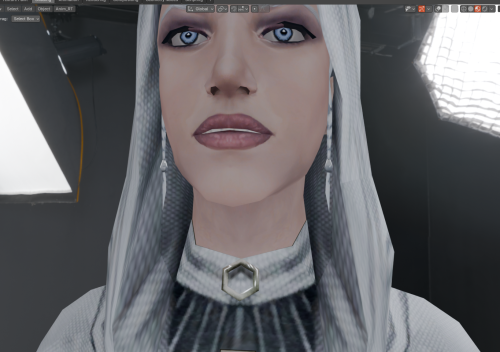
Hello everyone! This mod makes Handmaiden’s braids visible beneath the hood of her default outfit; the braids are present on the model, but by default, the "render" flag is not enabled for them. Credit for the improved base model of Handmaiden, which I used for my mod, goes to RedRob41 for the mod: "2x Upscale+ Character Textures & Model Fixes for TSL."1 point -
Version 1.10.1
318,966 downloads
The K1 Community Patch (K1CP) is a compilation of previous bugfix mods and a multitude of new original fixes put together with the intention of resolving the many and various issues that KOTOR has. This includes some well-known game breaking bugs/softlocks, broken quests, inaccessible content, as well as lesser issues such as problems in conversations, visual inconsistencies, player annoyances, etc. The intention is for the changes to be as seamless as possible, fixing and improving things whilst still retaining the original developer intent. A huge thanks to all of the mod authors who created these mods, and allowed them to be included in this patch! Unfortunately, the individual list of changes has grown far too long to be included in this post. However, you can view a detailed breakdown of each author's individual contributions in the included readme file and a summary of the changes the current version has made since the previous release in the changelog file. List of Contributing Authors (alphabetical): A Future Pilot blennus danil-ch darthbdaman DarthParametric Ebmar Frykas Gimmick5000 jc2 JCarter426 Kainzorus Prime Kexikus KOTOR 1 Restoration Team Leilukin Markus Ramikin N-DReW25 ndix UR R2-X2 Red Hessian Salk th3w1zard1 Thrak Farelle WildKarrde Installation: Run INSTALL.exe and navigate to your K1 install folder. Generally speaking, this mod should be installed before anything else, except mods that do hard edits/overwrites of 2DA, TLK or MOD (module) files. Warning: Never run the installer from inside the archive! Always extract the archive onto your hard drive first. N.B.: With the advent of version 1.10.0, K1CP has migrated away from the use of TSLPatcher and switched to HoloPatcher. This allows for additional patching functionality and resolves some bugs encountered with TSLPatcher. HoloPatcher is also multi-platform. The bundled installer is the Windows version, but Mac and Linux users can download the appropriate installer for their system here. It is highly recommended that you do not install the game on your system's C drive, especially in Program Files. Windows can have permissions issues when trying to install the mod to a C drive destination. If you are using the Steam version of the game and have installed Steam in its default Program Files location, we advise creating a new Steam Library on a different drive and moving the game there via the game's Properties pop-up in Steam. Translation: The mod now has translations in French and Russian, available as separate patches. To use, first download the base K1CP v1.10.0 archive and extract it to your harddrive. Download your translation patch of choice and extract its contents into K1CP's tslpatchdata folder. Proceed to install the mod as normal. Traduction (Français - Harlockin): Le mod a maintenant des traductions en français et en russe, disponibles sous forme de patchs séparés. Pour l'utiliser, téléchargez d'abord l'archive de base de K1CP v1.10.0 et extrayez-la sur votre disque dur. Téléchargez le patch de traduction de votre choix et extrayez son contenu dans le dossier tslpatchdata de K1CP. Procédez à l'installation du mod comme d'habitude. Переводы (Русский - olegkuz1997): Мод теперь включает в себя переводы на французский и русский языки, доступные в виде отдельных патчей. Для использования сперва скачайте базовый архив K1CP v1.10.0 и распакуйте его на жесткий диск. Скачайте нужный вам патч с переводом и извлеките его содержимое с заменой в папку tslpatchdata K1CP. После чего приступите к установке мода как обычно. Compatibility/Known Issues: K1CP uses module injection in an attempt to remain as compatible as possible with other mods. This may result in issues with mods that simply put files in the Override folder. It is recommended that you consult the individual authors of any large scale mods, particularly those that edit DLGs and scripts, as to whether their work is compatible with K1CP. Some mods will likely require updates, some may need to be installed in a specific order, whilst others may be fundamentally incompatible. K1CP currently only supports the English language version of the game, and makes a number of edits to the TLK file in English. If anyone is able to provide translations of these changes to other languages, please let us know. The KOTOR 1 Restoration (K1R) mod is incompatible with K1CP, however there is ongoing work to re-create the K1R mod for K1CP: https://deadlystream.com/files/file/2345-restored-content-for-k1cp-demo/ These are the currently known bugs/issues with KOTOR or the mod that the K1CP is looking to resolve: https://github.com/KOTORCommunityPatches/K1_Community_Patch/issues If you find any others, especially with changes/additions K1CP makes, please report them on the Github issue page or here on Deadly Stream so they can be addressed. Be sure to include as much information as possible, including a list of all the other mods you have installed, the order you installed them in, steps to reproduce the problem, along with screenshots and save files, if appropriate. You may also be directed to provide the install log file, a list of the contents of your Override folder, and specific MOD files from your modules folder. Uninstallation: Given the complexity of this mod, a clean install of KOTOR is the recommended approach for uninstalling K1CP. However, HoloPatcher does provide uninstall Shell (Bash) and PowerShell scripts which will work as long as K1CP was the most recent mod installed. Permissions: Due to this mod being a compilation from many different authors, please do not distribute/rehost it. Acknowledgements: All of the mod authors who have helped make this patch a reality - thank you! - especially for agreeing to distribution outside of Deadly Stream Fred Tetra - For KOTOR Tool tk102 - For DLGEditor and K-GFF JdNoa/Dashus - For DeNCS stoffe - For TSLPatcher/ChangeEdit/TalkEd bead-v - For MDLEdit and KOTORMax ndix UR - For TGA2TPC, TPCView, and MDLOps v1.0+ seedhartha - For KOTORBlender fork for Blender 2.8+ Cortisol - For Holocron Toolset and HoloPatcher/PyKotor th3w1zard1 - For additional customisation and feature improvement of HoloPatcher Fair Strides - For various tools and updates to older tools DrMcCoy - For Xoreos Tools Snigaroo - For maintaining mod builds at https://kotor.neocities.org/modding/mod_builds/ danil-ch - For the original info.rtf template Many thanks to ebmar, Salk, and KnifeMaster for providing numerous bug reports and beta testing certain fixes THIS MODIFICATION IS PROVIDED AS-IS AND IS NOT SUPPORTED BY BIOWARE/OBSIDIAN ENTERTAINMENT, LUCASARTS, DISNEY OR ANY LICENSEES/SPONSORS OF THE MENTIONED COMPANIES. USE OF THIS MODIFICATION IS AT YOUR OWN RISK AND NEITHER THE ABOVE MENTIONED COMPANIES NOR THE AUTHORS ARE RESPONSIBLE FOR ANY DAMAGE CAUSED TO YOUR COMPUTER BY THE USAGE OF THIS MODIFICATION.1 point -

Version 1.6.3
97,641 downloads
KOTOR II: The Sith Lords Community Patch Original Mod Development/Inception: A Future Pilot Current Editor/Maintainer: @JCarter426 1. Description: This mod is a compilation of various bugfix mods put together with the intention of fixing all the known bugs with the last official patch of KOTOR 2. A huge thanks to all of the mod authors who created these mods, and gave me permission to include them in this patch. 2. Install: Run INSTALL.exe and navigate to your K2 install folder. Generally speaking, this mod should be installed before anything else, except mods that do hard edits/overwrites of 2DA, TLK or MOD (module) files. 3. Uninstall: Given the complexity of this mod, a clean install of KOTOR II is recommended. However, you can check through the installation log file if you wish to undo the changes made. 4. List of included mods and fixes (alphabetical by author): A Future Pilot: Running in outer space makes you look like a squirrel injected with caffeine Ashton Scorpius: Malak had some oral hygiene problems: TSL Jedi Malak Mouth Fix 1.1.0 bead-v: The Ebon Hawk has a couple panels with bad models: Ebon Hawk Model Fixes 2.0 danil-ch: In the prologue there are remote clones instead of sensor droids: Prologue Sensor Droids Fix A number of textures don't use shaders: Textures Improvement Project DarthParametric: There are multiple issues with the Harbinger level geometry: Harbinger Hull Fixes 1.1 The Zeison Sha armour for males (PMBMM) is unable to properly perform a two-handed grip during weapon animations: Get a Grip! Zeison Sha Armour Male Model Fix 1.0 There are some minor level geometry issues in the Peragus Administration level: Peragus Administration Level Room Model Fixes 1.0 The head texture for Visas has a poor quality mask for its environment map and incorrectly uses her skin colour for the inside of her mouth The female player head PFHA04 has some clipping issues with the right eyeball and eyelid (reported by Soka) The female player head PFHA05 has incorrect UVs for the upper teeth, causing them to be flesh-coloured (reported by ebmar) The Ebon Hawk's medbay has some bad lightmaps and the camera can clip through its walls (suggested by JCarter426) The Ebon Hawk's interior had various minor additional geometry/lightmap issues not addressed by bead-v's mod The Bumani Exchange Corp. module lacked a skybox/starscape (reported by JCarter426) Mandalore is missing the helmet filter effect on one of his lines (reported by Sniggles) War Droid texture variants didn't properly display the blaster texture (Reported by Sith Holocron) When Kreia first wakes up in the Peragus Administration Level morgue, it's possible to briefly see her body disappear FF97: Khoonda’s flag was missing its texture: Khoonda Flag Fix 1.0.0 GearHead: Droids were erroneously unable to equip claw weapons: KotOR2 Droid Claw Fix 1.0.0 Droids wielding two blasters fired only one shot when using Power Blast: KotOR2 HK-47 Power Blast Fix 1.0.0 JCarter426: Various issues: JC's Minor Fixes for K2 1.5 T3-M4 and the HK units lacked shaders: JC's Shader Fixes for K2 1.1 Various fixes for which feats characters can select: JC's Feat Fixes for K2 1.2 T3-M4 was missing VO and some Gand VO was misplaced: JC's VO Fix for K2 1.2 The Republic soldier body models have been improved: JC’s Republic Soldier Fix for K2 1.1 (with DarthParametric lending a hand) TSLRCM’s Zhug encounter on Nar Shaddaa had a couple issues: JC’s Zhug Attack Fix for TSLRCM 1.1 Strength Gauntlets were missing from random loot. Peragus items have had their stats unified across all areas. They will also now stack in the inventory menu. Party puppets such as Bao-Dur’s remote would erroneously trip the stealth sensor in the jungle tomb mission (reported by Sniggles) Malak's flashback lightsaber has a long blade, matching its appearance in the first game (inspired by Marius Fett's Secret Tomb Lightsaber Fixes) Kainzorus Prime: Boma beasts have black between their teeth: Boma Beast Teeth Fix 1.0 The model in the galaxy map for Peragus looks nothing like it: Peragus Galaxy Map Change LiliArch: The broken item icon, and Grenn's case icon are incorrect LoneWanderer: The damage penalty for mining lasers did not actually apply, so the mining lasers have been implemented as a different item type. LOTO: Texture fixes: Female Asian Head 6 Dark Side Texture Fix 1.0.0 Marauder: A number of items have wrong descriptions or properties: Marauder Fix Pack 1.0.3 N-DReW25: The Serocco guard has a VO that used the wrong actor: Serroco Guard VO Fix 1.0 It's possible to not be able to get a starport visa if you let a bounty hunter go: Bounty Hunter Starport Visa Fix 1.0 ndix UR: One of the player heads wasn't able to blink or move his eyes: PMHC06 Fixed for TSL PapaZinos: The speeder on Nar Shaddaa clipped through the railing: Don't Let Kreia Fly Your Speeder! 1.0.0 Khoonda’s turrets had the wrong appearance: Khoonda Turrets Model Repair 1.0.0 Model fixes: Nar Shaddaa Docks Repair 1.1.0 Model fixes: Nar Shaddaa Landing Pad Repair Model fixes: Telos Model Repairs 1.0.0 Model fixes: TSL Turrets Model Repair 1.0.0 Model fixes: Ultimate Citadel Station Repairs 1.0.0 Model fixes: Ultimate Ebon Hawk Repairs for TSL 2.0.2 The full version of the mod at the link of the above includes some alternative animated texture options. Model fixes: Ultimate Harbinger Repairs 2.0.1 Model fixes: Ultimate Peragus Models Repair 1.3.0 Squall Lionheart: PMHH01 has some issues: PMHH01 Fixed Thor110: Model fixes: Dantooine & Coruscant Model Fix 1.0.0 (Dantooine only) Model fixes: Gamorrean Shadow Fix 1.0.1 Model fixes: Sentry Droid Animation Fix 1.0.0 VarsityPuppet: Some doors were oriented wrong: Side Opening Doors on Malachor ZimmMaster: The walking and running animations are janky: Movement Animation Fix for Both KOTOR and TSL 5. Bugs: These are the currently known bugs with KOTOR II or the mod that the K2CP is looking to resolve: https://github.com/KOTORCommunityPatches/TSL_Community_Patch/issues If you find any others, please report them. 6. Permissions: Due to this mod being a compilation from many different authors, please do not distribute it. 7. Special Thanks/Acknowledgements: · All of the mod authors who have helped make this patch a reality - thank you! · Fred Tetra - For KOTOR Tool · tk102 - For DLGEditor and K-GFF · JdNoa/Dashus - For DeNCS · Stoffe - For TSLPatcher · bead-v - For MDLEdit and KOTORMax · ndix UR - For TGA2TPC, TPCView, and MDLOps v1.0+ · seedhartha - For KOTORBlender fork for Blender 2.8+ · Fair Strides - For various tools and updates to older tools · DrMcCoy - For Xoreos Tools · Snigaroo - For maintaining mod builds on the KOTOR Community Portal · danil-ch - For the original info.rtf template THIS MODIFICATION IS PROVIDED AS-IS AND IS NOT SUPPORTED BY BIOWARE/OBSIDIAN ENTERTAINMENT OR LUCASARTS OR ANY LICENSERS/SPONSORS OF THE MENTIONED COMPANIES. USE OF THIS MODIFICATION IS AT YOUR OWN RISK AND THE ABOVE MENTIONED COMPANIES OR THE AUTHOR IS NOT RESPONSIBLE FOR ANY DAMAGE CAUSED TO YOUR COMPUTER FOR THE USAGE OF THIS MODIFICATION.1 point -
Version 1.0.0
223 downloads
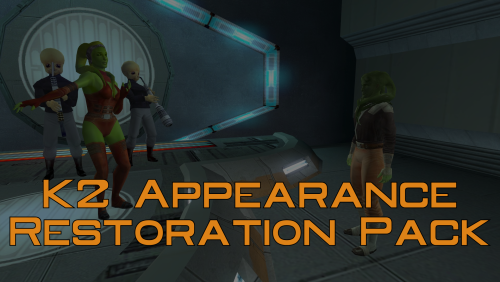
A Mod for Star Wars Knights of The Old Republic II Author: N-DReW25 1.0.0 Release Date: 26.04.2026 Installation: Please install The Sith Lords Restored Content Mod 1.8.6 FIRST, no exceptions. It is highly advised to install the KOTOR 2 Community Patch before this mod, this is optional. Click on the HoloPatcher.exe, pick your desired appearance restoration, click install, and sit back and watch the installer do its magic. Repeat this process until all, or only the appearances you want, of the appearances are installed. Description: The Sith Lords Restored Content Mod (TSLRCM) restores cut content, obviously, but what you may or may not know is that it also restores cut appearances such as Saedhe's and Hussef's cut appearances - both of whom use generic appearances in the vanilla game. But TSLRCM doesn't restore ALL of the cut appearances, my Kotor II Restored Content Plus mod did have options to restore these cut appearances but with more and more install options being added I decided to take these restored appearances and make them their standalone mod. Thus far, this mod restores: * The appearance of the Harbinger's Captain which had a unique head. * The appearance of Ralon which used Jorran's body model. * The male and female Fat Commoner variants which were mostly unused from the first game * The Smuggler variants which were used quite frequently in the first game on NPCs like Holdan. * The first Rodian variant which was bugged in the first game causing it to render as the second variant (fixed in K1CP). * The male Twi'lek variants with special Twi'lek outfits which were used quite frequently in the first game on NPCs like Larrim. * The green female Twi'lek head from the first game has been added to replace Ramana's head whilst Ramana's original head has been added as a brand new appearance for Jonra Far. Known Bugs: This mod shouldn't have any bugs but if you find any please report them to me on Deadlystream. Incompatibilities: To be added! Permissions: Do NOT claim credit for this mod and do not use assets from this mod without my permission. Thanks to: Dashus: For kickstarting the Kotor restoration efforts with TSLRP! Zbyl2 and the TSLRCM Team: For creating TSLRCM in the first place! Bioware: For such an amazing first game! Obsidian: For such an amazing sequel and for keeping the cut content in the files! Fred Tetra: For Kotor Tool! th3w1zard1: For maintaining the HoloPatcher! Everyone who downloads the mod! Legal: THIS MODIFICATION IS NOT SUPPORTED BY BIOWARE/OBSIDIAN ENTERTAINMENT, LUCASARTS, DISNEY OR ANY LICENSERS/SPONSORS OF THE MENTIONED COMPANIES. USE OF THIS FILE IS AT YOUR OWN RISK AND THE ABOVE-MENTIONED COMPANIES OR THE AUTHOR IS NOT RESPONSIBLE FOR ANY DAMAGE CAUSED TO YOUR COMPUTER FOR THE USAGE OF THIS FILE.1 point -

Version 1.0
2,052 downloads
_____________________ABOUT This mod will update the visual appearance of the Harbinger and other Hammerhead based ships in the game. The Harbinger will look like it has seen better days; the other Hammerheads will look better maintained. The mod was created by sELFiNDUCEDcOMA. _____________________INSTALLATION Copy the files into your game's Override folder. You may wish to backup this folder first before doing so as any existing files of the same name will be overwritten. _____________________DISCLAIMER You install this mod at your own risk. I doubt your computer will explode from using the files. However, I am not liable for any damages to your computer or game installation that may occur from using this mod. In short: take responsibility for your own actions before blaming others for your own mistakes. _____________________USAGE It is for me to decide where these mod files are hosted. It is for me to decide who may use them in other mods. You don't ask and get an answer from me, then you don't have permission to use the mod files. Pretty simple really. I find that my mod work has been used without my permission, I will contact the hosting site to have the files removed. Depending upon the extent of the usage and site rules, I may ask that they take other measures against you.1 point -
Version 1.0.0
1,195 downloads
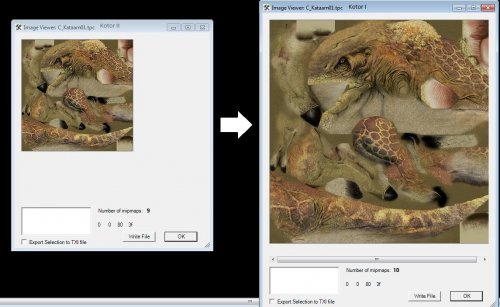
A friend suggested that I upload these here since finding these darn things is quite a chore, and because the difference is honestly quite dramatic. It really is what it says on the tin. I took a bunch of Kotor 1 files and collected those that were downgraded for Kotor 2 (Obsidian literally saved them at a smaller resolution for no adequately explained reason other than perhaps to save resources for console release or because the engine was lagging) So, it's a quick texture swap. I've included a far more in-depth explanation for installing in the readme, but the gist is, you drop these in your override to install them and remove them from your override to uninstall them. I obviously take no credit for these nor do I claim any rights/give permissions in their usage. If you wish, I can provide a TXT document listing all of the textures for using your own Kotor 1 files instead of these.1 point -

Version 1.0.0
2,764 downloads
To Install 1. Download: chunks.rar 2. Copy all files to the Knights of the Old republic's Override folder. (Example location - C:\Program Files (x86)\Steam\steamapps\common\swkotor\Override) 3. When/if prompted to overwrite files, press okay. 4. If you like the mod; leave a comment or endorse! (It would be much appreciated) Made with love.1 point -

Version 1.0
1,749 downloads
A KNIGHTS OF THE OLD REPUBLIC RESOURCE High Quality Blasters for Modders By Sithspecter Description: These are all the source files necessary for you to create your own iterations of my High Quality Blasters. Permissions: If you wish to create a mod that adds on to my High Quality Blasters mod with a new item utilizing these resources, you are free to do so as long as you provide the appropriate credit AND please message me with a screenshot. You don’t need to wait for me to respond, just drop me a PM so that I’m aware. DO NOT UPLOAD UN-MODIFIED SOURCE FILES FROM THIS RESOURCE WITHOUT EXPRESS PERMISSION FROM MYSELF. THIS RESOURCE IS INTENDED TO ALLOW MODDERS TO CREATE THEIR OWN RETEXTURES AND REMODELS OF THE WEAPONS. Use: Included are the original ASCII model files and the PSD source texture files. It should be all you need to create your own retextures/remodels of the blasters in the mod. To achieve final texture results similar to my mod, complete these steps once you are done with your texture: 1. Merge all the visible layers into one layer. 2. Select all and copy. 3. Paste into the Alpha Channel 4. Invert the image in the Alpha Channel 5. Play with the Brightness/Contrast until you achieve predominantly white, with bits of black where you want the texture to be shiny. 6. Size the image to 512 by 512 for rifles, and 256 by 256 for pistols. 7. Sharpen the image 2-3 times. 8. Sharpen the Alpha Channel 2-3 times. 9. Profit Bugs: Due to differences between the body models (especially female), the weapons will sometimes appear to clip the hands (especially in the female off-hand). There is nothing I can do about this without introducing more issues, it is something that happens with the default weapons, and you will have to live with it. The Assassin Droid and the War Droid carry repeating blasters. I attempted to retrofit the high quality blaster to those models, but was unable to due to tool limitations. The texture is still applied to the old models, albeit incorrectly. It still looks better, though slightly odd. You will have to live with it. The new textures are also applied incorrectly to the weapons you can see on the tables in Kebla Yurt's store. They might look a bit funky, but you will have to live with it. Legal: THIS MODIFICATION IS PROVIDED AS-IS AND IS NOT SUPPORTED BY BIOWARE/OBSIDIAN ENTERTAINMENT, LUCASARTS, DISNEY OR ANY LICENSERS/SPONSORS OF THE MENTIONED COMPANIES. USE OF THIS FILE IS AT YOUR OWN RISK AND THE ABOVE MENTIONED COMPANIES OR THE AUTHOR IS NOT RESPONSIBLE FOR ANY DAMAGE CAUSED TO YOUR COMPUTER FOR THE USAGE OF THIS FILE.1 point -

Version 1.0.2
84 downloads
This page is a database of alternatives to some of my mods that I felt needed to be placed elsewhere than their normal page. Think of it as like a collection of some of your favorite snack brands, but only the flavors that most people don't buy. Few looking for cool ranch Doritos want to find themselves surrounded instead by the clam chowder, German potato, or Caribbean citrus jerk flavors, so those of you with more niche palettes can come here to find what you are looking for. Here you can find your clam chowder Doritos. These alternates may be created for several reasons, primarily by request. Thus this page may serve as a resource for other modders who feel these versions better suit their own mods. I will provide a brief description for each, any other pertinent info or instructions can be found on their original mod page as linked. For most people, I recommend using the versions of the mod found on those original pages, unless directed here by another mod you are using or you simply find the changes described below to your liking. Mods Available: Ultimate Ebon Hawk Repairs for K1 - No Animation Edition -- Version 1.03 of the parent mod offered a version of itself that removed all of the misaligned blinking animations from the models. Since version 2.0, these animations have been aligned to their textures, but anyone who got used to or simply prefers the ship without them can download a version here that removes them, and otherwise is up-to-date with v2.0.0 changes. Ultimate Ebon Hawk Repairs for TSL - No Animation Edition -- Version 1.1 of the parent mod offered a version of itself that removed all of the misaligned blinking animations from the models. Since version 2.0, these animations have been aligned to their textures, but anyone who got used to or simply prefers the ship without them can download a version here that removes them, and otherwise is up-to-date with v2.0.2 changes. Ultimate Harbinger Repairs - No Dirt Overlay -- Upon request, I have created an alternate version of the Harbinger mod that removes TSL's dirt overlay from every model on the ship. This may be beneficial to those using certain HD texture mods for the ill-fated cosmological hammerhead. LEH_EHawk01 for TSL - I added an alternate version of TSL's Ebon Hawk cockpit that uses the LEH_EHawk01 texture that the first game/prologue used. Compatibility options for the various animation options, and up-to-date with v2.0.2 of Ebon Hawk Repairs. This is primarily for people looking for compatibility options for texture mods that offer high resolution or otherwise retextured versions of LEH_EHawk01 but not LEH_EHawk02. If you are looking for a high resolution version of LEH_EHawk02, try tjsase's TSL HD Cockpit Skyboxes. These modifications are not supported by Obsidian Entertainment, Lucasarts, Disney or any licensers/sponsors thereof. Use of any of these modifications is at your own risk and neither the aforementioned companies nor the author may be held responsible for any damages caused to your computer via usage of any modifications found on this page.1 point -

Version 1.0.0
235 downloads
A Mod for Star Wars Knights of The Old Republic 2 Author: N-DReW25 1.0.0 Release Date: 03.03.2022 Installation: Alongside the "Readme.txt" file will be the following folder: "Movie Cutscene Mods" * As of 1.0.0, there is only one Movie Cutscene mod. Open the "Xbox trailer" folder and simply copy the .BIK file into your swkotor "movies" folder and overwrite the original .BIK file. Uninstallation: Depends on what you've chosen to install. * For Movie Cutscene Mods, open the "Backup (Vanilla Cutscenes) and copy the .BIK file to your Kotor 2 movies folder and overwrite the Xbox .BIK. Description: I've previously made a mod called "Knights of the Old XBOX" for K1, the KotOX mod is intended to give players the opportunity to play their PC version of Kotor with Xbox features. From Xbox style Dark Jedi to Xbox style NPCs, there are more quite a few Xbox options to spice up your PC Kotor with my KotOX mod. But unlike Bioware, Obsidian Entertainment released their sequel on both PC and Xbox in the Winter of 2004. This led me to believe that there aren't very many Xbox exclusive features in Kotor 2 for me to port over to the PC, and since TSLRCM can't be used on the Xbox version not many people play Kotor 2 the Xbox today. It was brought to my attention on Discord that the Xbox version of Kotor 2 had a different trailer than its PC counterpart, the PC's trailer appeared to use footage from pre-E3 2004. As a result, the PC trailer has the following problems: * The dead Republic Soldiers on the Harbinger bridge use the default Corpse model. * In the Harbinger arrival cutscene, the Harbinger is orange instead of red, the asteroids were darker, less detailed and were static. * Looking out of a Citadel Station window pre-Battle of Telos showed a cityscape with red lights instead of blue. * A shot of the Mandalorian Dxun Camp looks nothing like it does in the final release. * M4-78 is shown. * Dxun looks nothing like it does in the final release. * The Exile's Robes turn blue (This is because it's using the Blue Jedi Robe textue from K1 and is being applied to the Cloaked Jedi Robe model, thus causing a texture glitch). * Atton is using his beta appearance in certain scenes whereas in others he is using his final release appearance. * Mandalore is made of solid gold. * A Kath Hound can be faintly seen in the background of a Dxun for one second. * A Telos surface Merc is wearing a Light Scan Visor from K1 with a green double-vibroblade. These items aren't present in the final release. * Sith Soldiers outside the Dxun Sith Tomb are red, this isn't present in the final release. * The Dxun Sith Tomb exterior looks nothing like it does in the final release * At the end, the Kotor 2 logo looks nothing like it does in the final release The Xbox trailer didn't have any of these problems, the Xbox footage appeared to have been recorded sometime between mid to late 2004 when most of the games final content was completed. Of course, not ALL of the Xbox trailer's inaccuracies were fixed (The Exile still used K1 heads and some old footage was still used here and there). Regardless, the Xbox trailer has since been ported to the PC version of Kotor 2 for you to watch. In the event in which I, or someone else, discovers more Xbox exclusive features that I can port I'll add them to this mod. After installing this mod, the in-game trailer will look like this: Known Bugs: This mod shouldn't have bugs but if there is Just PM me on Deadlystream. Incompatibilities: Would be incompatible with any mods which modify the Kotor 2 trailer .BIK, no mods to my knowledge do this so you should be good! Report any unknown incompatibilities to me on Deadlystream.com Permissions: Do NOT claim credit for this mod and do not use assets from this mod without my permission. Thanks to: FiendishlyInventive for requesting the Xbox trailer be ported to PC! Pixel Theater for uploading the Xbox trailer to YouTube! Bioware for such an amazing game! Stoffee for TSLPatcher! Fred Tetra for Kotor Tool and everyone who downloads the mod! Legal: THIS MODIFICATION IS NOT SUPPORTED BY BIOWARE/OBSIDIAN ENTERTAINMENT, LUCASARTS, DISNEY OR ANY LICENSERS/SPONSORS OF THE MENTIONED COMPANIES. USE OF THIS FILE IS AT YOUR OWN RISK AND THE ABOVE-MENTIONED COMPANIES OR THE AUTHOR IS NOT RESPONSIBLE FOR ANY DAMAGE CAUSED TO YOUR COMPUTER FOR THE USAGE OF THIS FILE.1 point -

Version 1.2
547 downloads
This is it. This is how Atton Rand was meant to dress. The faithfulness to his concept art is staggering Features: A coveted glimpse of Atton Rand's chest Known Issues: You're always going to see the neck seam because of cast shadows, so how obvious it is depends on the lighting. Some of the best lighting is found in the well-lit entryways of Nar Shaddaa's entertainment promenade, so if you want Atton's chest to look good while he tells you about the horrible acts he's committed, try to initiate the conversation there. If you use the vanilla textures, there's a period of time in the middle of a dark side descent in which Atton's face won't match with his chest, since there's an extra transition texture for the face but not for the body. You can avoid this somewhat by using subtler dark side face textures; I like using luminousbathhouse's Atton reskin. File: The file contains my edits on the vanilla texture files at 512p, and an optional file for use with luminousbathhouse's Atton reskin. Installation: Move P_AttonBA.tga and P_AttonBAD01.tga to Knights of the Old Republic II\override Uninstallation: Delete P_AttonBA.tga and P_AttonBAD01.tga from Knights of the Old Republic II\override1 point -

Version 1.1
1,077 downloads
This mod does several things: It makes all texture variations of the commoner clothing available to the player, with all the items - 11 total outfits - placed in various locations throughout the game. I've placed them where those outfits seemed to be the most popular, so if you see an NPC wearing an outfit you haven't seen before, the item can probably be found nearby. It changes which clothing item the player receives on Telos, based on class as seen in the character creation menu. Only the first clothing item the player receives will be based on their class; players of all classes will still be able to find the other variants elsewhere in the game. It adds a male variant of the Czerka uniform to match the existing female texture. For whatever reason there wasn't a male variant, so I've cobbled together one from the female variant and the other male textures. It shuffles around some of the textures so the male and female variants match each other more closely, primarily based on color. I've made sure to patch any affected characters to revert their outfits to their original appearances. It adds unique icons and names to all the items, so you can tell them apart. (They were all just called "Clothing" before.) I've named them based on who in the game wears them; for example, two of the outfits popular on Dantooine I've named "Settler Clothing" and "Fringer Clothing". The icons display both the male and female variants of each item, due to the differing appearances. It adds custom icons for Atton's Ribbed Jacket and Mira's Ballistic Mesh Jacket. They originally used the same icon as commoner variant #1, and since I changed that to look like the commoner clothing I saw it fit to give the unique items their own icons as well. It touches up several of the male textures to fix some discoloration and bad seams. I have also included an option to give the commoner clothing some upgrade capabilities. If you choose this option, you'll be able to upgrade the clothing items with some underlays, the same upgrades available to the miner uniform.1 point