All Activity
- Past hour
-
 Smooth_Pedro joined the community
 -
 lutzia joined the community
 - Today
-
 JudgementalCat joined the community
 -
 EJA joined the community
 -
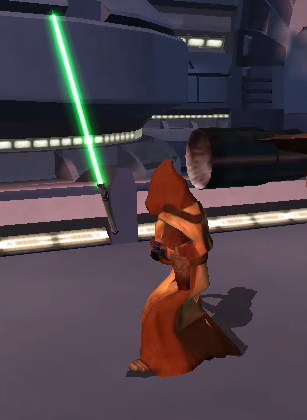
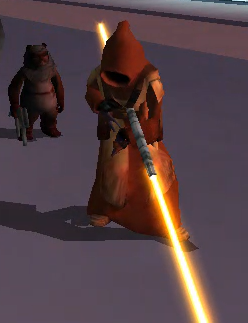
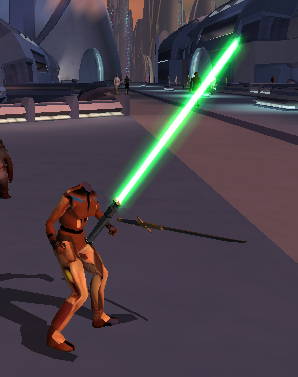
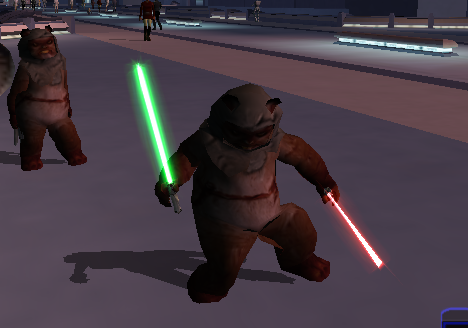
View File Playable Ewok with 2 Hand Animations This is a total overhaul of my previous Ewok Mod using the method I used on my Jawa mod so that the Ewok now has 2 handed weapon animations. Aware of small glitch where because Ewok is too fat 2h lightsaber clips through model slightly. Can be fixed easily probably will later. This Kotor 1 mod adds a playable custom ewok mdl that can be placed into the override folder to replace some npcs or used in conjunction with KSE as a playable character with combat animations. No 2 hand mele combat animations at this time. This .Zip file contains a ReadMe.txt a brief tutorial.txt on how to recreate the mod process, the custom .tga files for the textures, and finally the custom .mdl and .mdx files that can be dropped into override following the instructions in the ReadMe file. I also included a link to how to recreate the process incase anyone is interested. Disclaimer: This mod utilizes a modified asset from the community-maintained SWBF2 Mod Tools SDK 2020 available at ModDB, alongside original assets from Star Wars: Knights of the Old Republic. Full credit goes to the original developers, artists, and respective intellectual property rights holders (Lucasfilm, Pandemic Studios, and BioWare). This is a strictly non-profit, fan-made educational project intended exclusively as a technical proof-of-concept demonstrating asset handling for the KOTOR modding community. Furthermore, I do not own or claim rights to any of the third-party tools used or described in this project; all rights belong entirely to their respective developers Submitter EwokKotor Submitted 07/21/2026 Category Mods K1R Compatible Yes
-
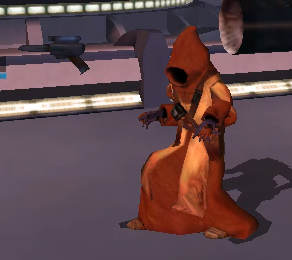
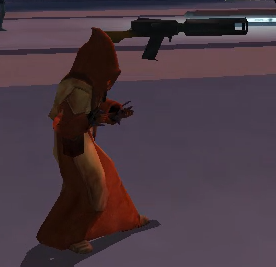
View File Playable Jawa This mod adds a playable Jawa to K1. Shoutout to DarthParametric for helping me to figure out the bug on the prototype! Simply drop the files into Override to install. Feel free to use this mod in your own works but plz give credit. Video on process coming soon. Submitter EwokKotor Submitted 07/21/2026 Category Mods K1R Compatible Yes
-
View File KOTOR_FPS_CAP # KOTOR 1 has a built-in frame limiter — BioWare shipped it switched off **TL;DR:** *Star Wars: Knights of the Old Republic* (2003, Odyssey engine) contains a complete busy-wait frame limiter in its main loop. It is controlled by a single `float` in the executable that defaults to `0.0`, which leaves the limiter dormant, so the game free-runs at uncapped framerate. On high-refresh displays this uncapped rate is what causes the long-standing **movement / "stuck after combat turn" freeze** and related timing bugs, which the community has only ever worked around with external FPS caps or by dropping the monitor to 60 Hz. Writing `60.0` (or any target) to that one float **arms the engine's own limiter** — a native, self-contained fix. No injected code, no wrappers, no driver settings. It's a 4-byte data patch. Verified: on a 144 Hz display with all external caps removed, the patched exe holds a hard 60 FPS and the freeze does not occur. --- ## The bug KOTOR's main loop (`WinMain`, `FUN_004041f0` in a Ghidra auto-analysis of the standard PC exe) is a classic `PeekMessage` real-time loop: ``` while (quit_flag == 0) { read timer (game clock) if no pending message: render scene (delta-time based) SwapBuffers (present) ... optional limiter here ... } ``` Gameplay logic — movement, and the combat round/turn state machine — advances by frame **delta-time**. With no frame cap, delta-times on a fast display become tiny and irregular, and the 2003-era state machine mis-steps: the controlled character's action queue stalls until something rebuilds it (switching party member, or a save/load clears it). That is the freeze players have reported for 20 years. ## The dormant limiter Immediately after `SwapBuffers`, the loop contains this (Ghidra decompilation, lightly annotated): ```c if (DAT_007a3c58 != 0) // a separate, also-off coarse limiter Sleep(DAT_0078d1e8); if (0.0f < cap) { // cap = _DAT_007a3c64 (the frame-cap float) target = 1000.0f / cap; // target frame time // measure elapsed since frame start, then: if (elapsed < target) { do { // busy-spin: re-read the game timer } while (elapsed < target); // hold the frame until target reached } } ``` With real constant values read from the binary: | Symbol | RVA | Value | Meaning | |-------------------|-----------|----------|----------------------------------| | `_DAT_007a3c64` | `0x7a3c64` | **0.0** | frame cap (FPS). **This is it.** | | numerator const | `0x73d6fc` | 1000.0 | `target_ms = 1000.0 / cap` | | zero const | `0x73d700` | 0.0 | used in the `0.0 < cap` gate | | timer scale const | `0x73d708` | 0.001 | raw timer -> milliseconds | The gate is literally **"if cap > 0, limit the frame."** With `cap = 60`, the loop busy-waits until each frame has taken `1000/60 ≈ 16.67 ms`, i.e. it caps at 60 FPS. This is the *same* formula the engine uses elsewhere — the movie-playback path caps to 30 with it — so the mechanism is proven, not speculative. ## Why it's off `_DAT_007a3c64` starts at `0.0`. The **only** code that writes it is a render-setup function (`FUN_004c5880`), and that write is guarded: ```c if (DAT_00832904 != 0) { ... _DAT_007a3c64 = (float)DAT_00832904; // arm the cap } ``` `DAT_00832904` lives in **BSS** — zero-initialized, and it has **no writer anywhere in the binary** (it's a config variable exposed by address, never set by default). So the guard is never true, the cap value is never assigned, and `_DAT_007a3c64` stays `0.0` for the entire session. The limiter is complete, correct, and permanently asleep. Because nothing ever writes the cap during normal play, **patching its initial `.data` value is safe and permanent** — no code path overwrites it. ## The patch Standard PC v1.03 / GOG / "editable" executable: ``` file offset 0x3A3C64 : 00 00 00 00 (float 0.0, limiter off) -> 00 00 70 42 (float 60.0, 60 FPS cap) ``` Other caps if you prefer: `30.0` = `00 00 F0 41`, `72.0` = `00 00 90 42`, `120.0` = `00 00 F0 42`. A Python patcher (`kotor_fpscap_patch.py`) is included; it fingerprints the two `.rdata` constants before writing, backs up the exe, and refuses to touch an executable whose layout it doesn't recognize: ``` python kotor_fpscap_patch.py "path\to\swkotor.exe" 60 ``` ## Verification - 144 Hz display, all external FPS caps and driver "wait for vertical refresh" overrides removed. - Patched exe launched directly. - Framerate held a hard **60**; the movement/turn freeze did not reproduce on transitions that previously triggered it. ## Caveats - **Busy-wait, by design.** The limiter spins a CPU core while pacing each frame (this is BioWare's own implementation — the movie path spins the same way). On a modern machine, one pegged core for a single-threaded 2003 game is harmless, but it is not a `Sleep`-based idle cap. A future refinement could redirect the gate to the engine's own `Sleep(DAT_0078d1e8)` limiter instead. - **Offset is per-exe-layout.** `0x3A3C64` is verified for the standard PC exe. Other builds (Steam-with-different-packing, 4-CD, Mac) may differ; find `_DAT_007a3c64` by locating the `1000.0 / cap` main-loop math. - **Steam "Verify integrity" reverts it** (restores the stock exe). Re-apply after any verify. - Stacks cleanly with the 4GB LARGE_ADDRESS_AWARE patch, UniWS widescreen, and the community mod builds — it only touches one unrelated float. ## Method Static reverse engineering only (Ghidra). Chain: locate timing-API imports (`QueryPerformanceCounter`, `GetTickCount`, `Sleep`) → their callers → the `PeekMessage` message pump → its caller (`WinMain`) → the frame-limiter block in the loop → the cap float and its dormant guard. Full decompiled C of the engine was exported and searched locally to trace the call chain. --- *Reverse-engineered from a legally-owned copy for interoperability and bug-fixing. Not affiliated with BioWare/LucasArts/Aspyr.* Submitter VexFlint Submitted 07/21/2026 Category Mods K1R Compatible Yes
-
Version 1.0.0
4 downloads
# KOTOR 1 has a built-in frame limiter — BioWare shipped it switched off **TL;DR:** *Star Wars: Knights of the Old Republic* (2003, Odyssey engine) contains a complete busy-wait frame limiter in its main loop. It is controlled by a single `float` in the executable that defaults to `0.0`, which leaves the limiter dormant, so the game free-runs at uncapped framerate. On high-refresh displays this uncapped rate is what causes the long-standing **movement / "stuck after combat turn" freeze** and related timing bugs, which the community has only ever worked around with external FPS caps or by dropping the monitor to 60 Hz. Writing `60.0` (or any target) to that one float **arms the engine's own limiter** — a native, self-contained fix. No injected code, no wrappers, no driver settings. It's a 4-byte data patch. Verified: on a 144 Hz display with all external caps removed, the patched exe holds a hard 60 FPS and the freeze does not occur. --- ## The bug KOTOR's main loop (`WinMain`, `FUN_004041f0` in a Ghidra auto-analysis of the standard PC exe) is a classic `PeekMessage` real-time loop: ``` while (quit_flag == 0) { read timer (game clock) if no pending message: render scene (delta-time based) SwapBuffers (present) ... optional limiter here ... } ``` Gameplay logic — movement, and the combat round/turn state machine — advances by frame **delta-time**. With no frame cap, delta-times on a fast display become tiny and irregular, and the 2003-era state machine mis-steps: the controlled character's action queue stalls until something rebuilds it (switching party member, or a save/load clears it). That is the freeze players have reported for 20 years. ## The dormant limiter Immediately after `SwapBuffers`, the loop contains this (Ghidra decompilation, lightly annotated): ```c if (DAT_007a3c58 != 0) // a separate, also-off coarse limiter Sleep(DAT_0078d1e8); if (0.0f < cap) { // cap = _DAT_007a3c64 (the frame-cap float) target = 1000.0f / cap; // target frame time // measure elapsed since frame start, then: if (elapsed < target) { do { // busy-spin: re-read the game timer } while (elapsed < target); // hold the frame until target reached } } ``` With real constant values read from the binary: | Symbol | RVA | Value | Meaning | |-------------------|-----------|----------|----------------------------------| | `_DAT_007a3c64` | `0x7a3c64` | **0.0** | frame cap (FPS). **This is it.** | | numerator const | `0x73d6fc` | 1000.0 | `target_ms = 1000.0 / cap` | | zero const | `0x73d700` | 0.0 | used in the `0.0 < cap` gate | | timer scale const | `0x73d708` | 0.001 | raw timer -> milliseconds | The gate is literally **"if cap > 0, limit the frame."** With `cap = 60`, the loop busy-waits until each frame has taken `1000/60 ≈ 16.67 ms`, i.e. it caps at 60 FPS. This is the *same* formula the engine uses elsewhere — the movie-playback path caps to 30 with it — so the mechanism is proven, not speculative. ## Why it's off `_DAT_007a3c64` starts at `0.0`. The **only** code that writes it is a render-setup function (`FUN_004c5880`), and that write is guarded: ```c if (DAT_00832904 != 0) { ... _DAT_007a3c64 = (float)DAT_00832904; // arm the cap } ``` `DAT_00832904` lives in **BSS** — zero-initialized, and it has **no writer anywhere in the binary** (it's a config variable exposed by address, never set by default). So the guard is never true, the cap value is never assigned, and `_DAT_007a3c64` stays `0.0` for the entire session. The limiter is complete, correct, and permanently asleep. Because nothing ever writes the cap during normal play, **patching its initial `.data` value is safe and permanent** — no code path overwrites it. ## The patch Standard PC v1.03 / GOG / "editable" executable: ``` file offset 0x3A3C64 : 00 00 00 00 (float 0.0, limiter off) -> 00 00 70 42 (float 60.0, 60 FPS cap) ``` Other caps if you prefer: `30.0` = `00 00 F0 41`, `72.0` = `00 00 90 42`, `120.0` = `00 00 F0 42`. A Python patcher (`kotor_fpscap_patch.py`) is included; it fingerprints the two `.rdata` constants before writing, backs up the exe, and refuses to touch an executable whose layout it doesn't recognize: ``` python kotor_fpscap_patch.py "path\to\swkotor.exe" 60 ``` ## Verification - 144 Hz display, all external FPS caps and driver "wait for vertical refresh" overrides removed. - Patched exe launched directly. - Framerate held a hard **60**; the movement/turn freeze did not reproduce on transitions that previously triggered it. ## Caveats - **Busy-wait, by design.** The limiter spins a CPU core while pacing each frame (this is BioWare's own implementation — the movie path spins the same way). On a modern machine, one pegged core for a single-threaded 2003 game is harmless, but it is not a `Sleep`-based idle cap. A future refinement could redirect the gate to the engine's own `Sleep(DAT_0078d1e8)` limiter instead. - **Offset is per-exe-layout.** `0x3A3C64` is verified for the standard PC exe. Other builds (Steam-with-different-packing, 4-CD, Mac) may differ; find `_DAT_007a3c64` by locating the `1000.0 / cap` main-loop math. - **Steam "Verify integrity" reverts it** (restores the stock exe). Re-apply after any verify. - Stacks cleanly with the 4GB LARGE_ADDRESS_AWARE patch, UniWS widescreen, and the community mod builds — it only touches one unrelated float. ## Method Static reverse engineering only (Ghidra). Chain: locate timing-API imports (`QueryPerformanceCounter`, `GetTickCount`, `Sleep`) → their callers → the `PeekMessage` message pump → its caller (`WinMain`) → the frame-limiter block in the loop → the cap float and its dormant guard. Full decompiled C of the engine was exported and searched locally to trace the call chain. --- *Reverse-engineered from a legally-owned copy for interoperability and bug-fixing. Not affiliated with BioWare/LucasArts/Aspyr.* -
 MaxsonL joined the community
 -
 lyuben301 joined the community
 -
 Chaser, I tried downloading the mod just now, and noticed that it doesn't provide its own copy of korr_m38ab.mod. This makes it very difficult to download the mod on its own. Just thought you should know.
 -
 dodrarikaan joined the community
 -
Version 3.0.0
0 downloads
This is a total overhaul of my previous Ewok Mod using the method I used on my Jawa mod so that the Ewok now has 2 handed weapon animations. Aware of small glitch where because Ewok is too fat 2h lightsaber clips through model slightly. Can be fixed easily probably will later. This Kotor 1 mod adds a playable custom ewok mdl that can be placed into the override folder to replace some npcs or used in conjunction with KSE as a playable character with combat animations. No 2 hand mele combat animations at this time. This .Zip file contains a ReadMe.txt a brief tutorial.txt on how to recreate the mod process, the custom .tga files for the textures, and finally the custom .mdl and .mdx files that can be dropped into override following the instructions in the ReadMe file. I also included a link to how to recreate the process incase anyone is interested. Disclaimer: This mod utilizes a modified asset from the community-maintained SWBF2 Mod Tools SDK 2020 available at ModDB, alongside original assets from Star Wars: Knights of the Old Republic. Full credit goes to the original developers, artists, and respective intellectual property rights holders (Lucasfilm, Pandemic Studios, and BioWare). This is a strictly non-profit, fan-made educational project intended exclusively as a technical proof-of-concept demonstrating asset handling for the KOTOR modding community. Furthermore, I do not own or claim rights to any of the third-party tools used or described in this project; all rights belong entirely to their respective developers -
 bibobubi joined the community
 - Yesterday
-
 Of course I did lmao. I tried a LOT of things. What made me furious is it WAS supposed to work, there's literally nothing wrong with the dialogue and script, which is probably why it worked for you. But me... just a black screen. Anyway. Glad you can finish the mod ! (My K1 expansion will be a LOT easier to install. :D)
 -
 haniru joined the community
 -
Did you really expect someone to hold on to saves for 11 years?

-
Version 1.1.0
0 downloads
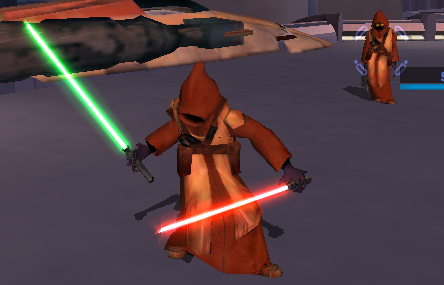
This mod adds a playable Jawa to K1. Shoutout to DarthParametric for helping me to figure out the bug on the prototype! Simply drop the files into Override to install. Feel free to use this mod in your own works but plz give credit. Video on process coming soon. -
 FIXED Mod will be posted soon! It was a user error where since I only had the Base (PFBCS) selected and didnt have cutscenedummy explicitly selected it was not applying the transform to cutscene dummy, rather only to the base. I then ran into an error where this caused warping, but found by unparenting the mesh before scaling then reparenting once the changes were applied to the rig enabled me to find a workaround. Submitting on deadlystream also in meantime this should be live https://www.nexusmods.com/kotor/mods/1837
 -
 What version of blender and kotorblender are you using?
 -
I hate to say this but I just got past Freedom Nadd's tomb, did you ever try just... walking through the door? Like I know that sounds bad but I mean literally running into the door? It stayed closed for me but it had no collision and I loaded into Dxun fine. Thank you for the installation guide, it didn't solve my own problem but I'll leave what worked for me (so far) here for any future users. I installed TJM manually onto the Aspyr patch version on Steam, along with the wonderful 3C-FD Patcher by J. The mod launches and runs fine on the modern version to my knowledge but to fix the dialogue you gotta play around with it; imo it's worth it for the qol that the Aspyr patch + 3D-FD patch provide. Go into the TJM part 2 installation ZIP, >StreamVoice>GBL. You'll see a bunch of folders with .wav files inside; you need to convert all of them to .mp3. There's about 3000 of them and it took me about 15-25 minutes of work with Audacity. Once you do that, use JCarter's SithCodec to encode the .mp3s into the VO format, then put the encoded files back into their GBL folders. Keep all the folders under GBL in order (IE, keep all the "bast.mp3/wav" files in the bast file) and then in your Kotor 2 directory, pop the new Streamvoice folder into your Kotor 2 directory, overwrite the old files, and it should work a-okay. Hope this helps someone in the future.
-
For some reason in Blender when i scale down the whole base and apply the transforms the scale applies to the mesh but not the dummy. I am attaching a very short video demonstrating this. I will try to see if I can figure out how to scale the rig using the ASCII, unless there is a better way? KBlender Problem Export Scaled Rig.mp4
-
could you please reupload the save, they are empty. tia
-
 marrodbrosis joined the community
 -
Are you talking about Nadd's tomb ? Or installing the mod ? If it's the latter yeah no problem, I can help you if needed. Here are some detailed installation instructions : 0) Make sure you have a clean install of KotOR 2 without any mods, as this completely replaces the game with a "new one". 1) Download parts 1 and 2 of the mod then unzip both files. 2) Open part 1, go in Override, press CTRL + A then CTRL + C to copy everything, then go to your game's Override folder (probably this if you're on Steam : C:\Program Files (x86)\Steam\steamapps\common\Knights of the Old Republic II\Override ) and paste everything here. 3) Open part 2 and do the same steps for the 3 folders "Modules", "Movies" and "StreamVoice" (copy paste every file that's in these folders in your game's respective folders (Modules, Movies, StreamVoice). You can skip "launcher"). The Legacy install worked better for me as for the Aspyr version the voice lines of the dialogues wouldn't work. If you're talking about Nadd's tomb... I gave up lol. I myself am a modder and mostly wanted to try this mod for reference points on several fields (story, fights, dialogues and lip syncing, etc.) for my own K1 post-game expansion so after trying for 10 minutes to see what was wrong I let it go.
-
 I for the life of me cannot get this damn mod to work on pc. I have tried so many ways, but the quest will not pop up after getting the force back on peragus. it works perfectly on mobile, but not on pc, its like the global.jrl file isnt being updated.
 -
Did you end up getting this working? I've been having a ton of trouble getting the mod going both on the Aspyr patch and on the legacy beta. Help would be greatly appreciated
-
 The problem is your rig didn't scale: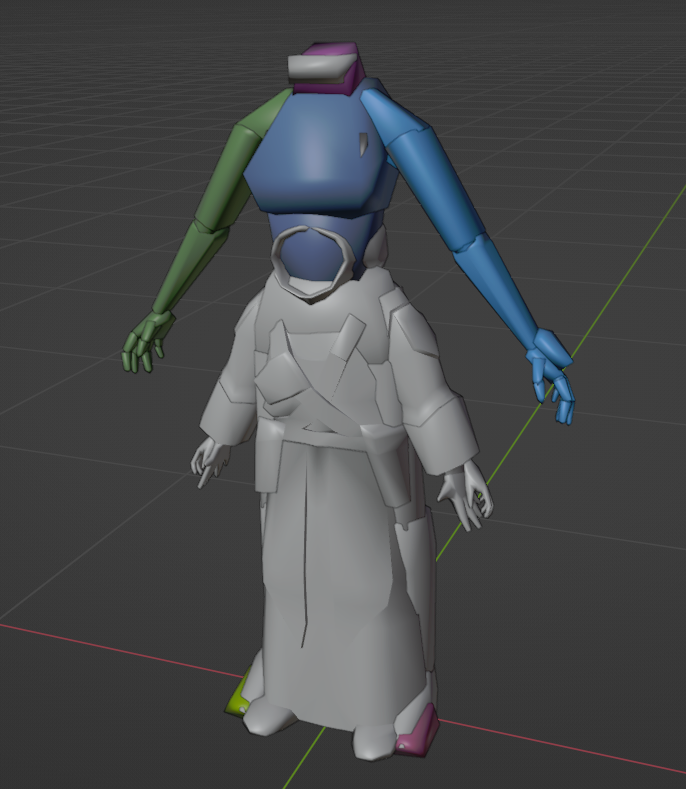
-
pmbal.mdxpmbal.mdl Here are the Mdl and Mdx.
-
Attaching the models would be beneficial.
-
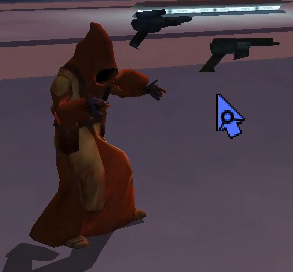
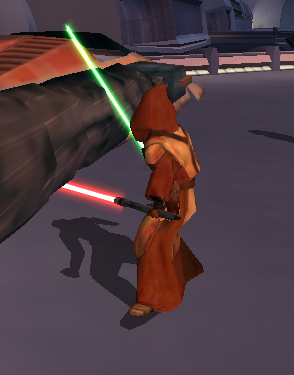
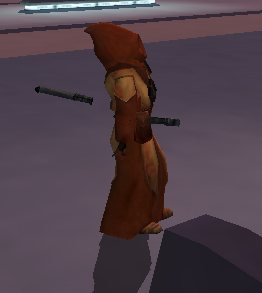
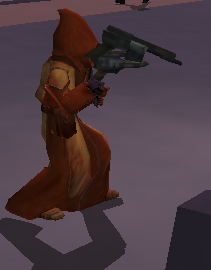
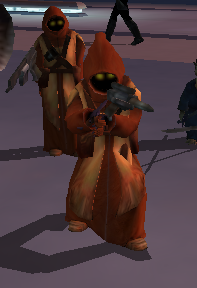
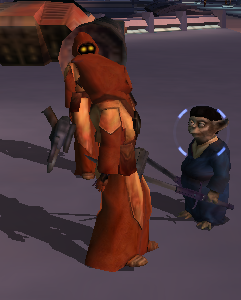
Because I made an error while trying to use Blender to adjust the hand hooks and mistakenly concluded it had an problem exporting weapon hooks. But you are right Blender works. I was able to adjust the hand hook placement in blender but now while the lightsaber hilt IS aligned while in combat animations it is now floating behind during idle, well the right weapon floats behind the left weapon floats on the right and in front. Also interesting enough moving rhand and lhand worked for the mele weapons but blasters still are not sitting in hand during animation.
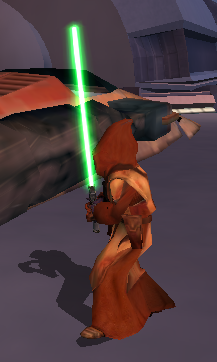
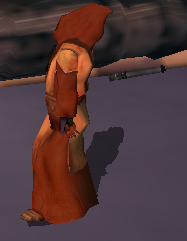
-
Why are you using ASCIIs if you're using KBlender?
-
 when the sith trooper die,they don't have the sound
- 28 comments
-
- 1
-

-
- sith soldier
- marius fett
- (and 1 more)
- Last week
-
As the title says I am currently trying to work on a playable Jawa mdl and am having problems with the weapons in game placement specifically when in combat animations. Essentially my ,admittedly convoluted, process was that I scaled down pfbcs.mdl/.mdx to the size of a jawa in blender, scaled down the animation to match, and applied all transformations excluding rotation. I then exported that, used MDLedit to batch an ASCII file from the export, then with the supermodel in the same folder using MDLedit batched it back to Binary. Regular animations such as walking and combat stances work fine with no stretching, but the problem is I think the weapons seem to still be spawning in the original location from before scaling down. In Blender I tried creating a custom scaled down supermodel, I even edited the hand hooks placement for the g2r1 (which from what I could tell was the idle mele 1h animation) in the graph-editor panel in the animation section, and tried compiling the player character again using that as the supermodel but it didn't seem to work. I am thinking that maybe the game is drawing the weapon placements from the hooks in the actual main supermodel in the game files? Anyways I am kind of at a loss. I am thinking maybe this might be fixable by editing the ASCII file, but if it IS just pulling from some global animation array regarding the weapon hook placement I don't think it would be. But am honestly running out of ideas and any help would be much appreciated. The steps adding the actual Jawa mesh I did after and it seems to be working ok but the part I have described is what produced the bug. Anyways any help or feedback would be great thanks, for your time.