Fair Strides
-
Posts
2,347 -
Joined
-
Last visited
-
Days Won
75
Content Type
Profiles
Forums
Blogs
Forum & Tracker Requests
Downloads
Gallery
Store
Events
Everything posted by Fair Strides
-
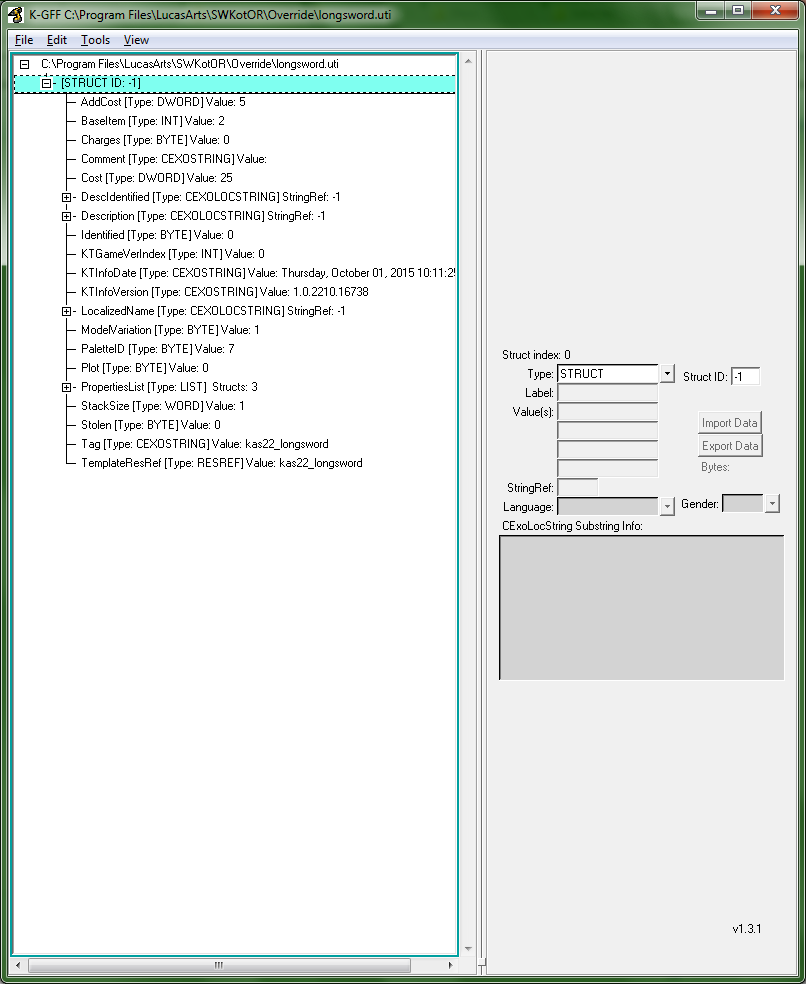
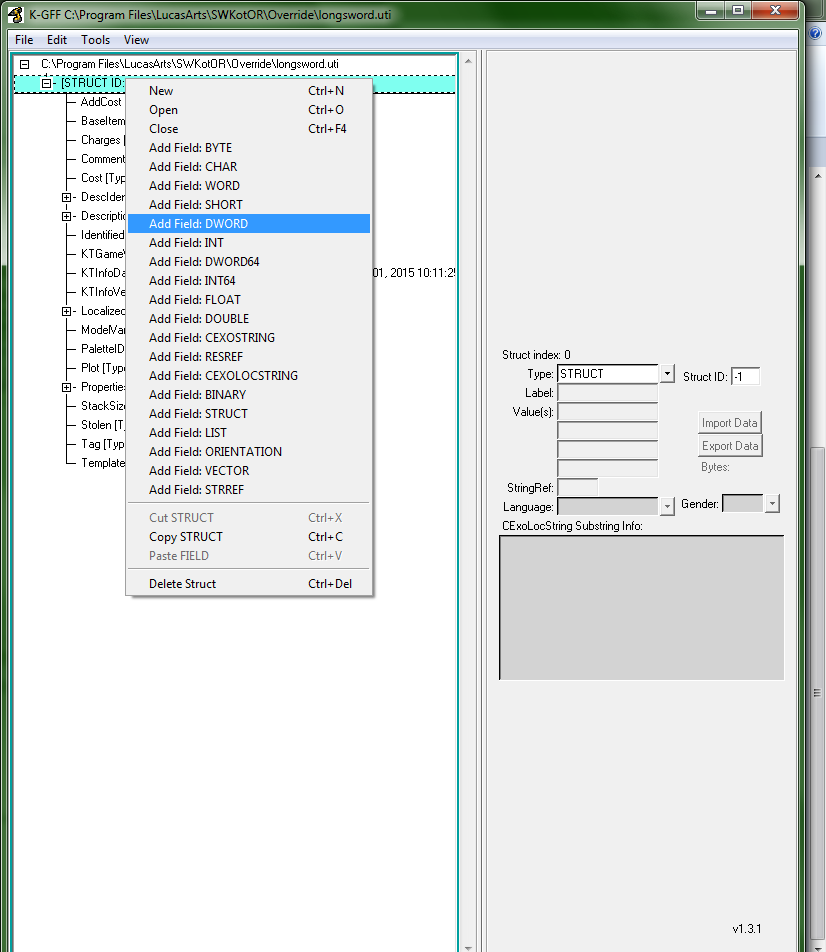
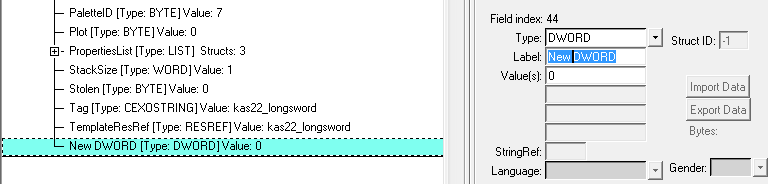
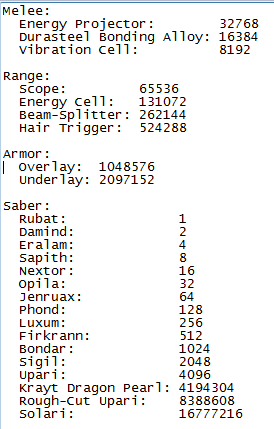
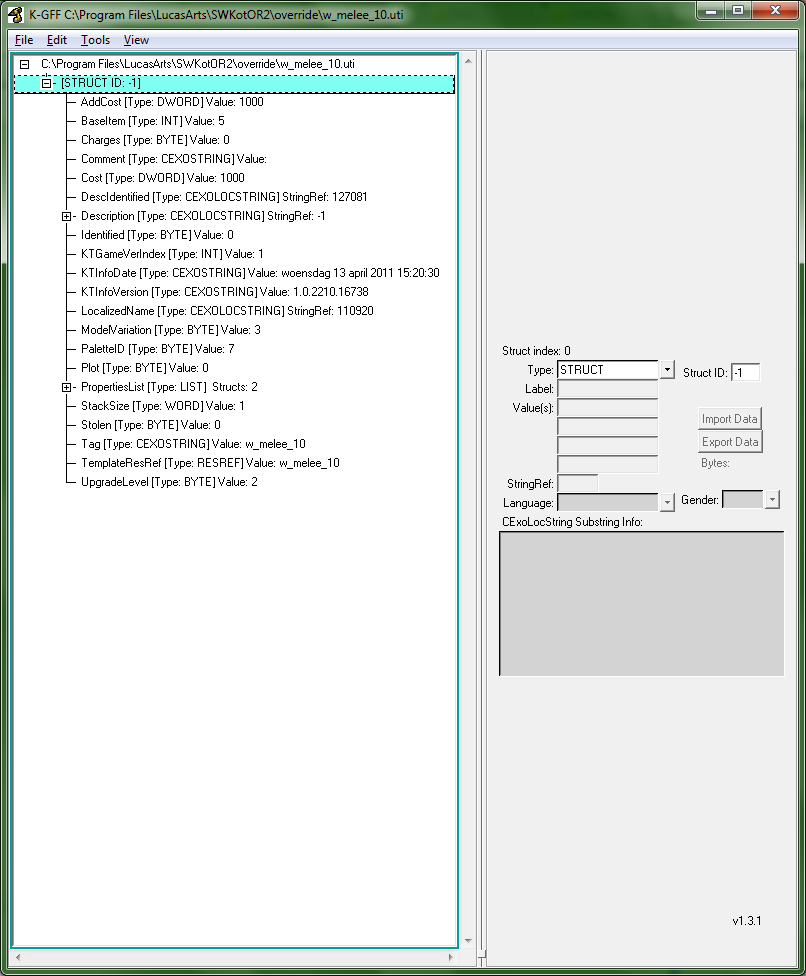
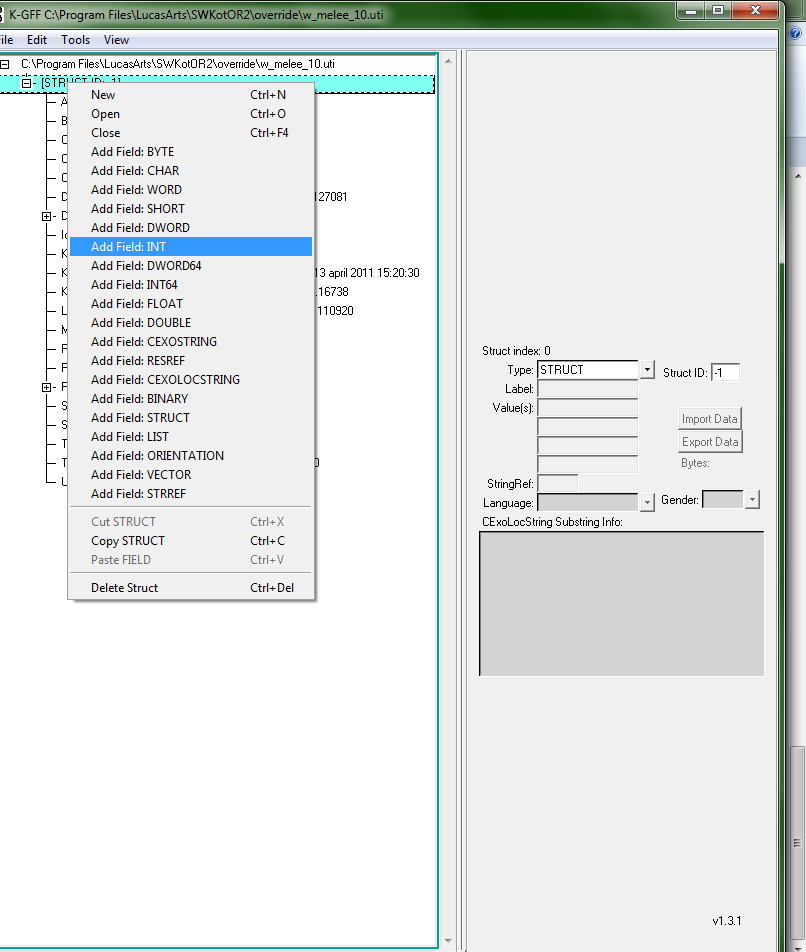
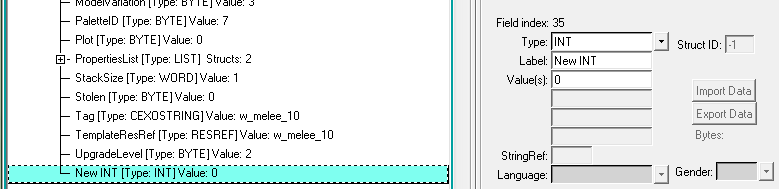
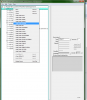
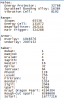
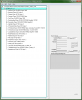
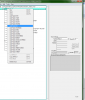
 How to Add Upgrades to Your Items This tutorial is brought to you by LiliArch and Fair Strides (me). Okay, today I have great news you guys! LiliArch and I were talking one night and she put me up to figuring out how the game stored an item's upgrades, and both us of wanted to find out if it was even possible to attach upgrades to an item outside of the game itself. And the answer is yes. When I began investigating for LiliArch, we both had the idea to check a savegame to see what it had, and when I checked the saves for both games, I discovered that, once again, Obsidian had re-done (and I might very much say improved upon) something Bioware did: the upgrade slot storage. I'll be detailing the steps for adding an upgrade to an item for both games, though I must say that KotOR 2 is much friendlier to accommodate the upgrades. KotOR 1: In KotOR 1, the items have an Upgrade field that simply has a number. While this number might appear to be random (such as 8192 for the Vibration Cell in the swords or 65536 for the Scope on the blasters), the upgrades follow a simple formula: 1 x 2 x 2 per each row above and including the upgrade in the upgrade.2da = Your upgrade # What this means is simple: Row 0 = 1, and then keep doubling this number (Row 1 = 2, Row 2 = 4, .etc) until you get to your row; then double the number again and use that. Short: 1. Add DWORD field to main branch. 2. Label "Upgrade". 3. Enter combined numbers of desired upgrades (see the list at the bottom). 4. Click a new field and then save. 5. Done! Long: Here's an example .uti (item) file from KotOR 1. I've opened it in K-GFF and minimized all the branches: Now, you'll need to add the Upgrades field yourself, since none of the game's normal items come with upgrades and KotOR Tool doesn't use this field at all. To do so, right-click on the second thing in the window (the entry that just says "[sTRUCT ID: -1]" And then you'll want to select "Add Field: DWORD" Click on the added field, and then on the right-hand side, you will see some boxes. You will want to select the second box down (labelled "Label:") like so: And replace the "New DWORD" with "Upgrades". At this point, you will just need to enter the value of your upgrade into the Value box below the Label box. After that, you can click on another field in the .uti file and then save the .uti. Done! A list of the default upgrade items' (vanilla, no mods) numbers: KotOR 2: In KotOR 2, Obsidian made 6 fields to handle the upgrades, and each field has an index into the row of upgrade.2da to control what the item is. Much simpler to plug in a row number than a big number, right?! (Actually, this is probably more to do with the big influx of upgrades in K2 and the Upgrades field from K1 being a DWORD [a 4-byte unsigned integer], it could only hold a maximum value of 4294967295. In KotOR 1 Upgrade terms, this means that the upgrade.2da effectively becomes maxed out at 32 or 33 items... and it has 24 in the base game.) Short: 1. Add INT field. 2. Label "UpgradeSlot#", where "#" refers to the next slot you're adding, starting at 0. 3. Enter the index of the row in upgrade.2da for your desired upgrade. 4. Click on a new field and save the uti. 5. Repeat 1-4 as needed for each slot you want. 6. Done! Long: So, you have up to 6 fields to create, though you'll only use 2 for the armors, 3 for the ranged and melee weapons, and the full 6 for the lightsabers. The fields are all INT fields: UpgradeSlot0, UpgradeSlot1, UpgradeSlot2, UpgradeSlot3, UpgradeSlot4, and UpgradeSlot5. UpgradeSlot0 and UpgradeSlot1 are for the Armor Overlay and Armor Underlays in armors. UpgradeSlot0 through Upgrade Slot2 are used from left-to-right in order for the melee and ranged weapons. And for UpgradeSlot0 through UpgradeSlot5 in regards to lightsabers: UpgradeSlot0 = First Crystal slot (upper-left) UpgradeSlot1 = Color Crystal slot (middle-left) *THIS CAN"T BE EDITED, IT'S ALWAYS -1!!! UpgradeSlot2 = Second Crystal slot (lower-left) UpgradeSlot3 = Focusing Lens slot (upper-right) UpgradeSlot4 = Emitter slot (middle-right) UpgradeSlot5 = Energy Cell slot (lower-right) Now I'll run through the process of adding the UpgradeSlot0 field and then you can just add the rest if the item you're upgrading needs those slots. Here's an example .uti (item) file from KotOR 2. I've opened it in K-GFF and minimized all the branches: Now, you'll need to add the UpgradeSlot field yourself, since none of the game's normal items come with upgrades and KotOR Tool doesn't use this field at all. To do so, right-click on the second thing in the window (the entry that just says "[sTRUCT ID: -1]" And then you'll want to select "Add Field: INT" Click on the added field, and then on the right-hand side, you will see some boxes. You will want to select the second box down (labelled "Label:") like so: And replace the "New INT" with "UpgradeSlot0". At this point, you will just need to enter the value of your upgrade into the Value box below the Label box. After that, you can click on another field in the .uti file and then save the .uti. Done!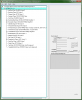




-
Download:Revan's Flowing Cape and Belt Fix
Fair Strides replied to Sithspecter's topic in Mod Releases
You mean you don't want to go into the torture chamber? In all seriousness, tell me the model name and I'll see what I can do. Functionally, the only thing different should be the geometry, so directly carrying it over should work. We might lose some smoothing, but it'll animate, right? -
Download:Revan's Flowing Cape and Belt Fix
Fair Strides replied to Sithspecter's topic in Mod Releases
So... Why doesn't the maskless one work? If it's something simple, I could try to help. -
Well, I recently got an area animation to work in the Ebon Hawk, so I reckon I could do all of the ambient area animations (like speeders whizzing past or ships taking off..)...
-
I'm the moderator who got Shem's mods up here. Due to the edits from Malkior's addon and me making the mod use TSLPatcher, I split the mod (and the Ultimate Sound Mod) into separate versions for both games. If you'll check the top of this, you'll see a thing about "K1R Comp vatible: Yes". You've download the K1 version of both of these mods... As to the crashing thing, if you're using the Steam version with the new update and you're using Workshop mods, the game gets unstable with five or more Workshop mods installed... I hope to get the rest of Shem's mods up soon, but I should be able to get all but the K2 version of this particular mod (SEM) up relatively quickly...
-
Besides other custom audio (like from M4-78EP) skipping as well, I can't think of anything important...
-
Bugs and minor inconveniences with M4-78EP (1.2)
Fair Strides replied to Sith Holocron's topic in M4-78 Enhancement Project
This "not being able to move" issue is one of the original bugs in the base game and we can't patch this bug... The only real "fix" for it is to save and re-load the game, which usually frees up the player... -
Well, the newest version is 3.3.7a, so you might delete KSE from you system and re-download from here on DS. Then you can try that and if it doesn't work, post the KPF Log, KSE.ini, and KSE Log files to here.
-
NEW Gameplay mechanics (via feats)
Fair Strides replied to Jorak Uln's topic in General Kotor/TSL Modding
That's what I suspected, but please check this thread for our discussions: http://deadlystream.com/forum/topic/3637-wrist-launcher/ -
NEW Gameplay mechanics (via feats)
Fair Strides replied to Jorak Uln's topic in General Kotor/TSL Modding
Well, I can think of a way to make it work, but it would depend on whether my interpretation of the game's engine is accurate... But that doesn't mean I'd be doing it. As for finding it in KSE, possibly try checking the "Show hidden feats/powers" box? And new effects are possible, though I'm not sure about animated ones (might have to animate the texture and not the model). -
I mean, you do realize that the GUI was resized on widescreen to be closer in aspect-ratio/size to a conventional fullscreen, right? That way you didn't have pieces as tiny as your pinky nail when on 1920x1080...
-
Good, because I was going to freak out and tear the whole quest apart...
-
NOSTALGIA!!! http://imgur.com/sxqT0Tq
-
Specific Questions about the Latest KotOR II Update
Fair Strides replied to milestails's topic in General Kotor/TSL Modding
Great, Logan and Trex need to re-do their GUIs for a Steam release... -
http://deadlystream.com/forum/topic/3684-a-huge-apology-about-kse/
-
The landing and take-off movies will be among the last things done. And the hologram should be doable then as well.
-
These follow under the "polishing" section, and as it is, those particular things I can implement rather quickly with the game's loot system already filling the containers.
-
From what we've discussed, there will most likely be no demo, but we think we have several beta-testers in mind for when we get to that point (which is a very long ways away... ).
-
So... You opened a thread for an issue, said "Hey, someone fix this"... and you already had it fixed before you even opened the thread?
-
Specific Questions about the Latest KotOR II Update
Fair Strides replied to milestails's topic in General Kotor/TSL Modding
In addition, a lot of the textures (I use Sagethumbs to see their thumbnails) are for the controller buttons and menus. -
Any discussion on that Workshop Bug that makes the game unstable after you use a certain number of mods from the Workshop?
-
You can re-download KSE, extract everything from the 7z archive, and try running KSE again. This should give you a KPF.exe in the folder where KSE now is, and it should generate a KSE.ini file with the following format: [installed] K1_Installed=1 K2_Installed=1 TJM_Installed=0 [Paths] Steam_Path= K1_Path=C:\Program Files\LucasArts\SWKotOR K2_Path=C:\Program Files\LucasArts\SWKotOR2 - SG K2_SavePath=C:\Program Files\LucasArts\SWKotOR2 - SG\saves K2_SavePathCloud= TJM_Path=undef [Options] Use_K2_Cloud=0
-
One thing I will mention as far as the Aurora Lights before anyone goes rushing off to add them all over the area... I recall Quanon saying that the game only uses something like the three lights closest to the player at any one time, so that's something to bear in mind. It might also go a ways towards explaining why the game devs used so many different models when they made their areas (Seriously! Did you guys count them? Must be 30 models minimum per area...) Also, SS, I believe the minimap thing is a prime candidate for this thread: New Area Knowledge Thread - General Kotor/TSL Modding - Deadly Stream
-
I can send you the 1.1 patch, since I know that S9 wouldn't begrudge me doing so. bossr_patch_1.1.rar