-
Posts
6,550 -
Joined
-
Last visited
-
Days Won
451
Content Type
Profiles
Forums
Blogs
Forum & Tracker Requests
Downloads
Gallery
Store
Events
Everything posted by Sith Holocron
-
Congratulations, DarthParametric! Xuul contributed a review for the video and he handles almost all of the visuals so he's being modest. And the audio and music balancing, I almost forgot to mention that!
-
Howdy folks! As the release of the next chapter of DarthStoney's version of M4-78 is now released, I have to start planning for the next chapter - and that chapter is on the M4-78 Enhancement Project. As with my previous chapters, I have to acquire questions from you out there. This tends to give you all a chance to get feedback and straight answers from the mod makers and I usually place it right before or after Xuul's encapsulated review. Near the bottom are the questions I have received so far and that Zbyl2 is sending me the text and audio response to tomorrow. Please don't skip ahead yet. Here's the thing though . . . I haven't written any of the EP chapter yet. Sometimes the questions I received from all of you helps drive how I approach the material. The EP has had several versions (spread across different sites) and isn't even available here at the moment. That causes interesting challenges but not any that can't be overcome. If you haven't played M4-78 Enhancement Project yet and/or you want to take some notes for questions, here's where to get it . . . If you wish to play the last non-Steam version of M4-78 EP, you can pick it up at this MODDB link. If you have Steam, you might wish to try out the 1.3 version which is only available in the Steam Workshop. I will send these questions directly to Zbyl2 and Hassat Hunter. Hopefully, Zbyl2 and Hassat Hunter will share their answers/audio with each other as well - as that will likely increase the quality of the answers. Plus - honestly - I'd like to hear both of them responding in this. By the way, if you have questions for me regarding any aspect of M4-78 EP, you can include those as well. If you're still reading this, you'll probably want to know what questions have already been asked . Here's what Zbyl2 has already answered and will be sending me his repsonses tomorrow mornong. (One of the questions apparently will need a follow up from the original questioner for clarification purposes.) The Questions (So Far) The questions go up in intensity as they go on. 1) In M4-78 EP, who are hinted to be the real colonists? (I am well aware of the thread discussing this but perhaps your video could explain the behind the scenes of how and why the L'xing and whatever from HK-47's backstory became a part of the mod? 2) If Kaah never had VO in the original TSL files? Why did you decide to waste time by giving him VO when he could have had a Twi'lek VO instead? 3) Why does Vash refer to M4-78's chamber as a "tomb"? (Show a clip of Vash saying "Thank you for saving me from this tomb?") 4) What were the motivations of M4-78 and ES-05 and what where the consequences of having her mind erased by M4-78 and M4-78 being reprogrammed by Kaah? I never really understood that 5) Could you give us more detail on the cut Sith survivor Saruv and the Selkath cameo and other early M4-78 ideas that never made it in? 6) Why did you guys decide to make a custom skybox instead of using the original one? (Shows an image of the original M4-78 skybox) 7) Did you guys notice the lag problem when you first were developing M4-78 and what was your reaction to it? 8) What do you guys think went really well and really bad in the final versions of M4-78? 9) On the new terminals in the industrial zone near IS-24's chamber, why are there English letters on them and not the Star Wars Aurebesh? And why do some of them have maps of the M4-78 modules exactly how they appear on the Mini-Map? 10) What happened to M4-78 after the events of TSL? 11) How much significance was placed on making the mod as true to the original intent (or what's known of it) as possible? (M4 isn't and obviously never was going to be a true restoration in the sense of not having custom content to glue what remained in the files together - but even so, surely there was some thought process of "Would the developers have done it this way". Or perhaps that wasn't even a factor so much as just making the mod the best it can be.) 12) M4-78 is often associated intimately with TSLRCM due to both projects sharing core team members. I can't count the number of times when new players have chosen to play with M4-78 automatically because word-of-mouth puts it in the same breath as TSLRCM. Before and now - that is, at the mod's 1.0 release and now with the much-improved 1.3 released - what do you think of this association? Do you think it's justified, or a type of unwarranted association which might provide a mistaken impression on what M4-78 can achieve when compared to how seamless TSLRCM is? Has there ever been any talk of attempting to formally distance M4-78 from TSLRCM, at least in terms of direct comparisons? 13) Who was behind the decision that the player could not leave M4-78 after landing, and why was that decision retained? De facto M4-78 is an optional planet, and to prevent the player from leaving even if they don't like the content or execution is akin to a punishment, in my mind. What was this decision meant to accomplish, or do you feel it was necessitated by the design? (Ed: This is the question that Zbyl2 will need clarification on.) 14) Why was M4-78 released as a 1.0 (and indeed a 1.2) when such a major issue as the industrial zone lag wasn't fixed until 1.3? 15) Was the 1.0 release, to your mind, released before it was ready? If so, do you lay this at the feet of fans who continued pressing for a release, or failures of design or implementation on the part of the development team? 16) Many of the quests in M4-78 are seemingly designed to maximize the amount of modules you need to backtrack into to complete them, or at least to force the player to explore every module if they hadn't already. I think the majority of M4-78's side-quests could be referred to as fetch-quests, barring parts of the main quest. Vanilla KOTOR 2 has these as well, to be sure, but M4-78's quests seem to truly delight in making the player run as far as humanly possible before they can complete them. This may seem like a joking question, but I'm serious when I ask if this was actually taken into account. Even with the improved fast-travel droids, did anyone ever stop and say "this is way too much running around, let's trim this down"? 17) Another question that may seem like a joke but which I'm perfectly serious about: do you find M4-78 fun? For the team, is the project primarily about creating a mod which others will enjoy playing, or about the content which the team could restore, and remaining faithful to what little else is known aside from that? In other words: with this final product, do you actually have fun (and foresee others having fun!) with your creation? Do you have any questions that you would like to add to the list? If you can't think of any questions right now, could you leave comments on any version of M4-78 Enhancement Project? I'm taking the good, bad, and the ugly here. (If you've seen the series so far, you know that Xuul and I don't hold back negative opinions.) Reply today! (PS: I'm the one that just locked the last thread seeking questions. Just so you know.)
-
KOTOR 1 DARTH NIHILUS MOD.
Sith Holocron replied to eaterofsoulsxx's topic in General Kotor/TSL Modding
Read this entire thread before making another post. -
SKIN:[TSL] Swoop Monitors Replacement Pack
Sith Holocron replied to Sith Holocron's topic in Mod Releases
This might give you a better idea of what the screens looks like in motion. This one is the one from Onderon. -
Hey guys, I thought I'd mention some stuff and then present an opportunity to join in. Ndux UR has been rendering most of the music portion of the video. It's a time consuming process so who knows when it will be done. I'm not in a rush. One thing Ndix's current set up doesn't allow for is making a scene with lip syncing. I have a small skit that could go before the video spoken between M4-78 and Kaah. If you have some KOTOR Machinima experience, reply with examples of your work either here or send me a PM and I can provide you with the audio of that skit.
-
Try using this on it and seeing if it might work before giving up. My apologies if I've misunderstood the problem.
- 180 replies
-
- work in progress
- star forge
-
(and 1 more)
Tagged with:
-
Camera not facing where it should
Sith Holocron replied to Kexikus's topic in General Kotor/TSL Modding
Could you tell us which module you're referring to? -
Hello ladies and gents, Xuul has sent me what may be the final draft of the next chapter of the documentary which I'll need to check for sound issues. Unfortunately, I am at work so I haven't had the chance to watch and listen to it yet. But we're rounding the final corner, folks. As soon as it's ready, either Xuul or I will be posting information in our Status Updates to let you know you can go watch it. I am very interested in your reaction to it.
-
-
TOOL:KOTOR Font Tool (NWN Font Maker)
Sith Holocron replied to Darth_Sapiens's topic in Mod Releases
Not knowing what mods you have in your heavily modified build, I still say to give it a shot and see what happens. Worse case scenario is you've only lost a few hours. Check to see if any of the saves might skew closer to your mod build. Also worth considering, make your very own save set the next time you do Peragus. (Make copies of those saves to put in a separate location as well.) -
KOTOR TSL voice trailer
Sith Holocron replied to Basil Bonehead's topic in Knights of the Old Republic General
Just realized this thread was in the wrong section. Moving! -
KOTOR TSL voice trailer
Sith Holocron replied to Basil Bonehead's topic in Knights of the Old Republic General
If you just want the quote, the link here might still work: http://deadlystream.com/forum/topic/5142-tslrcms-take-on-bao-durs-endgame-fate/page-3?do=findComment&comment=38882 (mrmann: If it doesn't, I'll try to find it when I get home tomorrow morning. PM me a reminder.) -
TOOL:KOTOR Font Tool (NWN Font Maker)
Sith Holocron replied to Darth_Sapiens's topic in Mod Releases
Why not just use one the save files collections on this very site and change the character to what you need with KSE instead of redoing Peragus over and over? -
-
Version 1.0
17,557 downloads
AUTHOR: Sith Holocron ORIGINAL RELEASE: 17 APR 2018 GAMES: Star Wars Knights of the Old Republic 2. [This mod will not work in Star Wars Knights of the Old Republic 1.] Description: ------------------ Were you ever dissatisfied with the low-resolution loading screens when the in-game footage looks so much better ? What if there was a mod that took care of that for you? Psssst . . . it’s this mod! This version of the mod covers the areas in the normal “vanilla” game and the areas added/restored by TSLRCM. If you’re looking for additional loading screens that cover large scale add-on mods, you should seek out the “Replacement Loading Screens for KotOR2 Add-On Pack” which is also available on Deadly Stream. The texture size is 2048 by 2048 so you'll have a large sized picture for each. List of the areas covered in this mod Code Area -------- ------------------------------------------------------ 701KOR Korriban - Valley of the Dark Lords 702KOR Korriban - Sith Academy 710KOR Korriban - Shyrack Cave 711KOR Korriban - Secret Tomb 851NIH Ravager - Command Deck 852NIH Ravager - Bridge 901MAL Malachor V - Surface 902MAL Malachor V - Depths 903MAL Malachor V - Trayus Academy 904MAL Malachor V - Trayus Core 905MAL Malachor V - Trayus Crescent 906MAL Malachor V - Trayus Proving Grounds 907MAL Malachor V - Kreia/Sion Cutscene Installation: ----------------- Drop the TGA files and loadscreen.2da into your Override folder. Uninstall: -------------- If for any reason, you don’t like one (or more) of the loading screens, consult the list above so you can determine which you’ll need to remove from your Override folder. To completely remove the loading screens, delete all the above listed TGA files and the loadscreen.2da. Legal Disclaimer: ------------------------- All materials and copyrights belong to LucasArts, Bioware and Obsidian Entertainment Inc. I own none of the materials, and I'm not making any money out of this mod. It is to be distributed as-is without alteration, unless by permission of me. This mod is not to be distributed for profit, either. I hereby state that I specifically do NOT wish this mod to be uploaded to Steam Workshop. I may release this on NexusMods at a later date but I don't wish others to do so. Usage in other mods must be requested and approved by me before your use. Special Thanks: ----------------------- Ndix UR for his wonderful Loading Screen Template which enabled me to offer these loading screens in a format resembling the original loading screens for you all. Thanks to DarthParametric, JCarter426, NDreW-25, and Marius Fett for their input and technical expertise. And thanks to YOU for giving this large 3-parted mod a look-see! Won’t you leave feedback on the download page? (I would like to see what I’ve done right , you see…) Note: Compatible with VarsityPuppet's TOR Style Loading Screens 1.0 Video Preview: ---------------------- If you'd like a preview of all of the loading screens, check out this video below. It does show the screens without the filter and the black bars but it give you an idea what you'll be working with before you download. I recommend watching the video maximized. This video shows all screens in part 1, part 2, and part 3 of this mod (excepting 235TEL.) -
View File Replacement Loading Screens for KotOR2: Original Pack (with or without TSLRCM) - Part 3 AUTHOR: Sith Holocron ORIGINAL RELEASE: 17 APR 2018 GAMES: Star Wars Knights of the Old Republic 2. [This mod will not work in Star Wars Knights of the Old Republic 1.] Description: ------------------ Were you ever dissatisfied with the low-resolution loading screens when the in-game footage looks so much better ? What if there was a mod that took care of that for you? Psssst . . . it’s this mod! This version of the mod covers the areas in the normal “vanilla” game and the areas added/restored by TSLRCM. If you’re looking for additional loading screens that cover large scale add-on mods, you should seek out the “Replacement Loading Screens for KotOR2 Add-On Pack” which is also available on Deadly Stream. The texture size is 2048 by 2048 so you'll have a large sized picture for each. List of the areas covered in this mod Code Area -------- ------------------------------------------------------ 701KOR Korriban - Valley of the Dark Lords 702KOR Korriban - Sith Academy 710KOR Korriban - Shyrack Cave 711KOR Korriban - Secret Tomb 851NIH Ravager - Command Deck 852NIH Ravager - Bridge 901MAL Malachor V - Surface 902MAL Malachor V - Depths 903MAL Malachor V - Trayus Academy 904MAL Malachor V - Trayus Core 905MAL Malachor V - Trayus Crescent 906MAL Malachor V - Trayus Proving Grounds 907MAL Malachor V - Kreia/Sion Cutscene Installation: ----------------- Drop the TGA files and loadscreen.2da into your Override folder. Uninstall: -------------- If for any reason, you don’t like one (or more) of the loading screens, consult the list above so you can determine which you’ll need to remove from your Override folder. To completely remove the loading screens, delete all the above listed TGA files and the loadscreen.2da. Legal Disclaimer: ------------------------- All materials and copyrights belong to LucasArts, Bioware and Obsidian Entertainment Inc. I own none of the materials, and I'm not making any money out of this mod. It is to be distributed as-is without alteration, unless by permission of me. This mod is not to be distributed for profit, either. I hereby state that I specifically do NOT wish this mod to be uploaded to Steam Workshop. I may release this on NexusMods at a later date but I don't wish others to do so. Usage in other mods must be requested and approved by me before your use. Special Thanks: ----------------------- Ndix UR for his wonderful Loading Screen Template which enabled me to offer these loading screens in a format resembling the original loading screens for you all. Thanks to DarthParametric, JCarter426, NDreW-25, and Marius Fett for their input and technical expertise. And thanks to YOU for giving this large 3-parted mod a look-see! Won’t you leave feedback on the download page? (I would like to see what I’ve done right , you see…) Note: Compatible with VarsityPuppet's TOR Style Loading Screens 1.0 Video Preview: ---------------------- If you'd like a preview of all of the loading screens, check out this video below. It does show the screens without the filter and the black bars but it give you an idea what you'll be working with before you download. I recommend watching the video maximized. This video shows all screens in part 1, part 2, and part 3 of this mod (excepting 235TEL.) Submitter Sith Holocron Submitted 04/17/2018 Category Skins TSLRCM Compatible
-
Version 1.1
19,217 downloads
Replacement Loading Screens for KotOR2: Original Pack (with or without TSLRCM) – Part 2 ============================================================================== AUTHOR: Sith Holocron ORIGINAL RELEASE (version 1.0): 17 APR 2018 UPDATED RELEASE (version 1.1): 02 OCT 2018 GAMES: Star Wars Knights of the Old Republic 2 [This mod will not work in Star Wars Knights of the Old Republic 1] Description: Were you ever dissatisfied with the low-resolution loading screens when the in-game footage looks so much better? What if there was a mod that took care of that for you? Psssst…it’s this mod! This version of the mod covers the areas in the normal “vanilla” game and the areas added/restored by TSLRCM. If you’re looking for additional loading screens that cover large scale add-on mods, you should seek out the “Replacement Loading Screens for KotOR2 Add-On Pack” which is also available on Deadly Stream. The texture size is 2048 by 2048 so you'll have a large sized picture for each. List of the areas covered in this mod Code Area ------ ------------------------------------------------------ 301NAR Nar Shaddaa - Refugee Landing Pad 301NARa Nar Shaddaa - Refugee Landing Pad (Alternate)* 302NAR Nar Shaddaa - Refugee Quad 303NAR Nar Shaddaa - Docks 304NAR Nar Shaddaa - Jekk'Jekk Tarr 305NAR Nar Shaddaa - Jekk'Jekk Tarr Tunnels 306NAR Nar Shaddaa - Entertainment Promenade 351NAR Nar Shaddaa - Goto's Yacht 371NAR Nar Shaddaa - Swoop Track 401DXN Dxun - Jungle Landing 402DXN Dxun - Jungle 403DXN Dxun - Mandalorian Ruins 404DXN Dxun - Mandalorian Cache 410DXN Dxun - Jungle Tomb 411DXN Dxun - Sith Tomb 421DXN Dxun - Turret Minigame 501OND Onderon - Iziz Spaceport 502OND Onderon - Iziz Merchant Quarter 503OND Onderon - Iziz Cantina 504OND Onderon - Sky Ramp 505OND Onderon - Turret Minigame 506OND Onderon - Royal Palace 510OND Onderon - Swoop Track 511OND Onderon - Iziz Merchant Quarter Invasion 512OND Onderon - Iziz Western Square 601DAN Dantooine - Khoonda Plains 602DAN Dantooine - Khoonda 603DAN Dantooine - Khoonda Plains Cutscenes 604DAN Dantooine - Crystal Cave 605DAN Dantooine - Enclave Courtyard 610DAN Dantooine - Enclave Sublevel (updated texture!) 650DAN Dantooine - Rebuilt Jedi Enclave Also included in this latest update are two optional textures to increase the resolution of the columns in the Dantooine Enclave Sublevel. Installation: ------------- Drop the TGA files and loadscreen.2da into your Override folder. * The loading screen “load_301NARa.tga” is an alternate version of “load_301NAR.tga”. If you wish to use the alternate version, delete the “a” from the alternate and put that texture into the Override rather than the original texture. Uninstall: ---------- If for any reason, you don’t like one (or more) of the loading screens, consult the list above so you can determine which you’ll need to remove from your Override folder. To completely remove the loading screens, delete all the above listed TGA files and the loadscreen.2da. Legal Disclaimer: ------------------- All materials and copyrights belong to LucasArts, Bioware and Obsidian Entertainment Inc. I own none of the materials, and I'm not making any money out of this mod. It is to be distributed as-is without alteration, unless by permission of me. This mod is not to be distributed for profit, either. I hereby state that I specifically do NOT wish this mod to be uploaded to Steam Workshop. I may release this on NexusMods at a later date but I don't wish others to do so. Usage in other mods must be requested and approved by me before your use. Special Thanks: ------------------- Ndix UR for his wonderful Loading Screen Template which enabled me to offer these loading screens in a format resembling the original loading screens for you all. Thanks to DarthParametric, JCarter426, NDreW-25, and Marius Fett for their input and technical expertise. And thanks to YOU for giving this monstrosity a whirl! Won’t you leave feedback on the download page? (I would like to see what I’ve done right, you see…) Note: Compatible with VarsityPuppet's TOR Style Loading Screens 1.0 -
View File Replacement Loading Screens for KotOR2: Original Pack (with or without TSLRCM) - Part 2 Replacement Loading Screens for KotOR2: Original Pack (with or without TSLRCM) – Part 2 ============================================================================== AUTHOR: Sith Holocron ORIGINAL RELEASE (version 1.0): 17 APR 2018 UPDATED RELEASE (version 1.1): 02 OCT 2018 GAMES: Star Wars Knights of the Old Republic 2 [This mod will not work in Star Wars Knights of the Old Republic 1] Description: Were you ever dissatisfied with the low-resolution loading screens when the in-game footage looks so much better? What if there was a mod that took care of that for you? Psssst…it’s this mod! This version of the mod covers the areas in the normal “vanilla” game and the areas added/restored by TSLRCM. If you’re looking for additional loading screens that cover large scale add-on mods, you should seek out the “Replacement Loading Screens for KotOR2 Add-On Pack” which is also available on Deadly Stream. The texture size is 2048 by 2048 so you'll have a large sized picture for each. List of the areas covered in this mod Code Area ------ ------------------------------------------------------ 301NAR Nar Shaddaa - Refugee Landing Pad 301NARa Nar Shaddaa - Refugee Landing Pad (Alternate)* 302NAR Nar Shaddaa - Refugee Quad 303NAR Nar Shaddaa - Docks 304NAR Nar Shaddaa - Jekk'Jekk Tarr 305NAR Nar Shaddaa - Jekk'Jekk Tarr Tunnels 306NAR Nar Shaddaa - Entertainment Promenade 351NAR Nar Shaddaa - Goto's Yacht 371NAR Nar Shaddaa - Swoop Track 401DXN Dxun - Jungle Landing 402DXN Dxun - Jungle 403DXN Dxun - Mandalorian Ruins 404DXN Dxun - Mandalorian Cache 410DXN Dxun - Jungle Tomb 411DXN Dxun - Sith Tomb 421DXN Dxun - Turret Minigame 501OND Onderon - Iziz Spaceport 502OND Onderon - Iziz Merchant Quarter 503OND Onderon - Iziz Cantina 504OND Onderon - Sky Ramp 505OND Onderon - Turret Minigame 506OND Onderon - Royal Palace 510OND Onderon - Swoop Track 511OND Onderon - Iziz Merchant Quarter Invasion 512OND Onderon - Iziz Western Square 601DAN Dantooine - Khoonda Plains 602DAN Dantooine - Khoonda 603DAN Dantooine - Khoonda Plains Cutscenes 604DAN Dantooine - Crystal Cave 605DAN Dantooine - Enclave Courtyard 610DAN Dantooine - Enclave Sublevel (updated texture!) 650DAN Dantooine - Rebuilt Jedi Enclave Also included in this latest update are two optional textures to increase the resolution of the columns in the Dantooine Enclave Sublevel. Installation: ------------- Drop the TGA files and loadscreen.2da into your Override folder. * The loading screen “load_301NARa.tga” is an alternate version of “load_301NAR.tga”. If you wish to use the alternate version, delete the “a” from the alternate and put that texture into the Override rather than the original texture. Uninstall: ---------- If for any reason, you don’t like one (or more) of the loading screens, consult the list above so you can determine which you’ll need to remove from your Override folder. To completely remove the loading screens, delete all the above listed TGA files and the loadscreen.2da. Legal Disclaimer: ------------------- All materials and copyrights belong to LucasArts, Bioware and Obsidian Entertainment Inc. I own none of the materials, and I'm not making any money out of this mod. It is to be distributed as-is without alteration, unless by permission of me. This mod is not to be distributed for profit, either. I hereby state that I specifically do NOT wish this mod to be uploaded to Steam Workshop. I may release this on NexusMods at a later date but I don't wish others to do so. Usage in other mods must be requested and approved by me before your use. Special Thanks: ------------------- Ndix UR for his wonderful Loading Screen Template which enabled me to offer these loading screens in a format resembling the original loading screens for you all. Thanks to DarthParametric, JCarter426, NDreW-25, and Marius Fett for their input and technical expertise. And thanks to YOU for giving this monstrosity a whirl! Won’t you leave feedback on the download page? (I would like to see what I’ve done right, you see…) Note: Compatible with VarsityPuppet's TOR Style Loading Screens 1.0 Submitter Sith Holocron Submitted 04/18/2018 Category Skins TSLRCM Compatible Yes
-
Version 1.2
19,007 downloads
AUTHOR: Sith Holocron ORIGINAL RELEASE: 17 APR 2018 GAMES: Star Wars Knights of the Old Republic 2. [This mod will not work in Star Wars Knights of the Old Republic 1.] Description: ------------------ Were you ever dissatisfied with the low-resolution loading screens when the in-game footage looks so much better ? What if there was a mod that took care of that for you? Psssst . . . it’s this mod! This version of the mod covers the areas in the normal “vanilla” game and the areas added/restored by TSLRCM. If you’re looking for additional loading screens that cover large scale add-on mods, you should seek out the “Replacement Loading Screens for KotOR2 Add-On Pack” which is also available on Deadly Stream. The texture size is 2048 by 2048 so you'll have a large sized picture for each. "221TEL Citadel Station - Suburban" Is NOT included as a great corrected example is already available in this mod by JCarter426. List of the areas covered in this mod Code Area -------- ------------------------------------------------------ 001EBO Prologue - Ebon Hawk Interior 002EBO Prologue - Ebon Hawk Exterior Hull 003EBO Ebon Hawk - Interior 004EBO Ebon Hawk - Interior - Red Eclipse Slayer Invasion 005EBO Ebon Hawk - Escape from Peragus [2] 006EBO Ebon Hawk - Interior (Duplicate of 003EBO – used before cutscene) 007EBO Ebon Hawk - Interior (Duplicate of 003EBO – used before cutscene) 101PER Peragus - Administration Level 102PER Peragus - Mining Tunnels 103PER Peragus - Fuel Depot 104PER Peragus - Asteroid Exterior 105PER Peragus - Dormitories 106PER Peragus - Hangar Bay 107PER Peragus - Turret Minigame 151HAR Harbinger - Command Deck 152HAR Harbinger - Crew Quarters 153HAR Harbinger - Engine Deck 201TEL Citadel Station - Dock Module 202TEL Citadel Station - Entertainment 203TEL Citadel Station - Residential 082 East 204TEL Citadel Station - Residential 082 West 205TEL Citadel Station - Cutscene with the Admiral 207TEL Citadel Station - Cantina 208TEL Citadel Station - Bumani Exchange Corp. 209TEL Citadel Station - Czerka Offices 211TEL Citadel Station - Swoop Track [4] 220TEL Citadel Station - Suburban 222TEL Citadel Station - Entertainment Module 081 231TEL Telos IV - Restoration Zone [5] 232TEL Telos IV - Underground Base 233TEL Telos IV - Czerka Site 235TEL Telos IV – Shuttle Cutscene 261TEL Telos IV - Polar Plateau 262TEL Telos IV - Secret Academy 298TEL Telos IV - Military Base Sub-Level (TSLRCM) 299TEL Telos IV - HK Manufacturing Plant (TSLRCM) Installation: ----------------- Drop the TGA files and loadscreen.2da into your Override folder. The loading screen “load_301NARa.tga” is an alternate version of “load_301NARa.tga”. If you wish to use the alternate version, delete the “a” from the alternate and put that texture into the Override rather than the original texture. Uninstall: ------------- If for any reason, you don’t like one (or more) of the loading screens, consult the list above so you can determine which you’ll need to remove from your Override folder. To completely remove the loading screens, delete all the above listed TGA files and the loadscreen.2da. Legal Disclaimer: ------------------------ All materials and copyrights belong to LucasArts, Bioware and Obsidian Entertainment Inc. I own none of the materials, and I'm not making any money out of this mod. It is to be distributed as-is without alteration, unless by permission of me. This mod is not to be distributed for profit, either. I hereby state that I specifically do NOT wish this mod to be uploaded to Steam Workshop. I may release this on NexusMods at a later date but I don't wish others to do so. Usage in other mods must be requested and approved by me before your use. Special Thanks: ----------------------- Ndix UR for his wonderful Loading Screen Template which enabled me to offer these loading screens in a format resembling the original loading screens for you all. Thanks to DarthParametric, JCarter426, NDreW-25, and Marius Fett for their input and technical expertise. And thanks to YOU for giving this monstrosity a whirl! Won’t you leave feedback on the download page? (I'd like to see what I’ve done right , you see…) Note: Compatible with VarsityPuppet's TOR Style Loading Screens 1.0 Video Preview: ---------------------- If you'd like a preview of all of the loading screens, check out this video below. It does show the screens without the filter and the black bars but it will give you an idea what you'll be working with before you download. I recommend watching the video maximized. This video shows all screens in part 1, part 2, and part 3 of this mod (excepting 235TEL.) -
View File Replacement Loading Screens for KotOR2: Original Pack (with or without TSLRCM) - Part 1 AUTHOR: Sith Holocron ORIGINAL RELEASE: 17 APR 2018 GAMES: Star Wars Knights of the Old Republic 2. [This mod will not work in Star Wars Knights of the Old Republic 1.] Description: ------------------ Were you ever dissatisfied with the low-resolution loading screens when the in-game footage looks so much better ? What if there was a mod that took care of that for you? Psssst . . . it’s this mod! This version of the mod covers the areas in the normal “vanilla” game and the areas added/restored by TSLRCM. If you’re looking for additional loading screens that cover large scale add-on mods, you should seek out the “Replacement Loading Screens for KotOR2 Add-On Pack” which is also available on Deadly Stream. The texture size is 2048 by 2048 so you'll have a large sized picture for each. "221TEL Citadel Station - Suburban" Is NOT included as a great corrected example is already available in this mod by JCarter426. List of the areas covered in this mod Code Area -------- ------------------------------------------------------ 001EBO Prologue - Ebon Hawk Interior 002EBO Prologue - Ebon Hawk Exterior Hull 003EBO Ebon Hawk - Interior 004EBO Ebon Hawk - Interior - Red Eclipse Slayer Invasion 005EBO Ebon Hawk - Escape from Peragus [2] 006EBO Ebon Hawk - Interior (Duplicate of 003EBO – used before cutscene) 007EBO Ebon Hawk - Interior (Duplicate of 003EBO – used before cutscene) 101PER Peragus - Administration Level 102PER Peragus - Mining Tunnels 103PER Peragus - Fuel Depot 104PER Peragus - Asteroid Exterior 105PER Peragus - Dormitories 106PER Peragus - Hangar Bay 107PER Peragus - Turret Minigame 151HAR Harbinger - Command Deck 152HAR Harbinger - Crew Quarters 153HAR Harbinger - Engine Deck 201TEL Citadel Station - Dock Module 202TEL Citadel Station - Entertainment 203TEL Citadel Station - Residential 082 East 204TEL Citadel Station - Residential 082 West 205TEL Citadel Station - Cutscene with the Admiral 207TEL Citadel Station - Cantina 208TEL Citadel Station - Bumani Exchange Corp. 209TEL Citadel Station - Czerka Offices 211TEL Citadel Station - Swoop Track [4] 220TEL Citadel Station - Suburban 222TEL Citadel Station - Entertainment Module 081 231TEL Telos IV - Restoration Zone [5] 232TEL Telos IV - Underground Base 233TEL Telos IV - Czerka Site 235TEL Telos IV – Shuttle Cutscene 261TEL Telos IV - Polar Plateau 262TEL Telos IV - Secret Academy 298TEL Telos IV - Military Base Sub-Level (TSLRCM) 299TEL Telos IV - HK Manufacturing Plant (TSLRCM) Installation: ----------------- Drop the TGA files and loadscreen.2da into your Override folder. The loading screen “load_301NARa.tga” is an alternate version of “load_301NARa.tga”. If you wish to use the alternate version, delete the “a” from the alternate and put that texture into the Override rather than the original texture. Uninstall: ------------- If for any reason, you don’t like one (or more) of the loading screens, consult the list above so you can determine which you’ll need to remove from your Override folder. To completely remove the loading screens, delete all the above listed TGA files and the loadscreen.2da. Legal Disclaimer: ------------------------ All materials and copyrights belong to LucasArts, Bioware and Obsidian Entertainment Inc. I own none of the materials, and I'm not making any money out of this mod. It is to be distributed as-is without alteration, unless by permission of me. This mod is not to be distributed for profit, either. I hereby state that I specifically do NOT wish this mod to be uploaded to Steam Workshop. I may release this on NexusMods at a later date but I don't wish others to do so. Usage in other mods must be requested and approved by me before your use. Special Thanks: ----------------------- Ndix UR for his wonderful Loading Screen Template which enabled me to offer these loading screens in a format resembling the original loading screens for you all. Thanks to DarthParametric, JCarter426, NDreW-25, and Marius Fett for their input and technical expertise. And thanks to YOU for giving this monstrosity a whirl! Won’t you leave feedback on the download page? (I'd like to see what I’ve done right , you see…) Note: Compatible with VarsityPuppet's TOR Style Loading Screens 1.0 Video Preview: ---------------------- If you'd like a preview of all of the loading screens, check out this video below. It does show the screens without the filter and the black bars but it will give you an idea what you'll be working with before you download. I recommend watching the video maximized. This video shows all screens in part 1, part 2, and part 3 of this mod (excepting 235TEL.) Submitter Sith Holocron Submitted 04/18/2018 Category Skins TSLRCM Compatible Yes
-
Version 1.4
1,274 downloads
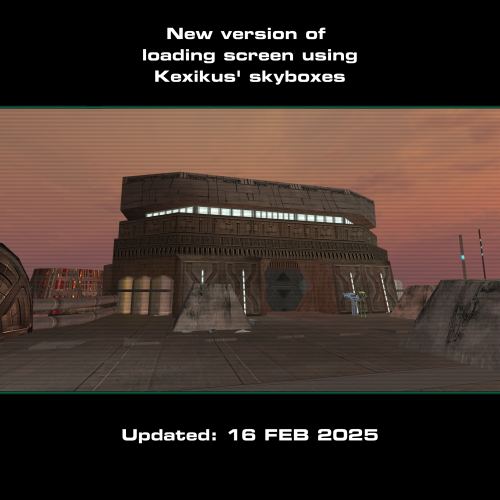
AUTHOR: Sith Holocron ORIGINAL RELEASE: 17 APR 2018 UPDATED RELEASE: 23 MAR 2019 UPDATED RELEASE: 27 AUG 2019 CURRENT UPDATED RELEASE: 16 FEB 2025 GAMES: Star Wars Knights of the Old Republic 2 [This mod will not work in Star Wars Knights of the Old Republic 1] Description: Were you ever dissatisfied with the low-resolution loading screens when the in-game footage looks so much better? What if there was a mod that helped take care of that for you? Psssst…it’s this mod! This version of the mod covers the loading screens for the following mods: Azgath N'Dul's Tomb, Coruscant Jedi Temple, Curse of the Sith, Korriban Expansion, and the M4-78 Enhancement Project. If you’re looking for the loading screens that cover the areas in the normal “vanilla” game and the areas added by TSLRCM, seek out the “Replacement Loading Screens for KotOR2: Original Pack” which is also available on Deadly Stream. The texture size is 2048 by 2048 so you'll have a large sized picture for each. This mod now contains alternate skyboxes for those that use Kexikus’ skyboxes for M4-78 EP. List of the areas covered in this mod. Code Area ------------ ------------------------------------------------------ Curse of the Sith 100CDN Curse of the Sith Azgath N'Dul's Tomb 712KOR Korriban - Azgath N'Dul's Tomb 713KOR Korriban - Tomb Antechamber M4-78 Enhancement Project 703KOR Korriban cutscene #1 for M4-78 version 1.5 705KOR Korriban cutscene #2 for M4-78 version 1.5 801DRO M4-78 - Landing Pad 802DRO M4-78 - Central Zone 803DRO M4-78 - Environmental Zone 804DRO M4-78 - Industrial Zone 805DRO M4-78 - M4-78 Archon Chamber 806DRO M4-78 - Archon I Chamber (ES-05) 807DRO M4-78 - Archon II Chamber (IS-24) 808DRO M4-78 – Central Zone (irradiated) 809DRO M4-78 - Industrial Zone (irradiated) 810DRO M4-78 - Industrial Zone - Design & Testing 811DRO M4-78 - Industrial Zone - Research & Development Coruscant Jedi Temple 952COR Coruscant - Jedi Temple 953COR Coruscant - Jedi Temple Council Chambers 954COR Coruscant - Jedi Temple Landing Pad Korriban Expansion 740KOR Valley Floor 741KOR Poxus Awakens Herrco [Cutscene] 743KOR Tomb of Darth Doom III 745KOR Poxus' Academy 746KOR Poxus' Sanctuary 747KOR Shuttle Area 748KOR Sith Ruins 749KOR Thulsa Gaul’s Outer Sanctum 750KOR Thulsa Gaul’s Inner Sanctum 910DAG Tomb of Ezer Arden Installation: Drop the TGA files and loadscreen.2da into your Override folder. As M4-78 Enhancement Project includes its own TGA files, you’ll have to allow my TGAs to overwrite the TGAs already there in the Override folder. If you wish to use the alternate loading screens that feature Kexikus’ skyboxes, grab the TGA files from the “Alternate loading screens for Kexikus' M4-78 skyboxes” folder. As before, allow the new TGAs to override what’s in the Override folder. Uninstall: If for any reason, you don’t like one (or more) of the loading screens, consult the list above so you can determine which TGA file/s you will need to remove from your Override folder. To completely remove the loading screens, delete all the above listed TGA files. Recommendations for Coruscant TGA’s: This section won’t tell you how to install Coruscant Jedi Temple, or how fix compatibility issues with other mods. However, if you use the Jedi Temple Expansion (3.0) mod by HK-42, please install his mod first - before you put the relevant Coruscant TGAs from my mod in the Override. Allow the following files to overwrite the pre-existing ones: load_952cor.tga, load_953cor.tga, and load_954cor.tga. Legal Disclaimer: All materials and copyrights belong to LucasArts, Bioware and Obsidian Entertainment Inc. I own none of the materials, and I'm not making any money out of this mod. It is to be distributed as-is without alteration, unless by permission of me. This mod is not to be distributed for profit, either. I hereby state that I specifically do NOT wish this mod to be uploaded to Steam Workshop. I may release this on NexusMods at a later date but I don't wish others to do so. Usage in other mods must be requested AND approved by me before your use. Messages that request permission without providing information on how your alternate version would be different than mine should be considered an instant denial of permission. @ndix UR and/or @newbiemodder have permission to include the Korriban Expansion loading screens in their mod if they wish – and if it is ever updated. . Attribution is requested. Special Thanks: ----------------------- @ndix UR for his wonderful Loading Screen Template which enabled me to offer these loading screens in a format resembling the original loading screens for you all. Thanks to @DarthParametric, @JCarter426, @N-DReW25, and @Marius Fett for their input and technical expertise. If you want to have your War Droid utilize the textures from Sithspecter's High Quality blasters, be sure to use the fix for the model created by @DarthParametric which you can find here. Thanks to @timurD2003 for testing the 23MAR2019 update to this mod. And thanks to YOU for giving this mod a chance! Won’t you leave feedback on the download page? (I'd like to see what I’ve done right, you see. That's not too needy, right?) Video Preview: ---------------------- If you'd like a preview of all of the loading screens, check out this video below. It does show the screens without the filter and the black bars but it give you an idea what you'll be working with before you download. I recommend watching the video maximized.