Leaderboard



Popular Content
Showing content with the highest reputation on 07/15/2025 in all areas
-
Dalmatian Droid2 points
-
.thumb.png.f103015a7735d6a47c61c2a78a21b0ef.png)
Version 1.2.0
874 downloads
A Mod for Star Wars Knights of The Old Republic Author: N-DReW25 1.2.0 Release Date: 05.07.2026 Installation: Please install the K1 Community Patch FIRST before this mod! Simply click on the HoloPatcher.exe, and you'll be given 4 installation options. Each option will install appearances from a specific category, please consult the "Description" section of the readme for more info on what each category adds. Select the option you'd like, click install, and sit back and watch the TSLPatcher do its magic. Repeat the process for any other appearances that you'd like to install! Description: Kotor II has a few popular heads which were cut from the final game, they include: Saedhe's unique head, Hussef's unique head, and the "Jedi Master 4" head which was used for Kaevee. Whilst these heads were restored in TSLRCM, no such restoration of unused heads existed for K1... until now! This mod restores unique heads and appearances which were cut from the final game, however, due to the nature of many popular Kotor mods these appearances have been divided into four installations. 1) Restored NPC Heads: This install adds unique heads for the Czerka Protocol Officer, Tanis Venn, the Infected Outcasts, and several Dark Jedi throughout the game. 2) Restored Sith Officer Uniforms: This install takes the seldomly used Sith Officer uniform variants used by Uthar and Yuthura and gives them to Sith Officers throughout the game. 3) Restored Jedi Appearances: This install restores the Jedi Council Member appearance and restores certain unsured Player Head Jedi throughout the game. 4) Restored NPC Variants: Restored every single possible configuration of NPC using a generic head and a Republic, Sith Officer, and Czerka Officer outfit throughout the game. Please refer to the screenshots on this mod's Deadlystream download page for a visual reference. Known Bugs: This mod shouldn't have bugs but if there is Just PM me on Deadlystream. Incompatibilities: Please report any incompatibilities! 1) Restored NPC Heads: Is incompatible with any mod which adds "N_SithAppren01_H.tga" or "N_SithAppren01_H.tpc". 2) Restored Sith Officer Uniforms: Is incompatible with Heyorange's Sith Uniform Reformation. 3) Restored Jedi Appearances: Is incompatible with Diversified Jedi Captives on the Star Forge and Jedi Diversity on the Star Forge. 4) Restored NPC Variants: Is incompatible with Czerka Redux, most likely incompatible with Heyorange's Sith Uniform Reformation, and may not be needed with the NPC Diversity Pack mod as that mod already covers many of the NPCs affected by this install. Permissions: Do NOT claim credit for this mod and do not use assets from this mod without my permission. Thanks to: SpaceAlex: For modifying the "N_SithAppren01_H" texture in his K1 Enhancement Pack mod, this texture was used as a basis for my own fixed texture! Jacqylfrost: For porting the infamous female dirty commoner head texture from the Nintendo Switch, without his work this component wouldn't have been possible! Bioware: For such an amazing game! Aspyr: For including the female dirty commoner head texture on the Nintendo Switch! Fred Tetra: For Kotor Tool! Stoffee: For TSLPatcher! Everyone who downloads the mod! Legal: THIS MODIFICATION IS NOT SUPPORTED BY BIOWARE/OBSIDIAN ENTERTAINMENT, LUCASARTS, DISNEY OR ANY LICENSERS/SPONSORS OF THE MENTIONED COMPANIES. USE OF THIS FILE IS AT YOUR OWN RISK AND THE ABOVE-MENTIONED COMPANIES OR THE AUTHOR IS NOT RESPONSIBLE FOR ANY DAMAGE CAUSED TO YOUR COMPUTER FOR THE USAGE OF THIS FILE.1 point -

Version v0.7.1
1,005 downloads
Translate an entire mod or KOTOR install to 80 languages using Google Translate! This is a very powerful tool that can modify TLK strings and CExoLocStrings in GFFs in bulk quickly. Simply follow the prompts, point it to the GFF/TLK/Kotor directory/whatever and have it automatically translated to the language of your choice! This tool can also create those bitmap 'font packs' that users have been using to play the game in non-released languages (Many thanks to Drazgar and DarthParametric for providing the insight into the TXI files). This means the in game text will show the correct characters when playing the game. How to use: Simply run the executable. It'll ask you many things. There are 3 actions you can do with this: Set all dialog unskippable sets all dialog found in dlgs, at the chosen path, to unskippable. Includes every node. Not recommended lol Translate Will translate All CExoLocStrings (localized strings) and TLK entries at the path to the language(s) of your choice Create Fonts Will create fonts of the chosen languages to your current directory in a folder named after the language. Just drag and drop these files to your Override folder once it completes. If you point PATH1 to a KOTOR install, it will ONLY patch the Override folder, the Modules folder, the rims folder (if exists), and the dialog.tlk file. This was a design choice to improve how long the patcher takes to finish. This includes any subfolders within the aforementioned folder names. The patched files will be in the same directory as the original files with the appended language suffixed to the end of the file. For example, 'dialog_de.tlk'. You will need to rename them as their original filenames to activate them. Supported filetypes/formats: TalkTable files (TLK) Any GFF file (DLG, UTC, etc) TGA/TXI (non-translateable obviously) Any capsule (ERF, MOD, etc) DBCS languages such as Japanese/Korean/Chinese are not currently supported. This program is in beta. Please report any bugs you encounter. Source code: https://github.com/NickHugi/PyKotor/tree/master/Tools/BatchPatcher Credit: @Cortisol for creating the PyKotor library @DarthParametric for extensive testing and feature recommendations. @Drazgar for providing a ton of knowledge in regard to the TXI/TGA font packs The project would not be possible without these awesome modders. K1-translated dialog files:1 point -
Version 1.0.0
467 downloads
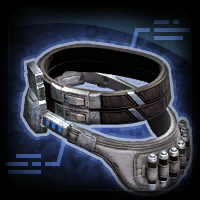
The mod replaces the Belt icons. Thanks to DarthParametric for publishing the icons. Credit Bioware/Broadsword/EA as the original source. To Install 1. Download: Belt.rar 2. Copy all files to the Knights of the Old republic's Override folder. (Example location - C:\Program Files (x86)\Steam\steamapps\common\swkotor\Override) 3. When/if prompted to overwrite files, press okay. 4. If you like the mod; leave a comment or endorse! (It would be much appreciated) Made with love.1 point -
Apparently, 99% of people asking for that kind of thing won't do it themselves. And tbf, I have no idea what language this Taung guy would speak. If its basic (Human), then we'd need a voice actor with a good mic and a low voice. Not very easy to get. Then there's the developing part. Good luck with that too lol It would be great indeed. Unfortunately, as the community is quite restricted nowadays, because of the game's age, you'll likely never find someone who'll do that for you, unless they're a super Taunt fan. That being said, you can always learn how to mod the game and do it yourself !1 point
-
 I guess I could. I released it kinda fast as a modder's ressource. Gonna make something in the following days1 point
 -

Version 1.0.0
328 downloads
This is a dump of various icons from The Old Republic, converted to PNGs for ease of use. The full dump is the 315MB archive which are untouched besides the format conversion, while the smaller 58MB archive is a subset of ones I considered useful/interesting and ran through an upscaler to resize and clean them up a little. I extracted these a while back, so it's not completely up to date with the latest version of the game. Use how you see fit, since they don't belong to me. But credit Bioware/Broadsword/EA as the original source.1 point -

Version 0.1.0
240 downloads
This is a simple Python utility that lets you create new lightsaber textures for KotOR and TSL. Note that (especially in KotOR) creating a new lightsaber colour requires more steps than this - a future project will make this a one-click process for users, but for now I'm releasing this as a standalone tool for mod developers. Installation You should have Python 3 installed. There are no other dependencies. Just download and unzip the zip archive from this page, and you should be good to go! I'll be releasing a Windows .exe version at some point. If you're not comfortable using the Python script, either wait for that or ask me (or one of the many helpful people on DeadlyStream) to make your lightsaber textures for you. Usage Run the script editor.py using Python, with a command like "python editor.py". This will open up the editor. You can choose the glow and core colours for the saber texture, and then save it using one of the bottom two buttons. The texture will then be saved in the current directory. Bugs There might be some bugs, but it's a pretty simple script and it seems to work fine. FAQ The lightsaber looks dark in-game! For a bright lightsaber, you should select a colour with both Saturation and Brightness parameters set to 100% (in the second tab in the colour picker). Then you can use the Hue slider to choose a colour. Can I use this for my mod? Sure, feel free to use the textures for your own mods! I'd appreciate it if you credit this tool for helping create the lightsaber textures. Can I redistribute this program in its entirety (with or without attribution)? Please don't redistribute this program elsewhere on the internet. I will keep it here, so you can point people to it. How do I take this texture and put it straight in the game (not as part of a mod)? I'm working (along with others on DeadlyStream) to make an "end-user version" of this tool, as part of a larger modding project. Stay tuned! The lightsaber core looks weird! You should probably leave the "Core" colour to its default value (pure white) to get lightsabers that look like the ones from the base game. But if you want to experiment, the option to change the core colour is there!1 point