
Jump to content

10 Screenshots

About This File

Author:

Kainzorus Prime


Mod Name:

TOR HK Droids Skin Pack


*************************

Under NO circumstances is this, or any of my other mods, to be posted on ANY site other than by myself.

*************************


1. Info

===========

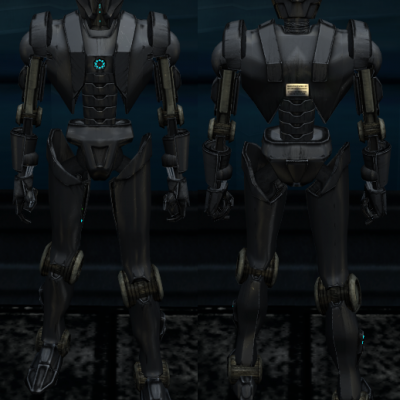
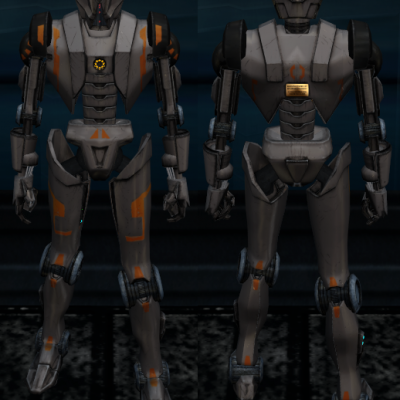
This mod provides several custom versions of HK series droids, available for Darth Parametric's TOR HK Droids mod.


2. Installation:

=========

Copy the files of your choosing into the Override folder, overwriting as necessary.


Darth Parametric's original mod is required for this one to function properly - http://www.nexusmods.com/kotor2/mods/52/?


3. Credits:

===========

Special thanks to:


Darth Parametric - for the original TOR HK Droids mod.


What's New in Version 1.0

Released

  • Initial release.
  • Like 1
  • Thanks 1

User Feedback

Recommended Comments


GNihilus2

Posted

goodness!!! .... 88 mb??

are these heavier than Darth Parametric's original mod i wonder??


looks like a "must-have" alternative ...   ;)

Kainzorus Prime

Posted

88 megs is nothing. I have packed the hexed model files with each skin variant for convenient use, so people wouldn't have to fiddle with things more than necessary.

L0ki194

Posted

Nice work. Definitly using this forever.

  • Like 1
djnugent

Posted

This is AWESOME!!!!


Any chance the HK-47 mdl's and mdx's are compatible w/ KOTOR1?

If not...


Any chance we could get one that is....?

Bas Qui-Xoi

Posted

I tried the mod, followed the instructions to the letter and it's not working. This isn't the only reskin I'm having issues with since the update on steam . I tried this out after doing a complete reinstall of kotor 2 and the 1.8.4 tslrcm but natta. The tsl patcher for the required mod gave no error message and I picked the skins I wanted but when I approached HK-50 on Peragus there was no change in his appearance.

Kainzorus Prime

Posted

I tried the mod, followed the instructions to the letter and it's not working. This isn't the only reskin I'm having issues with since the update on steam . I tried this out after doing a complete reinstall of kotor 2 and the 1.8.4 tslrcm but natta. The tsl patcher for the required mod gave no error message and I picked the skins I wanted but when I approached HK-50 on Peragus there was no change in his appearance.


Loads of people have problems with steam versions of TSL right now. It's on the game's end, not the mod's.

Bas Qui-Xoi

Posted

That's what I thought but threw it out there in case I had overlooked something. Tanks for the reply.

ShaneDix1313

Posted

Why doesn't HK change color when chosen the selected mod/color ? He's not currently built right know but i'm looking at him in the place you first find him!

Kainzorus Prime

Posted

Why doesn't HK change color when chosen the selected mod/color ? He's not currently built right know but i'm looking at him in the place you first find him!


That is odd. Have you copied all the contents from the variant of your choice into the Override, and overriden the files as needed?

ShaneDix1313

Posted

Yes Sir! I also uninstalled the game/ reinstalled game and TSLRC Mod also. (Most recent version.) I also have Darth Parametric's original mod also to run this mod.....

ShaneDix1313

Posted

That is odd. Have you copied all the contents from the variant of your choice into the Override, and overriden the files as needed?

Yes Sir! I also uninstalled the game/ reinstalled game and TSLRC Mod also. (Most recent version.) I also have Darth Parametric's original mod also to run this mod.....

ShaneDix1313

Posted

I got it to work great mod, thanks

How did u get it to work??

Domino5555

Posted

Do I have to get a paid membership just to download the original mod?

Alexlos93

Posted

I can't get the mod to work with Darth Parametric's. I installed his version into the steam workshop directory as it says to do on his page. Then, I copied and pasted the HK-47 Classic and HK-51 black frame skins into the same directory. It asked if I wish to overwrite, which I did. No success though. Any suggestions? Please help!

Kainzorus Prime

Posted

Do I have to get a paid membership just to download the original mod?

No.


I can't get the mod to work with Darth Parametric's. I installed his version into the steam workshop directory as it says to do on his page. Then, I copied and pasted the HK-47 Classic and HK-51 black frame skins into the same directory. It asked if I wish to overwrite, which I did. No success though. Any suggestions? Please help!

Reallly not sure, since I don't use the steam version, so I am unaware of the differences between that one and retail.

Lokran

Posted

These look excellent. My biggest problem would be Choosing which one to use, ;).

   Great work, thanks for the variety.

Guest gmmfcyeahbuddy

Posted

I cant get this to show up in game. No other texture replacers give me issues. I have the original mod from the nexus. Does any one know how I can get this to show up in game?

Guest

Posted

How would I get it then?


You just download it? 

Guest

Posted

My problem with this is the lack of a list for what picture corresponds to what skin. 

Guest puttymon

Posted

Did anyone ever find a solution to get this to work?  I have the mod required for this to work but it wont work.

Mister Terentatek

Posted (edited)

I mean. It's been 7 years from release. And there's still no answer on how to  make this actually work, which is hillarious ) ) renders looks very tempting which is only more sadden thing in this case. lol. (GOG, installled as instructed)

Edit: I've actually managed. If someone interested on how to do the twist - PM me.

Edited by Mister Terentatek

Join the conversation

You can post now and register later. If you have an account, sign in now to post with your account.

Guest
Add a comment...

×   Pasted as rich text.   Paste as plain text instead

  Only 75 emoji are allowed.

×   Your link has been automatically embedded.   Display as a link instead

×   Your previous content has been restored.   Clear editor

×   You cannot paste images directly. Upload or insert images from URL.

×
×
  • Create New...

Important Information

By using this site, you agree to our Guidelines.
