
DarthParametric
-
Posts
4,903 -
Joined
-
Last visited
-
Days Won
556











About DarthParametric

- Birthday 03/12/1976
Recent Profile Visitors


DarthParametric's Achievements






Single Status Update
See all updates by DarthParametric
-
So I created a thing:
https://github.com/DarthParametric/KOTOR_Registry_Install_Path_Editor/releases/latest
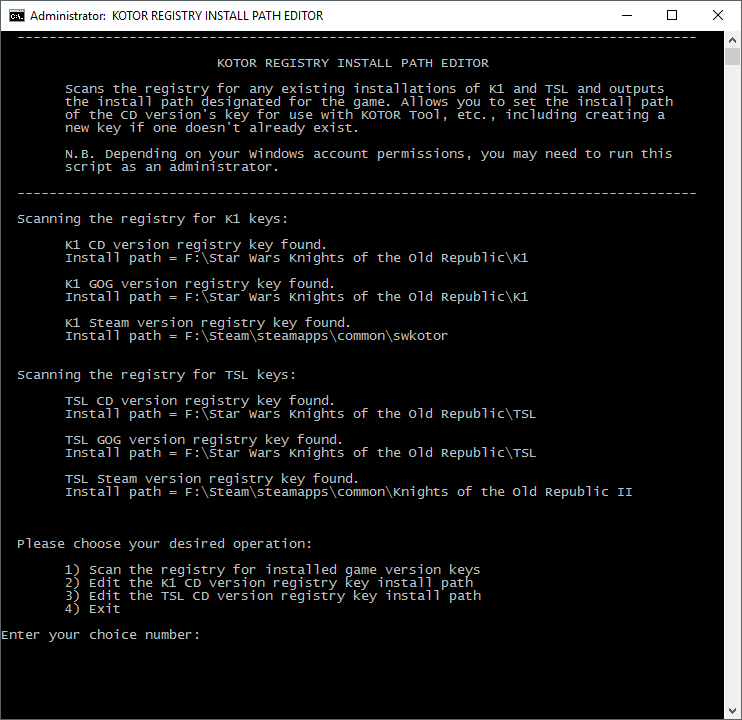
Hopefully it should help with those struggling with install path registry edits. Simply download the CMD file and double-click it to run it. Alternatively, you may need to right-click on it and choose Run As Administrator. The script will scan the registry looking for any install info for the CD, GOG, and Steam versions of both games. If it finds them it will display the listed install path currently stored in the registry. You can choose to edit the CD version's key using the install path of either the GOG or Steam versions (assuming they exist on your system), or create the CD registry key with that info if it doesn't already exist.
If anyone has an alternative version of either game, say from Origin or some other store, I'd be interested in finding out what registry keys those versions use so I can add them to the script.