


J
-
Posts
162 -
Joined
-
Last visited
-
Days Won
28
Content Type
Profiles
Forums
Blogs
Forum & Tracker Requests
Downloads
Gallery
Store
Events
Files posted by J
-
Crash Fix for Disable Vertex Buffer Objects
NOTE: It is generally not recommended to disable Vertex Buffer Objects. This mod was created while testing.
Using Disable Vertex Buffer Objects=1 (yes with the spaces) on the Aspyr version of the game causes crashes in certain modules. This mod disables normal/bumpmaps in all world models that had them enabled. World bumpmaps seem to not even be working in the Aspyr update, so there should be no visual difference. This was the biggest problem on G0T0's Yacht, which had constant crashing.
362 downloads
(0 reviews)0 comments
Updated
-
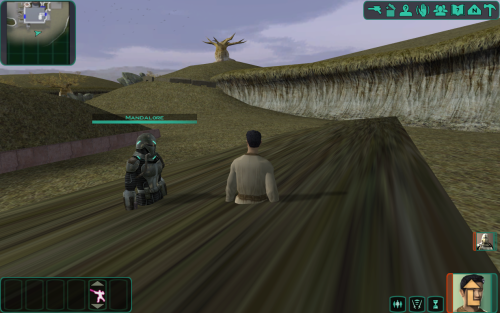
Stretching Model Bug Fixes
NOTE: It is generally not recommended to disable Vertex Buffer Objects. This mod was created while testing.
Fixes a few bugged models that stretch across the sky when Vertex Buffer Objects are disabled in the .ini. This seems to only be a bug in the Aspyr updated version.
Currently Fixed:
- Valley of the Dark Lords
- Khoonda Plains
- Refugee Sector Girl
- Bastila's Head
- Khoonda Plains 2
- Khoonda Secret Room
370 downloads
-
Optimized and Upscaled Textures - TSL
Version 4 released - should be final
Compressed and optimized, 2x Upscaled Vanilla Textures
This is not a 4k/8k super high-res remaster of the textures. Priorities were optimizing vanilla textures first, while also doubling the resolution. This should act as a base texture upgrade. Then I suggest you still use other texture mods and bug fixes on top of this.
Every texture has been doubled in resolution. GUI and icons are also included.
All textures are packed as compressed TPCs and then bundled in two .erf files.
INSTALL: extract the 2 .erf files to your game directory\TexturePacks (NOT IN THE OVERRIDE DIRECTORY)
This will overwrite the existing vanilla texture files so back them up if you wish.
Refined Add-on Textures: extract to override folder
These are textures that originally looked bad or were very low resolution so I reworked them. They still look vanilla+.
- All circular grates had really low quality textures. Instead of upscaling, they have been tiled twice as dense.
- The ebon hawk scaffolding was low quality and looked bad when upscaled. The scaffolding from Nar Shadda was used and color matched.
- Nar Shadda panels were too uniform, shifted part of the texture to make the tile look more random.
Optimization:
- a lot textures were twice the file size they should have been
- the highest quality compression was used on the new texture, it takes a very long time to convert but avoids bad compression artifacts
Upscale:
- HDCube 4 was used to upscale every texture at 2x
- different model weights used depending on the texture
- alpha channels processed separately, then recombined
1,163 downloads
- upscaled
- texture pack
- (and 3 more)
(0 reviews)0 comments
Updated
-
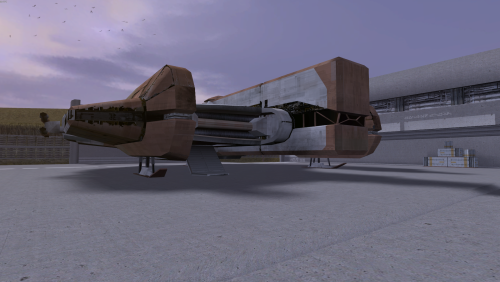
HD Ebon Hawk - TSL
HD damaged Ebon Hawk. The original texture was upscaled then a lot of manual cleanup and detail was added.
I also baked in custom reflections.
This replaces all landing pad ebon hawk textures and the prologue/endgame texture.
The always damaged version is a damaged ebon hawk for the whole game.
Both versions have damaged prologue and end game textures. The clean version has a repaired texture for the rest of the game.
320 downloads
-
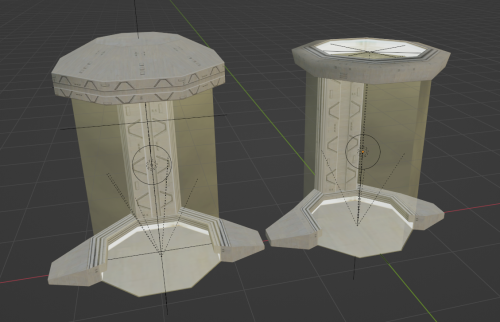
Stutter Fix and Force Cage Update
There's a few reports of people having low framerate when looking in the direction of a force cage. I was able to reproduce this just by running in fullscreen. The fix is simple. Just had to remove "proceduretype water" from the texture. I figured I'd release something more than just a simple fix so here's an updated model with upscaled and tweaked textures. If you don't want the changes then just grab "plc_frcdist01.txi" for the lag fix.
Install:
Extract files to override directory
For the stutter fix only - download the single txi file and place in override directory
5,984 downloads
(1 review)0 comments
Updated
-
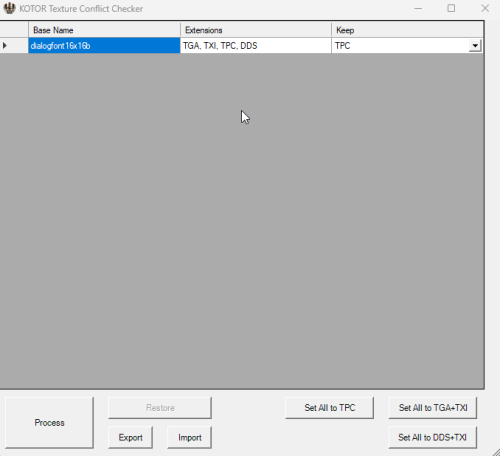
Texture Conflict Checker
By J in Modding Tools
Texture conflict checker for K1 and K2. Place in your game directory and open it. It will list all conflicting textures, in the override folder, and allow you to choose which version to keep. Unwanted textures are moved to a texture_duplicates folder and can be restored through the tool.
Source: https://github.com/J0-o/kotormods/tree/main/Texture Conflict Checker
127 downloads
(1 review)0 comments
Updated
-
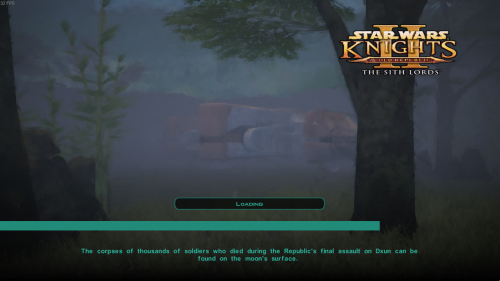
loading screens Fullscreen Art Loading Screens - TSL
Fullscreen replacement loading screens for TSL.
All loading screens are included.
How these were created:
- Captured in-game screenshots with a low FOV
- Reshade effects were used for sudo-raytraced lighting and color correction
- Used GIMP to apply smoothing and anti aliasing
- Applied and blended 3 different "paint" filters, in GIMP
- added dark gradient at bottom of screen to make text more readable
248 downloads
-
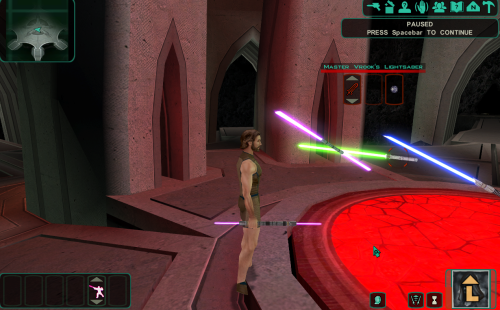
Fallen Jedi Floating Sabers
Modified Krea's floating lightsabers to match those of fallen Jedi. Gave each saber matching feats from Thematic Jedi Masters and altered their walking speeds. Sabers are also immune to stun, fear and paralysis.
3 Versions:
- Original saber owners colors (green, blue,purple)
- 3 purple sabers
- 3 red sabers
(all have the same speed and feat changes)
244 downloads