Leaderboard




Popular Content
Showing content with the highest reputation on 08/23/2026 in all areas
-
![More information about "[TSL] HD Female Twi'leks + NPC Diversity + Playable Female Twi'leks"](https://deadlystream.com/downloads/screens/monthly_2026_08/Untitled-5.thumb.png.7898d1364f6c45f4fde7a5d0b256d967.png)
Version 1.0.1
48 downloads
===================================================== [TSL] HD Female Twi'leks + NPC Diversity + Playable Female Twi'leks ===================================================== Mod for Knights of the Old Republic II - The Sith Lords Author: Lily File Name: HD_Female_Twilek_Diversity_and_PCs.rar Latest Version: 1.0 --- 1. DESCRIPTION: This mod overhauls the female Twi'lek NPCs in KotOR 2 and adds 26 new playable female Twi'lek heads. NPC Overhaul: - Upscaled and updated dancer outfits. - Body skin tones all match head skin tones. - Added specular highlights to body textures. - Added specular highlights with a bump map to the heads, giving female lekku the same light-reactive shine male Twi'leks have. Eyes and lips also get a subtle shine. - NPCs now use different lekku positioning per head, so they no longer all look like pure reskins. - The mercenary droidmaster on Telos Surface and Borna Lys on Nar Shaddaa now each have a unique head texture pulled from the new playable set, plus a backup head, so their default appearance doesn't clone the player. - Includes a patch for Leilukin's "Dahnis Unique Look" mod, giving their textures an HD look. Playable Heads: - 26 playable female Twi'lek models, including every female Twi'lek NPC. - A number of completely new heads. - Dark side transitions. - Every playable head comes with a Handmaiden-style underwear model, a dancer outfit model, and an assassin-style clothing model, all with matching skin tones. --- 2. INSTALLATION: Run Install.exe and select your KotOR 2 game directory. There are 4 installation options. - Default Installation: Includes playable Twi'lek models and replacements for NPC Twi'leks. You probably want this one. - Playable Twi'leks ONLY: Includes only models for the player character, NPC Twi'leks will remain unchanged - NPC replacement ONLY: Replaces models for NPC Twi'leks, does not add any playable characters - Dahnis Patch: Updates the look for Dahnis based on Leilukin's Dahnis Unique Look mod. Install that mod first! If you use the default installation, you DO NOT need to install NPC replacement ONLY or Playable Twi'leks ONLY. The Dahnis patch NEEDS to be installed separately - it is NOT included in any other option. You should be safe to reinstall this mod on top of itself without any problems. A "backup" folder is created by the installer in the same directory. Don't delete it if you plan to uninstall later. --- 3. UNINSTALLATION: Run Install.exe, select your KotOR 2 directory, and use the "Tools > uninstall/restore backup" option to revert all changes made by this mod. --- 4. KNOWN ISSUES: If you decide to install only PCs and then later decide to add the NPCs, you should use the default installation option the second time. Installing PCs ONLY and then NPCs ONLY will prevent the backup head from working properly. If you do this, just run the default installation and it should work. If you have already visited Nar Shaddaa, Borna will not have her updated appearance. You should use a save from before arriving. If you find any bugs or problems, please report them. --- 5. MOD COMPATIBILITY: All files should have unique names. Installing this This mod only touches female Twi'lek head/body models, textures, and appearance-related files - no dialogue, scripting, or module changes. Should be compatible with all other mods, including TSLRCM. If you have any other mods that have changed the female Twi'lek appearances, this mod will obviously stop the old appearances from showing. All files should have unique names, so this should not overwrite other mods, and it would just take Appearance.2da changes (or an uninstallation) to revert. If you use Leilukin's "Dahnis Unique Look" mod, install that mod first, then run this mod's Dahnis Patch. Do not use the Steam Workshop for KotOR. It will almost certainly end with compatibility issues. --- 6. SUPPORT: My mods are free to use. You do not need to pay for them, but if you would like to say thanks, you can buy me a coffee! --- 7. PERMISSIONS: Please let me know if you plan on using any of the files in my mod for your own mod. The answer is "yes you may", but I would like to know what you are doing with it! Do not directly reupload this mod anywhere else. --- 8. THANKS: - Dark Hope - HD Twilek base textures - Leilukin & SpaceAlex - Dahnis Unique Look - Effixian - Red Twi'lek head - DarthParametric - Twi'lek high boots model - redrob41 - Original Twi'lek head/body model fixes - corpsecotillion - Original dark side transition texture - Fred Tetra - KotOR Tool - Cortisol - Holocron Toolset & HoloPatcher - Fair Strides - TSLPatcher - ??? - A couple playable heads are originally from a decade-old modpack with no credits. If you are or know the author, let me know and I can credit the author/remove them. THIS MODIFICATION IS NOT SUPPORTED BY BIOWARE/OBSIDIAN ENTERTAINMENT OR LUCASARTS OR ANY LICENSORS/SPONSORS OF THE MENTIONED COMPANIES. USE THIS FILE AT YOUR OWN RISK.2 points -
Version 1.0
22 downloads
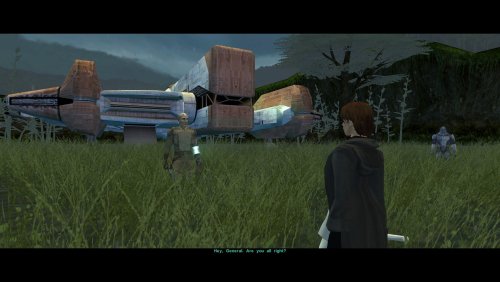
As you know, there's a story segment on Dxun where your party splits up. While you're off to Onderon, the other group goes to explore the jungle. After everything's done, there's a little reunion scene with the party leader of your choosing, just a few lines between the Exile and their companion before Kreia interrupts. Turns out, despite being one of the possible party leaders, Bao-Dur was the only one who didn't have any lines at all. The game simply skipped straight to Kreia rather abruptly. This little fix adds that missing reunion scene with Bao-Dur, provided he's been chosen to lead the party on Dxun, putting him on par with all other companions. Requirements: TSLRCM — for being able to send Bao-Dur at all. Notes: The mod can be installed and uninstalled at any time; the changes are minimal and safe. Since these lines weren't even cut originally (they were just missed), I've reused some of Bao-Dur's existing voice lines that I deemed fit the occasion perfectly. Installation: Copy following file from archive's "Override" folder to yours: reunion.dlg. Credits: Fred Tetra, for KOTOR Tool TK102, for DLGEditor Torlack, stoffe & TK102, for NWNSSCOMP JdNoa & Dashus, for DeNCS Cortisol, for Holocron Toolset2 points -
![More information about "[TSL] Armor Class 4, 5 & 6 Remodel"](https://deadlystream.com/downloads/screens/monthly_2026_08/20260820104814_1.thumb.jpg.91c70495978fda2fbe562710fc25d73a.jpg)
Version 1.0.0
117 downloads
===================================================== [TSL] Armor Class 4, 5 & 6 Remodel ===================================================== Mod for Knights of the Old Republic II - The Sith Lords Author: Lily Latest Version: 1.0 --- 1. DESCRIPTION: This mod replaces the armor body models for classes 4, 5, and 6 in KotOR 2, giving them a more armored look. The original KotOR 1 models were made by Attackperson35. This mod adds the models to KotOR 2, including Bao-Dur variants. Textures are sourced from Dark Hope's and Vurt's armor texture mods with small tweaks. The included textures are from those two mods combined - if you prefer a different look, you can install the models only and drop in textures from whatever. Class 4 (Light Armor): The shoulder pads from the original models have been kept. Shin guards, knee pads, and armguards have been removed - this is light armor, and the extra plating looked out of place on it. Affects: Light Combat Suit, Combat Suit, Mandalorian Combat Suit, Zabrak Combat Suit, Echani Light Armor, Massassi Ceremonial Armor, Mandalorian Heavy Suit, Electromesh Suit, and any other armor sharing the class 4 body. Class 5 (Medium Armor): Includes shoulder pads, wrist guards, and shin guards. Affects: Heavy Combat Suit, Bonadan Alloy Heavy Suit, Zabrak Battle Armor, Ubese Environmental Suit, Echani Shield Suit, Reinforced Fiber Armor, Zabrak Field Armor, Ulic Qel Droma's Mesh Suit, Armored Flight Suit, and any other armor sharing the class 5 body. Class 6 (Medium Armor): Includes shoulder pads, wrist guards, and shin guards. Affects: Khoonda Militia Armor, Military Suit, Echani Battle Armor, Cinnagar War Suit, Sith Battle Suit, Verpine Fiber Mesh, Exar Kun's Light Battle Suit, Heavy Cinnagar War Suit, Verpine Fiber Ultramesh, and any other armor sharing the class 6 body. --- 2. INSTALLATION: Run Install.exe and select your KotOR 2 game directory. Each armor class has two installation options: - Models: Installs new armor body models. - Textures: Installs the included texture selection. You can install models only, textures only, or both. Installing models without textures will use whatever textures you already have installed. Double check that you do not have both an old .tga/.txi file pair AND a new .tpc file for the armor textures If you do, one is going to take priority over the other. You can use Remove Duplicate TGA-TPC to accomplish this quickly. A "backup" folder is created by the installer in the same directory. Don't delete it if you plan to uninstall later. --- 3. UNINSTALLATION: Run Install.exe, select your KotOR 2 directory, and use the "Tools > uninstall/restore backup" option to revert all changes made by this mod. --- 4. KNOWN ISSUES: None. If you find any bugs or problems, please report them. --- 5. MOD COMPATIBILITY: This mod replaces armor body models and their associated textures only. No 2da files, scripts, or dialogue are changed. Should be compatible with all other mods, including TSLRCM. Models replaced: - Class 4: PFBCL, PFBCM, PFBCS, PMBCL, PMBCM, PMBCS, BAODUR_BC - Class 5: PFBDL, PFBDM, PFBDS, PMBDL, PMBDM, PMBDS, BAODUR_BD - Class 6: PFBEL, PFBEM, PFBES, PMBEL, PMBEM, PMBES, BAODUR_BE Any mod that replaces these same files will conflict. Do not use the Steam Workshop for KotOR. It will almost certainly cause compatibility issues. --- 6. SUPPORT: My mods are free to use. You do not need to pay for them, but if you would like to say thanks, you can buy me a coffee! --- 7. PERMISSIONS: Do not directly reupload this mod anywhere else. Ask before using any assets. --- 8. THANKS: - Attackperson35 - Original KOTOR 1 armor models (classes 4, 5, and 6) - Dark Hope - HD armor textures: Class 4 textures Class 5 textures Class 6 textures - Vurt - Vurt's Visual Resurgence armor textures - redrob41 - Original Bao-Dur body model fixes - bead-v - MDLEdit - Cortisol - Holocron Toolset & HoloPatcher - Fair Strides - TSLPatcher THIS MODIFICATION IS NOT SUPPORTED BY BIOWARE/OBSIDIAN ENTERTAINMENT OR LUCASARTS OR ANY LICENSORS/SPONSORS OF THE MENTIONED COMPANIES. USE THIS FILE AT YOUR OWN RISK.2 points -
Thank you!! Hope you enjoy!2 points
-
![More information about "[TSL] HD Rodians"](https://deadlystream.com/downloads/screens/monthly_2026_08/20260821112801_1.thumb.jpg.ce1b722df7b5c30541478f89b6d4b4c9.jpg)
Version 1.0.0
27 downloads
===================================================== [TSL] HD Rodians ===================================================== Mod for Knights of the Old Republic II - The Sith Lords Author: Lily File Name: HD_Rodians_TSL.zip Latest Version: 1.0 --- 1. DESCRIPTION: This mod ports Stormie97's High Quality Aliens: Rodians from KotOR 1 to KotOR 2, with Dark Hope's HD retextures included and tweaked. - Replaces the original low-poly Rodian model with Stormie97's custom high-poly version. - Five HD texture variants for Rodian NPCs. - Adds an environment map for specular sheen. - All four Rodian appearance entries updated in appearance.2da. - Sitting Rodian placeable updated in placeables.2da. --- 2. INSTALLATION: Run Install.exe and select your KotOR 2 game directory. A "backup" folder is created by the installer in the same directory. Don't delete it if you plan to uninstall later. --- 3. UNINSTALLATION: Run Install.exe, select your KotOR 2 directory, and use the "Tools > uninstall/restore backup" option to revert all changes made by this mod. --- 4. KNOWN ISSUES: None. If you find any bugs or problems, please report them. --- 5. MOD COMPATIBILITY: This mod only touches the Rodian model, Rodian textures, and the relevant rows in appearance.2da and placeables.2da - no dialogue, scripting, or other module changes. Should be compatible with all other mods, including TSLRCM. If you have any other mods that change Rodian appearances, this mod will obviously stop the old appearances from showing. All files should have unique names, so this should not overwrite other mods, and it would just take Appearance.2da changes (or an uninstallation) to revert. Do not use the Steam Workshop for KotOR. It will almost certainly end with compatibility issues. --- 6. SUPPORT: My mods are free to use. You do not need to pay for them, but if you would like to say thanks, you can buy me a coffee! --- 7. PERMISSIONS: Do not directly reupload this mod anywhere else. Ask before using any assets. --- 8. THANKS: - Stormie97 - High Quality Aliens: Rodians - Dark Hope - Rodian HD Retexture - bead-v - MDLEdit - Cortisol - Holocron Toolset & HoloPatcher - Fair Strides - TSLPatcher THIS MODIFICATION IS NOT SUPPORTED BY BIOWARE/OBSIDIAN ENTERTAINMENT OR LUCASARTS OR ANY LICENSORS/SPONSORS OF THE MENTIONED COMPANIES. USE THIS FILE AT YOUR OWN RISK.2 points -
Version 1.1.0
94 downloads
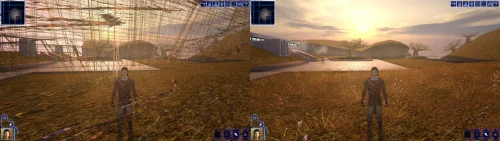
Turn off grass. For years that has been the first answer to almost any KOTOR problem, and it was good advice, because on a modern PC the grass really does tear itself across the sky. This patch fixes that, and quite a lot else. KOTOR decides how to light the world once, when it starts, choosing between two methods built for graphics cards of 2003. On most machines today neither is on offer, so the game quietly falls back to a path that was never finished: no proper lighting on walls and floors, no reflections on metal or armour, no fog, no soft shadows, and none of the screen effects. It still runs. It just looks wrong, and a lot of people have never seen it look right. This rebuilds that lighting using something every modern card does support, and puts the game back on the paths the developers actually finished. The grass is one of them. If you play on an NVIDIA card, the lighting has been working for you all along. Those drivers still carry register combiners, one of the two original methods, and it does the job properly. It is also an extension from 2001 that no other vendor implements, surviving on one company's willingness to keep shipping it. This moves every card onto a method that is still current, so there is one path everyone is exercising rather than one propped up by goodwill. What you get back Grass that stays on the ground Lighting on walls and floors, the baked lighting that makes interiors look lit rather than flat Reflections on metal, armour and polished surfaces Fog, in the places the game meant to have it Soft shadows, and the screen effects: bloom, blur, film grain, the distortion around force powers, and the colour wash on some cutscenes Bump lighting on creatures, which the game only ever drew on an NVIDIA card. The wet highlight in a Hutt's eyes is the easiest place to notice it. Requirements KOTOR 1, version 1.0.3. GOG, Steam and the CD release all work. Install it with the KotOR Patch Manager. Your game files are not modified; the manager applies the patch while the game runs. It replaces the separate cube map fix and soft shadows fix. Both are folded in, so disable those if you have them enabled in the patch manager. Source, releases and issues: https://codeberg.org/Synchro/kotor-modern-driver-compatibility Settings, if you ever need them You do not need any of this to play. The first time you run it, a file called `K1DriverCompat.ini` appears next to `swkotor.exe` with every option listed, explained, and switched off. Open it and delete the `#` in front of anything you want to change. The one worth knowing about is `look`, which chooses between the two ways cards of 2003 drew bright light. `look = nvidia` is the default and the calmer of the two. `look = ati` lets strong lights bleach out what they land on, the way a Radeon did. Neither is a bug, and neither is more correct than the other. Replacement shaders You can drop your own shader files into override/shaders/, you can create it if it isn't there. The patch will use shaders in there instead of the ones it generates, with no rebuilding and no tools. They are plain text in ARB fragment program assembly, which is what the patch compiles its own into. It sits under override so a replacement can ship as an ordinary TSLPatcher mod rather than needing its own packaging, and in a subdirectory because these are not game resources. The game ignores them completely: it only looks in override for the file extensions it knows, and has no idea what an .arb file is. Reading them is this patch's job. For more information on naming, shader inputs, and all of the mode types, take a look at this section of the README: https://codeberg.org/Synchro/kotor-modern-driver-compatibility#replacement-shaders Tested on AMD, Intel and NVIDIA hardware, on Windows and on Linux through Proton, across the GOG, Steam and CD releases. If something looks wrong `logs/K1DriverCompat.log` in your game folder holds one session and is overwritten each run, so there is only ever one file to send. Setting `log = debug` in the ini before reproducing the problem makes it far more useful. Thanks @Lane and @J tested this on cards and I don't own. Nearly everything here is based on how some particular drivers behave, and that is worth nothing until somebody with that hardware runs it and reports back. The faults that turned up that way are ones I had no way of finding on my own. @Lane also wrote the KotOR Patch Manager, which is what this ships for. LLM Disclosure This project made use of an LLM during development, in the following capacities: Brainstorming: exploring possible approaches and design directions Decompilation assistance: help interpreting and structuring reverse-engineered code Code comments: refining and clarifying existing comments Skeletons and fixes: generating initial code scaffolding and minor fixes All LLM-assisted output was modified and reviewed by a human before being committed.1 point -
![More information about "[TSL] Folklore Mandalorians"](https://deadlystream.com/downloads/screens/monthly_2026_08/Untitled-1.thumb.jpg.ed2021d17e7e3ab55cd9630e30cc2ddf.jpg)
Version 1.0.0
40 downloads
===================================================== [TSL] Folklore Mandalorians ===================================================== Mod for Knights of the Old Republic II - The Sith Lords Author: Lily File Name: TSL_Folklore_Mandalorians.zip Latest Version: 1.0 --- 1. DESCRIPTION: This mod is a port of Attackperson35's Folklore Mandalorians mod to KotOR 2. It replaces the Mandalorian NPC models and textures. Features: - Glowing visor with a different color per texture variant. - Edited jetpack model. - Edited helmet. - Remapped textures on the main model. - Remeshed shoulderplates that no longer clip the model. - 7 texture variants. --- 2. INSTALLATION: Run Install.exe and select your KotOR 2 game directory. A "backup" folder is created by the installer in the same directory. Don't delete it if you plan to uninstall later. Double check that you do not have both an old .tga/.txi file pair AND a new .tpc file for the armor textures If you do, one is going to take priority over the other. You can use Remove Duplicate TGA-TPC to accomplish this quickly. --- 3. UNINSTALLATION: Run Install.exe, select your KotOR 2 directory, and use the "Tools > uninstall/restore backup" option to revert all changes made by this mod. --- 4. KNOWN ISSUES: None. If you find any bugs or problems, please report them. --- 5. MOD COMPATIBILITY: This mod only replaces the Mandalorian male and female models (N_Mandalorian.mdl/mdx, N_Mandalorianf.mdl/mdx) and seven texture files (N_Mandalorian01-07.tpc). No 2DA, dialogue, or scripting changes are made. It should be compatible with all other mods, including TSLRCM. Any mod that also modifies Mandalorian model or texture files will conflict with this one. Note: the models in this mod are remapped specifically for the included textures. Other textures applied to these models may not display correctly. Do not use the Steam Workshop for KotOR. It will almost certainly end with compatibility issues. --- 6. SUPPORT: My mods are free to use. You do not need to pay for them, but if you would like to say thanks, you can buy me a coffee! --- 7. PERMISSIONS: Do not directly reupload this mod anywhere else. Ask before using any assets. --- 8. THANKS: - Attackperson35 - Folklore Mandalorians (original KotOR 1 mod) - Vurt - Vurt's Visual Resurgence (textures) - Dark Hope - Textures - DarthDeadMan - Head and jetpack 3D models - Fred Tetra - KotOR Tool - Cortisol - Holocron Toolset & HoloPatcher - Fair Strides - TSLPatcher THIS MODIFICATION IS NOT SUPPORTED BY BIOWARE/OBSIDIAN ENTERTAINMENT OR LUCASARTS OR ANY LICENSORS/SPONSORS OF THE MENTIONED COMPANIES. USE THIS FILE AT YOUR OWN RISK.1 point -
Beautiful, thank you Lily1 point
-
Darkhope and Vurt both use the textures i used, however i used the ones specifically from VURTS resurgence for my mod. I got his permission to use them, including in my other mods on nexus as well.1 point
-
Version 1.0.1
104 downloads
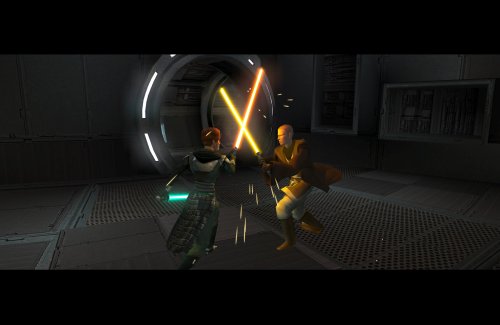
Expands the mechanics of training your Jedi companions in TSLRCM. SUMMARY TSLRCM adds the ability to teach your Jedi party members a select few powers, feats, and forms. It’s a cool concept that adds to the feeling of training your companions, but it was never very fleshed out. As is, there’s a very limited pool of abilities to teach, no real player choice in what to teach, and no depiction of the training aside from a fade to black. This isn’t a fault of the TSLRCM team, there just wasn’t much to restore. The mod aims to expand the whole training mechanic to make it more interesting and immersive. Summary of the main changes of this mod: - You can now choose which abilities to teach your companions. - The pool of teachable powers, feats and forms has been significantly expanded. - Every teachable ability now includes a brief cutscene depicting the training. - Party members can learn 1 power or feat and 1 form at a time and must level up before learning more. - Different prestige classes can teach different abilities. JM/SL can teach a wider selection of powers, JWM/SM can teach more combat feats, and JW/SA can teach a mix of both. - Handmaiden and Disciple can now be trained like other Jedi companions. DETAILS INSTALLATION TSLRCM required. Ensure TSLRCM is installed first before installing this mod. To install, run HoloPatcher.exe. Select the main install option and run. Unaltered copies of any modified files will be placed inside the "backup" folder in the location of HoloPatcher.exe. If you have PartySwap installed, run the included compatibility patch. Ensure both PartySwap and the main mod have been installed first before installing this patch. UNINSTALLATION Remove the following files from override: If any files were created inside the backup folder, move them to override. COMPATIBILITY Incompatible with any mods that hard overwrite the dlg files for Atton, Bao-Dur, Disciple, Handmaiden, Mira, or Visas. Compatible with PartySwap by Darth Tyren & Leilukin using the included compatibility patch. Compatible with Visas Marr and Female Exile Romance by Leilukin. The following mods appear compatible but have not been extensively tested: Handmaiden and Female Exile - Disciple and Male Exile Romance by Leilukin Atton Rand and Male Exile Romance by Leilukin Not compatible with Mira Romance Mod by JediArchivist. Soft conflict with Train the Handmaiden by jc2 as this mod also allows training Handmaiden. BUGS Minor bug where Handmaiden doesn’t restart her idle animation after learning Burst of Speed, for some reason. Talking to her fixes it. No other bugs that I’m aware of. Please report any. PERMISSIONS You are free to use and edit this mod’s dlg files if needed to make a compatibility patch for another mod. However, please ask permission before reuploading or modifying the files for any other reason. Do not reupload any files from the PartySwap patch without permission from the author. CREDITS offthegridmorty zbyl2, DarthStoney, Hassat Hunter, VarsityPuppet & contributors - TSLRCM dlg files DarthTyren, Leilukin - PartySwap dlg files HoloPatcher - Cortisol, th3w1zard1 TSLPatcher - stoffe, Fair Strides KOTOR Tool - Fred Tetra K-GFF - tk102 AniCam - JdNoa Reone Toolkit Lip Composer - seedhartha Holocron Toolset - Cortisol, th3w1zard11 point -
Version 1.0.0
31 downloads
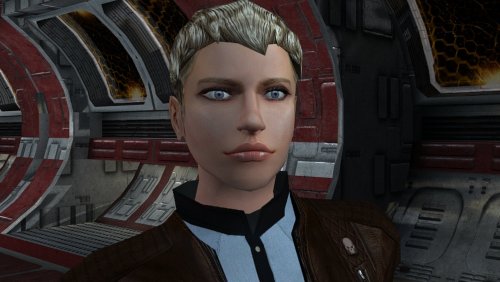
The mod replaces the PFHC04 model and textures. To Install 1. Download: PFHC04 2. Copy all files to the Knights of the Old republic's Override folder. (Example location - C:\Program Files (x86)\Steam\steamapps\common\swkotor\Override) 3. When/if prompted to overwrite files, press okay. 4. If you like the mod; leave a comment or endorse! (It would be much appreciated) Made with love.1 point -
![More information about "[TSL] Immersive TSL Maps"](https://deadlystream.com/downloads/screens/monthly_2026_08/Screenshot2026-08-06063718.thumb.png.55ee84f8ed71feecd0adc61432c09a15.png)
Version 1.1
59 downloads
[TSL] Immersive TSL Maps AUTHOR: Sith Holocron ORIGINAL RELEASE: 13 AUG 2026 UPDATED RELEASE: 15 AUG 2026 GAMES: Star Wars Knights of the Old Republic II Description: This will be a longer description. Buckle up. I didn’t originally set out to make this a full mod. I suppose this originally started as a response to a request. In the comments for Ashton Scorpius’ “TSL Ebon Hawk Downloadable Map” (https://deadlystream.com/files/file/1406-tsl-ebon-hawk-downloadable-map/?tab=comments) someone asked if the swoop bike could be removed from the Ebon Hawk’s map. I decided to take this on – partly as a challenge to myself and partly because the requester has been making ridiculous specific requests for years. In short, I worked on a mod request out of spite. I thought that would be the end of it. Then at some point, I was working on textures for the Dantooine Enclave sublevel. I was doing a lot of fooling around with textures back then. (This was before I picked up a subscription to Topaz Gigapixel.) While checking - and rechecking - textures in game, I kept seeing that map. Since I already had new textures to work with, why not put them in the map? I requested a upscale of that map from someone and I went to work. I never posted as a mod but I do recall showing it on Discord at some point. Later, I wound up redoing the maps for the M4-78 Enhancement Project as one-off. As there weren’t many maps to do there, I figured that would be the end of it. (Yes, I have also updated that mod recently as N-DReW25 has adjusted some of the maps for his Unofficial Patch.) Not too long ago in Discord, there was a discussion about how the Ebon Hawk seemingly has supposed to be in another hangar on Telos Citadel Station at one point in development. As the participants were discussing that, I did some preliminary work on a map for that Docks section and then quickly posted it in that discussion so folks new to the conversation would have a better idea of the area they were talking about. Realizing that I kept on coming back to this part of texturing, I just decided to jump into this as my next project. I’ve mainly concentrated on the interior maps but all of the standard maps have been upscaled. Additionally, most maps of external spaces have also had tweaks made to the as well. My Workflow: For starters, I generally extract the maps from the game and then upscale them to use as the foundation. There have been occasions where I have acquired maps from elsewhere (such as 204TEL, 208TEL, and 506OND from N-DReW25) which show extra rooms that may not be accessible through in game play but can be entered via the whereami armband mod. I warp to each of the map locations armed with that whereami armband. Using GLIntercept, I’ll take numerous screenshots of the area I’m in from above so I can compare what textures they used for each of the rooms I’m tackling. I sort through my textures, adjust the lighting/coloring depending on the variable they’ve set for that area, and just paste them over the upscaled map. Repeat ad nauseum. In addition to this method, I’ll sometimes take a picture of an area from directly above and paste that directly into the map. There’s also the fun part of sometimes having to redraw the white borders of rooms because the AI doesn’t know exactly what’s important in the thing it’s upscaling. When the map has a background, I’ve sometimes reinterpreted what it should look like but if there wasn’t a background, I’ve left it alone. To sum up, it’s not just a simple upscale but it is a time-consuming pain in the ass which is why I’ve only created an average of one map per day during the project’s creation period. You’re welcome? Installation: If you’re using “TSL Ebon Hawk Downloadable Map 1.2.3” by Ashton Scorpius, you’ll want to install my mod after Ashton’s mod. Copy all TGA files (excepting those in the “Alternate 003EBO map” folder) to the Knights of the Old Republic II's Override folder. (Example location - C:\Program Files (x86)\Steam\steamapps\common\swkotor2\Override) When/if prompted to overwrite files, press okay. If you prefer the alternate map in the “Alternate 003EBO map”, now copy that one file to the Knights of the Old Republic II's Override folder. Please let me know in the comment or review section which of the maps is your favorite. If you like the mod; please leave a comment or endorse! It would be much appreciated. Uninstall: Remove the files you’ve added in Installation instructions. Changelog: 1.1: Updated the 401DXN (Dxun - Jungle Landing) map. The Ebon Hawk and crashed freighter have been replaced on the map. Thanks: N-DReW25: For both feedback on the maps themselves and providing three of the maps for be to have a more complete version. Fair Strides: For continual feedback on the maps. Vriff: For continual feedback on the maps. Kharak (of SketchFab.com): For hosting a viewable 3d model of the Ravager on this website used in my two Ravager maps: https://sketchfab.com/3d-models/sith-centurion-battlecruiser-3f2934da83cb421c87a3510ce62ceb8d To the too many folks in the KOTOR Discord’s media section to name for all of their feedback. P.S. I have no plans to redo the KotOR1 maps. Besides the map window being extremely small in that game, it’s also a game I find myself returning to less and less. You’ll have to convince someone else to work on the KotOR1 maps.1 point -
Amazing detail! Must Have1 point
-
Wouldn't this require TSLRCM since the option to choose Bao-Dur as the party leader is not available in the original release of the game?1 point
-
I think they used Dark Hope's Mandalorian textures as a bad for their own. If you don't like the ones from this mod, you could use this instead:1 point
-
What a wonderful mod!1 point
-
![More information about "[TSL] Ebon Hawk skybox for M4-78 EP"](https://deadlystream.com/downloads/screens/monthly_2026_08/EHSkyboxforM4-78EPThumbnail.thumb.png.785575fb7fac539a0adcc772f373b0cc.png)
Version 1.0.0
10 downloads
[TSL] Ebon Hawk skybox for M4-78 EP AUTHOR: Sith Holocron ORIGINAL RELEASE: 21 AUG 2026 GAMES: Star Wars Knights of the Old Republic II (using M4-78 Enhancement Project) Description: I like Kexikus’ skyboxes for the various worlds in K1 and TSL. I like tjsase’s Ebon Hawk skyboxes for TSL. However, it seems I've always had to make a choice between keeping one or the other when considering either tjsase's Ebon Hawk skybox (which utilizes the standard skybox included in the EP) or Kexikus' world skybox which is its own thing. That is until I made a Frankenstein's monster of the EH skybox and the EP world skybox together, which I think merges them suitably. (See attached picture.) I reached out in early 2025 to both modders to see if I could make this combined skybox available to the public. The first modder responded almost immediately. The second modder – who doesn’t visit the site often – finally granted permission today. Installation: Copy the TGA file to the Knights of the Old Republic II's Override folder. (Example location - C:\Program Files (x86)\Steam\steamapps\common\swkotor2\Override) When/if prompted to overwrite files, press okay. If you like the mod; please leave a comment or endorse! It would be much appreciated. Uninstall: Remove the TGA file you’ve added in Installation instructions. Thanks (in alphabetical order): Kexikus: For their kind permission to publicly release their work in this skybox to the public. tjsase: For their kind permission to publicly release their work in this skybox to the public. You can find Kexikus’ mods on Deadly Stream here: https://deadlystream.com/profile/12766-kexikus/content/?type=downloads_file You can find tjsase’s mods on Deadly Stream here: https://deadlystream.com/profile/12310-tjsase/content/?type=downloads_file1 point -
Yeah, unfortunately the Kotor Patch Manager needs a clean executable (you can use a gog one or the editable exe, both work), the best way to get widescreen support back in that scenario is to use @J's https://github.com/J0-o/KotorUniResPatch patches. They work quite well, but depending on what you already have installed you may need to undo existing overrides in order for everything to look right. (e.g. the high resolution menu mods) They've properly scaled pretty much every interface in the game to look right (and even unlocked the in game resolution menu) This does have me thinking that it might be a good idea to have a standalone version of this mod that can be dropped in to existing modbuild installs or installs with other pre-patched executables. Stay tuned for something on that, I'll see if I can take a look at what is needed on the weekend.1 point
-
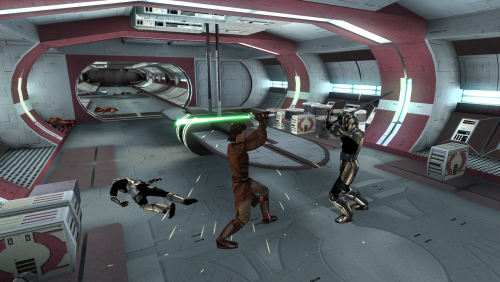 You might wish to update the link of Carth's Republic Uniform and Flight Suit. Marius Fett had all their old mods deleted and they reuploaded the new version in the link below:1 point
 -
Version 1.0.0
27 downloads
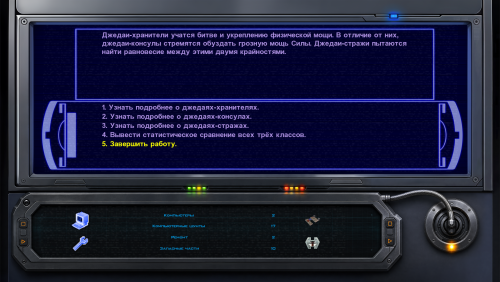
Just another interface for computer terminals. Animated (4 frames) texture, for 16x9 monitors. How to install: Unpack and copy all files to the Knights of the Old Republic's Override folder.1 point -
View File Keanu Reeves Inspired Player Head (K1) This mod adds a fully selectable male player head inspired by Keanu Reeves to Star Wars: Knights of the Old Republic. FEATURES • Custom high-detail head model with corrected in-game UVs and opaque 2048x2048 textures. • Neutral, light-side, and progressive dark-side head textures that change with alignment. • Matching alignment-aware cinematic portraits for character creation, the party interface, and the HUD. • KOTOR I-native facial animation support: blinking, eye movement, lip sync/phonemes, and expressions. • Rebuilt mouth articulation that opens through the natural upper/lower lip gap. • Repositioned teeth and a fully enclosed, dark oral cavity that prevents see-through gaps from frontal, oblique, side, and reclined camera angles. • Corrected neck and jaw shading across the welded source-model boundary. • Long hair configured for KOTOR I's native danglymesh simulation. • Merge-safe TSLPatcher installation for heads.2da, appearance.2da, and portraits.2da, including the installer info document. • No executable patch is required. INSTALLATION 1. Extract the archive outside your game folder. 2. Close KOTOR I. 3. Run TSLPatcher.exe and select the folder containing swkotor.exe if asked. 4. Start a new game and select the new portrait during male character creation. Install after major restoration or community-patch packages. Do not copy the tslpatchdata folder directly into Override. See the included README for complete compatibility and uninstall information. COMPATIBILITY This release is for KOTOR I only. It uses TSLPatcher and unique resource names, and is designed to coexist with K1R and other merge-safe mods. Install this mod after K1R or other large content packages. CREDITS • ShaolinGhost — concept, source asset, direction, testing, and release. • Ghost Studio — KOTOR head conversion, facial rigging, native-hair setup, packaging, and verification workflow. • BioWare and LucasArts — KOTOR I and its original PMHA04 animation/rig foundation. • Stoffe — TSLPatcher. PERMISSIONS You may make personal edits. Do not re-upload, redistribute, or include this mod in another public release without ShaolinGhost's permission. DeadlyStream staff retain the maintenance rights described in the site's upload terms. DISCLAIMER This is a non-commercial fan modification. It is not affiliated with or endorsed by Keanu Reeves, Lucasfilm, Disney, Electronic Arts, BioWare, or any other rights holder. Use at your own risk and keep backups of modded files. Version: 1.1.1 Game: Knights of the Old Republic Contains ported content from another game: No Submitter ShaolinGhost Submitted 08/10/2026 Category Skins K1R Compatible Yes1 point
-
This is the definitive map mod for TSL! You don't realize how much of a pain the low-res vanilla maps are until you find a good replacement for them. Each map here is done with tremendous quality and is very pleasant to look at. Especially in the smaller locations, like cantinas, you can clearly see all the details in each room. Honestly impressive. The bigger exterior locations get detailed backgrounds (Onderon's maps with outlined city streets are my favorites!), which completes the look just right. Thank you so much for your work!1 point
-
 I encountered a bug when training Bao-Dur to become a Jedi before obtaining a lightsaber. The placeholder that you spawn for him in the training scene is never removed and remains on the Ebon Hawk. Looks to be a pretty simple script fix. a_noremotefix.nss just needs an extra line void main() { DestroyObject(GetObjectByTag("naked_fakpc", 0), 0.0, 0, 0.0, 0); + DestroyObject(GetObjectByTag("nak_fakbao", 0), 0.0, 0, 0.0, 0); AssignCommand(GetObjectByTag("BaoDur", 0), ActionJumpToLocation(Location(Vector(64.13808, 25.90077, 1.8), 303.63025))); AssignCommand(GetFirstPC(), ActionJumpToLocation(Location(Vector(63.85465, 28.03239, 1.8), 303.63025))); } Looks like this may be an issue in a_remotetrain.nss as well based on this post. void sub2() { SetGlobalFadeOut(3.0, 0.5, 0.0, 0.0, 0.0); AssignCommand(GetObjectByTag("BaoDur", 0), ActionJumpToLocation(Location(Vector(64.13808, 25.90077, 1.8), 303.63025))); DelayCommand(3.5, AssignCommand(GetFirstPC(), ActionJumpToLocation(Location(Vector(63.85465, 28.03239, 1.8), 303.63025)))); + DelayCommand(3.5, DestroyObject(GetObjectByTag("nak_fakbao", 0), 0.0, 0, 0.0, 0)); + DelayCommand(3.5, DestroyObject(GetObjectByTag("train_remote", 0), 0.0, 0, 0.0, 0)); SetGlobalFadeIn(4.0, 1.0, 0.0, 0.0, 0.0); DelayCommand(4.0, ActionResumeConversation()); } I've created a patch for this.1 point
 -
Version 1.0.0
39 downloads
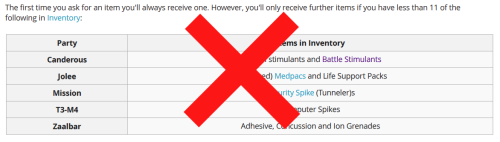
Removes inventory quantity check from free companion items, and makes companions give the items in bulk, instead of one at a time. Description Canderous, Jolee, Mission, T3-M4, and Zaalbar can all give you a selection of free items throughout the game. The way this works is obfuscated from the player, but with some trial and error, it becomes obvious that the system is rather poorly thought out, and encourages extremely degenerate gameplay to exploit it. After first boarding the Ebon Hawk, each of the companions can give up to 10 items (11 in the case of Canderous, Mission, and T3 for some reason). Every time a Star Map is found, this number increases by 20, up to 110 (or 111) items in total. However, if you have more than 10 of the appropriate items, you can also not receive an item. This can be circumvented by dumping the items into a container, or selling them, and talking to the companion again. This extremely annoying. This mod removes the check for the having too many of the given item already in the party inventory. This mean you will no longer have to dump your inventory items in a container to maximize the amount of items you receive. This does not change the total or type of items, it just removes the busywork required to get them. This mod also makes the companions give all of their items in bulk, instead of one at a time. Previously, you only received one item, and would have to repeatedly speak to the companion and ask them for items, until they refused you, to know that you had reached the item limit. This represents 553 conversations of wasted time (not including the conversation where the companions refuse to give you the items). It is now much faster to actually get these items. Canderous has special dialogue based on which items he gives you. He will still play that line, but as he now gives you multiple items as random, this line doesn't actually reflect anything. Similarly the player will still ask for one item, and the companions will respond as if one item was given. I will not be changing that, this is just a convenience mod. There are optional files available to make Zaalbar and Canderous choose a single item type at random, and give only items of that type, instead of randomly choosing which item type to give for each individual item, leading to a relatively even variety. Canderous was originally going to give Battle Stims, in addition to the Adrenals he gives in the vanilla game, and by default he still checked to see if the player had Battle Stims in there inventory when determining whether they were eligible to receive Adrenals. There is an optional file to restore this Battle Stim functionality, making Canderous randomly give Battle Stims in addition to Adrenals. This will not work with the Single Item Type optional, as Canderous' dialogue is not setup to support it. Install/Uninstall Copy the contents of the 0 - Install folder to your game folder. You can copy the contents of one of the 1 - Canderous **** optional folders, if you want that functionality. You can only choose 1 of these You can copy the contents of the 2 - Zaalbar Single Type Items if you want that functionality. Compatibility Will be compatible with all mods that don't make edits to the companion item distribution system. This mod doesn't edit any dialogue, only the underlying scripts. Recommended Mods KotOR 1 Community Patch is strongly recommended. Special Thanks/Acknowledgements KOTOR Tool – Fred Tetra DeNCS – JdNoa & Dashus DLGEditor – tk102 K-GFF – tk102 TSL Patcher – stoffe KotOR Scripting Tool - Blue Holocron Toolset– Cortisol & th3w1zard1 Mirrors Nexus ModPub Other Links Nexus ModPub Deadlystream YouTube Twitch Discord Twitter darth@darthbdaman.com Less Annoying Freebies by darthbdaman is a trivial modification and does not have a copyright license1 point -
Version 1.0.0
66 downloads
Description I’ve upscaled and retextured some robes from [TSL] Prequel Robe Replacement. Main Features - 2x upscale of all robes from the original mod using Topaz Gigapixel. - Retextured three of the original robes in GIMP: Jedi Robe, Baran Do Novice Robe, and Baran Do Sage Robe. - 1K file available. This version resizes the robes back down to their original resolution. - Optional Robes file included. See the photos for previews of the custom robe options. Requirements This mod requires [TSL] Prequel Robe Replacement 1.0 (no exceptions) Install Instructions - Install the required mod: [TSL] Prequel Robe Replacement first. This mod will not work without it. - Download your preferred files - Extract the contents of the zip file. - Place the override folder into your main KOTOR 2 directory, or place the TGA files directly into the game’s override folder. - Replace files if prompted. Credits Original mod by Kainzorus Prime, Please like/endorse the original mod.1 point -
Version 1.0.0
64 downloads
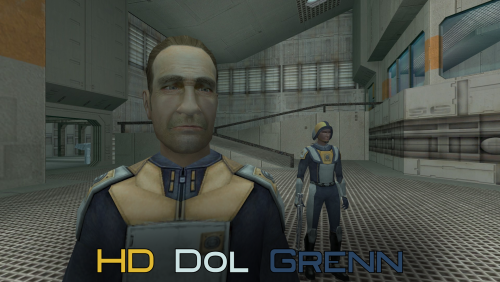
A Mod for Star Wars Knights of The Old Republic II Author: N-DReW25 1.0.0 Release Date: 01.05.2026 Installation: Open the "For Override" folder and drag/copy the textures within and drop/paste them into your Kotor II Override folder. Delete the file "N_DolGrenH.tpc" if it is present. Uninstallation: Delete the N_DolGrenH.tga file from your Override folder. Description: Lieutenant Dol Grenn's head in Kotor II was made via photo sourcing elements of other old male heads from Kotor I. Most of his face and beard comes from Davik, his eyebrows and sideburns are Davik's eyebrows and sideburns that are recolored brown, and most of his hair is Deadeye Duncan's hair that has also been recolored brown. Using this exact same method described above, I was able to photo source elements of Dark Hope's Davik and Deadeye Duncan heads to make a HD Lieutenant Grenn head. Known Bugs: This mod shouldn't have bugs but if you find any report them to me on Deadlystream. Incompatibilities: Would be incompatible with any mods which add N_DolGrenH.tga or N_DolGrenH.tpc. Permissions: As Dark Hope gave free permission for anyone to use her mods, you are therefore allowed to use this mod as it was made using her work. Thanks to: Dark Hope: For giving everyone free permission to use her work and for making the Davik and Deadeye mods in the first place! Bioware: For such an amazing game! Obsidian Entertainment: For such an amazing sequel! Fred Tetra: For Kotor Tool! And everyone who downloads the mod! Legal: THIS MODIFICATION IS NOT SUPPORTED BY BIOWARE/OBSIDIAN ENTERTAINMENT, LUCASARTS, DISNEY OR ANY LICENSERS/SPONSORS OF THE MENTIONED COMPANIES. USE OF THIS FILE IS AT YOUR OWN RISK AND THE ABOVE-MENTIONED COMPANIES OR THE AUTHOR IS NOT RESPONSIBLE FOR ANY DAMAGE CAUSED TO YOUR COMPUTER FOR THE USAGE OF THIS FILE.1 point