Leaderboard


Popular Content
Showing content with the highest reputation on 02/16/2026 in all areas
-
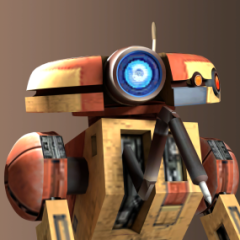
2 pointsUpdating the vehicle fleet in a far, far away...
-
2 points
-
1 pointI'll take care of it if no one minds)
-
1 pointWell, the original games were developed with 4:3 resolution in mind. KotOR more than TSL, I think... So no, the camera shots should not be framed for 16:9. Another matter is what modders do. The K1 CP does frame shots for assuming 16:9 resolution. Probably TSLRCM, too. But I played the sequel (with TSLRCM) only once several years ago, so I could not really say.
-
1 pointNothing. The game is a quarter of a century old and was designed for a Pentium II Celeron with 64MB of pooled system and video memory. The problems people encounter today are due to poor OpenGL support in their shitty drivers (i.e. AMD), not being overtaxed by added textures. The bigger issue is you probably won't notice any difference with or without a normal map, so they are mostly a waste of time. They used it sparingly because there was a limit to what they could fit in the Xbox's aforementioned pocket calculator-sized memory. And its presence in the first place was likely a legacy of Aurora/NWN. The engine doesn't accept normal maps in TGA format, so back in the old days it simply wasn't possible to make use of them. Additionally, even if you have a correct texture the relevant mesh/es in the model need a flag set for it, which wasn't exposed in the old modding tools. As to why more recent mods don't make use of them, some do. But like I said, it's mostly a waste of time because you can't even tell.
-
1 pointYou use the normal as a normal. Odyssey's normal implementation is pretty crap though. The source has to be de-swizzled and the Y (green) channel flipped because TOR is DirectX (-Y) and Odyssey is OpenGL (+Y). Odyssey doesn't have specular, so you're stuck with using envmaps. For stuff like clothes or anything else that gets tinted, you can bake the colour into the diffuse via the Blender plugin. Refer to the wiki on the SWTOR Slicers Github page for details.
-
1 point
Version 1.0.0
40 downloads
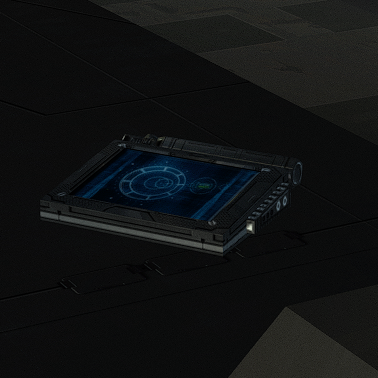
New animated texture. To Install 1. Download 2. Copy all files to the Knights of the Old republic's Override folder. (Example location - C:\Program Files (x86)\Steam\steamapps\common\swkotor\Override) 3. When/if prompted to overwrite files, press okay. 4. If you like the mod; leave a comment or endorse! (It would be much appreciated) Made with love. -
1 point

Version 1.0.0
31 downloads
n the original game, the Star Map on Dantooine is positioned awkwardly off-center, despite the room clearly being designed for it to be in the middle. Thanks to a Reddit user who spotted this, I couldn't ignore it any longer. This mod corrects the placement so the Star Map now sits properly at the room's center. An additional optional file does the same for the Ancient Droid, centering him in his chamber as well. This mod will only apply it's changes on saves, where the ruins were not yet entered. Credits: WilliamDarkstar4, for the unfortunate discovery that drove me to this Fred Tetra, for KOTOR Tool TK102, for DLGEditor Torlack, stoffe & TK102, for NWNSSCOMP JdNoa & Dashus, for DeNCS Cortisol, for Holocron Toolset -
1 pointLike a lot of other things in the game, the answer is via scripting. For vanilla modules, typically this is done in concert with the module's GIT file, which has provision for a day music track and a night music track (a leftover from Neverwinter Nights). This is linked to an row ID in ambientmusic.2da which points to the music track that loops in the background. Using scripting, you can start/stop the current music and switch it to a different track. For example, in K1 when you encounter Malak in the Leviathan Hanger, the trigger script switches the module from its default music, track 11 (mus_area_sewers), to track 8 (mus_theme_malak): https://github.com/KOTORCommunityPatches/Vanilla_KOTOR_Script_Source/blob/master/K1/Modules/M40AC_Leviathan_Hangar_lev_m40ac/k_plev_malakmov2.nss#L5 Or in TSL, for the introduction of Nihilus, it switches from track 8 (mus_sith) to 4 (mus_nihilus ) https://github.com/KOTORCommunityPatches/Vanilla_KOTOR_Script_Source/tree/master/TSL/TSLRCM/Modules/852NIH_Ravager_Bridge/a_nih_intro.nss Or this script in TSLRCM, which switches the Ebon Hawk's default track to the romance track (mus_s_romance) which they added to their version of ambientmusic.2da: https://github.com/KOTORCommunityPatches/Vanilla_KOTOR_Script_Source/blob/master/TSL/TSLRCM/Modules/006EBO_Ebon_Hawk_(post-Dantooine)/a_006romance.nss At the end of your conversion, you can add another script to the exit node of the DLG which stops the new music track, switches it back to the original one, then sets that to play. Typically any time you need to know how to do something, there's a vanilla example you can crib from.
-
1 pointUpscales approved and now available on Deadly Stream: https://deadlystream.com/topic/12120-skinrevenge-of-revan-upscales/
-
1 pointHey everyone! My Name is Lane. Some of you know me from Kotor Speedrunning, and others from my various Youtube exploits. I don't ever really post on Deadly Stream, but I've been lurking in and around the KotOR modding community for about a decade now. I have a degree in computer Science and decided to put it to good use, and reverse engineer KotOR 1 (the GoG version). This has been an on-going project for about 2-3 years now, and I've been sharing my progress with friends, and in some Youtube Videos. However, I've pretty much hit a wall with what I can do with this effort now. So I wanted to release my progress publicly, so other smart and clever people can start doing fun stuff with this. Linked below is a Google Drive with several useful things: A Ghidra Zip File (GZF) containing everything you need to use this A Ghidra SARIF export that contains all data types, function labels, parameters, Classes, and other additions I've made A Ghidra Format XML that contains the labels and function adjustments I've worked on. This is lighter weight than the SARIF file, but has more limitations when it comes to import fidelity. A generated `.h` file, that contains the Header information I have pieced together over time. Even lighter-weight, and more limited than the above What this is not: True Debug Symbols for kotor BioWare Intellectual Property A runnable or compilable program Kotor's Source Code A reverse engineering of Kotor 2 A reverse engineering of the Steam version * * A note about Kotor 1 Steam: While this reverse engineering effort targeted the GoG release of KotOR 1, the Steam version has MANY similarities; often times having identical memory addresses for most functions. Any Patch made for the GoG version can be pretty reasonably ported to Steam with a little bit of effort. What this is: A decently representative result of what Kotor's debug symbols might look like (format and terminology pulled from the MacOS symbols, and existing NWN docs) A research-based labeling and reverse engineering of the GoG version of Kotor 1 A labor of love for the past several years that I'm happy to share Why this is cool/important: This provides a stepping off point for creating proper patches for KotOR 1 This also provides a means for researching underlying issues with things such as memory management, graphical limitations, and compatibility This also provides a researching angle for coming to understand some of the more mysterious file formats, and how they interact with the game itself There are also a variety of fundamental similarities between this and KotOR 2. Which may unlock some insights for that game This is also the first step towards a proper re-compilation (though that is a long-ways off) How do I use the GZF? (New way) You need Ghidra installed, with a modern Java Runtime Download `k1_win_gog_swkotor.exe.gzf` from the google drive below Create a new Ghidra project Drag the GZF into the project Double click it to begin browsing You now have a decently labeled/decompiled instance of KotOR 1 How do I use the SARIF or XML? (Old way) You need Ghidra installed, with a modern Java Runtime Create a new project, and import swkotor.exe (as purchased from GoG) Open the EXE in Ghidra's code browser When it asks if you want it analyzed, select 'Yes" The default analyzers are fine, technically you could speed this up by stripping out a few unneeded analyzers The analyzers will take several minutes to complete (progress can be tracked in the bottom right) Once the analyzers have run, we can proceed Select "File > Add To Program..." and select the SARIF (or XML) file (download below) The importer will analyze the symbols and apply them to the project You now have a decently labeled/decompiled instance of KotOR 1 Limitations: 99.9% of the functions have been labeled, however there were a few stragglers that I was never able to work out. These will appear as `FUN_<address>` 92.3% of the Data is labeled, with stragglers being named `DAT_address` Data Types are VERY incomplete. The labeled ones consist mostly of frequently used types, and known fields. Unknown fields are marked `field<index>_<offset>` Virtual Function calls are very under labeled (largely due to the difficultly of labeling vtables in Ghidra). Though you can determine the underlying function by applying the offset to the associated Class vtable. Most functions have only automatic variables defined within their decomp. Typing and purpose of underlying variables beyond function names, and parameter types, are left up to inference. Overlapping functions. Certain functions overlap in this compilation, due optimizations within the Visual C++ runtime. As a result some functions such as `GetProperty0x30` are shared by multiple classes, and thus lack a name-space. You can usually work out their purpose by checking the associated data type at that offset. If you used the XML import, you will be missing a lot of typing and Function Class/Namespace info Final Notes: Please feel free to ask me any questions about this effort, or any thing strange you might find within the decomp. I've grown to be quite the kotor expert over the years, and I'd be happy to share any insights. You can reach out to me on Discord @lane_d, I'm in the Kotor server, OpenKotOR server, DeadlyStream server, and the kotor speedrunning server. I will be periodically posting updates to this drive, whenever I get the chance to work on this more. If anyone has any major contributions they'd like to see added, please reach out! I'd be happy to chat. Google Drive Link Here
-
1 point
Version 1.1.0
60 downloads
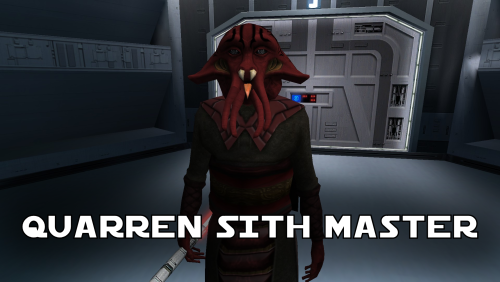
A Mod for Star Wars Knights of The Old Republic Author: N-DReW25 1.1.0 Release Date: 05.02.2026 Installation: Simply click on the HoloPatcher.exe, select your swkotor directory, click install and sit back and watch the HoloPatcher do its magic. Description: In the 19th Century, European Colonizers would use non-European collaborators to help pacify and/or assimilate non-European cultures into their Empires. The European Colonizers and the non-European target for colonization might have major linguistic and cultural differences making dialogue between the two groups almost impossible, but by taking a non-European collaborator of the Europeans and using them as an intermediary between the two groups the non-European group might become more suspectable to the Europeans through the use of the non-European collaborator who is closer to the non-European group than they are to the Europeans. A random example of this might be the Italians using the Arabs to help them colonize the Somalis. The Italians want to colonize Somalia but they do not speak Somali and aren't at all culturally similar, whereas the Somalis would more than likely know Arabic and would be more culturally similar to Arabs so using Arabs to help Italians colonize the Somalis would be a viable tactic. This concept of wanting to colonize a group that is different from you so you instead use a culturally similar group to make it easier for you to colonize the original group is central to this mod. On Manaan, the Sith Empire is secretly training Selkath youths into becoming Dark Jedi and Sith Agents to one day stage a coup against the Manaan government to take over their planet and exploit their precious resources. Similar to the real life example above the same hurdles that applied to Europeans and non-Europeans still apply to the Sith in this scenario. The Sith Empire is predominantly human and are shown to be quite racist to non-human species throughout the game. The Selkath are an aquatic alien species so not only is there a differing alien culture the Sith have to deal with but the Selkath primarily live underwater. The leader behind this Sith plot to train Selkath youth is a human Sith Master who appears as a generic Sith Master in-game. This mod changes this NPC so that the Sith Master is now an alien Quarren, another aquatic alien species. With this mod installed, it makes much more sense as to why the Sith are trying to train and convert Selkath youth to the Sith when the mastermind behind this plot is a fellow aquatic alien who would be much more culturally similar to his Selkath students and would be a much easier leader for the Selkath to blindly follow despite this master serving an empire that would be racist towards them all. Known Bugs: This mod shouldn't have any bugs but if you find any please feel free to report them on Deadlystream.com. A third install was planned but could not be implemented due to a bizarre bug. The third option was a version of the vanilla dialogue which had an AI filter over it to make it sound like the Quarren from Kotor II (this same method was used in the ROR mod for the Quarren Jedi Master). This could not be added as the VO in-game would be sped up with the pitch increased for reasons unknown to me. This install has been included in the mod but cannot currently be installed, when this bug can be fixed I will add the ability to install it. Incompatibilities: Please report any incompatibilities! Permissions: Do NOT claim credit for this mod and do not use assets from this mod without my permission. The textures for this mod comes from Quanon's Big Sellout, a modder's resource that was published on LucasForums back in the day. These are the same textures that are used in Quanon's Sith Quarren PC mod found on NexusMods. As these textures came from Quanon's Big Sellout, they can be used in your mod though I strongly advise you credit Quanon as the original artist and acknowledge Quanon's Big Sellout to avoid people thinking you stole it from the Sith Quarren PC mod. Thanks to: Quanon: For making the original textures and including it in your Big Sellout modder's resource! Marius Fett: For fixing the Death Field animation bug which projected the lightning from his feet instead of his hands! ElevenLabs Website: For the custom AI VO service! Bioware: For such an amazing game! Obsidian Entertainment: For creating the original Quarren models, textures, and VO! Fred Tetra: For Kotor Tool! th3w1zard1: For HoloPatcher! Everyone who downloads the mod! Legal: THIS MODIFICATION IS NOT SUPPORTED BY BIOWARE/OBSIDIAN ENTERTAINMENT, LUCASARTS, DISNEY OR ANY LICENSERS/SPONSORS OF THE MENTIONED COMPANIES. USE OF THIS FILE IS AT YOUR OWN RISK AND THE ABOVE-MENTIONED COMPANIES OR THE AUTHOR IS NOT RESPONSIBLE FOR ANY DAMAGE CAUSED TO YOUR COMPUTER FOR THE USAGE OF THIS FILE. -
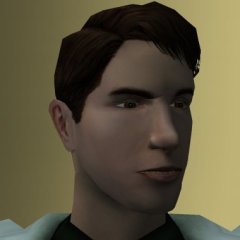
1 pointA new mod has been added to the series and I have an update to the main NPC Diversity Pack mod. When the mod goes live, this link shall take you to the Quarren Sith Master mod - a mod which turns the Manaan Sith Master into a Quarren using textures from Quanon's Big Sellout modder's resource. The update for my NPC Diversity Pack is in the works and shall include new generic commoner heads with some ported outright from Kotor II and some made from scratch. Right now, there are the following generic heads: 3 white male, 2 black male, 3 asian male, 3 white female, 2 black female, 3 asian female, 2 old white male, 2 old black male, 2 old asian male, 2 old white female, 2 old black female, and 2 old asian female bringing the total to 28 generic heads in the vanilla game. The final plan of the NPC Diversity Pack is to increase each race to 5 heads meaning there'll be 5 white male, 5 black male, 5 asian male, 5 white female, 5 black female, 5 asian female, 5 old white male, 5 old black male, 5 old asian male, 5 old white female, 5 old black female, and 5 old asian female which will bring the total of generic heads all the way up to 60. Right now, only the non-old heads are ready meaning, with this update, you can optionally install 14 additional generic heads into your game that'll be spread out amongst the generic NPCs across the game. Whilst this update is not yet finished, here are some previews as to what some of these heads will look like: In addition to these new heads, I am planning on reconfiguring some of the genders of the NPCs in the modules. For example, the NPCs in the Dantooine Enclave exterior are all women and the Anchorhead Town NPCs are all men. I plan on replacing some of these NPCs with the opposite gender so that the female heads from these optional addons can be added to more planets and more areas throughout the game without having them congested in certain areas that are segregated by gender. More updates on this will be released closer to the updates release whenever that'll be.
-
0 points
 Hey eb, I got a warning that said "A file named tar_m02ab.mod already exists in the modules folder. Skipping file...". Is that normal? I am using the Community Patch :).