Leaderboard




Popular Content
Showing content with the highest reputation on 10/15/2025 in all areas
-
Version 1.0.0
86 downloads
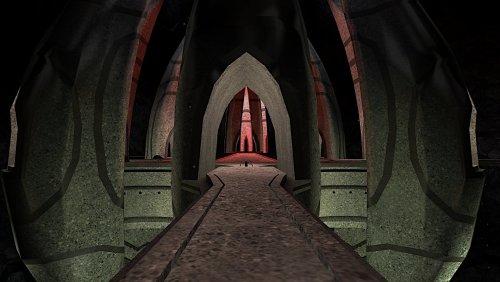
Simple Reskin - Malachor V KotOR2: TSL ------------------------------------------ Author: Kaidon Jorn October 2025 This mod is a simple reskin of the planet Malachor V All done with random textures from the internet. It's the second time I've attempted a planet or area reskin, so please, go easy on me. It may not be my forte, but I enjoyed making it anyway. Installation: Extract the .zip file to somewhere on your PC then just copy the subfolder to the game's Override folder. To uninstall just delete the folder from Override. Permissions: For personal use only, do not redistribute the contents herein. Thanks to the modders at DeadlyStream.com for teaching me how to mod the KotOR games and for hosting my mods. THIS MODIFICATION IS PROVIDED AS-IS AND IS NOT SUPPORTED BY BIOWARE/OBSIDIAN ENTERTAINMENT OR LUCASARTS OR ANY LICENSERS/SPONSORS OF THE MENTIONED COMPANIES. USE OF THIS FILE IS AT YOUR OWN RISK AND THE ABOVE MENTIONED COMPANIES OR THE AUTHOR IS NOT RESPONSIBLE FOR ANY DAMAGE CAUSED TO YOUR COMPUTER FOR THE USAGE OF THESE FILES.3 points -
Hey everyone! My Name is Lane. Some of you know me from Kotor Speedrunning, and others from my various Youtube exploits. I don't ever really post on Deadly Stream, but I've been lurking in and around the KotOR modding community for about a decade now. I have a degree in computer Science and decided to put it to good use, and reverse engineer KotOR 1 (the GoG version). This has been an on-going project for about 2-3 years now, and I've been sharing my progress with friends, and in some Youtube Videos. However, I've pretty much hit a wall with what I can do with this effort now. So I wanted to release my progress publicly, so other smart and clever people can start doing fun stuff with this. Linked below is a Google Drive with several useful things: A Ghidra Zip File (GZF) containing everything you need to use this A Ghidra SARIF export that contains all data types, function labels, parameters, Classes, and other additions I've made A Ghidra Format XML that contains the labels and function adjustments I've worked on. This is lighter weight than the SARIF file, but has more limitations when it comes to import fidelity. A generated `.h` file, that contains the Header information I have pieced together over time. Even lighter-weight, and more limited than the above What this is not: True Debug Symbols for kotor BioWare Intellectual Property A runnable or compilable program Kotor's Source Code A reverse engineering of Kotor 2 A reverse engineering of the Steam version * * A note about Kotor 1 Steam: While this reverse engineering effort targeted the GoG release of KotOR 1, the Steam version has MANY similarities; often times having identical memory addresses for most functions. Any Patch made for the GoG version can be pretty reasonably ported to Steam with a little bit of effort. What this is: A decently representative result of what Kotor's debug symbols might look like (format and terminology pulled from the MacOS symbols, and existing NWN docs) A research-based labeling and reverse engineering of the GoG version of Kotor 1 A labor of love for the past several years that I'm happy to share Why this is cool/important: This provides a stepping off point for creating proper patches for KotOR 1 This also provides a means for researching underlying issues with things such as memory management, graphical limitations, and compatibility This also provides a researching angle for coming to understand some of the more mysterious file formats, and how they interact with the game itself There are also a variety of fundamental similarities between this and KotOR 2. Which may unlock some insights for that game This is also the first step towards a proper re-compilation (though that is a long-ways off) How do I use the GZF? (New way) You need Ghidra installed, with a modern Java Runtime Download `k1_win_gog_swkotor.exe.gzf` from the google drive below Create a new Ghidra project Drag the GZF into the project Double click it to begin browsing You now have a decently labeled/decompiled instance of KotOR 1 How do I use the SARIF or XML? (Old way) You need Ghidra installed, with a modern Java Runtime Create a new project, and import swkotor.exe (as purchased from GoG) Open the EXE in Ghidra's code browser When it asks if you want it analyzed, select 'Yes" The default analyzers are fine, technically you could speed this up by stripping out a few unneeded analyzers The analyzers will take several minutes to complete (progress can be tracked in the bottom right) Once the analyzers have run, we can proceed Select "File > Add To Program..." and select the SARIF (or XML) file (download below) The importer will analyze the symbols and apply them to the project You now have a decently labeled/decompiled instance of KotOR 1 Limitations: 99.9% of the functions have been labeled, however there were a few stragglers that I was never able to work out. These will appear as `FUN_<address>` 92.3% of the Data is labeled, with stragglers being named `DAT_address` Data Types are VERY incomplete. The labeled ones consist mostly of frequently used types, and known fields. Unknown fields are marked `field<index>_<offset>` Virtual Function calls are very under labeled (largely due to the difficultly of labeling vtables in Ghidra). Though you can determine the underlying function by applying the offset to the associated Class vtable. Most functions have only automatic variables defined within their decomp. Typing and purpose of underlying variables beyond function names, and parameter types, are left up to inference. Overlapping functions. Certain functions overlap in this compilation, due optimizations within the Visual C++ runtime. As a result some functions such as `GetProperty0x30` are shared by multiple classes, and thus lack a name-space. You can usually work out their purpose by checking the associated data type at that offset. If you used the XML import, you will be missing a lot of typing and Function Class/Namespace info Final Notes: Please feel free to ask me any questions about this effort, or any thing strange you might find within the decomp. I've grown to be quite the kotor expert over the years, and I'd be happy to share any insights. You can reach out to me on Discord @lane_d, I'm in the Kotor server, OpenKotOR server, DeadlyStream server, and the kotor speedrunning server. I will be periodically posting updates to this drive, whenever I get the chance to work on this more. If anyone has any major contributions they'd like to see added, please reach out! I'd be happy to chat. Google Drive Link Here1 point
-
Version 1.1.2
4,783 downloads
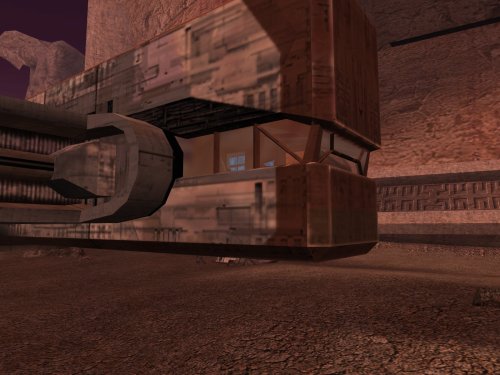
This mod edits the various landing pad areas so that you can see the through the cockpit windows of the Ebon Hawk and the Telos shuttles, which should be a bit more interesting than the blacked-out windows in the vanilla game. It also adds more detail to the room which is visible through the hole in the side of the ship in the prologue. This mod includes some model fixes to the Telos hangars and Telos shuttle crash site developed by PapaZinos, which are included here with permission. I have also made the following model improvements to the areas: - Added proper lightmaps and missing geometry to the Ebon Hawk on Malachor V (i.e. landing gear hatches, the exit ramp, and the entire port side). Also patched the chunk missing from the starboard side for better consistency with the prerendered cutscenes. - Fixed the flickering windows at the Citadel Station Entertainment Module's shuttle terminals. - Changed the texture for the base of the crane in the Telos Academy to one that doesn't look like concrete. - Added unique environment map reflections for the Ebon Hawk similar to KOTOR 1 ("Enhanced Reflections" version only). - Replaced the 512x512 vanilla Ebon Hawk texture with the 1024x1024 version from KOTOR 1 ("Enhanced Reflections" version only). Because mods that edit the same area models are incompatible by nature, I have included optional compatibility patches for use with other notable mods. Please see the "Compatibility" section below for further information. **IMPORTANT**: There are two versions of this mod: - Enhanced Reflections - Adds new area-specific reflections to the Ebon Hawk's exterior. Recommended if you do not use any mods that reskin/upscale the Ebon Hawk exterior (or if you do and are willing to do some extra work to make them compatible) - Reskin Friendly - More readily compatibility with reskins of the Ebon Hawk exterior. Does not include the new reflections. Thank you for downloading, and I hope you enjoy this mod! ------------------------------------------------------------------- ASPYR (STEAM/GOG) COMPATIBILITY NOTES When using the Aspyr version of the game from Steam or GOG, the "Enhanced Reflections" version of this mod requires the 3C-FD Patcher by J (https://deadlystream.com/files/file/2734-fog-fix-more-3c-fd-patcher/) for the reflections to display properly. Even if you are using the "Reskin-Compatible" version, I still strongly recommend the 3C-FD Patcher since it fixes a few graphics issues which Aspyr accidentally introduced when they re-published TSL. ------------------------------------------------------------------- INSTALLATION If you are using one or more of the mods listed in the "Compatibility" section below, install them first. Run "INSTALL.exe" for this mod and follow the prompts. It is normal to see warnings that 202tel.mod and 222tel.mod already exist and have been skipped. When installation is complete, copy the files from any required compatibility patches into your game's Override folder, overwriting when asked. If you are using TSLRCM from the Steam Workshop, see this guide for how to combine installer-based mods with the Workshop: https://steamcommunity.com/sharedfiles/filedetails/?id=488641307 For best results, I recommend using a save from before visiting the Citadel Station Entertainment Module for the first time. However, this is not required. If you continue from a later save, all you will miss are a couple of pilots for the Entertainment Module shuttles. ------------------------------------------------------------------- COMPATIBILITY This mod is compatible with The Sith Lords Restored Content Mod (TSLRCM). For best results, install this mod after TSLRCM, any of the mods listed below, or any other mods which make significant edits to the Telos Entertainment Module. Except as noted below, this mod is incompatible with any other mods that edit the same files. The main installation is compatible with following mods: - Ultimate Citadel Station Repairs by PapaZinos (https://deadlystream.com/files/file/2059-ultimate-citadel-station-repairs/) - Telos Model Repairs by PapaZinos (https://deadlystream.com/files/file/2059-ultimate-citadel-station-repairs/) I have also included compatibility patches for the following mods: - KOTOR 2 Community Patch (K2CP) (https://deadlystream.com/files/file/1280-kotor-2-community-patch/) - M4-78 Enhancement Project (https://deadlystream.com/files/file/277-m4-78-enhancement-project/) - High Quality Skyboxes II for TSL by Kexikus (https://deadlystream.com/files/file/1793-high-quality-skyboxes-ii/) - Realistic Nar Shaddaa Skybox by Sharen Thrawn (https://www.gamefront.com/games/knights-of-the-old-republic-ii/file/realistic-nar-shaddaa-skybox) - Telos Polar Academy Hangar Skybox by DarthParametric (https://deadlystream.com/files/file/1389-telos-polar-academy-hangar-skybox/) - Coruscant Jedi Temple by deathdisco (https://deadlystream.com/files/file/585-coruscant-jedi-temple-by-deathdisco/) - Nar Shaddaa Landing Pad Repair by PapaZinos (https://deadlystream.com/files/file/2004-nar-shaddaa-landing-pad-repair/) - Spark Effect - Ebon Hawk by PapaZinos (https://deadlystream.com/files/file/2314-spark-effect-ebon-hawk/) This mod is compatible with most reskins and texture mods. If you use the "Enhanced Reflections" install package with a mod that reskins the exterior of the Ebon Hawk, the Telos military base, and/or the Telos polar academy, follow the steps below. ------------------------------------------------------------------- KNOWN ISSUES It has been reported that the Korriban area model may render with severe distortion on the Steam/Aspyr version of the game with "Disable Vertex Buffer Objects=1" in swkotor2.ini. If you experience this issue, copy the files from "Korriban Distorted Model Fix" into your Override folder. The fix works by changing the shrubs in the area from danglymeshes to static trimeshes, so this patch should only be used if you encounter this issue. You may also be interested in "Stretching Model Bug Fixes" by J (https://deadlystream.com/files/file/2683-stretching-model-bug-fixes/), which addresses other models which may distort. If you have previously downloaded version 1.1 of this mod, see the comments below for a smaller download which contains only the affected Korriban models. ------------------------------------------------------------------- USING RESKIN MODS WITH ENHANCED REFLECTIONS If you are using an Ebon Hawk reskin with the "Enhanced Reflections" version, perform the following steps: 1. Make a copy of PER_EH1.tga/txi for each row in the table below, named to match the Texture Name column. 2. Open each of the resulting TXI files in a text editor and change the envmaptexture or bumpyshinytexture parameter to the corresponding "EnvMap" in the table. 3. Delete each corresponding TPC file from this mod, as well as kor_ehok.tpc. Texture Name EnvMap Notes: ------------- ------------- ------------- wk_dan_eh1 WK_CM_DanPad wk_dxn_eh1 WK_CM_DxnHawk wk_nar_eh1 WK_CM_NarPad wk_per_eh1 WK_CM_PerHang wk_telac_eh1 WK_CM_TelAcad wk_telcit_eh1 WK_CM_TelHang wk_cor_eh1 WK_CM_CorPad Only needed if using with Coruscant Jedi Temple by deathdisco wk_m478_eh1 WK_CM_M478Pad Only needed if using with M4-78 If the reskin includes any of the following files, open their TXIs and change the "envmaptexture" or "bumpyshinytexture" as follows. Also delete the conflicting TPC file from this mod. Texture Name EnvMap ------------- ------------- 002_ebo_main1 WK_CM_PerSpace 002_ebo_main3 WK_CM_PerSpace mal_ebo_main2 WK_CM_MalHawk If you are using a reskin mod for the Telos military base and/or polar academy with the "Enhanced Reflections" version, I recommend doing the following: 1. Make extra copies of tel_tr07.tga/txi and rename them to wk_telacadmtl.tga/txi. 2. Open wk_telacadmtl.txi with a text editor and change the envmaptexture to WK_CM_TelAcad. 3. Delete the version of wk_telacadmtl.tpc from this mod. ------------------------------------------------------------------- CREDITS KotorBlender by seedhartha MDLedit and KOTORmax by bead-v tpcview and tga2tpc by ndix UR NWNSSCOMP by Torlack and tk102 K-GFF by tk102 TSL Patcher by stoffe ERFEdit by stoffe and Fair Strides Kotor Tool by Fred Tetra Thanks to Kexikus, deathdisco, and DarthParametric for granting permission to include modified files from their mods for compatibility. Thanks to PapaZinos for also granting permission to include some of his model fixes as part of the standard installation. Thanks to Sharen Thrawn for creating the original Nar Shaddaa Realistic Skybox mod. Thanks to Thor110 for reporting a render order issue with the placeable Telos shuttle. Thanks to Emil8000 for reporting the distortion issues with the Ebon Hawk on Korriban and to StellarExile and J for suggesting how to fix it. The Telos shuttles' interiors are based on "Modder's Resource: Shuttle" by Darth InSidious and JCarter426 and are used in accordance with the permissions in its Readme file. Thanks to both of them for putting that together. The original resource may be downloaded here: https://deadlystream.com/files/file/381-modders-resource-shuttle/. This mod includes material ported from Knights of the Old Republic 1 by Bioware. ------------------------------------------------------------------- VERSION HISTORY 1.0 - Initial Release 1.1 - Corrected an issue where the placeable shuttle did not render properly behind the forcefield doors in the Telos military base - Patched a small vanilla hole by the statue over Ajunta Pall's tomb on Korriban 1.1.1 - Added a patch for cases when the Ebon Hawk on Korriban is distorted on the Steam version of the game. Thanks to Emil8000 for reporting the issue and to StellarExile and J for suggesting how to fix it. 1.1.2 - Fixed an incorrect texture reference for the reskin-compatible version of the Telos Academy. Thanks to J for reporting the error. No changes to the Enhanced Reflections version ------------------------------------------------------------------- DISCLAIMER AND PERMISSIONS This modification is provided as-is and is not supported by Disney, Lucasarts, or Obsidian. Use at your own risk. The author shall not be held responsible for damage to your game installation, computer, or saved games resulting from the use of this mod. The cockpit interior elements may be treated as a modders resource and used in other mods as long as appropriate credit is given to this mod's author. The new environment maps may also be used in other mods with appropriate credit. Use of any assets which are based on or incorporate material from other authors also requires permission from those authors. Other uses not described here of assets from this mod require the author's permission. This mod shall not be reposted on any sites other than Deadly Stream without permission.1 point -
While it's not the topic of this thread... my project xoreos was "supposed" to be that, eventually. Unfortunately, there really hasn't been much work on it for years now. A combination of being burned out by the sheer scope, not really any steady contributors, me being full-time employed again [1] and having too many other hobbies [2]. That's not meant as a justification or anything (I, frankly, don't think I owe one as such), just in case people are wondering. It's just what it is, as unhappy I am about it. reone quickly surpassed xoreos, for KotOR at least, and that's pretty amazing. I haven't really followed it day-by-day, but I kept an occasional eye. Personally, I'm still a bit sad that seedhartha didn't want to continue working on xoreos instead, but that's of course his prerogative. I mean, I get the push to do something on your own. And I feel like he and I didn't really connect well on a personal level; not that I'm saying we had any altercations or anything, but our communcation was sparse. Nothing drastic, just that we're maybe a bit too different. Or maybe I'm reading more into it than is real, I don't know, I'm also a socially awkward person. I just wanted that said, because I read somewhere that people were wondering if there's any rivalry between reone and xoreos or anything like that. There isn't, and I wish the project and seedhartha all the best. [1] A lot of progress was made while I was unemployed or freelancing. And since I suck at the latter, it wasn't so different from the former. Unfortunately, that's not sustainable [2] I DM 4 Pathfinder groups, I build and paint miniatures, I watch shows, movies, anime, and I'm also kinda learning Japanese? Story of my life, too many interests, never enough time Sorry for the long off-topic ramble here. Just wanted to give a life sign and right a few misconceptions I saw elsewhere on the internet.1 point
-
They haven’t logged into the site for 9 years? Not sure you're going to get a timely response from them.1 point
-
Someone picked up the project and created an active fork - https://github.com/modawan/reone You can keep tabs on their progress via the OpenKotor Discord, along with other engine reimplementation projects. As to seeing it in action, well you can always pull a copy of the repo, compile it. and test it out directly. Or maybe someone on the Discord can provide precompiled binaries.1 point
-
So I recently discovered the Holocron Toolset (I'm pretty late to the party I guess) and I've been playing around with it to make some small adjustments to items and NPCs. I would like to know how I can make a completely custom item and have it be able to spawn in a container as a random drop? I'd like to make 3-4 Jedi robes that are lore friendly and could spawn between levels 14-24. I've already learned how to create them (using Crado and Aleema's robes as the base) but need to know how they can be implemented as drops without manually adding them to a container or NPC's inventory.1 point
-
View File Kotor 2 Unofficial Patch Male Light Side Saves Here are some saves files of a Male Light Side Sentinel character using the Kotor 2 Unofficial Patch mod. I wanted to upload these saves in case anyone ever wanted to do any modding of Kotor 2 Unofficial Patch. Submitter nonameperson66 Submitted 05/22/2025 Category Game Saves Mods Used https://deadlystream.com/files/file/891-kotor-2-unofficial-patch/ Game The Sith Lords1 point
-
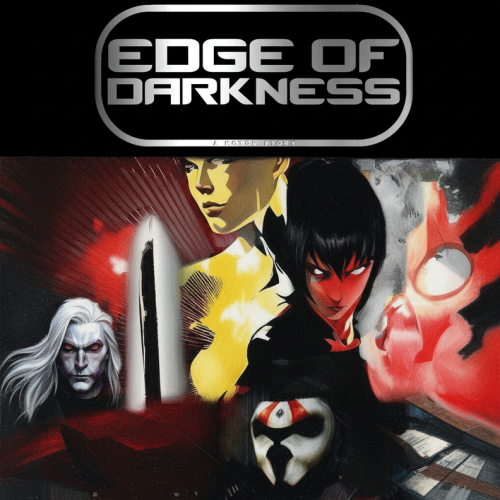 I've questioned many of the developers of this project, and dived into some insane rabbit holes just to understand what on earth this project was intended to be.\ To save anyone the time of doing this themselves, let me be frank and blunt: this project has been heavily bloated full of nonsense plotlines and content that frankly makes no sense. The intro does absolutely nothing to prepare the player for the story ahead, the backlore required to understand half of this requires you almost play through the entirety of one of the TOR campaign lines (spoilers are present). There's two revisions which is important to understand. Revision 1 was HARIII's, and iiuc N-Drew's nuggets that turned into a draft. It is my understanding 90sk took those and ran with it without staying authoritative to the original revisions. I spent maybe an hour or two speaking with both N-Drew and 90sk and what I came to understand is basically this. I post this simply because I'd love to see the original revision and the new revision and their entirety of their dialogue trees and plot points, as well as whose contributions caused specific changes to be evident. From what I understand N-DreW has backed away from this project simply because it's gotten too... convoluted... for him to even approach anymore. Some of the ideas in revision 2 just make zero sense at all, such as hitting a plot point that transports one to the future to see Luke Skywalker and R2-D2. Just nonsense on top of nonsense. While it is impressive this TC actually is fully playable without softlock bugs being immediately evident, i struggle so much to get into this revision because the versioning scheme doesn't follow semvar, and it's constantly being overhauled with some large rework/new vision that makes it feel like everything I previously experienced lore-wise and dialogue-wise has been cut and no longer exists. It fails to build on itself basically. I'd love to see the full scoop of what exactly happened during development of this mod but dying to a gizka at least brought me a laugh. 10/101 point
 -
 Awesome mod, think it may have made sense to just make the cloak skinnier to avoid the clipping issues, but the mod looks too damn cool to care. Great mod, definitely keeping this one, mods like this keep the game alive! Thanks for making this great mod and it's sister mod without the cloak Stormie!1 point