Quanon
-
Posts
482 -
Joined
-
Last visited
-
Days Won
33
Content Type
Profiles
Forums
Blogs
Forum & Tracker Requests
Downloads
Gallery
Store
Events
Everything posted by Quanon
-
Version 1.0.0
548 downloads
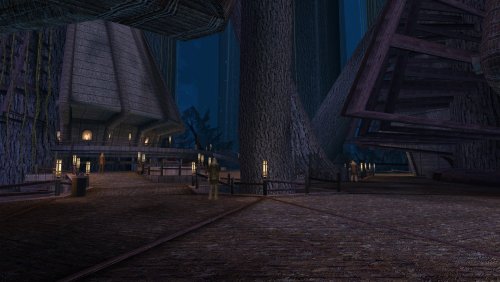
This mod will add upscaled textures for the Kashyyk part of the game. Except the skies, see note below. All textures are now 4x their original size. Example a 128x128 becomes 512x512, etc... I've not gone up to the 4096x4096 sizes as I don't see what that would add to this older game. A few textures do get to this size, example is the Ebon Hawk. Normal maps have also been redone, rerendered not just upscaled. Also included are the textures used by the Czerka Offices on Kashyyk and a few other places in the game. It's still a 400% improvement on the older files. Enjoy! Sky textures are made by the awesome Kexikus get them here: => => https://www.nexusmods.com/kotor/mods/69 -
 I might do that, but I've still got a lot to do on K1 first.
 -
View File Quanons Manaan Upscaled Textures This mod will add upscaled textures for the Manaan part of the game. Except the skies, see note below. All textures are now 4x their original size. Example a 128x128 becomes 512x512, etc... I've not gone up to the 4096x4096 sizes as I don't see what that would add to this older game. A few textures do get to this size, example is the Ebon Hawk. Normal maps have also been redone, rerendered not just upscaled. It's still a 400% improvement on the older files. Have a peek at the screenshots and: Enjoy! Minor note: No the Sith base is not included, this is a separate texture set within the game, it gets used on various other locations to. So it'll be a pack on its own. Sky textures are made by the awesome Kexikus get them here: => https://deadlystream.com/files/file/723-high-quality-skyboxes-ii/ => https://www.nexusmods.com/kotor/mods/69 For the best looking Cantina signs, pick up this mod by SithHolocron: => https://deadlystream.com/files/file/1135-animated-manaan-cantina-sign-for-kotor1/ Submitter Quanon Submitted 05/12/2022 Category Mods K1R Compatible Yes
-
Version 1.0.0
585 downloads
This mod will add upscaled textures for the Manaan part of the game. Except the skies, see note below. All textures are now 4x their original size. Example a 128x128 becomes 512x512, etc... I've not gone up to the 4096x4096 sizes as I don't see what that would add to this older game. A few textures do get to this size, example is the Ebon Hawk. Normal maps have also been redone, rerendered not just upscaled. It's still a 400% improvement on the older files. Have a peek at the screenshots and: Enjoy! Minor note: No the Sith base is not included, this is a separate texture set within the game, it gets used on various other locations to. So it'll be a pack on its own. Sky textures are made by the awesome Kexikus get them here: => https://deadlystream.com/files/file/723-high-quality-skyboxes-ii/ => https://www.nexusmods.com/kotor/mods/69 For the best looking Cantina signs, pick up this mod by SithHolocron: => https://deadlystream.com/files/file/1135-animated-manaan-cantina-sign-for-kotor1/ -
 I'm slowly going through every planet and texture set the game has. There's a sort of developer easter egg in this set. Look out to find some babies when you're on Tatooine 😂
 -
View File Quanons Ebon Hawk Interior Upscaled Textures This mod will add upscaled textures for the interior of the Ebon Hawk. Except the skies, see note below. All textures are now 4x their original size. Example a 128x128 becomes 512x512, etc... I've not gone up to the 4096x4096 sizes as I don't see what that would add to this older game. Normal maps have also been redone, rerendered not just upscaled. It's still a 400% improvement on the older files. Have a look at the screenshots and; Enjoy! EDIT: Looks like I forgot to pack the tpc normalmap files, you can get these with the extra ZIP I provided. Just unpack/ copy to the override folder! Sky textures are made by the great Sithspecter get them here: => https://deadlystream.com/files/file/938-high-quality-cockpit-skyboxes/ Install these after my pack and just overwrite them when asked. Other great texture mods to improve the many monitors and screens in the Ebon Hawk by talented SithHolocron: => https://deadlystream.com/files/file/848-animated-ebon-hawk-monitors-not-including-galaxy-map/ => https://deadlystream.com/files/file/1237-more-subtle-animated-ebon-hawk-monitors-still-not-including-galaxy-map/ => https://deadlystream.com/files/file/1032-kotor1-canon-animated-galaxy-map/ => https://deadlystream.com/files/file/724-kotor1-animated-galaxy-map/ NormalMaps.7z Submitter Quanon Submitted 05/09/2022 Category Mods K1R Compatible Yes
-

Version 1.0.0
958 downloads
This mod will add upscaled textures for the interior of the Ebon Hawk. Except the skies, see note below. All textures are now 4x their original size. Example a 128x128 becomes 512x512, etc... I've not gone up to the 4096x4096 sizes as I don't see what that would add to this older game. Normal maps have also been redone, rerendered not just upscaled. It's still a 400% improvement on the older files. Have a look at the screenshots and; Enjoy! EDIT: Looks like I forgot to pack the tpc normalmap files, you can get these with the extra ZIP I provided. Just unpack/ copy to the override folder! Sky textures are made by the great Sithspecter get them here: => https://deadlystream.com/files/file/938-high-quality-cockpit-skyboxes/ Install these after my pack and just overwrite them when asked. Other great texture mods to improve the many monitors and screens in the Ebon Hawk by talented SithHolocron: => https://deadlystream.com/files/file/848-animated-ebon-hawk-monitors-not-including-galaxy-map/ => https://deadlystream.com/files/file/1237-more-subtle-animated-ebon-hawk-monitors-still-not-including-galaxy-map/ => https://deadlystream.com/files/file/1032-kotor1-canon-animated-galaxy-map/ => https://deadlystream.com/files/file/724-kotor1-animated-galaxy-map/ NormalMaps.7z -
Just south west of the... euh, something cluster, tucked away in the corner. You might have to squint your eyes a little.
-
It seems I've not updated the normalmaps for this pack correctly; you might encounter an error message while playing the game. To fix the Invalid Normalmap: Remove the following ;tga files from your override folder: -LDA_Ehawk01b -LDA_flr01B -LDA_flr02B -LDA_flr10b -LDA_FreightL01b -LDA_trim01B -LDA_water02B -LDA_wall03bmp -LDA_rock04B Replace these with the .tpc versions. That should fix any issues. The quick fix can be found bellow, for those who already downloaded this. _LDA_Normalmap_Fix.7z
-
Happy to oblige! Now what on earth are you babbling about 🤔
-
View File Quanons Tatooine Upscaled Textures This mod will add upscaled textures for the Tatooine part of the game. Except the skies, see note below. All textures are now 4x their original size. Example a 128x128 becomes 512x512, etc... I've not gone up to the 4096x4096 sizes as I don't see what that would add to this older game. A few textures do get to this size, example is the Ebon Hawk. Normal maps have also been redone, rerendered not just upscaled. It's still a 400% improvement on the older files. Have a peek at the screenshots and; Enjoy! Also try and spot the babies while on Tatooine. EDIT: Added a tiny zip with a missing wall texture! Sky textures are made by the awesome Kexikus get them here: https://deadlystream.com/files/file/723-high-quality-skyboxes-ii/ Qs_Tatooine_miss.7z Submitter Quanon Submitted 05/07/2022 Category Mods K1R Compatible Yes
-
Version 1.0.0
581 downloads
This mod will add upscaled textures for the Tatooine part of the game. Except the skies, see note below. All textures are now 4x their original size. Example a 128x128 becomes 512x512, etc... I've not gone up to the 4096x4096 sizes as I don't see what that would add to this older game. A few textures do get to this size, example is the Ebon Hawk. Normal maps have also been redone, rerendered not just upscaled. It's still a 400% improvement on the older files. Have a peek at the screenshots and; Enjoy! Also try and spot the babies while on Tatooine. EDIT: Added a tiny zip with a missing wall texture! Sky textures are made by the awesome Kexikus get them here: https://deadlystream.com/files/file/723-high-quality-skyboxes-ii/ Qs_Tatooine_miss.7z -
Thanks! Happy to do a little modding again.
-
View File Quanons Dantooine Upscaled Textures This mod will add upscaled textures for the Dantooine part of the game. Except the skies, see note below. All textures are now 4x their original size. Example a 128x128 becomes 512x512, etc... I've not gone up to the 4096x4096 sizes as I don't see what that would add to this older game. It's still a 400% improvement on the older files. Have a peek at the screenshots I made and; Enjoy! Sky textures are made by the awesome modder Kexikus get them here: Submitter Quanon Submitted 05/04/2022 Category Mods K1R Compatible Yes
-

Version 1.1.0
908 downloads
This mod will add upscaled textures for the Dantooine part of the game. Except the skies, see note below. All textures are now 4x their original size. Example a 128x128 becomes 512x512, etc... I've not gone up to the 4096x4096 sizes as I don't see what that would add to this older game. It's still a 400% improvement on the older files. Have a peek at the screenshots I made and; Enjoy! Sky textures are made by the awesome modder Kexikus get them here: -
As always, top notch work Marius! I should do a replay of K1 to check out all these lovely mods you've put out.
-
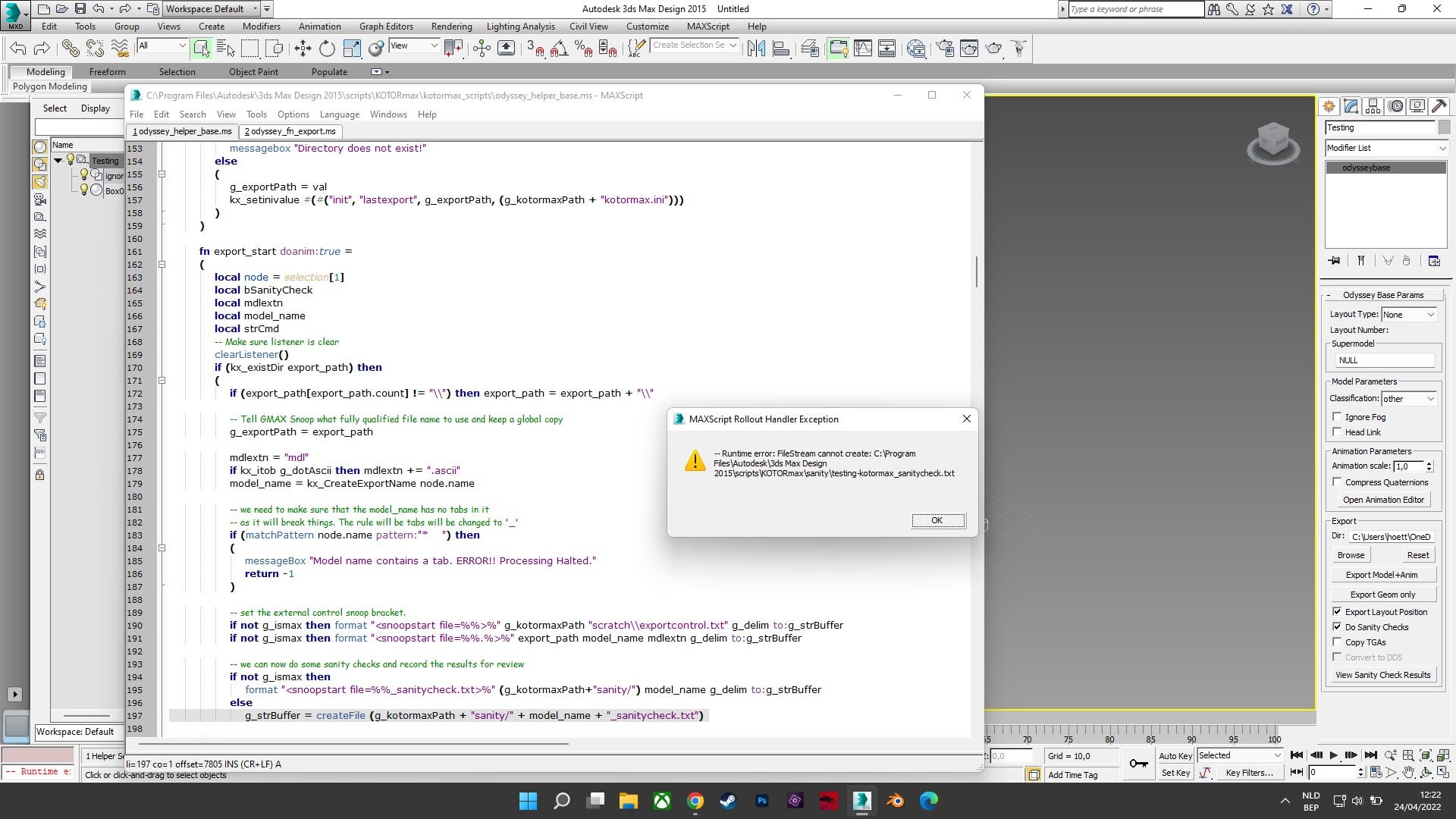
Hey, all! I recently reinstalled 3Ds Max and KotorMax. But I ran into a little snag. Whenever I hit export I get this error message. I've looked through an old PM chain between me and Bead-V, cause I had the feeling I've encountered this before... Feel like a noob now 😅 I checked the KotorMax.ini file. UseMax is 1, so... Sanity looks weird though? [init] dock=1 basepointer=1 sanity=111110111111111 verbose=0 visible=1 usemax=1 exportwok=0 exportcolors=0 dotascii=1 lowercase=1 position=[0,100] lastexport=""

-
Quanons modding tutorials A long time ago, on the LucasForums, I made some tutorials. Most where about 3d models and how to get them working in the game. Mind the long time ago, most of these tutorials will mention older modding tools. Still, they might contain some helpful knowledge and a few handy tips. The files aren't ordered, most names should give you a good clue though, what the tutorial is about. Most are old AVI videos, the quality isn't super. Other files often contain a word doc and some extra gubbins you can open in 3Ds Max. Not much is said on how to model in 3Ds Max, for that, far better videos and instructions can be found on youtube and on the internet at large. Even I use it frequently to learn new tricks or speed up my work or to troubleshoot a model. Also, keep trying and trying, you don't want to know how often I had to. Happy modding! And enjoy the nostalgia trip. Links to my Mediafire: http://www.mediafire.com/folder/4xndcfs4zrm3d/Kotor_Tuts http://www.mediafire.com/file/kw7btvf80epzcyp/Lights%26Render.pdf/file http://www.mediafire.com/file/uo4di9y8bjt4gac/Creating_Lightmaps.pdf/file
-
- 5
-

-

-
View File Quanon's Modeling Tutorial (Part 3) Part of the... From Sith Holocron: Only Part 3 of this tutorial was found at JumpStationZ. Hopefully, there's enough in here to be helpful to somebody. Submitter Quanon Submitted 02/26/2020 Category Modding Tools
-

Version 1.0.0
127 downloads
Part of the... From Sith Holocron: Only Part 3 of this tutorial was found at JumpStationZ. Hopefully, there's enough in here to be helpful to somebody. -

-
Happy B-day SithSpecter!!! May you have many more happy 3D modelling days!!!
-
After updating Bastilas hair, I decided Carth couldn't be left behind. I've got mixed results... The UVmap on Carth badly stretches parts of his skin. And all the nice detail I had gets a bit lost. It all gets a very soft look; the details aren't as sharp. It just looks odd. Certainly when I did a test in the game. On my preview renders it's a bit less. But; perhaps the hair samples I used where to long. Though I alway thought Carth had a bit more flow to his hair; say compared to Canderous. But it seems I can't get that look across. Bioware certainly did a very poor job on the unwrapping of the UVmaps of the main characters. I don't understand all the cuts they've made across the model. It just makes the whole skinning process difficult. Anyhow, here's what I've got so far on this: EDIT1: Forgot to add, the other 'sexy' stuff: Edit2: Kept on tweaking; to get flow of the hair to match up better on each part of his UVmap and figured out how to get a nice color on it. That at least comes a bit closer to his vanilla look. I'll keep the blondy Carth as an extra option for the pack. I guess I might also include a black haired Carth. What eye colors would match up best for those? Onwards to a quick preview in the game.