Kirin
-
Posts
38 -
Joined
-
Last visited
-
Days Won
2
Content Type
Profiles
Forums
Blogs
Forum & Tracker Requests
Downloads
Gallery
Store
Events
Everything posted by Kirin
-
 Top Mod !!!
 -
View File Bao-Dur Jedi Robe Variants - [ORIGINAL MOD NEEDED] Five variants for the textures of the 2 armors added by Sheam for BaoDur. ----------------- INSTALATION: 1. Install "Bao-Dur Wears Jedi Robes" by Shem https://deadlystream.com/files/file/741-bao-dur-wears-jedi-robes/ 2. Choose one of the reskins you prefer and replace them in the override folder. ----------------- Donations: If you want to support my work you can here: buymeacoffee.com/kirin117 ------------------ Acknowledgements: Shem - For "Bao-Dur Jedi Robe" --- https://deadlystream.com/profile/17254-shem/ 90SK and L0rdReV@n88 - For the textures at variant 2 --- https://deadlystream.com/profile/8934-90sk/ DARTH DARKUS - For the textures at variant 3, 4 and 5 Kaidon Jorn - For the new textures --- https://deadlystream.com/profile/8962-kaidon-jorn/ Submitter Kirin Submitted 12/26/2025 Category Mods TSLRCM Compatible Yes
-
Version 1.0.0
221 downloads
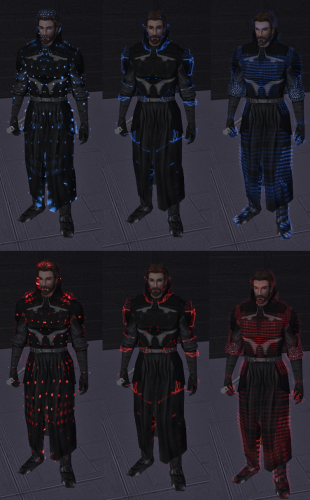
Made some color variants for 3 models of the original mod "Animated Energy Shields" made by Dark Hope. Video Here: https://youtube.com/shorts/U5OtokRDOaE?feature=share In the images from left to right Dotted Electric Wave. Note that the pattern differs from armor to armor. Here are the name of the texture file corelated with the Energy shield in game and also the colors in the vanila game. fx_tex_14 = Energy Shield (Cyan) fx_tex_16 = Telos Mining Shield, Arkanian Energy Shield (Red) fx_tex_17 = Echani Shield (Blue) fx_tex_18 = Mandalorian Melee Shield (Violet) fx_tex_19 = Mandalorian Power Shield (Violet) [SLOW ANIMATION] fx_tex_20 = Echani Dueling Shield (Blue) fx_tex_22 = Verpine Shield (Orange) [BUG I THINK] -------------------------- How to Install: Go to "Vanila Colors" folder select 1 of the 3 models types and add the files in override. The colors are as they are in the vanilla game. How to use different colors: For exmaple I want to change "Mandalorian Melee Shield" go to "Extra Colors" folder select the model and the color you want rename the file with fx_tex_18 and then replace it into the override folder. Note: I dont have a video of the animations of the shields but an example can be seen on the original mod page see below. https://deadlystream.com/files/file/2193-animated-energy-shields/ ----------------- Donations: If you want to support my work you can here: buymeacoffee.com/kirin117 -------------------------- Acknowledgements: Dark Hope - For the original mod and thank you for allowing me to modifie and uploading your mod. -
Version 1.0.0
116 downloads
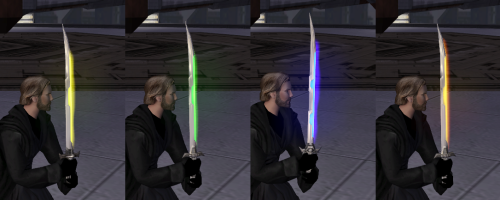
This mod will make the short and double Vibroweapons silver metelic color. And 3 alternative options for the colors of the edges. ------------ Instalation: 1. Install "[TSL] Vibroweapons replacement pack retexture 1.0" by IRobert [NEEDED TO WORK] https://deadlystream.com/files/file/1285-tsl-vibroweapons-replacement-pack-retexture/ 2. Install "Vibrosword replacement pack 1.0" by DeadMan [NOT NEEDED TO WORK BUT NEEDED TO COMPLETE THE COLECTION] https://deadlystream.com/files/file/65-vibrosword-replacement-pack/ 3. Install my mod replace the files in the override folder Note: The Optional extra colors can be mixed and matched and will work with all mods and will replace also fo the Vibroswords(Long), just install them last. ----------------- Donations: If you want to support my work you can here: buymeacoffee.com/kirin117 ------------ Acknowledgements: DeadMan - For the original mod of both games Seph6 - For the short and double bladed models IRobert - For the TSL port RevanDark - for making original models for Jedi Academy -
![More information about "Bao-Dur Jedi Robe Variants - [ORIGINAL MOD NEEDED]"](https://deadlystream.com/downloads/screens/monthly_2026_01/3.thumb.png.b60f8dcdf9a96dc98bb6b6043436c536.png)
Version 1.1.0
206 downloads
Five variants for the textures of the 2 armors added by Sheam for BaoDur. ----------------- INSTALATION: 1. Install "Bao-Dur Wears Jedi Robes" by Shem https://deadlystream.com/files/file/741-bao-dur-wears-jedi-robes/ 2. Choose one of the reskins you prefer and replace them in the override folder. ----------------- Donations: If you want to support my work you can here: buymeacoffee.com/kirin117 ------------------ Acknowledgements: Shem - For "Bao-Dur Jedi Robe" --- https://deadlystream.com/profile/17254-shem/ 90SK and L0rdReV@n88 - For the textures at variant 2 --- https://deadlystream.com/profile/8934-90sk/ DARTH DARKUS - For the textures at variant 3, 4 and 5 Kaidon Jorn - For the new textures --- https://deadlystream.com/profile/8962-kaidon-jorn/ -
View File Masks and Mesh Fix Added 6 new masks with 6 variants for the colors, all masks have the same stats see the last photo. The original masks in the vanila game are not modified. Left Column: Vhail Sith Mask I and II Middle Column: Vhail Mask I and II Right Column Kirin Mask I and II ---------------------- INSTALATION: 1. Copy the files int the folder "1-Red Main Files" Into yhe game override folder. 2. (Optional) If you prefer the colors of the mask to be red you are done if not do step 1 then copy the files form the folder of your prefered color into the game override folder and you are Done. NOTE: the mesh fix is included in the folder "1-Red Main Files" How to get the items: 1. Add them with the Savegame editor. 2. Add them with Cheat Codes: giveitem Vhal_S_Mask_I giveitem Vhal_S_Mask_II giveitem Vhal_Mask_I giveitem Vhal_Mask_II giveitem Kirin_Mask_I giveitem Kirin_Mask_II ----------------- Donations: If you want to support my work you can here: buymeacoffee.com/kirin117 ---------------------- ACKNOWLEDGEMENTS: 1. Darth Vhail "Four Masks Reskins 1.0" - Original creator of the textures. Thank you for the permission to modifie the original files. https://deadlystream.com/profile/27189-darth-vhail/ 2. DarthParametric - Thank you for the help with the mesh fix. https://deadlystream.com/profile/15735-darthparametric/ Submitter Kirin Submitted 12/24/2025 Category Mods TSLRCM Compatible Yes
-
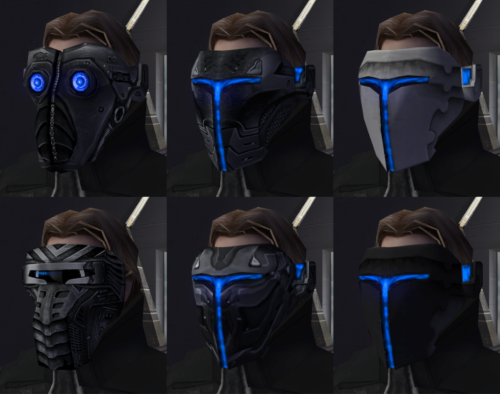
Version 1.1.0
231 downloads
Added 6 new masks with 6 variants for the colors, all masks have the same stats see the last photo. The original masks in the vanila game are not modified. Left Column: Vhail Sith Mask I and II Middle Column: Vhail Mask I and II Right Column Kirin Mask I and II ---------------------- INSTALATION: 1. Copy the files int the folder "1-Red Main Files" Into yhe game override folder. 2. (Optional) If you prefer the colors of the mask to be red you are done if not do step 1 then copy the files form the folder of your prefered color into the game override folder and you are Done. NOTE: the mesh fix is included in the folder "1-Red Main Files" How to get the items: 1. Add them with the Savegame editor. 2. Add them with Cheat Codes: giveitem Vhal_S_Mask_I giveitem Vhal_S_Mask_II giveitem Vhal_Mask_I giveitem Vhal_Mask_II giveitem Kirin_Mask_I giveitem Kirin_Mask_II ----------------- Donations: If you want to support my work you can here: buymeacoffee.com/kirin117 ---------------------- ACKNOWLEDGEMENTS: 1. Darth Vhail "Four Masks Reskins 1.0" - Original creator of the textures. Thank you for the permission to modifie the original files. https://deadlystream.com/profile/27189-darth-vhail/ 2. DarthParametric - Thank you for the help with the mesh fix. https://deadlystream.com/profile/15735-darthparametric/ -
 Great Mod. Looks amazing !!!
 -
 Hello I think I ask this a few years to late but anyways. After I install the TOR version of the HK units (all of them 47 50 and 51) I get this head for them. Any solution for this?
 -
 Hello Vhail. In my opinion your masks mods are the best. I saw that you only posted them as images not as mods or I cant find them. I saw that you ware not active for a long time, but by any chance if you see this comment can you upload them as mods?