


offthegridmorty
-
Posts
107 -
Joined
-
Last visited
-
Days Won
15
Content Type
Profiles
Forums
Blogs
Forum & Tracker Requests
Downloads
Gallery
Store
Events
Everything posted by offthegridmorty
-
Improved LS Enlightenment & DS Corruption Feats
offthegridmorty commented on offthegridmorty's file in Mods
 @Stuck Oh, so it does. Well that's embarrassing. Thanks for reporting. I'll upload a fixed version shortly.
 -
 @diegodb @StupidSmeagol Your install log is from HoloPatcher. You should use the TSLPatcher included with the mod. I have no idea why HoloPatcher fails to compile the scripts.
 -
View File Delayed Story Cutscenes Delays certain story cutscenes. DESCRIPTION Some important cutscenes can occur very early in KOTOR 2 leading to some awkward narrative pacing, specifically the cutscene of Kreia’s past and the cutscene introducing Visas. This mod delays these cutscenes from triggering until certain progress is made. Visas’ cutscene will no longer trigger until after you’ve left Telos and visited at least one other planet, in addition to meeting the usual alignment requirements. Kreia’s cutscene is supposed to be locked behind a high influence check. However, you can completely bypass the influence requirement with only 14 Intelligence, making it pretty easy to get the scene as soon as the dialogue option becomes available. This mod increases the Intelligence check difficulty. By default, the dialogue will only become available after leaving Telos, and only while on the Ebon Hawk, as in TSLRCM. An optional patch is included to further delay its availability until at least one Jedi has been found. INSTALLATION To install, run HoloPatcher.exe and select the install option corresponding to whether you have TSLRCM or not. Unaltered copies of any modified files will be place in the “backup” folder in the location of HoloPatcher. (Optional) Install the option “Kreia Cutscene Extended Delay” if you want to delay the availability of Kreia’s dialogue until at least one Jedi has been found. UNINSTALLATION Remove the following files from override: - kreia.dlg - k_align_move.ncs - m_cnd_kreiamovie.ncs Move any files inside the backup folder to override. COMPATIBILITY Compatible with TSLRCM using the TSLRCM-compatible install option. TSLRCM must be installed first before installing this mod. Compatible with PartySwap but PartySwap must be installed first. Since PartySwap requires TSLRCM, you must use the TSLRCM-compatible option. PERMISSIONS Feel free to do whatever you want with this mod. CREDITS offthegridmorty Credit to Snigaroo who requested this mod. zbyl2, DarthStoney, Hassat Hunter, VarsityPuppet, TSLRCM contributors - TSLRCM source script for k_align_movie HoloPatcher - Cortisol, th3w1zard1 TSLPatcher - stoffe, Fair Strides KOTOR Tool - Fred Tetra DeNCS - JdNoa, Dashus Submitter offthegridmorty Submitted 08/31/2026 Category Mods TSLRCM Compatible Yes
-
Version 1.0.0
75 downloads
Delays certain story cutscenes. DESCRIPTION Some important cutscenes can occur very early in KOTOR 2 leading to some awkward narrative pacing, specifically the cutscene of Kreia’s past and the cutscene introducing Visas. This mod delays these cutscenes from triggering until certain progress is made. Visas’ cutscene will no longer trigger until after you’ve left Telos and visited at least one other planet, in addition to meeting the usual alignment requirements. Kreia’s cutscene is supposed to be locked behind a high influence check. However, you can completely bypass the influence requirement with only 14 Intelligence, making it pretty easy to get the scene as soon as the dialogue option becomes available. This mod increases the Intelligence check difficulty. By default, the dialogue will only become available after leaving Telos, and only while on the Ebon Hawk, as in TSLRCM. An optional patch is included to further delay its availability until at least one Jedi has been found. INSTALLATION To install, run HoloPatcher.exe and select the install option corresponding to whether you have TSLRCM or not. Unaltered copies of any modified files will be place in the “backup” folder in the location of HoloPatcher. (Optional) Install the option “Kreia Cutscene Extended Delay” if you want to delay the availability of Kreia’s dialogue until at least one Jedi has been found. UNINSTALLATION Remove the following files from override: - kreia.dlg - k_align_move.ncs - m_cnd_kreiamovie.ncs Move any files inside the backup folder to override. COMPATIBILITY Compatible with TSLRCM using the TSLRCM-compatible install option. TSLRCM must be installed first before installing this mod. Compatible with PartySwap but PartySwap must be installed first. Since PartySwap requires TSLRCM, you must use the TSLRCM-compatible option. PERMISSIONS Feel free to do whatever you want with this mod. CREDITS offthegridmorty Credit to Snigaroo who requested this mod. zbyl2, DarthStoney, Hassat Hunter, VarsityPuppet, TSLRCM contributors - TSLRCM source script for k_align_movie HoloPatcher - Cortisol, th3w1zard1 TSLPatcher - stoffe, Fair Strides KOTOR Tool - Fred Tetra DeNCS - JdNoa, Dashus -
 Both. At max LS points with +0 CHA modifier, DS powers are -50% less effective and cost +50% more. Every +1 to CHA reduces the penalty to both cost and effects by 5%. So at 20 CHA, they are only -25% less effective and +25% more costly, and at 30 CHA there is no penalty whatsoever.
- 15 comments
-
- 1
-

-
- difficulty
- force powers
- (and 5 more)
-
@Salk Thanks, I like that idea. Could give armor low chance of breaking then. I'll see about adding that when I update. And it should be straightforward to port to K1.
-
View File Bashing Overhaul Improves the mechanics of bashing locked containers. DESCRIPTION KOTOR 2 added a neat little mechanic that makes it so bashing containers has a chance of breaking some of the items inside, adding risk and incentivizing putting points in Security or bringing along the right companion to help out. At least, that’s what the game wants you to think. In truth, this is one of TSL’s several illusory mechanics which don’t really work the way you think. Here’s how it actually works: Some containers, when unlocked with Security, get a random number of low value items added to their inventory. If you instead bash a container, a random number of broken items are added to the container’s inventory. Nothing inside the container is actually broken. The first issue with this is that high value items like weapons or upgrades are never broken, making bashing not all that risky, especially later in the game. What’s much worse though is that many of the locked containers in the game actually get a flag set when initially populated that blocks Security from adding the “not broken” items. This means there is no advantage to using Security on these containers outside of saving time. In fact, by bashing you at least get a few broken items you can use for components, and you lose nothing. Another more mundane issue is that many locked containers are simply missing the bashing script, causing the game to abandon this mechanic which it initially presents as important. This mod overhauls the bashing mechanic, not only fixing its bugs and making it work the way you’d expect, but also giving it more depth and impact. When you bash a container, there is a chance to break some of the items that are actually inside. You may break multiple items or none at all, with it being most likely to break a small but nonzero number of items. Breakable items now include more valuable items such as weapons, shields, droid tools, implants, upgrades, etc. Armor and droid plating cannot be broken since, well, they’re designed to resist being broken. Plot items and datapads are all protected from being broken, in addition to credits, components, and chemicals. Some feats, effects and weapons will affect how likely you are to break items. Finesse reduces the chance of breaking an item when using a melee weapon while Precise Shot reduces the chance of breaking an item when using a ranged weapon. Using the Plasma Torch also reduces the chance of breaking items. On the other hand, being under the effects of Fury or Wookie Rage will significantly increases the chance of breaking items. INSTALLATION To install, run HoloPatcher.exe. Unaltered copies of any modified files will be placed inside a backup folder in the location of HoloPatcher.exe. UNINSTALLATION Remove k_contain_bash.ncs and m_plc_treasdisp.ncs from Override. If k_contain_bash.ncs was created inside the backup folder, move it to Override. Remove the following files from Modules: 101PER.mod, 102PER.mod, 103PER.mod, 105PER.mod, 106PER.mod, 151HAR.mod, 152HAR.mod, 153HAR.mod, 262TEL.mod, 301NAR.mod, 302NAR.mod, 303NAR.mod, 305NAR.mod, 404DXN.mod, 506OND.mod, 601DAN.mod, 610DAN.mod, 650DAN.mod, 851NIH.mod, 852NIH.mod, 903MAL.mod If any .mod files were created inside the backup folder, move them to Modules. COMPATIBILITY Should be compatible with most mods unless they edit the k_contain_bash script. PERMISSIONS Feel free to do whatever you want with this mod, just give credit. CREDITS offthegridmorty HoloPatcher - Cortisol, th3w1zard1 TSLPatcher - stoffe, Fair Strides KOTOR Tool - Fred Tetra DeNCS - JdNoa, Dashus Submitter offthegridmorty Submitted 08/28/2026 Category Mods TSLRCM Compatible Yes
-
Version 1.0.2
59 downloads
Improves the mechanics of bashing locked containers. DESCRIPTION KOTOR 2 added a neat little mechanic that makes it so bashing containers has a chance of breaking some of the items inside, adding risk and incentivizing putting points in Security or bringing along the right companion to help out. At least, that’s what the game wants you to think. In truth, this is one of TSL’s several illusory mechanics which don’t really work the way you think. Here’s how it actually works: Some containers, when unlocked with Security, get a random number of low value items added to their inventory. If you instead bash a container, a random number of broken items are added to the container’s inventory. Nothing inside the container is actually broken. The first issue with this is that high value items like weapons or upgrades are never broken, making bashing not all that risky, especially later in the game. What’s much worse though is that many of the locked containers in the game actually get a flag set when initially populated that blocks Security from adding the “not broken” items. This means there is no advantage to using Security on these containers outside of saving time. In fact, by bashing you at least get a few broken items you can use for components, and you lose nothing. Another more mundane issue is that many locked containers are simply missing the bashing script, causing the game to abandon this mechanic which it initially presents as important. This mod overhauls the bashing mechanic, not only fixing its bugs and making it work the way you’d expect, but also giving it more depth and impact. When you bash a container, there is a chance to break some of the items that are actually inside. You may break multiple items or none at all, with it being most likely to break a small but nonzero number of items. Breakable items now include more valuable items such as weapons, shields, droid tools, implants, upgrades, etc. Armor and droid plating cannot be broken since, well, they’re designed to resist being broken. Plot items and datapads are all protected from being broken, in addition to credits, components, and chemicals. Some feats, effects and weapons will affect how likely you are to break items. Finesse reduces the chance of breaking an item when using a melee weapon while Precise Shot reduces the chance of breaking an item when using a ranged weapon. Using the Plasma Torch also reduces the chance of breaking items. On the other hand, being under the effects of Fury or Wookie Rage will significantly increase the chance of breaking items. INSTALLATION To install, run HoloPatcher.exe. Unaltered copies of any modified files will be placed inside a backup folder in the location of HoloPatcher.exe. UNINSTALLATION Remove k_contain_bash.ncs and m_plc_treasdisp.ncs from Override. If k_contain_bash.ncs was created inside the backup folder, move it to Override. Remove the following files from Modules: 101PER.mod, 102PER.mod, 103PER.mod, 105PER.mod, 106PER.mod, 151HAR.mod, 152HAR.mod, 153HAR.mod, 262TEL.mod, 301NAR.mod, 302NAR.mod, 303NAR.mod, 305NAR.mod, 404DXN.mod, 506OND.mod, 601DAN.mod, 610DAN.mod, 650DAN.mod, 851NIH.mod, 852NIH.mod, 903MAL.mod If any .mod files were created inside the backup folder, move them to Modules. COMPATIBILITY Should be compatible with most mods unless they edit the k_contain_bash script. PERMISSIONS Feel free to do whatever you want with this mod, just give credit. CREDITS offthegridmorty HoloPatcher - Cortisol, th3w1zard1 TSLPatcher - stoffe, Fair Strides KOTOR Tool - Fred Tetra DeNCS - JdNoa, Dashus -
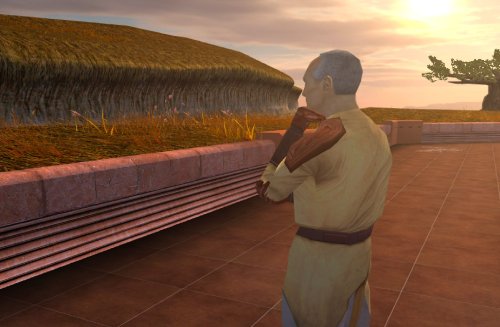
View File Nemo's Timely Departure Despawns Nemo once you cleanse the grove. DESCRIPTION After returning to the Enclave from cleansing the grove, the Council gives you a mission to investigate the nearby ruins, telling you they already a Jedi to investigate and fear the worst since he hasn’t returned. This Jedi turns out to be Nemo, but since the game doesn’t despawn Nemo from the courtyard until after this conversation, you’ll literally pass him on your way into the Enclave. Apparently the whole time they were awaiting his return he was standing outside reflecting on the beauty of nature, before suddenly remembering he was supposed to be doing something and sprinting over to the ruins. This mod fixes the issue so Nemo will no longer be outside the Enclave once you have cleansed the grove. INSTALLATION Move the file from “to override” to your override folder. UNINSTALLATION Remove k_pdan_14a_area.ncs from your override folder. COMPATIBILITY Compatible the KOTOR 1 Community Patch, which this mod forwards the script changes from. Not compatible with other mods that edit the script k_pdan_14a_area.ncs, though I’m not aware of any. PERMISSIONS You may use this mod however, but any redistribution or modification should include the source script, maintaining the comment headers and credit to K1CP. CREDITS offthegridmorty JC, DarthParametric - K1CP source script for k_pdan_14a_area Submitter offthegridmorty Submitted 08/23/2026 Category Mods K1R Compatible Yes
-
- 1
-

-
Version 1.0.0
113 downloads
Despawns Nemo once you cleanse the grove. DESCRIPTION After returning to the Enclave from cleansing the grove, the Council gives you a mission to investigate the nearby ruins, telling you they already sent a Jedi to investigate and fear the worst since he hasn’t returned. This Jedi turns out to be Nemo, but since the game doesn’t despawn Nemo from the courtyard until after this conversation, you’ll literally pass him on your way into the Enclave. Apparently the whole time they were awaiting his return he was standing outside reflecting on the beauty of nature, before suddenly remembering he was supposed to be doing something and sprinting over to the ruins. This mod fixes the issue so Nemo will no longer be outside the Enclave once you have cleansed the grove. INSTALLATION Move the file from “to override” to your override folder. UNINSTALLATION Remove k_pdan_14a_area.ncs from your override folder. COMPATIBILITY Compatible the KOTOR 1 Community Patch, which this mod forwards the script changes from. Not compatible with other mods that edit the script k_pdan_14a_area.ncs, though I’m not aware of any. PERMISSIONS You may use this mod however, but any redistribution or modification should include the source script, maintaining the comment headers and credit to K1CP. CREDITS offthegridmorty JC, DarthParametric - K1CP source script for k_pdan_14a_area -
 Thanks @vault13deathclaw, I did see these but since they're for when you first train her to be a Jedi I felt like they sounded a little too dramatic for a routine training. @N-DReW25 Had no clue these existed! I just assumed they didn't since they weren't in the dlg file. Will update, thanks!
 -
View File Immersive Skill Checks Hides tags on skill & attribute checks in dialogue. Customizable. SUMMARY This mod removes the written indicators at the beginning of skill & attribute checks in dialogue, as well as optionally success and failure tags. For example, you will no longer see “[Wisdom]” at the beginning of a line you get from having enough Wisdom, it will just be there as an option. I got this idea while playing IStewieAI’s Tweaks and Engine Fixes for FNV which has this feature, and I thought it would be interesting to see in KOTOR. I liked how it made me think a little harder about my dialogue choices, since normally I just automatically pick an option if it has a skill indicator, since it’s almost always advantageous to pick. Those options are still usually obvious and often go to the top of the list anyway, but it adds a nice bit of immersion and a little extra challenge. There are multiple versions to choose from: LITE - removes attribute tags only MEDIUM - removes both attribute & skill tags HIGH - removes attribute, skill, & persuade/intimidate tags FULL - removes attribute, skill, persuade/intimidate, success/failure, & influence tags This mod does not affect tags for using Force powers (e.g. Choke, Force Persuade, etc.) or Lie tags. If you’re new to the game, please be aware of the implications of installing any of these versions. Many conversation mechanics may become non-obvious. IMPORTANT NOTES: - For Medium version and up, this will remove all instances of text like “[Computer]” or “[Repair]” even when they are intended to indicate an option to actually use that skill, rather than just speaking from your knowledge on it. You’ll still see [X Spikes] or [X Parts] at the end of Computer or Repair options where applicable, however it’s possible some options can become ambiguous for this reason. - On rare occasions, different attributes can unlock the same line, therefore this mod can result in occasionally seeing duplicate dialogue options. - Some lines may not be affected, for example if they are added by another mod or not found in dialog.tlk. INSTALLATION To install, run HoloPatcher.exe. Select the option corresponding to the version you want and whether you have TSLRCM installed. Unaltered copies of dialog.tlk will be placed inside the "backup" folder in the location of HoloPatcher.exe. UNINSTALLATION Replace dialog.tlk in the main game folder (outside override) with the version found in the backup folder. COMPATIBILITY Compatible with TSLRCM using the TSLRCM compatible option. This mod must be installed after any other mods which hard overwrite dialog.tlk. If any other mod makes changes to lines with a dialogue check indicator, those specific lines will be overwritten by this mod. Mods which append dialog.tlk using a patcher are compatible. PERMISSIONS Do whatever you want with this mod, just give credit. CREDITS offthegridmorty HoloPatcher - Cortisol, th3w1zard1 TSLPatcher - stoffe, Fair Strides tlk2xml, xml2tlk - DrMcCoy Submitter offthegridmorty Submitted 08/08/2026 Category Mods TSLRCM Compatible Yes
-
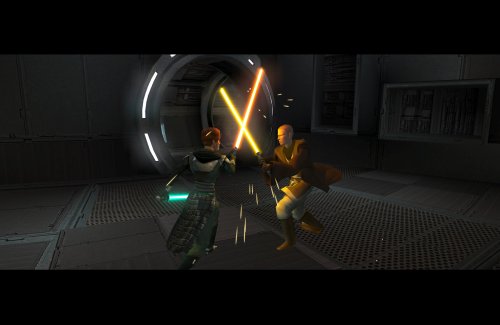
View File Expanded Jedi Training for TSLRCM Expands the mechanics of training your Jedi companions in TSLRCM. SUMMARY TSLRCM adds the ability to teach your Jedi party members a select few powers, feats, and forms. It’s a cool concept that adds to the feeling of training your companions, but it was never very fleshed out. As is, there’s a very limited pool of abilities to teach, no real player choice in what to teach, and no depiction of the training aside from a fade to black. This isn’t a fault of the TSLRCM team, there just wasn’t much to restore. The mod aims to expand the whole training mechanic to make it more interesting and immersive. Summary of the main changes of this mod: - You can now choose which abilities to teach your companions. - The pool of teachable powers, feats and forms has been significantly expanded. - Every teachable ability now includes a brief cutscene depicting the training. - Party members can learn 1 power or feat and 1 form at a time and must level up before learning more. - Different prestige classes can teach different abilities. JM/SL can teach a wider selection of powers, JWM/SM can teach more combat feats, and JW/SA can teach a mix of both. - Handmaiden and Disciple can now be trained like other Jedi companions. DETAILS INSTALLATION TSLRCM required. Ensure TSLRCM is installed first before installing this mod. To install, run HoloPatcher.exe. Select the main install option and run. Unaltered copies of any modified files will be placed inside the "backup" folder in the location of HoloPatcher.exe. If you have PartySwap installed, run the included compatibility patch. Ensure both PartySwap and the main mod have been installed first before installing this patch. UNINSTALLATION Remove the following files from override: If any files were created inside the backup folder, move them to override. COMPATIBILITY Incompatible with any mods that hard overwrite the dlg files for Atton, Bao-Dur, Disciple, Handmaiden, Mira, or Visas. Compatible with PartySwap by Darth Tyren & Leilukin using the included compatibility patch. Compatible with Visas Marr and Female Exile Romance by Leilukin. The following mods appear compatible but have not been extensively tested: Handmaiden and Female Exile - Disciple and Male Exile Romance by Leilukin Atton Rand and Male Exile Romance by Leilukin Not compatible with Mira Romance Mod by JediArchivist. Soft conflict with Train the Handmaiden by jc2 as this mod also allows training Handmaiden. BUGS Minor bug where Handmaiden doesn’t restart her idle animation after learning Burst of Speed, for some reason. Talking to her fixes it. No other bugs that I’m aware of. Please report any. PERMISSIONS You are free to use and edit this mod’s dlg files if needed to make a compatibility patch for another mod. However, please ask permission before reuploading or modifying the files for any other reason. Do not reupload any files from the PartySwap patch without permission from the author. CREDITS offthegridmorty zbyl2, DarthStoney, Hassat Hunter, VarsityPuppet & contributors - TSLRCM dlg files DarthTyren, Leilukin - PartySwap dlg files HoloPatcher - Cortisol, th3w1zard1 TSLPatcher - stoffe, Fair Strides KOTOR Tool - Fred Tetra K-GFF - tk102 AniCam - JdNoa Holocron Toolset - Cortisol, th3w1zard1 Submitter offthegridmorty Submitted 08/08/2026 Category Mods TSLRCM Compatible Yes
-
 @Lily Thanks for pointing this out. I'll upload a new version.
 -
 @itzsethgamer If it isn't letting you install, it means it isn't detecting your TSLRCM installation. Are you using the Steam Workshop version of TSLRCM? If so, it's not recommended to install other mods (read here) and I don't recommend installing the non-RCM version either. If you want to use this mod alongside TSLRCM, do a fresh install of the game and use the TSLRCM version from Deadlystream.
 -
Version 1.0.0
17 downloads
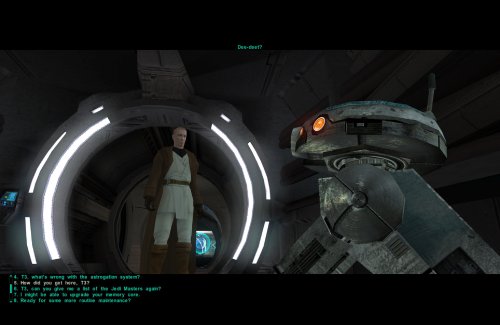
Hides tags on skill & attribute checks in dialogue. Customizable. SUMMARY This mod removes the written indicators at the beginning of skill & attribute checks in dialogue, as well as optionally success and failure tags. For example, you will no longer see “[Wisdom]” at the beginning of a line you get from having enough Wisdom, it will just be there as an option. I got this idea while playing IStewieAI’s Tweaks and Engine Fixes for FNV which has this feature, and I thought it would be interesting to see in KOTOR. I liked how it made me think a little harder about my dialogue choices, since normally I just automatically pick an option if it has a skill indicator, since it’s almost always advantageous to pick. Those options are still usually obvious and often go to the top of the list anyway, but it adds a nice bit of immersion and a little extra challenge. There are multiple versions to choose from: LITE - removes attribute tags only MEDIUM - removes both attribute & skill tags HIGH - removes attribute, skill, & persuade/intimidate tags FULL - removes attribute, skill, persuade/intimidate, success/failure, & influence tags This mod does not affect tags for using Force powers (e.g. Choke, Force Persuade, etc.) or Lie tags. If you’re new to the game, please be aware of the implications of installing any of these versions. Many conversation mechanics may become non-obvious. IMPORTANT NOTES: - For Medium version and up, this will remove all instances of text like “[Computer]” or “[Repair]” even when they are intended to indicate an option to actually use that skill, rather than just speaking from your knowledge on it. You’ll still see [X Spikes] or [X Parts] at the end of Computer or Repair options where applicable, however it’s possible some options can become ambiguous for this reason. - On rare occasions, different attributes can unlock the same line, therefore this mod can result in occasionally seeing duplicate dialogue options. - Some lines may not be affected, for example if they are added by another mod or not found in dialog.tlk. INSTALLATION To install, run HoloPatcher.exe. Select the option corresponding to the version you want and whether you have TSLRCM installed. Unaltered copies of dialog.tlk will be placed inside the "backup" folder in the location of HoloPatcher.exe. UNINSTALLATION Replace dialog.tlk in the main game folder (outside override) with the version found in the backup folder. COMPATIBILITY Compatible with TSLRCM using the TSLRCM compatible option. This mod must be installed after any other mods which hard overwrite dialog.tlk. If any other mod makes changes to lines with a dialogue check indicator, those specific lines will be overwritten by this mod. Mods which append dialog.tlk using a patcher are compatible. PERMISSIONS Do whatever you want with this mod, just give credit. CREDITS offthegridmorty HoloPatcher - Cortisol, th3w1zard1 TSLPatcher - stoffe, Fair Strides tlk2xml, xml2tlk - DrMcCoy -
Version 1.0.1
336 downloads
Expands the mechanics of training your Jedi companions in TSLRCM. SUMMARY TSLRCM adds the ability to teach your Jedi party members a select few powers, feats, and forms. It’s a cool concept that adds to the feeling of training your companions, but it was never very fleshed out. As is, there’s a very limited pool of abilities to teach, no real player choice in what to teach, and no depiction of the training aside from a fade to black. This isn’t a fault of the TSLRCM team, there just wasn’t much to restore. The mod aims to expand the whole training mechanic to make it more interesting and immersive. Summary of the main changes of this mod: - You can now choose which abilities to teach your companions. - The pool of teachable powers, feats and forms has been significantly expanded. - Every teachable ability now includes a brief cutscene depicting the training. - Party members can learn 1 power or feat and 1 form at a time and must level up before learning more. - Different prestige classes can teach different abilities. JM/SL can teach a wider selection of powers, JWM/SM can teach more combat feats, and JW/SA can teach a mix of both. - Handmaiden and Disciple can now be trained like other Jedi companions. DETAILS INSTALLATION TSLRCM required. Ensure TSLRCM is installed first before installing this mod. To install, run HoloPatcher.exe. Select the main install option and run. Unaltered copies of any modified files will be placed inside the "backup" folder in the location of HoloPatcher.exe. If you have PartySwap installed, run the included compatibility patch. Ensure both PartySwap and the main mod have been installed first before installing this patch. UNINSTALLATION Remove the following files from override: If any files were created inside the backup folder, move them to override. COMPATIBILITY Incompatible with any mods that hard overwrite the dlg files for Atton, Bao-Dur, Disciple, Handmaiden, Mira, or Visas. Compatible with PartySwap by Darth Tyren & Leilukin using the included compatibility patch. Compatible with Visas Marr and Female Exile Romance by Leilukin. The following mods appear compatible but have not been extensively tested: Handmaiden and Female Exile - Disciple and Male Exile Romance by Leilukin Atton Rand and Male Exile Romance by Leilukin Not compatible with Mira Romance Mod by JediArchivist. Soft conflict with Train the Handmaiden by jc2 as this mod also allows training Handmaiden. BUGS Minor bug where Handmaiden doesn’t restart her idle animation after learning Burst of Speed, for some reason. Talking to her fixes it. No other bugs that I’m aware of. Please report any. PERMISSIONS You are free to use and edit this mod’s dlg files if needed to make a compatibility patch for another mod. However, please ask permission before reuploading or modifying the files for any other reason. Do not reupload any files from the PartySwap patch without permission from the author. CREDITS offthegridmorty zbyl2, DarthStoney, Hassat Hunter, VarsityPuppet & contributors - TSLRCM dlg files DarthTyren, Leilukin - PartySwap dlg files HoloPatcher - Cortisol, th3w1zard1 TSLPatcher - stoffe, Fair Strides KOTOR Tool - Fred Tetra K-GFF - tk102 AniCam - JdNoa Reone Toolkit Lip Composer - seedhartha Holocron Toolset - Cortisol, th3w1zard1 -
 You can install it any time before the 2nd trip to Onderon.
 -
View File Onderonian Air Force Makes manning the turrets on Onderon matter. SUMMARY In KOTOR 2 you can use the air defense turrets on Onderon to take out the enemy fighters above the Sky Ramp. It’s a fun minigame but pretty inconsequential with no real effect on anything. You do gain some XP, but the game doesn’t even notify you of this, not helping the feeling that you didn’t really accomplish anything. This mod aims to make manning the turrets more impactful by, one, properly notifying the player of the XP gain for taking out the fighters, and two, making it so that if you don’t take out the fighters, they fire on you as you make your way up the Sky Ramp. This is accomplished in a similar way to the aerial lasers from K1, except that instead of being a static environmental threat, the lasers will actively track and target you and your allies with some degree of accuracy. A hit from a fighter deals a base 42 points of blaster damage which falls off with distance over a 6m range. Keep it moving to avoid getting hit! INSTALLATION Use HoloPatcher.exe to install. Unaltered copies of any modified files will be placed inside the "backup" folder in the location of HoloPatcher. UNINSTALLATION Remove k_505_modheart.ncs from Override. Remove 504OND.mod from Modules and, if present, replace with the version inside the backup folder. COMPATIBILITY Should be compatible with most other mods. I don't know of any incompatibilities. PERMISSIONS Please do not reupload this mod without my permission. CREDITS offthegridmorty This is a fulfillment of a mod request by Snigaroo. Credit to him for the cool idea! HoloPatcher - Cortisol TSLPatcher - stoffe, Fair Strides KOTOR Tool - Fred Tetra K-GFF - tk102 DeNCS - JdNoa, Dashus Mods in screenshot: Ultimate Onderon High Resolution by ShiningRedHD High Quality Skyboxes II by Kexikus Submitter offthegridmorty Submitted 02/05/2026 Category Mods TSLRCM Compatible Yes
-
Version 1.0.0
219 downloads
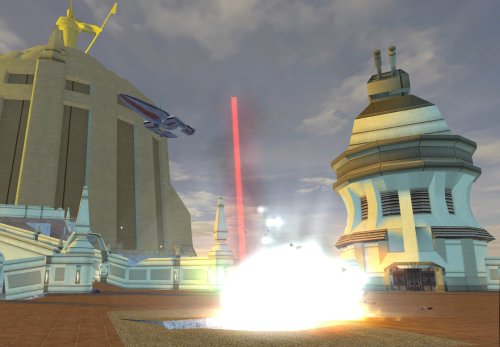
Makes manning the turrets on Onderon matter. SUMMARY In KOTOR 2 you can use the air defense turrets on Onderon to take out the enemy fighters above the Sky Ramp. It’s a fun minigame but pretty inconsequential with no real effect on anything. You do gain some XP, but the game doesn’t even notify you of this, not helping the feeling that you didn’t really accomplish anything. This mod aims to make manning the turrets more impactful by, one, properly notifying the player of the XP gain for taking out the fighters, and two, making it so that if you don’t take out the fighters, they fire on you as you make your way up the Sky Ramp. This is accomplished in a similar way to the aerial lasers from K1, except that instead of being a static environmental threat, the lasers will actively track and target you and your allies with some degree of accuracy. A hit from a fighter deals a base 42 points of blaster damage which falls off with distance over a 6m range. Keep it moving to avoid getting hit! INSTALLATION Use HoloPatcher.exe to install. Unaltered copies of any modified files will be placed inside the "backup" folder in the location of HoloPatcher. UNINSTALLATION Remove k_505_modheart.ncs from Override. Remove 504OND.mod from Modules and, if present, replace with the version inside the backup folder. COMPATIBILITY Should be compatible with most other mods. I don't know of any incompatibilities. PERMISSIONS Please do not reupload this mod without my permission. CREDITS offthegridmorty This is a fulfillment of a mod request by Snigaroo. Credit to him for the cool idea! HoloPatcher - Cortisol TSLPatcher - stoffe, Fair Strides KOTOR Tool - Fred Tetra K-GFF - tk102 DeNCS - JdNoa, Dashus Mods in screenshot: Ultimate Onderon High Resolution by ShiningRedHD High Quality Skyboxes II by Kexikus -
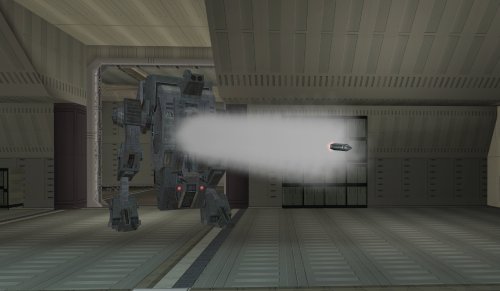
View File True Tank Droid Makes the tank droid more tank-like. SUMMARY The tank droid is a pretty cool unique enemy in TSL, but a couple of things bother me about it. I always found it disappointing that it has these giant gun barrels which look like they’re for launching missiles, like a tank, but instead it just tosses frag grenades at you. The game even has functioning rockets but for whatever reason they weren’t given to the tank droid. It also has a super high defense which makes it dodge attacks like the Matrix, which feels pretty odd. This is just a feature of the game mechanics, but it becomes particularly glaring on the tank droid. I mean it’s a giant droid, can it really be that hard to hit? This mod makes a few changes to make the tank droid more true to form. It will now shoot rockets instead of throwing grenades. These are not your average wrist rockets; they are bigger and more deadly, dealing 60 pts of piercing AOE damage. Additionally, the tank droid gets a -5 defense penalty for being a chonker but its base health is doubled and it gets Master Toughness granting -10% damage immunity. Its natural energy resistance is also reduced from -15 to -10 but it gains -5 slashing, piercing and bludgeoning resistance. Essentially you’ll miss significantly less but you’ll need more hits using the right weapons and moves to take it down. INSTALLATION To install, run TSLPatcher.exe. Unaltered copies of any modified files will be placed inside the backup folder in the location of TSLPatcher.exe. UNINSTALLATION Remove the following files from Override: c_drdmkfour001.utc, crhide_tankdroid.uti, c_tankdroid.mdl, c_tankdroid.mdx, w_roktank.mdl, w_roktank.mdx, m_imp_tankrocket.ncs, m_rnd_tankdroid.ncs, and spells.2da. If any files were created inside the backup folder, move them to Override. COMPATIBILITY Should be compatible with most other mods unless they edit the tank droid. When in doubt, install this mod after others. This mod edits the c_tankdroid model to line up the rocket with the gun barrels a little better, which will overwrite model changes made by other mods. Install after Droid Models Animation Fix by CapitaineSpoque, which this mod forwards the relevant changes from. PERMISSIONS Please do not reupload this mod without my permission. CREDITS offthegridmorty CapitaineSpoque - base tank droid model, Droid Models Animation Fix TSLPatcher - stoffe, Fair Strides KOTOR Tool - Fred Tetra KotorBlender - seedhartha Mods in screenshot: Ultimate High Resolution Pack - ShiningRedHD Ultimate Character Overhaul - ShiningRedHD Submitter offthegridmorty Submitted 02/02/2026 Category Mods TSLRCM Compatible Yes
-
Version 1.0.0
128 downloads
Makes the tank droid more tank-like. SUMMARY The tank droid is a pretty cool unique enemy in TSL, but a couple of things bother me about it. I always found it disappointing that it has these giant gun barrels which look like they’re for launching missiles, like a tank, but instead it just tosses frag grenades at you. The game even has functioning rockets but for whatever reason they weren’t given to the tank droid. It also has a super high defense which makes it dodge attacks like the Matrix, which feels pretty odd. This is just a feature of the game mechanics, but it becomes particularly glaring on the tank droid. I mean it’s a giant droid, can it really be that hard to hit? This mod makes a few changes to make the tank droid more true to form. It will now shoot rockets instead of throwing grenades. These are not your average wrist rockets; they are bigger and more deadly, dealing 60 pts of piercing AOE damage. Additionally, the tank droid gets a -5 defense penalty for being a chonker but its base health is doubled and it gets Master Toughness granting -10% damage immunity. Its natural energy resistance is also reduced from -15 to -10 but it gains -5 slashing, piercing and bludgeoning resistance. Essentially you’ll miss significantly less but you’ll need more hits using the right weapons and moves to take it down. INSTALLATION To install, run TSLPatcher.exe. Unaltered copies of any modified files will be placed inside the backup folder in the location of TSLPatcher.exe. UNINSTALLATION Remove the following files from Override: c_drdmkfour001.utc, crhide_tankdroid.uti, c_tankdroid.mdl, c_tankdroid.mdx, w_roktank.mdl, w_roktank.mdx, m_imp_tankrocket.ncs, m_rnd_tankdroid.ncs, and spells.2da. If any files were created inside the backup folder, move them to Override. COMPATIBILITY Should be compatible with most other mods unless they edit the tank droid. When in doubt, install this mod after others. This mod edits the c_tankdroid model to line up the rocket with the gun barrels a little better, which will overwrite model changes made by other mods. Install after Droid Models Animation Fix by CapitaineSpoque, which this mod forwards the relevant changes from. PERMISSIONS Please do not reupload this mod without my permission. CREDITS offthegridmorty CapitaineSpoque - base tank droid model, Droid Models Animation Fix TSLPatcher - stoffe, Fair Strides KOTOR Tool - Fred Tetra KotorBlender - seedhartha Mods in screenshot: Ultimate High Resolution Pack - ShiningRedHD Ultimate Character Overhaul - ShiningRedHD-
- 13
-
-
-
- difficulty
- rebalance
- (and 1 more)
-
 Hm, that’s a fair point. I’ll consider switching it back. Edit: I may decide to switch Twitch’s back but leave the vibrosword on Bendak. He only spams Power Attack so he’ll always some deal damage and I’m kind of OK with the armband being a way to get an edge on him without cheesing. We’ll see though.
- 4 comments
-
- 1
-
-
- difficulty
- combat
- (and 4 more)
-
I ended up with an override install because I figured there were more conflicting mods that installed to override and I didn't want individual NPCs to be overwritten since it's meant to be a comprehensive mod. But yeah good point, not sure why I didn't consider making a second option to allow for MOD-based install. I'll include it in the next update! Re armor, the difficulty curve is more important than the absolute difficulty, so since your armors get progressively stronger they should work together fine, and like you said people can mix and match.
- 4 comments
-
- 1
-
-
- difficulty
- combat
- (and 4 more)
-
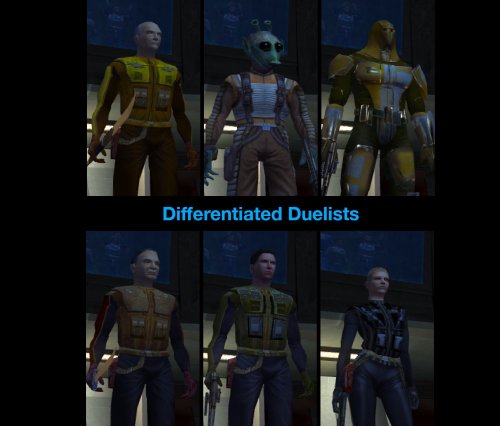
View File Differentiated Duelists Rebalance of the Taris duelists. SUMMARY This mod re-equips and rebalances the Taris duelists, aiming to give them more variety, smooth out their difficulty curve, and make the fights a bit more challenging and engaging overall. Almost all duelists have had their stats or equipment tweaked to some degree to make them more distinct in both appearance and combat while ensuring a natural progression in difficulty throughout the fights. Twitch has undergone the most extensive changes and should now be significantly more challenging. Each of the human duelists gets a different set of level-appropriate light armor, instead of all wearing the same armor as they do in vanilla. Certain duelists have had their AI tweaked for improved behavior. Detailed changes to each duelist are listed below. This mod is not intended to dramatically alter the difficulty of the dueling arena but will make it harder overall. Note this mod will only work on saves from before entering the Taris cantina for the first time. DETAILS INSTALLATION Run HoloPatcher.exe and select an install option. The default option installs the mod to the Override folder. An alternative option is included which installs to the Modules folder. If you don’t have any mods which edit these NPCs in Override but do have mods which edit them in Modules, you can use the alternative install option to prevent overwriting them. See compatibility notes for more details. Direct the installer to your game folder then press install. Unaltered copies of any modified files will be placed inside the backup folder in the location of HoloPatcher.exe. If you receive the following warning while running the alternative install option: “A resource located at ‘…\Override\…’ is shadowing this mod’s changes in Modules\tar_m02ae.mod!” then you should install the default option instead. If you have Effixian’s Taris Arena Changes installed, run the compatibility patch after running the default install option. UNINSTALLATION To uninstall from the default install option: Remove the following files from Override: tar02_bendak021.utc, tar02_gerlon021.utc, tar02_ice021.utc, tar02_marl021.utc, tar02_twitch021.utc, tar02_deadeye022.utc, m_ai_dueler.ncs, m_att_dueler.ncs, m_dmg_dueler.ncs, m_htb_dueler.ncs, m_per_dueler.ncs, m_rnd_dueler.ncs, m_spn_dueler.ncs, and m_udf_dueler.ncs. If any files were created inside the backup folder, move them to Override. To uninstall from the alternative install option: Remove tar_m02ae.mod from the Modules folder and, if present, replace with the tar_m02ae.mod in the backup folder. COMPATIBILITY Two install options are included to allow compatibility with different sets of mods that edit the same NPCs. If you are using any other mods which edit the duelist NPCs in the Override folder, you should use the default install option. However if the only other mods you have which edit these NPCs do so in the Modules folder, you can use the alternative install option to prevent overwriting them. See list of which mods are compatible with which options below. Installs to Override (use the default option if using any of these mods): Effixian’s Taris Arena Changes by Effix NOTE: Install order critical! Taris Arena Changes > Differentiated Duelists > Patch Bendak Starkiller Emblem Armour by redrob14 Installs to Modules (use the alternative option if using any of these mods and none of the previously listed mods): K1 NPC Diversity Pack - N-DReW25 NOTE: If you prefer the armors from this mod, install it after Differentiated Duelists. Galaxy of Faces - N-DReW25 If unsure, install using the default option after any other mods that edit these NPCs to ensure its full changes take effect. Twitch, Ice, and Bendak will not be affected by combat AI changes from other mods. PERMISSIONS Feel free to do whatever you want with this mod as long as credit is provided. CREDITS offthegridmorty HoloPatcher - Cortisol TSLPatcher - stoffe, Fair Strides KOTOR Tool - Fred Tetra DeNCS - JdNoa, Dashus Mods in screenshots: High Quality Blasters by Sithspecter HD Fire and Ice by Cinder Skye JC’s Blaster Visual Effects by JCarter426 Taris Dueling Arena Adjustment by DarthParametric Taris Reskin Pack by Quanon Ultimate Character Overhaul by ShiningRedHD Ultimate Taris High Resolution by ShiningRedHD Submitter offthegridmorty Submitted 01/06/2026 Category Mods K1R Compatible Yes

