Jorak Uln
-
Posts
710 -
Joined
-
Last visited
-
Days Won
64
Content Type
Profiles
Forums
Blogs
Forum & Tracker Requests
Downloads
Gallery
Store
Events
Everything posted by Jorak Uln
-
Obsidian definitely tried to cope the prequel look, but in a very poor way: http://vignette3.wikia.nocookie.net/starwars/images/c/cf/Jedi_Archives.png/revision/latest?cb=20121231115325 In the prequels obviously the holo bookshelves are much denser and shinier, but seem to contain shiny "text" animations as well: I could give it a try, but dont have access to blue ray/DVD Prequels right now, could some of you guys upload the whole scene in HD by chance?
-

Fascinating discoveries researching NWN tools
Jorak Uln replied to xander2077's topic in General Kotor/TSL Modding
One thing that gone through my mind since a long time and that i mentioned elsewhere a while ago is the implementation of new talents. In particular im very interested in the "Automatic Quicken Spell" from NwN 1 and 2 that enables realtime combat. I know that some guys said its highly unlikely to get that feat into the game but some impossible things had been made possible already.. That feat was present in an earlier version of Kotor Tool and maybe -outside the box - it can be simulated? -
 Technically, it should work with K2 as well, but its possible that some effects are spelled differently in the second game - all you have to do is to check in Kotor Tool and (if necessary) rename the tga's. I could do it, but time is short atm, and there are still some other Overhauls to be released first.
 -
Its really about time to update my old thread here - i havent had much time for modding lately, but now started again.. In the process, i developed a much different approach of doing animated panels: Until now i used just glow & a chromatic filter for the screen information layer: Old: https://m.youtube.com/watch?v=fFLMuVJ6XHw I dont know if its visible well enough, but in the new version i basically made 2 changes: 1) Simulated background glow 2) Screen infos with "fluid" animation & similar coloring like screen background: https://m.youtube.com/watch?v=mT8-S62gzSQ https://m.youtube.com/watch?v=b0f4dkFof5E So, would you guys prefer the new style in the upcoming Nar Shaddaa Overhaul? Does it look more natural like a tech panel that way?
-
Preordered the new Blood & Wine Addon for W3 - cant wait to continue that unique gaming experience!
- Show previous comments 12 more
-
-

I haven't, but I'm seriously considering upgrading my PC for it and downloading Witcher 3. It looks an amazing mod with so many views/downloads. I hate to say it but I literally didn't read up about the secondary quests and didn't collect ANY gwent cards, missed all the missions and hated myself for it, now I'm playing again haha. Just bought Bloodborne as well!
-
Yay. I still havent played through all quests either.
But if you upgrade your PC i would seriously recommend GTX 1070 or even 1080.
Fantastic cards, W3 with STLM 2.2 and only Ultimate Graphics Options Mod (on max) installed is the closest thing you can get to the 2013 Trailer and an absolute blast to your eyes.
Btw, dont own a PS4, so no Bloodbourne - but still have to beat through Dark Souls 3.
-
Welcome! I see you like Mask of the Betrayer? It was one of my first games ever, and one of the best. The plot and dark atmosphere were just phenomenal, bit like Kotor 2 which i found much better written than the first one to be honest.
-
@xander2077: your ideas sound really interesting - especially new robe & armor models (based on SWTOR??) should be an intriguing addition to the visuals of both games.
-
@DP: Ive seen you doing different models like complex alien heads like a virtuoso, but i dont want to sound pushy, just out of curiosity, would a body model be much harder to make than a new head or weapon? Off topic: Ive seen an old remake mod for Dragon Age 1 lately - Baldurs Gate Redux, and if i remember right you were also in the team. Do you know if there are any lifesigns from this project?
-
Hi guys, i have a request for you talented modelers out there: since a long time i wondered if its possible to give the Mandalorians in K1 & TSL the SWTOR looking armor: http://i46.tinypic.com/zmecgg.jpg and Mandalore/Canderous a less bulky variant: http://dulfy.net/wp-content/uploads/2013/08/swtor-mandalore-the-preserverst-armor-freelancer-contractors-bounty-pack-male.jpg That would be awesome!
-
But it looks pretty good! Though the braids in post 21 might look less Kreia-like without the golden braces. Any way to get rid of them?
-
Astro Giuseppe, Ultra Robert: thank you so much for uploading the video! Its exactly what i needed and very detailed, too. One question, at that big,round projector in the middle of the central room the displays are pink instead of green - is that a customized version? @Xuul: Thanks for the hint. I might ask Shoelace later when i can afford more time.
-
Hey guys, who of you guys plays SWTOR regulary? Due to my lack of time i cant play through the smugglers story; so i want to ask you guys if one of you could make a close-up video in first person perspective from the different Panels/screens of the XS Freighter, and - if possible - also of the other personal ships. Youtube isnt very informative on that (not zooming enough in to see all the details...); That would help me enormously on my Ebon Hawk/Harbinger/Ravager project...
-
 It has been a long time - here a short teaser of things to come... soon i hope
 -
SKIN:Animated Ebon Hawk Monitors (not including Galaxy Map)
Jorak Uln replied to Sith Holocron's topic in Mod Releases
Arent there any plugins for Photoshop which generate animations automatically for you? Since that would save you not only an awful lot of time, but also gives you the opportunity to use different ones simultanously for the same texture.. -
SKIN:Animated Ebon Hawk Monitors (not including Galaxy Map)
Jorak Uln replied to Sith Holocron's topic in Mod Releases
Very nice work SH! I like it. Does your program support animations or did you cut & paste them per hand? -
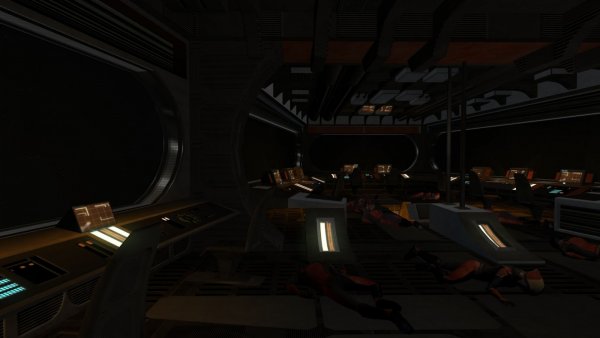 Made some refinements compared to the K1 version...
 -
Hey guys, im trying to finish my TSL Version of the Harbinger for release. One problem still stands in the way - all my textures are covered by a shadowy, low-res vanilla texture that name i cant find out: By installing Malkiors Darker Peragus redux i found out that its definitely not the Lightmaps causing this - it could be one of the splash textures... Does anyone know by chance which tex it is?
-
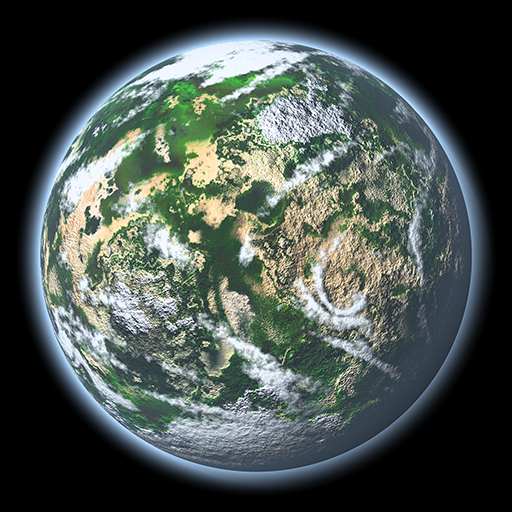 Sieht gut aus! Allerdings ist der Leuchteffekt der Atmosphäre - Corona? noch zu stark. Ich habe hier übrigens ein Tutorial gefunden, wie du ausserdem realistische Schatten erzeugen kannst: http://images.google.de/imgres?imgurl=http%3A%2F%2Fwww.artofgregmartin.com%2Fgallery%2Ftuts_arts%2Fplanet_images%2Fplanet_glow.jpg&imgrefurl=http%3A%2F%2Fwww.artofgregmartin.com%2Fgallery%2Ftuts_arts%2Fmaking_a_planet.html&h=500&w=500&tbnid=pv4AfSF0CmSMkM%3A&docid=saWE1YjoJw-blM&ei=lnzEVoqpLomH6ATT77fwCQ&tbm=isch&iact=rc&uact=3&dur=2691&page=4&start=62&ndsp=22&ved=0ahUKEwiKzM2w-v7KAhWJA5oKHdP3DZ4QrQMI4AEwPw
 -
 Hey thanks! Ive thought about dds converting, i also have some fixes/improvements in mind, but spare time is short these days...
 -
BioWare Official TGA > DDS Converter Release thread
Jorak Uln replied to Darth_Sapiens's topic in Mod Releases
the texture seems to be 1024x1024x32 -> 32 bit one. Its also a non-transparent one. Btw, in this article i read that there seem to be different settings for .dds that are particulary good/bad in handling for example transparency: DDS DXT1: Low levels of loss in RGB channel, only supports 1-bit alpha. Great compression, and uses 1/4 of the texture RAM of lossless formats. Ideal for items that aren't using detailed alpha channels. Hard to use, if you want professional results. All of the DDS formats require quite a bit of practice to get good results out of the filtering available in the DDS plugins / conversion tools available. If you don't have Photoshop, I recommend using the plugin for GIMP or ATi's Compressionator application, to get good control over the settings. However, I'm just going to be real and say that, having tried all of that out... the Photoshop plugin is markedly superior, in terms of detailed control. DDS DXT3: Low levels of loss in the RGB channel, alpha is lossy 8-bit but tends to come out "crisp", due to compression algorithm used. Uses half the texture RAM of lossless formats. Needs sharpening applied to mips for good results, and tends to work best if you accept some high contrast where you might want subtlety ideally. Good for "glow" style teamcolor, where the alpha compression is acceptable, but works fairly poorly for "paint" style, where you need more subtle alphas. Can sometimes cause major artifacts in RGB channel (blocks of area where the compression method doesn't handle the area well), which are very hard to get rid of. DDS DXT5: RGB channel is usually a little more lossy than DXT3. Alpha channel is more "soft" than DXT3. Uses half the texture RAM of lossless formats. DXT5 is tricky, and you may have to adjust sharpness / contrast between mips per piece, due to the way that the compression works- it's not as consistent as DXT3, in terms of artifacts. Alpha is better for "paint" style teamcolor. Works far worse for "glow". Artifacts may shift color values enough that it's a problem for texture2, where tiny changes in RG values make a big difference in terms of what you see in the engine. Can sometimes cause major artifacts in RGB channel (blocks of area where the compression method doesn't handle the area well), which are very hard to get rid of. Anyway, i still dont know why its not working? -
BioWare Official TGA > DDS Converter Release thread
Jorak Uln replied to Darth_Sapiens's topic in Mod Releases
Ive tried out the conversion tool for this texture: 1024x1024: its power of 2, but - however, take a look at the floor: with tga: with dds: (Note, that the white grainy pixels over the screens are from my graphics card and have nothing to do with it) any idea why its not working?
-
That shouldnt been happening. Can you PM me the pics and i'll fix it asap. Thats my Kotor 1 Complete Overhaul. Currently the modules Manaan, Sith Base and Endar Spire are released.
-
 5/5 I like it very much! Would like to see some new armors...
 -
Yes, absolutely. I did the Telos Board Overhaul when i started modding, and this mod series benefits also from things i learned when doing the K1 Complete Overhaul.
-
View File TSL ORIGINS - Telos Overhaul Unlike its predecessor, the Complete Overhaul for K1, the purpose of this texture mod is to preserve the original look of the game, while using different texturing techniques to give the old game engine a modern look, emulating shine & vector based animations from the Mass Effect series. Im sorry guys that i cant provide screenshots at the moment, my graphics card is malfunctioning. Installation: Download the file, extract its contents with an archive extraction tool such as 7zip or WinRAR, and move the contents to the override folder for your game. Enjoy! Submitter Jorak Uln Submitted 12/12/2015 Category Skins TSLRCM Compatible Yes