Leaderboard


Popular Content
Showing content with the highest reputation on 07/13/2026 in all areas
-
Version 10.2026
91 downloads
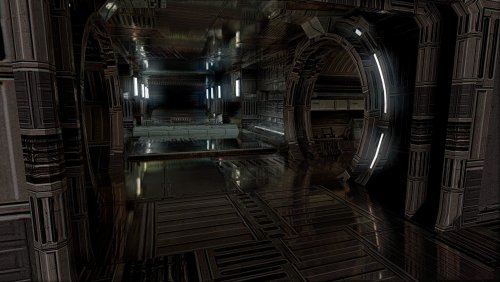
TSL HyperPixel ReShade This reshade preset has been tuned to drastically enhance TSL's native visual quality. Please note it will tax your system. TSL must be installed, then Install ReShade (With full add-on support), then install this directory into your TSL directory (where Override is, not inside Override itself). The preset is called 90SK's HyperPixel ReShade. You can edit the settings, they have been calibrated to show significantly enhanced reflections and reflective detail. It contains a collective work, not expressly created here. All credit is to the ReShade community, the KotOR and TSL Community, and to me as well.1 point -
 Another thing I'd like to add. If you use this mod with Recruit HK-47 on Taris, Yuka Laka will not have his new appearance on Taris. Only on Tatooine. Is there a way to make his appearance consistent?1 point
 -

Version 1.0.0
27,121 downloads
This mod will replace and update DrdProt texture files. To Install 1. Download: DrdProtHD 2. Copy all files to the Knights of the Old republic's Override folder. (Example location - C:\Program Files (x86)\Steam\steamapps\common\swkotor\Override) 3. When/if prompted to overwrite files, press okay. 4. If you like the mod; leave a comment or endorse! (It would be much appreciated) Made with love.1 point -
I am sharing my TSL ReShade efforts. These are screenshots from the result of this 90SK XXX reshade preset. 90SK's TSL ReShade.zip1 point
-

Version 1.0
36,439 downloads
so here is the HD visas part of my ongoing texture project series, I desired to maintain the vanilla "look", but with much higher quality textures, I feel I have sufficiently achieved this, (i took a little liberty on the dark side transitions, but they are definitely not "movie style") the usual disclaimers apply, and of course you don't need my permission to reuse this, as long as it's not for profit.1 point -

Version 1.1
71,282 downloads
A KNIGHTS OF THE OLD REPUBLIC MODIFICATION High Quality Blasters By Sithspecter Description: When Knights of the Old Republic won Game of the Year in 2004, none of the awards were for the blaster models. While the storyline and gameplay are top notch, the default weapons are sadly lacking in quality. Extremely low polygon models combined with 64 px by 64 px textures make them horrendous to look at. On my last playthrough of KotOR, I had enough of the ugly blasters. Who wants to pay thousands of credits for a terrible looking grey-ish blob that's supposed to be a top notch firearm? Nobody, that's who! So I sought out to fix this problem and provide high quality models and textures. This mod completely replaces the existing blasters with newly modeled firearms, complete with high quality textures. Special care was taken to retain the form and look of the original items, but in a high quality package. Each weapon was carefully textured based on close examination of its default counterpart. It's a much improved package that I hope will be a permanent addition to your KotOR override folder for years to come. Use: Use of High Quality Blasters is extremely easy. Put all the files in your Override folder, then play the game. That's it! The new models will automatically appear when you load up your last save. However, this mod does make a couple .uti changes to avoid doubling up on weapon textures. I've applied a new model and texture to a few items that share a model and texture in the default game. The following items are affected: Baragwin Assault Gun Baragwin Disruptor-X Weapon Baragwin Heavy Repeating Blaster Baragwin Ion-X Weapon Carth's Blaster Genoharadan Blaster What this means is that if you already have one of these items, it will still show up as high quality, but it will share a texture with another high quality item. If you re-acquire one of these through cheats or KSE, it will appear properly. If you start a new game, everything will appear properly. This will not negatively affect the gameplay in anyway. A note about the Sith Sniper Rifle: I discovered that the Sith Sniper Rifle is widely used as a blaster wielded by Sith Troopers. It looks somewhat comical used by them (predominantly fired from the hip). So, I have included something of a patch that allows the Sith Troopers to use a regular looking version of it with the new texture. The Sniper version can be found at Kebla Yurt's store in the Upper City North of Taris and in a container in the Sith Academy on Korriban. If you want to cheat more Sith Sniper Rifles that look like a sniper, use the following code: giveitem g_w_blstrrfl006 Installation: 1. Run "High Quality Blasters Installer.exe" in the zip file. 2. Follow the on screen instructions, and point the Installer to your game folder (not Override folder) 3. Profit Version 1.1: If you have installed High Quality Blasters previously, you can install this version over it and it will still be fine. However, if you want to fix the bug of the blaster randomly appearing under the Ebon Hawk on Tatooine, you must remove the following files (make sure of exact filenames): w_ionrfl_004.mdl (NOT w_ionrfl_04.mdl) w_ionrfl_004.mdx (NOT w_ionrfl_04.mdx) INCOMPATIBILITY: IF YOU HAVE TOASTY FRESH'S TOTAL WEAPON OVERHAUL OR FALLEN GUARDIAN'S WEAPON MODEL OVERHAUL TEXTURE REWORK, YOU SHOULD BE ABLE TO INSTALL THIS MOD OVER THOSE MODS WITHOUT AN ISSUE. HOWEVER: DO NOT INSTALL TOASTY FRESH'S TOTAL WEAPON OVERHAUL OR FALLEN GUARDIAN'S WEAPON MODEL OVERHAUL TEXTURE REWORK OVER THIS MOD. IT WILL LIKELY CAUSE THE TEXTURES TO BE WRONG. Bugs: Due to differences between the body models (especially female), the weapons will sometimes appear to clip the hands especially in the female off-hand). There is nothing I can do about this without introducing more issues, it is something that happens with the default weapons, and you will have to live with it. Changelog: Version 1.1: Fixed an issue where a blaster rifle randomly appeared under the Ebon Hawk on Tatooine. Fixed an issue where Bith instruments were replaced by pistols. Fixed the Assassin Droid and War Droid models to accept the high quality repeating blaster texture for their weapons. Credit: Thanks to 90SK, Fair Strides, Varsity Puppet, and Kexikus for providing feedback for this mod. Credit goes to Kexikus for the inspiration from your screenshots. They look fantastic so I modeled the screenshots for this modafter your High Definition Skyboxes mod. Permissions: Do not upload this mod or assets from this mod, modified or not, to other sites without my express permission. I have uploaded this mod to multiple sites and can provide support on those sites. Legal: THIS MODIFICATION IS PROVIDED AS-IS AND IS NOT SUPPORTED BY BIOWARE/OBSIDIAN ENTERTAINMENT, LUCASARTS, DISNEY OR ANY LICENSERS/SPONSORS OF THE MENTIONED COMPANIES. USE OF THIS FILE IS AT YOUR OWN RISK AND THE ABOVE MENTIONED COMPANIES OR THE AUTHOR IS NOT RESPONSIBLE FOR ANY DAMAGE CAUSED TO YOUR COMPUTER FOR THE USAGE OF THIS FILE.1 point -

Version 1.0.0
589 downloads
This mod will add upscaled textures for the Manaan part of the game. Except the skies, see note below. All textures are now 4x their original size. Example a 128x128 becomes 512x512, etc... I've not gone up to the 4096x4096 sizes as I don't see what that would add to this older game. A few textures do get to this size, example is the Ebon Hawk. Normal maps have also been redone, rerendered not just upscaled. It's still a 400% improvement on the older files. Have a peek at the screenshots and: Enjoy! Minor note: No the Sith base is not included, this is a separate texture set within the game, it gets used on various other locations to. So it'll be a pack on its own. Sky textures are made by the awesome Kexikus get them here: => https://deadlystream.com/files/file/723-high-quality-skyboxes-ii/ => https://www.nexusmods.com/kotor/mods/69 For the best looking Cantina signs, pick up this mod by SithHolocron: => https://deadlystream.com/files/file/1135-animated-manaan-cantina-sign-for-kotor1/1 point -

Version 1.0.0
601 downloads
This mod will add upscaled textures for the Sith bases, Taris, Manaan, and Malaks ship, the Leviathan, you explore in the game. All textures are now 4x their original size. Example a 128x128 becomes 512x512, etc... I've not gone up to the 4096x4096 sizes as I don't see what that would add to this older game. A few textures do get to this size, example is the Ebon Hawk. Normal maps have also been redone, rerendered not just upscaled. It's still a 400% improvement on the older files. Have a look at the screenshots and; Enjoy!1 point -
Version 1.0.0
552 downloads
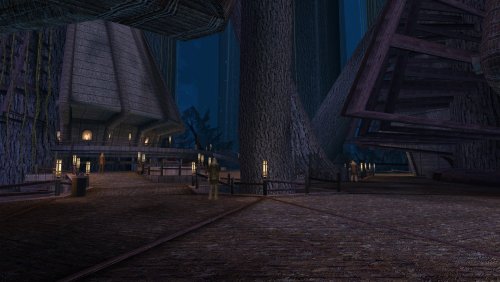
This mod will add upscaled textures for the Kashyyk part of the game. Except the skies, see note below. All textures are now 4x their original size. Example a 128x128 becomes 512x512, etc... I've not gone up to the 4096x4096 sizes as I don't see what that would add to this older game. A few textures do get to this size, example is the Ebon Hawk. Normal maps have also been redone, rerendered not just upscaled. Also included are the textures used by the Czerka Offices on Kashyyk and a few other places in the game. It's still a 400% improvement on the older files. Enjoy! Sky textures are made by the awesome Kexikus get them here: => => https://www.nexusmods.com/kotor/mods/691 point -

Version 1.1.0
913 downloads
This mod will add upscaled textures for the Dantooine part of the game. Except the skies, see note below. All textures are now 4x their original size. Example a 128x128 becomes 512x512, etc... I've not gone up to the 4096x4096 sizes as I don't see what that would add to this older game. It's still a 400% improvement on the older files. Have a peek at the screenshots I made and; Enjoy! Sky textures are made by the awesome modder Kexikus get them here:1 point -
AI DISCLOSURE & FEEDBACK I use AI often in my workflows to assist with creating my mods, including handling monotonous and repetitive tasks. You should assume that anything I post has had AI assistance in some way. As I stated in my Dathomir WIP post, I expect discussion of my projects to remain professional and focused on the actual artwork, performance, and gameplay. Constructive criticism that helps improve the art or gameplay is welcome. Derogatory statements about AI will be ignored. I am here to improve the finished product, and I will not change my workflow to accommodate personal objections to AI. Hey everyone! I'm ShaolinGhost, a second-year Game Design student at AAU finishing my bachelor's degree and moving onto my Masters this year. I'm working on both of these tools as part of my thesis project, and I'm super excited to share what I've been building. Why I'm Making This KotOR isn't just my favorite game. It literally shaped how I see video games and the world. I played it when I was a kid, and it's stuck with me ever since. That's the whole reason I want to do this: give modders and game devs a toolkit that actually feels like real game development software. Right now, modding KotOR is awesome, but the tools are spread all over the place. You bounce between different programs, learn different interfaces, and it's honestly kind of a pain. I want to fix that. My goal is to bring KotOR modding and the game itself to Unity with a professional-grade modding kit. Two tools that work together perfectly: GhostRigger-K1-K2 — Your all-in-one 3D model editor (import/export, rigging, texturing, the whole pipeline) GhostScripter-K1-K2 — Your IDE for writing quests, dialogues, scripts, and managing everything else Both tools are built to feel like actual game development software based purely off of my experience using things like RizomUV, Zbrush, Maya, Topogun, Acurig, UnrealEngine etc. clean dark theme, intuitive layouts, everything in one place. What GhostRigger Can Do Browse and load any KotOR model directly from your game files Real-time 3D viewport with orbit, pan, zoom, and wireframe view Import your own models from OBJ or FBX (sculpt in ZBrush/Maya, bring it in) Auto-rigging to KotOR skeleton templates Manual Rigging in the tool supported Export back to KotOR format, compile, and test in seconds Handle all your textures (TGA → TPC conversion, UV viewing, the works) Basically: Sculpt your stuff outside, import it clean, and let GhostRigger handle the KotOR technical stuff. What GhostScripter Can Do Script Editor — Write NWScript with full syntax highlighting, auto-complete, and a built-in function reference Dialogue Editor — Build dialogue trees visually with a node-based graph (way easier than text editors) Quest Builder — Templates that scaffold out quests automatically with the right variable names and structure 2DA Manager — Edit spreadsheets like globalcat.2da without pain One-Click Export — Push your mod straight to the override folder or package it as an ERF It all connects together. You can even rig models in GhostRigger, and GhostScripter will automatically pull them in. What I'm Looking For I want to make sure these tools actually solve real problems for modders. So I'm opening this up for feedback: For GhostRigger: What features would make rigging faster for you? Are there things you wish you could do that other tools make hard? What about the workflow? Does the architecture I stated so far feel natural? For GhostScripter: Should I add a visual quest state editor, or is the current form good? Would a script dependency checker (find broken references) be useful? What about integrating a decompiler so you can edit existing mods? Any other QoL features you'd want in an IDE? Drop your thoughts in the replies! I'm building this for the community, and I want to make sure it's something you'll actually use. Timeline & Release Right now, both tools are functional and I'm actively testing them. Once I've verified that all the core features work smoothly and reliably, I'll release them for public use and testing. I want to make sure they're stable and solid before I put them in your hands. I'll keep you posted on progress, and when they're ready, you'll be the first to know!


 0 points
 -
https://github.com/CrispyW0nton/Kotor-3D-Model-Converter/tree/qt-ghostrigger Development Update: GhostRigger Has Taken a Big Step Forward Hey everyone, I wanted to post an update on GhostRigger because the project has been moving fast lately. The short version: GhostRigger is still very much a WIP, but it has grown from a basic model viewer / importer concept into a much more serious KotOR development toolkit. A lot of recent work has focused on making the tool feel less like a loose utility and more like professional game-dev software for working with Odyssey/Aurora assets. Major Recent Progress GhostRigger now has much stronger support for: Loading and browsing KotOR 1 and KotOR 2 game assets directly from the game directory Rendering MDL/MDX models in a modern Qt viewport Texture handling improvements, including fixes for wrapping/clamping issues on module and character textures Better module/area model categorization and labeling Improved viewport controls, including transform/gizmo work Measurement tools for inspecting models and scene scale A new lighting system inspired by the Aurora/Odyssey render pipeline Experimental lightmap baking tools Better module rendering, including ongoing work around baked lightmaps MCP tooling for automated inspection, validation, and asset transfer workflows Continued work on the Character Builder pipeline One big area of research recently has been KotOR’s “mesh objects as bones” system. KotOR does not use a modern armature system like Blender, Unity, or Unreal. Instead, the named MDL node hierarchy itself is the skeleton, and many _g meshes are both visible geometry and animation bones. That changes how the Character Builder needs to work. The “Build Skeleton” step is being reworked around this native KotOR logic instead of trying to force modern FBX armature assumptions onto the game. Character Builder Direction The Character Builder is being reshaped around a clearer workflow: Choose a base KotOR model/skeleton Load the custom mesh Align the mesh to the KotOR skeleton Assign/build the KotOR node hierarchy correctly Assign or preview animations through the supermodel chain Preview heads, weapons, equipment, and attachments Export a game-ready MDL/MDX There is still work to do here. I do not want to pretend this is launch-ready yet. The goal is not just “can it import a model,” but “can a KotOR modder actually use this smoothly to get a model in-game without fighting the tool.” That means the rigging, preview, animation assignment, texture handling, and export flow all need to feel reliable. Huge Thanks to LordVader I also want to give a major shoutout to LordVaderCW, who has been contributing a lot of important work through his fork. Recent collaboration from LordVader has brought in substantial improvements, including: A new Aurora-style lighting system A new transform gizmo system Measurement tooling Experimental lightmap baker work Lightmap/rendering patches Fixes around rendering artifacts, including Windows-specific GPU issues General cleanup and modernization across the Qt branch This collaboration has been extremely helpful. A lot of the recent progress is coming from comparing approaches, merging work, testing real KotOR assets, and trying to make sure GhostRigger behaves like a proper KotOR tool rather than just a generic model viewer. Current Focus Right now the main priorities are: Making module rendering more accurate Improving lightmap and texture correctness Continuing the Character Builder rework around native KotOR skeleton logic Making the viewport/gizmo workflow smoother Building a real animation and equipment preview system Making sure exported assets are structurally valid for K1 and K2 The big question I keep coming back to is: would this actually help a KotOR modder get a custom model into the game faster and with fewer headaches? That is the standard I am aiming for. Thanks again to everyone who has been following the project, and especially to LordVader for the recent collaboration. There is still a lot to do, but GhostRigger is becoming much closer to the kind of full game-dev toolkit I originally wanted to build for KotOR.0 points