Leaderboard



Popular Content
Showing content with the highest reputation on 12/29/2025 in all areas
-
![More information about "Bao-Dur Jedi Robe Variants - [ORIGINAL MOD NEEDED]"](https://deadlystream.com/downloads/screens/monthly_2026_01/3.thumb.png.b60f8dcdf9a96dc98bb6b6043436c536.png)
Version 1.1.0
201 downloads
Five variants for the textures of the 2 armors added by Sheam for BaoDur. ----------------- INSTALATION: 1. Install "Bao-Dur Wears Jedi Robes" by Shem https://deadlystream.com/files/file/741-bao-dur-wears-jedi-robes/ 2. Choose one of the reskins you prefer and replace them in the override folder. ----------------- Donations: If you want to support my work you can here: buymeacoffee.com/kirin117 ------------------ Acknowledgements: Shem - For "Bao-Dur Jedi Robe" --- https://deadlystream.com/profile/17254-shem/ 90SK and L0rdReV@n88 - For the textures at variant 2 --- https://deadlystream.com/profile/8934-90sk/ DARTH DARKUS - For the textures at variant 3, 4 and 5 Kaidon Jorn - For the new textures --- https://deadlystream.com/profile/8962-kaidon-jorn/1 point -
 Try using this TSLPatcher, which came from an older version of KOTOR 1 Community Patch with fixes that are required to install my Handmaiden/Disciple romance mod properly. Install.exe1 point
 -
Blender has built-in GLTF support, so the GLB would be your best bet. Note that the model was textured for a modern PBR rendering pipeline. KOTOR uses an extremely basic Blinn-Phong based renderer, so you'll need to convert the textures to work with that. Fortunately it's an extremely simplistic set of metals for the most part. Unfortunately, KOTOR doesn't support specular, but instead tries to fake it with cubemaps. Getting metal to look good is challenging. One other thing of note is that while KOTOR does support normal maps, its implementation is poor, so detail relying on normal maps won't show up as well. As to the use, you don't need to request permission. It's already licensed for use with attribution. That's the entire point of the license.1 point
-
Broadly, you would need to: Convert the model from one of its currently supported formats to the MDL/MDX format supported by the game. This can be done in a 3D modeling program by importing the model together with one of the existing game models and making some adjustments. Change the item's item type to something else (e.g. Long Sword) by modifying the BaseItem field in the item UTI file. Here is a list of common modding tools. It isn't complete, but it's a good start. Additionally, you would need Blender, 3ds Max, or Gmax for the first part.1 point
-
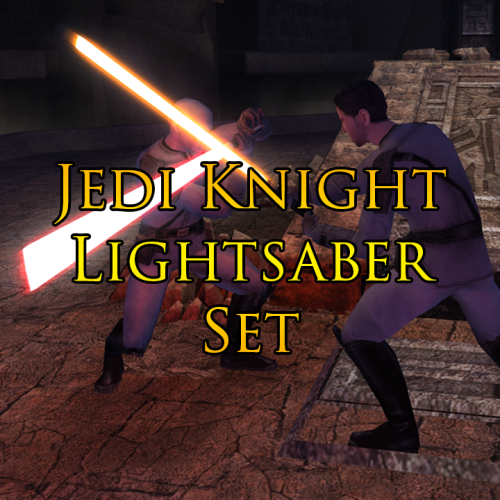 Got it. Only using latest saber mods you've made anyway.1 point
 -
@Rohndo Did you make sure you download the latest version of my mod? Your screenshot shows you are using TSLPatcher to install my mod, which should not happen since I have already replaced TSLPatcher with HoloPatcher as the installer of my mod. I suggest you download my mod and then try to install my mod again..1 point
-

4,558 downloads
Original Review on Filefront: Anyone remember the history to do with this? A while ago (well over a year) on Holowan, getting Bao-Dur into Jedi robes was all but impossible - the models simply didn't mesh, and his head always floated above the robes some. Thankfully, Kristy Kistic was able to remedy the issue, but the mod was never released - until now, that is. Well, it basically does what I said there - fixes Bao-Dur's head, and causes it to no longer float above his head when he wears any robes. A much-needed fix indeed, for those of you who like to train him as a Jedi. Kudos to Shem for bringing this to the public at long last, and Kristy for making it in the first place! Anyways, to install this thing just run the TSLPatcher - it modifies appearance.2da. And also remember to cheat in one of his robes if you install this mod while having Bao-Dur in your party - the codes are 'baodurjedi' and 'baodursith' for the respective light and dark side-aligned ones. Note: Please remember to give the author of the mod feedback, as the download count isn't particularly verbose. Written comments tend to be much more useful and encouraging. -Emperor Devon1 point -
Version 1.0.0
35 downloads
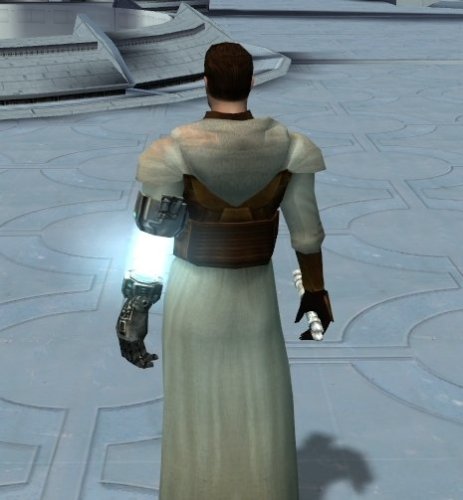
Description This mod is a modder's ressource, and will not include anything in game. I was unhappy with Bao dur's models animations while porting him into k1. I figured i would scrap the arm and tie it to a scout model, which bear the same size properties. This ressource contains a completely new male body appearance, with bao dur severed/robotic arm, bao dur animation as unarmed to see the model in action, and complete support for all the vanilla items in the game. You can tie any head to the model aswell. So you can do a lot of thing with this, make a new playable character or bring new npc appearances. The textures provided only cover vanilla + some extras (as i use my override folder, i have few modder textures i provided aswell). They are 1024x512 to allow the arm uv mapping into a single texture. Atm the textures are low res, im gonna update this someday, at least to 2048x1024. Video showcase for the ressource Disclaimer : There are few combat animation glitches, the arm is not totally under the gun for rifles for instance, or is not "exactly" at the perfect position for dual hand melee weapons. There is clipping with heavy armors especially. Otherwise after playtesting everything else seems fine. Some armor textures have conflicted properties with .txi. When cm_bright was applied, i deleted alpha channel to the arm so the armor keeps the original effect, but the arm metal won't be reflective. I deleted alpha channels for robes to deal with transparency/metal reflection. I provided the unedited textures aswell. Obviously models have unique names to prevent conflict with other vanilla models in game and between each other. Installation and how are the files ordered : - The folder "Add the appearance" contains an executable that will add everything to your game override and create a single new appearance row in appearance.2da that bears the mullet man head and white skin. You can manually change the head inside appearance.2da if you wish to, this is a ready to go install and you simply have to give the appearance to npcs or anything. The black/asian skins are located in the ressources folder/underwear. - The folder "ressources" contains everything related to the mod itself (body models and textures). The textures contained within the base appearance folders (robes, clothing, armors ...) are unedited, which mean there will be bad interactions regarding alpha layers and .txi i attributed. - The "edited textures" folder contain my ready to go texture, i edited the alpha layers there so maybe you prefer tweaking the base textures. - The "supermodel" folder contains Baodur base model/textures (you can use it if you want to) and contains the animation information to perform the unarmed attack. I tied every models to baodur base one as a supermodel to allow the custom attack animation. If you want to get rid of this, simply change every model's supermodel to s_female02. - The texture for bao dur arm is provided aswell in a single folder. Credit: @DarthParametric, i totally stole his entire process to make Kel dor models possible via his modder's ressource. Kotor discord channel for insights on developping mods for this awesome game. Permissions: Feel free to use my work, just a simple credit.1 point