Jump to content

12 Screenshots

About This File

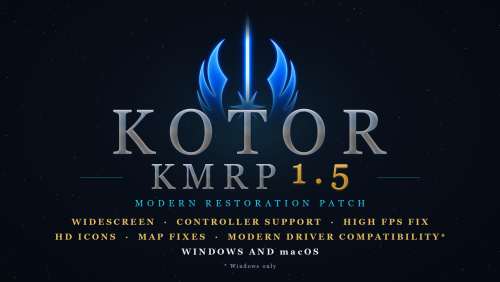
KMRP - KOTOR MODERN RESTORATION PATCH

Any resolution, properly scaled UI, controller support and engine fixes for KOTOR 1

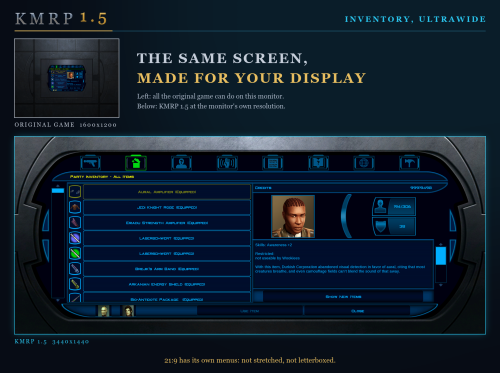
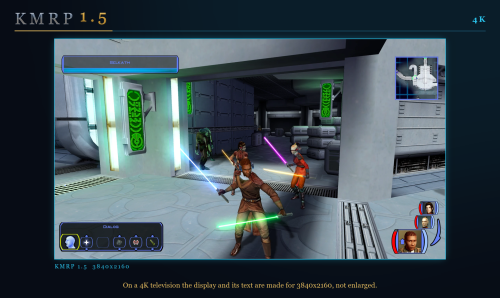
Any resolution | 800x600 to 8K | 4:3 | 16:10 | 16:9 | 21:9 | 32:9 | Windows and macOS

━━━━━━━━━━━━━━━━━━━━━━━━━━━━━━━━━━━━━━━━

WHAT IS KMRP?

Vanilla KOTOR was built around fixed pixel sizes and interface layouts designed for resolutions such as 640x480.

On modern displays this causes tiny text, overlapping list entries, undersized icons, broken map scaling and other interface problems.

KMRP fixes these problems in the game engine itself.

One installer, one click, and one click to undo everything. It changes how the game looks, fits and controls, and nothing about its story, quests or balance.

━━━━━━━━━━━━━━━━━━━━━━━━━━━━━━━━━━━━━━━━

WHAT IS NEW IN 1.5

  • No resolution to choose. The game starts at your display's own resolution. Its Screen Resolution setting lists every size and refresh rate your display supports, and a change takes effect at once, with no restart and no patching again.
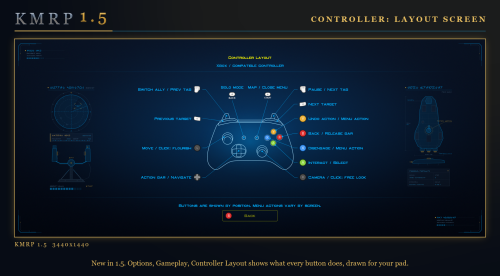
  • Controller support, built in. A controller works on every screen, with the right button pictures for your pad (Xbox or PlayStation), rumble and a Controller Layout screen.
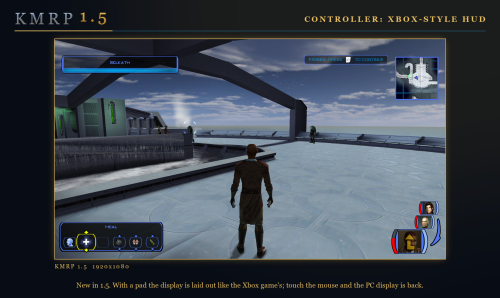
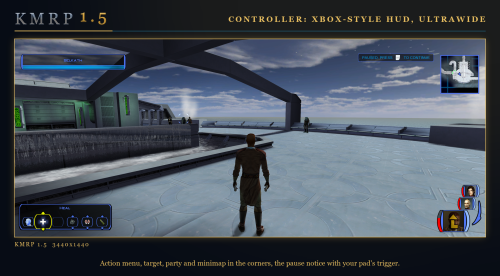
  • Xbox-style HUD. Modelled on the console version. On by default, can be switched off.
  • Above 60 frames per second. An option installs D3M0's High FPS Fixes, switched on by itself above 60 Hz.
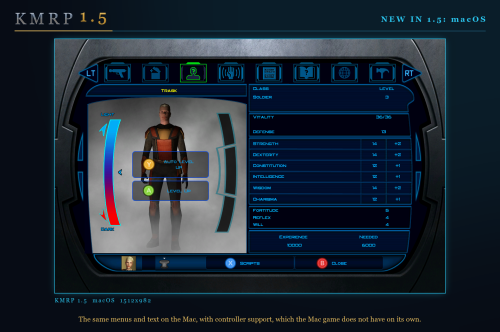
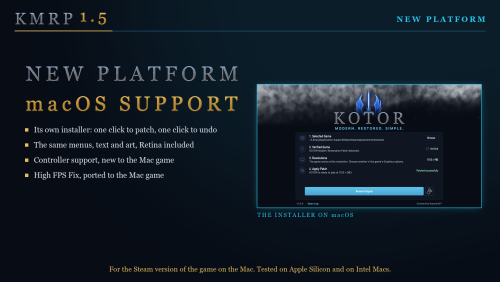
  • macOS. The Steam game, on Intel and Apple Silicon Macs, with its own installer.
  • swkotor.exe is no longer rewritten. On Windows the changes are applied in memory each time the game starts, through KOTOR Patch Manager's runtime.

━━━━━━━━━━━━━━━━━━━━━━━━━━━━━━━━━━━━━━━━

WHAT IT FIXES

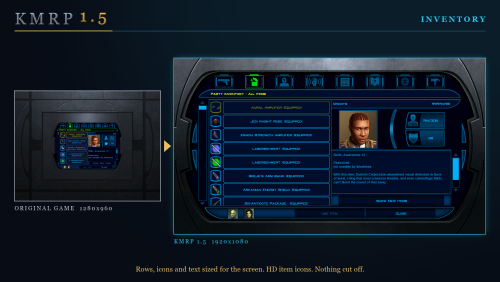
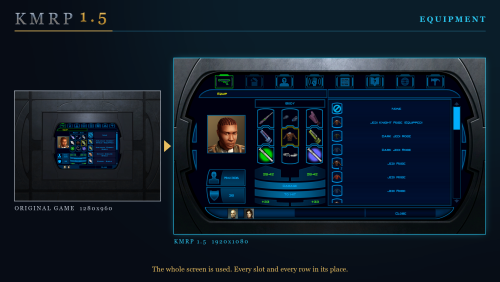
  • Readable text with properly scaled list rows
  • Inventory, Abilities and Store icons and rows scale correctly
  • Item stack counts remain visible with larger fonts, in the inventory and in shops
  • Popups and check boxes grow with the screen
  • Long item description crash fixed, along with several rare crashes
  • Area map fills its frame, fog of war covers the complete map, markers scale and are clicked where you see them
  • HUD minimap follows your character
  • Movies play at the game's resolution, with no switch to 640x480, and are not cropped on wide screens
  • HD art: higher-quality portraits, item icons and menu art

Every shape from 4:3 to 32:9 is covered, from 800x600 up to 8K: 66 common resolutions have menus built for them, and any other size gets menus fitted to it.

━━━━━━━━━━━━━━━━━━━━━━━━━━━━━━━━━━━━━━━━

PLATFORMS

  • Windows: the Steam, GOG and disc 1.03 versions. The installer checks the game's file before doing anything and refuses any other build.
  • macOS: the Steam game, on Intel and Apple Silicon Macs.
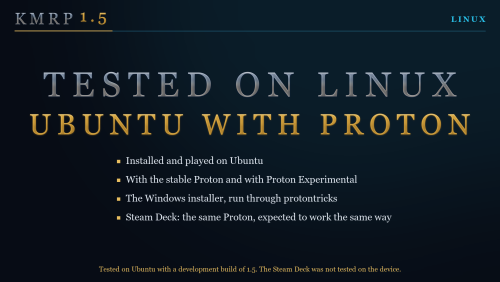
  • Linux: the Windows installer was tested on Ubuntu with Proton. No Steam Deck was tested.

━━━━━━━━━━━━━━━━━━━━━━━━━━━━━━━━━━━━━━━━

INSTALLATION

  1. Install other content mods (K1CP, K1R and so on) first.
  2. Start the game once so its settings file exists.
  3. Run the KMRP installer and press Start Patching. There is no resolution to pick.
  4. To undo everything, run it again and press Restore Original.

If you use KOTOR Patch Manager, KMRP's two patches are listed there and other patches can be added beside them.

━━━━━━━━━━━━━━━━━━━━━━━━━━━━━━━━━━━━━━━━

INSTALLER OPTIONS

  • Controller support, and with it the Xbox-style HUD
  • High FPS Fix (D3M0's High FPS Fixes)
  • HD item icons
  • Map-note corrections (Derslok)
  • Driver compatibility for lighting, fog and shadows on modern graphics cards (Synchro)

━━━━━━━━━━━━━━━━━━━━━━━━━━━━━━━━━━━━━━━━

COMPATIBILITY

KMRP 1.0 was tested with KOTOR 1 Community Patch 1.10.0 and KOTOR 1 Restoration 1.2. Install those first, then KMRP.

━━━━━━━━━━━━━━━━━━━━━━━━━━━━━━━━━━━━━━━━

CREDITS

  • ndix UR: KOTOR High Resolution Menus 1.5
  • Synchro: K1 Modern Driver Compatibility 1.2.0, and published area-map research
  • Derslok: K1 Area Map Fixes
  • D3M0: High FPS Fixes
  • Lane Dibello and the KOTOR Patch Manager project: the runtime KMRP's patches run on
  • MadDerp: Party Portraits
  • JackInTheBox: KOTOR 1 HD Icon Pack 1.0
  • RaymanGT: HD menu and UI asset set
  • Xelu: Free Controller & Key Prompts

Bundled work is included with its authors' permission or under its licence. Full notices are in the repository.

━━━━━━━━━━━━━━━━━━━━━━━━━━━━━━━━━━━━━━━━

SOURCE AND CHANGELOG

github.com/RayesDiyab/KMRP-KOTOR-Modern-Restoration-Patch

Licence: GPL-3.0. Unofficial; you must own the game.

Edited by RaymanGT
Description Edit


What's New in Version 1.5.0

Released

KMRP 1.5: the biggest update since release.

Resolution and display

  • No resolution to choose in the installer. The game starts at your display's own resolution.
  • The in-game Screen Resolution list shows every size and refresh rate your display supports, each listed once.
  • Changing resolution in the game takes effect at once, with no restart and no patching again.
  • Any resolution works, not only listed ones. 66 common sizes have menus built for them; any other size gets menus fitted to it.
  • Connect another display, a 4K television for example, and its resolutions appear by themselves.
  • The mouse stays inside the game window in fullscreen.
  • The game comes to the front when it starts.

Text, lists and menus

  • Menu and dialogue text is drawn at the size it was rendered at, so it is sharp.
  • Text no longer runs over the right edge of its box.
  • List rows sit as far from their box's left border as from its right.
  • Lists are as tall as whole rows, spaced like the inventory's.
  • Skill rows are as tall as the Feats and Powers rows, and skill icons grow with them and sit inside their frames.
  • The journal shows six quest rows, spaced like the inventory's.
  • Item icons sit in their slots at the game's own size.
  • The target's action buttons are no longer cut off.
  • The combat-mode message reads in full, on one line.
  • The status summary fits its text and no longer crowds its right edge.
  • Popups with long text make a wide box at high resolutions, not a tall, narrow one.
  • Stack counts in shops sit in the icon's lower right corner, like the inventory's.
  • Feedback Options: the circles no longer sit on the scrollbar. Script Selection: the option rows are centred.
  • The one-frame white flash in the in-game menus is gone.

Movies

  • Movies play at the game's resolution, with no switch to 640x480 and no flicker.
  • Movies are no longer cropped on a screen wider than the movie.
  • Controller buttons can skip movies.

Controller support (new)

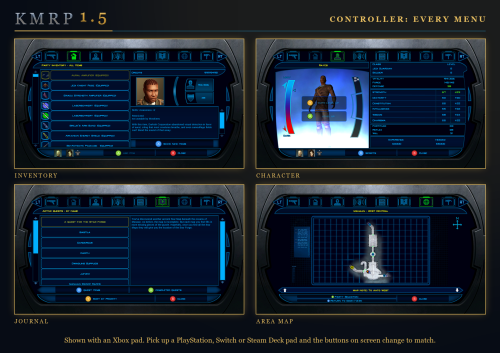
  • A controller works on every screen: menus, character creation, level up, settings, shops, Pazaak, dialogue.
  • Button pictures on every menu, matching your pad (Xbox or PlayStation), shown from the first frame and following the pad you use.
  • Rumble, using BioWare's own 22 patterns, with three settings.
  • A Controller Layout screen.
  • D-pad moves through every list and setting; holding a direction scrolls.
  • Start opens the Map and closes the menu; R3 changes which party member a menu shows; LT and RT switch menu tabs.
  • In combat, X disengages and Y cancels the last queued action.
  • An A beside the highlighted dialogue reply and beside the focused button in Yes/No boxes.
  • Controller support is also a patch of its own, "KOTOR 1 Native Controller Mod + Xbox HUD", which works without the rest of KMRP and on any interface mod.

Xbox-style HUD (new)

  • A HUD modelled on the console version, on by default and switchable.
  • It follows the device in use (pad or mouse) and fits any screen.
  • Its frames are redrawn and its portraits framed alike.

High frame rates (new)

  • High FPS Fix option, installing D3M0's High FPS Fixes. Switched on by itself above 60 Hz.

macOS (new)

  • KMRP for the Steam game on the Mac, with its own installer, on Intel and Apple Silicon.
  • Same features as Windows: resolution chosen in the game, controller support as its own patch, High FPS Fixes, HD icons as an option.

Linux

  • Tested on Ubuntu with Proton. No Steam Deck was tested.

Installer

  • The game's own file is no longer rewritten; changes are applied in memory each time the game starts, through KOTOR Patch Manager's runtime.
  • KMRP is now two patches, each working without the other, so other KPM patches can sit beside them.
  • Finds Steam's and GOG's KOTOR by itself, and accepts GOG's own executable.
  • Optional parts are independent: controller support, Xbox-style HUD, HD item icons, map notes, High FPS Fix.
  • Says when a newer KMRP is out.
  • KMRP's patch is half the size: 129 MB instead of 249 MB.

Crashes and faults fixed

  • Loading a save from in game no longer crashes.
  • Level Up no longer opens twice and freezes the game.
  • Character creation no longer crashes on A; the Name screen stays open after A.
  • The status summary no longer crashes after a D-pad press.
  • R3 free look no longer crashes the game.
  • Answering a dialog no longer acts on the world behind it.
  • A on a door works again after an action slot had the focus.
  • Several faults after changing resolution in the game: ability rows, the first party portrait, the pause box and conversation text.
  • Controller button pictures on container screens are no longer tiny.

Full changelog and downloads: KMRP 1.5.0 on GitHub

  • Like 7
  • Influence Gained 2
  • Light Side Points 2

User Feedback

Recommended Comments

barachiel

Posted

Mod itself works great.

One compatibility error, I'm trying to use this with K1 Cutscenes Rescaled (specifically the 3440x1440 version), and the movies don't play right when used with this mod.  

  • Like 1
vorynsdagoth

Posted (edited)

It's not working for me :c Everything's huge and just blown up into the left corner; I can't see anything at all, even after following the instructions and ensuring it was the correct resolution.

EDIT: Fixed that problem by forcing the DPI scaling; however, it lags and stutters something fierce on my native resolution.

Edited by vorynsdagoth
LordMerek

Posted

13 hours ago, barachiel said:

Mod itself works great.

One compatibility error, I'm trying to use this with K1 Cutscenes Rescaled (specifically the 3440x1440 version), and the movies don't play right when used with this mod.  

Yes 100% noticed this, cutscenes are completely borked if you try to use any type upscaled cutscenes mod with this one. This needs to be fixed ASAP to prevent the game from minimizing which is very much still present even if you don't install an upscale mod.

RaymanGT

Posted

16 hours ago, barachiel said:

Mod itself works great.

One compatibility error, I'm trying to use this with K1 Cutscenes Rescaled (specifically the 3440x1440 version), and the movies don't play right when used with this mod.  

I will look into it, thank you for the feedback

  • Like 1
N-DReW25

Posted

Might I suggest a rename of the mod.


With no context as to what this mod was, clicking on it all I see is "KMRP - KOTOR Modern Restoration Patch" alongside many screenshots of Manaan. At first glance, I thought this was some sort of restored content mod and the Manaan screenshots were the Pazaak Tournmanent.


Of course, once you actually read the mod page and the screenshots with text it becomes quite clear that this isn't a restoration mod. However, do consider that many in the Kotor community use Snigaroo's Mod Builds to mod their game and since the mod build is just a list of mods with no screenshots having a name like KMRP - KOTOR Modern Restoration Patch is bound to cause some confusion with casual players.


If you were to rename it, I would suggest you replace/drop the word "restoration" as that word is shared between three different mods which do completely different things.


Kotor 1 Restoration: The K1 restoration mod of the 2010s which is now largely broken, abandoned, and incompatible with the widely used K1CP.

KMRP - KOTOR Modern Restoration Patch: Your mod, a mod which patches and fixes the default screen resolution of Kotor.

Restored Content for the Kotor 1 Community Patch: The K1 restoration mod of the 2020's which is still in development and is made specifically for the widely used K1CP.

Zantos_Endar

Posted

For reasons beyond me, this mod seems to be incompatible with  Trask Ulgo Without Tutorials by Leilukin, and the now-depreciated Tutorial Remover by darthbdaman. Having either of them installed causes the game to crash while trying to load the Endar Spire after character creation. Strangely, darthbdaman's Jedi From the Start does not have this issue.

PoopaPapaPalpatine

Posted (edited)

My cinematics aren't playing scaled to my monitor but other than that, this is such a great mod!

Edited by PoopaPapaPalpatine
RaymanGT

Posted

13 hours ago, Zantos_Endar said:

For reasons beyond me, this mod seems to be incompatible with  Trask Ulgo Without Tutorials by Leilukin, and the now-depreciated Tutorial Remover by darthbdaman. Having either of them installed causes the game to crash while trying to load the Endar Spire after character creation. Strangely, darthbdaman's Jedi From the Start does not have this issue.

I will look into it 

Thank you

12 hours ago, PoopaPapaPalpatine said:

My cinematics aren't playing scaled to my monitor but other than that, this is such a great mod!

Will be fixed in the next update!

  • Like 1
  • Light Side Points 1
Zantos_Endar

Posted (edited)

After working through my mod list (which is essentially an edited version of Snigaroo's build), I have narrowed down some incompatibilities. The following mods cause the game to crash to desktop after character creation. The game loads fine with all of them installed together without this patch. If a save is made without widescreen, then reloaded after patching in widescreen, the game will run until it tries to load a new module, at which point it will crash during the loading screen.

Trask Ulgo Without Tutorials

High Quality Starfields and Nebulas

NPC and PC HD Pack

Dark Side Ending Cutscene Enhancement

Dark Sacrifice Romance Enhancement

Weapon Model Overhaul

Juhani Real Cathar Head

Thematic Companions

Sentinel Sneak Attack

Manaan Pazaak Tournament

Considering my list consists of over 130 mods, only 10 incompatibilities is very good showing, yet baffling. I have no idea what commonality these mods have that causes the exact same crash. Some are loose files, others use patchers. Some edit modules, some tweak combat settings, some are just model or texture replacers. And I have several other mods installed that do those sorts of things without causing a crash. Several only make modifications to later areas (two only modifying the very last cutscene) and yet the game fails to load the intro.

Incompatibilities aside though, this really is an exceptional enhancement on its own. Really appreciate the amount of work that went into this.

Edited by Zantos_Endar
  • Like 1
RaymanGT

Posted

6 minutes ago, Zantos_Endar said:

After working through my mod list (which is essentially an edited version of Snigaroo's build), I have narrowed down some incompatibilities. The following mods cause the game to crash to desktop after character creation. The game loads fine with all of them installed together without this patch. If a save is made without widescreen, then reloaded after patching in widescreen, the game will run until it tries to load a new module, at which point it will crash during the loading screen.

Trask Ulgo Without Tutorials

High Quality Starfields and Nebulas

NPC and PC HD Pack

Dark Side Ending Cutscene Enhancement

Dark Sacrifice Romance Enhancement

Weapon Model Overhaul

Juhani Real Cathar Head

Thematic Companions

Sentinel Sneak Attack

Manaan Pazaak Tournament

Considering my list consists of over 130 mods, only 10 incompatibilities is very good showing, yet baffling. I have no idea what commonality these mods have that causes the exact same crash. Some are loose files, others use patchers. Some edit modules, some tweak combat settings, some are just model or texture replacers. And I have several other mods installed that do those sorts of things without causing a crash. Several only make modifications to later areas (two only modifying the very last cutscene) and yet the game fails to load the intro.

Incompatibilities aside though, this really is an exceptional enhancement on its own. Really appreciate the amount of work that went into this.

I will look into making them compatible 

Thank you for telling me! 

  • Light Side Points 1
PoopaPapaPalpatine

Posted

2 hours ago, Zantos_Endar said:

After working through my mod list (which is essentially an edited version of Snigaroo's build), I have narrowed down some incompatibilities. The following mods cause the game to crash to desktop after character creation. The game loads fine with all of them installed together without this patch. If a save is made without widescreen, then reloaded after patching in widescreen, the game will run until it tries to load a new module, at which point it will crash during the loading screen...


That's odd. I have all of these but the Trask, Sneak, Dark Side Romance, NPC/PC HD mods, and it runs fine for me. My only issue is with the cutscenes not being scaled.

  • Like 1
Zantos_Endar

Posted

8 hours ago, PoopaPapaPalpatine said:


That's odd. I have all of these but the Trask, Sneak, Dark Side Romance, NPC/PC HD mods, and it runs fine for me.

Fascinating. I triple checked them again and the issue is consistent. Installing after the patch also makes no difference. And as soon as I uninstall, everything runs fine. I started this on a fresh install and checked each mod against the patch one by one, so I wonder what issue I could have on my end.

11 hours ago, Zantos_Endar said:

After working through my mod list (which is essentially an edited version of Snigaroo's build), I have narrowed down some incompatibilities. The following mods cause the game to crash to desktop after character creation. The game loads fine with all of them installed together without this patch....

As it turns out, these mods work fine for me if I do not install Modern Driver Compatibility.

  • Like 1
Narzoul

Posted

Hiya RaymanGT, to say I'm surprise by this mod is put to it simply at this point, it even work on my Windows 7 64bit. I have question though, could you perhaps look into as to make exe to display cinematics in widescreen, without editing though hex, only to have what is known as cinematics display black screen, but audio is playing, only alt-tab out of the game works to display properly.

The only mod that helps me is Flawless Widescreen , but it shouldn't be a solution, otherwise great mod there mate.

David1337

Posted (edited)

On 9/5/2026 at 7:17 AM, vorynsdagoth said:

It's not working for me :c Everything's huge and just blown up into the left corner; I can't see anything at all, even after following the instructions and ensuring it was the correct resolution.

EDIT: Fixed that problem by forcing the DPI scaling; however, it lags and stutters something fierce on my native resolution.

Setting windows scaling to 100% is what fixed this for me

This mod is a Godsent. I am finally able to play KOTOR 1 for the 1st time because I never got it working properly on a 4K TV. Now the game looks amazing together with a texture mod. Thank you.

I found 1 bug though so far, in my 15 hours: the Scripts menu is empty for all characters, it looks like this: https://imgur.com/70Ekx9O

kotor.png

Edited by David1337
  • Like 1
Synchro

Posted

On 9/8/2026 at 1:51 AM, Zantos_Endar said:

Fascinating. I triple checked them again and the issue is consistent. Installing after the patch also makes no difference. And as soon as I uninstall, everything runs fine. I started this on a fresh install and checked each mod against the patch one by one, so I wonder what issue I could have on my end.

As it turns out, these mods work fine for me if I do not install Modern Driver Compatibility.

Do you have any luck if you try the latest version of Modern Driver Compatibility? I fixed some pretty major shader bugs I initially missed. What kind of issues were you running into with those mods installed? Rendering issues? Or a straight up crash.

Zantos_Endar

Posted

On 9/13/2026 at 10:30 AM, Synchro said:

 What kind of issues were you running into with those mods installed? Rendering issues? Or a straight up crash.

Crash straight to desktop in the middle of the loading screen, same spot each time. I will see if I can get the MDC update working.

Trihne

Posted (edited)

Also want to point out the one issue: The scripts menu being missing, no options visible like in the screenshot of David1337


Edited by Trihne
whosdes

Posted

If your Windows scaling is above 100%, the game will zoom into a corner. Set scaling to 100% to fix it.

RaymanGT

Posted

On 9/23/2026 at 9:41 AM, whosdes said:

If your Windows scaling is above 100%, the game will zoom into a corner. Set scaling to 100% to fix it.

Fixed in 1.5

On 9/21/2026 at 4:10 AM, Emre06 said:

Game movies not scaling. If you added the feature for movie resolution fixes in this mod, it would be amazing:


How to force KotOR I & II's .bik movies to play in any resolution

Fixed in 1.5

On 9/20/2026 at 3:32 PM, Narzoul said:

Is it compatible with K1 High FPS Fixes 1.1.1 ?

Added in 1.5

On 9/16/2026 at 2:47 AM, Trihne said:

Also want to point out the one issue: The scripts menu being missing, no options visible like in the screenshot of David1337


Fixed in 1.5

Join the conversation

You can post now and register later. If you have an account, sign in now to post with your account.

Guest
Add a comment...

×   Pasted as rich text.   Paste as plain text instead

  Only 75 emoji are allowed.

×   Your link has been automatically embedded.   Display as a link instead

×   Your previous content has been restored.   Clear editor

×   You cannot paste images directly. Upload or insert images from URL.

×
×
  • Create New...

Important Information

By using this site, you agree to our Guidelines.