

Skins
32 files
-
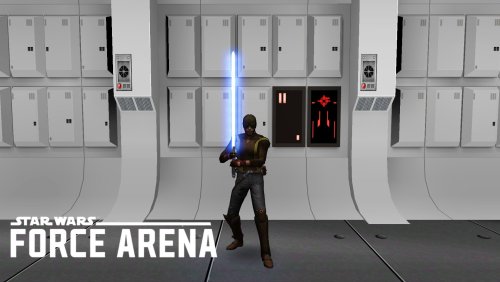
Force Arena - Kanan Jarrus(Blind)
By HoboPeach
Here is Kanan Jarrus(Blind)Season 3 from the Force Arena
Extract the skin file to base folder in Gamedata.
THIS FILE IS NOT MADE, DISTRIBUTED, OR SUPPORTED BY ACTIVISION PUBLISHING, INC., RAVEN SOFTWARE, OR LUCASARTS ENTERTAINMENT COMPANY, LLC. ELEMENTS™ & © LUCASFILM LTD.™ & DISNEY, INC.™ AND/OR ITS LICENSORS. STAR WARS®, JEDI®, & JEDI KNIGHT® ARE REGISTERED TRADEMARKS OF LUCASFILM LTD™ AND WALT DISNEY, INC.™ STAR WARS®, JEDI®, & JEDI KNIGHT® ARE REGISTERED TRADEMARKS OF LUCASFILM LTD™ & DISNEY, INC.™
17 downloads
(0 reviews)0 comments
Submitted
-
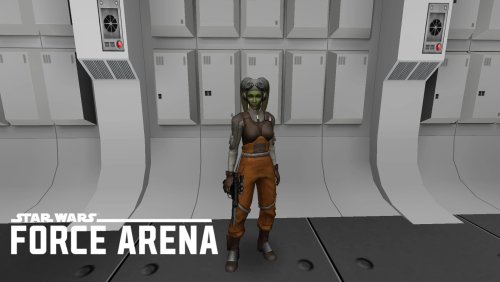
Force Arena - Hera Syndulla
By HoboPeach
Here is Hera Syndulla from the Force Arena
Extract the skin file to base folder in Gamedata.
Npc Spawn hera
THIS FILE IS NOT MADE, DISTRIBUTED, OR SUPPORTED BY ACTIVISION PUBLISHING, INC., RAVEN SOFTWARE, OR LUCASARTS ENTERTAINMENT COMPANY, LLC. ELEMENTS™ & © LUCASFILM LTD.™ & DISNEY, INC.™ AND/OR ITS LICENSORS. STAR WARS®, JEDI®, & JEDI KNIGHT® ARE REGISTERED TRADEMARKS OF LUCASFILM LTD™ AND WALT DISNEY, INC.™ STAR WARS®, JEDI®, & JEDI KNIGHT® ARE REGISTERED TRADEMARKS OF LUCASFILM LTD™ & DISNEY, INC.™
32 downloads
(0 reviews)0 comments
Updated
-
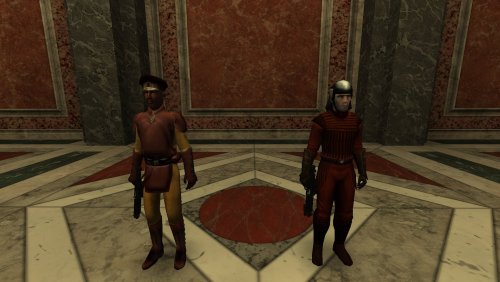
Naboo Guard and Naboo Palace Guard from Movie Battles II
By HoboPeach
Here is the Naboo guard and the palace guard ported from Movie Battles II
Sound:Yes
Bot:No
Npc:Yes
Team Support:No
Extract Naboo Guard and Naboo Palace Guard.pk3 To base folder in Gamedata.
Npc Spawn nabooguard
Npc Spawn naboopalace
THIS FILE IS NOT MADE, DISTRIBUTED, OR SUPPORTED BY ACTIVISION PUBLISHING, INC., RAVEN SOFTWARE, OR LUCASARTS ENTERTAINMENT COMPANY, LLC. ELEMENTS™ & © LUCASFILM LTD.™ & DISNEY, INC.™ AND/OR ITS LICENSORS. STAR WARS®, JEDI®, & JEDI KNIGHT® ARE REGISTERED TRADEMARKS OF LUCASFILM LTD™ AND WALT DISNEY, INC.™ STAR WARS®, JEDI®, & JEDI KNIGHT® ARE REGISTERED TRADEMARKS OF LUCASFILM LTD™ & DISNEY, INC.™
17 downloads
(0 reviews)0 comments
Updated
-
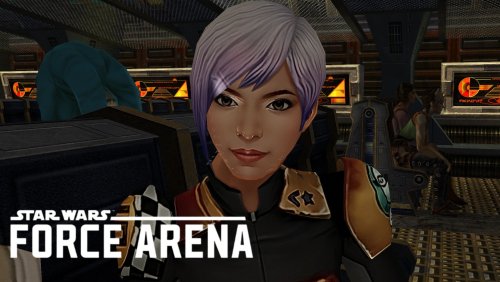
Sabine as Rosh
By HoboPeach
INSTALLATION INSTRUCTIONS: Put The Rosh as Sabine.pk3 in your gamedata/base folder.
DESCRIPTION: This a Single Player Skin That replaces Rosh with Sabine.
THIS FILE IS NOT MADE, DISTRIBUTED, OR SUPPORTED BY ACTIVISION PUBLISHING, INC., RAVEN SOFTWARE, OR LUCASARTS ENTERTAINMENT COMPANY, LLC. ELEMENTS™ & © LUCASFILM LTD.™ & DISNEY, INC.™ AND/OR ITS LICENSORS. STAR WARS®, JEDI®, & JEDI KNIGHT® ARE REGISTERED TRADEMARKS OF LUCASFILM LTD™ AND WALT DISNEY, INC.™ STAR WARS®, JEDI®, & JEDI KNIGHT® ARE REGISTERED TRADEMARKS OF LUCASFILM LTD™ & DISNEY, INC.™
40 downloads
(0 reviews)0 comments
Updated
-

Jedi Trainer Species
By 90SK
It's a mini-mod that adds a new species based off of the Jedi Trainer
My first successful clothing mod from 2006. Quite a while ago!
Recently uncovered and debugged, and please comment or contact me with ideas or troubleshooting.
The Jedi trainer was a pretty neat character and I thought giving Jaden that look was cool.
Permission:
Please mention me if using the file where credit is due. Otherwise, free to use all ways.
Legal: Do not sell this mod. It is made without support given by licensors, sponsors of parent companies, or the author.
76 downloads
(0 reviews)0 comments
Updated
-

Sith Female Twi'lek (Customizable)
By Riven_Fall
Hello, i present you, my new jedi academy mod its Sith Female Twi'lek skin, customizable =).
Autor: Riven_Fall , KoptaTom@gmail.com
Filename: SithTwi.pk3
/////////////////////////////////INSTALATION\\\\\\\\\\\\\\\\\\\\\\\\\\\\\\\\\\\\\\\\\\\\\\\\\\\\\\\\\\
Unzip file SithTwi.zip and copy SithTwi.pk3 into Jedi Academy\GameData\Base and youre done, then just start Jedi Academy go to new game, and pick youre skin in character creation and enjoy.
There are some few details that need little work as icons etc. but skin works great and no issues with textures..
If you notice any bugs let me know..
/////////////////////////////COPYRIGHTS\\\\\\\\\\\\\\\\\\\\\\\\\\\\\\\\\\\\\\\\\\\\\\\\\\\\\\\\\\\\\\
Please you can modify/alter any skins inside mod, skin/mod was created by myself, if want use in some compilation or pack.. you can but please advertise me, Thank you.
______________________________________________________________________________________________________
Special thanks to Raven Software
THIS MODIFICATION IS NOT MADE, DISTRIBUTED, OR SUPPORTED BY ACTIVISION,
RAVEN, OR
LUCASARTS ENTERTAINMENT COMPANY LLC. ELEMENTS TM & © LUCASARTS
ENTERTAINMENT COMPANY LLC AND/OR ITS LICENSORS.
268 downloads
(0 reviews)0 comments
Submitted
-

Ahsoka Tano
By Cerez
Add Ahsoka Tano as a playable character, adversary, or player companion in Jedi Academy.
ADDITIONAL NOTE: Single-player character selection menu addon available here.
RELEASED: 4 August 2015
AUTHOR: Cerez
SUMMARY:
New Model: Yes
Bot: Yes
NPC: Yes
Team Support: Yes
Custom Sounds: Yes
Custom Lightsaber: Yes
DESCRIPTION:
A lifelike rendition of the character Ahsoka Tano, Padawan to Anakin Skywalker, from around the time of her departure from the Jedi Order.
FEATURES:
-----------------------------------
AHSOKA AS SINGLE-PLAYER SIDEKICK:
Have Ahsoka assist you on your single-player missions. After loading a level and activating cheat mode, type this in the game's console:
npc spawn ahsoka
A CHATTY BOT:
Ahsoka's multiplayer bot has a true-to-character, chatty personality, and is loaded with new things to say -- directly sourced from and inspired by her character talk and snap-backs from official games and TV show episodes, leading up to the end of The Clone Wars.
NEW DUAL LIGHTSABER COMBINATION:
Ahsoka being a dual lightsaber wielder in the traditional fashion, with a shoto blade, I've included her second lightsaber in the game's lightsaber selection menu. This allows the player to actually use a shoto (shorter bladed lightsaber). I found this makes fighting against duals a little less predictable, and helps to spice things up a bit both visually, and in terms of gameplay.
Console Reference:
Primary: tano
Supporting (Shoto): tano2
INSTALLATION:
-----------------------------------
Simply move the PK3 files into the "base" folder of your game directory.
KNOWN BUGS:
-----------------------------------
Slight clipping with the skirt and limbs in certain movement/poses, unavoidable due to the game's technical design limitations.
CREDITS:
-----------------------------------
Designed by: Cadellin and Cerez
Modelled by: Cadellin
Model Edited by: Cerez
Weighted by: Cerez
Textured by: Cadellin and Cerez
Shaded by: Cerez
Audio Sampling: Cerez
Icon Design: Cerez
NPC and Bot Files: Cerez
Lightsaber Hilt by: AshuraDX
SPECIAL THANKS TO:
Cadellin for his patience with my fine-tunings, and for taking on this project wholeheartedly.
Asgarath83 for investing countless hours into tutoring me and for all his tremendous support.
AshuraDX, DT85, Archangel35757, and everyone at JKHub for their kind and generous feedback, help and support.
Psyk0Sith and Spacemonkey for their incredibly useful if somewhat rough-around-the-edges tutorials on character rigging for the game.
AshuraDX for his permission to use the awesome lightsaber hilt bundled with this character model.
PROJECT TECHNICAL DETAILS:
-----------------------------------
Total Design and Development Time: 1 year
Software Used: 3DS Max, Silo, Photoshop
PERMISSIONS:
-----------------------------------
Hereby permission is given to anyone to edit and create derivative works of the contents of this mod under two conditions:
1. Due credit is given to the author. (If it makes sense, please also include this readme.)
2. The author is informed of the new use/release of the material (out of courtesy).
THIS FILE OR THIS LEVEL IS NOT MADE, DISTRIBUTED, OR SUPPORTED BY LUCASARTS, A DIVISION OF LUCASFILM ENTERTAINMENT COMPANY LTD. ELEMENTS ™ & (©) LUCASARTS, A DIVISION OF LUCASFILM ENTERTAINMENT COMPANY LTD.
408 downloads
-
File Reviews
-

Stuck 0
-
I'm very eager to give it a try but I just can't. I installed KMRP, used KPM patcher with only 2 patches - KMRP and High FPS Fixes.
Then I run your install.cmd and all I get is this:
INSTALL FAILED: Executable compatibility check failed at 47 required hook site(s).
0x004F1A3E: expected [B8 14 00 00 00], found [6A 85 05 C2 9E]
0x004F1A43: expected [0F B6 D0 3B 4C 96 38], found [CE EB 19 56 C1 7C 49]
0x0054EC5B: expected [C7 02 14 00 00 00], found [34 50 71 50 DE 29]
0x00552C9A: expected [8D 7E 38 B9 15 00 00 00 F3 AB], found [66 3F 2E 33 9D 15 28 89 29 00]
0x00552F8A: expected [8D 6E 38], found [DA 7B 54]
0x00552FD6: expected [83 FF 14], found [A7 5A 68]
0x005A54A0: expected [0F B6 F0 3B 54 B1 38], found [F6 AB 63 77 5A C7 1D]
0x005A54AA: expected [83 F8 14], found [75 93 66]
...and 39 more mismatched hook site(s).
Another executable patch or a different KOTOR binary layout is using code this mod needs. No changes were made.Press any key to continue . . .
Edited by WarlordThorvald
I had bunch of graphic mods and old widescreen fix installed before, but deleted it and restored original exe - no luck.
Then I just deleted my game and re-downloaded it (steam version), installed KMRP and patched clean version of the game with KPM - and result is the same.
I am at loss here. -
Does exactly was it says it does!
An observation: Having this active requires it to be installed dead last after EVERYTHING ELSE. If, say, I were to add"High FPS Fixes" or other patches through KotorPatchManager with "...Progression" already active, I lose the ability to back out of the level-up screen(effectively restoring the vanilla game's constraints where it would not let you exit the level-up UI to return to normal gameplay at all until you leveled up.)
This I confirmed via live testing/gameplay last night: I had to uninstall and re-install "....progression" after adding the KPM patches so it effectively sits at the very END of the installation order. This fixed the issue and I could back out of the level-up screen freely.
FYI I'm using KMRP 1.5.1 and KPM in my setup.
-
 1
1
-
-

Ellhaim 0
This mod sorta works. Except that the model is very transparent. Especially on the metal/darker details of her outfit/model. Kind of unusable imo. Just makes me feel like I'm playing the ghost of Talon.
-
Fantastic work!!! Quick question to any who read this: I'm a total rookie with modding, and in my most recent playthrough, when the camera executed the flyby when the HK-50s shot you down over the polar region(when they start speaking "Egotistical Boast") I saw the mod author's logo. Again, since I;m new to this, I likely made a mistake when I added them, so how can I correct it so I don't see the logo?
-

lorddli 2
does what it says on the tin and i like it
-
1
-
-
Awesome mod! Some necessary powers filling out the pool, especially with Revitalize.
I don't know if this is cool, if not I will absolutely delete it... But I had AI upscale your icons so that they would work properly at high resolution (the images look basically identical, they're just 64x64 instead of 32x32). -
Nice job !
ou plutôt dans ce cas Beau travail ! -
This Mod fixes all of the problems that I have when I got back to play this game on newer systems.
The dev behind this mod was quick to answer any questions I had since I was a Linux user of this mod.
Great quality mod, that fixes issues I was having in Ultrawide such as the dialogue windows not working on the first step of a new conversation (Typical on Ultrawide) as well as improving general stability of the game.
Would recommend for anyone playing the game.
-
Ok, I hope this helps perfect it because it's a good idea on paper. I'll keep it as "matter-of-factly" as possible.
My experience with this mod: My setup already had TSLRCM+M478PE+PartySwap as a foundation already running. I installed this mod, created a fresh, new character to test it out, made it to the Telos Citadel Station, and after the "house arrest" sequence wrapped up and I was free to move, the quest triggers, unknown to me, were compromised. For example: The ambush on Dock Module 126? The 5 thugs that attack you spawned, I fought them and beat them, but the dialogue script failed to recognize the instance, leaving the TSF NPC in an infinite "text box loop" saying "don't let them hurt the droid; the instance didn't close properly and, naturally, the journal quest didn't update. I reloaded a save file just prior to that beat and it played out correctly a second time. When I showed the "modified holdout blaster" to Lt. Grenn to pick up the "suspicious goods" quest? that dialogue with Grenn played normally, however the journal didn't log the "suspicious goods" quest at all. So, the masked thug that's supposed to ambush you in the Entertainment Module immediately after that dialogue didn't spawn. Another tell-tale sign that something was wrong is that the Dobo Brothers' Merchant Room was completely inaccessible: The door would not open, full stop. Also, one of the doors to the cantina turned into a "one-way" exit. You could exit out of the cantina through it but not go back in. The other door worked fine. And for some reason, some NPCs appeared with no head whatsoever, (though I'm uncertain of this last bit is related.) To solve these problems on my setup, I purged my game's Override, performed a Steam Integrity Check, and re-installed all my mods in the proper order, except this one. I hope this helps you perfect it.
EDIT: To be clear, I don't use the Steam Workshop for anything whatsoever; I only use Steam to launch the game. All my mods were installed through their respective standalone TSLPatcher executable.
Edited by jmorenobothwell -
-
lorddli 2
Perfect companion mod to go along with KMRP
-
You are the pillar of this community
-
The Atton no guyliner with mid scruff is absolutely perfect! Love this!
-
This wonderful black magic fuckery has enabled me to play my favorite game of all time at 240fps without any issues and I am very happy about it. Thank you!
Edited by gilless429-
 1
1
-
-






-
File Comments
-
By offthegridmorty · Posted
@Stuck Oh, so it does. Well that's embarrassing. Thanks for reporting. I'll upload a fixed version shortly. -
This is a great idea! Unfortunately there appears to be a problem with the script. It applies the new 8*3/2 integer to every influence gain or loss, regardless of what class you are (or at least with a Consular, didn't test with the other two starting classes) .
-

By paramano01 · Posted
I tested it. i had to only take out KMRP from my mods and the cutscenes work fine. So it is this mod. I tried all compatibility and DPI settings, I tried replacing the cutscene movies with different movie mods, no luck. -
By StellarExile · Posted
Love it! Was trying to do this myself but you did it far better. -

By WildKarrde · Posted
All good, I apologize if my last reply was a bit brusque. In fairness, the two cutscenes do feel very similar, and the original game files suggest that they might have been intended as alternative lines for the same dialog, which TSLRCM chose to implement as two separate cutscenes. I do appreciate your interest, and while I am confident I haven’t repeated lines from the post-Enclave cutscene, I would like to know if you do find a definite duplication.
-