


Saul0097
-
Posts
42 -
Joined
-
Last visited
-
Days Won
2
Content Type
Profiles
Forums
Blogs
Forum & Tracker Requests
Downloads
Gallery
Store
Events
Everything posted by Saul0097
-
Can I move this mod to skins? I accidentally uploaded it to mods.
-
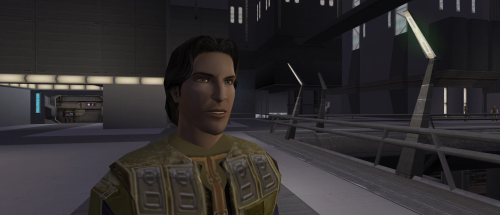 I'm gonna add some facial hairs to some select heads, I've already done them, just need to darkside transitions and sith eyes. Which female head did you have in mind? I'm gonna update the last transition. I want to add the reddish ring around the eye.
 -
View File Custom Exile HD This mod gives the Male Jedi Exile (PMHH01) a custom visual overhaul with realistic pale green eyes, a custom skin tone, brown hair with subtle realistic highlights, custom portraits, and movie inspired dark side transitions. Features HD Custom Exile face texture Realistic pale green eyes Custom skin tone Brown hair with subtle realistic highlights Custom portraits Movie inspired dark side transitions Second Sith transition with yellow eyes and a reddish undertone Simple texture replacement Installation Place the override folder into your main kotor 2 directory. If asked to overwrite files, choose yes. Compatibility This mod may conflict with other mods that replace the same Exile head, portraits, or dark side transition textures. Requirements None. Submitter Saul0097 Submitted 05/19/2026 Category Mods TSLRCM Compatible Yes
-
Version 1.1
54 downloads
This mod gives the Male Jedi Exile (PMHH01) a custom visual overhaul with realistic pale green eyes, a custom skin tone, brown hair with subtle realistic highlights, custom portraits, and movie inspired dark side transitions. Features HD Custom Exile face texture Realistic pale green eyes Custom skin tone Brown hair with subtle realistic highlights Custom portraits Movie inspired dark side transitions Second Sith transition with yellow eyes and a reddish undertone Simple texture replacement Installation Place the override folder into your main kotor 2 directory. If asked to overwrite files, choose yes. Compatibility This mod may conflict with other mods that replace the same Exile head, portraits, or dark side transition textures. Requirements None. -
View File True Controller Support (K1) True Controller Support adds modern controller support to Star Wars: Knights of the Old Republic through an ASI plugin. This mod is designed to add console style controller support for Kotor 1 without the need for external software or steam input. This major update includes two separate downloads: - Xbox Controller Support Version - PlayStation Controller Support Version (Might support other Gamepads but hasn't been tested.) Main Features Adds console like controller support to KOTOR with natural analog left stick walk/run movement, horizontal right stick camera control, and D-pad/Touchpad cursor emulation for seamless menu and UI navigation. Default Controls Shared Xbox and PlayStation controls: LB / L1 = Pause RB / R1 = Cursor Select (Left Click) LT / L2 = Cycle Target RT / R2 = Cycle Target Left Stick = Movement Right Stick = Camera Movement A / Cross = Default Action B / Circle = Escape / Game Menu Y / Triangle = Cancel Action X / Square = Swap Character LS / L3 = Flourish Weapon RS / R3 = First-Person Free Look Start = Escape / Game Menu Select / Touchpad = Solo Mode Right Stick Up/Down = Cycle through the action menu and floating hotbar (Mouse scroll wheel) Xbox Version Notes Xbox uses the D-pad for cursor emulation D-pad directional arrow navigation is disabled by default (This is because the cursor moves at the same time) D-pad directional navigation can be enabled in kotorgamepad.ini (It works, but it is slightly janky, so it is disabled by default.) PlayStation Version Notes PlayStation uses the touchpad for cursor emulation by default Cursor emulation can be switched to the D-pad in kotorgamepad.ini D-pad directional arrow navigation is enabled by default (This works better on PlayStation because cursor emulation is handled by the touchpad) Note: Playstation touchpad cursor can be adjusted using the ini file, you got alot of settings, I've made some adjustments myself but haven't really fine tuned it. Installation and setup: In-Game Settings: Set your in-game keybinds and controls to default Leave Mouse Look disabled (Mouse Look is disabled by default in the game) Do not enable Mouse Look for this version of the mod like previous versions. Make sure steam input is disabled if updating from an older version: Old files to remove if present: K1Controller.ini K1Controller.asi K1Controller.log dinput8.dll SDL2.dll Xbox Controller Version install instructions Download the Xbox version Extract the contents of the zip file Place the following files into your main swkotor directory: dinput8.dll kotorgamepad.ini kotorgamepad.asi PlayStation Controller Version install instructions Download the PlayStation version Extract the contents of the zip file Place the following files into your main swkotor directory: dinput8.dll SDL2.dll kotorgamepad.ini kotorgamepad.asi Switching Versions If you are switching from Xbox to PlayStation, delete the Xbox version files first If you are switching from PlayStation to Xbox, delete the PlayStation version files first Then install the version you want to use Replacing the files directly may work, but a clean reinstall is recommended Uninstallation: Xbox version: Delete dinput8.dll Delete kotorgamepad.ini Delete kotorgamepad.asi PlayStation version: Delete dinput8.dll Delete SDL2.dll Delete kotorgamepad.ini Delete kotorgamepad.asi Credits: Key Mouse Accessibility by LaneDibello for reference. Submitter Saul0097 Submitted 05/15/2026 Category Mods K1R Compatible Yes
-
Version 2.0
370 downloads
True Controller Support adds modern controller support to Star Wars: Knights of the Old Republic through an ASI plugin. This mod is designed to add console style controller support for Kotor 1 without the need for external software or steam input. This major update includes two separate downloads: - Xbox Controller Support Version - PlayStation Controller Support Version (Might support other Gamepads but hasn't been tested.) Main Features Adds console like controller support to KOTOR with natural analog left stick walk/run movement, horizontal right stick camera control, and D-pad/Touchpad cursor emulation for seamless menu and UI navigation. Default Controls Shared Xbox and PlayStation controls: LB / L1 = Pause RB / R1 = Cursor Select (Left Click) LT / L2 = Cycle Target RT / R2 = Cycle Target Left Stick = Movement Right Stick = Camera Movement (horizontal like console) A / Cross = Default Action B / Circle = Escape / Game Menu Y / Triangle = Cancel Action X / Square = Swap Character LS / L3 = Flourish Weapon RS / R3 = First-Person Free Look Start = Escape / Game Menu Select / Touchpad = Solo Mode Right Stick Up/Down = Scroll through the action and floating hotbar menu items and actions (Mouse scroll wheel) Xbox Version Notes Xbox uses the D-pad for cursor emulation D-pad directional arrow navigation is disabled by default (This is because the cursor moves at the same time) D-pad directional navigation can be enabled in kotorgamepad.ini (It works, but it is slightly janky, so it is disabled by default.) PlayStation Version Notes PlayStation uses the touchpad for cursor emulation by default Cursor emulation can be switched to the D-pad in kotorgamepad.ini D-pad directional arrow navigation is enabled by default (This works better on PlayStation because cursor emulation is handled by the touchpad) Note: Playstation touchpad cursor can be adjusted using the ini file, you got alot of settings, I've made some adjustments myself but haven't really fine tuned it. Installation and setup: In-Game Settings: Set your in-game keybinds and controls to default Leave Mouse Look disabled (Mouse Look is disabled by default in the game) Do not enable Mouse Look for this version of the mod like previous versions. Make sure steam input is disabled if updating from an older version: Old files to remove if present: K1Controller.ini K1Controller.asi K1Controller.log dinput8.dll SDL2.dll Xbox Controller Version install instructions Download the Xbox version Extract the contents of the zip file Place the following files into your main swkotor directory: dinput8.dll kotorgamepad.ini kotorgamepad.asi PlayStation Controller Version install instructions Download the PlayStation version Extract the contents of the zip file Place the following files into your main swkotor directory: dinput8.dll SDL2.dll kotorgamepad.ini kotorgamepad.asi Switching Versions If you are switching from Xbox to PlayStation, delete the Xbox version files first If you are switching from PlayStation to Xbox, delete the PlayStation version files first Then install the version you want to use Replacing the files directly may work, but a clean reinstall is recommended Uninstallation: Xbox version: Delete dinput8.dll Delete kotorgamepad.ini Delete kotorgamepad.asi PlayStation version: Delete dinput8.dll Delete SDL2.dll Delete kotorgamepad.ini Delete kotorgamepad.asi Credits: Key Mouse Accessibility by LaneDibello for reference. -
View File Vanilla Maps HD (KOTOR1) All maps x4 upscaled to HD Vanilla Maps HD (K1) upscales the original KOTOR 1 map textures while keeping the vanilla look intact. The maps are high res (2k) and much sharper. All maps were upscaled 4x using Topaz Gigapixel. Main features Upscaled vanilla map textures. 4x Topaz Gigapixel upscale. Installation instructions Copy the Override folder into your main Knights of the Old Republic directory. Replace files if prompted. Submitter Saul0097 Submitted 05/14/2026 Category Mods K1R Compatible Yes
-
Version 1.1
282 downloads
All maps x4 upscaled to HD Vanilla Maps HD (K1) upscales the original KOTOR 1 map textures while keeping the vanilla look intact. The maps are high res (2k) and much sharper. All maps were upscaled 4x using Topaz Gigapixel. Main features Upscaled vanilla map textures. 4x Topaz Gigapixel upscale. Installation instructions Copy the Override folder into your main Knights of the Old Republic directory. Replace files if prompted. -
View File Bigger Dialog Font BIGGER DIALOG FONT ━━━━━━━━━━━━━━━━━━━━━━━━━━━━━━━━━━━━ DESCRIPTION Bigger Dialog Font increases dialogue and menu description font size in KOTOR 2 for better readability on modern displays. The main download includes all available font sizes: 20% Bigger 25% Bigger 30% Bigger 40% Bigger 50% Bigger 60% Bigger 70% Bigger 80% Bigger Choose whichever size works best for your resolution and setup. The download also includes an optional Font Upscaled folder. Increasing the original font size can make the text appear low-resolution or blurry, so these upscaled font textures can be used to make the larger text look clearer. ━━━━━━━━━━━━━━━━━━━━━━━━━━━━━━━━━━━━ DIALOG SUBTITLE WORD WRAP BETA The optional Dialog Subtitle Word Wrap beta modifies dialog.tlk to add line breaks to dialogue subtitles, helping prevent subtitle text from extending off-screen when using the larger font sizes. The add-on is now modular and includes three versions: Vanilla TSLRCM TSLRCM + KOTOR 2 Community Patch Choose the version that matches your installation. The requirements only apply to the Dialog Subtitle Word Wrap version you choose. The regular Bigger Dialog Font files do not have any known mod requirements. Important: Always back up your original dialog.tlk before installing the Dialog Subtitle Word Wrap beta. ━━━━━━━━━━━━━━━━━━━━━━━━━━━━━━━━━━━━ INSTALLATION Main Font Files Download and extract the ZIP file. Open the extracted folder. Choose your preferred font size. Place the files from your chosen size folder into your KOTOR 2 override folder. Replace files if prompted. Optional Upscaled Font If you want clearer font textures, open the Font Upscaled folder and place its files into your Override folder. This is optional, but recommended if the enlarged font looks blurry or low-resolution. Dialog Subtitle Word Wrap Beta Read the included README first. Choose the version that matches your setup: Vanilla TSLRCM TSLRCM + KOTOR 2 Community Patch Back up your original dialog.tlk. Place the new dialog.tlk into your main KOTOR 2 directory, where the game executable is located. ━━━━━━━━━━━━━━━━━━━━━━━━━━━━━━━━━━━━ EXTRA NOTES Screenshots were taken at 1920x1080. ━━━━━━━━━━━━━━━━━━━━━━━━━━━━━━━━━━━━ CHANGELOG Consolidated all font sizes into the main download. Added 20%, 25%, 30%, 40%, 50%, 60%, 70%, and 80% font size options. Added optional upscaled font textures for clearer enlarged text. Dialog Subtitle Word Wrap beta is now modular. Added separate Dialog Subtitle Word Wrap versions for Vanilla, TSLRCM, and TSLRCM + KOTOR 2 Community Patch. Submitter Saul0097 Submitted 05/10/2026 Category Mods TSLRCM Compatible Yes
-
Version 3.0
458 downloads
BIGGER DIALOG FONT ━━━━━━━━━━━━━━━━━━━━━━━━━━━━━━━━━━━━ DESCRIPTION Bigger Dialog Font increases dialogue and menu description font size in KOTOR 2 for better readability on modern displays. The main download includes all available font sizes: 20% Bigger 25% Bigger 30% Bigger 40% Bigger 50% Bigger 60% Bigger 70% Bigger 80% Bigger Choose whichever size works best for your resolution and setup. The download also includes an optional Font Upscaled folder. Increasing the original font size can make the text appear low-resolution or blurry, so these upscaled font textures can be used to make the larger text look clearer. ━━━━━━━━━━━━━━━━━━━━━━━━━━━━━━━━━━━━ DIALOG SUBTITLE WORD WRAP BETA The optional Dialog Subtitle Word Wrap beta modifies dialog.tlk to add line breaks to dialogue subtitles, helping prevent subtitle text from extending off-screen when using the larger font sizes. The add-on is now modular and includes three versions: Vanilla TSLRCM TSLRCM + KOTOR 2 Community Patch Choose the version that matches your installation. The requirements only apply to the Dialog Subtitle Word Wrap version you choose. The regular Bigger Dialog Font files do not have any known mod requirements. Important: Always back up your original dialog.tlk before installing the Dialog Subtitle Word Wrap beta. ━━━━━━━━━━━━━━━━━━━━━━━━━━━━━━━━━━━━ INSTALLATION Main Font Files Download and extract the ZIP file. Open the extracted folder. Choose your preferred font size. Place the files from your chosen size folder into your KOTOR 2 override folder. Replace files if prompted. Optional Upscaled Font If you want clearer font textures, open the Font Upscaled folder and place its files into your override folder. This is optional, but recommended if the enlarged font looks blurry or low-resolution. Dialog Subtitle Word Wrap Beta Read the included README first. Choose the version that matches your setup: Vanilla TSLRCM TSLRCM + KOTOR 2 Community Patch Back up your original dialog.tlk. Place the new dialog.tlk into your main KOTOR 2 directory, where the game executable is located. ━━━━━━━━━━━━━━━━━━━━━━━━━━━━━━━━━━━━ EXTRA NOTES Screenshots were taken at 1920x1080. ━━━━━━━━━━━━━━━━━━━━━━━━━━━━━━━━━━━━ CHANGELOG Consolidated all font sizes into the main download. Added 20%, 25%, 30%, 40%, 50%, 60%, 70%, and 80% font size options. Added optional upscaled font textures for clearer enlarged text. Dialog Subtitle Word Wrap beta is now modular. Added separate Dialog Subtitle Word Wrap versions for Vanilla, TSLRCM, and TSLRCM + KOTOR 2 Community Patch.-
- 1
-

-
- qol
- hud/interface
- (and 5 more)
-
View File Vanilla Maps HD Vanilla Maps HD upscales the map textures in Knights of the Old Republic II to make them sharper and cleaner. I tried other upscaled map mods, but they still were not sharp or high res enough for what I wanted. So I extracted the map textures myself and upscaled them x4 using Topaz Gigapixel. This mod also includes upscaled map textures for The Sith Lords Restored Content Mod and Droid Planet. You do not need either mod installed for Vanilla Maps HD to work. If you do use them, the included map textures are covered. Installation instructions Extract the zip file Place override folder into your main kotor 2 directory Replace files if prompted Main features Upscaled vanilla KOTOR II map textures x4 Topaz Gigapixel upscale Sharper and cleaner map images Includes support for The Sith Lords Restored Content Mod map textures Includes support for Droid Planet map textures Optional file available for Cathalan Improvement Project Requirements No hard requirements. The Sith Lords Restored Content Mod and Droid Planet are not required, but their map textures are included for users who have them installed. Cathalan Improvement Project is only needed if you use the optional Cathalan file. Credits Obsidian Enterainment Submitter Saul0097 Submitted 05/06/2026 Category Mods TSLRCM Compatible Yes
-
View File Vanilla Icons and GUI HD VANILLA ICONS AND GUI HD 1,539 UPSCALED ICON AND INTERFACE TEXTURES FOR KOTOR II ━━━━━━━━━━━━━━━━━━━━━━━━━━━━━━━━━━━━ OVERVIEW Vanilla Icons and GUI HD contains 1,539 upscaled textures in the main file, not including compatibility-patch textures. The mod upscales every icon, GUI icon, and interface texture that could be safely enhanced while preserving the original appearance of Star Wars: Knights of the Old Republic II — The Sith Lords. This includes item icons, weapons, armor, clothing, portraits, menu icons, galaxy-map assets, GUI backgrounds, controller icons, and other interface textures. All included textures were upscaled to 4x their original resolution using Topaz Gigapixel. The mod began as Gamepad Menu Upscaled, later expanded into Forgotten UI Textures, and has now grown into a complete icon and interface overhaul. ━━━━━━━━━━━━━━━━━━━━━━━━━━━━━━━━━━━━ MAIN FILE CONTENTS The main file includes: • Item, weapon, armor, clothing, and equipment icons • Usable-item and inventory icons • Force-power, feat, ability, and interface icons • Player-character, party-member, and other character portraits • Gamepad menu textures and controller icons • Menu and GUI icons • Galaxy-map textures and icons • GUI backgrounds • Additional interface textures The vanilla blue lightsaber icons have also been recolored to correct their noticeably purple appearance. (See image) while preserving their original design, glow, and transparency. ━━━━━━━━━━━━━━━━━━━━━━━━━━━━━━━━━━━━ COMPATIBILITY PATCHES Only install a compatibility patch when using its corresponding mod. THE SITH LORDS RESTORED CONTENT MOD PATCH Includes additional and replacement interface textures used by The Sith Lords Restored Content Mod. Requires the main file and TSLRCM. KOTOR 2 COMMUNITY PATCH Includes additional and replacement interface textures used by the KOTOR 2 Community Patch. Requires the main file and the KOTOR 2 Community Patch. ━━━━━━━━━━━━━━━━━━━━━━━━━━━━━━━━━━━━ MISCELLANEOUS FILES SWOOP RACE OVERLAYS Upscales the interface overlays used during swoop races. The latest version of Vanilla Planets HD already includes these textures. You do not need this optional file if using my other mod. TSLRCM MAIN MENU LOGO Upscales the TSLRCM main menu logo The TSL Main Menu Model Fix and all of its prerequisites are hard requirements for this file. ━━━━━━━━━━━━━━━━━━━━━━━━━━━━━━━━━━━━ INSTALLATION 1. Download and extract the main file. 2. Copy the included Override folder into your main KOTOR II installation directory. 3. Place the folders and replace files when prompted. 4. Install the TSLRCM or KOTOR 2 Community Patch compatibility files afterward, when applicable. 5. If you’re using both TSLRCM and the KOTOR 2 Community Patch, install the TSLRCM icon patch first, followed by the K2CP icon patch. ━━━━━━━━━━━━━━━━━━━━━━━━━━━━━━━━━━━━ REQUIREMENTS AND COMPATIBILITY • Requires Star Wars: Knights of the Old Republic II — The Sith Lords • Compatible with The Sith Lords Restored Content Mod • Compatible with the KOTOR 2 Community Patch • Compatibility patches require the main file and their corresponding mods • The optional TSLRCM main-menu file requires the TSL Main Menu Model Fix and all of its prerequisites COMPATIBILITY NOTE The main file replaces many of the same textures included in: TSL - AI Upscaled Icon Overhaul TSL - AI Upscaled PC and Party Portrait Overhaul Installing Vanilla Icons and GUI HD afterward will overwrite matching icons and portraits from those mods. ━━━━━━━━━━━━━━━━━━━━━━━━━━━━━━━━━━━━ CREDITS Obsidian Entertainment — Original KOTOR II textures and assets Submitter Saul0097 Submitted 05/06/2026 Category Mods TSLRCM Compatible Yes
-
Version 4.1
466 downloads
VANILLA ICONS AND GUI HD 1,539 UPSCALED ICON AND INTERFACE TEXTURES FOR KOTOR II ━━━━━━━━━━━━━━━━━━━━━━━━━━━━━━━━━━━━ OVERVIEW Vanilla Icons and GUI HD contains 1,539 upscaled textures in the main file, not including compatibility-patch textures. The mod upscales every icon, GUI icon, and interface texture that could be safely enhanced while preserving the original appearance of Star Wars: Knights of the Old Republic II — The Sith Lords. This includes item icons, weapons, armor, clothing, portraits, menu icons, galaxy-map assets, GUI backgrounds, controller icons, and other interface textures. All included textures were upscaled to 4x their original resolution using Topaz Gigapixel. The mod began as Gamepad Menu Upscaled, later expanded into Forgotten UI Textures, and has now grown into a complete icon and interface overhaul. ━━━━━━━━━━━━━━━━━━━━━━━━━━━━━━━━━━━━ MAIN FILE CONTENTS The main file includes: • Item, weapon, armor, clothing, and equipment icons • Usable-item and inventory icons • Force-power, feat, ability, and interface icons • Player-character, party-member, and other character portraits • Gamepad menu textures and controller icons • Menu and GUI icons • Galaxy-map textures and icons • GUI backgrounds • Additional interface textures The vanilla blue lightsaber icons have also been recolored to correct their noticeably purple appearance. (See image) while preserving their original design, glow, and transparency. ━━━━━━━━━━━━━━━━━━━━━━━━━━━━━━━━━━━━ COMPATIBILITY PATCHES Only install a compatibility patch when using its corresponding mod. THE SITH LORDS RESTORED CONTENT MOD PATCH Includes additional and replacement interface textures used by The Sith Lords Restored Content Mod. Requires the main file and TSLRCM. KOTOR 2 COMMUNITY PATCH Includes additional and replacement interface textures used by the KOTOR 2 Community Patch. Requires the main file and the KOTOR 2 Community Patch. ━━━━━━━━━━━━━━━━━━━━━━━━━━━━━━━━━━━━ MISCELLANEOUS FILES SWOOP RACE OVERLAYS Upscales the interface overlays used during swoop races. The latest version of Vanilla Planets HD already includes these textures. You do not need this optional file if using my other mod. TSLRCM MAIN MENU LOGO Upscales the TSLRCM main menu logo The TSL Main Menu Model Fix and all of its prerequisites are hard requirements for this file. ━━━━━━━━━━━━━━━━━━━━━━━━━━━━━━━━━━━━ INSTALLATION 1. Download and extract the main file. 2. Copy the included Override folder into your main KOTOR II installation directory. 3. Place the folders and replace files when prompted. 4. Install the TSLRCM or KOTOR 2 Community Patch compatibility files afterward, when applicable. 5. If you’re using both TSLRCM and the KOTOR 2 Community Patch, install the TSLRCM icon patch first, followed by the K2CP icon patch. ━━━━━━━━━━━━━━━━━━━━━━━━━━━━━━━━━━━━ REQUIREMENTS AND COMPATIBILITY • Requires Star Wars: Knights of the Old Republic II — The Sith Lords • Compatible with The Sith Lords Restored Content Mod • Compatible with the KOTOR 2 Community Patch • Compatibility patches require the main file and their corresponding mods • The optional TSLRCM main-menu file requires the TSL Main Menu Model Fix and all of its prerequisites COMPATIBILITY NOTE The main file replaces many of the same textures included in: TSL - AI Upscaled Icon Overhaul TSL - AI Upscaled PC and Party Portrait Overhaul Installing Vanilla Icons and GUI HD afterward will overwrite matching icons and portraits from those mods. ━━━━━━━━━━━━━━━━━━━━━━━━━━━━━━━━━━━━ CREDITS Obsidian Entertainment — Original KOTOR II textures and assets -
Version 2.1
254 downloads
Vanilla Maps HD upscales the map textures in Knights of the Old Republic II to make them sharper and cleaner. I tried other upscaled map mods, but they still were not sharp or high res enough for what I wanted. So I extracted the map textures myself and upscaled them x4 using Topaz Gigapixel. This mod also includes upscaled map textures for The Sith Lords Restored Content Mod and Droid Planet. You do not need either mod installed for Vanilla Maps HD to work. If you do use them, the included map textures are covered. Installation instructions Extract the zip file Place override folder into your main kotor 2 directory Replace files if prompted Main features Upscaled vanilla KOTOR II map textures x4 Topaz Gigapixel upscale Sharper and cleaner map images Includes support for The Sith Lords Restored Content Mod map textures Includes support for Droid Planet map textures Optional file available for Cathalan Improvement Project Requirements No hard requirements. The Sith Lords Restored Content Mod and Droid Planet are not required, but their map textures are included for users who have them installed. Cathalan Improvement Project is only needed if you use the optional Cathalan file. Credits Obsidian Enterainment -
View File Vanilla Loading Screens HD This mod upscales all vanilla loading screens in KOTOR 2 All textures were upscaled 4x using Topaz Gigapixel AI, then resized and optimized for in game use. The goal is to keep the original look while improving clarity and sharpness. Main Features 4x AI upscaled using Topaz Gigapixel Improved clarity and detail Preserves the original art style Optimized for in-game use No redesigns or stylistic changes Files: 2K optimized version Balanced quality and performance Installation Manual Install Extract the contents of the zip file, open the folder and place "override" into your Knights of the Old Republic II directory. Click replace if prompted. Community / Support For KOTOR 1 and KOTOR II modding help, tech support, mod requests, resources, tutorials, project discussion, and mod updates, join my discord server, Kotor Workbench: Kotor Workbench modding server Modders and non modders are both welcome. Submitter Saul0097 Submitted 04/07/2026 Category Mods TSLRCM Compatible Yes
-
Version 1.1
222 downloads
This mod upscales all vanilla loading screens in KOTOR 2 All textures were upscaled 4x using Topaz Gigapixel AI, then resized and optimized for in game use. The goal is to keep the original look while improving clarity and sharpness. Main Features 4x AI upscaled using Topaz Gigapixel Improved clarity and detail Preserves the original art style Optimized for in-game use No redesigns or stylistic changes Files: 2K optimized version Balanced quality and performance Installation Manual Install Extract the contents of the zip file, open the folder and place "override" into your Knights of the Old Republic II directory. Click replace if prompted. Community / Support For KOTOR 1 and KOTOR II modding help, tech support, mod requests, resources, tutorials, project discussion, and mod updates, join my discord server, Kotor Workbench: Kotor Workbench modding server Modders and non modders are both welcome.

