

Leaderboard

1byIvanSeliverstenko.thumb.jpg.a45d64ef8f08bdf42f9c4ea9ad30e127.jpg)

Popular Content
Showing content with the highest reputation on 06/13/2026 in all areas
-
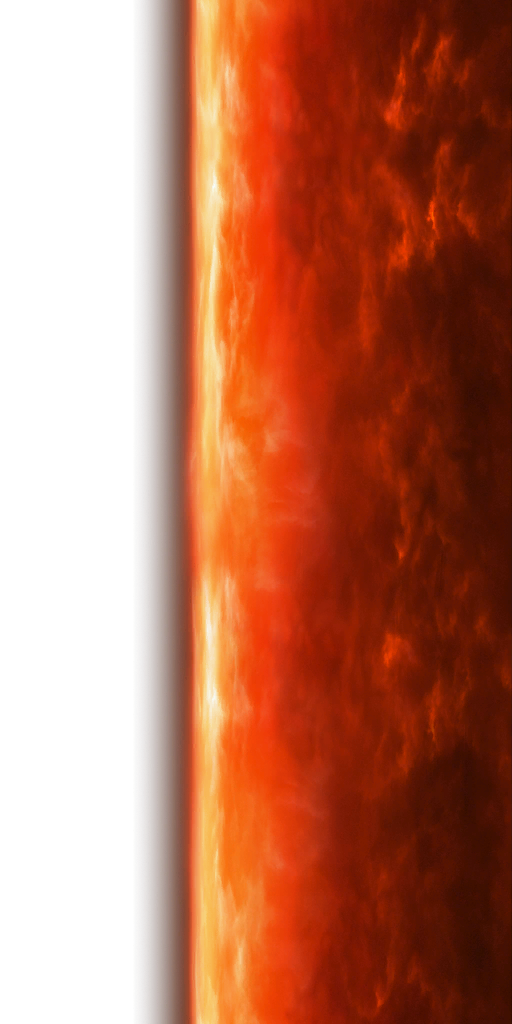
Yavin itself is also a billboard (albeit a dome-shaped one), just like the Yavin outside the window of the station in K1. Might be useful to someone if they wanted to swap it. /resources/art/fx/geometry/galaxy_map/texture/gal_map_yavin_dome.dds gal_map_yavin_dome.dds
 2 points
 -
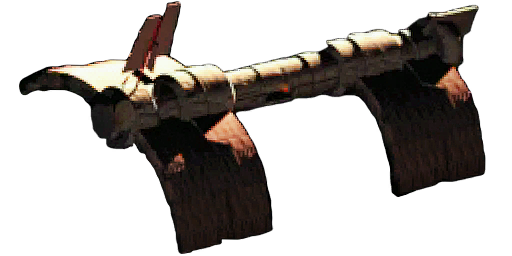
There is not. I have posted about it previously (probably multiple years ago at this point), but TOR only has a simple billboard (a plane with an alpha-masked texture) of the station, not a model. It's just a little Easter egg as you fly past Yavin on your way to Yavin IV, you never actually visit it. /resources/art/fx/geometry/cinematics/texture/cine_billboard_yavin_station_01.dds cine_billboard_yavin_station_01.dds
 1 point
 -
Something didn't work out for me. He disappeared)) Maybe I'm doing something wrong. DP_I-Wing.tga DP_I-Wing.txi DP_I-Wingb.tpc It looks fine without the bump layer.
 1 point
 -

Version 4.0.0
2,672 downloads
tga2tpc Author: ndix UR Release: Sep 2020 Version: 4.0.0 Convert TGA images to TPC format for use in KotOR and TSL. TPC files contain the information from a TXI file (so the TXI file is no longer needed when a TPC file is used), and can be uncompressed or compressed with either DXT1 or DXT5. Advanced features like animation and cubemap layering are initiated by the presence of specific TXI directives like cube 1 and proceduretype cycle. For some reason, the game really wants normal maps to be in TPC format. This will let you create and use full 32-bit color normal maps without having to make them into simple height maps by using indexed color. The tool is free, open source, and cross-platform. Code is available at https://github.com/ndixUR/tga2tpc The app is written in javascript, built on Electron using three.js, jquery, bootstrap. It includes a ported version of the AMD/GPUOpen Compressonator image compression library. ============================================================ How do I set it up? Windows: unzip the package, run tga2tpc.exe Mac: unzip the package, move tga2tpc.app to /Applications, run it * This is not a signed application, so you have to do whatever is required to run non-MAS applications on your MacOS version. ============================================================ How do I use it? Drag files in and hit start. There shouldn't be much more to it than that. Using power-of-2 sized textures is always required for optimal quality, TXI information is optional, and the settings are pretty much self-explanatory. The nature of TPC alpha blending is not necessarily intuitive so you may need to seek information to use it properly. Compressor settings: Super Fast - the lowest quality setting, uses the pre-4.0.0 image compressor that includes the 'compression failure' error for long conversion queues Fast - Bare bones setting Normal - Runs two profiles and selects the best result, adaptive color weighting Slow - Deeper refinement of the color palette for each 4x4 pixel block Ultra - 3D refinement of the color palette for each 4x4 pixel block How Automatic encoding mode selects encoding for each texture in the queue: 24bpp TGA = DXT1 32bpp TGA = DXT5 8bpp TGA = 8bpp uncompressed isbumpmap1 or compresstexture 0 in TXI data = 24 or 32bpp uncompressed ============================================================ Features Create cubemaps Create animated textures Automatic compression selection based on trends from the vanilla game High quality DXT1/5 compression engine using custom ported version of AMD/GPUOpen Compressonator Multi-core image compression on systems with 4 or more cores Horizontal/Vertical flip, for those pesky wrongly oriented TGA files Bicubic downsampling for mipmaps (precomputed lower detail versions of the texture, part of the TPC format) Control texture alpha blending setting (part of TPC format), can be loaded from TXI file comments of the form: "# alphablending 0.67" Known Issues Cannot create uncompressed animated textures. Super Fast compressor has a memory leak issue, leading to errors for long conversion queues Using 4:1 and wider size ratios for individual frames of animated textures seem to crash the game. 2:1 is fine, 1:4 is fine, etc. Only for converting from TGA to TPC. For TPC to TGA, use Kotor Tool, xoreos-tools, tpcview, etc. Progress bar doesn't update as often as you might want. The package size is large. This is the cost of easy cross-platform GUI support. All electron applications are large like this. You are likely to have problems trying to read TGAs from folders containing markup entities/encoded characters (like ') ============================================================ Thanks DarthParametric for inciting the creation of this tool, and doing the testing. DrMcCoy and all the contributors to xoreos, whose TPC decoding implementation provided the basis for the TPC library herein. bead-v for moral support.1 point -
 In case anyone is on this mod page in 2023, reading through the comments. I'm following Merek's tested moding guide including this mod and the guide is titled as 2023 verified, so this works with the current version of TSLRCM according to that guide.1 point
 -
 I like this mod. I thought the same about empty chairs when I first played TSL. I watched it in-game, the scene became better. I also noticed a few things: 1. The camera mainly uses either shots from long distance or close-ups of main council members (Vrook & Co) that prevents taking a good look at the additional masters. Only rare shots from a medium distance allow to see in detail jedi on the left and right of speaker. 2. Added jedi-statists give off a feeling like they unconcerned about the meeting (or aren't allowed to talk). I understand that they play no role in the story, and you probably didn't want to add anything that may break the impression of such important moment, but still it turned out to be a little weird to me. I think both issues can be solved, while only slightly affecting the scene: Have a council member with an alien VO say one short neutral line, for example, "Is anyone want to add something?" and then zoom in camera on every added jedi-statist for a second when they stay silent, blink or shake their head (if they have such an animation). Vandar can use some very short one-liner like "Hmm...". The scene can then continue as usual. I hope you 'll address these issues to make the scene even more immersive if you decide to release v3.0 of this mod.1 point
 -
 Ugh. The idea of making master robes suck less visually is great. But what are Anakin Skywalker's robes doing in a game set long before Anakin Skywalker existed? Completely breaks immersion. Please make these optional. Is there an easy way to remove these "future" robes and keep improved master robes without breaking anything? Suppose I edit them out of Daralaa's store, will they randomly spawn in loot anyway or something?1 point

