Leaderboard



Popular Content
Showing content with the highest reputation on 05/20/2026 in all areas
-
 All good. Attached is an updated patch which should open that door too, let me know if it still doesn't do the trick. Yavin Station Hangar Compatibility Patch (Beta 0_2).zip2 points
 -
Version 1.10.1
312,332 downloads
The K1 Community Patch (K1CP) is a compilation of previous bugfix mods and a multitude of new original fixes put together with the intention of resolving the many and various issues that KOTOR has. This includes some well-known game breaking bugs/softlocks, broken quests, inaccessible content, as well as lesser issues such as problems in conversations, visual inconsistencies, player annoyances, etc. The intention is for the changes to be as seamless as possible, fixing and improving things whilst still retaining the original developer intent. A huge thanks to all of the mod authors who created these mods, and allowed them to be included in this patch! Unfortunately, the individual list of changes has grown far too long to be included in this post. However, you can view a detailed breakdown of each author's individual contributions in the included readme file and a summary of the changes the current version has made since the previous release in the changelog file. List of Contributing Authors (alphabetical): A Future Pilot blennus danil-ch darthbdaman DarthParametric Ebmar Frykas Gimmick5000 jc2 JCarter426 Kainzorus Prime Kexikus KOTOR 1 Restoration Team Leilukin Markus Ramikin N-DReW25 ndix UR R2-X2 Red Hessian Salk th3w1zard1 Thrak Farelle WildKarrde Installation: Run INSTALL.exe and navigate to your K1 install folder. Generally speaking, this mod should be installed before anything else, except mods that do hard edits/overwrites of 2DA, TLK or MOD (module) files. Warning: Never run the installer from inside the archive! Always extract the archive onto your hard drive first. N.B.: With the advent of version 1.10.0, K1CP has migrated away from the use of TSLPatcher and switched to HoloPatcher. This allows for additional patching functionality and resolves some bugs encountered with TSLPatcher. HoloPatcher is also multi-platform. The bundled installer is the Windows version, but Mac and Linux users can download the appropriate installer for their system here. It is highly recommended that you do not install the game on your system's C drive, especially in Program Files. Windows can have permissions issues when trying to install the mod to a C drive destination. If you are using the Steam version of the game and have installed Steam in its default Program Files location, we advise creating a new Steam Library on a different drive and moving the game there via the game's Properties pop-up in Steam. Translation: The mod now has translations in French and Russian, available as separate patches. To use, first download the base K1CP v1.10.0 archive and extract it to your harddrive. Download your translation patch of choice and extract its contents into K1CP's tslpatchdata folder. Proceed to install the mod as normal. Traduction (Français - Harlockin): Le mod a maintenant des traductions en français et en russe, disponibles sous forme de patchs séparés. Pour l'utiliser, téléchargez d'abord l'archive de base de K1CP v1.10.0 et extrayez-la sur votre disque dur. Téléchargez le patch de traduction de votre choix et extrayez son contenu dans le dossier tslpatchdata de K1CP. Procédez à l'installation du mod comme d'habitude. Переводы (Русский - olegkuz1997): Мод теперь включает в себя переводы на французский и русский языки, доступные в виде отдельных патчей. Для использования сперва скачайте базовый архив K1CP v1.10.0 и распакуйте его на жесткий диск. Скачайте нужный вам патч с переводом и извлеките его содержимое с заменой в папку tslpatchdata K1CP. После чего приступите к установке мода как обычно. Compatibility/Known Issues: K1CP uses module injection in an attempt to remain as compatible as possible with other mods. This may result in issues with mods that simply put files in the Override folder. It is recommended that you consult the individual authors of any large scale mods, particularly those that edit DLGs and scripts, as to whether their work is compatible with K1CP. Some mods will likely require updates, some may need to be installed in a specific order, whilst others may be fundamentally incompatible. K1CP currently only supports the English language version of the game, and makes a number of edits to the TLK file in English. If anyone is able to provide translations of these changes to other languages, please let us know. The KOTOR 1 Restoration (K1R) mod is incompatible with K1CP, however there is ongoing work to re-create the K1R mod for K1CP: https://deadlystream.com/files/file/2345-restored-content-for-k1cp-demo/ These are the currently known bugs/issues with KOTOR or the mod that the K1CP is looking to resolve: https://github.com/KOTORCommunityPatches/K1_Community_Patch/issues If you find any others, especially with changes/additions K1CP makes, please report them on the Github issue page or here on Deadly Stream so they can be addressed. Be sure to include as much information as possible, including a list of all the other mods you have installed, the order you installed them in, steps to reproduce the problem, along with screenshots and save files, if appropriate. You may also be directed to provide the install log file, a list of the contents of your Override folder, and specific MOD files from your modules folder. Uninstallation: Given the complexity of this mod, a clean install of KOTOR is the recommended approach for uninstalling K1CP. However, HoloPatcher does provide uninstall Shell (Bash) and PowerShell scripts which will work as long as K1CP was the most recent mod installed. Permissions: Due to this mod being a compilation from many different authors, please do not distribute/rehost it. Acknowledgements: All of the mod authors who have helped make this patch a reality - thank you! - especially for agreeing to distribution outside of Deadly Stream Fred Tetra - For KOTOR Tool tk102 - For DLGEditor and K-GFF JdNoa/Dashus - For DeNCS stoffe - For TSLPatcher/ChangeEdit/TalkEd bead-v - For MDLEdit and KOTORMax ndix UR - For TGA2TPC, TPCView, and MDLOps v1.0+ seedhartha - For KOTORBlender fork for Blender 2.8+ Cortisol - For Holocron Toolset and HoloPatcher/PyKotor th3w1zard1 - For additional customisation and feature improvement of HoloPatcher Fair Strides - For various tools and updates to older tools DrMcCoy - For Xoreos Tools Snigaroo - For maintaining mod builds at https://kotor.neocities.org/modding/mod_builds/ danil-ch - For the original info.rtf template Many thanks to ebmar, Salk, and KnifeMaster for providing numerous bug reports and beta testing certain fixes THIS MODIFICATION IS PROVIDED AS-IS AND IS NOT SUPPORTED BY BIOWARE/OBSIDIAN ENTERTAINMENT, LUCASARTS, DISNEY OR ANY LICENSEES/SPONSORS OF THE MENTIONED COMPANIES. USE OF THIS MODIFICATION IS AT YOUR OWN RISK AND NEITHER THE ABOVE MENTIONED COMPANIES NOR THE AUTHORS ARE RESPONSIBLE FOR ANY DAMAGE CAUSED TO YOUR COMPUTER BY THE USAGE OF THIS MODIFICATION.1 point -
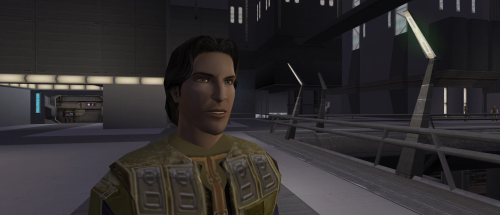 the canon Meetra Surik Head1 point
 -
are u planning to do remakes of all the heads male and female?1 point
-
Version 2.2
143,157 downloads
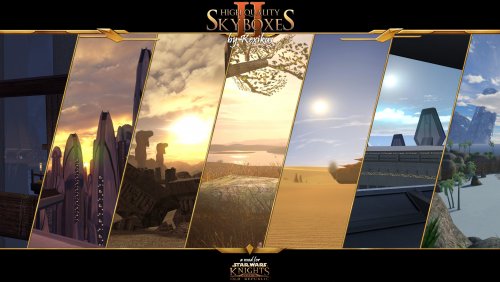
ABOUT: This mod replaces every skybox and every planetary backdrop in the game with a new high resolution version made from scratch. This includes a replacement of every skybox model to fix all the glaring issues with the original. There are also some additional minor changes that either fix issues with the vanilla environments or serve to better blend ingame terrain and skybox. Other than that I recommend you just check out the screenshots as pictures say more than a thousand words or check the video to see the animated skyboxes. Click the following image to see additional interactive screenshot comparisons: There are also add-ons with new skyboxes for the following mods: Brotherhood of Shadows: Solomon's Revenge Yavin IV Ord Mandell including InSidious' reskin Green Grass for Dantooine If you find any issues or have any other comments, please let me know and I'll see what can be done. INSTALLATION: If you have a previous version of this mod installed, remove it before installing the new version or you might run into some issues. For installation instructions check the read-me files of the individual downloads. Usually it's just copying files to your Override folder. For the mod to take full effect you need a savegame where you have not yet left Dantooine. COMPABILITY: This mod is not compatible with any mod that edits skyboxes in any way. This includes mods that only edit their models. There might also be rare incompabilities with mods that edit non-skybox area models if those models are also edited by this mod. PERMISSIONS: You may NOT redistribute any textures included in this archive without my explicit permission. You may however use all the models as long as you give me credit. CREDITS: This mod was created by Kexikus using mainly Terragen 4, Photoshop CS6 and 3ds Max as well as some After Effects. Additional tools used: KotOR Tool by Fred Tetra K-GFF by TK102 MDL edit by bead-v MDLOps by ndix UR KOTORmax by bead-v tga2tpc by ndix UR Additional resources by: Andy Welder: Dantooine tree model Animum: Yavin tree model Bioware: Taris buildings, Kashyyyk buildings, Kashyyyk tree textures, Manaan building textures, Hammerhead cruiser model, Yavin ruins dandelO: grass shader Dantooine and Yavin, snow shader Dantooine Jeronimoe: BOS:SR Taris ship models Jorak Uln: Taris window texture killst4r: Unknown World palm tree Martin Frank: Yavin bush model Misha Winkler: Grass model Dantooine and Yavin Quanon: Additional Taris buildings, Unknown World crashed ship rhcreations: Yavin temple Riccardo Faidutti (SCIFI 3D): Additional Taris buildings Solarsystem Scope: Moon textures Dantooine, Unknown World and Ord Mandell, Yavin texture Tom Patterson: Yavin cloud texture Veronica Bush: Yavin bush model Yughues: Kashyyyk branch texture Unknown: Unknown World fern model THIS MOD IS NOT SUPPORTED BY LUCASARTS OR BIOWARE. USE THIS FILE AT YOUR OWN RISK. NEITHER THE AUTHOR OF THIS MOD NOR THE COMPANIES MENTIONED ABOVE ARE RESPONSIBLE FOR ANY DAMAGE TO YOUR COMPUTER WHEN USING THIS FILE.1 point -
Version 1.0.0
418 downloads
Release preparation tools For preparing and checking our KOTOR releases, we use our own small toolset. These tools are not required to install or play this mod. They are used on our side for release preparation, model checking, packaging notes, and general KOTOR modding workflow. Current tool: KOTOR Model Workbench https://github.com/jenkeee/kotor-model-workbench KOTOR Room Items https://github.com/jenkeee/kotor-roomitems Released on June 16, 2026. This installer adds Old Rags and Visage of Eternal Hunger to the Endar Spire starting footlocker. Hi everyone, Working on this mod has been a really exciting experience. I’ve said before — probably everywhere I’ve posted about it — that this project started simply as a result of my curiosity, and eventually I decided to share it with everyone. Game modding tutorials I’d like to thank all the people who left the first comments and showed interest in the mod. Your reactions were the exact push I needed to want to bring this project into a more complete state. Since then, the project has grown a lot, and the number of files involved has increased significantly. The mod is now in a working state and is still actively being developed, so I’ll be updating the description to reflect the project as it currently stands. Updated Overview of the Project Files 1. Original requirement You need the original Yavin 4 mod by MotOR Squad + Master Zionosis. 2. Yavin by jenkeee EN - installer.zip This is my fix package for the mod. It repairs several quests so the mod works properly on the modern Steam version of the game. I also changed the final fight with Trask and added Revan’s Mask as a loot drop. 3. Yavin Trask Head Universal Hotfix.zip During development, I encountered a bug where Trask could lose his head model. This installer is meant to overwrite Trask-related files in the Override folder and fix that issue. 4. kotor_stability01.zip This is a small legacy safe-mode launcher. Inside the package there is a text file where you need to specify the path to your kotor.exe. 5. Yavin Yav_93 Leviathan Terminal Hotfix.zip Thanks to the players who reported this bug. The terminal on level 93 uses two Leviathan terminal entries from the vanilla game. While restoring the terminal for the mod, my Override files unintentionally affected the Leviathan level as well. This hotfix corrects that problem. 6. veh1.1 - installer.zip This is the version of the mask with baked animations. The cloak is no longer static, and now moves slightly, as if it were fluttering in the wind. Savegame Reminder A quick reminder about how the KOTOR save system works: if an object with an error has already been written into your save, that error may remain stored in the save file itself. Because of that, when applying fixes, it is strongly recommended to load a save made before entering the location where the problem was found. Ideally, you should load a save from before your first visit to that location. That is the best way to ensure your installation remains valid. Why I Started Making These Posts I started making these posts because I wanted to talk to the Jedi still out there. The saga is going through difficult times, and the disturbances in the Force are stronger than ever. More than anything, I’m interested in what players think: is there really a need for a remake like the one Gothic 1 is getting? With KOTOR II, my opinion is absolutely clear — that game deserves a full remake. But KOTOR I is a different case. It is a complete and finished work, and in many ways it is still beautiful exactly as it is. KOTOR has always been a game for enthusiasts, and even today I still play it on the highest difficulty. For those who have read this far, from this point on I want to describe the technical side of the project. Technical Side of the Project BioWare removed the cloak and the mask from the release version of the game, leaving them only in cutscenes. Why? And more importantly — for what reason? Trying to answer that question is exactly why I began all these experiments with KOTOR resources, as a level-capped Jedi Consular digging into the game’s internals. I did not try to add more polygons to the cloak model. My goal was to preserve its original state as much as possible. I still had to redefine a few vertices, but I tried to stay as close to the original as I could. You can see the result of this work either by downloading the mod or by watching the short video below. The Main Question And that is really why I wrote this wall of text — to ask one question. Jedi friends, and Sith class enemies alike: should I continue this mod? DarthMouse and I have a lot of ideas. There is also a huge amount of work ahead, and this is not development in Unity or Unreal. I want to use my mod as an example and explain how I made the cloak move — and the reaction to this post will show whether this project deserves to live on. About the Technical Process First, we have to understand what is actually possible in the KOTOR environment. KOTOR is a true legacy dinosaur, and any developer understands that movement can, in theory, be handled either on the CPU or on the GPU. I do not want to turn this into a lecture — I’m only giving a broad overview of the technical process. In the end, the entire approach depends on that core decision: do we simulate cloak movement on the GPU, or on the CPU? After studying the engine — Aurora, Odyssey, KOTOR — I decided to stay with the kind of technology that would have been available to the original developers at the time. That means rigging the mesh and creating animations for the beautiful and terrible state mixer that KOTOR uses. To the modders who will keep experimenting with KOTOR after me: please study my work before you try to make cloth movement with bones and animation. I still hope that one day I will see a proper GPU-based solution, maybe even with a full ReShade-style injection. Why BioWare Probably Cut the Cloak I’ll answer the original question briefly: for anyone who has actually tried animating this cloak, the reason BioWare cut it from the release becomes obvious. First, without increasing the polygon count, it is extremely difficult to make the cloth look truly presentable. Second, the state mixer makes debugging much harder. Third, development time. I spent more than 36 hours just on the walking animation alone. And where I spent 36 hours today, twenty years ago I would have spent at least 300. That, more than anything else, is why the cloak and Revan’s mask were never fully completed for gameplay in the original release. Final Note In many ways, this entire reconstruction was made for this look. Media boss fight: short with new mask: Original walkthrough: https://www.youtube.com/watch?v=IcvhjSGpTnE&t=1s0 points -
Version 1.0.0
52 downloads
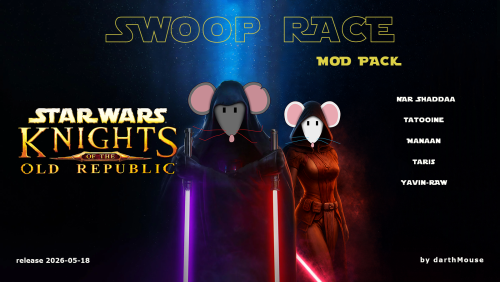
Release preparation tools For preparing and checking our KOTOR releases, we use our own small toolset. These tools are not required to install or play this mod. They are used on our side for release preparation, model checking, packaging notes, and general KOTOR modding workflow. Current tool: KOTOR Model Workbench https://github.com/jenkeee/kotor-model-workbench KOTOR Room Items https://github.com/jenkeee/kotor-roomitems end_sprTERMINAL.zip adds a launch terminal to the Endar Spire starting area, allowing the player to access the mod level content directly from the beginning of a new game. Several people wrote to me about this publication, and I realized that I needed to show the implementation of the development. For this purpose, I prepared tatooine_yavin_station_installer_swoopad.zip. Initially, I planned to make this add-on in one or two evenings, but in the end the work took more than a week. All I can say is this: if someone decides to add their own model into the world of KOTOR, an extremely interesting quest awaits them. The starting version of the modification does not fully reflect the essence of the idea. It already has a technical demonstration of the transport, but it lacks a visual and gameplay representation of how this system can work inside a full location. The file tatooine_yavin_station_installer_swoopad.zip adds two helper NPCs: Boba Fett — an NPC through whom the player can mount the swoop bike. Princess Leia — an NPC through whom the player can dismount from the swoop bike. I did not pack everything inside the .mod. This release is dedicated to the memory of Carrie Fisher. If not for the memory of this heroine of the saga, we would have abandoned our attempts to finish the model. This was a very interesting quest. And how many quest games have you completed to the end, or at least started playing? Yavin IV by jenkeee: maintenanced We have not updated the VEH post for quite a while. This is our core mod about Revan’s mask, based on the old Yavin mod. From the outside, it may have looked like the mod was abandoned. In reality, everything is very simple: while working on the previous mod, we had to study the KOTOR and Odyssey systems in much greater detail, and we came to the conclusion that the previous result was not enough. At first, the plan was smaller. But the deeper we got into it, the more obvious it became that a mod about the mask should not be just an item, a dialogue, and a few events. It should be a full modification. This time, the modification is planned to be much larger: new locations, scripted cutscenes, separate scenes, and a more complex technical foundation. Work is moving slowly. Most likely, we will not finish the main modification earlier than in 3–5 months. At the same time, there is another mod I would like to discuss with all the Jedi in the comments. Right now, less than 10% of the main work is done: mostly prepared dialogues, assets, and the technical base. But, as always, there is a BUT. During development, we accumulated enough files to assemble a separate modification. In the mask mod, we planned a level on a swoop bike. The original mini-game was not suitable for full movement, so in the end we wrote a workaround controller. It turned out pretty fun, and we decided to assemble it into a separate modification and share it with everyone. We hope to see our scripts in your own modifications someday. This mod was made by the darthMouse creative team for two categories of people. The first category is players who have already seen almost everything in KOTOR, but still return to this game from time to time for personal reasons that nobody else can really understand. In our mod, you will be able to visit levels that are not available during normal gameplay, but that you still know. These are the swoop-racing levels from the mini-games. The second category is modders. This is a ready-made package with tested scripts. You can look at jenkeee’s elegant solutions, inspired by the work of Master Zionosis and MotOR Squad. In every module, the logic described in OnRoomEnter can be moved to a helper, and we can implement mount / dismount tools almost like in any MMO from the 2000s, but inside KOTOR. This publication is exactly that: a demo. Not the final version of the big mod, but a set of materials you can touch, test, and possibly use in other modifications. What is included in the demo The archive includes a custom swoop-race package for KOTOR1. Currently available: Tatooine 2026 Manaan 2026 Yavin 2026 preview / raw Taris 2026 Nar Shaddaa 2026 The races can be launched through Yavin Station. The idea is that KOTOR can be used not only as a set of corridors, dialogues, and battles. With careful work on scripts, modules, and player states, it is possible to plan larger locations — almost in a GTA-style logic, as far as that is even possible inside Odyssey. Of course, this is not “GTA in KOTOR” and not a finished universal framework. It is more of a demonstration of direction: how we can think about transport, movement, separate player states, and larger zones within the limits of an old engine. If you have questions, ideas, strange scenarios, or even comments that may look silly at first glance — write them. This is exactly the kind of case where a “stupid question” can save several weeks of development. A small author’s digression I often say obvious things, but sometimes it is useful for someone to read them. Maybe this will be the first source of obviousness in someone’s life. At one point, I used to read Habr and admire how smart and complicated the people there seemed. Today, many things written there look either obvious to me or like an eternal holy war. And the obvious thing I want to write about is this: the importance of your questions. The stupidest question, according to someone, is still the first step toward solving a problem. Very often, a person cannot ask the right question simply because other topics have not been discussed before. When you approach something complex without knowledge, you do not only lack the answer — you do not even understand what question needs to be asked. And the question is the most important thing. Without a question, there will be no answer. When will salaries become decent? When will the war end? Where is true love? Why, why exactly — Kathleen Kennedy? As you can see, I am not trying to answer such difficult questions. But many of you are probably ready to answer them. Usually, people just do not answer such things for the public. They talk about them with friends. And if you do not have situations like that, maybe you are a lonely person. Almost like Terry Davis. This man spoke with God through a keyboard, starting somewhere around 2005. He was inspired by systems like the Commodore 64, and even back then he could see meaning in the generated answers of his TempleOS. Of course, he was not the first person like that in history. There is an even more famous figure — Alan Turing. But can you imagine Alan today? And Terry? I feel like Terry died too early. His knowledge would have complemented today’s world very well. Today, every second person communicates with a computer almost as naturally: writes a question, receives an answer, argues, clarifies, gets angry, formulates the question again. What once looked like a strange personal obsession has now become a normal part of life. I am not sure I have perfectly formulated what I wanted to express in this text. But maybe that is the point. Do not be afraid to ask. Sometimes you will receive an answer before you even manage to say the question out loud. And if you formulate the question well enough, it often turns out that the answer is already somewhere nearby — or that you already know where to look for the source of truth. This mod is a tech demo, a technical snapshot, and an invitation to discussion. Download it, test it, break it, ask questions, and write comments. It is important for us to understand what scenarios we need to take into account next — especially if you make KOTOR mods yourself or want to use some of these solutions in your own projects.0 points -
Version 1.1
52 downloads
This mod gives the Male Jedi Exile (PMHH01) a custom visual overhaul with realistic pale green eyes, a custom skin tone, brown hair with subtle realistic highlights, custom portraits, and movie inspired dark side transitions. Features HD Custom Exile face texture Realistic pale green eyes Custom skin tone Brown hair with subtle realistic highlights Custom portraits Movie inspired dark side transitions Second Sith transition with yellow eyes and a reddish undertone Simple texture replacement Installation Place the override folder into your main kotor 2 directory. If asked to overwrite files, choose yes. Compatibility This mod may conflict with other mods that replace the same Exile head, portraits, or dark side transition textures. Requirements None.0 points -
I'm gonna add some facial hairs to some select heads, I've already done them, just need to darkside transitions and sith eyes. Which female head did you have in mind? I'm gonna update the last transition. I want to add the reddish ring around the eye.0 points
-
🔥 AMAZING , Looking forward to using this one day!0 points