Leaderboard


Popular Content
Showing content with the highest reputation on 02/07/2026 in Files
-
2 points
Version 1.1.0
43 downloads
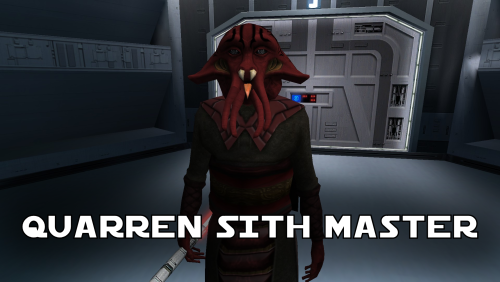
A Mod for Star Wars Knights of The Old Republic Author: N-DReW25 1.1.0 Release Date: 05.02.2026 Installation: Simply click on the HoloPatcher.exe, select your swkotor directory, click install and sit back and watch the HoloPatcher do its magic. Description: In the 19th Century, European Colonizers would use non-European collaborators to help pacify and/or assimilate non-European cultures into their Empires. The European Colonizers and the non-European target for colonization might have major linguistic and cultural differences making dialogue between the two groups almost impossible, but by taking a non-European collaborator of the Europeans and using them as an intermediary between the two groups the non-European group might become more suspectable to the Europeans through the use of the non-European collaborator who is closer to the non-European group than they are to the Europeans. A random example of this might be the Italians using the Arabs to help them colonize the Somalis. The Italians want to colonize Somalia but they do not speak Somali and aren't at all culturally similar, whereas the Somalis would more than likely know Arabic and would be more culturally similar to Arabs so using Arabs to help Italians colonize the Somalis would be a viable tactic. This concept of wanting to colonize a group that is different from you so you instead use a culturally similar group to make it easier for you to colonize the original group is central to this mod. On Manaan, the Sith Empire is secretly training Selkath youths into becoming Dark Jedi and Sith Agents to one day stage a coup against the Manaan government to take over their planet and exploit their precious resources. Similar to the real life example above the same hurdles that applied to Europeans and non-Europeans still apply to the Sith in this scenario. The Sith Empire is predominantly human and are shown to be quite racist to non-human species throughout the game. The Selkath are an aquatic alien species so not only is there a differing alien culture the Sith have to deal with but the Selkath primarily live underwater. The leader behind this Sith plot to train Selkath youth is a human Sith Master who appears as a generic Sith Master in-game. This mod changes this NPC so that the Sith Master is now an alien Quarren, another aquatic alien species. With this mod installed, it makes much more sense as to why the Sith are trying to train and convert Selkath youth to the Sith when the mastermind behind this plot is a fellow aquatic alien who would be much more culturally similar to his Selkath students and would be a much easier leader for the Selkath to blindly follow despite this master serving an empire that would be racist towards them all. Known Bugs: This mod shouldn't have any bugs but if you find any please feel free to report them on Deadlystream.com. A third install was planned but could not be implemented due to a bizarre bug. The third option was a version of the vanilla dialogue which had an AI filter over it to make it sound like the Quarren from Kotor II (this same method was used in the ROR mod for the Quarren Jedi Master). This could not be added as the VO in-game would be sped up with the pitch increased for reasons unknown to me. This install has been included in the mod but cannot currently be installed, when this bug can be fixed I will add the ability to install it. Incompatibilities: Please report any incompatibilities! Permissions: Do NOT claim credit for this mod and do not use assets from this mod without my permission. The textures for this mod comes from Quanon's Big Sellout, a modder's resource that was published on LucasForums back in the day. These are the same textures that are used in Quanon's Sith Quarren PC mod found on NexusMods. As these textures came from Quanon's Big Sellout, they can be used in your mod though I strongly advise you credit Quanon as the original artist and acknowledge Quanon's Big Sellout to avoid people thinking you stole it from the Sith Quarren PC mod. Thanks to: Quanon: For making the original textures and including it in your Big Sellout modder's resource! Marius Fett: For fixing the Death Field animation bug which projected the lightning from his feet instead of his hands! ElevenLabs Website: For the custom AI VO service! Bioware: For such an amazing game! Obsidian Entertainment: For creating the original Quarren models, textures, and VO! Fred Tetra: For Kotor Tool! th3w1zard1: For HoloPatcher! Everyone who downloads the mod! Legal: THIS MODIFICATION IS NOT SUPPORTED BY BIOWARE/OBSIDIAN ENTERTAINMENT, LUCASARTS, DISNEY OR ANY LICENSERS/SPONSORS OF THE MENTIONED COMPANIES. USE OF THIS FILE IS AT YOUR OWN RISK AND THE ABOVE-MENTIONED COMPANIES OR THE AUTHOR IS NOT RESPONSIBLE FOR ANY DAMAGE CAUSED TO YOUR COMPUTER FOR THE USAGE OF THIS FILE. -
1 point
Version 1.0.0
66 downloads
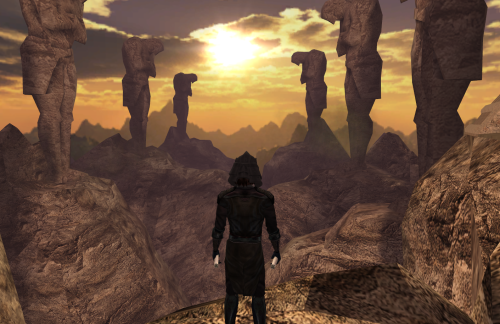
Hello, very simple mod today. After Ajunta Pall's swords, here's another much needed modernisation of the game. I bring you one of the most known Dark Lords of the Sith's mask. The actual mask (or more like helmet ?). Not the ugly vanilla one. Anyway, you'll just have to run the Installer and select either the standard version or the upscaled one. It'll look a bit better but will also take a bit more space, so you choose. Compatible with everything as long as it doesn't replace Tulak Hord's mask (yes, even compatible with mods that would only change the mask's stats as long as the file doesn't get thrown in Override). Thanks to @DarthParametric for his awesome SWTOR ports and some guy for the upscale. I do not own this model. I know nothing of licenses so I'm just going to say that if you want to use this mod (which is basically a modders resource mixed with an end user mod), just make sure doing it is fine. Some guy says that if you want to reuse the upscale, it's okay as long as you attribute the work the same way (credit him as some guy). -
1 point

Version 1.0
6,765 downloads
I've got tired of standart ingame vibroswords and was looking for mods which will replace them with high(er) quality models. While looking for KotOR models I've found an intresting mod for Jedi Academy made by RevanDark which added tons of new weapons. I especially liked the look of 'Cyber Ninja' swords and I thought it will be great to have such swords in KotOR... So, this mod will replace standart vibroswords with cool "Cyber Ninja" swords. I've managed to convert models and re-create glowing effect for the blades. Mod will not change stats of weapons. Credit goes to RevanDark for creating original JA models. Permissions: Under NO CIRCUMSTANCES ANY OF MY MODS TO BE UPLOADED TO STEAM WORKSHOP. Anything else - be my guest, use like you want, just give credit to me. -
1 point

Version 1.0.0
35,427 downloads
Animated energy shields. They look better in the game. To Install 1. Download: Animated energy shields 2. Copy all files to the Knights of the Old republic's Override folder. (Example location - C:\Program Files (x86)\Steam\steamapps\common\swkotor\Override) 3. When/if prompted to overwrite files, press okay. 4. If you like the mod; leave a comment or endorse! (It would be much appreciated) Made with love. -
1 point

4,057 downloads
Original Review on Filefront: Anyone remember the history to do with this? A while ago (well over a year) on Holowan, getting Bao-Dur into Jedi robes was all but impossible - the models simply didn't mesh, and his head always floated above the robes some. Thankfully, Kristy Kistic was able to remedy the issue, but the mod was never released - until now, that is. Well, it basically does what I said there - fixes Bao-Dur's head, and causes it to no longer float above his head when he wears any robes. A much-needed fix indeed, for those of you who like to train him as a Jedi. Kudos to Shem for bringing this to the public at long last, and Kristy for making it in the first place! Anyways, to install this thing just run the TSLPatcher - it modifies appearance.2da. And also remember to cheat in one of his robes if you install this mod while having Bao-Dur in your party - the codes are 'baodurjedi' and 'baodursith' for the respective light and dark side-aligned ones. Note: Please remember to give the author of the mod feedback, as the download count isn't particularly verbose. Written comments tend to be much more useful and encouraging. -Emperor Devon -
1 point
Version 1.0.0
83 downloads
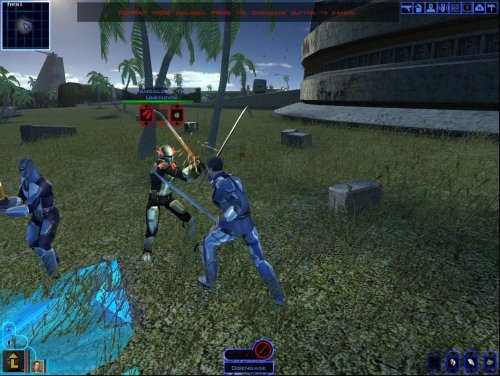
[K1] Mandalore the Unknown Author: RavenFal Release Date: 11/28/2025 "Yes, that's him. I toyed with calling him dar'Mand'alor, loosely translating Mandalore the Unknown." ―Abel G. Peña This mod changes the Mandalorian Captain found by the Temple on the Unknown World to be “Mandalore the Unknown”, the self-proclaimed Mandalore referenced several times in KOTOR by HK-47 and the Mandalorians on Kashyyyk, but never seen in-game. Per the campaign guide, Canderous defeated him between games and took his armor and helmet as a way to honor him, combining the helmet with Mandalore the Ultimate's mask (which is why Manalore's helmet in KOTOR 2 looks so different compared to the mask from the comics). This mod moves that confrontation earlier in the timeline, allowing players to experience Canderous acquiring his armor from KOTOR 2 and letting him (or anyone in your party who can equip heavy armor) to rock up to the Star Forge wearing one of the coolest armor sets from either game. “Mandalore the Unknown” is wearing an upgradeable armor set with the appearance of Mandalore's Armor from KOTOR 2. Upon his defeat, he'll drop this armor instead of the “Mandalorian Assault Armor” the Mandalorian Captain drops in the base game. The appearance is set up as a disguise, and so it will work for both male and female characters. He also drops a datapad that explains why he was sending teams of Mandalorians to hunt in the Shadowlands, what he's doing on the Unknown World, and changes up events a little more to make to him the one who made the modifications to Mandalore's mask. I have also included optional files to change Mandalore the Ultimate from SilverEdge9's Brotherhood of Shadow: Solomon's Revenge mod to also have the appearance of Mandalore from KOTOR 2. The mask looted from the “Non-Canon” chest remains unaltered and has its original appearance. This mod is not compatible with any mod that alters g_mandalor004.utc (the Mandalorian Captain on the Unknown World). To Install the main mod: 1. Run the “Install.exe” program from the mod folder. To Install Optional files to change the appearance of Mandalore the Ultimate in BOSSR: 1. Copy all files from the “Optional – BOSSR Mandalore Replacement” folder into your Override folder. To Uninstall the main mod: 1. Delete the following files from your Override folder: bos_mandhelm.uti g_a_mandotsl.uti g_mandalor004.utc mandotsl_datapad.uti p_mandalorebb.mdl p_mandalorebb.mdx P_MandB.tga 2. Replace the “appearance.2da” file from your Override folder with the “appearance.2da” file saved in the “backup” folder found in the main mod folder. To Uninstall the Optional files for BOSSR: 1. Delete the following files from your Override folder: brg_mandalore.utc msp_mandalore.utc myp_mandalore.utc mzp_mandalore.utc Credits: SilverEdge9 for the original Brotherhood of Shadow: Solomon's Revenge files. -
1 point

Version 1.3.1 Master Jorn Editio
7,643 downloads
Darth Darkus' Armored Robes v 1.3.1 -Master Jorn Edition- ============================================ These robes reskins were done by Darth Darkus around 2010 if I remember correctly. He granted me permission to use them in HotOR 1.6, which I did because they look great. In 2012, I released v 1.2 on DeadlyStream as close to how I thought he intended them to be originally but also added the icons, uti's and installation with TSL Patcher. Now, I am releasing my own version of the mod 5 years later, with my own spins on them. These new robes will now replace the default robes and have been made upgradeable. Two of his robe reskins have been omitted (red and blue guard robes), and my personal reskins of the brown jedi armored robes now use three of the default jedi robe texture slots. These robes have been redone to add shine to the obvious metal parts, which also meant that the shredded outer robe on the Inquisitor's and Marauder's had to be "spliced" with full and intact versions. In order to make up for the missing shredded robes I went and put some nice textures on them. Double click the .exe file to install. Version 1.3.1 adds the missing texture on the Consular's Battle Robe (my bad), adjusts stats on all robes and touches up Inquisitor's Battle Robe, and lowered the vendor prices on a few robes. Permissions: You may not redistribute files contained herein and you may not use these files in your own mod without my consent. Original Read Me file as follows.. *********************************** ~~~~~~~~STAR WARS:~~~~~~~~~ KNIGHTS OF THE OLD REPUBLIC: THE SITH LORDS MODIFICATION *********************************** PRIMARY DEVELOPMENT BY DARTH DARKUS, (SECONDARY DEVELOPMENT BY KAIDON JORN) *********************************** ARMORED ROBES *********************************** ~~~~~~~~~~~~~ ~DESCRIPTION~ ~~~~~~~~~~~~~ I KNOW SOME OF THESE ROBES ARE FAR FROM PERFECT BUT YOU CAN FEEL FREE TO CHANGE THEM AS YOU LIKE THIS PACKAGE WILL ADD 9 ARMORED ROBES TO KOTOR: TSL... ~~~~~~~~~~~ ~NEW ITEMS~ ~~~~~~~~~~~ 3 ARMORED JEDI ROBES 3 ARMORED GUARDIAN ROBES 3 ARMORED SITH ROBES ~~~~~~ ~BUGS~ ~~~~~~ NONE KNOWN! IF ANY PROBLEMS SHOULD APPEAR YOU CAN PM ME AT LUCASFORUMS ~~~~~~~~~ ~CREDITS~ ~~~~~~~~~ DARTH DARKUS- PRIMARY DEVELOPMENT ~~~~~~~~ ~THANKS~ ~~~~~~~~ ALL THE PEOPLE WHO MAKE TOOLS, YOU ARE AWSOME. WITHOUT THEM NOTHING WOULD BE POSSIBLE. - KOTOR TOOL ..........................Fred Tetra - SVÖSH - FOR HIS GREAT COLLAR FIX - THE MODDERS ON HOLOWAN, WHO ALWAYS HAVE A HELPING HAND FOR STARTERS. ~ OTHER USAGE ~~~~~~~~~~~ YOU MAY USE AND/OR MODIFY THIS PACKAGE FOR OTHER MODS, BUT DON'T FORGET TO GIVE ME CREDIT. YOU MAY UPLOAD THIS SKIN PACKAGE ELSEWHERE WITHOUT MY PERMISSION. ~ THIS MODIFICATION IS NOT MADE, DISTRIBUTED, OR SUPPORTED BY BIOWARE, OBSIDIAN, OR LUCASARTS ENTERTAINMENT COMPANY LLC. ELEMENTS TM & © LUCASARTS ENTERTAINMENT COMPANY LLC AND/OR ITS LICENSORS. -
1 point

3,578 downloads
TSL Jedi Items + Credits: 90SK - VarsityPuppet - DarthDarkus - Kaidon Jorn - SithSpectre This is an expansion for Jedi robes and Jedi armors in TSL. You can choose one option for each of the armor or robe types This will replace the Jedi master robe, Padawan robe, Jal Shey armors, armored flight suit, and Star Forge robe. All the new items have icons, male and female skins, and stats. Main Square merchant sells new item type with seven or more new items Multiple options for the Jedi item types included in the archive. The default Jal Shey items will have new appearances. The items will work with your old saves. -To Install, Choose up to one of each type of armor, and then copy mod files from archive to Override in your SKotORII directory. -To uninstall, remove the mod files from your Override folder. Please note that the Armored Flight Suit replacements will change the merchant on Onderon, to a new merchant and inventory. It shouldn't affect escaping Onderon. This mod is best used with new game or relatively early game (before Dxun) Features: This mod does a number of things: It will offer replacement types for the Jedi Items (JS/ZS armors, robes types 1 & 2, armored flight suit, and Rakatan cloak) Flight Suit Armors/Jedi Heavy Armors (giveitem jediheavy25 - jediheavy34) are all sold by the Main Square merchant on Onderon. The Star Forge Robe (giveitem deluxe) is in Vogga's treasure chamber. The Ubese Environment Suit is now a Ubese Disguise, (giveitem a_light_11) and is in random loot system. JS/ZS Armors have four types you can choose one of, DarthDarkus' Robes, Tunics, Bandon Armors, or Cloaked Heavy Armors Padawan robe replacement options (not pictured) are Jedi Master Robes, Cloaked KotOR 1 type, and Bastila Tunics. Additional details are still accurate for the replacements, but for Version 4.0 I have split up the archive so you can choose what to install. Additional Details: --- Compatibility: Update 6/18: I will add more screenshots of the additional skins for this update, but basically, the replacements will patch into Override and replace the items in your old saves. So you should be able to see changes to the items right away. You won't be able to install more than one of each type of replacement for each armor type. Update 6/28: Improved details, additional sf robe option added, fixed some items like g_i_cermshield and a_robe_26 ds restriction has been lifted --- Please do not reupload this mod anywhere or in any way. Contact 90SK on DeadlyStream.com for info, questions, or comments. --- This mod is as-is content and not supported by Obsidian, Bioware, or LucasArts. It is meant for personal use only and at users own risk. The devlopers of KOTOR and the author are not responsible for your computer or what you choose to do with it. -
1 point

Version 1.2
1,233 downloads
******************************************** Knights of the Old Republic - The Sith Lords ******************************************** TITLE: Effixian's K1 to K2 Heads AUTHOR: Effix(ian) CONTACT: PM me on the forums or find me on Steam ************ DESCRIPTION ************ This mod adds player heads: - PFHC01 from KotOR 1, as requested by shadongo. - PMHA05 from KotOR 1, as requested by Fallen Guardian. ************* INSTALLATION ************* PFHC01 from K1 to K2: Unzip somewhere and run the file "TSLPatcher_Effixians_PFHC01_from_K1_to_K2.exe". PMHA05 from K1 to K2 Unzip somewhere and run the file "TSLPatcher_Effixians_PMHA05_from_K1_to_K2.exe". Steam's TSLRCM: Point the patcher to TSLRCM workshop folder, location is something like [drive]:\[steam folder]\SteamLibrary\steamapps\workshop\content\208580\485537937 ***** BUGS ***** None known. ************* UNINSTALLING ************* 1. Remove the following files from your Override folder: For PFHC01 from K1 to K2: - pfhx01.mdl - pfhx01.mdx - PFHX01.tga - PFHX01A.tga - PFHX01AD1.tga - PFHX01AD2.tga - po_PFHX01.tga - po_PFHX01d1.tga - po_PFHX01d2.tga For PMHA05 from K1 to K2: - pmhx05.mdl - pmhx05.mdx - PMHX05.tga - PMHX05.txi - PMHX05D1.tga - PMHX05D1.txi - PMHX05D2.tga - PMHX05D2.txi - po_PMHX05.tga - po_PMHX05d1.tga - po_PMHX05d2.tga 2. Get the following files from the mod's backup folder and put them back in your Override folder: appearance.2da heads.2da portraits.2da ******************* DISTRIBUTION NOTES ******************* You may not: Use the material from this mod in your own mod without giving me credit, implying it was your creation. You might: Use the material from this mod in your own mod if you simply ask me. ********* THANKS TO ********* - Fred Tetra's Kotor Tool - bead-v's MDLedit - stoffe's TSLPatcher - The people at Deadly Stream ------------------- THIS MODIFICATION IS NOT MADE, DISTRIBUTED, OR SUPPORTED BY BIOWARE, OBSIDIAN, OR LUCASARTS ENTERTAINMENT COMPANY LLC. ELEMENTS TM & © LUCASARTS ENTERTAINMENT COMPANY LLC AND/OR ITS LICENSORS. -
1 point

Version 2.2
5,783 downloads
---------------------------------------- Knights of the Old Republic - Seikan's Armors of the Old Republic 2.2 ---------------------------------------- AUTHOR: Seikan EMAIL: chanes340@hotmail.fr RELEASE: December 2016 ---------------------------------------- Description ---------------------------------------- 6 years after the first release, I present to you a complete rework of my old mod “Seikan’s Armors of the Old republic”, a complete rework on the textures was done, along with the addition to the items in-game. This mod add a new set of armors, using the Darth Bandon's model as male model, and Bastilla's model as female model. These armors will replace the Revan robes row in the appearance.2da. It also adds a set of mandalorian helmets, sith trooper helmets, and a new model for Tulak Hord's mask. ---------------------------------------- Changes in 2.2 version ---------------------------------------- -Fixes bug of Endar Spire beginning footlocker containing Revan’s armor instead of the beginning loot allowing you to progress in the game. Revan’s armor is now located along with Mandalore the Ultimate’s armor. -Fixes the bug of the mandalorian warrior armor not appearing on Jagi. -Fixes the issue of Caucasian female characters having the wrong textures attributed to it. -Removes a useless entry on the TSL patcher that caused it to report an error though there was no real issue. ---------------------------------------- New Items Checklist ---------------------------------------- - Revan's Armor - Darth Revan's Armor - Mandalorian Warrior Armor (blue) - Mandalorian Sergeant Armor (red) - Cassus Fett Battle Armor (yellow) - Mandalore The Ultimate's Armor - Sithmaster-armor - Darth Bandon's Fiber Armor - Tulak Hord's Robe - Tulak Hord's Mask - Neo Crusader Hemlet (blue) - Neo Crusaders Helmet (red) - Cassus Fett Battle Hemlet (yellow) - Female Neo Crusader Hemlet (blue) - Female Neo Crusader Hemlet (red) - Female Cassus Fett Battle Hemlet (yellow) - Sith Hemlet - Female Sith Hemlet ---------------------------------------- How to Install This Mod ---------------------------------------- - Run the TSL patcher, and select your game directory. ---------------------------------------- Location of the items ---------------------------------------- - Darth Revan's Armor : Naga Sadow tomb. - Mandalorian Warrior Armor (blue) Neo Crusader Hemlet (blue) Female Neo Crusader Hemlet (blue): Dropped by Jagi - Mandalorian Sergeant Armor (red) Female Neo Crusader Hemlet (red) Neo Crusaders Helmet (red): Dropped by Mandalorian commander in the Shadowlands - Cassus Fett Battle Armor (yellow) Cassus Fett Battle Hemlet (yellow) Female Cassus Fett Battle Hemlet (yellow): Sold at the usual spot (Dantooine) - Revan's Armor Mandalore The Ultimate's Armor: Found in The Krayt Dragon lair. - Sithmaster-armor Sith Hemlet Female Sith Hemlet: Taris Governor - Darth Bandon's Fiber Armor: Self explanatory. - Tulak Hord's Robe Tulak Hord's Mask : Self explanatory. ---------------------------------------- Contact Info ---------------------------------------- - Email all questions or comments to: chanes340@hotmail.fr, or contact me through Deadlystream, Username: Seikan ---------------------------------------- Terms of Use ---------------------------------------- - Altering the contents of this mod is permitted only for your own personal usage. - You are not allowed to use the resources included in this package for other released mods without my consent. (which you’ll most likely have, just ask me, I just like to know what’s being done with my mod) ---------------------------------------- Credits ---------------------------------------- Models, skins, idea: Seikan Rework on Tulak Hord’s mask model and mapping: xander2077 ---------------------------------------- Special Thanks ---------------------------------------- - Thanks to those who took the time and effort to create the tools required to mod KOTOR. Without those, none of this would have been possible. - Thanks to Holowan Labs for all the help and support through the development process of the earlier version. - Thanks to Illy-chan, who suggested me to use Bastilla’s model for the female version of the armors. -Thanks to xander2077 Who did a nice overhaul of Tulak Hord’s mask, which is now part of this mod. ---------------------------------------- Additional Notes ---------------------------------------- -There are male and female helmets, since it needs to modify the appearance of the character. So if you wear a female helmet with a male you will be changed into a female. -The helmets will change you into a white character, so if you wear underwear while using one of the helmets, your character will be changed to a white character. -If you wear a helmet during a "star map vision",, or the Revan revelation you will have a really ugly face, that's normal, otherwise, there would be pieces of head, getting out all over the helmets, so I’d advise you to take them off before such scenes. -Since I’m a little bit short of time I haven’t had the time to test the mod myself, so there might be a few bugs here and there, if you find any I’d appreciate if you contact me, I’ll try getting a fix for it ready. -Compatibility wise, it obviously won't be compatible with mods modifying the same files (Revan robes models, Jagi, Tulak Hords sarcophagus and mask, Taris Governor etc....) -
1 point

Version 1.0
2,730 downloads
Knights of the Old Republic 2: The Sith Lords mod [TSL] Vibroweapons replacement pack retexture A replacement of all vibroweapons. This mod is just a conversion of my mod for KotOR to work with KotOR 2: TSL. Original ReadMe from KotOR mod: ====================================================== Original models of vibroswords for KotOR by: DeadMan Original models of vibroblades and double vibro-blades for KotOR by: Seph6 Original models for Jedi Academy by: RevanDark Author: IRobert Contact: PM me on the forums *********** Description *********** This is a retexture/recolor for DeadMan's [K1] Vibroswords replacement pack and Seph6 [K1] Vibroblades and Vibro double-blades replacement pack. It will replace the standard vibroswords, vibroblades and vibro double-blades with new models. The "new" textures looks similar to original game weapons. Colors match to those made by BioWare (mostly). Every blade looks like it was vibrating and there are more color options than in original mods. New icons clearly shows color of blade and hilt. *********** Instalation *********** Place the content of Override folder in your SW KotOR Override folder. All models and textures are inculded. **** Bugs **** I did not notice any, but if You do, please contact me. ********* Thanks to ********* DeadMan for giving me permission to use his mod. Seph6 for giving me permission to use his mod. RevanDark for making original models for Jedi Academy ********* Permissions ********* You can freely use, change or modify this mod as long as you credit ME, DEADMAN, SEPH6 and REVANDARK. You can't upload this mod anywhere, never. If you have questions just pm me on forums. Enjoy ---------------------------------------------------------------------- THIS MOD IS NOT SUPPORTED BY LUCASARTS OR OBSIDIAN USE THIS FILE AT YOUR OWN RISK. THE AUTHOR OF THIS MOD IS NOT RESPONSIBLE FOR ANY DAMAGE TO YOUR COMPUTER WHEN USING THIS FILE. --------- Thanks to 90sk for contact, help and advice with making this conversion. -
1 point

Version c.03
14,335 downloads
TSL Loot & Immersion Upgrade Version c.01 by 90SK "This is but a taste of the dark side to whet your appetite..." -------------------------------------------------------------------- Mod Info: A fresh take on the body items in TSL, with over 60 new skins! In-character skins and integration into TSL's world. It was created to add life to TSL's selection of armors and robes. Requires a new game & start to fully add everything. This mod is not primarily compatible with other mods, please know what you are installing and consult files before installing. See changelog for details on latest version and giveitem codes. -------------------------------------------------------------------- Patches for Loot Immersion Upgrade: Ceremony Jedi Tunics Alternate Expansion Marauder Tunics Expansion Patch/Alternate Version of Loot-Immersion Upgrade c.04 Default Jal Shey Expansion Contributors: 90SK - Skinning, item creation, scripting, ideas/putting the mod together VarsityPuppet - Skinning help, Model enhancement: Jedi robe, Master robe, Heavy armor robe, Darth Bandon female armor Sithspectre - Heavy Armor Female skin remap to male and model RGB - Skinning help, texture parts for M class Items (Darth Bandon model) Fred Tetra - KotOR Tool Silveredge9 & Quanon - Mandalore mask model and original skin flying-gg - Beta Testing Effixian - great placement of jedi armor on Geeda merchant idea L0rdReV@n88 - Exile darksider robe skin Sharen Thrawn - Nar Shaddaa skybox skin Gsccc - Tutorial on VO recording tk102, Stoffe, Darth333 - Scripting tutorials Darth Nihilus art from prima guide as base for Nihilus mask reskin Developers of KotOR - a lot of materials, the games, and making way for my work to be done. ------------------------------------------------------------------- It will add many additional robes and armors, replace many robes and armors, add and improve loot drops, and it is designed to fit in with TSL. Content Overview: Cloaked Knights of the Old Republic 1 style tunics replace the padawan robe model with new skins. Jedi master robes have been reskinned. Significant added content focused on armors/robes for Onderon pt1 and pt2, Nar Shaddaa, Dxun, Telos, Korriban, and Dantooine. Canon and comic book style improved masks for Nihilus and Mandalore. Improved Bao-Dur skin (tan, green eyes). Korriban and Dxun tombs have improved appearance item loot. All unrestrictive items and textures totally overhauled. Metallic/improved HK-50, 51, 47 and T3. Vacuum mask replaced with an electromesh mask design. No-glitch upgrade screens for red space suit and Mandalore Armors + Custom Icons. Cheat code "giveitem light_matrix" for blue hypermesh armor. Cheat code "giveitem revan" for Darth Revan robe . Cheat code "giveitem shadow" Azkul's outfit. Cheat code "giveitem 90sk_1" and "giveitem 90sk_2" additional Exile's personal robes. -------------------------------------------------------------------- INSTRUCTIONS AND DETAILS: PLEASE READ CAREFULLY*** Step 1. Download 7Zip to unpack .7z files (harmless freeware for file packing) Step 2. Copy baseitems.2da to an empty Override Install TSLRCM and any Lightsaber mods you want Next, after installing saber mods or TSLRCM, copy this mod's Override from Mod archive to either your "Program Files/steam/steamapps/common/Knights Of The Old Republic II" , or "Program Files/LucaAarts/SWKotOR2" if you're not using the steam version Step 3. That's it! To verify that the mod is working, check it in KSE. You can do a few things to remove the mod if you need to, but it is largely not recommended. Use the auto-generated Backup folder to replace files from the mod. You can also reset your Override folder (delete your override folder, make a new folder and name it override) Manually manage your Override folder ------------------------------------------------------------------- Misc Information: If you have any questions about the mod, or want to know more about it before you download, feel free to leave a comment or Private Message me (90SK) on DeadlyStream. -------------------------------------------------------------------- Changelog: ------------------------------------------------------------------- NOTES: Compatibility: Troubleshooting: ------------------------------------------------------------------- COMPATIBILITY & MOD DETAILS: - Item Classes: This mod replaces: the Jedi robe class, the Jedi master robe class, the Jal Shey / Zeison Sha / Darth Malak's armor class, the armored flight suit class, and the star forge robe class. Version c.01 is the current version. This mod is designed to fit in with and improve TSL. This mod is not compatible with the STEAM TSLCRM due to directory conflicts Please start a new game to use Loot & Immersion Upgrade v4.4.4b has not been tested with NPC Overhaul Level and weapon mods are compatible with Loot & Immersion Upgrade If you have questions about something on this page, feel free to PM me (90SK) -------------------------------------------------------------------- Additional Credits: Do not redistribute or release this mod, or use any component of it in your own mods (except specifically for personal use), without permission from the original authors. Explicitly do not release this mod on any site or in any way/shape/form. Special thanks to VarsityPuppet and all authors aside from myself credited for use of their work and expertise in this mod. Special thanks to Flying-gg for some essential beta testing. Extra special thanks to staff of LucasForums and DeadlyStream! -------------------------------------------------------------------- THIS MODIFICATION IS PROVIDED AS-IS AND IS NOT SUPPORTED BIOWARE/ OBSIDIAN ENTERTAINMENT OR LUCASARTSOR ANY LICENSERS/SPONSORS OF THE MENTIONED COMPANIES. USE OF THIS FILE IS AT YOUR OWN RISK AND THE ABOVE MENTIONED COMPANIES OR THE AUTHOR IS NOT RESPONSIBLE FOR ANY DAMAGE CAUSED TO YOUR COMPUTER FOR THE USAGE OF THIS FILE.