All Activity
- Past hour
-
That's... actually what I did recently, before posting here the first time. Except the part about knowing to back up the fresh EXE. I'll do this and let you know how it goes. Edit: ...Huh??? Okay now I'm even more perplexed. I did all of those steps to the letter, but the problem still happened. Both the fresh install with the mods in that order and then the patches (including loose file), then removing the patches (and loose file), adding the converted EXE (it was able to convert first try this time), and then reinstall the patches (including loose file). Still happening. I... I just don't get it. >_<
-
To be honest, to be as safe as possible, I would recommend you to back up your save files and do a clean reinstallation of KotOR 2, which means you need to not just uninstall the game on Steam, but also manually delete the KotOR 2 game folder as well. If you're subscribing to any Steam Workshop mods, unsubscribe and delete the Steam Workshop folders. Also, install TSLRCM and M4-78EP by running the EXE installers downloaded from Deadly Stream, and do not use any Steam Workshop mods. After you reinstall KotOR 2, back up the fresh swkotor2.exe executable, then install TSLRCM, M4-78EP and PartySwap, try to apply the Full Party Select Patch again. If that doesn't work, uninstall all the patches, try the KotOR 2 EXE converter, and reapply the patch again.
- 473 replies
-
- 1
-

-
- handmaiden
- party
- (and 2 more)
-
Okay that's even weirder. Yes I do have a backup, but this copy of the EXE should have been the one Steam downloaded when verifying files. I'm really perplexed here. o_o Is it possible a Steam setting regarding the game could have been changed or anything? Edit: Just tried verifying files again, it found some stuff, and now the EXE file is working with the EXE converter. I... I don't get it. >_<
- Today
-
Your steam exe has been modified. Do you have a backup of the original steam exe?
-
Okay that's even weirder. I tried running this, and it errored out. Said "unsupported Steam EXE hash". Now what?
-
I think I may know what's going on. https://j0-o.github.io/kotor2converter/ use this to convert your vanilla steam (not the DS editable executable) and try with the exe it outputs.
-
.thumb.png.e1132444dd8587c72edc645e18adc5a5.png) For those of you who downloaded version 1.0, there is no need to install 1.1. All you need to do to get the bug fix if you've already installed 1.0 is go into the mod's tslpatchdata folder and copy the files "SM_TwiFem.mdx" and "SM_TwiFem.mdl" and place them into your Override folder.
For those of you who downloaded version 1.0, there is no need to install 1.1. All you need to do to get the bug fix if you've already installed 1.0 is go into the mod's tslpatchdata folder and copy the files "SM_TwiFem.mdx" and "SM_TwiFem.mdl" and place them into your Override folder. -
 mzzeria joined the community
 -
 Ohdie joined the community
 -
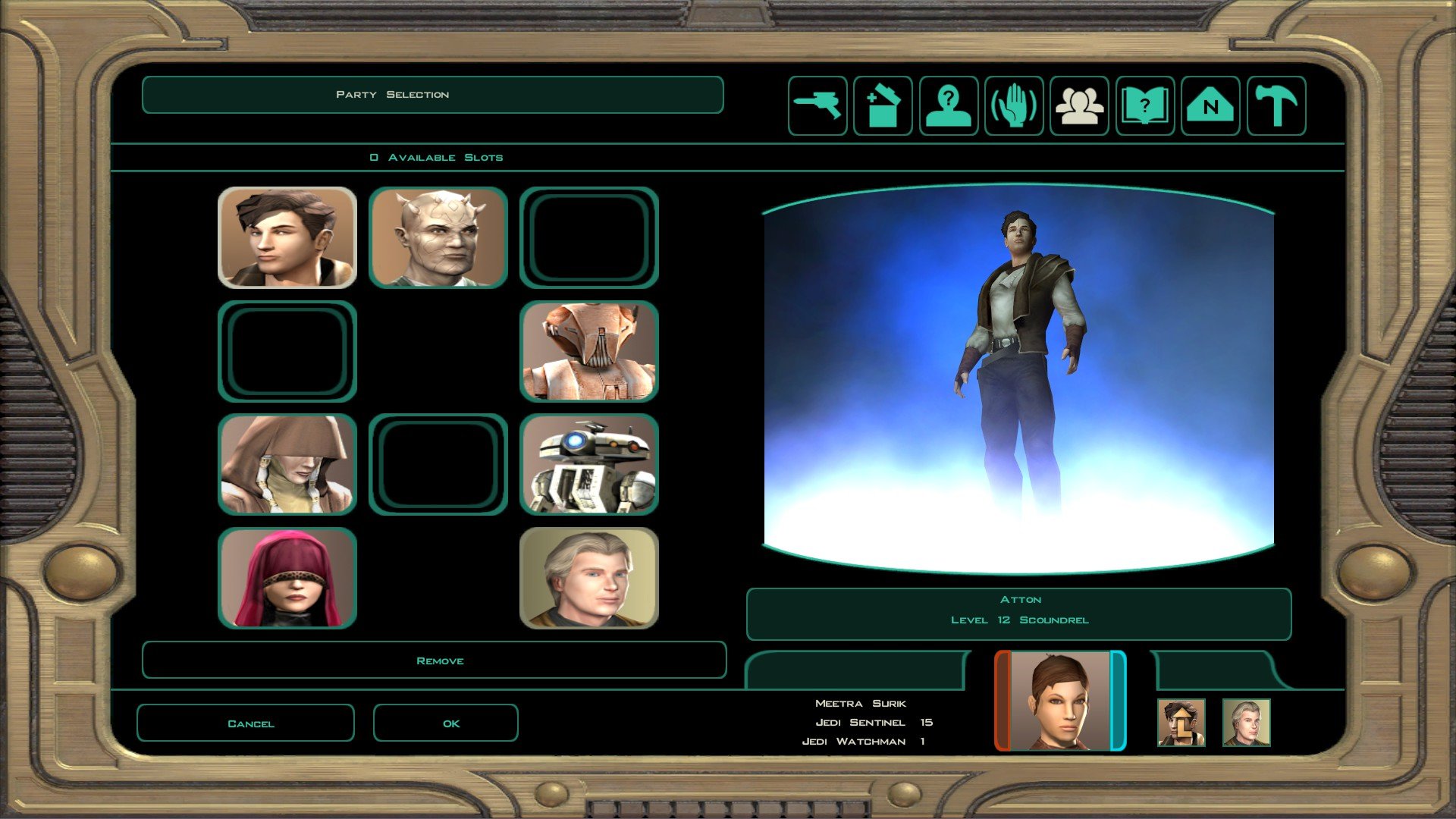
Yeah, it still looks like this. One slot is missing (Handmaiden), and the other missing slot is for Mira/Hanharr because I haven't recruited them yet. (Disciple's slot was also missing until I recruited him.)
-
Does your party select screen still look like this? Or does it have the additional 2 portrait slots?
-
 amitelynch joined the community
 -
Yeah, that's a good idea. I'll try that, but I worry it'll mess up my TSCRCM/M4-78 mods and such. Will edit post to say how it goes. Edit: File verification is done. It reacquired 19 files, and now the patcher appears to be working (in the state where it's not showing all patches, like before). It could install the patch without displaying errors. (And if I try loading a save file it's back to the correct UI but Handmaiden is missing.)
-
KotOR Patch Manager is specific about which game versions and the executables it supports. This is one of the reasons I still keep the PartySwap item as an optional add-on even with the existence of the Full Party Select patch; in case a player is unable to use KotOR Patch Manager and the Full Party Select patch, they still have the PartySwap item add-on to fall back to so they can continue to add Handmaiden to their party after Disciple joins. Can you try to verify integrity of game files of your KotOR 2 game on Steam, and see what happens?
- 473 replies
-
- 1
-
-
- handmaiden
- party
- (and 2 more)
-
Huh. That's odd. I replaced the executable with the backup of the original, and now the patcher lists more mods. But now it's showing an error that the mods do not support my game version. So I then tried replacing the executable with the original AGAIN, and it started behaving as before; patcher could install mods without error, but as I realized in this brief oddity, it's not actually showing the full patch list. Edit: Tried repeating the process again, and now I'm back to it showing the full list of patches but says it doesn't support my game version.
-
This means that KotOR Patch Manager does not support the editable executable, so you still need the executable from your original Steam game. Can you restore the original executable and try to apply the Full Party Select patch again?
-
Done. However when I opened the patch manager for step 5... it says it loaded the patch list but none of them showed up. Even when I tried reselecting the EXE file and patch folder, and using the refresh option.
-
@NovaPolaris Try these steps: Open KotOR Patch Manager and uninstall all patches with the "Uninstall All" button at the bottom. Make a backup of your game executable (swkotor2.ext). Download KOTOR 2 Editable Executable from Deadly Stream. Replace your game executable with the downloaded one. Open KotOR Patch Manager and apply the Full Party Select patch again.
- 473 replies
-
- 1
-
-
- handmaiden
- party
- (and 2 more)
-
 The mod is all great but it has bad StreamVoices, what i mean is that it can't work on normal Version of kotor but on legacy version, and on newer PC, the legacy version isn't working so you need to have MP3 voices but gladly there is steamworkshop version that have working Voices so if you would install from deadlystream except streamvoices and install from workshop, you have working game, The fights are very easy even in hard mode, there are some places that are buggy like the companion can see enemy from wall and you need to something do with StreamVoices do let it work. If you want have Kotor 3 than its Very recoomended to play this mod and sometimes it can make you just dissapointed, like there are sometimes nonsense things here, Waring spoilers: Like Exile ignoring that there is Revan literally In the same ship and almost in the same room.
 -
Crud, I missed that! I'm sorry. >_< When I installed it, it said everything installed successfully, no errors, as far as I could see. And just in case, same thing for PartySwap. Appeared to install successfully with no errors.
-
@NovaPolaris You have not answered this question I asked you: When you used KotOR Patch Manager and applied the Full Party Select Patch, did KotOR Patch Manager say at the bottom that the patches are applied successfully
- 473 replies
-
- 1
-
-
- handmaiden
- party
- (and 2 more)
-
This is what it looks like for me.
-
Can you share a screenshot of what your party selection screen looks like in-game?
-
It's the Steam version. Sorry I didn't think to list that, that's important. >_< (Also I'm not using Steam Workshop mods, already dealt with that in previous troubleshooting.) And yes I did put the file there. That's what I meant about the party select UI working but Handmaiden is missing.
-
@NovaPolaris Which platform are you playing KotOR 2 on: Steam, GOG or somewhere else? When you used KotOR Patch Manager and applied the Full Party Select Patch, did KotOR Patch Manager say at the bottom that the patches are applied successfully? After applying the Full Party Select patch, did you follow through my instructions by putting the partyselect_p.gui file from the "FullPartySelect additional files" folder of KotOR Patch Manager's patch folder into your KotOR 2 game's override folder? Putting the partyselect_p.gui file in your KotOR 2 game's override folder is required to make the changes made by the Full Party Select patch actually show up in game, and allowing you to see and directly select Handmaiden in the party selection screen after Disciple joins your party.
- 473 replies
-
- 1
-
-
- handmaiden
- party
- (and 2 more)
-
I'm fairly new to posting here, so I hope it isn't bad to post asking for help like this. >_< Been getting a vexing issue with PartySwap and FullPartySelect, and I still don't know why it's happening despite all the troubleshooting I've done so far. Reinstalled the game and mods (TSLRCM + M4-78, PartySwap, FullPartySelect, as well as Train the Handmaiden and Train the Disciple) multiple times in troubleshooting attempts, and did my best to make sure the install order is correct, but the best I've gotten so far is being able to recruit both Handmaiden and Disciple (they both joined, and are both on the ship and interactable), and getting the party select UI working (making sure the loose file is installed). The problem is that no matter what I do so far, I can't get Handmaiden to show up in the party select, even when it looks like I got FullPartySelect working. I've tried loading earlier saves, such as before recruiting Disciple, but she vanishes from the menu after that too. Please may it not be something like "you have to start a new playthrough".
-
So, for someone who have problems with this mod, this guide will be probally for only steam users who have problem with Legacy Version or just want to have working mod with Widescreen 1. Have fresh Kotor 2 installed WITHOUT ANY MODS, EVEN WITHOUT TLRSCM 2..Install first this mod from deadly stream, install everything you need EXCEPT StreamVoices 3.Install this mod again FROM WORKSHOP, this two mods should be have same version so it should be compatible If you want to have Atton to your ship you need to have with you Exile when you are talking to him (sorry for late answers) Are you using the SteamWorkshop Version? I install this mod so many times from deadly stream and the only problem i have is StreamVoices He also say to put it in order, are you done this too? (No offense, just a reminder)
-
 NovaPolaris joined the community
 -
 DankWolfi joined the community
 -
 Keyw joined the community
 -
.thumb.png.3301b414885aa5c5ced45535fec5ddfc.png) This is really clever!
This is really clever!