Search the Community
Showing results for tags 'light'.
Found 5 results
-
View File NPC Alignment Fix This modification alters the alignment of various npcs to match their allegiance and characteristics, since in KotOR BioWare left everything neutrally aligned with few exceptions. Through this, "vs. alignment group" properties now have more opportunities to take effect as they should. Unlike in the sequel there's no Force Sight so I didn't get too fancy - it's mostly just set values all across the board to ensure everyone is firmly sitting in their respective sides. No longer will the game regard Darth Bandon as this misunderstood Grey individual, but instead as the smug good-for-nothing slimebag we all know him to be. _____________________________ What will this change, really? In terms of combat, the Solari crystal will work fully against every Dark Jedi (and more) you come across. Of course they now have a different fp usage dynamic as you would expect so it more or less balances itself out. What if I'm Dark-Sided? The Mantle of the Force crystal can remove your lightsaber's light-side restrictions. Also don't forget, mods that add items with bonuses versus alignments will benefit from these changes too, so you don't need to limit yourself only to what exists in the base game! Compatibility... As long as you install this mod last there really shouldn't be any issues other than different mods hard overwriting my changes, in which case they will take no effect, but nothing too serious. Due to the number of files this mod entails, it is very likely that any other mods that edit .utc files via override will coincide with the ones my modification references. _____________________________ Credits: Fred Tetra for Kotor Tool. stoffe for TSLPatcher and ERFEdit, updated by Fair Strides. The Deadlystream community for being an all-around helpful bunch. Submitter TK-664 Submitted 04/05/2021 Category Mods K1R Compatible Yes
-

Version 1.1
29,226 downloads
This modification alters the alignment of various npcs to match their allegiance and characteristics, since in KotOR BioWare left everything neutrally aligned with few exceptions. Through this, "vs. alignment group" properties now have more opportunities to take effect as they should. Unlike in the sequel there's no Force Sight so I didn't get too fancy - it's mostly just set values all across the board to ensure everyone is firmly sitting in their respective sides. No longer will the game regard Darth Bandon as this misunderstood Grey individual, but instead as the smug good-for-nothing slimebag we all know him to be. _____________________________ What will this change, really? In terms of combat, the Solari crystal will work fully against every Dark Jedi (and more) you come across. Of course they now have a different fp usage dynamic as you would expect so it more or less balances itself out. What if I'm Dark-Sided? The Mantle of the Force crystal can remove your lightsaber's light-side restrictions. Also don't forget, mods that add items with bonuses versus alignments will benefit from these changes too, so you don't need to limit yourself only to what exists in the base game! Compatibility... As long as you install this mod last there really shouldn't be any issues other than different mods hard overwriting my changes, in which case they will take no effect, but nothing too serious. Due to the number of files this mod entails, it is very likely that any other mods that edit .utc files via override will coincide with the ones my modification references. _____________________________ Credits: Fred Tetra for Kotor Tool. stoffe for TSLPatcher and ERFEdit, updated by Fair Strides. The Deadlystream community for being an all-around helpful bunch. -
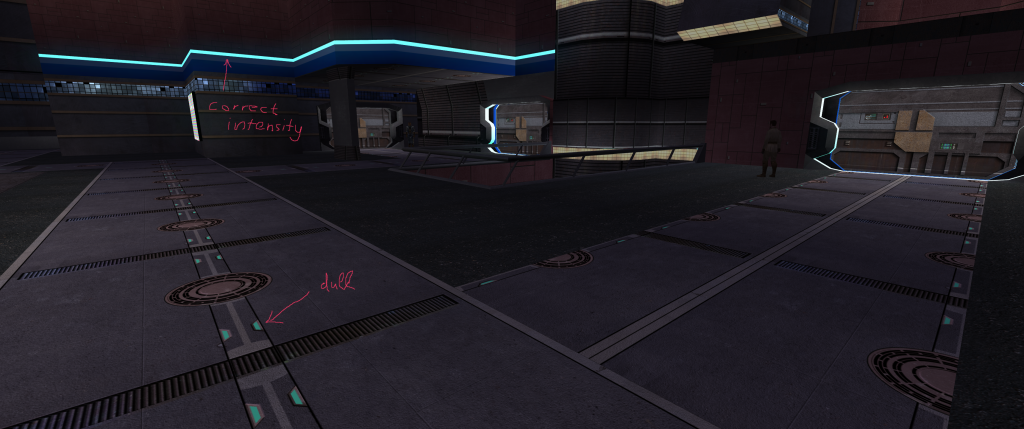
Im trying to retexture Nar Shaddaa's Main area, the Landing Platform, but when adding lights to the NAR_fl08 they look totally dim. They are cubemap based for extra brightness; this worked always so far, but not with NAR_fl08 somehow. I did try Txi commands "blending additive & blending punchthrough" with the same result. At the screenshots you see other cubemap based "lights" textures, which are illuminated correctly for comparison. Do you guys have an idea what causes this & help me out? Any ideas are greatly appreciated!

-
Recently, I've been playing around with modding some skins (K1)--simple placeables, etc. to get a feel for it. One issue I keep running into is that the modded skin in-game is much darker than outside of game. I'm wondering if this is an issue with the .tga format? Or is there something I'm not seeing attached to the object I'm skinning? Could it be purely environmental light throwing off the color? Any advice you could offer would be much appreciated. Thanks!
-
So I didn't see a thread here about this. I only just heard about it on the radio on the way home so you guys might be more in the loop than I am. I've heard it suggested that it could be be due to the tone of the movie being too dark for Star Wars. This kind of bums me out. The Force Awakens didn't exactly do it for me and the trailer for Rogue One made me optimistic that this movie might take a few more risks. After this, I'm adjusting my expectations downward. I'm curious as to what the rest of you think though. Chat has been dead recently so I can't ask anyone there.