



VeSeeker
-
Posts
6 -
Joined
-
Last visited
Content Type
Profiles
Forums
Blogs
Forum & Tracker Requests
Downloads
Gallery
Store
Events
Everything posted by VeSeeker
-
Help with animated textures and .txi parameters
VeSeeker posted a topic in General Kotor/TSL Modding
I'm working on getting some textures animated correctly on the Switch version of Kotor and Kotor 2. I've figured out that although the texture files are the exact same as the PC version, for whatever reason the animation doesn't work, and it has something to do with the .txi files and mipmaps. Take fx_tex_stealth for example. This is the full .txi file for that texture: proceduretype cycle numx 2 numy 2 fps 8 blending additive decal 1 mipmap 0 downsamplemax 0 downsamplemin 0 I made this short video to show the behavior on the Switch (I used an emulator to record but I have verified that it is the exact same behavior on actual Switch hardware). With the default texture there is simply no animation. Removing the 'mipmap' line, or setting mipmap to any number above 0 gets the animation shown on the right in the video. The texture is correctly animated, but it stops when you get close enough. (When I recompress the texture to .tpc I have to change numx to 1 and numy to 4, but that's kinda unrelated). So its got to be something about the highest quality mipmap not being able to cycle through the texture for whatever reason. I thought this might be a limitation on the size of the texture so I halved it but it still has the same behavior. I've tried messing with the downsamplemin and max parameters but it didn't make a difference. Any .txi experts out there that have seen something like this before? Is there a way to force the texture to always render at the second highest quality mipmap or something? I'd appreciate any advice. Thanks to JC and J for the initial help on the discord. -
Kotor 1 Modding Guide for Nintendo Switch
VeSeeker replied to VeSeeker's topic in General Kotor/TSL Modding
For that mod it worked normally except using power blast would either crash the game, or the shots would be invisible. Switch is really finicky about model changes sometimes. -
I realize this is very niche, but I made a guide for modding the switch version of Kotor 1, based off of the neocities guide. Hopefully it saves someone the 3ish weeks it took me. If anyone is interested, I'm going to try to get the neocities guide for Kotor 2 to work on the switch sometime in the next couple months.
-
 Reviving this thread one more time... I've spent the last 3 weeks making a guide for modding Kotor 1 on the switch, based off of the neocities guide. I got most of the mods to work (including world overhauls!). I also had trouble with animated retextures, really curious why they don't work. I am like 75% through a run, and I'm updating the guide whenever I run into a crash, but it's pretty stable so far. Also I made this small mod for improving some of the icons and UI in the switch version if anyone is interested.
 -
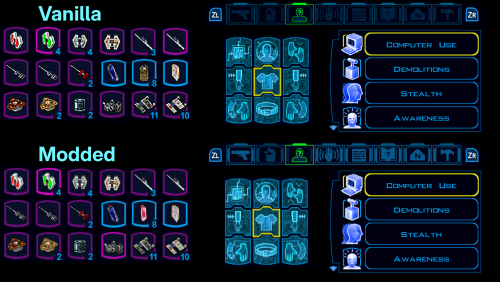
View File Kotor 1 UI and Icon Upscale for Nintendo Switch In the image above, the 9 equip slots are in the wrong spot, so the top one is the modded version, and the bottom is the original. Replaces a bunch of item icons with their Kotor 2 version (full list below), as well as upscales some UI elements for the Nintendo Switch version of the game. This mod doesn't touch anything that ajdrenter's Pretty Good! Icons mod does. The screenshot above is just an example of some of the upscaled icons and elements. I think the Kotor 2 versions of the icons are a huge improvement. A lot of the UI changes are pretty minor, but I still prefer it over vanilla. I made a full guide for modding Kotor 1 on the Switch, based off of the neocities guide. Check it out here if you want. Installaion: Put the .tpc files in each of the 2 folders in atmosphere/contents/0100854015868000/romfs/override/Textures. Kotor 2 icon list: Stims: ii_Adrnaline_001 - 006 ii_CmbtShot_001 - 003 Credits: ii_credits_001 - 014 Datapads: ii_datapad_001-015 Repair kits: ii_DrdRepEqp_001 - 003 Idk what this is: ii_DrdSecSpk_001 Keys: ii_key_001 - 015 Medpacks: ii_MedEqpmnt_001 - 005 Weapon upgrades & Miscellaneous: ip_pltuseitm_001 - 010 ip_pltuseitm_012 - 024 ip_pltuseitm_026 - 068 Spikes and parts: ii_ProgSpike_001 - 002 ii_SecSpike_001 - 002 Lightsaber crystals: iw_SbrCrstl_001 - 021 Mines: ii_TrapKit_001 - 004 Armor upgrades: ii_upgrade_228 renamed ip_pltuseitm_069 ii_upgrade_247 renamed ip_pltuseitm_070 Submitter VeSeeker Submitted 08/24/2026 Category Mods K1R Compatible Yes
-
Version 1.0.1
12 downloads
Replaces a bunch of item icons with their Kotor 2 version (full list below), as well as upscales some UI elements for the Nintendo Switch version of the game. This mod doesn't touch anything that ajdrenter's Pretty Good! Icons mod does. The screenshot above is just an example of some of the upscaled icons and elements. I think the Kotor 2 versions of the icons are a huge improvement. A lot of the UI changes are pretty minor, but I still prefer it over vanilla. I made a full guide for modding Kotor 1 on the Switch, based off of the neocities guide. Check it out here if you want. Installaion: Put the .tpc files in each of the 2 folders in atmosphere/contents/0100854015868000/romfs/override/Textures. Kotor 2 icon list: Stims: ii_Adrnaline_001 - 006 ii_CmbtShot_001 - 003 Credits: ii_credits_001 - 014 Datapads: ii_datapad_001-015 Repair kits: ii_DrdRepEqp_001 - 003 Idk what this is: ii_DrdSecSpk_001 Keys: ii_key_001 - 015 Medpacks: ii_MedEqpmnt_001 - 005 Weapon upgrades & Miscellaneous: ip_pltuseitm_001 - 010 ip_pltuseitm_012 - 024 ip_pltuseitm_026 - 068 Spikes and parts: ii_ProgSpike_001 - 002 ii_SecSpike_001 - 002 Lightsaber crystals: iw_SbrCrstl_001 - 021 Mines: ii_TrapKit_001 - 004 Armor upgrades: ii_upgrade_228 renamed ip_pltuseitm_069 ii_upgrade_247 renamed ip_pltuseitm_070
