Leaderboard



Popular Content
Showing content with the highest reputation on 11/08/2026 in all areas
-
Adding onto Vriffs point about the Discord channel there's plenty of people that are probably in the same headspace as you that you could talk to and also it'd be a great discussion for future KPatches! Edit, here's the links: https://discord.gg/B6hszS7Ps https://discord.gg/kotor https://discord.gg/openkotor1 point
-
It's in our github, the sqlite db files. We develop and maintain KPM over on the OpenKotOR discord, if you have any questions or want to collaborate on anything feel free to join if you're not a member yet and someone can probably offer any support if you run into patch development problems.1 point
-
1 point
-
Version 1.5.1
4,405 downloads
KMRP - KOTOR MODERN RESTORATION PATCH Any resolution, properly scaled UI, controller support and engine fixes for KOTOR 1 Any resolution | 800x600 to 8K | 4:3 | 16:10 | 16:9 | 21:9 | 32:9 | Windows, macOS and Linux ━━━━━━━━━━━━━━━━━━━━━━━━━━━━━━━━━━━━━━━━ HOTFIX 1.5.1 A hotfix for 1.5.0, for Windows and for Linux with Proton. If you play on Linux or SteamOS you need this version: 1.5.0 does not start there. Run the 1.5.1 installer over your existing install; there is no need to restore first. The macOS version is not affected and stays at 1.5.0. Linux and SteamOS. The game starts again under Proton. SteamOS is tested and working. Mods in Override always win. Load screen mods, texture mods and custom fonts work again. In 1.5.0 they were ignored whenever KMRP had a file of the same name. Translations. Their own fonts are used, with all their letters, at the right size. Tested with the Polish translation. Controller. Changing the resolution in the game no longer ends it, A plays the selected card in Pazaak, and movement no longer stutters with PadForge, DS4Windows and similar tools. Installer on Linux. It finds your Steam game by itself, and Restore Original completes. Temp folder. KMRP no longer leaves 177 MB behind at every start. Windows 7. The "ordinal 40 not found in Cabinet.dll" error is removed. On Linux and SteamOS, set KOTOR's controller layout in Steam to Gamepad. Otherwise the game gets no controller. The installer reminds you. ━━━━━━━━━━━━━━━━━━━━━━━━━━━━━━━━━━━━━━━━ WHAT IS KMRP? Vanilla KOTOR was built around fixed pixel sizes and interface layouts designed for resolutions such as 640x480. On modern displays this causes tiny text, overlapping list entries, undersized icons, broken map scaling and other interface problems. KMRP fixes these problems in the game engine itself. One installer, one click, and one click to undo everything. It changes how the game looks, fits and controls, and nothing about its story, quests or balance. ━━━━━━━━━━━━━━━━━━━━━━━━━━━━━━━━━━━━━━━━ WHAT IS NEW IN 1.5 No resolution to choose. The game starts at your display's own resolution. Its Screen Resolution setting lists every size and refresh rate your display supports, and a change takes effect at once, with no restart and no patching again. Controller support, built in. A controller works on every screen, with the right button pictures for your pad (Xbox or PlayStation), rumble and a Controller Layout screen. Xbox-style HUD. Modelled on the console version. On by default, can be switched off. Above 60 frames per second. An option installs D3M0's High FPS Fixes, switched on by itself above 60 Hz. macOS. The Steam game, on Intel and Apple Silicon Macs, with its own installer. swkotor.exe is no longer rewritten. On Windows the changes are applied in memory each time the game starts, through KOTOR Patch Manager's runtime. ━━━━━━━━━━━━━━━━━━━━━━━━━━━━━━━━━━━━━━━━ WHAT IT FIXES Readable text with properly scaled list rows Inventory, Abilities and Store icons and rows scale correctly Item stack counts remain visible with larger fonts, in the inventory and in shops Popups and check boxes grow with the screen Long item description crash fixed, along with several rare crashes Area map fills its frame, fog of war covers the complete map, markers scale and are clicked where you see them HUD minimap follows your character Movies play at the game's resolution, with no switch to 640x480, and are not cropped on wide screens HD art: higher-quality portraits, item icons and menu art Every shape from 4:3 to 32:9 is covered, from 800x600 up to 8K: 66 common resolutions have menus built for them, and any other size gets menus fitted to it. ━━━━━━━━━━━━━━━━━━━━━━━━━━━━━━━━━━━━━━━━ PLATFORMS Windows: the Steam, GOG and disc 1.03 versions. The installer checks the game's file before doing anything and refuses any other build. macOS: the Steam game, on Intel and Apple Silicon Macs. The macOS version stays at 1.5.0. Linux: the Windows installer through Proton. SteamOS is tested and working with 1.5.1. No Steam Deck itself was tested. ━━━━━━━━━━━━━━━━━━━━━━━━━━━━━━━━━━━━━━━━ INSTALLATION Install other content mods (K1CP, K1R and so on) first. Start the game once so its settings file exists. Run the KMRP installer and press Start Patching. There is no resolution to pick. To undo everything, run it again and press Restore Original. Linux and SteamOS: run the installer with protontricks-launch --appid 32370, then set KOTOR's controller layout in Steam to Gamepad. If you use KOTOR Patch Manager, KMRP's two patches are listed there and other patches can be added beside them. ━━━━━━━━━━━━━━━━━━━━━━━━━━━━━━━━━━━━━━━━ INSTALLER OPTIONS Controller support, and with it the Xbox-style HUD High FPS Fix (D3M0's High FPS Fixes) HD item icons Map-note corrections (Derslok) Driver compatibility for lighting, fog and shadows on modern graphics cards (Synchro) ━━━━━━━━━━━━━━━━━━━━━━━━━━━━━━━━━━━━━━━━ COMPATIBILITY KMRP 1.0 was tested with KOTOR 1 Community Patch 1.10.0 and KOTOR 1 Restoration 1.2. KMRP 1.5.1 was tested with KOTOR 1 Community Patch 1.10.0 and with the Polish translation. Since 1.5.1, files that other mods put in the Override folder always win over KMRP's. ━━━━━━━━━━━━━━━━━━━━━━━━━━━━━━━━━━━━━━━━ CREDITS ndix UR: KOTOR High Resolution Menus 1.5 Synchro: K1 Modern Driver Compatibility 1.2.0, and published area-map research Derslok: K1 Area Map Fixes D3M0: High FPS Fixes Lane Dibello and the KOTOR Patch Manager project: the runtime KMRP's patches run on MadDerp: Party Portraits JackInTheBox: KOTOR 1 HD Icon Pack 1.0 RaymanGT: HD menu and UI asset set Xelu: Free Controller & Key Prompts Bundled work is included with its authors' permission or under its licence. Full notices are in the repository. ━━━━━━━━━━━━━━━━━━━━━━━━━━━━━━━━━━━━━━━━ SOURCE AND CHANGELOG github.com/RayesDiyab/KMRP-KOTOR-Modern-Restoration-Patch Licence: GPL-3.0. Unofficial; you must own the game.1 point -
It is advisable to rotate the ankle joint and straighten the arms at the elbows.1 point
-
 As long as you switch the game's executable with the editable executable you *should* have zero issue.1 point
-
Version 1.0.0
145 downloads
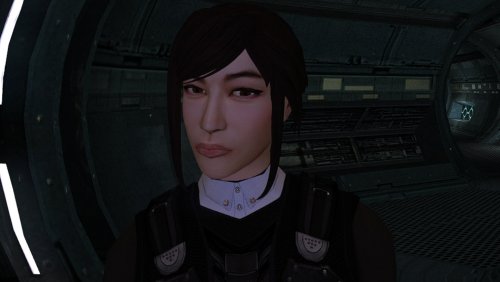
The mod replaces the PFHA05 model and textures. To Install 1. Download: PFHA05 2. Copy all files to the Knights of the Old republic's Override folder. (Example location - C:\Program Files (x86)\Steam\steamapps\common\swkotor\Override) 3. When/if prompted to overwrite files, press okay. 4. If you like the mod; leave a comment or endorse! (It would be much appreciated) Made with love.1 point -
Bones are needed to deform the geometry of an imported model. Your geometry has remained in its original position. It is easier for you to export the model from TOR. with the bones and weights already included. The bones will allow you to deform the mesh in Blender, and the vertex groups (with their associated weights) can be renamed to match the vertex groups used in KOTOR. If importing bones with vertex groups is not possible: 1. Create a skeleton and bind it to the mesh. 2. Deform the mesh using this skeleton so that the arms and legs are in the same positions as those of the KOTOR model. 3. Rename the weighted vertex groups so that they match the vertex groups of the KOTOR model. 4. Apply (save) the mesh modifier and delete the skeleton. 5. Rename the UV map of the imported model to "UVMap." 6. Join the objects using Ctrl + J. Select the mesh of the imported model first, then the mesh of the KOTOR model, and press Ctrl + J. 7. Enter Edit Mode and delete the KOTOR model mesh. 8. Export the model. It’s better to use the original hands. Getting the weight settings right is incredibly difficult. If I happen to work on something like this in the near future, I’ll post step-by-step screenshots.1 point
-
Do you still have the bones and weights? You could rename the vertex groups along with their corresponding weights by following the same pattern. The legs and arms must match the positioning of the original; otherwise, the animation will not play correctly. Bones are required to make these adjustments.1 point
-
Peragus Hanger continued...1 point
-
 Unnecessary mod. There are plenty of opportunities to shut the romances down in the later dialogue options. Both Carth and Bastila are quite easy to discourage.0 points
-
[Yes AI was used in this work, if you dont like that, then thats cool This is not for you] Hello! I’ve been building kjk, a new engine that runs KOTOR 1 and KOTOR 2 with Jedi Academy-style real-time combat, so you’re actually swinging the saber and throwing Force powers yourself, plus co-op with friends. It uses your own game files, so nothing’s pirated or bundled. Where it’s at right now: KOTOR 1 is fully playable from the Endar Spire to the ending, light side or dark Dialogue, quests, party, stores, the galaxy map, plus pazaak, swoop racing and the turret all work Combat uses your KOTOR stats and feats with JA’s sabers, blasters and Force powers, and you also get ragdolls and dismemberment Co-op works: your friends play your companions, and you can join over Steam without port forwarding Mac, Windows, Linux, and Steam deck are all supported natively. (Steam deck performance is not very good yet) You’ll need KOTOR 1, KOTOR 2 and Jedi Academy installed (Steam and GOG copies get found automatically) Its coming along nicely, and some playtesters have played 3 person co-op from Endar Spire all the way into Tatooine. Our two biggest challenges are getting all the cutscenes looking good, and getting retargeted jedi knight animations to look nice on the differently proportioned KOTOR characters. You can download and play the alpha here: https://github.com/kjk-engine/kjk/releases Discord: https://discord.gg/23bAu2wvH Here is video proof, although this was recorded in single player (note that this is a much older build with more bugs):0 points