Leaderboard



Popular Content
Showing content with the highest reputation on 11/02/2026 in Files
-
Version 1.0.0
13 downloads
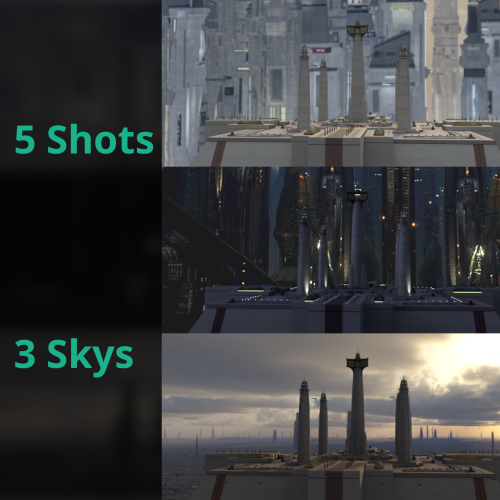
These videos are my attempt to create Ebon Hawk cutscenes for the Coruscant Jedi Temple mod by DeathDisco. I'm releasing the unedited shots for whomever wants to add sound and music. I may add space shots at a later date. Three locations are shown: the temple exterior, the council chamber interior, and the landing pad. The exterior and landing pad both feature landing and takeoff shots, while the council chamber only shows the Ebon Hawk landing. Each shot has been rendered three times: once with the original Coruscant skybox, once with the Realistic Nar Shaddaa skybox by Sith Holocron, 90SK, and DeathDisco, and once with the High Quality Skybox mod by Kexikus. The files are saved as .mov files with the codec Avid DNxHR 444 10-bit for compatibility with modern editors like DaVinci Resolve (video players might show the wrong colors). If you need more time to hold a shot for a transition, let me know and I'll update the appropriate videos. AI Disclosure: I upscaled 2 textures to improve the original skybox's filtering but not add to detail.3 points -
Version 1.0.0
24 downloads
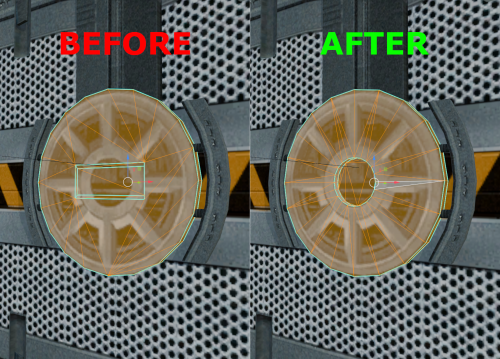
Hello everyone! This mod modifies the door models from Peragus so that the opening at the locking mechanism features a round hole instead of an angular notch, matching what is shown in the textures.1 point -
Version 1.0.1
129 downloads
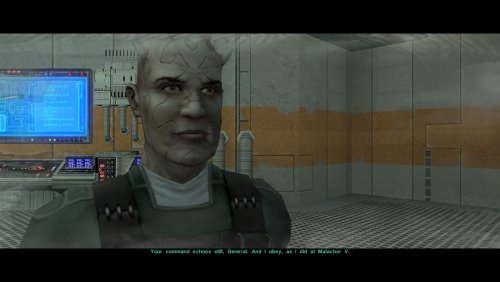
One of the many threads left hanging by KOTOR 2's incomplete ending is that Bao-Dur mysteriously disappears just before the Battle of Telos with very little indication of what might have happened to him. This mod attempts to fill the narrative gap with a pair of cutscenes showing Bao-Dur accompanying HK-47 to the Telos underground base and retrieving data from the Republic's database while HK-47 continues alone to the HK factory. It also adds a brief cutscene after the battle showing him staying behind on Citadel Station as the player departs. If the player does not rebuild HK-47 or if the HK factory is not located, essentially the same scenes occur but without HK-47. I have taken some general inspiration from KOTOR 2 writer Chris Avellone's comments on Bao-Dur's intended fate, but I have chosen to go in a different direction with much of it. Thank you for downloading, and I hope you enjoy this mod! ------------------------------------------------------------------- INSTALLATION If you are using any of the mods noted in the "Compatibility" section below, install them first. Afterwards, run "INSTALL.exe", and select the Main Installation option. After the installation is complete, if you are using my mod "Equip Party for Malachor, rerun "INSTALL.exe", and select the option for the compatibility patch. If you are using The Sith Lords Restored Content Mod (TSLRCM) from the Steam Workshop, see this guide for how to combine installer-based mods with the Workshop: https://steamcommunity.com/sharedfiles/filedetails/?id=488641307. ------------------------------------------------------------------- COMPATIBILITY This mod requires The Sith Lords Restored Content Mod (TSLRCM) (https://deadlystream.com/files/file/578-tsl-restored-content-mod/). It is also compatible with the KotOR 2 Community Patch (K2CP) (https://deadlystream.com/files/file/1280-kotor-2-community-patch/). If you are using any of the following mods, they must be installed prior to this mod: - TSLRCM - M4-78 Enhancement Project by zbyl2, DarthStoney, and Hassat Hunter (https://deadlystream.com/files/file/277-m4-78-enhancement-project/) - PartySwap by DarthTyren and Leilukin (https://deadlystream.com/files/file/544-partyswap/) - Equip Party for Malachor by me (https://deadlystream.com/files/file/3128-equip-party-for-malachor/) - Any other mods which overwrite pcdead2.dlg in the module 003ebo.mod.(*) This mod is incompatible with mods other than those mentioned above which edit the following files: - a_221load.ncs - a_901jump.ncs - a_escape_851.ncs - a_hand_pc_end.ncs It is incompatible with mods other than those listed above which overwrite pcdead2.dlg in 003ebo.mod. It may be compatible with mods which edit pcdead2.dlg in place if they are installed after this mod. ------------------------------------------------------------------- CREDITS KotorBlender by seedhartha tpcview and tga2tpc by ndix UR NWNSSCOMP by Torlack and tk102 K-GFF by tk102 DLGEditor by tk102 TSL Patcher by stoffe and Fair Strides ERFEdit by stoffe and Fair Strides Kotor Tool by Fred Tetra Holocron Toolset by Cortisol and th3w1zard1 2DA Editor by VarsityPuppet SithCodec by JCarter426 Reone Toolkit by seedhartha Edited vanilla and TSLRCM scripts are based on the K2CP team's repository of unaltered, decompiled vanilla scripts, which may be found at https://github.com/KOTORCommunityPatches/Vanilla_KOTOR_Script_Source. Thanks to N-DReW25 for suggesting that I might try addressing Bao-Dur's fate in some fashion. Thanks to Leilukin for granting permission to include modified versions of scripts from PartySwap for compatibility. Thanks to vault13deathclaw for reporting a critical incompatibility between version 1.0 and M4-78. ------------------------------------------------------------------- VERSION HISTORY 1.0 - Initial Release 1.0.1 - Revised installation procedure to allow compatibility with M4-78. Thanks to vault13deathclaw for reporting the issue. ------------------------------------------------------------------- DISCLAIMER AND PERMISSIONS This modification is provided as-is and is not supported by Disney, Lucasarts, or Obsidian. Use at your own risk. The author shall not be held responsible for damage to your game installation, computer, or saved games resulting from the use of this mod. This mod shall not be reposted, in whole or in part, on any sites other than Deadly Stream without the author's permission. Scripts from this mod may be modified and redistributed for the purpose of compatibility with this mod as long as credit is given to this mod's author. Otherwise, assets from this mod shall not be redistributed in other modifications without the author's permission. Assets containing work by other authors also require the permission of those authors.1 point -
Version 1.0.0
36 downloads
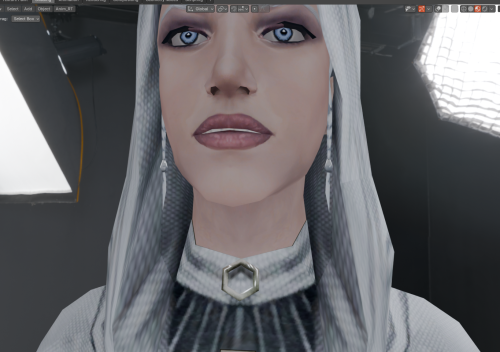
Hello everyone! This mod makes Handmaiden’s braids visible beneath the hood of her default outfit; the braids are present on the model, but by default, the "render" flag is not enabled for them. Credit for the improved base model of Handmaiden, which I used for my mod, goes to RedRob41 for the mod: "2x Upscale+ Character Textures & Model Fixes for TSL."1 point -
Version 1.0.0
13 downloads
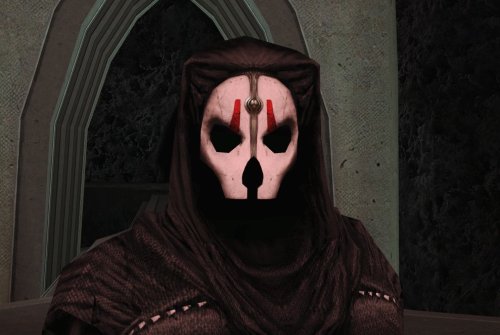
As Chris Avellone intended... This mod removes the facial features beneath Darth Nihilus’ mask, leaving just blackness. INSTALLATION Move the files from “to override” to your Override folder. UNINSTALLATION Remove N_DarthNihilus.mdl and N_DarthNihilus.mdx from Override. COMPATIBILITY Should be compatible with Darth Nihilus texture mods. Will conflict with mods that edit the Darth Nihilus model. Install this mod after others to ensure its changes take effect. PERMISSIONS Feel free to do whatever you want with this mod, just give credit. CREDITS offthegridmorty KOTOR Tool - Fred Tetra KOTORBlender - seedhartha Screenshots use HD Darth Nihilus by Darth_Sapiens1 point -

Version 1.0.2
6,461 downloads
Revamped FX MOD AUTHOR: Olegkuz1997 FOR WHICH GAMES: For Star Wars Knights of the Old Republic 1-2 Description: It's a fairly simple pak retexture of some of the game's (most notable) visuals. Some of them just don't look good, and some of them look downright awkward, which of course is forgiven for the game's seniority. I did it for myself, but who if anyone needs it, take it. My personal goal was to update the quality of the effects without slipping into tastelessness and to keep them generally true to Bioware beautiful art design. The insides of the mod: 1. Sparks displayed during every combat action in the game look a more colorful (honeyed) and leave a small tracer as opposed to the pale yellow vanilla ones. 2. Lightning, Force Drain, Death Field now look a more colorful. The spell curve has been replaced and is now more broken. The spell textures on the bodies have been completely redrawn, as I was not entirely satisfied with the previous version. Instead of a uniform “web” entangling the entire victim, now a large lightning bolt breaks into dozens of small dancing discharges. DF and FD now improved with AI and edited manually - to avoid monotony in textures. 3. Grenade blast marks look similar to the original ones, but with improved resolution and transparency. 4. Smoke became blacker and thicker. 5. Explosions became more decent, but this is just AI upscaling, not new textures. Maybe it's because I almost never use plasma grenades. Also replaced the texture of the droid fire gimmicks. Not perfect, heh, but at least it's not out of place. 6. The texture of the burning bodies became more sympotic thanks to transparency and less like a ridiculous orange shield. 7. The effects of the “fire sword” (Master Power Attack etc) are less intrusive, but the original idea and visual distinction are preserved. 8. Also various little things like blaster bolts, campfire, ice, carbonite etc. Note: ---------------- In the “Optional” folder there are alternative texture options, namely: Spell outline without small lightning bolts in a circle, visually cleaner (fx_conjure). Less intense fire blast texture. Matter of taste. I've been told it's less irritating to the eyes. Textures of the starry sky and nebulas. Not exactly FX but because why not. That gets rid of the “checkerboard” arrangement of stars and has a deeper black tone. Opengl32.dll - shader that increases the effect of bloom. Throw it into swkotor folder. All the above screenshots were made using it. Installation: ---------------- Drop tga and tpc files in your game’s Override folder. To uninstall: ---------------- Take them out again.1 point -
Version 4.0.0
1,213 downloads
Version 4 released - should be final Compressed and optimized, 2x Upscaled Vanilla Textures This is not a 4k/8k super high-res remaster of the textures. Priorities were optimizing vanilla textures first, while also doubling the resolution. This should act as a base texture upgrade. Then I suggest you still use other texture mods and bug fixes on top of this. Every texture has been doubled in resolution. GUI and icons are also included. All textures are packed as compressed TPCs and then bundled in two .erf files. INSTALL: extract the 2 .erf files to your game directory\TexturePacks (NOT IN THE OVERRIDE DIRECTORY) This will overwrite the existing vanilla texture files so back them up if you wish. Refined Add-on Textures: extract to override folder These are textures that originally looked bad or were very low resolution so I reworked them. They still look vanilla+. - All circular grates had really low quality textures. Instead of upscaling, they have been tiled twice as dense. - The ebon hawk scaffolding was low quality and looked bad when upscaled. The scaffolding from Nar Shadda was used and color matched. - Nar Shadda panels were too uniform, shifted part of the texture to make the tile look more random. Optimization: - a lot textures were twice the file size they should have been - the highest quality compression was used on the new texture, it takes a very long time to convert but avoids bad compression artifacts Upscale: - HDCube 4 was used to upscale every texture at 2x - different model weights used depending on the texture - alpha channels processed separately, then recombined1 point -

Version 1.5
20,412 downloads
Summary This mod replaces the lightsaber blade textures. I've made new textures using Saber, a plug-in for After Effects made by visual effect artists who work on the actual films, which they released for free on VideoCopilot.net. The new textures are of higher quality (1024x1024 vs the original 128x128) and should be more accurate to the movie look, given that they were generated with a tool made by movie people. I've adjusted some of the blade colors; I mainly used math to choose them, placing them at even distributions along the color spectrum, and sticking with the plug-in's default setting for blue. In more practical terms, this means yellow is a bit yellower, while green and violet are closer to the blue end. Blue itself is much brighter than the original. Orange and cyan are no longer reused copies of the Heart of the Guardian and Mantle of the Force colors from K1. They both look more like standard lightsaber blades. Orange's blade color falls exactly between red and yellow - you know, actually orange. Cyan and viridian are evenly placed between blue and green. Silver uses the same color settings as blue, but at 33% saturation. I've added an alternate optional texture to have the viridian blade more closely resemble the original, if you would prefer. Video Preview Installation Extract files from the downloaded archive. Copy the files from Override to your own Override folder (if you don't have one, make one). Optionally, copy whatever files you want to use from the Alternate Textures folder to your Override folder, replacing the previously-installed files. If you use the Ultimate Saber Mod, copy the files from the USM New Colors folder to your Override folder. This gives all colors added in USM the same upgrade for visual consistency. Uninstallation Remove the installed files. Compatibility This mod should be compatible with any mods that add or alter lightsaber hilts, assuming the use the orginal game textures for the blades. This mod is not compatible with other mods that alter the lightsaber blade textures, including my own past mods. Credits KOTOR Tool – Fred Tetra Saber – Andrew Kramer & VideoCopilot.net tga2tpc – ndix UR Permissions I hereby grant nobody except myself permission to upload some or all of this mod anywhere for any reason. For any reason. If you would like to include any part of this mod in anything, then please contact me for permission. Disclaimers IT'S SO DENSE, EVERY SINGLE IMAGE HAS SO MANY THINGS GOING ON... Donations If you enjoy my mods and would like to show your support in a monetary manner, you may do so via PayPal with this donation link. For various legal and ethical reasons, this is entirely optional and is not a requirement to downloading or using any of my mods. I also do not create specific mods for hire. I make mods as a hobby and will most likely do so regardless of any donations or lack thereof, but modding does take up a lot of my time and every bit helps.1 point